
Self-host Docling Studio
v0.7.2PDF analysis studio with configurable extraction pipelines
- Stars
- 268
- Ports
- 3000 (Frontend (nginx)), 8000 (Backend API (FastAPI))
- Requires
- SQLite
ghcr.io/scub-france/docling-studio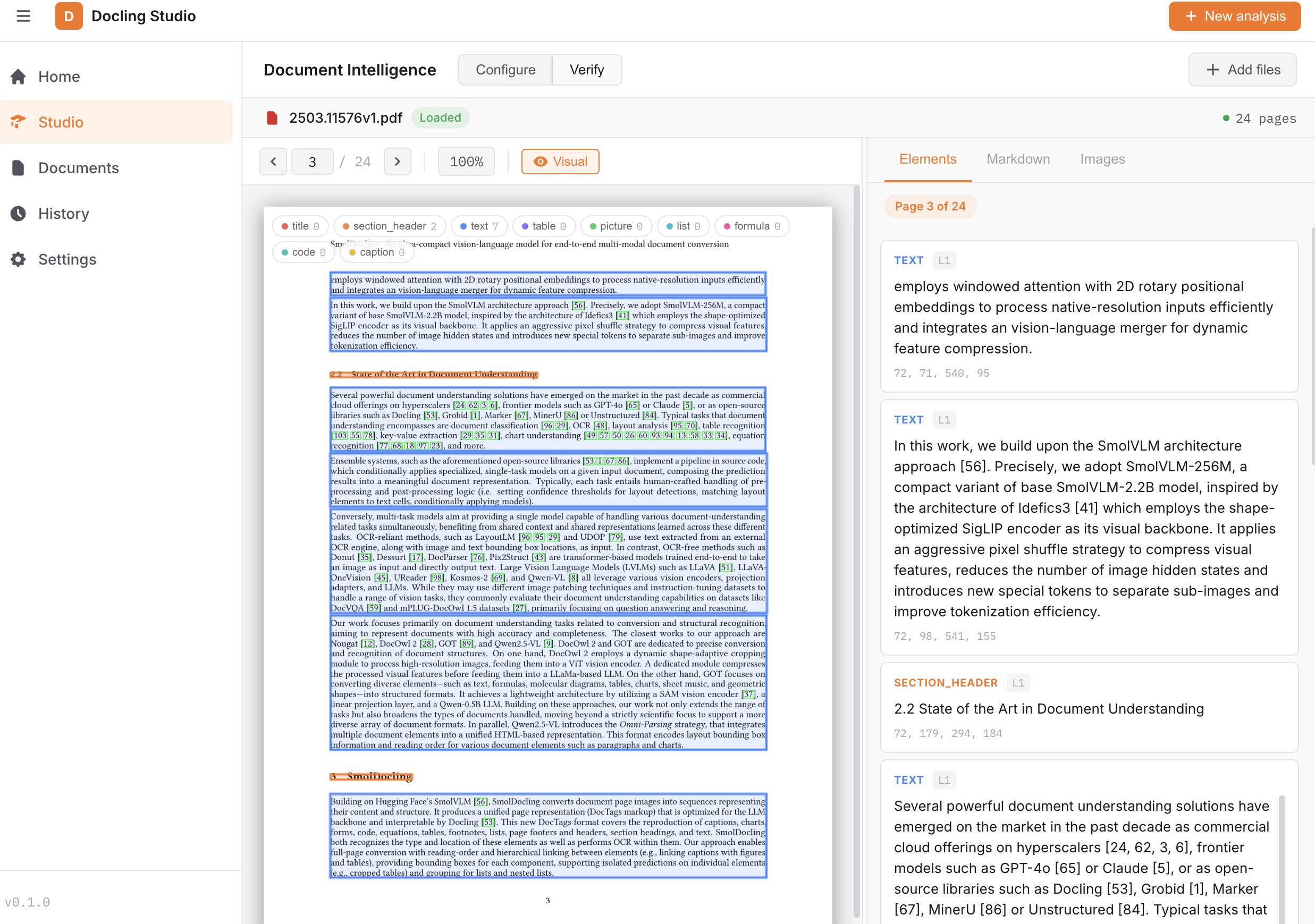
What is Docling Studio?
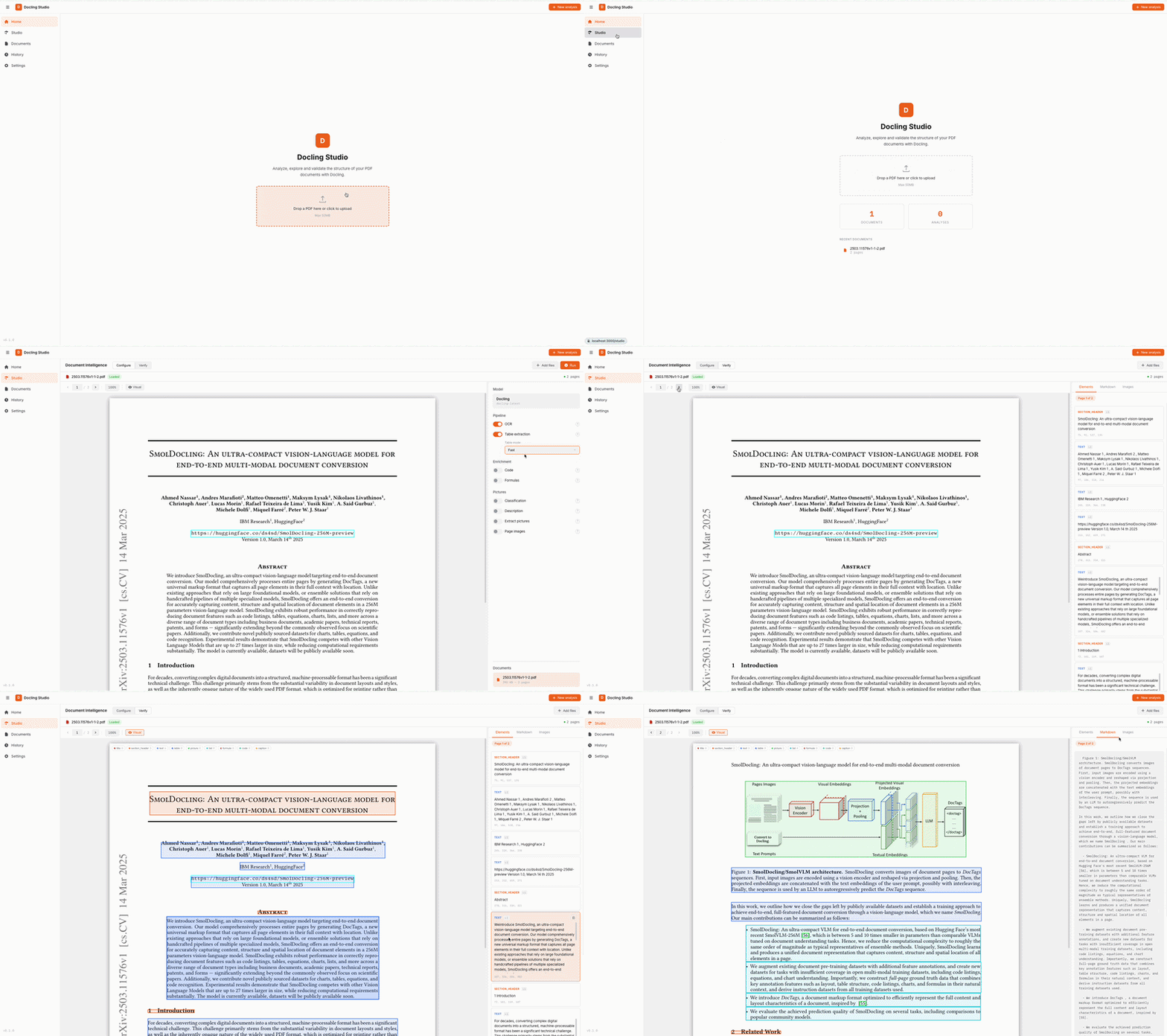
Docling Studio runs in the browser and lets you analyze PDF files. After uploading a document, you choose which Docling features to enable — optical character recognition, table structure recovery, code and math detection, image classification, and picture extraction. The viewer overlays color-coded boxes on each PDF page and keeps a side panel in sync with the current page. Extracted material can be cut into chunks using several strategies with token limits you control. If you enable the ingestion profile, chunks go to OpenSearch for vector and keyword search, and the entire document hierarchy is mirrored into Neo4j as a graph of sections, paragraphs, tables, pages, and chunks. The interface also handles document listing, deletion, search, and filtering by index status, keeps a history of past analyses, exports to Markdown or HTML, enforces configurable size and rate limits, and offers dark/light themes plus French and English. Under the hood a Vue 3 frontend (nginx on port 3000) talks to a FastAPI backend (port 8000) backed by SQLite. Two container images exist: a large one (~1.9 GB) that runs Docling locally on CPU, and a small one (~270 MB) that calls a separate Docling Serve instance. The codebase is MIT-licensed and sees regular updates.
Should you self-host Docling Studio?
Docling Studio scores 51/100 on selfhost.directory (how scoring works) and ranks #7 of 12 in Document Processing. It has 268 GitHub stars.
It shipped 9 stable releases in the past year. The latest, v0.6.1, came out on 22 September 2026.
Setup is moderate: expect some configuration beyond a single command. An official Docker image is available. It is MIT-licensed and written mostly in Python.
Its closest alternative on selfhost.directory is Resume-Matcher (81/100, 28 910 stars). It scores higher overall, so compare the two before you pick. See Docling Studio vs Resume-Matcher side by side.
Features
- Analysis history
- Configurable Docling extraction pipeline
- Document Management
- Health endpoint
- Live reasoning (RAG)Requires Ollama instance and reasoning packages; opt-in at build time
- Markdown and HTML export
- Multi-language Support
- PDF viewer with bounding box overlay
- Remote Docling Serve mode
- Semantic Chunking
- Upload limits and rate limiting
Docling Studio README
More in Document Processing
 DocumensoOpen-source, self-hosted DocuSign alternative to create, send and sign PDFs with templates, teams, direct links and an API; deploy via Docker, Compose or Kubernetes.
 DocusealOpen-source, self-hosted DocuSign alternative for creating fillable PDF forms and collecting digital signatures via a mobile-friendly web tool.
 dots.ocrOpen-source vision-language model for self-hosted OCR that turns multilingual PDFs and images into Markdown or JSON with layout boxes, and charts into SVG.
 ExcaliburExcalibur is a self-hosted, open-source web interface for extracting tabular data from text-based PDFs, powered by Camelot, with CSV, Excel, JSON and HTML export.
 GotenbergSelf-hosted open-source Docker API that converts URLs, HTML, Markdown, and 100+ office formats into PDFs, and merges, splits, encrypts or watermarks them.
 jsreportOpen-source self-hosted reporting server: design reports with javascript templates in a studio and render pdf, excel, docx or html, plus REST API and scheduling.
 MindGenius AIA self-hosted AI agent that reads PDFs and creates editable mind maps on your own hardware — your documents and API keys stay local.
 ocrmypdf-autoSelf-hosted Docker container that watches a folder for PDFs, runs OCRmyPDF with Tesseract to make them searchable, and saves results to an output folder.
 OpenPdfSelf-hosted open-source PDF suite with 30 tools to merge, split, convert, OCR, secure docs. Privacy-first iLovePDF replacement, no limits or sign-ups.
 PaddleOCROpen-source, self-hosted OCR and document-parsing toolkit: scanned PDFs and photos come out as Markdown or JSON for RAG pipelines, across 100+ languages.
 Paperless-GPTOpen-source, self-hosted AI companion for paperless-ngx: suggests titles, tags, correspondents and dates, and runs LLM vision OCR for searchable scans.
 papernewsSelf-hosted tool pulling RSS/Atom and Hacker News, using an LLM to rewrite articles into clean English, rendering a LaTeX PDF for e-ink readers.
0 comments