
Self-host Booksonic-Air
v2201.1.0Self-hosted audiobook server with Subsonic API
- Stars
- 221
- Port
- 4040 (HTTP server)
- Requires
- Java Runtime Environment
What is Booksonic-Air?
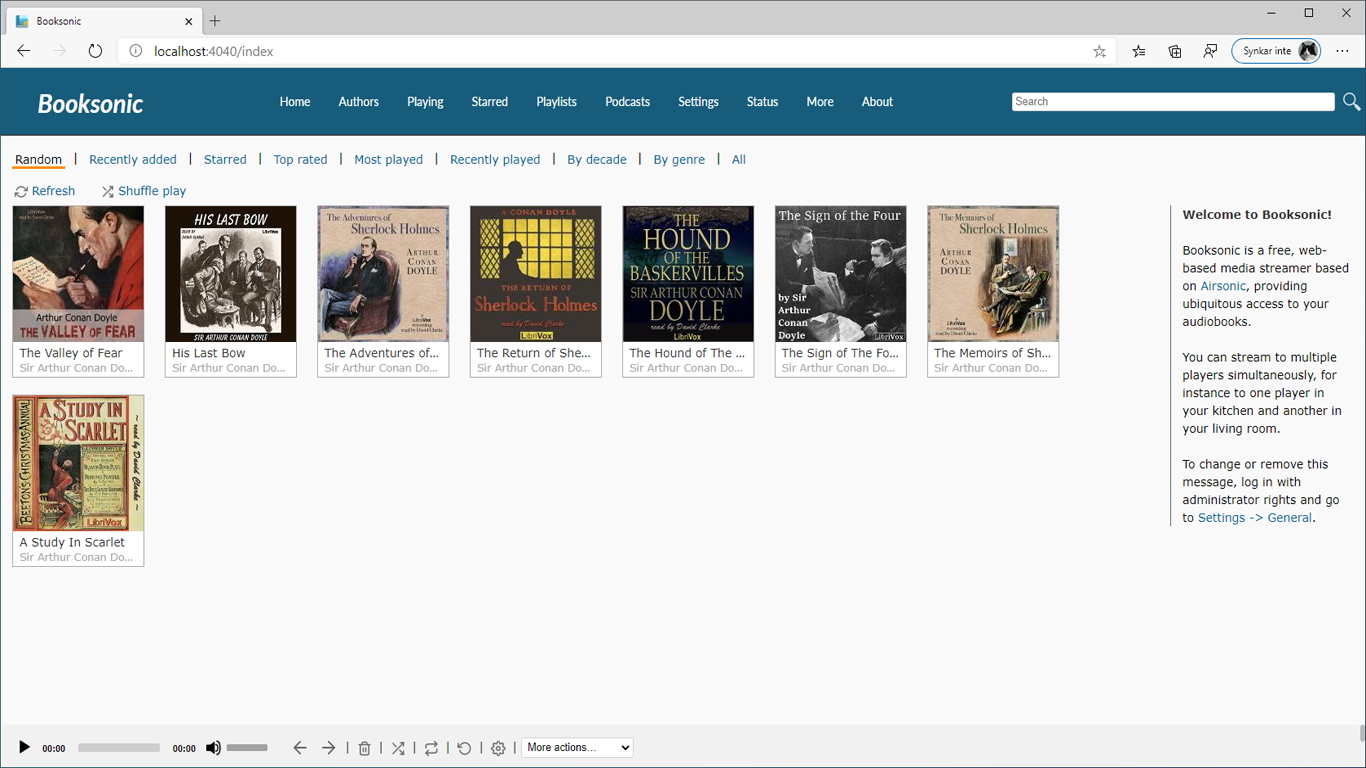
Booksonic Air is a self-hosted audiobook streaming server forked from Airsonic. It lets you host your own audiobook collection and stream it to web browsers, Android devices via the companion Booksonic App, or any Subsonic-compatible client. The server handles large libraries, offers on-the-fly transcoding for formats like FLAC, WMA, APE, and others, and can limit bitrate for constrained bandwidth. It runs on Java, so it works on Windows, macOS, Linux, and Unix. Installation options include a Docker image from linuxserver.io, a downloadable WAR file, and a Windows installer. Development is currently paused indefinitely, with the author recommending Audiobookshelf as an alternative.
Should you self-host Booksonic-Air?
Booksonic-Air scores 44/100 on selfhost.directory (how scoring works) and ranks #11 of 15 in Audiobook Management. It has 221 GitHub stars.
There was no stable release in the past 12 months, so check the repository's recent activity before you rely on it.
Setup is moderate: expect some configuration beyond a single command. It is GPL-3.0-licensed and written mostly in Java.
Its closest alternative on selfhost.directory is Audiobookshelf (79/100, 14 826 stars). It scores higher overall, so compare the two before you pick. See Booksonic-Air vs Audiobookshelf side by side.
Features
- Android app
- Audiobook streaming
- Bitrate limiting
- Metadata Management
- Offline Download
- Subsonic API Compatibility
- Transcoding
Booksonic-Air README
FAQ
I have downloaded an APK of Booksonic online, how do I know if it is safe?
Avoid sideloading; if you must, verify the APK signature with apkpure.com's verification tool, but building from source or using Google Play is safest.
I have a great idea for a feature, how do I contact you?
Email support@booksonic.org, open a GitHub issue, or post on the Booksonic SubReddit; pull requests are welcome.
Is Booksonic open-source?
Yes, the server is a fork of Subsonic and the Android app is a fork of DSub; source code is on GitHub.
Can I run Booksonic in the cloud?
Yes, rent a VPS (e.g., Interserver or Contabo) and install Booksonic there; it cannot run on Dropbox or Google Drive.
Do you plan to release an iOS version of Booksonic?
Most likely yes, but no timeline; in the meantime use any Subsonic-compatible iOS app or web apps like Jamstash or Aurial.
My bookmarks keep getting reset/changed on the demo server
The demo server uses a shared account; register a personal demo account at booksonic.org/registerDemoAccount and configure it in the app.
I am getting the message <UNKNOWN SSID> when I try to enter SSID in server settings
Grant location permission to the Booksonic app in Android settings, then force close and reopen the app.
When I try to reset my password it says reCaptcha v1 is shut down
Update to Booksonic Air server; for older versions, manually edit the database script file to reset the password to "booksonic".
Casting to Chromecast fails
Chromecast doesn't support self-signed certificates; enable "Use device as a proxy" in Settings → Playback as a workaround.
The server says "Folder not found" when I try to use a network location
This is a Windows permissions issue; see the guide at popeen.com for fixing network shared folder access.
I can connect to the server in the browser but not in the app
Ensure you include http:// or https:// at the start and :4040 at the end; if using Docker or Tomcat, also add /booksonic to the URL.
I can't connect to the server outside of my network
Port forward port 4040 in your router and access via http(s)://example.com:4040.
The first and/or second tracks keeps downloading over and over
This is a known bug. Workaround: go to Settings → Download and enable "hide from others".
More in Audiobook Management
 bragibooksSelf-hosted web app for cleaning up and organizing audiobook libraries, with file merging, format conversion, and metadata fetching from Audible.
 ChaptarrSelf-hosted audiobook and eBook manager forked from Readarr with narrator-aware metadata, dual libraries, and *arr integrations.
 DewarrSelf-hosted audiobook discovery linking Goodreads/Hardcover to Audiobookshelf/Grimmory with automated downloads from MyAnonamouse, Prowlarr, AudiobookBay via qBittorrent
 LibationLibation: Liberate your Library
 librarrLibrarr is a self-hosted, open-source search and download manager for books, audiobooks, and manga. It searches multiple indexers and auto-imports into Calibre.
 LibratoryLibratory turns PDFs into M4B audiobooks with chapter markers, read-along highlighting, and bilingual editions. Self-hosted with offline-first TTS and AI.
 listenarrOpen-source, self-hosted audiobook manager that searches indexers, sends grabs to qBittorrent or SABnzbd, and organizes an Audible-enriched library automatically.
 OpenReaderA self-hosted open-source document reader that speaks EPUB, PDF, DOCX, text, and Markdown files aloud with word-level highlighting and audiobook export.
 PrismediaPrismedia is a self-hosted media server organizing movies, TV, music, books, audiobooks, comics, and photos in one library with web and native Apple apps.
 ReadMeABookSelf-hosted audiobook automation: request from Audible catalog, search via Prowlarr, download via torrent/Usenet, import to Plex or Audiobookshelf with metadata.
 ShelfBridgeShelfBridge is a self-hosted, open-source tool that syncs audiobook progress from Audiobookshelf to Hardcover with multi-user support and smart matching.
 abs-kosync-bridgeBookBridge is a self-hosted, open-source sync engine aligning reading and listening progress across Audiobookshelf, KOReader, Grimmory, BookOrbit. Runs in Docker.
0 comments