
Self-host Ollama GUI
v2.0.5Browser chat UI for models on a local Ollama server
- Stars
- 1 263
- Port
- 80 (nginx serves the app and proxies /api to Ollama; published to the host as 8080 (`-p 8080:80`))
- Requires
- Ollama
ghcr.io/helgesverre/ollama-gui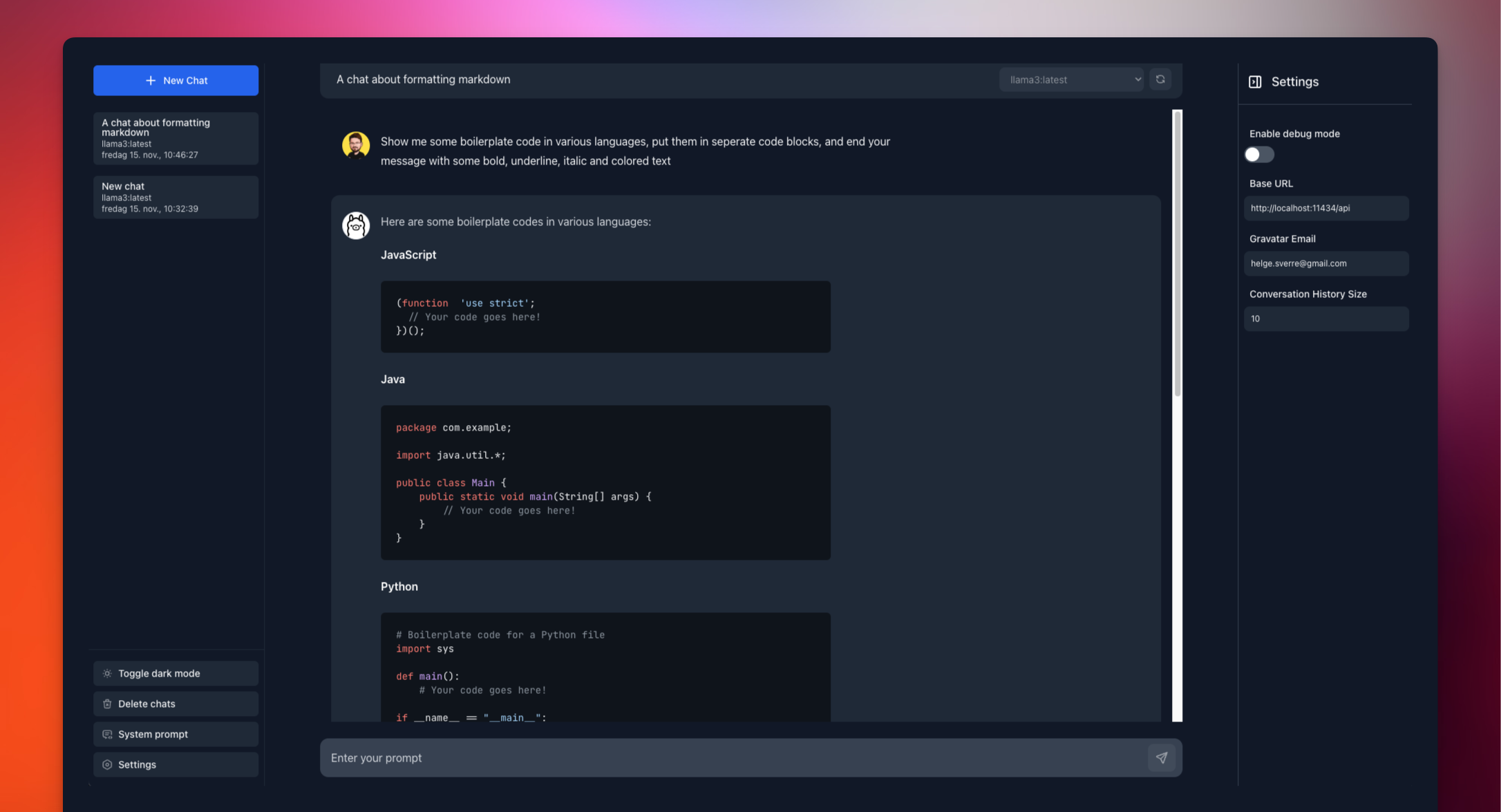
What is Ollama GUI?
Ollama GUI is a browser chat front end for models served by an Ollama instance on your own hardware, suited to people who want private LLM conversations without a vendor account. The project ships no server component of its own: it is a single-page app whose conversation records sit in browser storage (IndexedDB), and its only network peer is the Ollama endpoint you configure. Answers arrive as a stream you can halt, redo or amend, with amended turns preserved as switchable versions and any reply branchable into a fresh chat. Thinking-capable models such as qwen3 and deepseek-r1 surface their reasoning in a foldable panel, while gpt-oss exposes an effort setting; vision models accept image uploads, and text or code files can be attached to a message. A bundled snapshot of the model catalogue lets you look up models, pull them with progress feedback, remove them, read their capabilities and context length, or drop them out of RAM. System prompts and sampling options like temperature, top_p, num_ctx and seed can be configured app-wide, per model or per conversation. Older threads are ordered by day and support pinning, archiving, renaming, automatic titles and keyword search; rendered Markdown carries code highlighting plus KaTeX equations, and everything exports to JSON or a single thread to Markdown. Self-hosting is one command: the ghcr.io image runs nginx serving the site and forwarding /api to Ollama, the compose file adds the model server itself at http://localhost:8080, or you can build the static bundle with Bun and reverse-proxy it. The hosted build at ollama-gui.vercel.app reaches a local Ollama once that origin is allowed. History is scoped per origin, so another port, browser or private window shows an empty list, and over plain HTTP Gravatar pictures and offline caching are unavailable.
Should you self-host Ollama GUI?
Ollama GUI scores 54/100 on selfhost.directory (how scoring works) and ranks #16 of 69 in AI Chat. It has 1 263 GitHub stars.
It shipped 6 stable releases in the past year. The latest, v2.0.5, came out on 23 October 2026. New versions land roughly every 3 days.
Setup is easy: most people get it running in one sitting. An official Docker image is available. It is MIT-licensed and written mostly in Typescript.
Its closest alternative on selfhost.directory is LibreChat (85/100, 46 430 stars). It scores higher overall, so compare the two before you pick. See Ollama GUI vs LibreChat side by side.
Features
- Chat history with search
- Generation settings
- Image and file attachments
- Import and export
- Keyboard Shortcuts
- Local-only chat storage
- Markdown and math rendering
- Model Management
- Multi-device LAN access
- Reasoning model support
- Streaming chat with stop, regenerate and edit
Ollama GUI README
More in LLM
 serverOpen-source inference server streaming AI deployment. Supports TensorRT, PyTorch, ONNX frameworks. Self-hosted on NVIDIA GPUs x86 ARM via Docker containers from NGC.
 Ailin¹ Collective IntelligenceSelf-hosted open-source engine coordinating 100,000+ AI models through 31 strategies with verifiable consensus and OpenAI-compatible API.
 antigravity-claude-proxyProxy that exposes Antigravity provided claude / gemini models, so we can use them in Claude Code and OpenClaw (Clawdbot)
 bishengAn Apache-2.0, self-hosted LLM devops platform for enterprise AI: GenAI workflows, RAG knowledge bases, agents, model management, evaluation, SFT and OCR.
 latitudeThe open-source AI agent observability platform that groups failing traces into signals and dispatches coding agents; self-hosted via Docker Compose or Helm.
 llmakerllmaker is a self-hosted, open-source CLI that provisions and manages complete LLM stacks on your own hardware with a single command.
 llmfitOpen-source hardware-fit tool: a CLI, TUI and web dashboard that detects your CPU, RAM and GPU, then ranks hundreds of local LLM models, self-hosted with Docker.
 LocalAILocalAI is the open-source AI engine. Run any model - LLMs, vision, voice, image, video - on any hardware. No GPU required.
0 comments