
Self-host mem0
ts-v3.3.1Durable memory layer for AI chat agents
- Stars
- 68 986
- Ports
- 8000 (FastAPI REST API inside the container; the reference compose file publishes it as 8888:8000 (API reachable at http://localhost:8888).), 3000 (Web dashboard container (http://localhost:3000).)


What is mem0?
Mem0 (pronounced "mem-zero") is a memory layer that lets AI assistants and agents keep durable context about the people they talk to: it extracts facts from conversations, stores them, and pulls back the relevant ones while the user interacts. Memory is tracked separately for users, sessions and agents, and the current algorithm links extracted entities across stored memories and fuses semantic, keyword (BM25) and entity signals at retrieval time, with time-aware ranking for questions about past events or upcoming plans. There are three ways to consume it: as a Python or Node library you import into your app, as a self-hosted Docker stack, or through the vendor's hosted platform. The self-hosted bundle is a FastAPI REST service with a Next.js dashboard; the browser flow gives you a live log of every API call, memory browsing by user, entity lists with cascade delete, labelled per-user API keys and a page to change the LLM and embedder at runtime. Login uses JWTs, programmatic calls send an X-API-Key header, and auth is enabled by default with an opt-out flag meant for local development only. Postgres with the pgvector extension holds the vectors in the server stack, while the library defaults to a local Qdrant store; OpenAI gpt-5-mini and text-embedding-3-small are the out-of-the-box models, with Anthropic and Gemini also bundled in the image. Setup is a couple of commands: copy the example env file, set a Postgres password and provider key, then run make bootstrap or docker compose up. In terms of limits, the headline benchmark scores were measured on the managed platform and its proprietary optimizations are not in the open-source SDK, and features such as SSO or audit logs belong to the paid Enterprise tier of the platform rather than your own deployment.
Should you self-host mem0?
mem0 scores 86/100 on selfhost.directory (how scoring works) and ranks #2 of 167 in Developer Tools. It has 68 986 GitHub stars, +1 982 in the last 30 days.
It shipped 82 stable releases in the past year. The latest, ts-v3.3.1, came out on 25 September 2026.
Setup is easy: most people get it running in one sitting. It is Apache-2.0-licensed and written mostly in Python.
Its closest alternative on selfhost.directory is openhands (87/100, 93 487 stars). It scores higher overall, so compare the two before you pick. See mem0 vs openhands side by side.
Features
- Async memory operations
- CLI
- Custom Instructions
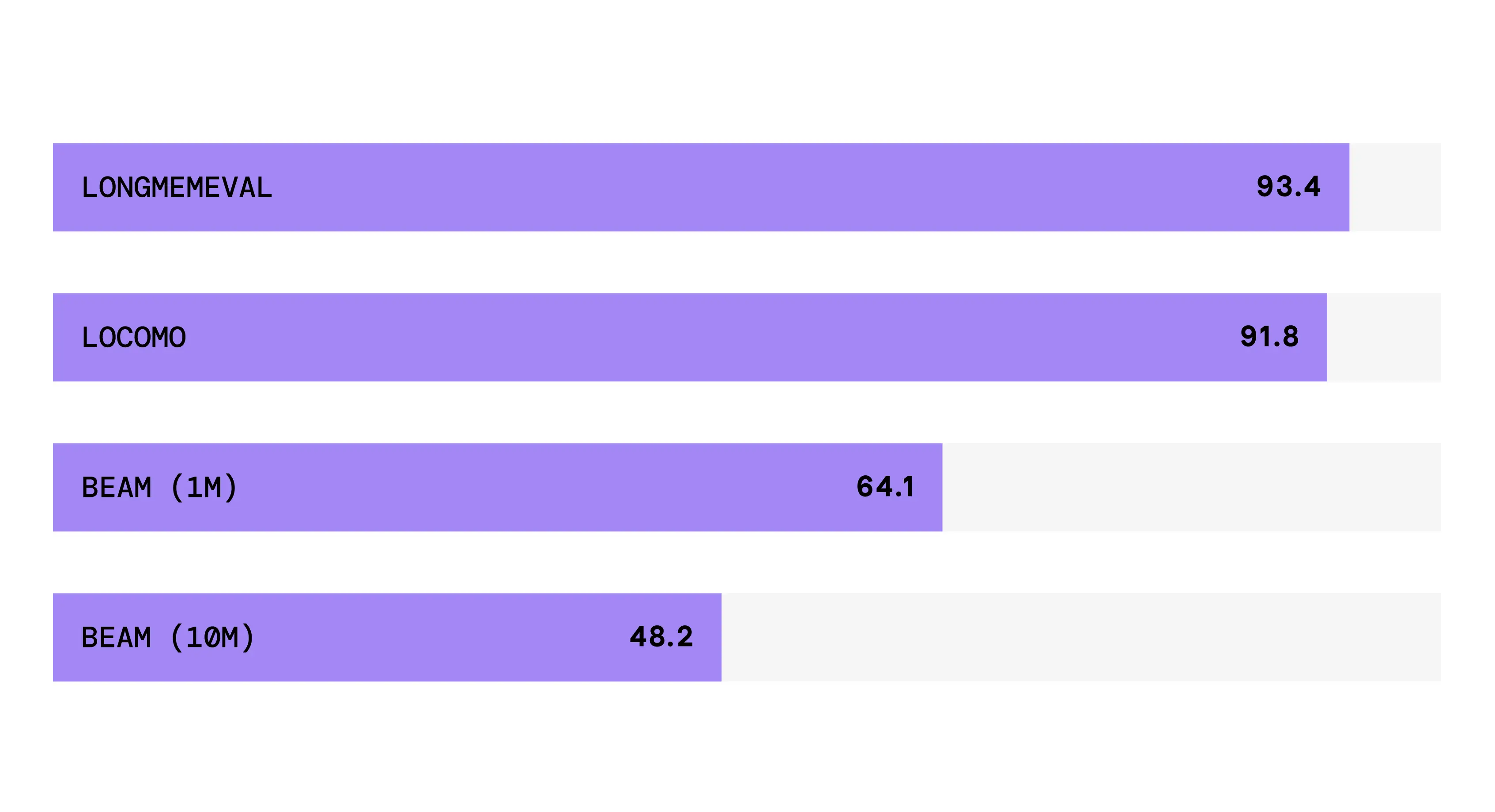
- Entity linkingBenchmarks published for the new algorithm were measured on the managed platform, which has proprietary optimizations the open-source SDK lacks.
- Hybrid search with BM25 keyword matchingRequires the mem0ai[nlp] extra plus a spaCy model.
- Metadata Filtering
- Multimodal memory
- Node.js SDK
- Persistent agent memory
- Per-user API keys
- Pluggable LLM and embedder
- Python SDK
- Reranker support
- REST API
- Web Dashboard
mem0 README


🎃 Register here → · Contributors get priority
More in Developer Tools
 mem0-mcp-selfhostedSelf-hosted MCP server for Claude Code with persistent memory via Qdrant, Ollama embeddings, and optional Neo4j graphs. Runs via uvx/pip with zero-config OAT auth.
 mem9Open-source, self-hosted persistent memory server for AI agents: hybrid recall, multi-space API, webhooks and LLM fact extraction on TiDB, PostgreSQL or db9.
 Mend Renovate CLIMend Renovate CLI auto-updates dependencies across 90+ package managers on GitHub, GitLab, Bitbucket, Azure DevOps. Self-hosted, open-source, replaces manual maintenance.
 mergeableMergeable is a self-hosted, open-source GitHub PR inbox with customizable search-based sections, local browser storage, and multi-instance support.
 Metronix MemorySelf-hosted memory layer for AI agents providing persistent memory, hybrid dense+sparse+graph retrieval, MCP server, and agent-scoped facts across sessions.
 microclawSelf-hosted Rust agent platform with Server, Work desktop app, and SDK sharing one Agent Engine for multi-step tools, memory, and chat automation.
 MiddlewareSelf-hosted open-source platform measuring team performance with DORA metrics via Git and CI/CD integrations.
 Mimi RemoteOpen-source iOS/iPadOS app to continue Codex CLI and Claude Code sessions from your computer on mobile over local network or Tailscale.
 MindsDBSelf-hosted, open-source agent workspace that automates recurring knowledge work, publishes artifacts to live URLs, and routes across frontier and open models.
 Mini-qrOpen-source self-hosted QR code creator and scanner. Design beautiful scannable codes with custom styles, colors, frames, logos. Scan using camera or upload images.
 MiraSelf-hosted AI code reviewer for GitHub, GitLab, Forgejo with your LLM key. Code indexing, vuln scanning, custom rules, learning loop, dashboard — free.
 mirrordOpen-source, self-hosted Kubernetes dev tool: your local process or AI agent runs on your machine while mirrord proxies a target pod's traffic, env vars, DNS and files.
0 comments