
Self-host kokoro-web
v0.1.3Open-source AI text-to-speech with OpenAI-compatible API
- Stars
- 760
- Port
- 3000 (Web UI and OpenAI-compatible API)
ghcr.io/eduardolat/kokoro-web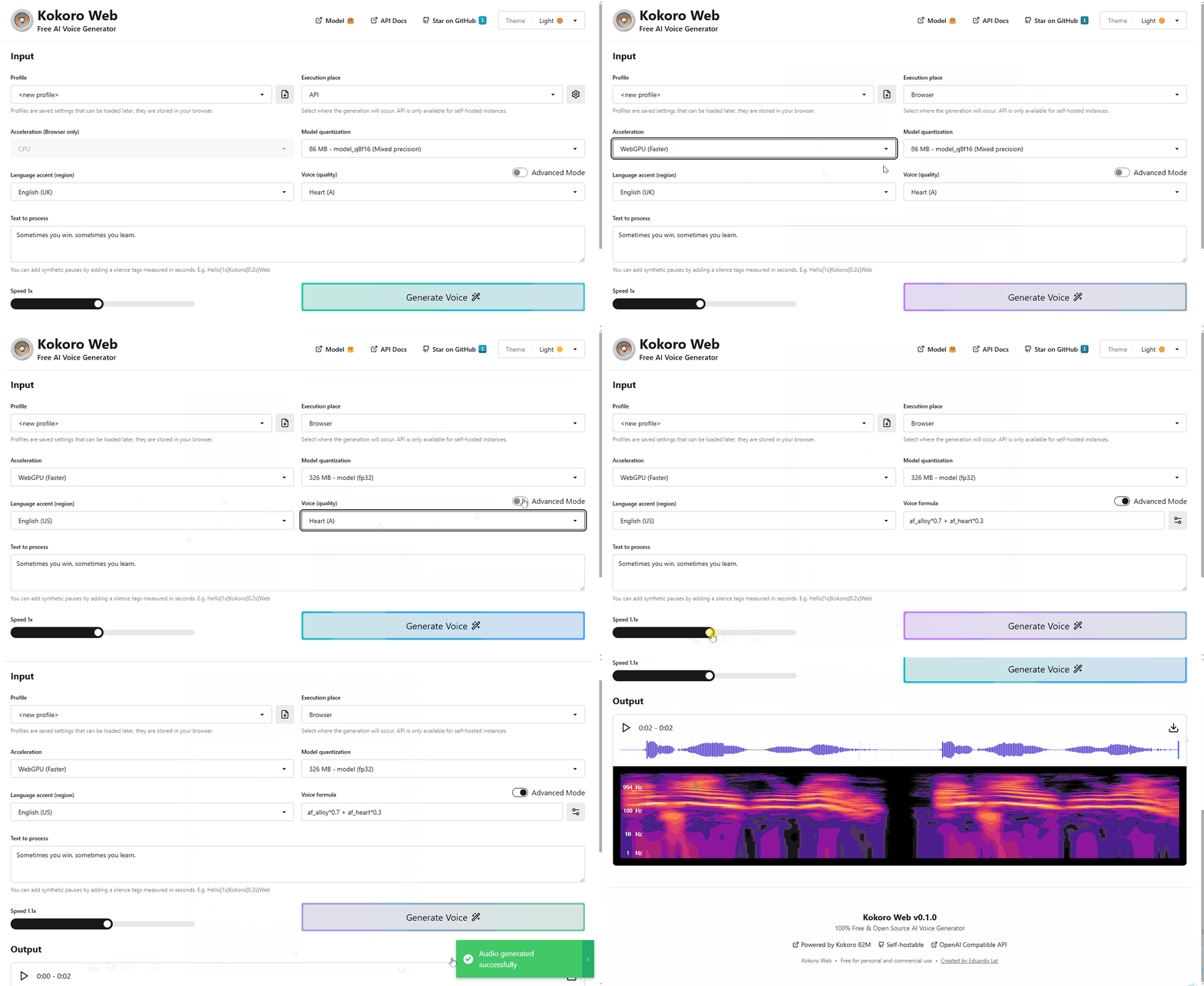
What is kokoro-web?
Kokoro Web is a free, open-source AI text-to-speech tool that runs in the browser or self-hosted via Docker. It uses the Kokoro-82M model from Hugging Face to produce natural voices across English (US/UK), Japanese, Chinese, Spanish, Hindi, Italian, and Portuguese (Brazil). The self-hosted edition exposes an OpenAI-compatible endpoint at /api/v1, letting existing apps swap in this service without code changes. The web interface offers dozens of voice profiles, speed adjustment, synthetic pause tags, WebGPU acceleration, and multiple model quantization levels. Optional API key authentication is controlled by an environment variable. The project is MIT licensed and maintained by Eduardo Lat.
Should you self-host kokoro-web?
kokoro-web scores 47/100 on selfhost.directory (how scoring works) and ranks #8 of 9 in Text to Speech. It has 760 GitHub stars.
There was no stable release in the past 12 months, so check the repository's recent activity before you rely on it.
Setup is easy: most people get it running in one sitting. An official Docker image is available. It is MIT-licensed and written mostly in Typescript.
Its closest alternative on selfhost.directory is OmniVoice-Studio (94/100, 92 781 stars). It scores higher overall, so compare the two before you pick. See kokoro-web vs OmniVoice-Studio side by side.
Features
- Browser-Based UI
- Model quantization options
- Multiple Language Support
- Multiple voice options
- OpenAI Compatible API
- Optional API key authentication
- Profile Management
- Speed Control
- Synthetic pauses
- Text-to-speech generation
- Theme System
- WebGPU acceleration
kokoro-web README
More in Text to Speech
 OmniVoice-StudioThis self-hosted, open-source ElevenLabs alternative clones and designs voices, dubs video and builds audiobooks in 646 languages, fully local on desktop or Docker.
 openai-edge-ttsA self-hosted, open-source text-to-speech API server that mimics OpenAI's /v1/audio/speech endpoint and synthesizes audio for free via Microsoft Edge's TTS voices.
 OpenReaderA self-hosted open-source document reader that speaks EPUB, PDF, DOCX, text, and Markdown files aloud with word-level highlighting and audiobook export.
 unspeechunSpeech is a self-hosted, open-source TTS proxy with an OpenAI-compatible API for multiple cloud providers like ElevenLabs, Azure, and Deepgram.
 wyoming-piperSelf-hosted Wyoming protocol server for Piper TTS, providing neural text-to-speech for Home Assistant and Wyoming clients. Open-source, runs locally via Docker or Python.
 airunnerSelf-hosted, open-source desktop AI engine: local LLM chat companions, Stable Diffusion art generation, TTS/STT voice, and a headless Ollama/OpenAI-compatible API.
 audiobook-studioSelf-hosted open-source app for producing audiobooks locally using XTTS voice cloning, with optional Voxtral cloud voices. Multi-voice, segment repair, chapter assembly
 Breeze TTS 2Self-hosted open-weight TTS model with voice cloning, design from descriptions, and voice direction. Streaming REST API and CLI for real-time synthesis on NVIDIA GPUs.
 chatterbox-tts-apiChatterbox TTS API is a self-hosted, OpenAI-compatible TTS server with voice cloning and 22-language support. Runs via Docker or Python, integrates with Open WebUI.
 ebook2audiobook---LegacySelf-hosted, open-source converter that turns ebooks and PDFs into audiobooks using multiple TTS engines, voice cloning, OCR and 1158 languages.
 Fish SpeechSelf-hosted text-to-speech toolkit with voice cloning, multi-speaker scripts and inline emotion tags, plus a TTS API server and WebUI in CUDA or CPU Docker images.
 Kokoro FastAPIA self-hosted, open-source FastAPI wrapper for the Kokoro-82M speech model with an OpenAI-compatible endpoint, multi-speaker mixing, SSML, timestamps and a web player.
0 comments