
Self-host hexon
v1.0.0Self-hosted GUI for managing Hexo blogs
- Stars
- 151
- Port
- 5777 (HTTP server)
- Requires
- Git, Node.js, Pnpm
What is hexon?
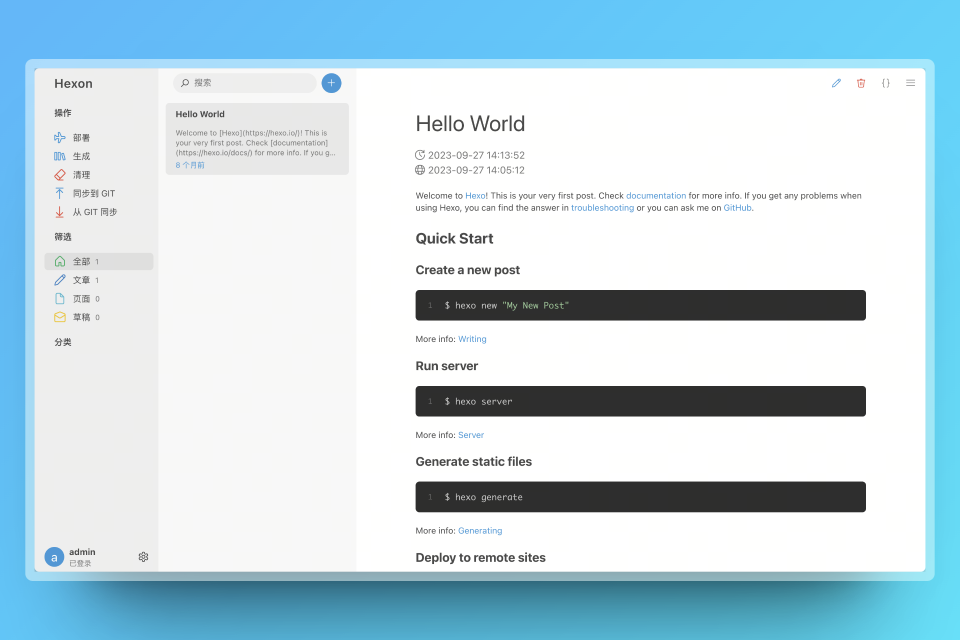
Hexon provides a web-based GUI for Hexo static site generators. It handles post and page management, front-matter templates, and runs git commands for content synchronization. The software requires git, Hexo, and Node.js to be pre-installed on the host system. It runs as a Node.js server with a Koa backend and Vue 3 frontend, listening on port 5777 by default. PM2 integration is available for production deployments. Authentication uses JWT tokens with a built-in password reset command. The project is licensed under GPL-3.0 and developed by winwin2011.
Should you self-host hexon?
hexon scores 44/100 on selfhost.directory (how scoring works) and ranks #17 of 24 in Blogging. It has 151 GitHub stars.
It shipped 1 stable release in the past year. The latest, v1.0.0, came out on 21 March 2026.
Setup is moderate: expect some configuration beyond a single command. It is GPL-3.0-licensed and written mostly in Typescript.
Its closest alternative on selfhost.directory is Typecho (66/100, 12 457 stars). It scores higher overall, so compare the two before you pick. See hexon vs Typecho side by side.
Features
- Custom script management
- Front-Matter Template
- Password authentication with reset
- PM2 production support
- Post and page management
hexon README
FAQ
How to configure Apache reverse proxy for Hexon?
Add AllowEncodedSlashes NoDecode in your VirtualHost configuration, and add nocanon at the end of the ProxyPass setting.
404 Error - What causes 404 errors when accessing Hexon?
404 errors are typically caused by reverse proxy configuration mistakes (e.g., Nginx or Apache config). Verify by using curl directly on the server to request assets without any reverse proxy.
More in Content Management
 KirbyKirby is a self-hosted flat-file CMS for developers. Stores content in text files, offers customizable Panel, supports headless and multi-language. License required.
- MediagoblinGNU MediaGoblin is a free software media publishing platform for sharing photos, videos, and other media in a decentralized and freedom-respecting environment.
 ResourceSpaceResourceSpace is an open-source Digital Asset Management (DAM) system designed for teams to store, organize, search, and share digital assets with advanced metadata, AI-powered search, and granular permissions.
- SPIPSPIP is a free and open-source content management system designed for collective use, multilingualism, and ease of use. It is distributed under the GNU/GPL license.
 stubbyStubby CMS is a self-hosted, open-source headless CMS for developers to manage blog and docs content with MDX, REST API, webhooks, and custom React components.
 tunan-blogA self-hosted blog platform built with Go and Next.js that includes an admin dashboard, Markdown writing, multilingual posts, and integrated Remark42 comments.
 TypemillOpen-source, self-hosted flat-file CMS for documentation sites, manuals and knowledge bases: write Markdown, publish websites, PDFs and EPUBs, no database needed.
 TYPO3The TYPO3 Core - Enterprise Content Management System. Synchronized mirror of https://review.typo3.org/q/project:Packages/TYPO3.CMS
 Umbraco CMSUmbraco is a free and open source .NET content management system helping you deliver delightful digital experiences.
 XiboXibo is a self-hosted, open-source digital signage platform for managing content across displays via a web CMS and multi-platform players, deployed with Docker.
 AntvilleSelf-hosted, open-source blog hosting for thousands of blogs, written in server-side JavaScript using Helma with PostgreSQL/MySQL backend.
 ApostropheA full-featured, open-source content management framework built with Node.js that empowers organizations by combining in-context editing and headless architecture in a full-stack JS environment.
0 comments