
Self-host Zigbee2MQTT
2.14.3Zigbee-to-MQTT bridge that replaces vendor hubs
$ sudo curl -fsSL https://deb.nodesource.com/setup_lts.x | sudo -E bash -- Stars
- 15 804
- Rating
- 5.0 (1)
- Port
- 8080 (Built-in web frontend (and the first-run onboarding page))
- Requires
- MQTT Broker
ghcr.io/koenkk/zigbee2mqtt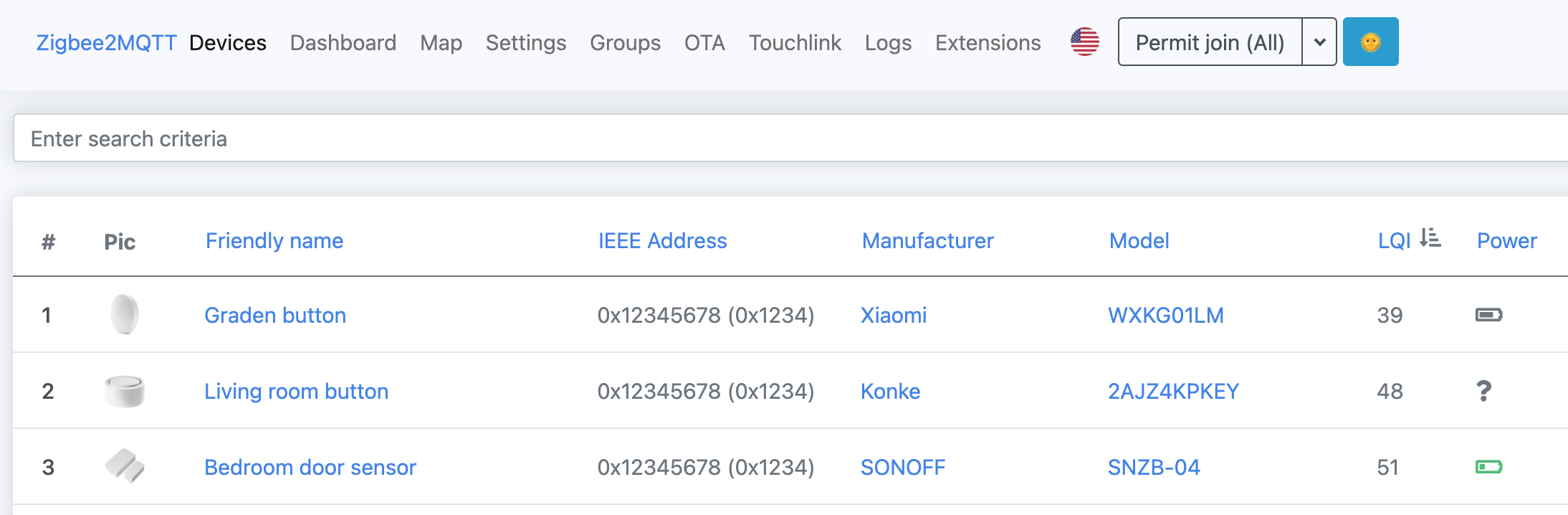
What is Zigbee2MQTT?
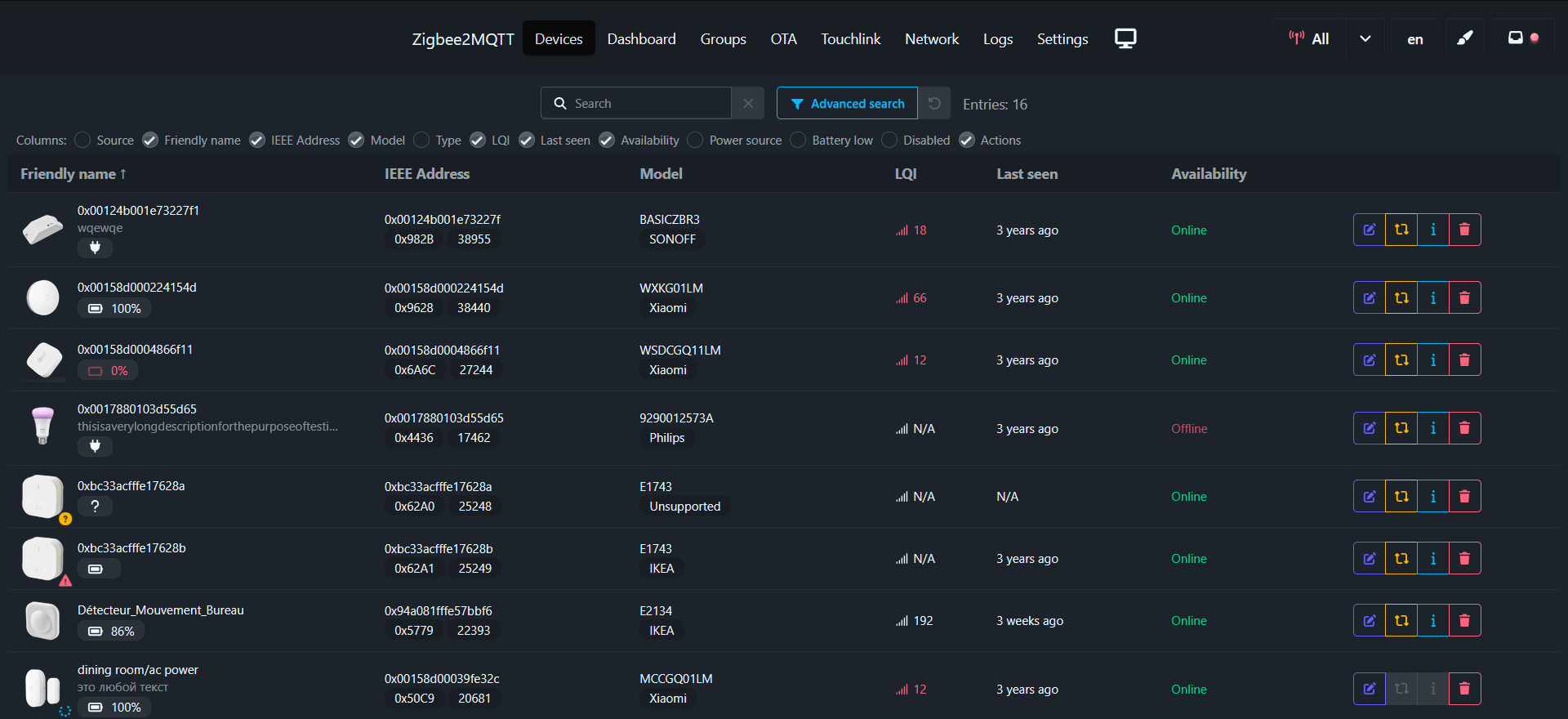
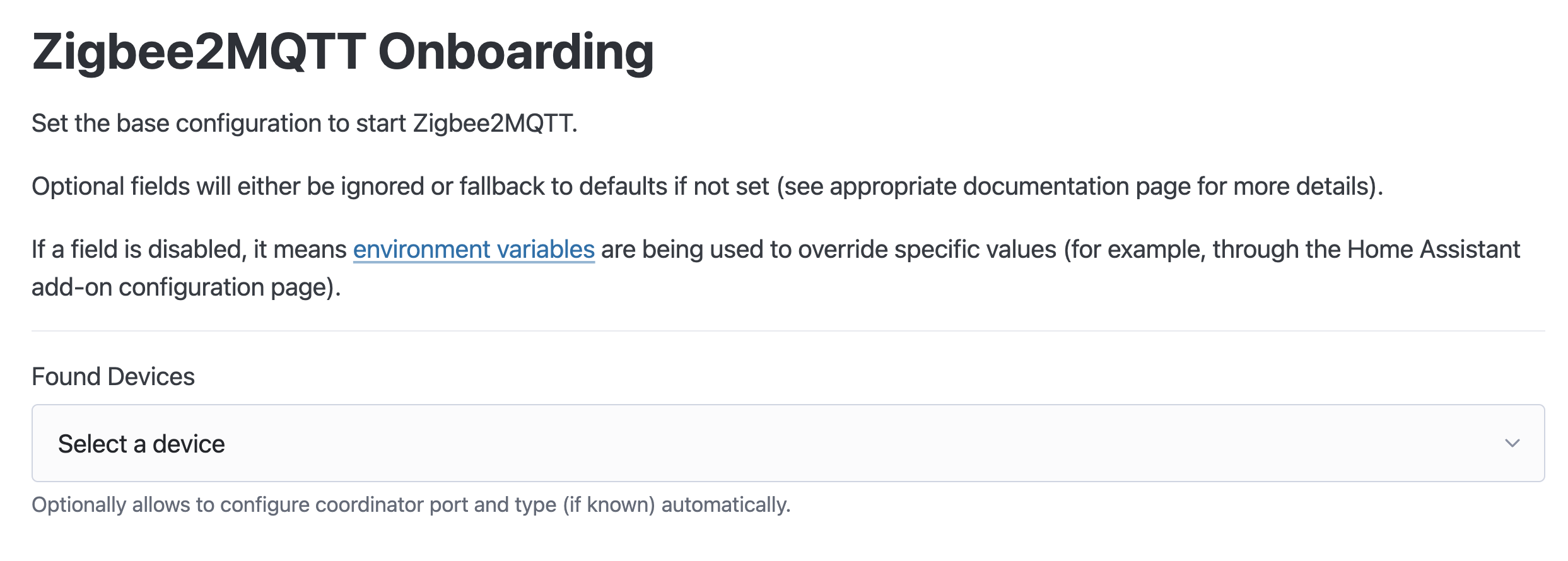
Zigbee2MQTT is a Node.js bridge that lets one Zigbee coordinator adapter run your whole Zigbee mesh, so lights, sensors and switches keep working without the manufacturer's own gateway. Everything the coordinator sees is republished as MQTT topics, and commands go back the same way, which means any home automation system that speaks MQTT can drive the devices. A built-in web frontend on port 8080 covers pairing, device settings, the network map and firmware update checks, and a first-run onboarding page writes the initial configuration.yaml for you; Home Assistant MQTT discovery can simply be switched on. You supply an MQTT broker (Mosquitto is the recommended one) and a supported coordinator adapter, one of five adapter families. It runs on Linux, in Docker or Docker Compose, as a Home Assistant add-on, on Windows, in a FreeBSD jail or on Kubernetes, with published images for x86, ARM and RISC-V. Notable limits: each instance manages a single coordinator and one Zigbee network, install-code and QR commissioning only works on certain adapter types, and a frontend HTTPS setup or reverse proxy is up to you.
Zigbee2MQTT alternatives
 ha-bridgeha-bridge is a self-hosted, open-source Java app that emulates the Philips Hue Bridge API, letting Alexa and Google Home control non-Hue devices.Compareha-bridge with Zigbee2MQTT
 DomoticzFree open-source home automation server you run yourself. Works on major OSes and Raspberry Pi, managing 150+ device types via mobile-friendly web UI.CompareDomoticz with Zigbee2MQTT
 ioBrokerSelf-hosted, open-source IoT and smart-home platform: wire devices, protocols and online services together through adapters, then script, log and visualise the data.CompareioBroker with Zigbee2MQTT
 ConBee IISelf-hosted Docker image for deCONZ Zigbee gateway with ConBee/RaspBee adapters, Phoscon UI, REST/WebSocket APIs, and optional VNC mesh view.CompareConBee II with Zigbee2MQTT
 HomeBridgeSelf-hosted, open-source HomeKit bridge: a Node.js server that emulates the HomeKit Accessory Protocol so 2,000+ community plugins expose non-HomeKit devices to Siri.CompareHomeBridge with Zigbee2MQTT
 JeedomSelf-hosted open-source home automation centralizing devices with multi-protocol support, scenarios, and plugins. Runs on Debian Linux.CompareJeedom with Zigbee2MQTT
 lhaSelf-hosted Lua home automation for Linux, Windows, Pi. Bridges ZigBee/Z-Wave, Blockly scripts, Vue.js dashboards, Web of Things API.Comparelha with Zigbee2MQTT
 ring-mqttSelf-hosted open-source bridge connecting Ring devices to MQTT with RTSP video streaming for automation platforms.Comparering-mqtt with Zigbee2MQTT
Should you self-host Zigbee2MQTT?
Zigbee2MQTT scores 77/100 on selfhost.directory (how scoring works) and ranks #5 of 104 in Home Automation. It has 15 804 GitHub stars, +113 in the last 30 days.
It shipped 16 stable releases in the past year. The latest, 2.14.3, came out on 1 November 2026. New versions land roughly every 4 weeks.
Setup is moderate: expect some configuration beyond a single command. An official Docker image is available. It is GPL-3.0-licensed and written mostly in Typescript.
Its closest alternative on selfhost.directory is Home Assistant (92/100, 92 099 stars). It scores higher overall, so compare the two before you pick. See Zigbee2MQTT vs Home Assistant side by side.
Features
- Automatic coordinator adapter discovery
- Built-in web frontend
- Device availability trackingDisabled by default.
- Device blocklist
- First-run onboarding wizard
- Frontend access tokenOff by default.
- Home Assistant Integration
- Large supported-device catalogue
- Multiple instances on one host
- OTA device firmware updatesUpdate checks contact third-party servers; can be disabled.
- Runtime configuration changes over MQTTSome options require a restart.
- Swappable UI package
- Works with any MQTT-based home automation system
- Zigbee network map
- Zigbee-to-MQTT bridging
Zigbee2MQTT README



Allows you to use your Zigbee devices without the vendor's bridge or gateway.
It bridges events and allows you to control your Zigbee devices via MQTT. In this way you can integrate your Zigbee devices with whatever smart home infrastructure you are using.
The documentation provides you all the information needed to get up and running! Make sure you don't skip sections if this is your first visit, as there might be important details in there for you.
How to install Zigbee2MQTT
Install Zigbee2MQTT with Docker
$ docker run \
   --name zigbee2mqtt \
   --restart=unless-stopped \
   --device=/dev/serial/by-id/usb-Texas_Instruments_TI_CC2531_USB_CDC___0X00124B0018ED3DDF-if00:/dev/ttyACM0 \
   -p 8080:8080 \
   -v $(pwd)/data:/app/data \
   -v /run/udev:/run/udev:ro \
   -e TZ=Europe/Amsterdam \
   ghcr.io/koenkk/zigbee2mqtt
A rootless container can be started with --user 1001:1001 --group-add dialout, or with podman run.
Install Zigbee2MQTT with Docker Compose
services:
    zigbee2mqtt:
        container_name: zigbee2mqtt
        image: ghcr.io/koenkk/zigbee2mqtt
        restart: unless-stopped
        volumes:
            - ./data:/app/data
            - /run/udev:/run/udev:ro
        ports:
            # Frontend port
            - 8080:8080
        environment:
            - TZ=Europe/Berlin
        devices:
            # Make sure this matched your adapter location
            - /dev/serial/by-id/usb-Texas_Instruments_TI_CC2531_USB_CDC___0X00124B0018ED3DDF-if00:/dev/ttyACM0
docker compose up -d zigbee2mqtt
Rootless containers need group_add: [dialout] and user: 1000:1000 in the service block.
Install Zigbee2MQTT with Linux
ZIGBEE2MQTT_DATAsudo apt-get install -y curl
sudo curl -fsSL https://deb.nodesource.com/setup_lts.x | sudo -E bash -
sudo apt-get install -y nodejs git make g++ gcc libsystemd-dev
corepack enable
sudo mkdir /opt/zigbee2mqtt
sudo chown -R ${USER}: /opt/zigbee2mqtt
git clone --depth 1 https://github.com/Koenkk/zigbee2mqtt.git /opt/zigbee2mqtt
cd /opt/zigbee2mqtt
pnpm install --frozen-lockfile
cd /opt/zigbee2mqtt
pnpm start
Can be kept running as a daemon with a systemd unit; updates are applied with ./update.sh.
How to configure Zigbee2MQTT
version=4MQTT protocol version; set to 5 when using the retention device option.values: 4, 5
mqtt.serverRequired MQTT server URL; mqtts:// is used for a TLS connection.ZIGBEE2MQTT_DATAEnvironment variable to specify a custom data directory (holding configuration.yaml, database.db and logs).ZIGBEE2MQTT_CONFIG_MQTT_BASE_TOPICExample of overriding any configuration.yaml value through an environment variable prefixed with ZIGBEE2MQTT_CONFIG_.Z2M_ONBOARD_NO_SERVERDisable the onboarding server completely.values: 1
Zigbee2MQTT releases & version history
Notes
- Deprecation of 32-bit platforms: Running Zigbee2MQTT on 32-bit platforms is deprecated, and support ends when Node.js 22 reaches end-of-life (April 2027). At that point the minimum supported Node.js version becomes v24, and Node.js v24 no longer ships official builds for any 32-bit platform. This affects every installation method (Docker, bare-metal/Linux, etc.). For Docker the 32-bit Docker images (
linux/386,linux/arm/v6andlinux/arm/v7) will not be updated anymore, and non-Docker installs on a 32-bit OS will no longer be able to run a supported Node.js version. If you run Zigbee2MQTT on 32-bit hardware or a 32-bit OS (e.g. Raspberry Pi 1/Zero, older Raspberry Pi OS 32-bit installs), plan to move to a 64-bit OS or hardware (amd64/x86_64,arm64/aarch64) before then. (#33552).
Improvements
- #13615 Onokom air conditioners: expose external temperature sensor controls (@zwg3)
- #13562 Acova ALCANTARA3: report apparent power and support accurate system mode selection (@maxiiss)
- #13555 AVATTO TS0601_thermostat_14: expose
system_modeandfrost_protection_temperature(@giogandola98) - #13580 Danfoss Ally eTRV0103: expose heating system mode and minimum temperature limits (@Retr0Joe)
- #13573 Sinopé TH1500ZB: expose power and energy measurements (@timoshawn)
- #13566 SONOFF MINI-ZB1GSP: expose
frequency,today_runtimeandlifetime(@CubeZ2mDeveloper) - #13565 SONOFF SNZB-02UL: allow periodic weather updates and apply selected icons immediately (@CubeZ2mDeveloper)
- #13574 SONOFF SNZT-03P and SNZT-04P: support OTA firmware updates (@CubeZ2mDeveloper)
- #13559 SONOFF ZBMINIL2: expose
external_trigger_modefor rocker and momentary switches (@CubeZ2mDeveloper) - #13547 Yale YRD430-BLE: expose
last_successful_pincode_saveandlast_successful_pincode_clear(@itsamenathan) - #13520 Tuya MTG235-ZB-RL: expose
distance_report(@bsaurusrex) - #13477 Aqara MCCGQ13LM: expose
action, allow battery range customization and ignore incorrect temperature reports (@Zuz666) - #13476 Calc precision and check min/max/resolution values in generateDefinition (@luar123)
- #13491 Lidl HG06620: expose countdown timer and allow firmware updates (@uluckas)
- #13499 MultIR MIR-SR100: expose configurable
warningsettings (@LotusRou) - #13496 Schneider Electric MEG5779: expose
window_open(@l-naumann) - #13457 Amina S: expose
hardware_current_limit(@bkflatekvaal) - #13437 Aqara KD-R01D: expose event, quick and anti-flicker modes and report knob press state correctly (@martinkura-svk)
- #13397 Aqara W600: expose battery voltage and external temperature status (@nilvanis)
- #13441 Aqara WXKG15LM: support OTA firmware updates (@igorlistopad)
- #13448 Eurotronic CoZB_dha: expose additional thermostat properties (@svhelge)
- #13419 Lidl HG06467: expose white mode and animated effect controls (@WFLM)
- #13314 SONOFF SWV-ZF2: expose flow and irrigation session volume (@jclark50)
- #13464 SONOFF: centralize firmware feature gates (@CubeZ2mDeveloper)
- #13447 Tuya ZS-300Z: fix
soil_moistureand exposesoil_moisture_warning_threshold(@MPX4132) - #13417 Namron 4512768, 4512791 and 4512792: support firmware updates (@xses79)
- #13421 NodOn IRB-4-1-00: support infrared remote control learning (@GalleonLimitless)
- #13430 Sber SBDV-00123: fix
local_temperature_calibrationrange (@emolenev) - #13423 Tuya MTG275-ZB-RL: expose
distance_report(@andi-at-1) - #13382 Bosch BTH-RA: expose weekly schedule (@dierochade)
- #13389 NEO NAS-WV03B: support OTA updates (@andrei-lazarov)
- #13392 Sber thermostat: allow temperature calibration from -10 to 10 °C (@emolenev)
- #13364 Schneider Electric EKO07259: expose regulator level in P9 mode (@J0st1)
- #13402 Tuya TS0002_power: support OTA updates (@andrei-lazarov)
- #13388 Tuya TS0601_soil: support over-the-air firmware updates (@andrei-lazarov)
- #13357 Schneider Electric: enable OTA for multiple devices (@peroo)
- #1920 Support for SONOFF Dongle-MP10 auto-discovery (@CubeZ2mDeveloper)
- #1912 Add application type and bacnet mappings (@luar123)
- #1878 Accept explicit manufacturer-specific cluster definitions (@SisyphusMD)
- #1872 Unified transport (@Nerivec)
Fixes
- #33423 Apply throttle and debounce to last seen updates from non-emitted frames (@cestercian)
- #33275 Do not let a malformed WebSocket frame escape the message listener (@arpitjain099)
- #33504 Drain the availability ping queue in a loop instead of recursing (@tomislavhorvaticek)
- #33472 Home Assistant: don't treat light_type select as an endpoint light (@cestercian)
- #33404 Home Assistant: fix
hw_versionandsw_versionnot being a string (@rfdrake) - #33071 Home Assistant: guard value templates against missing properties (@deviantintegral)
- #33412 Home Assistant: log deprecation message when exposing switch as light (@cristianchiriac)
- #33453 Home Assistant: map
emergency_heatingsystem mode toheat(@condrof) - #33508 Home Assistant: note legacy_action_sensor is deprecated (@andrei-lazarov)
- #33327 Home Assistant: rediscover entities that return after their exposes were removed (@mberglun)
- #33435 Home Assistant: support fan entities on non-primary endpoints (@Lauri-Nomme)
- #33410 Look up the endpoint name of a group member to check its state (@cristianchiriac)
- #33334 OTA: respond to update requests within the update check interval (@mberglun)
- #33329 Preserve secret references when persisting environment overrides (@igorlistopad)
- #33116 Update zigbee-herdsman to 11.0.0 with new transport (@Nerivec)
- #13571 HOBEIAN ZG-204ZX: report
temperaturein °C whentemperature_unitis fahrenheit (@jabla) - #13592 Shelly SBDW-203C: show the correct device name (@nazgul77)
- #13610 Sonoff SNZ-02B: clarify button location in calibration instructions (@LakesideMiners)
- #13604 Sonoff SNZB-02M: fix pressure reporting (@andrei-lazarov)
- #13600 Tuya PJ-1203-W: prevent freezing on gateway status queries (@cpruijsen)
- #13606 Tuya ZS-304Z: fix incorrect illuminance readings (@MPX4132)
- #13468 Aqara KD-R01D: remove unsupported
on_levelsetting (@k-lofnes) - #13558 Aqara ZNJLBL01LM and ZNCLBL01LM: fix incorrect position while the curtain is moving (@kwiatkowski)
- #13551 Heiman HS2VTD: report vibration correctly (@Leo2442926161)
- #13563 Innr OPL 130 C: stop exposing unsupported
power_on_behavior(@bharvey88) - #13579 Moes ZHT-002: report
schedule_modecorrectly (@willoma) - #13577 Schneider Electric CCTFR6400: restore +/- setpoint control when keypad lockout is unknown or binding fails (@simondo)
- #13575 Schneider Electric WV704R0A0902: restore temperature, setpoint and heating demand updates (@simondo)
- #13586 Sinopé TH1400ZB: fix floor and room temperature reporting (@jeremyk)
- #13498 Zosung IR blaster: prevent commands from replacing an in-progress transmission (@Komzpa)
- #13544 Tuya TS0601_3_phase_clamp_meter: fix incorrect negative phase power (@gorzynsk)
- #13543 Tuya TS0601_thermostat_3: allow 0.5 °C setpoint steps (@reidar-cederqvist)
- #13532 Moes TRV801Z: fix incorrect time on the thermostat (@araines)
- #13529 Moes ZHT-PT01-M-MS: fix
electricity_statisticsbeing 10x too high (@Koenkk) - #13446 Tuya devices: fix data point conversion results being overwritten (@MPX4132)
- #13522 Tuya SPM01V2.5: restore measurement updates and configurable reporting interval (@petrouv)
- #13530 Tuya TRV801Z: fix scheduled comfort and eco modes (@araines)
- #13526 Tuya ZG-103Z: adopted native converter for accelerometer values (@MPX4132)
- #13534 Tuya ZS-304Z: correct soil and illuminance calibration controls (@MPX4132)
- #13504 Tuya ME201WZ: ignore false and out-of-range level readings (@Smeagolworms4)
- #13524 Tuya ZS-304Z: support negative humidity and temperature calibration (@MPX4132)
- #13518 Visonic MCT-350 SMA: prevent rapid polling after a battery swap (@molant)
- #13479 Aqara ZNJLBL01LM: report
reverse_directionupdates correctly (@igorlistopad) - #13507 Develco EMIZB-132: fix power not being reported (@andrei-lazarov)
- #13509 Namron 4566700: avoid duplicate D692-ZG listing (@LarsSimonsen)
- #13508 NodOn IRB-4-1-00, OWON AC201 and AC221: fix louvers not closing when set to fully closed (@nthiers)
- #13490 Optimize duplicate checking (@Nerivec)
- #13503 Reject
on_timeandoff_wait_timevalues outside the ZCL range (@luantaraschi) - #13495 Schneider Electric MEG5779: fix unsupported attribute read errors (@l-naumann)
- #13510 Sercomm XHS2-SE: refresh battery level regularly (@molant)
- #13289 Shelly WS90: ignore all-zero frames (@Smeagolworms4)
- #13480 SONOFF MINI-ZBDIM: fix errors before brightness calibration (@LuisFigueroaG)
- #13482 Sunricher SR-ZG9095B: report fan mode changes (@LuisFigueroaG)
- #13405 Tuya TS0601_dimmer_1_gang_1: fix configuration failing (@andrei-lazarov)
- #13462 Undefined in arrays for m.numeric and m.binary (@luar123)
- #13478 Yandex YNDX-00537 and YNDX-00538: prevent selecting unsupported
fullpower type (@igorlistopad) - #13460 Develco AQSZB-110: allow higher VOC density readings (@paysonwallach)
- #13454 Develco SMSZB-120 and HESZB-120: stop the siren without triggering it (@Pwnyrider)
- #13471 Innr RS 240: correct product description (@daneedk)
- #13466 Move application type and bacnet mappings to zigbee-herdsman (@luar123)
- #13449 MultIR MIR-SR100: allow controlling the siren alarm (@LotusRou)
- #13469 Namron 4512758: expose
window_openas a read-only window sensor (@LuisFigueroaG) - #13455 Philips 7299355PH: report color temperature support correctly (@m-s-y)
- #13436 Philips 9290022267: fix color temperature limits (@nickdavies)
- #13197 Philips Hue: fix effect control in mixed groups (@SisyphusMD)
- #32734 Sinopé TH1123ZB: fix configure failing for devices that don't support power reporting (@Koenkk)
- #13450 SONOFF BASIC-ZB1GSP: allow configuration to continue when an attribute cannot be read (@CubeZ2mDeveloper)
- #13434 SONOFF: show relay settings as configuration entities (@clemencov)
- #13438 STREDA STREDA: fix buzzer timeouts and duplicate buzzing (@mbchristoff)
- #13445 Tuya ZS-304Z: fix illuminance readings reported too low (@MPX4132)
- #13470 Tuya: fix incorrect values sent for scaled numbers (@LuisFigueroaG)
- #13373 Aqara DS-K02D and DS-K02E: restore original wireless button actions (@smeyerspam-coder)
- #13426 Aqara WSDCGQ12LM: restore precise pressure reporting (@LuisFigueroaG)
- #13432 AVATTO ZDMS16-1: correct white label vendor name (@bernardesarthur)
- #13431 Danfoss Icon2: fix endpoint-specific settings being unavailable (@9colai)
- #13400 Gledopto GL-SPI-206P: fix brightness and color temperature control and report color correctly (@rlcamargos)
- #13346 Moes BHT-002: ignore data points with an unknown datatype (@Diaoul)
- #13386 Namron Zigbee Edge thermostat (4566702 / 4566703 / 4512783 / 4512784, HZC T11_ZG): various improvements (@xses79)
- #13379 Sercomm XHS2-SE and Universal Electronics Inc XHS2-UE: set long poll intervals to reduce battery drain (@molant)
- #13420 Shelly WS90: report pressure correctly (@Burki24)
- #13416 SONOFF S60ZBTPF: stop repeated power updates when power is unchanged (@limes007)
- #13399 SONOFF TRV-ZBT: report battery level (@timemaster5)
- #13384 Aqara FP310: fix occupancy freezing after idle (@rexcfnghk)
- #13372 Aqara PS-S04D: stop taking presence and PIR detection from the 0x00F7 struct (@theseus-elysium)
- #13362 Aqara ZNJLBL01LM: skip optimistic position updates (@belzadur)
- #13366 ENGO EONE-230W and EONE-BATB: use 1970 time base for thermostat time sync (@falkenhawk)
- #13363 HYSYIOT HS208Z: fix occupancy and battery reporting (@olegos37)
- #13404 LinknLink eMotion Air: report battery power source correctly (@andrei-lazarov)
- #13390 Mercator Ikuü SPP04G: report power, current and voltage after pairing (@corrin)
- #13406 ModernExtend: report pressure in hPa (@svhelge)
- #13393 Shelly WS90: correct sensor measurement ranges (@Burki24)
- #13409 STREDA SN3-1TB5K-03/PW: report correct rocker and doorbell actions (@mbchristoff)
- #13381 TS130F: allow setting position on groups (@blvosh2)
- #13378 Tuya ZG-103Z: Corrected axes' values (@MPX4132)
- #13359 Ubisys LD6: fix input configuration writes and reads, read start-up settings, update write hint (@mberglun)
- #13352 Philips Hue gradient lights: honor transition for gradient colors (@beaugbolle)
- #33248 Develco SMSZB-120: don't configure
zoneStatusreporting (@Koenkk) - #13350 EGLO 901471: fix CCT panel and RGB ring controls (@lmai95)
- #33249 HOBEIAN ZG-102ZA: expose
battery_lowandtamper(@Koenkk) - #1924 Tuya: parse EF00 command 0x0A as
dataReportAlt(@Dukakz) - #1923 Update group database when device is already in the group (@andrei-lazarov)
- #1918 OTA delayed for some devices due to order of operations (@Nerivec)
- #1917 Send default response on unknown ZCL frame (@pfrenssen)
- #1901 Deconz decoder context (@Nerivec)
- #1900 Deconz transport connection (@Nerivec)
- #1898 Tuya: mcuOtaBlockDataRequest size is 1 byte (@andi-at-1)
Frontend
- #675 fix: race condition with websocket populating store (@Nerivec)
- #677 fix: prevent fractional groups IDs (@andrei-lazarov)
- #679 fix: improve reconnection notifications (@andrei-lazarov)
- #680 fix: remove 'analog_in_' and 'analog_out_' prefixes for icons (@luar123)
New supported devices
This release adds support for 60 devices:
- #13581
4512797Namron Simplify wireless rotary dimmer (@xses79) - #13617
AY-223ZAOYAN Rainwater detection sensor (@yangchuangzhou-del) - #13603
E2435-NAIKEA TOFSMYGGA 2-gang outdoor plug (Matter) (@andrei-lazarov) - #13616
HYT001ZBVareo Smart thermostat for electric floor heating or boilers (@soukal24) - #13591
ROB_200-012-0ROBB Dual Zigbee AC phase-cut dimmer (@evanraalte) - #13619
S2100-1001SIMON i7 1-gang smart switch (pairing) (@solstead) - #13619
S2100-1002SIMON i7 2-gang smart switch (pairing) (@solstead) - #13619
S2100-1003SIMON i7 3-gang smart switch (pairing) (@solstead) - #13619
70E838TYSIMON i7 1-gang smart switch (neutral) (@solstead) - #13619
70E850TYSIMON i7 1-gang smart switch (no neutral) (@solstead) - #13619
70E839TYSIMON i7 2-gang smart switch (neutral) (@solstead) - #13619
70E851TYSIMON i7 2-gang smart switch (no neutral) (@solstead) - #13619
70E840TYSIMON i7 3-gang smart switch (neutral) (@solstead) - #13619
70E852TYSIMON i7 3-gang smart switch (no neutral) (@solstead) - #13554
SQ610RFNHSalus Controls Quantum wireless thermostat (@mikkelke) - #13554
KL08RFSalus Controls iT600 8-zone wiring centre (@mikkelke) - #13572
APRM-04-005Appartme Thermostatic radiator valve Zigbee 2.0 (@ArkadiuszKubiak) - #13561
Dongle-MP10SONOFF Dongle Max CC2674P10 (CC2674P10) with router firmware (@CubeZ2mDeveloper) - #13521
Ramses_esp32c6ELECRAM RAMSES II RF-to-Zigbee bridge (ESP32-C6) (@IMMRMKW) - #13589
SP-P06EAqara Outdoor plug H2 EU (@Koenkk) - #13557
TS0601_floor_thermostat_006Tuya Zigbee thermostat for electric floors with selectable internal and external sensors (@lin-hanhan) - #13536
ZM7LT1Moes Single-phase energy meter with CT clamp (@sdbldn) - #13536
ZM7LT3Moes Three-phase energy meter with CT clamps (@sdbldn) - #13536
ZC301Moes Zigbee curtain motor (@sdbldn) - #13481
ZTS-8BNova Digital 8 gang switch (@bernardesarthur) - #13481
SYZB-6WNova Digital 6 gang switch 4x4 with backlight and power_behavior (@bernardesarthur) - #13537
ECD-ZB-REPEATERECODO Zigbee repeater (@isaackennylee) - #13538
SBDW-203CShelly BLU DoorWindow Mini ZB (@frogk74) - #13528
ZG-204ZS-zHOBEIAN Dual PIR and mmWave radar presence and luminance sensor (pvvx/ZigbeeTLc) (@PrivateiFox) - #13533
teelichtteelicht Rechargeable tealight that flickers like a real candle (@rathlinus) - #13531
ZG-204ZV-zHOBEIAN Millimeter wave motion sensor with temperature and humidity (pvvx/ZigbeeTLc) (@Ctrl-F4) - #13531
ZG-204ZV2-TH-zHOBEIAN Millimeter wave motion sensor v2 with temperature and humidity (pvvx/ZigbeeTLc) (@Ctrl-F4) - #13531
ZG-204ZV2-zHOBEIAN Millimeter wave motion sensor v2 (pvvx/ZigbeeTLc) (@Ctrl-F4) - #33376#issuecomment-6154747784
119710Tervix Pro Line Zigbee+RF wireless room thermostat (@Koenkk) - #13459
4512795Namron Simplify thermostat (@xses79) - #13512
929004295101Philips Hue Essential Flex lightstrip (5m) (@newfarm1) - #13245
MD-GATE-ZB1MakeDIY Gate controller with main and optional pedestrian pulse and one or two limit contacts (@ShifuEst) - #13488
Rem4 HeaterAriston Boiler gateway (room thermostat interface) (@TheoLeCalvar) - #13497
S1-MHeiman Smart smoke alarm (@Leo2442926161) - #13497
C1-MHeiman Smart carbon monoxide alarm (@Leo2442926161) - #13511
SBDW-302CShelly BLU DoorWindow Outdoor ZB (@ericyew) - #13442
3ROR0194ZThird Reality, Inc Smart Outdoor Repeater (@3reality-support) - #13463
MS01Besisglas Battery-powered 24GHz radar presence sensor (@syh501) - #13463
WL01Besisglas Zigbee water leak sensor with wired probe (@syh501) - #13458
S4SN-0A24XShelly i4 Gen4 (@hoellen) - #13398
SP107E-ZigbeeTuya LED music controller (@Nordranei) - #13451
ZRF01Tuya Zigbee RF cloner with 8 slots (@Di4bLo84) - #13433
929003853601Philips Hue white and color ambiance A67 1600lm E27 (@seraphblade2010) - #13435
929004320901Philips Hue Play Table lamp (@JFS-HA) - #13428
FH9127Futurehome In-wall dimmer (@Bekkenes) - #13429
MIR-SR100MultIR Zigbee SR100 siren (@LotusRou) - #13348
AirWick_nRF52840Custom devices (DiY) AirWick smart aerosol dispenser (@OstrokolovNikita) - #13369
MG-AU01ZLMV01-XXMakeGood 1 gang light switch, energy monitoring and RGB backlights (@slim008) - #13365
NimlyCodePROOnesti Products AS Zigbee module for Nimly Code PRO (@eirikman) - #13376
SR-ZG9001K8-CCTSunricher CCT wireless wall switch with 2 scene buttons (@bgschuetze) - #13367
TRV602WZTopband Smart Thermostat (@Bastel-Bodo) - #13356
OXT-4CH-RELAY-ACTuya 4 channel relay module (@piotrf-hub) - #13356
OXT-4CH-RELAY-DCTuya 4 channel relay module DC (@piotrf-hub) - #13344
TS0505B_hsTuya Smart LED bulb (RGBCW) (@Kivi-Berlin) - #13344
TS0503B_hsTuya RGB COB LED Strip (@Kivi-Berlin)
Fixed device detections
- #13601 Detect
_TZE200_fzo2pocsas Zemismart ZM25TQ (@andrei-lazarov) - #13605 Detect
_TZE284_stvgmdjzas Moes SFL02-Z-1 (@andrei-lazarov) - #13618 Detect
SDM01G2Was BITUO TECHNIK SDM01G2W-U01 (@script0803) - #13595 Detect
Zbeaconas zbeacon DS01 (@Martinius79) - #13556 Detect
_TZ3210_ekjc2rzhas Girier TS0225_GIRIER (@pedrohcmeneses) - #13560 Detect
_TZE2841000000_8se38w3cas Tuya TZ-ZT01_GA4 (@okidoki22) - #13567 Detect
_TZE2841000000_hodyrylias Tuya ZT08 (@jp-irons) - #13588 Detect
_TZE28C1000000_cjbofhxwas Tuya PJ-1203-W (@Koenkk) - #13549 Detect
PIIC5804as Paulmann 291.46 (@binford6000) - #13583 Detect
ZBM-MG21as Silabs series 2 router (@HparkeY) - #13546 Detect
_TZE204_kobbcyumas Tongou TOWSMR1-40A-AC (@ASk1) - #13541 Detect
_TZE284_hkdl5fmvas WDYK ZJSBL7-100Z (@kamonishe) - #13552 Detect
TOFSMYGGA plug outdooras IKEA E2435/E2491 (@plerpsandplerps) - #13550 Detect
TRADFRI bulb E17 CWS opal 600lmas IKEA LED1624G9 (@linkyone) - #33385 Detect
_TZ3008_avdpejnsas Nous A6Z (@Koenkk) - #13506 Detect
_TZE200_bjzrowv2,_TZE204_bjzrowv2,_TZE284_bjzrowv2as Tuya TS0601_cover_15 (@andrei-lazarov) - #13505 Detect
_TZE28C1000000_19jwhi8cas Zemismart ZN-USC1U-HT (@andrei-lazarov) - #13487 Detect
_TZE28C1000000_yxun3xvras Tuya TS0601_1gang_switch (@hkchew03) - #13489 Detect
929004276603as Philips 929004276602 (@ltratt) - #13493 Detect
LCX048as Philips 929004284702 (@moritzba-44) - #13513 Detect
YRD410-PBas Yale YRD410-BLE (@gjcourt) - #13440 Detect
929003811401_01,929003811401_02as Philips 929003046601 (@LuisFigueroaG) - #13472 Detect
Hospitality on off plugas Legrand WNP10 (@starfoxcito) - #13474 Detect
LCE006as Philips 929002294203 (@sovintz) - #13465 Detect
V6,EGONYas Silabs Silabs series 2 router (@egony) - #13427 Detect
_TZE2841000000_nt4pquefas Tuya SGS02Z (@LuisFigueroaG) - #13424 Detect
Mill Wi-Fi Panel Heater Gen4as Mill Mill-gen-4 (@benjaminkjh) - #13414 Detect
SLZB-07MG26as SMLIGHT SLZB-07MG26 (@Nerivec) - #13401 Detect
_TZ3000_hopb2kjmas Nous B3Z (@andrei-lazarov) - #13411 Detect
_TZE200_3ymoslep,_TZE204_3ymoslep,_TZE284_3ymoslep,_TZE2841000000_3ymoslepas Nous H1Z (@andrei-lazarov) - #13407 Detect
_TZE204_zpvusbtvas Tuya ZN2S-RS02E (@andrei-lazarov) - #32940 Detect
_TZE28C1000000_gt5al3blas Gledopto GL-SPI-206P (@Koenkk) - #33259 Detect
ADUROLIGHTas Trust ZCTS-808 (@Koenkk) - #13370 Detect
PIIC51104as Paulmann 291.50 (@open-sourced) - #13412 Detect
ZTM2-ENas IMOU ZTM1-EN (@dan-danache) - #13342 Detect
_TZE204_rfpyqax9as Tervix Pro Line X10 (@Koenkk) - #33260 Detect
_TZE284_goecjd1tas AVATTO ZWPM16 (@Koenkk) - #32725#issuecomment-5921955508 Detect
_TZE284_adlblwabas Tuya TS0601_switch_8_2 (@Koenkk) - #33239#issuecomment-5933963506 Detect
_TZE284_xc7dve2gas Tuya TS0601_dimmer_1_gang_1 (@Koenkk)
Improvements
- #13337 Aqara UT-A01E: support custom NTC floor sensors (@w1r0x)
- #13315 NodOn SIN-4-1-20, SIN-4-1-21 and SIN-4-2-20: make wired input self-bind configurable (@nthiers)
- #13345 Tuya TS0601_cover_1: expose slat tilt on DP21 (@isaackennylee)
- #13341 Yale LIA: expose lock action, source and user from operation events (@leonardodelfino)
- #13310 Futurehome Charge: add plug lock state (@svhelge)
- #13322 LEDVANCE 4058075729025: expose power_on_behavior (@andrei-lazarov)
- #13323 LEDVANCE 4058075823976: expose brightness control (@andrei-lazarov)
- #13279 Namron 4566700: expose additional configuration settings (@xses79)
- #13271 Namron 540139X: expose temperature_display_mode (@torem)
- #13288 OWON PC321: expose metering report schedule (@Diaoul)
- #13268 SONOFF TRV-ZBT, TP-WGZBA: improve controls (@CubeZ2mDeveloper)
- #13247 Purmo/Radson Yali Parada Plus: add keypad lockout (@vkardell)
- #13256 SONOFF BASIC-ZB1GSP: read consumption and export energy attributes support (@CubeZ2mDeveloper)
- #13231 Tuya TO-Q-SYS-JZT: support more features (@k7s5a2)
- #13257 Tuya TS0001: expose power-on behavior, switch type, backlight, indicator and inching for _TZ3000_p26flek3 (@krobipd)
- #13215 Namron 4512758: set duty cycle and cycle length in percent mode, fix backlight settings (@DurinMusicspear)
- #13218 SONOFF SNZB-09P: add alarmStatus reporting and chime presets, gated to firmware >= 1.1.9 (@CubeZ2mDeveloper)
- #13223 SONOFF SWV: expose manual irrigation settings as scalar controls (@CubeZ2mDeveloper)
- #13204 SONOFF ZBMINIR2: expose more features (@CubeZ2mDeveloper)
- #13188 LinknLink eMotion Air: support more features (@StarStarDust)
- #13145 Namron Edge Thermostat (4566702/4566703/4512783/4512784): rework integration (@xses79)
- #13162 Schneider CCTFR6000 UFH: expose demand percentage and cycle time per channel (@lxhunter)
- #13146 Aqara QBKG11LM: add
power_outage_memorysupport (@mcapmari) - #13148 Namron Edge Thermostat: allow regulator_cycle 0 and thermostat_mode_extra manual (@papatistos)
- #13136 Profalux MOT-C1ZxxC/F: expose internal temperature (@fabienduval)
- #13140 Third Reality: add meteringOnlyMode attribute and command lookups (@3reality-support)
- #13150 Tuya TS0601_rcbo: add over voltage/current/temperature/leakage threshold controls (@mcapmari)
- #13112 Allow Tuya queryOnDeviceAnnounce to be a per-device function (@sekot)
- #13116 Aqara ZNMHLDJ01LM: support more features (@airlychee)
- #12955 Bosch BSD-2: Add HA siren discovery (@burmistrzak)
- #13114 Decode Tuya firmware IDs (@andrei-lazarov)
- #13118 Tuya TS0726 1 and 3 gang scene switches: expose switch_inching on (@isaackennylee)
- #1893 Ember: support manufacturer code stack config (@Nerivec)
Fixes
- #33236 Home Assistant: fix humidity incorrect for multi-endpoint climate devices (@Koenkk)
- #33037 Home Assistant: fix cover state reporting when moving from fully opened/closed state (@feixm1)
- #33048 Home Assistant: support more action events (@mistic100)
- #32654 Preserve HA name if set in withHomeassistant and remove analog prefix (@luar123)
- #33102 Prevent unhandled error within winston transports (@Nerivec)
- #33206 Republish retained messages on MQTT reconnect (@victor-fedorov-wb)
- #13327 Aqara WSDCGQ12LM: use hPa for pressure (@svhelge)
- #13309 Develco SMSZB-120: fix temperature (@svhelge)
- #13285 FrankEver FK_V02 and FK-BV05: various improvements (@novittukyll)
- #13318 Namron 4512783/4512784/4566702/4566703: set the clock as Unix local time (@pjsamuel3)
- #13321 Namron Edge Thermostat: allow regulator_cycle = 0 (@xses79)
- #13329 Tervix _TZE284_6kijc7nd: fix system_mode (@andrei-lazarov)
- #13328 Tuya TS011F: Fix conditional switch_type_button expose (@andrei-lazarov)
- #13265 Aqara ZNXNKG02LM: Fix settings not working (@andrei-lazarov)
- #13276 DIYRuZ FreePad: prevent spurious "many_undefined" action from messages without presentValue (@Mike-Raziel)
- #13299 Fix iasWarning toZigbee converter (@zador-blood-stained)
- #13307 Legrand: fix configure failing for various devices (@svhelge)
- #13262 Manhot: fix endpoints on multiple devices (@andrei-lazarov)
- #13306 Moes ZG-101ZD / ZG-101ZL: ignore UNSUPPORTED_ATTRIBUTE in configure (@Michal-Za)
- #13302 RINNconnect WSER40: fix not controllable (@onewaylifestreet)
- #13270 SONOFF: SNZB-02M: fix pressure reading and reporting (@CubeZ2mDeveloper)
- #13274 Third Reality 3RSB22BZ: prevent spurious "many" action from messages without presentValue (@Mike-Raziel)
- #13277 Tuya TS0001: drop inching for _TZ3000_p26flek3 (@krobipd)
- #13293 Zemismart ZM25RX-08/30: detect "stopped" motor_state (@andrei-lazarov)
- #13282 Zemismart ZMS-206US-4: handle proprietary status reports (@zemismart-dev)
- #13267 Zosung: honor OFF when stopping IR learning (@zemismart-dev)
- #13244 Aqara W600: improve external temperature handling (@nilvanis)
- #13233 Onesti Products AS locks: PIN code format, source 0x05, capability attributes (@fredrik-lindseth)
- #13229 Schneider Electric: declare hvacThermostat 0xE012 (open window detection status) (@mberglun)
- #13238 ShinaSystem CSM-300ZB_V2: rename
transactiontotransaction_interval(@rusty-art) - #13254 SONOFF S60ZBTPF/S60ZBTPG/BASIC-ZB1GSP/S61SZBTPB: mark
outlet_control_protectas config entity (@arnepluhar) - #13246 SONOFF ZBDongle-P: add as whitelabel of Custom devices (DiY) ti.router (@alichaudry)
- #13224 Develco SPLZB-137/SPLZB-141: fix continuous acFrequency reporting (@mberglun)
- #13219 OpenLumi LR-DGNWG05LM, LR-ZHWG11LM: enable device temperature reporting (@igorlistopad)
- #13207 Tuya covers: fix motor_direction mapping (@andrei-lazarov)
- #13203 Tuya: decode 24 bit current and power in phaseVariant2WithPhase (@aberenguel)
- #13192 Aqara SRTS-A01: expose identify (@Atze001)
- #13169 Aqara WSDCGQ12LM: fix temperature/humidity/pressure/battery not reporting (@sharan1612)
- #13200 Moes ZHT-002: improve schedule mode (@Di4bLo84)
- #13195 Sinopé TH1400ZB: split manufacturer-specific attributes out of the configure read (@louim)
- #13199 SONOFF SNZB-02WD and SNZB-02LD: adjust default reporting thresholds (@CubeZ2mDeveloper)
- #13196 SONOFF SNZB-06P24: disable default reporting for illuminance and occupancy (@CubeZ2mDeveloper)
- #13184 Tuya TS0601_heat_meter: correct heat meter switch and heat datapoint IDs (@zemismart-dev)
- #13185 Zemismart ZM16B: query battery status (@zemismart-dev)
- #13173 Aqara: allow effect_speed 0 when no effect is active (@BattermanZ)
- #13178 Expire cached transaction IDs so reused sequence numbers are processed (@cpruijsen)
- #13155 NodOn IRB-4-1-00: migrate to m.thermostat(), add IBH-1-1-00 offset (@nthiers)
- #13154 NodOn: fix switchTypeOnOff/switchTypeWindowCovering, give per-channel exposes their own endpoint (@nthiers)
- #13163 SONOFF MINI-ZBDIM: fix typo in calibration status lookup (@sevrob)
- #13161 Tuya TS130F: preserve start position before optimistic update (@feixm1)
- #13111 HOBEIAN ZG-IR01: Broadlink IR timings (@bapesupreme)
- #13143 SONOFF BASIC-ZB1GSP: skip onOff configReport for firmware >= 1.0.5 (@CubeZ2mDeveloper)
- #13142 Tuya SDM01: allow data report duration below 30 seconds (@ivankravets)
- #13151 Tuya TS0601_fan_5_levels_and_light_switch: expose as fan (@flaviocorrea13)
- #13115 Bituo SDM02-U01: add energy tier1&2 (@script0803)
- #33004 Cover: fix OPEN/CLOSE commands with
invert_cover: true(@Koenkk) - #13124 Fix illuminance 0 (@andrei-lazarov)
- #13117 Mowe MW781Z and MW783Z: add as white labels of TS0726 (@isaackennylee)
- #13121 Neo NAS-AB06B2: fix
alarm_stateenum value (@warfuric) - #12887 Nous B4Z: fix stale position after movement to absolute position (@feixm1)
- #13126 Philips gradient effect arguments (@chris-1243)
- #12931 SONOFF ZBM5 no-Neutral: fix configure still failing (@andrei-lazarov)
- #13123 Tuya TS0224: add back
max_duration(@andrei-lazarov) - #13119 Tuya: fix inching payload corrupted by utf8 encoding of bytes >= 0x80 (@isaackennylee)
- #12723 Definition generator: fix names of generated binary/analog clusters and use apptype to get the device class (@luar123)
- #12944 IAS*: Convert various devices to
modernExtend(@burmistrzak) - #33001 Lumi ZNJLBL01LM: fix cover state (@Koenkk)
- #13097 Moes GM25TEQ-TYZ-2/25: fix
motor_direction(@Kivi-Berlin) - #13108 NodOn SEM-4-3-20: correct zigbeeModel to match real hardware variants (@nthiers)
- #13107 Shelly Gen4 devices: fix
switch_modevalues andswitch_typewrite (@teodor-hristov) - #13110 Universal Electronics Inc XHS2-UE: use correct 3V_2100 voltage curve for battery percentage (@rwarner)
- #13106 ZHT-002-Correct-HVAC-to-Heat-Only (@Di4bLo84)
- #1888 Z-Stack: fix permitting join through only coordinator allowing join via routers (@deviantintegral)
- #1891 ZBoss: refresh network info after formation (@tostmann)
- #1882 Ember: prevent possible crash on bad ZDO frame (@Nerivec)
- #1866 Fix missing response ID for the foundation discover command (@canardos)
- #1874 Preserve 0xFFFF manufacturerCode in genOta requests (@syenchuk)
- #1858 Better handle discovery errors (@Nerivec)
- #1855 Honor group command response status (@gbarkan)
- #1863 Prevent creating groups with fractional IDs (@andrei-lazarov)
- #13338 Aqara JY-GZ-01AQ: report smoke alarm sent via IAS zone (@sebastian-0711)
- #13333 Develco HESZB-120: fix temperature (@mamrai1)
- #13324 Shelly S4DM-0010WW: fix power measurement exposure (@andrei-lazarov)
- #13320 SONOFF SNZB-03P: fix some attributes not working (@svhelge)
- #13336 Tuya TS0505B_2: fix ww/cw control (@craybill-greater)
New supported devices
This release adds support for 83 devices:
- #13304
100052992400Atlantic Group Nirvana+ connected radiator horizontal 750W (@ashkii7) - #13304
100052994200Atlantic Group Nirvana+ connected radiator vertical 1500W (@ashkii7) - #13312
1246595Somfy Glydea2 Ultra 50 WF Zigbee curtain motor (@DMajrekar) - #13319
291.45Paulmann Smart Home Zigbee LED bulb 11W Matt E27 RGBWW (@nurunet) - #13326
929004320801Philips Hue Play Floor lamp large (@amfor) - #13313
929004610603Philips Hue White and Color Lightstrip Flux (5m) (@joshhunt) - #13325
BVRF-L001Beca VRF/VRV central air-conditioning thermostat (@dankarization) - #13330
QADZ1LRQA 1 channel long range dimmer module (@queroautomacao) - #13284
ZAS-01PNovato Smart siren with night light (@bilgi-source) - #13187
ZSD20AVATTO Smart smoke alarm (@alblcl) - #13187
ZOT60AVATTO Smart Plug (@alblcl) - #13303
100042838900Atlantic Group Thermor Equateur 5 electric radiator (@T2Fr) - #13308
8840100HWaxman leakSMART water sensor v2 (@corporategoth) - #13266
allesin_coverAllesin Roller shade (@andrei-lazarov) - #13213
BN0-S-03/PWSTREDA 2-button wall switch (@mbchristoff) - #13213
BN0-T-03/PWSTREDA 4-button wall switch (@mbchristoff) - #13213
BN1-1-03/PWSTREDA Outlet (@mbchristoff) - #13213
BN3-110-03/PWSTREDA Outlet (@mbchristoff) - #13213
DF3-11R-03/PWSTREDA Outlet (@mbchristoff) - #13213
BN1-C-03/PWSTREDA Ceiling outlet (@mbchristoff) - #13213
SN2-E-03/PWSTREDA Spotlight dimmer (@mbchristoff) - #13213
SN3-1TB5-03/PWSTREDA Light and socket relay with buzzer and 4 buttons (@mbchristoff) - #13213
SN3-1TB5K-03/PWSTREDA Light and socket relay with buzzer, 4 buttons and doorbell push button (@mbchristoff) - #13275
CH8ZAutomatOn Underfloor heating controller - 8 zones (@Devligue) - #13296
CTL-Mini-DTP-TYZ/ACCTL Radar and PIR dual-technology presence sensor (@ccooyy7) - #13297
HS118ZHYSYIOT Rainwater detection sensor (@yangchuangzhou-del) - #13301
HS118ZHYSYIOT Rainwater detection sensor (@yangchuangzhou-del) - #13269
HS208ZHYSYIOT PIR 24Ghz human presence sensor (@yangchuangzhou-del) - #13259
JR-ZPM03Girier Smart Plug (@Chiller2019) - #13305
Ledron-YK-16-ModSvetomaniya Ledron remote control with new firmware (@slacky1965) - #13258
S4SW-0A1X1EULShelly 1L Gen4 (@szbotms) - #13272
WNP10Legrand Smart plug-in switch with Netatmo (@starfoxcito) - #13283
ZM-108-MMoes Smart curtain switch module (@dankarization) - #13243
10010339LUUMR Smart LED G9 2,5W CCT Clear (@kaistian) - #13221
81910AduroSmart ERIA 5-in-1 Multi Contact Sensor (@pokersfang) - #13221
AD-DL4CT3001AduroSmart ERIA Tunable White 4’’ Downlight (@pokersfang) - #13221
AD-DL4RGBW3001AduroSmart ERIA Colors & White 4’’ Downlight (@pokersfang) - #13221
AD-DL6CT3001AduroSmart ERIA Tunable White 5/6’’ Downlight (@pokersfang) - #13221
AD-DL6RGBW3001AduroSmart ERIA Colors & White 5/6’’ Downlight (@pokersfang) - #13221
AD-FLMCT3001AduroSmart ERIA Tunable White Filament Bulb (@pokersfang) - #13221
AD-GU10RGB3001AduroSmart ERIA Colors & White Spotlight (@pokersfang) - #13235
KM6839Miele Induction hob (@strobejb) - #13226
LD6Ubisys LED controller (@mberglun) - #13250
OTH3600-GA-ZBOuellet Zigbee smart floor heating thermostat (@mbdrlp) - #13227
TS0601_wsek35umTuya Radiator thermostat (@mfarad) - #13239
WSP406OWON Smart plug with energy metering (@jacky202509) - #13225
AE-5503-S-H-ZIGBEETuya Sauna thermostat (@VadimSurpin) - #13217
GDSD12LMAqara Track light V1 (@ultralcc) - #13217
GDGSD13LMAqara Track grille light V1 (12-head) (@ultralcc) - #13201
MG-BJQ002Moes Plug-in smart siren alarm with RGB night light (@kookon) - #13209
MW794ZMowe Mausklick series 4 gang scene switch (@isaackennylee) - #13193
LR-DGNWG05LMOpenLumi Lumi Router (for Xiaomi DGNWG05LM) (@igorlistopad) - #13193
LR-ZHWG11LMOpenLumi Lumi Router (for Aqara ZHWG11LM) (@igorlistopad) - #12586
MG-AU03MakeGood Double GPO with light switch, energy monitoring and RGB backlights (@KablammoNick) - #12586
MG-GPO02ZMakeGood Double GPO with energy monitoring and RGB backlights (@KablammoNick) - #13190
MW836PMowe Smart presence sensor with relay (24 GHz mmWave radar + infrared) (@isaackennylee) - #13176
Neptun.SmartSprut.device Neptun Smart leak protect module. (@JCFruit) - #13182
SNZT-03PSONOFF Smart Motion Sensor (@CubeZ2mDeveloper) - #13183
SNZT-04PSONOFF Smart Door/Window Sensor (@CubeZ2mDeveloper) - #13198
ST001Gluon FCU thermostat with minimum temperature limit (@gluoncompany) - #13194
TS0601_3ch_bidirectional_meterTuya 3-channel bidirectional smart energy meter with relay (@bin6527) - #13149
07519LImmax NEO Smart water leak sensor, Zigbee 3.0 (@michal-kocarek) - #13175
CK-TLSR8258-L5PI-01(7009)eWeLink Zigbee 3.0 18W led light bulb E27 RGBCW (@polaco1243) - #13160
OPS305OWON Ceiling mounted Zigbee presence sensor (@jacky202509) - #13160
WLS316OWON Water leak sensor (@jacky202509) - #13160
PB206OWON Panic button (@jacky202509) - #12688
SR-ZG9002KR12-Z4Sunricher Zigbee smart wall panel remote with 4 group buttons, 7 scene buttons and rotary knob (@CriSi315) - #13177
TS0225_EKAZAEkaza 24 GHz presence sensor (@themodernhousebr) - #13168
TS0601_air_quality_sensor_2Tuya Air quality sensor (@crogialli) - #13147
1443ZKCBE Thermostatic radiator valve (@animaluslex) - #13144
C-ZB-SSFSCandeo Smart switched fused spur (@candeodevelopment) - #13074
_TZE284_grxx6qekTuya Temperature & humidity smart switch 16A (@IgorGalarraga) - #13122
GKZ-LB431RGBCW-E26Hejhome Z26 RGB+CCT light bulb (@mahlernim) - #13099
EKGD-T4085P-4ZEkaza 4 gang switch with 2 gang socket 4x4 (@fredericocurti) - #13101
MS-63ANova Digital Smart circuit breaker (@codebyant) - #13094
ZG-303Z-zHOBEIAN Soil moisture sensor (pvvx/ZigbeeTLc) (@Ctrl-F4) - #13294
TS0601_cover_with_1_switch_limitedTuya Cover switch (without position control) with 1-gang switch (@andrei-lazarov) - #13174
ZNS-LRL2EZemismart 30A immersion switch (@thargy) - #13349
KES-606US-L1Zemismart Smart light switch - 1 gang (US) (@Alan16161) - #13342
Pro Line X10Tervix Underfloor heating controller - 8 zones (@andrewyavors) - #13281
TRV-ZBLSONOFF Zigbee thermostatic radiator valve (@CubeZ2mDeveloper) - #13340
ZG-308ZHOBEIAN Water valve (@13717033460) - #13332
ZY-N1Tuya Sound level sensor (@HACucoo)
Fixed device detections
- #13343 Detect
EFEKTA_eTH_POW_E,EFEKTA_eTH_POW_E_WT,EFEKTA_eTH_POW_E_LR_WTandEFEKTA_eTH_POW_R_LR_WTas EFEKTA EFEKTA_eTH_POW, andEFEKTA_ePST_POW_V2_Eas EFEKTA EFEKTA_ePST_POW_V2 (@smartboxchannel) - #13317 Detect
_TZ3000_f6pgzqobas EKAZA EKAC-T3093Z (@rafasiqueira) - #13290 Detect
_TZ3000_ahvrgyacas Nous B2Z (@andrei-lazarov) - #13292 Detect
_TZ300A_57kqwetwas Tuya TS0726_4_gang_switch_and_4_scene (@andrei-lazarov) - #13263 Detect
_TZE204_58of2pfnas Tuya DIY-DC-04 (@andrei-lazarov) - #13295 Detect
_TZE284_a0hirjnhas Tuya TS0601_cover_14 (@andrei-lazarov) - #13261 Detect
_TZE284_pxwixtkyas Tuya TS0601_cover_5 (@andrei-lazarov) - #13280 Detect `_TZE284_z98viqa6 as Moes SFD02-Z (@PaoloDozio)
- #13260 Detect
_TZE2841000000_n4ttsck2as ONENUO 288WZ (@andrei-lazarov) - #13264 Detect
_TZE2841000000_u68q868has Moes FWJZCEH18A001 (@andrei-lazarov) - #13291 Detect
_TZE28C1000000_1youk3hjas RTX ZPS4 (@andrei-lazarov) - #13234 Detect
_TZ3000_olo5jhjkas Tuya TS0001_power (@SiarheiKliuchnik) - #13230 Detect
_TZE284_uenof8jdas Moes SFL02-Z-2 (@andrei-lazarov) - #13241 Detect
_TZE28C1000000_pmbxyf97as Zemismart ZMS-206US-4 (@rxrotorboy) - #13253 Detect
JM720ES-EF-3.0as Moes ZC-HM (@badr-ctrl) - #13222 Detect _TZE284_zuq5xxib as ZMS1-TYZ (@zemismart-dev)
- #13210 Detect
_TZ3210_jrhczaaaas Girier TS130F_GIRIER (@Scheira1990) - #13208 Detect
_TZE200_fu14oapzas TS0601_cover_2 (@andrei-lazarov) - #13211 Detect
_TZE28C1000000_rzdkn5rxas TS0601_multifunction_switch (@andrei-lazarov) - #13205 Detect
CK-BL702-AL-02(7008)-1as TuyaCK-BL702-AL-01(7008_Z102LG01-1)(@Loa0) - #13206 Detect
PIIC5401as Paulmann 291.48 (@BIGFAAT) - #13170 Detect
_TZ3210_cqqb61yoas ECODO BU-GU10-Zigbee (@isaackennylee) - #13172 Detect
_TZ3210_tlwlmwm6as ECODO ECD-48V-MGT (@isaackennylee) - #32914 Detect
_TZE28C1000000_6fk3gewcas WETEN PCI E (@Koenkk) - #13181 Detect
_TZE28C1000000_a2teqi5uas Zemismart ZMS-208US-2 (@zemismart-dev) - #13189 Detect
_TZE28C1000000_v5xjyphjas IOTPerfect PF-PM02D-TYZ (@badr-ctrl) - #13179 Detect
_TZ3210_8etggm4uas ECODO PSL-24V/RGBCW/ECD (@isaackennylee) - #13165 Detect
_TZE2841000000_3mzb0sdzas Zemismart ZM16B (@williamg97) - #13132 Detect
_TZ3000_0lvv1d5bas Mowe MW811D (@isaackennylee) - #13134 Detect
_TZ3000_cb3aangpas Mowe MW786Z (@isaackennylee) - #13130 Detect
_TZ3000_syetgitmas Mowe MW815R (@isaackennylee) - #13138 Detect
_TZ300A_ohjmifizas Mowe MW782Z (@isaackennylee) - #13133 Detect
_TZ300A_vkflnsl0as Mowe MW784Z (@isaackennylee) - #13141 Detect
_TZ3210_o4vasvefas Ledisons LDN22-RGBWW5 (@TheLexus) - #13139 Detect
_TZ3210_rnj5wxxgas ECODO PSL-24V/RGBCW/ECD (@isaackennylee) - #13135 Detect
PIIC5800as Paulmann 291.52 (@aavdberg) - #13125 Detect
_TZE284_lyqazpe6and_TZE204_lyqazpe6as Tongou TOQCB2-80 (@CelerPi) - #33029 Detect
_TZE284_sndkanfras Lincukoo SZLMR10 (@Koenkk) - #33032 Detect
_TZE2841000000_6ycgarabas Tuya TS0601_smoke_co (@Koenkk)
Notes
- This hotfix release fixes several issues where cover states were inverted (e.g. #33004, #33014 and #33010)
Fixes
- #33006 Home Assistant: add state class for formaldehyde (@Wheemer)
- #33003 Home Assistant: fix some cover exposes (@feixm1)
- #13090 HOBEIAN ZG-IR01: fix temperature scaling when temperature_unit is fahrenheit (@bapesupreme)
- #13075 Schneider Electric S520567: fix entities postfixed with
_cover(@Koenkk) - #13089 SONOFF: BASIC-ZB1GSP: reverse energy exposes by firmware version (@CubeZ2mDeveloper)
- #13092 Tuya TS0301_cover_1: expose battery (@vajonam)
- #13086 Fix cover state reversing open/close buttons for coverInverted devices (@ThatDeltaGuy)
- #13073 Legrand 067797: keep on/off working in dimmer_off (relay) mode (@lorenzomigliorero)
- #13077 Manhot: add new modelIds (@ingjteng)
- #13087 Schneider Electric S520567: restore cover
state(@kinorai) - #13081 Tuya: fix power-on behaviour not available (@artt)
- #13065 Ubisys: add convertGet for configure_device_setup so input actions/configs can be read back (@SamHartleyFixes)
- #1860 Add fingerprint for zbt-1 (@Nerivec)
New supported devices
This release adds support for 7 devices:
- #13076
R12LM-Z20TLincukoo Human Motion & Presence Sensor (@joliam) - #13076
B08LRT-Z10TLincukoo 5in1 Sensor Button Switch (@joliam) - #13076
PZE2612Lincukoo Outdoor Smart Plug (@joliam) - #13085
TS0601_6gang_switch_2Tuya 6 gang touch panel switch with power monitoring and configurable indicator colors (@hammondses) - #13093
ZNMHLDJ01LMAqara Smart vertical blinds motor H1 (@airlychee) - #13084
RDZ101ZBSiemens Connected Home wireless room thermostat (@Cm0n89) - #13078
ZCMR-1Nova Digital Roller blind motor (@caio-emoraes)
Fixed device detections
- #13079 Detect
_TZ3210_rnj5wxxgas ECODO ECD-SS12 (@isaackennylee)
AI summary Preserve device config, Bosch and PushOk improvements
Features
- #32765 Allow to preserve device config when removing device (@cmiguelcabral)
Improvements
- #13068 Bosch BTH-RM230Z: add humidity alarm led toggle (@akarikuu)
- #13062 PushOk Hardware POK001: support
offline_actionandinverted(@zombierzn) - #13055 Rti-Tek STHZB: add STH2Z support (@QuAnnan2019)
- #13053 Schneider Electric CCTFR6400: expose hub-less operation (cluster registration, read responses, boost) (@PCR-2020)
- #13060 Tuya SPM02V1-GT: expose
ac_frequency(@SamHartleyFixes) - #13001 Add nerivec's smlight router variants (@Nerivec)
- #13006 Aqara KD-R01D: expose level configuration (@k-lofnes)
- #12979 Aqara: expose identify cluster on seven devices (@krobipd)
- #12977 EGLO 900024/12253: expose identify cluster (@krobipd)
- #12978 L&S Lighting 756200027: expose identify cluster (@krobipd)
- #12976 LEDVANCE 4099854295232/4099854293276: expose identify cluster (@krobipd)
- #13004 Make Tuya time sync configurable (@andrei-lazarov)
- #13002 Moes ZS-SF-EUC-WH-MS: expose more features (@jaimebarez)
- #12971 Namron Zigbee Edge Thermostat: expose writable sensor_mode (@papatistos)
- #12999 Shelly BLU TRV: add external occupancy support (@Burki24)
- #12975 Shelly: expose identify cluster (@krobipd)
- #13028 SONOFF BASIC-ZB1GSP: support export-energy (@CubeZ2mDeveloper)
- #13016 SONOFF SNZB-02DR2: improve support (@CubeZ2mDeveloper)
- #13017 SONOFF SNZB-02UL: improve support (@CubeZ2mDeveloper)
- #12997 SONOFF TP-WGZBA: hysteresis and time period exposes (@CubeZ2mDeveloper)
- #12974 StuckAtPrototype AirCube: expose identify cluster (@krobipd)
- #13012 Support HVAC clusters in definition generator (@kirovilya)
- #12980 Tuya TS011F_with_threshold, COOLO CS-201Z: expose identify cluster (@krobipd)
- #12941 Fix IAS max_duration limits and move to modernExtend (@andrei-lazarov)
- #12958 SONOFF SNZB-06P24: improve description (@CubeZ2mDeveloper)
- #12938 Ubisys: Expose identify cluster (@burmistrzak)
- #12919 Expose Power-on behavior in generated support (@andrei-lazarov)
- #12933 Heiman HS2NVL and HS2VDT: support more features (@Leo2442926161)
- #12905 Philips Hue: Expose identify cluster (@burmistrzak)
- #12908 Excellux EZ-500FL: expose
fertility_calibration(@iotRobot) - #12906 HEIMAN S1-TL: expose
shielding_sensor_detection(@Leo2442926161) - #12901 Heiman S1-TL: expose
alarm_state(@Leo2442926161) - #12872 Ubisys J1: Add
operational_statusconverter (@burmistrzak) - #12834 Philips 929002376101: support effects (@Foldman)
- #12799 Schneider Electric S520567: expose more features (@Zehir)
- #1837 Accept the Control4 custom profile ID on the EZSP adapters (@bharat)
Fixes
- #32791 Apply debounce to messages without payload (@ChillZwix)
- #32937 Clamp availability ping delay to the maximum supported timeout (@venglin)
- #32784 Fix crash on a
nullcolor in attribute output (@luantaraschi) - #32780 Fix stringify don't emit invalid JSON for an empty typed array (@luantaraschi)
- #32779 Fix stringify emit every element of a typed array (@luantaraschi)
- #32752 Home Assistant: avoid duplicate door names (@clemencov)
- #32702 Home Assistant: fix
motor_statenot exposed for SONOFF MINI-ZBRBS (@AT0myks) - #32842 Home Assistant: Improve various discovery mappings (@burmistrzak)
- #32900 Preserve duration in state (@luantaraschi)
- #32685 Replace express-static-gzip and finalhandler with srvx (@cany748)
- #32684 Replace object-assign-deep with local utility (@cany748)
- #32975 Require Node
<=26.2for serialport (@Koenkk) - #32928 Warn when setting unsupported device option (@andrei-lazarov)
- #13064 Legrand 067797: fix transition not working (@SamHartleyFixes)
- #13066 Level_config convertGet: fix logs discarded read errors at debug (@SamHartleyFixes)
- #13058 Zemismart ZMZ609-2: fix date/weather sync (@lboue)
- #13049 Tuya PJ-1203A: Ignore proprietary messages (@AndreKR)
- #13036 Fix unspecified error with
unknownParameter in utils.ts (@asgothian) - #12953 Konke KK-WA-J01W-2020: add battery support (@CCZU1623)
- #12968 Publish button hold length as action_duration, not duration (@luantaraschi)
- #12960 SONOFF MINI-ZBRBS and SWV-ZF* / ZN* OTA matching (@CubeZ2mDeveloper)
- #13018 Aqara SP-EUC01: enable event mode during configure (@LucaFriedrich)
- #13019 Dowsing & Reynolds DR3000: configure reporting (@andrei-lazarov)
- #12987 Dresden Elektronik BN-600085: remove unsupported battery expose (@ftonat)
- #12988 FrankEver FK-BV05: correct water consumption unit and enum datapoints (@gluoncompany)
- #12986 HEIMAN S1-TL: separate the reading (@Leo2442926161)
- #13007 Legrand K4027C: improve moving state detection (@managerfx)
- #12982 Namron 4512763: expose battery (@asmundg)
- #12984 Namron 4512792: fix power and current scaling (@mariusvollen)
- #13020 NodOn SIN-4-2-20: fix wired input reporting on endpoint 1 (@nthiers)
- #13022 Philips 929003856201: remove color temperature (@andrei-lazarov)
- #12945 Populate multiEndpointSkip in generateDefinitions (@luar123)
- #12989 Profalux MAI-ZTM20C: fix configure failing (@hostekevin)
- #12998 SONOFF TRVZB: filter out invalid 0 value for TRV timer_mode_target_temp (@CubeZ2mDeveloper)
- #13014 Tuya EZ-104UPT: change uv_level description (@iotRobot)
- #13010 Tuya ONENUO TH05Z: change manufacturerName to _TZE284_qf5mzewi (@latez)
- #13003 Tuya sprinklers: correct timestamp (@andrei-lazarov)
- #13031 Tuya TRV601/TRV602/TS0601_thermostat_1: fix
alarm_switch(@Aamoree99) - #13027 Tuya: Remove
respondToMcuVersionResponse(@andrei-lazarov) - #12985 Universal Electronics Inc URC4460BC0-X-R (XHS2-UE): fix excessive battery drain by configuring genPollCtrl longPollInterval (@rwarner)
- #12942 Aqara W600: improve external temperature handling (@k-lofnes)
- #12951 BITUO: enable frequency multiplier/divisor reads for energy meters (@script0803)
- #12964 Danfoss Icon: expose icon_application and only expose populated room endpoints (@tomsommer)
- #12956 Schneider: allow zero fixed load demand (@k-lofnes)
- #12954 Securifi PP-WHT-US: allow OTA (@andrei-lazarov)
- #12950 SODA S8: fix battery_low mapping (string -> boolean) (@herrmannj)
- #12959 SONOFF SNZB-02M: fix calibration ranges (@CubeZ2mDeveloper)
- #12928 Decode 24 bit current and power in phaseVariant2WithPhase (@aberenguel)
- #12934 Excellux EZ-500FL and EZ-500FS: various fixes (@iotRobot)
- #12925 Occupancy on multi-endpoint devices (@luar123)
- #12930 SONOFF ZBMINIR2: De-duplicate configuration (@andrei-lazarov)
- #12926 Support
genIdentifyon multiple endpoints (@burmistrzak) - #12929 Tuya SDM02V1-GT: fix energy datapoint mapping (@aberenguel)
- #12916 Ubisys: Rename
operational_statustomotor_statefor compatibility (@burmistrzak) - #12907 Paulmann RGBWW: fix device identification using softwareBuildID (@aavdberg)
- #12909 Third Reality 3RCB01057Z: fix color temp range (@3reality-support)
- #12657 Tuya TS110E: fix incorrect state for multi endpoint devices (@phyzical)
- #12903 Easyiot ZB-24GMS02: fix occupancy (@xsp1989)
- #12870 Lumi SJCGQ12LM (water leak T1): fix not enrolled as IAS Zone in configure (@SebastianBienert)
- #12902 Third Reality 3RMS26Z: update battery config (@3reality-support)
- #12900 Tuya TS0502B: fix color temp not reported correctly (@mp33de)
- #12889 AOYAN AY02SZ: fix white label matching (@zyjsmile857)
- #12880 Futurehome Charge: refactor, improve code (@svhelge)
- #12897 Namron 4512758: fix config read error (@svhelge)
- #12873 OWON DWS332-E: split from DWS312 device definition (@jacky202509)
- #12899 Philips LTW015 and LCB001: correct color temp range (@elizabethkang8)
- #12890 PTM 215Z: match Friends of Hue source-ID range (Senic & Gira smart switch) (@mrvdb)
- #12888 Schneider Electric: add custom attributes in lightingBallastCfg to devices configured with dimmingMode (@svhelge)
- #12881 Shelly EM Mini Gen4: Force power source (@andrei-lazarov)
- #12874 AOYAN AY205Z: fix white label matching (@zyjsmile857)
- #12877 Moes ZHT-002: improve
programming_mode(@Di4bLo84) - #12867 Moes ZHT-S03: remove forceTimeUpdates (@andrei-lazarov)
- #12856 Namron 4512758: fix
away_mode(@Koenkk) - #12853 Shelly BLU TRV: implement external temperature management (@Burki24)
- #12851 Frient SIRZB-112: fix not controllable (@ChillZwix)
- #12850 Home Assistant: set contact name to
nullto avoid duplicate door (@clemencov) - #12852 Philips 7299760PH (Hue Bloom): add color temp range (@ChillZwix)
- #32762 Tuya _TZ3000_mtnpt6ws: expose power on behaviour (@Koenkk)
- #12863 Ubisys: write InputActions in size-bounded chunks (@ovidiuch)
- #12838 AOYAN: fix switch module definitions (@zyjsmile857)
- #12707 Fix
statenot inverted when settinginvert_cover: true(@ThatDeltaGuy) - #12845 Heiman: make the descriptions are consistent (@Leo2442926161)
- #12841 IKEA E1524/E1810: fix arrow hold/release actions (@andrei-lazarov)
- #12846 NodOn SEM-4-1-00: bump definition version to trigger reconfigure (@nthiers)
- #12849 Philips 929004581801: fix color temp range (@jonas0b1011001)
- #12839 SONOFF SNZB-05P: fix power source (@andrei-lazarov)
- #12822 Match NUL padded modelID when several candidates exist (@ptondereau)
- #32721 ROBB ROB_200-070-0: fix occupancy not correctly exposed (@Koenkk)
- #12821 SONOFF MINI-ZBRBS: rename
motor_run_statustomoving(@AT0myks) - #12829 Tuya TS0601_water_valve and TS0601_water_meter: correct battery voltage multiplier (@Liionboy)
- #1851 Deconz: improve checkWaitForDataRequestTimeouts() (@bueeler)
- #1854 Fix not every group member removed when deleting a group (@gbarkan)
- #1848 Ignore iAS enroll failure for AduroSmart Eria Smart Siren (@andrei-lazarov)
- #1856 Patch serialport bindings-cpp for Node v26.3+ (@Nerivec)
- #1842 Add fingerprint for different zbt-2 batch (@Nerivec)
- #1840 Interview Control4 devices via a manufacturerCode-keyed quirk (@bharat)
- #1838 Prevent crash on backup failure (@Nerivec)
- #1835 OTA send relative upgrade time in upgradeEndResponse (@midlan)
- #32907 Improve Home Assistant cover state discovery (@feixm1)
Frontend
- #660 feat: preserve device config on remove when keep_config is set (@cmiguelcabral)
- #644 fix: Replace jszip with fflate (@cany748)
New supported devices
This release adds support for 84 devices:
- #13050
HPZERAD-V1Heiwa Ernest thermostat (OEM Eurevia) (@nicolasglg) - #13054
MS-DM-ZBNovaDigital Zigbee Module 1 channel Dimmer (@lecocissoto) - #13061
MW833PMowe Smart presence sensor (24 GHz mmWave radar) (@isaackennylee) - #13071
SJCGQ12LM-ESAqara Water leak sensor T1 engineering test version (no specific battery percentage support, not compatible with Aqara Home app) (@CCZU1623) - #13039
MG-DIM02ZTuya Zigbee dimmer module with power monitoring (@Dozosan) - #13045
SFD02-ZMoes Star feather smart dimmer switch (@erickrgb) - #12947
ZS-US1-LNMoes Smart light switch - 1 gang (@TechSgin) - #13038
LF101W2-ModSvetomaniya Smart light RGBW Ledron LF101W2 with new firmware (@slacky1965) - #13035
SC0002Selena Desktop environmental monitoring station (@Ales2-k) - #12981
SCHA-1-MOLinxura 4-button smart controller (@xiaodah123) - #12981
SHCB-1-MOLinxura Aura 12-button smart controller (@xiaodah123) - #13037
ZG-227ZPHOBEIAN Temperature(NTC) & humidity sensor (@13717033460) - #13026
3RKS030ZThird Reality Smart Scale (@3reality-support) - #12943
42-050Light Solutions LED driver CCT (@mikkelke) - #13033
4440156P6Philips Hue Wellner white ambiance E27 806lm with Bluetooth (@skynetforcats) - #13011
929004295401Philips Hue White and Color Ambiance E12 Full Spectrum Light (@jakemauer) - #12963
929004296901Philips Hue wired dimmer switch (@reeett) - #12992
CS-T10CEZVIZ Water leak sensor (@Gren-95) - #13025
D4Z-MNous Smart energy monitor for 3P+N system (@script0803) - #12973
MG-AU03GPOZLP-XXTuya Double GPO power point with USB-C and energy monitoring (also sold as Smartlink Automation 'Glass smart double power point with USB-C') (@shanelord01) - #13032
MS032ZTuya LED smart stair light controller (32 steps) (@staaks023) - #13023
S1-TL-AIHeiman Smart smoke alarm (@Leo2442926161) - #13013
S2-EHeiman Smart smoke alarm (@Leo2442926161) - #12996
SLC611OWON Zigbee smart switch with power metering (@jacky202509) - #12990
TH05-zTuya ZTH05 temperature & humidity sensor (pvvx/ZigbeeTLc) (@Ctrl-F4) - #13015
TS202PIR1-zTuya ZP01 PIR motion sensor (pvvx/ZigbeeTLc) (@Ctrl-F4) - #13005
WNRCB46WHLegrand Wired 4 scenes control (@starfoxcito) - #12991
WP-P09DAqara Wall outlet H2 UK (@piwi3910) - #12966
929004295601Philips Hue white ambiance B39 Candle E14 (@chris-1243) - #12957
929004296701Philips Hue wired on/off switch (1 channel) (@mkrle) - #12932
HCXDD13LMAqara Nebula ceiling lamp H1 (@ileodo) - #12939
M1P-EHeiman Smart occupancy sensor (@Leo2442926161) - #12949
TS0601_co2_temperature_humidity_sensorTuya CO2/temperature/humidity sensor (@mouse256) - #12918
ZB-MIDEA-ACPirogovX Zigbee air conditioner controller for Midea / Royal Clima / Hommyn / Neoline (ESP32-H2/C6) (@pirsasha) - #12921
CK-TLSR8656-Z23SE11HW-01(7019)eWeLink Zigbee water sensor (@owenb321) - #12936
GWA1241Gewiss ChorusSmart 2-channel push button controller (@LucaCh92) - #12913
PIR313-LOWON Light sensor (@grobian) - #12865
Ribag Air ORIBAG Licht Ribag Vertico Air Pendant Light (@rmurach) - #12682
TERNCY-WS01-S1TERNCY 1-gang no-neutral wall switch (@calvinastroboy) - #12682
TERNCY-WS01-S2TERNCY 2-gang no-neutral wall switch (@calvinastroboy) - #12682
TERNCY-WS01-S3TERNCY 3-gang no-neutral wall switch (@calvinastroboy) - #12682
TERNCY-WS01-S4TERNCY 4-gang no-neutral wall switch (@calvinastroboy) - #12682
TERNCY-WS01-D1TERNCY 1-gang neutral wall switch (@calvinastroboy) - #12682
TERNCY-WS01-D2TERNCY 2-gang neutral wall switch (@calvinastroboy) - #12682
TERNCY-WS01-D3TERNCY 3-gang neutral wall switch (@calvinastroboy) - #12912
929004296801Philips Hue wired wall switch module 2 channel (@reeett) - #12914
C-ZB-RD1Pv2-DIMCandeo Zigbee rotary dimmer pro (dimmer mode) (@candeodevelopment) - #12911
EZ-500FSExcellux Split-type sensor for detecting soil moisture, temperature and humidity (@iotRobot) - #12910
HE300_ZBMultIR Human presence sensor (@LotusRou) - #12896
TLSR-DIY-ZR01-LIGHT-CCTCustom devices (DiY) CCT LED lamp/dimmer with custom firmware (@nminaylov) - #12894
_TZE204_7lb6j8wgTuya Semicom touch panel: 3 shutters (@Simchon) - #12894
_TZE204_8eazvzo6Tuya Semicom touch panel: 6 switches (@Simchon) - #12886
3RMS26ZThird Reality Smart PIR Sensor Gen2 (@3reality-support) - #12882
929004291501Philips Hue white and color ambiance slim downlight 4 inch (@goldstar19) - #12879
AirCubeStuckAtPrototype AirCube air quality monitor (@krobipd) - #12893
AY301Z-2CHAOYAN 2 gang wall switch module (@zyjsmile857) - #12884
CK-TLSR8656-SS5-01(7035)eWeLink Zigbee smoke alarm (@shuang-nok) - #12859
EIGHTREE SocketEIGHTREE Smart plug (with power monitoring) (@z47mkp98bm-debug) - #12895
HS2NLVHeiman Smart notifier (@Leo2442926161) - #12885
ZB-24GMS02easyiot Zigbee motion and radar sensor (@xsp1989) - #12875
AY204TAOYAN Millimeter wave motion detection (@zyjsmile857) - #12855
S1-TLHeiman Smart smoke alarm (@Leo2442926161) - #12855
HS2VTDHeiman Smart 4 in 1 door sensor (@Leo2442926161) - #12855
HS2TDHeiman Smart 3 in 1 door sensor (@Leo2442926161) - #12855
HS2HTHeiman Smart temperature & humidity sensor (@Leo2442926161) - #12864
Z20-IK03FARTDNA 3 gang F style switch module (@oneliner-code) - #12861
TS0301_cover_2Tuya Cover motor (@andrei-lazarov) - #12836
CK-TLSR8656-SS5-01(7037)eWeLink Zigbee CO sensor (@shuang-nok) - #12826
929003812301Philips Runner single spotlight (White) (@chris-1243) - #12111
ChargeFuturehome Futurehome Charge (EV Charger) (@svhelge) - #12827
EZ-500FLExcellux Split-type sensor for detecting soil moisture, soil fertility, temperature and humidity (@iotRobot) - #12806
LWM005Modular Dim Module Hue 0-10V/1-10V 150-300W (@pmillart) - #12830
ROB_200-065-0ROBB LED Power Supply & RGBW Controller 24V 100W (@reinos) - #13044
ZMZ609-2Zemismart Zigbee neutral touchscreen switch 2 gang with power monitoring (@lboue) - #12972
ZXB3-125SMTONOFF Three-phase breaker (@analienx) - #12835
CK-TLSR8656-SS5-01(7037)eWeLink CK-TLSR8656-SS5-01(7037) (@shuang-nok) - #12682
TERNCY-WS01-S1TERNCY 1-gang no-neutral wall switch (@calvinastroboy) - #12682
TERNCY-WS01-S2TERNCY 2-gang no-neutral wall switch (@calvinastroboy) - #12682
TERNCY-WS01-S3"TERNCY 3-gang no-neutral wall switch (@calvinastroboy) - #12682
TERNCY-WS01-S4TERNCY 4-gang no-neutral wall switch (@calvinastroboy) - #12682
TERNCY-WS01-D1TERNCY 1-gang neutral wall switch (@calvinastroboy) - #12682
TERNCY-WS01-D2TERNCY 2-gang neutral wall switch (@calvinastroboy) - #12682
TERNCY-WS01-D3TERNCY 3-gang neutral wall switch (@calvinastroboy) - #12682
TERNCY-WS01-D4TERNCY 4-gang neutral wall switch (@calvinastroboy)
Fixed device detections
- #13052 Detect
_TZ3000_wvedmwypas Lonsonho TS130F_dual (@mahmoud202222) - #13070 Detect
_TZE200_loejka0ias Nous D4Z (@andrei-lazarov) - #13069 Detect
_TZE204_3yp57tbyand_TZE2841000000_3yp57tbyas Saswell SEA801-Zigbee/SEA802-Zigbee (@andrei-lazarov) - #13067 Detect
_TZE28C1000000_1fuxihtias Tuya TS0601_cover_1 (@kusok18) - #13057 Detect
_TZE28C1000000_xibaabmuas Zemismart ZMS-206US-4 (@andrei-lazarov) - #13046 Detect
_TZE2841000000_qf5mzewias ONENUO TH05Z (@andrei-lazarov) - #13047 Detect
_TZE28C1000000_dmckrsxgas Zemismart ZMS-206EU-2 (@andrei-lazarov) - #13009 Detect
_TZ3000_gjiggmioas Tuya TS0215A_sos (@luisrodriguezpaino-lab) - #13021 Detect
_TZE284_n41i9jytas Nova Digital ZVL-DUAL (@malheiros) - #12948 Detect
_TZE284_q9qytwfaas Tuya TS0601_power_monitoring_switch (@TechSgin) - #13000 Detect
_TZE28C1000000_hwv3by9kas Manhot MH03-8Z-OLED (@akhunduqji) - #12995 GWRJN5169: add various modelIds (@igorlistopad)
- #12935 Detect
_TZE2841000000_qf5mzewizas ONENUO TH05Z (@sekot) - #32740 Detect
_TZE28C1000000_nqqylykcas AVATTO ZDMS16-1 (@Koenkk) - #12898 Detect
_TZ3210_fawk5xjvas Nova Digital NFZB-03 (@rodolfomenardi) - #12869 Detect
_TZE204_qujphad5as Tuya TYBAC-006 (@tariqgooro) - #12862 Detect
_TZ3000_bbebkwjkas Tuya TS0001_switch_1_gang (@homeassistantmiller) - #32720 Detect
_TZ3210_o235agwxas Tuya TS110E_1gang_2 (@Koenkk) - #12842 Detect
_TZE284_tokhh9pfas Tuya TS0601_6gang_switch (@LEOBOESE) - #12858 Detect
_TZE28C1000000_vvvtcehjas Roximo CRTZ01 (@kulhaker478) - #12843 Detect
_TZ3210_rundhkxpas Moes ADCBZI01 (@pcjun97) - #12844 Detect
_TZE284_ksz749x8as Tuya ZTH02 (@brozikcz) - #12924 Detect
929004321101as Philips 929004321001 (@PSeros)
AI summary Removed Node.js 20 support, added device cache clearing option
Notes
- In #32508, support for Node.js 20 has been removed due to end-of-life status. If you run Zigbee2MQTT on bare metal, please upgrade to Node.js 24 or 26.
Features
- #32631 Add
clear_cacheoption to device remove request (@Nerivec) - #32625 Home Assistant: add discovery support for Tuya infrared receiver (learn mode) and emitter features (@jbouwh)
Improvements
- #12757 SONOFF SNZB-09P: improve battery handling and expose more alarm options (@CubeZ2mDeveloper)
- #12787 Sunricher dimmers: add minimum PWM (@niracler)
- #12764 Philips Hue plugs: expose Power-on behavior (@andrei-lazarov)
- #12523 NodOn SDO-4-1-00:add configureReporting for ssIasZone/zoneStatus (@nthiers)
- #12548 NodOn SEM-4-1-00: add energy reset, configureReporting and apparent power (@nthiers)
- #12733 Shelly Presence Gen4 (S4SN-0U61X): full sensor and zone configuration (@krobipd)
- #12758 Third Reality 3RDS17BZ: expose
delay_open(@3reality-support) - #12727 SONOFF SONOFF SNZB-02B/02M/02UL: add dewpoint and VPD (@CubeZ2mDeveloper)
- #12659 Shelly WS90: expose solar capacitor voltage (@sschwieb)
- #12690 EWeLink CK-BL702-MSW-01(7010) / Mumubiz CZV20: expose countdown auto-off timer (@juslex)
- #12670 Shelly WS90: expose battery voltage (@andrei-lazarov)
- #12687 SONOFF SWV Gen 2: add unified imperial gallon support (@CubeZ2mDeveloper)
- #12691 Tuya TS0002_power: expose per-endpoint countdown auto-off timer (@juslex)
- #12662 Aqara SSWQD22LM: support more features (@blakegong)
- #12665 Philips 929004308301: support color (@mrtncode)
- #12654 Wiren Board WB-MSW-ZIGBEE_v.4_official: expose IR transceiver controls (@u236)
- #12634 Zozung/Tuya based IR blasters: add support for Home Assistant infrared timings (@jbouwh)
- #1825 Handle
specialin ZCL spec (@Nerivec) - #1819 Allow to remove device from cache on request (@Nerivec)
Fixes
- #32535
experimental_event_entitiesandlegacy_action_sensorrequire restart (@andrei-lazarov) - #32662 Avoid running resolveDefinition in parallel (@luar123)
- #32619 Drop redundant types js yaml (@cany748)
- #31947 Fix restartRequired flag (@andrei-lazarov)
- #32603 Home Assistant: discover device trigger when mqtt output = attribute_and_json and add warnings about incompatible settings (@andrei-lazarov)
- #32544 Home Assistant: fix action published to wrong topic (@luar123)
- #32676 Publish groups on device leave (@Nerivec)
- #32486 Refresh exposes after manual device configure (@MaxRink)
- #32643 Remove json-stable-stringify-without-jsonify dep (@Nerivec)
- #32683 Replace jszip with fflate (@cany748)
- #32579 Replace rimraf with native fs.rmSync (@cany748)
- #32620 Replace source-map-support with native Node source map support (@cany748)
- #32508 Support Node 26, remove Node 20 support (@Koenkk)
- #12770 Schneider Electric: fix dimming mode (@svhelge)
- #12812 Shelly 1/1 Mini, 1PM/1PM Mini: merge identical variants into whitelabels (@krobipd)
- #32703 Sinopé TH1400ZB: expose
floor_temperatureandroom_temperature(@Koenkk) - #12814 SONOFF ZBM5: fix configure failing (@andrei-lazarov)
- #12818 Tuya
_TZ3000_w0qqde0gand_TZ3000_typdpbpg: removeswitch_type_button(@andrei-lazarov) - #12817 Tuya TS011F_plug_1: fix current scale (@andrei-lazarov)
- #12801 Tuya TS0601_water_valve and TS0601_water_meter: fix battery voltage expose (@Liionboy)
- #12791 Expose Tuya infrared learning ir code switch as button to Home Assistant (@jbouwh)
- #12772 LEDVANCE 4099854295232/4099854293276: silence periodic divisor-constant reports (@krobipd)
- #12802 Namron 4512758: expose Namron custom attributes (@svhelge)
- #12805 RTX ZVG1: Enable Tuya time sync (@andrei-lazarov)
- #12811 Shelly S4SN-0071A/S4SN-0071Z: merge Flood and Flood S into one definition (@krobipd)
- #12804 Smarthjemmet.dk devices: make
switchTypewritable (@mortenmoulder) - #12795 Somfy Glydea: fix incorrect position reported (@darkl0rd)
- #12793 Tuya AY-204Z: fix occupancy and battery reporting (@minorMismatch)
- #12798 Tuya TS011F_with_threshold: change min
over_voltage_thresholdrange to 90 (@galvesribeiro) - #12808 Wirenboard WB-MSW-ZIGBEE v.4: correct CO2 unit (@u236)
- #12789 Haozee HZ-SL10: fix light sensor DP commands (@13717033460)
- #12782 Nous L14: query on device announce (@andrei-lazarov)
- #12769 Shelly: remove shellyPowerFactorInt16Fix (@hpuac)
- #12778 Simplify template on infrared receiver entity to avoid warnings when the value is reset (@jbouwh)
- #12777 Smarli S-ZB-COV1-R251: disable unintended optimistic write of cover position (@loocd)
- #12774 Sonoff MINI-ZBRBS: add missing 'none' (0) value for
motor_travel_calibration_action(@bueste) - #12771 Tuya IR: clear last published timings and add override option for HA
value_template(@jbouwh) - #12760 HOBEIAN ZG-302ZM: fix auto on/off lookup (@nico1080)
- #12738 Fix vendor casing to prevent duplicates (@andrei-lazarov)
- #12737 Improve infrared emitter description (@jbouwh)
- #12729 NodOn SIN-4-1-20/SIN-4-1-21/SIN-4-2-20: fix wired input, endpoint 242 and identify (@nthiers)
- #12736 Shelly 2PM Gen4: switch input mode is mapped to the wrong endpoints in switch mode (@krobipd)
- #12747 Shelly Gen4: harden switch and button input handling (@krobipd)
- #12735 Shelly Gen4: stop offering settings the device cannot report (@krobipd)
- #12732 Shelly Gen4: stop reading through the RPC cluster (@krobipd)
- #12749 Shelly Gen4: write only the given Wi-Fi fields (@krobipd)
- #12748 Shelly WS90: discard non-value markers and recover the rain rate after a counter reset (@krobipd)
- #12750 Shelly: do not serialize RPC transactions of different devices against each other (@krobipd)
- #32647 Tuya TS0601_floor_thermostat: fix date/time (@Koenkk)
- #12069 Tuya ZY-M100-24GV3: drop bogus 0 sensitivity reads from device (@jameshobden)
- #12755 Yale SOLIS01: fix operation event decoding and battery scale; drop state derivation from ymc_action (@juslex)
- #12718 Add Legrand 600090A white-label (@andrei-lazarov)
- #12711 SONOF MINI-ZBRBS: fix configure failing (@bueste)
- #12708 Allow schema and type override for Home Assistant infrared discovery type (@jbouwh)
- #12715 BTicino F20T60A and FC80GCS: remove unused converters (@andrei-lazarov)
- #12704 Aqara DS-K02D/DS-K02E: fix ghost events (@glueckstein)
- #12699 Aqara T3: improve definition (@blakegong)
- #12701 EGLO 900878: add whitelabel of 900024/12253 (@krobipd)
- #12648 HEIMAN M1-PE : optimize reporting config (@Leo2442926161)
- #12676 Aqara ZNCLBL01LM: normalize terminal drift (@martinfrancois)
- #12675 Change action_transition_time unit to seconds (@andrei-lazarov)
- #12686 Innr RB 279 T: fix color temperature range (@Burki24)
- #12685 Leviton DG3HL: expose and preserve dimmer configuration (@PaulMcMillan)
- #12668 Paul Neuhaus lights: fix color and temperature control (@andrei-lazarov)
- #12689 Tuya: TS1201: fix discovery and add expose zosung learned timings (@jbouwh)
- #12650 Moes ZC-LS02: battery polling + stop mcuVersion flood (@Rhaiderr)
- #12656 SONOFF MINIZB1GS: update inchingControlSet timeout (@CubeZ2mDeveloper)
- #12647 SONOFF: restore composite exposes for irrigation settings (@CubeZ2mDeveloper)
- #12651 Tuya RB-SRAIN01: invert cleaning_reminder (@andrei-lazarov)
- #12644 HEIMAN HS1SA-E Plus: fix smoke level (@Leo2442926161)
- #12646 Tuya: fix negative numbers in datapoints (@andrei-lazarov)
- #12624 Aqara PS-S04D: fix battery never reporting (@hajarada)
- #12626 Definition generator: fix occupancy sensor on multi endpoint device (@luar123)
- #12628 ENGO E40: expose battery information of TRV and firmware info TRV (@henkiejan1)
- #12629 Tuya ZN2S-RS02E: fix endpoints (@hesham1216)
- #12605 Develco ZHEMI101: fix incorrect power report (@derabbink)
- #12616 Moes BHT-002: fix max
current_heating_setpoint(@emolenev) - #12622 Moes ZC-LS02: fix
motor_direction(@Rhaiderr) - #32460 Müller Licht 404021: fix detection (@Koenkk)
- #12612 Namron Simplify: refactor dimmer converter functions (@xses79)
- #12615 NYCE NCZ-3011-HA: fix IAS enrollment during reconfigure (@derabbink)
- #12620 Shelly: keep cover tilt controls visible when supported (@MaxRink)
- #12593 Third Reality 3RVS01031Z: improve definition (@3reality-support)
- #12619 Tuya cover moesCalibrationTime ENUM8 -> UINT16 (@junaidsurve)
- #32204 Tuya TS0505B_2: fix color control (@Koenkk)
- #12603 Tuya TS0726_1_gang and TS0726_2_gang: expose
indicator_mode(@chou0706) - #12609 Universal Electronics Inc XHS2-UE: fix battery voltage curve (@klinquist)
- #12597 Soma SmartShades3: remove tilt control (@smenzer)
- #12600 SONOFF SWV: fix configure when optional attribute is unsupported (@klinquist)
- #12598 Tuya TS011F_with_threshold: expose
child_lock(@olegos37) - #12595 Tuya: fix weather crash due to missing await (@Nerivec)
- #1830 Add support for some recent
EzspValueId(@Nerivec) - #1816 Optimize attribute reads during interview logic (@Nerivec)
- #1804 Greenpower: fix attr parsing (@Nerivec)
- #1809 NYCE NCZ-3011-HA: enable interviewQuirks (@derabbink)
Frontend
- #644 fix: Replace jszip with fflate (@cany748)
- #627 fix: translate remaining English strings in ptbr (@inacionery)
- #628 fix: add Legrand OUI (@andrei-lazarov)
- #634 fix: add STMicrolectronics OUI (@andrei-lazarov)
- #638 feat: allow to clear cache when removing device (@Nerivec)
- #612 fix: fix "disable periodic reporting" label (@andrei-lazarov)
- #610 feat: change "support" display to use definition source (@Nerivec)
- #614 fix: cleanup i18n (@Nerivec)
- #615 fix: improve source labeling (@Nerivec)
- #620 fix: fix rounded corners on some buttons (@andrei-lazarov)
- #623 feat: Add "Zigbee manufacturer" tooltip (@andrei-lazarov)
- #580 feat: Improve firmware versions display (@andrei-lazarov)
- #613 feat: add vendor image lookup (@luar123)
- #574 fix: use regions in icon_map and fix typo (@andrei-lazarov)
- #576 fix: add Develco OUI (@burmistrzak)
- #592 fix: min and max Group ID (@andrei-lazarov)
New supported devices
This release adds support for 51 devices:
- #12813
BHT-209-GCZBBeca Battery Zigbee thermostat with dry contact for boiler control (@Rolleroo) - #12809
929004321001Philips Hue Play Floor lamp large (@jonas0b1011001) - #12807
BAC-001Tuya Heating/cooling thermostat with fan control (@dansity) - #12751
GWA1201Gewiss Chorus on/off switch (@LucaCh92) - #12796
S4SN-0071ZShelly Flood S Gen 4 (@krobipd) - #12794
TO-WK-2W/BNova Digital Topazio 2 gang switch with socket (@raphic-nh) - #12800
ZBCMR-02Nova Digital Roller Blind Motor (@bmnascimento) - #12776
EZ-104UPTExcellux Contact sensor and vibration sensor (@iotRobot) - #12784
SAV-DL6IN-24V-12WSavolar Zigbee 12W Downlight RGB+CCT with external antenna design (@Aogu181) - #12768
SWS-IZNobø Mode switch (Home/Sleep/Away/Vacation) (@jostein87-blip) - #12788
ZF24ProTuya Tuya Temperature & Humidity Human Presence Sensor (@tiankakeji-cloud) - #12765
TS0201-LCD-SlDSlacky-DIY Tuya temperature and humidity sensor with LCD display and custom firmware (@slacky1965) - #12765
Router-ZG-807Z-SlDSlacky-DIY Tuya router with custom firmware (@slacky1965) - #12734
_TZE200_rgeapp2cTuya Semicom touch panel: 2 switches + 2 shutters (@Simchon) - #12746
_TZE28C1000000_jlbsptklTuya Human sresence sensor 1-gang smart switch (@tiankakeji-cloud) - #12746
_TZE28C1000000_jaunkx9gTuya Human presence sensor 2-gang smart switch (@tiankakeji-cloud) - #12746
_TZE28C1000000_usmqzgdmTuya Human presence sensor 3-gang smart switch (@tiankakeji-cloud) - #12742
91-943-PRO-RGBCWLight Solutions 5-in-1 RGBCCT LED controller (@andrei-lazarov) - #12754
RCL 241 TInnr Round Ceiling Light (42cm)- Warm to Cool White (@MrThyrox) - #12752
SEM-4-3-20NodOn 3CT Energy Meter (@nthiers) - #12719
eMotion AirLinknLink Battery-Powered mmWave Presence Multi-Sensor (@andrei-lazarov) - #12722
EZMB-RGB-TW-I2CAwoX EGLO Connect-Z LED G95 13.5W RGB + tunable white (@GeGerardo) - #12728
POK018PushOk Hardware Battery powered loudspeaker (@zombierzn) - #12712
CCT-IPaulmann Tunable white light controller with integrated motion sensor (tested with Skyla 948.64) (@SeoFood) - #12705
TP-WGZBASONOFF Zigbee thermostat panel (@CubeZ2mDeveloper) - #12714
ZSS-QT-LTH-CMoes Smart 3-in-1 brightness, temperature and humidity sensor (@Hotelk52339) - #12700
TO-DM-W/BNova Digital Topazio 1 gang Zigbee dimmer switch (@raphic-nh) - #12695
ZNYB01LMAqara Smart bathroom heater T1 (@Kevin6872) - #12693
LPC-V1Pulsar LLC Leak protection controller (@DmitryMolokanov) - #12658
NFZB-2Nova Digital 2-Gang switch with backlight, countdown and inching (@trzenaro) - #12684
SR-2421-Z2D8CSunricher Zigbee to DALI controller (@niracler) - #12678
TO-WK-1W/BNova Digital Topazio 1 gang switch with socket (@raphic-nh) - #12663
SSWQDYH02Aqara Spotlight V1 (@blakegong) - #11734
_TZE284_0kihjsysEyZEE 5-Gang TZExxx Zigbee Touch Switch (@shsurury) - #12649
100050060900Atlantic Group Galapagos electric radiator (@ptondereau) - #12637
SMRZB-342Frient Smart DIN Relay 2 (@OudeKaas69) - #12521
AY-601ZLAOYAN 1 gang switch module - without neutral wire (@zyjsmile857) - #12521
AY-602ZLAOYAN 2 gang switch module - without neutral wire (@zyjsmile857) - #12521
AY-603ZLAOYAN 3 gang switch module - without neutral wire (@zyjsmile857) - #12633
Dongle-PP10SONOFF Dongle Plus CC2674P10 (CC2674P10) with router firmware (@CubeZ2mDeveloper) - #12630
ZRS-USC-WHMoes Smart curtain switch (@radinsky) - #12520
AY02SZAOYAN Vibration sensor (@zyjsmile857) - #12518
AY205ZAOYAN PIR 24Ghz human presence sensor (@zyjsmile857) - #12519
AY208ZAOYAN 24G millimeter wave human presence sensor (@zyjsmile857) - #12623
EC1366Villeroy & Boch My View mirror cabinet (@mkrle) - #12613
RCL 242 CInnr Round ceilng light (42cm) - white and colour (@hidrissi-hass) - #12604
SE-RZ11Sercomm Boiler control relay module used in Enel Homix system (@matitalatina) - #12618
ZM6LT1Moes Smart 1-phase energy power meter with CT sensor clamp (@pranjal-joshi) - #12517
AY-204ZXAOYAN 24Ghz millimeter wave and T&H sensor (@zyjsmile857) - #12602
TOQCB2-80-2PTongou Smart circuit breaker (2P) (@aavdberg) - #12594
ZSN-03PNovato Temperature & humidity sensor (@bilgi-source)
Fixed device detections
- #32707 Detect
_TZE284_qvzsq3s2as Tuya PA-44Z (@Koenkk) - #12781 Detect
_TZE204_zhiqbr7las Skydance WZ5_rgbcct (@Gridban) - #12786 Detect
_TZE2841000000_bw4ayyehas Tuya ZD24_Presence_Sensor (@tiankakeji-cloud) - #12762 Detect
_TZ3210_r3wubmyhas Nous P8Z (@andrei-lazarov) - #12753 Detect
_TZ3210_htdm5hvwas Nous P4Z (@andrei-lazarov) - #12741 Detect
_TZE284_aoah6bv8as Moes JKD-513COM-Z (@wilsto) - #12724 Detect
_TZ3000_46vasa5has Tuya TS011F_2_gang_wall (@arpena) - #12721 Detect
SLZB-06Mg26Uas SMLIGHT SLZB-06M (@Psykosoldier) - #12698 Detect
_TZ3000_w0qqde0gas Nous A1Z (@andrei-lazarov) - #12702 Detect
_TZE28C1000000_68utemioas Tuya TS0601_dimmer_1_gang_1 (@andrei-lazarov) - #12703 Detect
_TZE28C1000000_xvywzhmias Zemismart ZN-USC1U-HT (@andrei-lazarov) - #12696 Detect Shyugj MotionSensor-ZB3.0 as HZC Electric S902M-ZG (@andrei-lazarov)
- #12692 Detect
AY-101Zas Tuya TS0203 andAY301Zas Tuya WHD02 (@zyjsmile857) - #12661 Detect
AY222Zas TS0207_water_leak_detector andAY201Zas ZG-227ZL (@zyjsmile857) - #12664 Detect
FB56-COS02HM1.4as Feibit SCA01ZB (@svhelge) - #12660 Detect
LGT011as Philips 046677590161 (@Koenkk) - #12645 Detect _TZE204_qtnjuoae as RTX ZVG1 (@molusk)
- #12636 Detect
_TZE28C1000000_hgeqeyuvas ZT24 and_TZE28C1000000_pzm3wab5as ZX24 (@tiankakeji-cloud) - #32496 Detect
_TZE2841000000_rccxox8pas Tuya PA-44Z (@Koenkk) - #12610 Detect
_TZ3210_lqb7lcq9as Nova Digital SA-WK (@felipemathies) - #12621 Detect
LIGHTIFY Conv Under Cabinet TWas Sylvania 72569 (@SiliconAvatar)
@ Every self-hosted release, weekly
One Monday email with the week's stable releases across the directory.
FAQ
What are general limitations that apply to all Zigbee implementations?
One instance drives one coordinator and one Zigbee network, a device can only belong to a single coordinator, and Zigbee cannot be extended across sites over IP or VPN.
How do I run multiple instances of Zigbee2MQTT?
Give every instance its own base topic and its own Zigbee channel in configuration.yaml.
I read that Zigbee2MQTT has a limit of 20 devices (when using a CC2530/CC2531 adapter), is this true?
No, that only applies to devices talking directly to the coordinator; mains powered devices act as routers and a network of routers multiplies the usable device count.
Why is the action property always empty?
With the legacy Home Assistant action sensor enabled, a published action is immediately followed by an empty one so that the sensor's state changes and can trigger automations.
How to interpret RSSI and LQI values?
RSSI is the raw signal strength in -dBm between two devices, while LQI is an unstandardised link quality number, so the two must be read together; the docs advise non-experts to ignore them.
Why are some links missing from my networkmap?
Usually nothing is wrong: sleepy end devices can be dropped from a router's child table through child ageing while still being able to communicate via that router.
What does and does not require re-pairing of all devices?
Changing the network key or panID, and most adapter switches, require re-pairing; updating Zigbee2MQTT or the coordinator firmware does not.
How do I move my Zigbee2MQTT instance to a different environment?
Copy the contents of the data directory, update the coordinator path in configuration.yaml and start Zigbee2MQTT again.
How do I migrate from one adapter to another?
Update to the latest version, stop Zigbee2MQTT, decide whether re-pairing is needed, then either remove the coordinator backup and database or copy the old adapter's IEEE address into the new one, adjust the serial port in configuration.yaml and start again.
Why does my device not or fail to pair?
Split the problem in two: either nothing is logged at all (interference, adapter placement, other Zigbee hubs still powered, device limit reached) or the interview fails (pair closer, replace the battery, retry, or enable debug logging and file an issue).
My network is unstable and/or performs poorly, what can I do?
Restart the Zigbee device with the poor connection, since routes can be lost after the coordinator moved, and follow the guide on improving network range and stability.
More in Home Automation
 zmNinjaNgA free, open-source ZoneMinder viewer for web, desktop, and mobile with live streams, event review, multi-camera grids, timeline navigation, push alerts, and AI helper.
 zwave-js-uiOpen-source, self-hosted Node.js and Vue app to manage a Z-Wave network from a web control panel and bridge devices to MQTT, including Home Assistant discovery.
 adb-hass-androidtvA self-hosted ADB server that connects to Android TV, Fire TV, and Google TV devices over the network, enabling integration with Home Assistant's AndroidTV integration.
 addon-grafanaSelf-hosted Grafana addon for Home Assistant to query, visualize, and alert on metrics. Runs via Supervisor with Ingress support.
 addon-influxdbSelf-hosted InfluxDB 1.x add-on for Home Assistant with Chronograf UI and Kapacitor, exposing HTTP API on port 8086 for sensor data.
 Advanced Camera CardA comprehensive camera card for Home Assistant
 Agent DVRSelf-hosted NVR for IP cameras with motion detection, AI object recognition, and zero-config remote access. Free for local use; paid tier unlocks cloud features.
 AI Automation SuggesterSelf-hosted Home Assistant integration that uses LLMs to analyze your smart home entities and suggest tailored automation YAML, supporting cloud and local AI providers.
 AircastAirCast is a self-hosted Home Assistant add-on bridging AirPlay to Chromecast for audio streaming from Apple devices.
 AlarmoEasy to use alarm system integration for Home Assistant
 amcrest2mqttSelf-hosted open-source bridge that exposes all events from Amcrest cameras to an MQTT broker with built-in Home Assistant discovery support.
 Anker SolixSelf-hosted Home Assistant integration for monitoring and controlling Anker Solix solar batteries, inverters, and power stations via cloud API and MQTT.
0 comments