
Self-host workbench
v0.9.1Open-source BullMQ dashboard with 13 framework adapters
docker run --rm -p 3000:3000 -e REDIS_URL=redis://host.docker.internal:6379 -e QUEUE_NAMES=email,image ghcr.io/pontusab/workbench-standalone:latest- Stars
- 455
- Port
- 3000 (HTTP port of the standalone Docker server)
- Requires
- Redis
ghcr.io/pontusab/workbench-standaloneWhat is workbench?
Workbench is an open-source dashboard for BullMQ job queues, aimed at developers running Node or Bun backends. It mounts as a route inside your existing app through first-party adapters for thirteen frameworks (among them Express, Fastify, Hono, NestJS, Next.js, Nuxt and Bun.serve), or runs on its own as a standalone GHCR image connecting to your Redis. The interface offers live per-queue counters, a virtualized runs table with full payloads, a parent/child flow graph, cron and delayed scheduler control, percentile latency metrics, error grouping by class, free-text search, an enqueue form, and keyboard-driven navigation. Alerts go to Slack, Discord or generic webhooks using a Grafana-style rules model, and an included MCP server lets editor assistants inspect and drive queues. Setup is a single CLI command, per-adapter package installs, a Docker run, or a signed native macOS app. The project is MIT licensed and still pre-1.0; it targets BullMQ only, not the legacy Bull library.
workbench alternatives
 lab-dashSelf-hosted dashboard for managing homelab applications with customizable grid layout, service health checks, and PWA support.Comparelab-dash with workbench
 ToolJetSelf-hosted, open-source low-code platform for internal tools and dashboards: visual builder, 90+ data sources, built-in database, AI app generation and MCP agent access.CompareToolJet with workbench
 dashwiseAn open-source, self-hosted homelab dashboard with built-in auth and OIDC SSO, widgets, link groups with uptime monitoring, RSS news and Spotlight-style search.Comparedashwise with workbench
 monoscopeOpen-source, self-hosted observability that keeps logs, metrics and traces in your own S3 buckets, with plain-English queries, scheduled AI agents and session replay.Comparemonoscope with workbench
 job-opsJobOps is a self-hosted, open-source job-search pipeline that pulls listings from 10+ job boards, scores fit with AI, rewrites your CV per role, and tracks every reply.Comparejob-ops with workbench
 kanAn open-source Trello alternative for self-hosted kanban boards: workspaces, labels, comments, activity logs, Trello imports and a REST API, run via Docker Compose.Comparekan with workbench
 Kan.bnThe open source Trello alternative.CompareKan.bn with workbench
 checkmateSelf-hosted, open-source uptime and infrastructure monitor: HTTP, ping, DNS, Docker and gRPC checks with incidents, status pages and Slack or email alerts.Comparecheckmate with workbench
Should you self-host workbench?
workbench scores 47/100 on selfhost.directory (how scoring works) and ranks #103 of 167 in Developer Tools. It has 455 GitHub stars, +5 in the last 30 days.
It shipped 8 stable releases in the past year. The latest, v0.9.1, came out on 1 June 2026.
Setup is easy: most people get it running in one sitting. An official Docker image is available. It is MIT-licensed and written mostly in Typescript.
Its closest alternative on selfhost.directory is openhands (87/100, 92 973 stars). It scores higher overall, so compare the two before you pick. See workbench vs openhands side by side.
Features
- Built-in alerting
- Cron scheduler management
- Enqueue jobs from UI
- Error triage
- Flow / DAG visualization
- Job actions (retry / remove / promote)
- Job search
- Keyboard Shortcuts
- MCP Server
- Metrics
- Open stack traces in editor
- Read-Only Mode
- Real-time job monitoring
workbench README
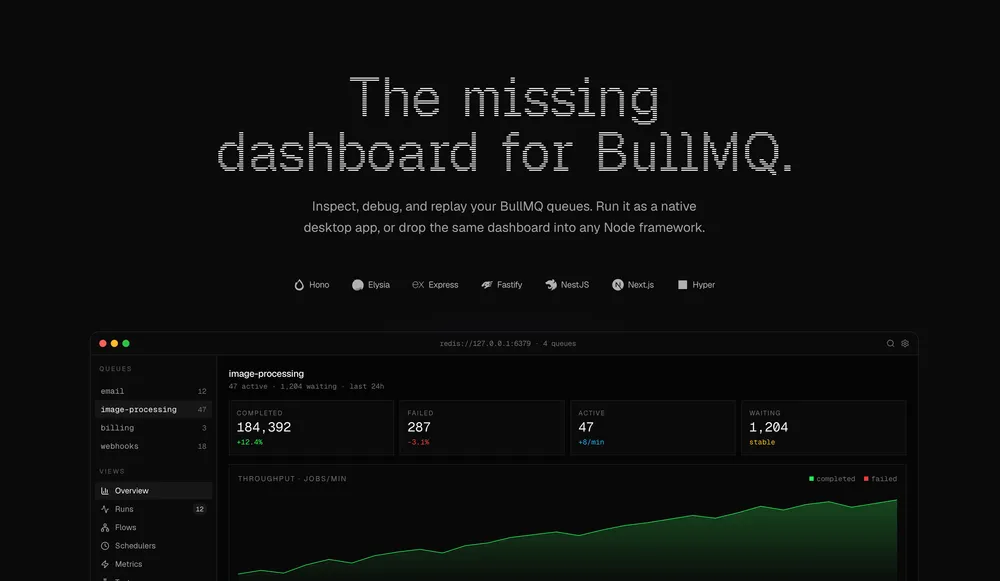
Open-source BullMQ dashboard. Drop-in for any Node or Bun backend.
Workbench is a modern dashboard for BullMQ. Runs jobs, flows, schedulers and metrics, all served from your own backend behind your own auth.
FAQ
Does it require a separate service?
No for the embedded path — it mounts as a route in your existing backend; a standalone Docker image exists if you prefer a separate container.
Can I run it without auth?
Yes, by omitting the auth option, though the docs warn against doing that in production.
What TypeScript version is needed?
TypeScript 4.x or 5.x works for most adapters and the core package, but @getworkbench/hono requires TypeScript 5.0+.
What Node version is required?
Node 18 or newer, or Bun 1.1+ for the Elysia and Bun.serve adapters.
Is it BullMQ-only?
Yes — Workbench targets BullMQ only; the legacy Bull library is not supported.
More in Developer Tools
 Wrench BoardA senior microsoldering technician, available to every repair shop from the seasoned pro to the apprentice. Powered by Claude Opus 5
 wyngletWynglet is a self-hosted, open-source toolkit adding OpenGraph previews, forms, QR codes, ratings, and GitHub stats to static sites via a Go binary with PostgreSQL.
 X HarnessSelf-hosted X/Twitter marketing automation on Cloudflare Workers/D1 with scheduling, DM, engagement gates, MCP server, and TypeScript SDK — zero software cost.
 x-proberSelf-hosted, open-source PHP probe: drop one PHP file on any web server to view CPU, memory, disk, network, PHP extensions and run benchmarks.
 YaadeOpen-source, self-hosted Postman alternative for teams: shared API collections, environments, scripts, OAuth2/OIDC login, and code export, run via Docker.
 yantrikdb-serverSelf-hosted memory DB for AI agents with recall, graph, contradiction detection, decay. Embedded lib, MCP server, or replicated cluster.
 YolksYolks provides pre-built Docker base images for game servers, language runtimes, and installers, hosted on ghcr.io and designed for Pterodactyl's Egg system.
 YourMemorySelf-hosted AI memory layer with Ebbinghaus decay, consolidation, and entity graphs. Runs locally via DuckDB, MCP-native, 89.4% Recall@5 on LongMemEval.
 ZealotSelf-hosted, open-source beta app distribution server for iOS, Android, macOS, Windows and Linux builds, with OTA install pages, webhooks and a fastlane plugin.
 zedexzedex is a self-hosted, open-source proxy server for the Zed editor that caches extensions, serves releases, and provides edit prediction via OpenAI-compatible backends.
 ZeroZero is a self-hosted, open-source terminal coding agent running locally with 25+ LLM providers, interactive TUI, and scriptable headless execution for CI.
 Zero to JupyterHub with KubernetesOpen-source Helm chart and guide for self-hosting JupyterHub on Kubernetes, enabling scalable multi-user notebook environments for teams and classrooms.
0 comments