
Self-host WireGuard Easy
v15.5.0 sudo docker compose up -d- Stars
- 27 432
- Port
- 51820 (UDP), 51821 (TCP)
ghcr.io/wg-easy/wg-easy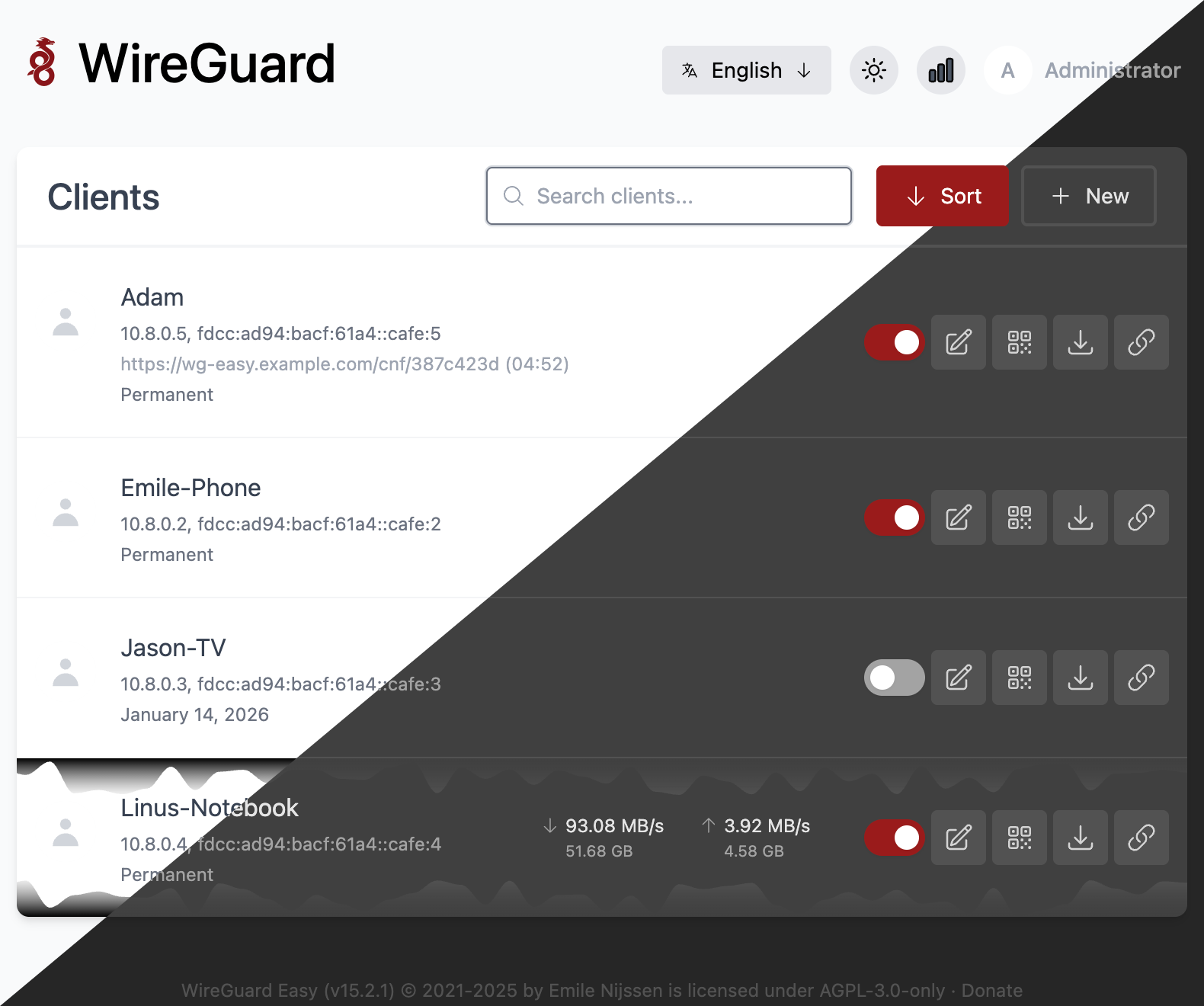
What is WireGuard Easy?
wg-easy is a self-hosted solution that simplifies the installation and management of WireGuard VPN with a web-based admin UI. It provides features such as client management, QR code generation, configuration file downloads, connection statistics, and real-time traffic charts. The application supports IPv6, CIDR, 2FA, and per-client firewall filtering. It is designed to be easy to install and use, with support for Docker and Docker Compose.
WireGuard Easy alternatives
 gravitlSelf-hosted, open-source WireGuard automation: mesh VPNs, remote access gateways and site-to-site networks managed from a web UI with ACLs and DNS.Comparegravitl with WireGuard Easy
 TailGuardSelf-hosted Docker container that bridges WireGuard-only devices into a Tailscale network, advertising WG subnets to the tailnet with an optional monitoring web UI.CompareTailGuard with WireGuard Easy
 easy-gateSelf-hosted dashboard parsing services from config files in real-time with IP-based user groups for tailored access.Compareeasy-gate with WireGuard Easy
 pihole-doh-wireguardSelf-hosted Docker Compose stack combining Pi-hole ad-blocking, Cloudflared DNS-over-HTTPS encryption, and WireGuard VPN for secure remote access to your home network.Comparepihole-doh-wireguard with WireGuard Easy
 wiredoorOpen-source, self-hosted ingress exposing HTTP/TCP/UDP from private networks via WireGuard tunnels, with full control over endpoints and routing.Comparewiredoor with WireGuard Easy
 defguardSelf-hosted WireGuard VPN platform bundling an identity provider, per-connection MFA, LDAP/AD sync and firewall ACLs; open-source AGPL core written in Rust.Comparedefguard with WireGuard Easy
 subspaceSelf-hosted, open-source web GUI for running a WireGuard VPN server: per-device configs with QR codes, SAML SSO with G Suite or Okta, and Let's Encrypt TLS.Comparesubspace with WireGuard Easy
 amneziawg-installerSelf-hosted, open-source AmneziaWG 3.1 VPN server you provision on your own VPS with a single bash script: DPI-proof obfuscation, no Docker, kernel module.Compareamneziawg-installer with WireGuard Easy
Should you self-host WireGuard Easy?
WireGuard Easy scores 73/100 on selfhost.directory (how scoring works) and ranks #7 of 56 in VPN. It has 27 432 GitHub stars, +360 in the last 30 days.
It shipped 6 stable releases in the past year. The latest, v15.5.0, came out on 24 October 2026. New versions land roughly every 2 months.
Setup is moderate: expect some configuration beyond a single command. An official Docker image is available. It is AGPL-3.0-licensed and written mostly in Typescript.
Its closest alternative on selfhost.directory is Tailscale (84/100, 38 780 stars). It scores higher overall, so compare the two before you pick. See WireGuard Easy vs Tailscale side by side.
Features
- 2FA
- API
- Dark Mode
- IPv6
- Multi-language
- Multi-user support
- Statistics
- Web UI
WireGuard Easy README


FAQ
What should I do if WireGuard exits with the error: Cannot find device 'wg0'?
This error indicates that the WireGuard interface wg0 does not exist. You can resolve this by loading the WireGuard kernel module manually or ensuring it loads on boot.
How do I restrict client access to specific networks or servers?
Use the Per-Client Firewall feature to enforce server-side restrictions on what each client can access. This feature requires iptables to be installed on the host system.
More in VPN
 wireguard-uiSelf-hosted, open-source web UI for administering a WireGuard VPN: manage peers, hand out configs via QR code, file, email or Telegram, and tweak server settings.
 Xray VPN OneClickSelf-hosted tool that deploys a VLESS+Reality proxy server on Linux in minutes with CLI for user management, traffic quotas, and subscription links.
 ZeroTierOpen-source networking daemon for encrypted peer-to-peer virtual L2 networks; the node and its network controller can be self-hosted on Linux, Docker, Windows or macOS.
 zerotier-edgeZerotier-Edge is a lightweight, single-binary web UI for self-hosted ZeroTier controllers, needing no Docker or database.
 Zerotier UIOpen-source, self-hosted web UI for a standalone ZeroTier network controller: create networks, authorize members, manage IP assignments, served over HTTPS.
 zero-uiZeroUI is a self-hosted, open-source web interface for managing ZeroTier network controllers with a React SPA and rule editor.
 ztnetOpen-source, self-hosted web UI to manage ZeroTier networks with multi-user accounts, organizations, custom private roots and OAuth login.
 3m-uiSelf-hosted open-source dashboard for Mihomo proxy: nodes, users, traffic quotas, subscriptions, TLS certs, Telegram alerts, and multi-server clusters.
 3x-uiOpen-source, self-hosted admin panel for Xray proxy servers: multi-protocol inbounds, per-client quotas and traffic stats, subscriptions, multi-node control, REST API.
- amneziawg-installerSelf-hosted, open-source AmneziaWG 3.1 VPN server you provision on your own VPS with a single bash script: DPI-proof obfuscation, no Docker, kernel module.
 awlAnywherelan is a self-hosted, open-source mesh VPN connecting devices directly without a central server. It provides SOCKS5 proxy and full-tunnel VPN gateway.
 CacheGuard-OSSelf-hosted open-source UTM appliance OS turning x86/x64 machines into complete network security gateways with firewall, VPN, WAF, antivirus, and more.
0 comments