
Self-host TeslaMate
v4.4.0Tesla drive-data logger with Grafana dashboards and MQTT
docker compose up -d- Stars
- 9 247
- RAM
- At least 1 GB of RAM
- Port
- 4000 (TeslaMate web interface)
teslamate/teslamate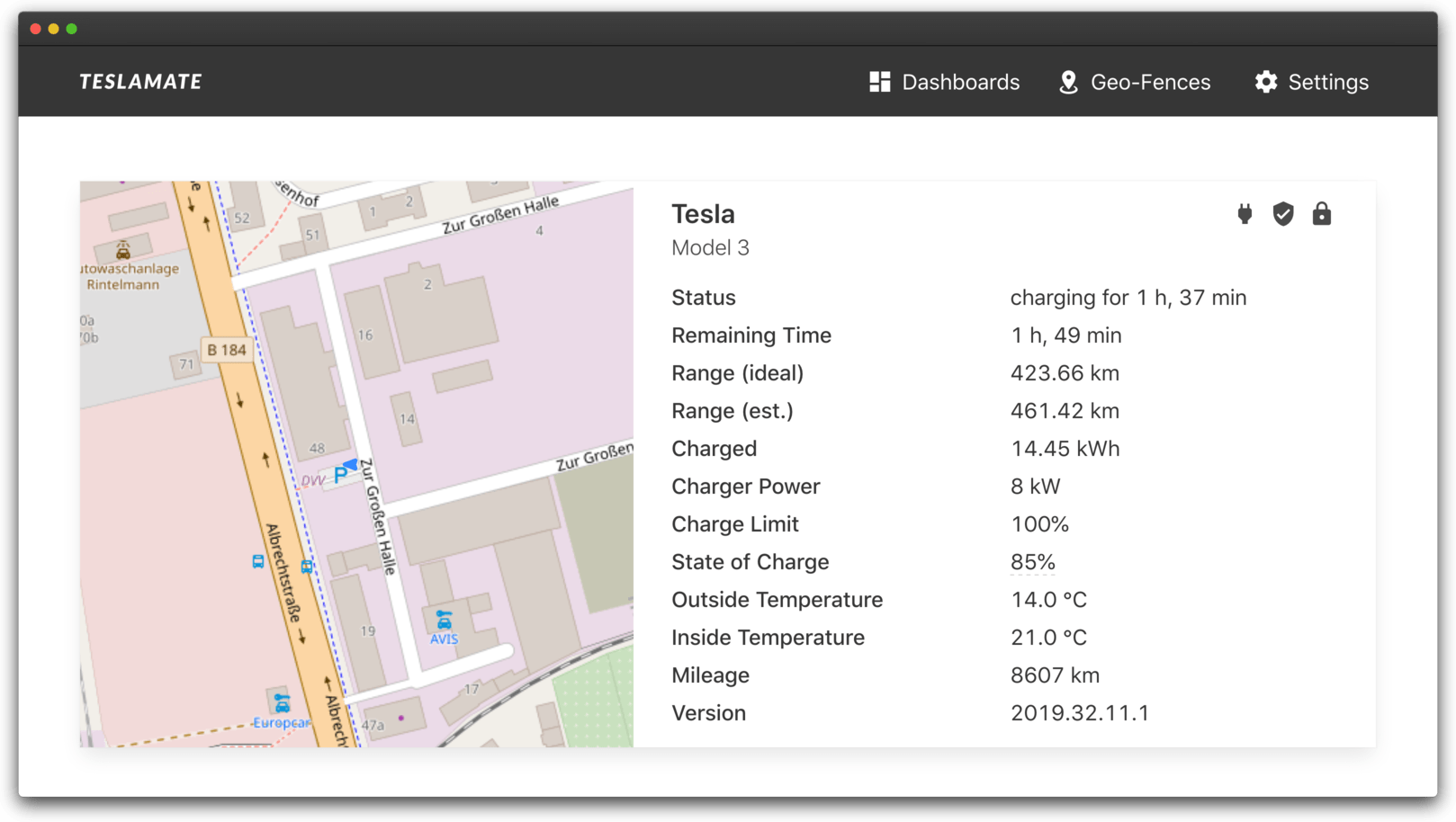



What is TeslaMate?
TeslaMate is a data logger for Tesla owners who want to keep their own driving history. After you sign in with Tesla API tokens it polls the vehicle in the background and stores every drive, charge session and battery measurement in a PostgreSQL database, while letting the car fall asleep as fast as possible so logging does not add standby drain. The bundled Grafana dashboards cover mileage, efficiency, battery health, temperatures, vehicle states and a lifetime driving map; automatic OpenStreetMap address lookup turns coordinates into named places, users can define geo-fences for custom locations such as home or work, track charging costs, log several cars per account, and migrate history imported from TeslaFi or tesla-apiscraper. Vehicle data is also published to a local MQTT broker, which the project calls its only supported integration surface, so Home Assistant (with optional MQTT discovery), Node-RED and Telegram consume the data there. The app is written in Elixir, serves its web UI on port 4000, and offers light, dark or system themes plus 19 interface languages. Self-hosting is a documented Docker Compose file on an always-on machine with at least 1 GB RAM; manual Debian, FreeBSD and Unraid setups exist but carry no support. Note the limits: there is no public API, the database schema is internal and can change, and telemetry streaming via the Tesla Fleet API is only useful for business-fleet accounts.
TeslaMate alternatives
 mygarageSelf-hosted vehicle tracker for households: service history, fuel, tires, insurance, docs, live OBD2. Docker, SQLite/Postgres, OIDC, PWA.Comparemygarage with TeslaMate
 Traefik Log DashboardSelf-hosted, open-source dashboard for analyzing Traefik logs with IP geolocation, status codes, service metrics, and 3D globe visualization. Runs via Docker Compose.CompareTraefik Log Dashboard with TeslaMate
 lab-dashSelf-hosted dashboard for managing homelab applications with customizable grid layout, service health checks, and PWA support.Comparelab-dash with TeslaMate
 evccSelf-hosted, open-source EV charge controller: steer wallboxes, home batteries and heat pumps around your solar surplus, with dynamic tariffs, plans and a web UI.Compareevcc with TeslaMate
 dashwiseAn open-source, self-hosted homelab dashboard with built-in auth and OIDC SSO, widgets, link groups with uptime monitoring, RSS news and Spotlight-style search.Comparedashwise with TeslaMate
 ThingsboardSelf-hosted source-available IoT platform for device management, data processing, and visualization with rule engine and multi-protocol support.CompareThingsboard with TeslaMate
 monoscopeOpen-source, self-hosted observability that keeps logs, metrics and traces in your own S3 buckets, with plain-English queries, scheduled AI agents and session replay.Comparemonoscope with TeslaMate
 checkmateSelf-hosted, open-source uptime and infrastructure monitor: HTTP, ping, DNS, Docker and gRPC checks with incidents, status pages and Slack or email alerts.Comparecheckmate with TeslaMate
Should you self-host TeslaMate?
TeslaMate scores 74/100 on selfhost.directory (how scoring works) and ranks #1 of 5 in Vehicle Management. It has 9 247 GitHub stars, +166 in the last 30 days.
It shipped 9 stable releases in the past year. The latest, v4.4.0, came out on 23 October 2026. New versions land roughly every 2 weeks.
Setup is moderate: expect some configuration beyond a single command. An official Docker image is available. It is AGPL-3.0-licensed and written mostly in Elixir.
Its closest alternative on selfhost.directory is LubeLogger (66/100, 2 955 stars). TeslaMate scores higher overall. See TeslaMate vs LubeLogger side by side.
Features
- Automatic address lookup
- Battery-friendly sleep handling
- Bundled Grafana dashboards
- Charge Cost Tracking
- Estimated consumption valuesEstimates only, refined by every future charge session.
- Geo-fencing / custom locations
- Home Assistant MQTT discovery
- Import from other Tesla loggers
- MQTT data publishing
- Multilingual UI
- Multi-Vehicle Support
- Public API / direct database access
- Web management interface
TeslaMate README


A powerful, self-hosted data logger for your Tesla.
- Written in Elixir
- Data is stored in a Postgres database
- Visualization and data analysis with Grafana
- Vehicle data is published to a local MQTT Broker
Caution
Use Official Versions Only
To protect yourself from malicious forks, malware, and data theft, please ensure you only obtain TeslaMate from the official source:
- Official Repository: https://github.com/teslamate-org/teslamate
- Official Documentation: https://docs.teslamate.org
We have received reports of deceptive websites and unofficial mobile apps (e.g. on the App Store) using the TeslaMate name to distribute modified or harmful versions. If you are using a version from another source, your Tesla account credentials and vehicle data may be at risk.
The documentation is available at https://docs.teslamate.org
- High precision drive data recording
- No additional vampire drain: the car will fall asleep as soon as possible
- Automatic address lookup
- Easy integration into Home Assistant (via MQTT)
- Easy integration into Node-Red & Telegram (via MQTT)
- Geo-fencing feature to create custom locations
- Supports multiple vehicles per Tesla Account
- Charge cost tracking
- Import from TeslaFi and tesla-apiscraper
- Customizable theme mode (light, dark, or system default)
- Web interface in 19 languages (Catalan, Danish, Dutch, English, Finnish, French, German, Hungarian, Italian, Japanese, Korean, Norwegian Bokmål, Simplified Chinese, Spanish, Swedish, Thai, Traditional Chinese, Turkish, Ukrainian); untranslated text falls back to English
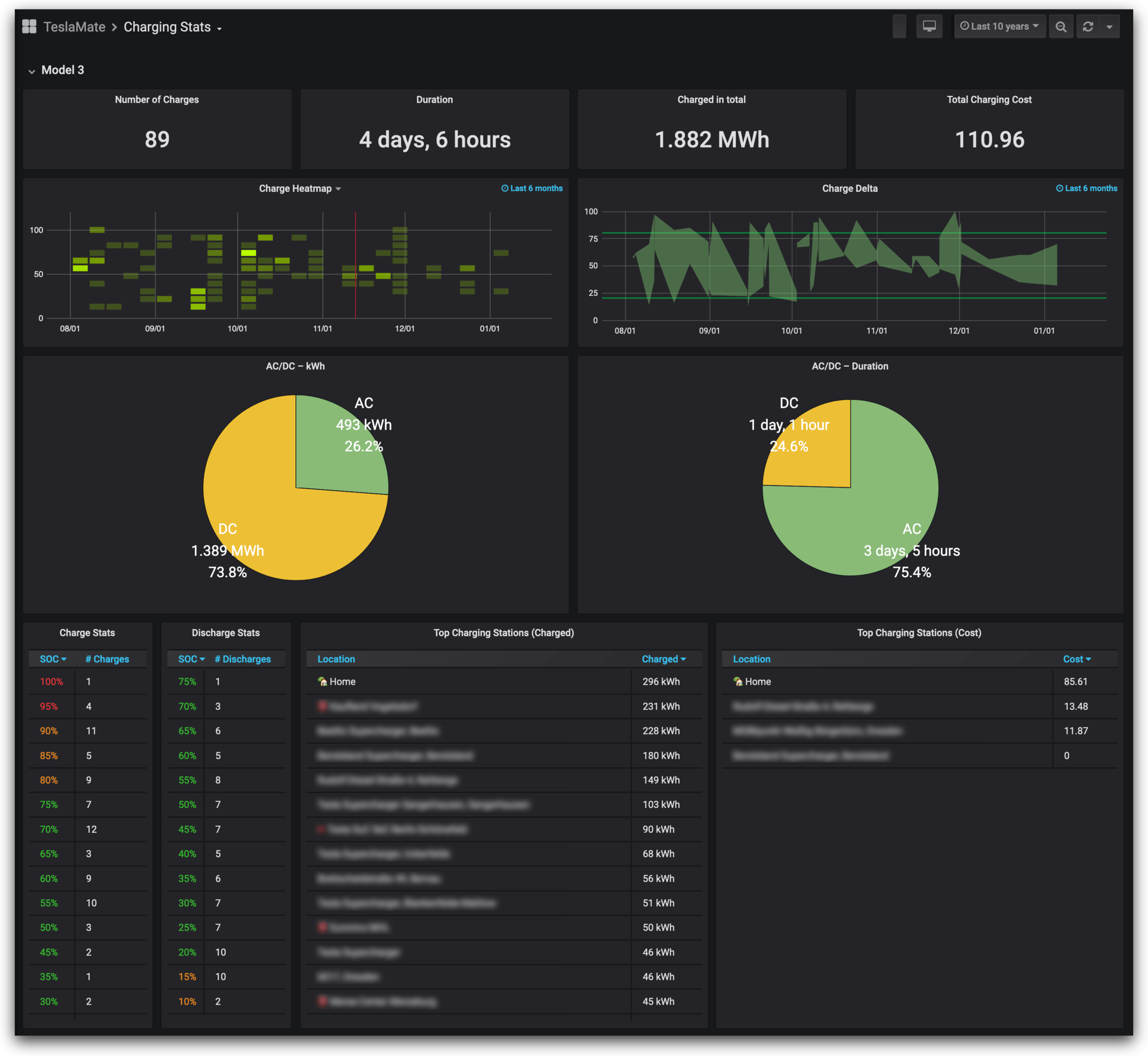
Sample screenshots of bundled dashboards can be seen by clicking the links below.
- Battery Health
- Charge Level
- Charges (Energy added / used)
- Charge Details
- Charging Stats
- Database Information
- Drive Stats
- Drives (Distance / Energy consumed (net))
- Drive Details
- Efficiency (Consumption (net / gross))
- Locations (addresses)
- Mileage
- Overview
- Projected Range (battery degradation)
- States (see when your car was online or asleep)
- Statistics
- Temperatures
- Timeline
- Trip
- Updates (History of installed updates)
- Vampire Drain
- Visited (Lifetime driving map)
Sneak peak into TeslaMate interface and bundled dashboards. See the docs for additional screenshots.


TeslaMate is licensed under the GNU Affero General Public License v3.0 or later (AGPL-3.0-or-later). See NOTICE for the copyright notice, the additional terms under section 7 of the AGPL, and the trademark notice. For the full legal terms, please refer to the LICENSE file.
This license is designed to ensure that TeslaMate remains free and open for everyone and that improvements made by commercial entities or third parties remain open to the entire community. By using, modifying, or building upon this project, you agree to the following:
- Copyleft: If you modify TeslaMate or incorporate it into another project, you must release the entire source code of your version under the same license (AGPL-3.0-or-later). This applies regardless of how you provide the software to others, in any form, including, without limitation, as a downloadable application, a binary, a package, a pre-packaged image, or a network service (SaaS).
- No Closed-Source Derivatives: We do not permit the use of TeslaMate or its components in closed-source products. Any software made to work with TeslaMate, including, without limitation, apps, dashboards, integrations, and services, must be open-source under an AGPL-compatible license. Software that integrates with TeslaMate may do so only via the supported integration surface (MQTT). If you build upon this project, you are expected to contribute back to the community.
- Attribution: You must keep all original copyright notices, the NOTICE file, and license information intact, and clearly mark modified versions as modified.
Trademark Policy: The use of all trademarks of the TeslaMate project is governed by our Trademark Policy.
Disclaimer: TeslaMate is an independent project and is not affiliated with, endorsed by, or sponsored by Tesla, Inc. "Tesla" and related marks are trademarks of Tesla, Inc.
Contributions: All contributors must sign our Fiduciary License Agreement (FLA 2.0). This is handled via cla-assistant.io automatically on first PR and does not take long. Why do we need this? It guarantees that TeslaMate will always remain Free Software and allows the teslamate-org to legally defend the project against license violations.
FAQ
Does TeslaMate have a public API? Can I read the database directly?
No public API exists and the PostgreSQL schema is internal storage with no compatibility promise; MQTT is the only supported integration surface. The web UI routes are not an API either.
Which network flows must be authorized?
For hardened setups only HTTPS (TCP/443) to the Tesla auth, owner API and streaming hosts plus OpenStreetMap Nominatim, and HTTP (TCP/80) to step.esa.int, needs egress plus DNS.
Why am I missing data when not using the Streaming API?
In polling mode TeslaMate suspends polling about 3 minutes after the car goes idle and only resumes 15 minutes later, so activity in that window cannot be detected without resetting the inactivity timer.
Help, my car does not fall asleep
Turn off accessory power in the car's charging settings, and on MCU1 vehicles enable energy saving and disable always-connected and cabin overheat protection. Running another logger such as TeslaFi at the same time also keeps the car awake.
How can I reorder my cars?
On the Settings page, under General Settings, use Move up or Move next to a car in the Car Order list.
Why are my Docker timestamp logs different than my machine?
Containers default to UTC; set the TZ environment variable in your compose file to get local log times.
What is the geo-fence feature for?
Geo-fences let you define custom locations like home or work, useful where OpenStreetMap addresses are inaccurate or you street-park.
Why is "null" displayed above the panels in Grafana?
The car name is empty in the database, so the Grafana car_id variable resolves to null. Name the car on the touchscreen and let TeslaMate sync it.
Why are no consumption values displayed in Grafana?
The Tesla API gives no per-trip consumption, so TeslaMate derives estimates from charging data. At least two qualifying charge sessions are needed before the first value appears.
TeslaMate stopped recording data. How can I fix it?
Check the logs to see whether Tesla, the database or new credentials are the problem, then generate fresh tokens and sign in again. Missed drives and charges cannot be recovered, though a TeslaFi import may fill the gap.
My car does not show up in TeslaMate
Use Reload vehicles on the car overview or the Settings page, since the vehicle list is only read at start-up; if nothing new appears the car is not yet in your Tesla account or data collection is disabled.
More in Vehicle Management
 teslamateapiTeslaMateApi is a self-hosted, open-source REST API exposing TeslaMate vehicle data as JSON with endpoints for status, drives, charges, and remote commands.
 TeslaMate Chinese DashboardsSelf-hosted Chinese localization of TeslaMate's Grafana dashboards with 46 translated panels, 13 original analyses, GCJ-02 map correction, and time-of-use pricing.
 torqvoiceSelf-hosted workshop management for auto repair shops with work orders, invoicing, vehicle histories, customer portal, and tire storage.
 Kia Uvo & Hyundai BluelinkA Home Assistant HACS integration that supports Kia Connect(Uvo) and Hyundai Bluelink. The integration supports the EU, Canada and the USA.
 LubeLoggerSelf-hosted, open-source web app for vehicle maintenance records, fuel economy, reminders, multi-user logins, CSV import, an API and OIDC SSO.
- mygarageSelf-hosted vehicle tracker for households: service history, fuel, tires, insurance, docs, live OBD2. Docker, SQLite/Postgres, OIDC, PWA.
0 comments