
Self-host skyvern
v1.0.57AI browser automation for web workflows without selectors
$ docker compose up -d- Stars
- 23 376
- Ports
- 8000 (Skyvern API server), 6080 (VNC WebSocket streaming of the browser), 8080 (Web UI), 9090 (Artifact server)
public.ecr.aws/skyvern/skyvern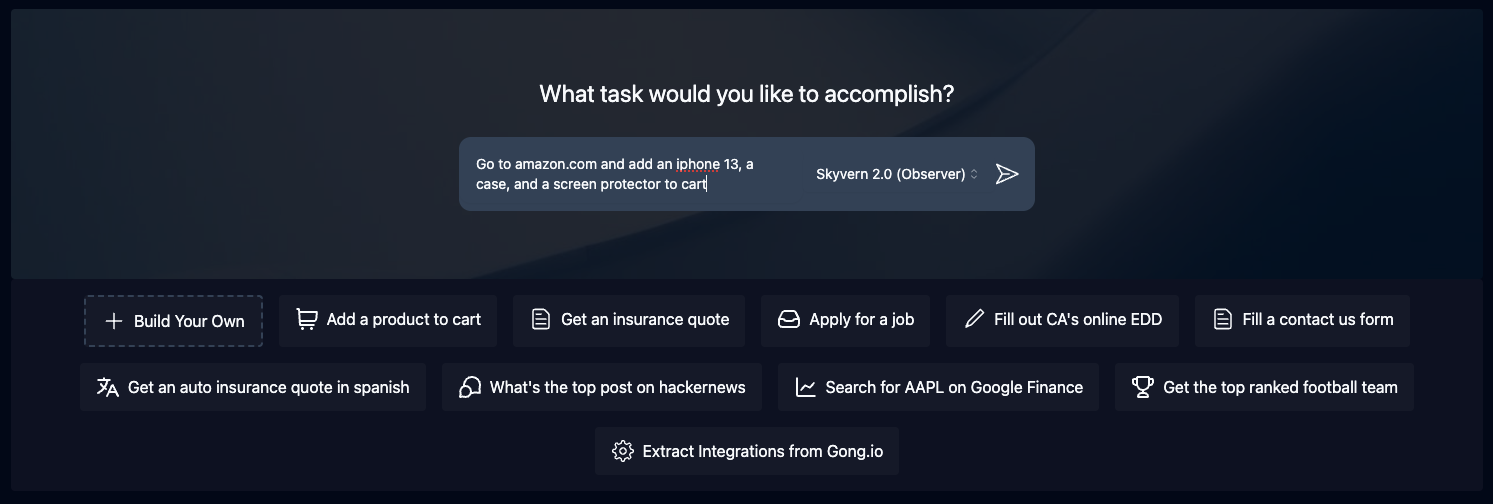


What is skyvern?
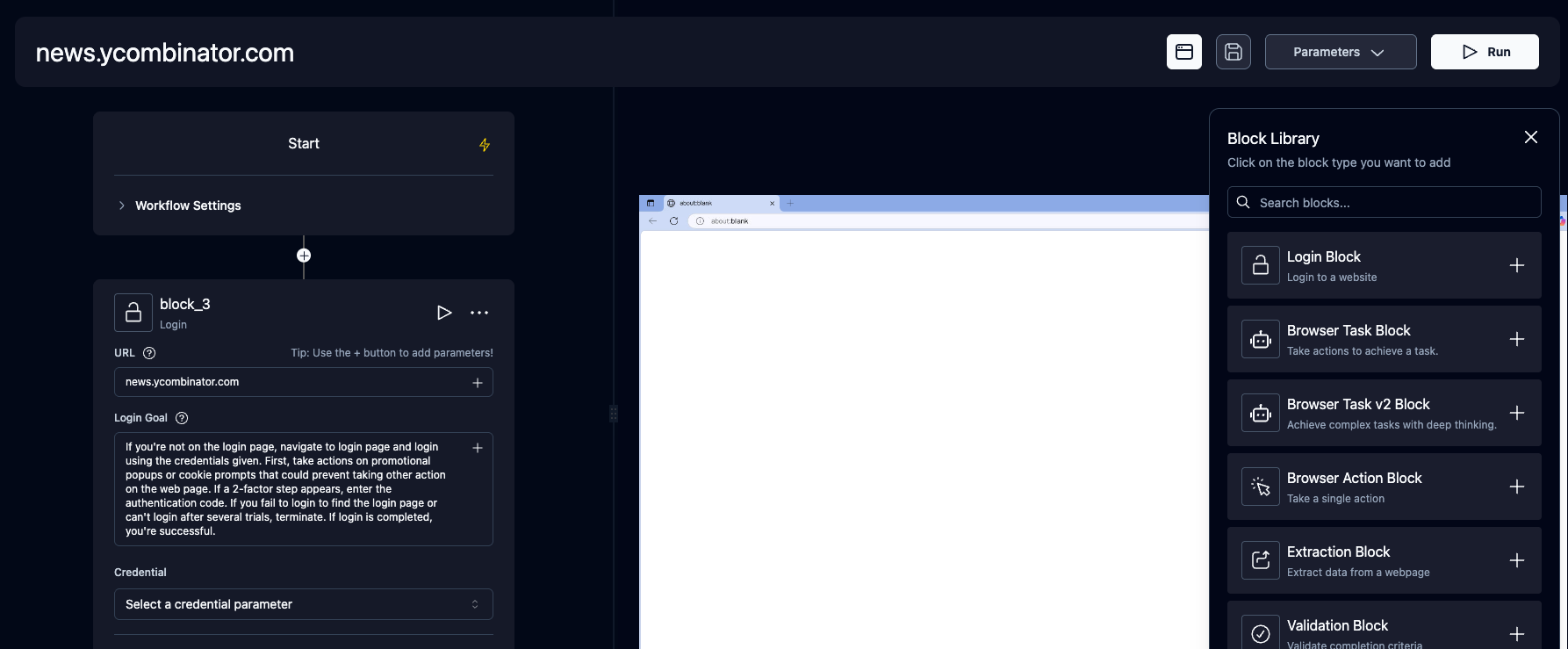
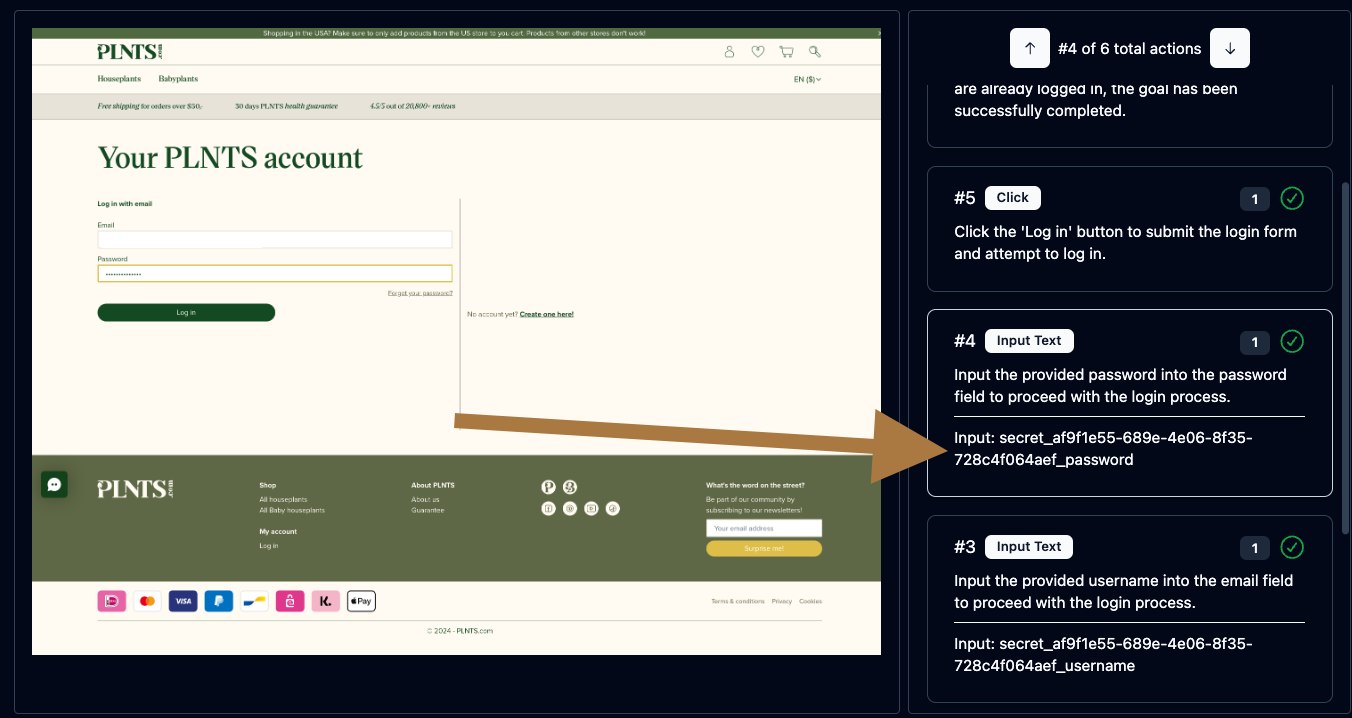
Skyvern automates browser-based work — logging into portals, filling forms, extracting data and downloading files — by letting vision LLM agents navigate sites instead of relying on brittle XPath or CSS selectors. It ships a Playwright-compatible Python and TypeScript SDK that adds natural-language commands such as act, extract, validate and prompt, plus a no-code workflow builder where tasks can be chained with loops, HTTP requests, custom code blocks, file handling and email sending. Runs can be watched as a live browser viewport stream, results can be delivered through webhooks, agents can be scheduled, and a MCP server exposes Skyvern to coding agents. Credentials can be stored locally or pulled from Bitwarden or a custom credential service, and 2FA flows (TOTP, email, SMS) are handled during automation. Self-hosting runs the API server and packaged UI via pip install "skyvern[all]" and skyvern quickstart, a Docker Compose stack that also starts Postgres, or the Kubernetes manifests in the repo; it needs an LLM provider key (OpenAI, Anthropic, Gemini, Azure, Bedrock, Ollama and others). The code is AGPL-3.0, with anti-bot measures reserved for the managed Skyvern Cloud, and the packaged-UI/Kubernetes paths ship without their own login layer.
skyvern alternatives
 skrunSkrun is a self-hosted agent runtime turning Agent Skills into POST /run APIs. Supports multiple LLMs, MCP, SSE, webhooks, dashboard. MIT, Node.js, SQLite/PostgresCompareskrun with skyvern
 bytechefSelf-hosted open-source platform unifying AI agents and workflow automation with 270+ connectors, visual editor, and durable execution.Comparebytechef with skyvern
 PyRunnerSelf-hosted Python script automation platform to upload, schedule, and monitor scripts from a browser with isolated environments, secrets, AI integration, and webhooks.ComparePyRunner with skyvern
 web-uiOpen-source, self-hosted Gradio web UI for browser-use AI agents: automate websites with any major LLM, drive your own Chrome profile, and watch the browser over VNC.Compareweb-ui with skyvern
 maxunSelf-hosted and open-source web data platform: build scrape, crawl, extract, search and monitor robots in a no-code recorder or with an API, SDK, CLI or MCP.Comparemaxun with skyvern
 steelSelf-hosted browser API giving AI agents control over real Chrome via standard automation tools, handling sessions, proxies, and anti-detection.Comparesteel with skyvern
 Big-AGISelf-hosted, open-source AI workspace for experts: run 2 to 24 models in parallel with Beam, personas, image generation, voice and BYO API keys via Docker.CompareBig-AGI with skyvern
 Crawl4AICrawl4AI converts websites into LLM-ready Markdown for RAG and AI agents. Self-host via pip/Docker or use the cloud API. Open-source Apache-2.0.CompareCrawl4AI with skyvern
All self-hosted alternatives to Playwright / Selenium scripts → All self-hosted alternatives to RPA tools →
Should you self-host skyvern?
skyvern scores 75/100 on selfhost.directory (how scoring works) and ranks #3 of 26 in Automation. It has 23 376 GitHub stars, +231 in the last 30 days.
It shipped 27 stable releases in the past year. The latest, v1.0.57, came out on 6 November 2026. New versions land roughly every 7 days.
Setup is moderate: expect some configuration beyond a single command. An official Docker image is available. It is AGPL-3.0-licensed and written mostly in Python.
Its closest alternative on selfhost.directory is Huginn (82/100, 50 461 stars). It scores higher overall, so compare the two before you pick. See skyvern vs Huginn side by side.
Features
- 2FA / TOTP handling in automations
- AI-Powered Browser Automation
- Credential storage and password-manager logins
- File downloading
- Form Filling
- Live browser viewport streaming
- MCP Server
- Natural-language page actions
- No-code workflow builder
- Playwright-compatible SDK
- REST API
- Scheduled runs
- Structured data extraction
- Webhooks
skyvern README

🐉 Automate Browser-based workflows using LLMs and Computer Vision 🐉
Skyvern automates browser-based workflows using LLMs and computer vision. It provides a Playwright-compatible SDK that adds AI functionality on top of playwright, as well as a no-code workflow builder to help both technical and non-technical users automate manual workflows on any website, replacing brittle or unreliable automation solutions.

Traditional approaches to browser automations required writing custom scripts for websites, often relying on DOM parsing and XPath-based interactions which would break whenever the website layouts changed.
Instead of only relying on code-defined XPath interactions, Skyvern relies on Vision LLMs to learn and interact with the websites.
Skyvern was inspired by the Task-Driven autonomous agent design popularized by BabyAGI and AutoGPT -- with one major bonus: we give Skyvern the ability to interact with websites using browser automation libraries like Playwright.
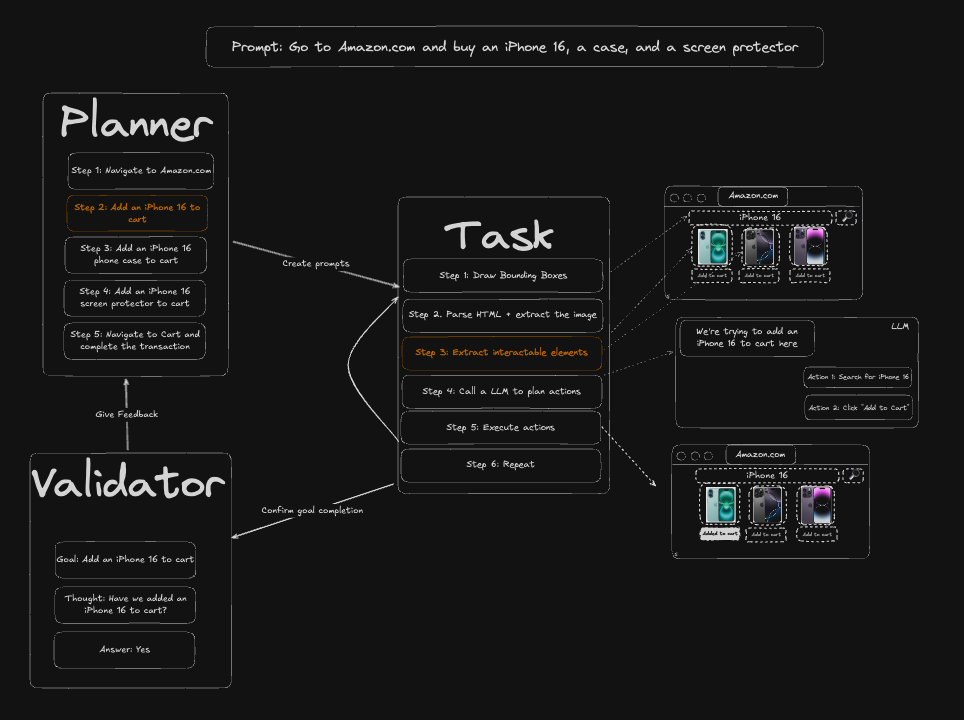
Skyvern uses a swarm of agents to comprehend a website, and plan and execute its actions:
How to install skyvern
Install skyvern with Docker Compose
OPENAI_API_KEY, LLM_KEY, VITE_SKYVERN_API_KEY, ENABLE_URL_VALIDATIONgit clone https://github.com/Skyvern-AI/skyvern.git
cd skyvern
cp .env.example .env
cp skyvern-frontend/.env.example skyvern-frontend/.env
docker compose up -d
docker compose ps
Starts PostgreSQL, the API server with its browser, and the web UI; open http://localhost:8080.
Install skyvern with Kubernetes
The repository has plain manifests in kubernetes-deployment/: a backend, a frontend, PostgreSQL, and a Traefik ingress. Fill in backend/backend-secrets.yaml (the same variables as .env) and frontend/frontend-secrets.yaml, then run ./k8s-deploy.sh.
Manifests ship without authentication; the docs say to keep the cluster off the public internet.
Install skyvern with pip
OPENAI_API_KEY, LLM_KEY, DATABASE_STRINGpip install "skyvern[server]" skyvern quickstart --install-type server
Python 3.11 to 3.14; API server without the web UI. The README's `pip install "skyvern[all]"` path adds the packaged UI.
How to configure skyvern
ENABLE_OPENAI=falseLLM Provider Configurations: ENABLE_OPENAI: Set to true to enable OpenAI as a language model provider.OPENAI_API_KEYOPENAI_API_KEY: Your OpenAI API key for accessing models like GPT-4.LLM_KEYLLM_KEY: The chosen language model to use. This should be one of the models provided by the enabled LLM providers (e.g., OPENAI_GPT5_5, OPENAI_GPT5_4, OPENAI_GPT6_ASTRA, OPENAI_GPT6_SOL, OPENAI_GPT6_1_SOL, OPENAI_GPT6_LUNA, OPENAI_GPT6_ASTRA_FLEX_WITH_FALLBACK, OPENAI_GPT6_SOL_FLEX_WITH_FALLBACK, OPENAI_GPT6_1_SOL_FLEX_WITH_FALLBACK, OPENAI_GPT6_LUNA_FLEX_WITH_FALLBACK, ANTHROPIC_CLAUDE5.5_OPUS, BENABLE_ANTHROPIC=falseENABLE_ANTHROPIC: Set to true to enable Anthropic as a language model provider.ANTHROPIC_API_KEYANTHROPIC_API_KEY: Your Anthropic API key for accessing models like Claude-3, Claude-4, and Claude-4.5.
skyvern releases & version history
What's Changed
Version bumped from 1.0.56 to 1.0.57
Recent Changes
- Name a row-level pick only when one leaf is all the row's text; the landing can only withhold (SKY-20123) (#9312) (1539b94)
- Keep the workflow live view streaming after a VNC close (SKY-20132) (#9311) (702731a)
- Skip the admission sleep in the provider-download cleanup-join test (SKY-20136) (#9310) (b895a9a)
- Name cloud-only test and doc locations without their paths in synced test comments (SKY-20137) (#9309) (de78273)
- Use neutral example domains in three synced comments and a docstring (SKY-20138) (#9308) (8830b79)
- Skip the application declaration on extraction blocks (SKY-20124) (#9307) (ef32f9c)
- Group slotted option text under its row and report a menu close as an observation (SKY-19979) (#9306) (4199277)
- Fit the Add Credential dialog on phone-width screens (SKY-20111) (#9305) (3ae1f0d)
- Replace CopyText with the shared CopyButton (SKY-20087) (#9304) (3da18e4)
- Share the Copy API command menu items and report copy failures (SKY-20086) (#9303) (789d0b3)
- Require admin for adapter configuration access regardless of RBAC (SKY-18299) (#9302) (d761a5e)
- Reconnect a Google or Microsoft connection in place and keep its grants and account (SKY-19560) (#9301) (f94e606)
- Explain the Power BI by-design refusal and give refused runs a real failure category (SKY-20045) (#9300) (63b0c13)
- Keep the browser and test runs on a Copilot turn where a secret was redacted (SKY-19956) (#9299) (aa5bf16)
- Stop withholding Copilot screenshots for size after a credentialed run (SKY-19967) (#9298) (ba2f829)
- Offer Attach a file and Demonstrate task from the Copilot plus button (SKY-19983) (#9297) (23ff61f)
- fix(SKY-20069): offer a list field of an earlier step in a loop's list slot (#9296) (443a4be)
- Let orgs sign in to Bitwarden with a personal API key; stop at once on code prompts (SKY-20048) (#9295) (ea2d40c)
- Rename the code block fallback's "Self-heal recovery" row to "Fallback to AI" (SKY-20071) (#9294) (0009e89)
- Style the Copilot demonstration offer like the other Copilot cards (#9293) (8572a1a)
- Offer "Allow on " and drop Move on the credential site question (SKY-19941) (#9291) (9e485f0)
- Show agent step tool calls in order beside the step on the canvas, each with its settings (SKY-20019) (#9290) (6f30b93)
- Doc: fix the review comments left open when two Doc PRs merged (#9289) (aec7009)
- Run the three FE/docs-reading tests on FE/docs-only PRs (SKY-19509) (#9288) (4a34a03)
- Bump version to 1.0.57 (#9282) (c531db3)
- Describe browser provisioning generically in two engine docstrings (SKY-20032) (#9287) (58fa8b7)
- Accept a Power BI result that exactly fills the saved row limit (SKY-20044) (#9286) (aab78a4)
- Give data-only Copilot code blocks a Goal that opens with their returned values (SKY-19371) (#9285) (96492c7)
- Group Agent settings into six folding groups with change summaries (#9284) (c4e014f)
- Start the display recorder bridge without OTel auto-instrumentation (SKY-19682) (#9283) (3dd728e)
- Store Credentials-page secrets in AWS Secrets Manager on self-hosted AWS (#9281) (6c7d2ce)
- Stop telling every deployment that credentials need a Bitwarden server (#9280) (90152d0)
- Doc: shortcut hints in context, a grip beside each step, an insert line between steps (#9279) (e7e6135)
- Reword three test comments about downstream readers (SKY-20031) (#9278) (c5910f3)
- Copilot demonstration: keep a click that loads a new page (#9277) (b62114d)
- fix(SKY-20024): list Demonstrate task after the matching steps in the Doc picker (#9276) (3961e83)
- Start a task demonstration from the Doc's step menu (#9275) (3391b6d)
- Doc: plain failure line, Enter runs the input box, truthful run results (#9274) (a0de4b5)
- Make typing in the Doc behave like Notion: quiet new steps, Enter on empty makes a note, / renames or replaces (#9273) (88740f4)
- Report start page and uploads on agent step nested-agent results (SKY-19823) (#9272) (d5f03a7)
- Ask to add or move a login's site when Copilot's sign-in card would refuse it (SKY-19941) (#9271) (5e410cd)
- Stop the API rescanning every module on each Playwright call from a frozen frame (SKY-18774) (#9270) (b549074)
- Upgrade oauthlib to 4.0.1 in the cloud lockfile (SKY-20014) (#9269) (4b98af6)
- Move the Nango services into one package with a single import surface (#9268) (731c53c)
- Flag a Doc loop that goes through a whole step result instead of its list (SKY-19996) (#9267) (ffe6910)
- Let users demonstrate one block of an existing agent after its earlier blocks run (SKY-19879) (#9266) (91493f4)
- Release the save lock when the Doc's Run pre-save fails (SKY-19997) (#9265) (ccf3d21)
- Fill a demonstrated credential in the iframe its field lives in (#9264) (2e2ee03)
- Show what each Copilot test run cost and say why a test browser did not start (SKY-19921) (#9262) (473caf5)
- Give each live view its own stream id and close a viewer whose relay stops (SKY-19931) (#9261) (0ba5e66)
- Let Copilot take Word .docx SOPs from Upload SOP and the chat, and read them (SKY-19934) (#9260) (e6f31a5)
- Stop saving Chrome's regenerated extension rules in browser profile archives (#9259) (f90df89)
- Remove the ANALYTICS_DASHBOARD, onboarding_questionnaire_v1 and ENABLE_DISCOVER_COPILOT_HANDOFF flags now that they are on for everyone (SKY-4553) (#9258) (7248f4f)
- Show a failed code block's own error, page and Fix with Copilot, and carry it in the API (SKY-19918) (#9257) (8ecd47d)
- Wait for the browser to record a committed page before reloading it (SKY-19509) (#9256) (a75193a)
- Keep the step you are typing in on screen after Cmd+S in the Doc (#9255) (d215d2b)
- Count a tunnel failure as the site's when the proxy vendor could not reach the host (SKY-17599) (#9254) (027fe46)
- feat: simplify Power BI and Gmail sign-in (SKY-19899) (#9253) (1800c72)
- Document the receiver 503 and report owner_not_authorized for restricted credential_id triggers (SKY-18604) (#9252) (f1f938a)
- Let code blocks read the text of a downloaded document (SKY-19726) (#9251) (86217c8)
- Charge a code block's zero-action minimum once per label per run (SKY-19917) (#9250) (1be9cb2)
- Turn off Edge component updates in Linux worker and PBS profiles (SKY-19857) (#9249) (5991e56)
- Drop the internal doc link from the VNC keycode docstring (SKY-19952) (#9248) (950aaa2)
- List an href-less link beside the Task V3 card whose click misses it (SKY-18877) (#9247) (08d206a)
- Drop the global dependency override that rebuilt every request's dependency tree (SKY-18774) (#9246) (daf346d)
- Make Doc steps read like Notion: no box on step text, controls on hover, chips on the text line (#9245) (c56274b)
- Show the run-blocker list unless the Doc is actually on screen (#9244) (5983595)
- Recover a statement the browser refuses to frame on a Task V3 download block (SKY-19922) (#9243) (441d830)
- Keep a just-added Doc step quiet until you leave it, run or save (#9242) (92f1c17)
- Quieter single-step runs in the Doc: no debug toast, no empty screenshot box, asks for missing inputs (#9241) (6639608)
- Say a failed Doc step in plain words and offer Browser Task for multi-action Browser Actions (#9240) (86fca1e)
- Place a visible CAPTCHA refusal on the visit whose document showed it (#9239) (cb02d0e)
- Pipe the secret-mask test driver to node on stdin so CodeQL stops failing the OSS sync (SKY-14367) (#9238) (91c75f9)
- Upgrade follow-redirects, body-parser and qs in the frontend lockfile (SKY-19561, SKY-19383) (#9198) (73fbad9)
- Validate Bitwarden item ownership in Cloud (#9233) (4c948b2)
- Keep prompt and provider text out of text prompt block logs (#9232) (08aba25)
- Re-resolve a serialized run's saved profile at run start (SKY-19415) (#9231) (0024614)
- Route Power BI query execution through Nango (#9229) (e9dabaf)
- Run pre-commit and mypy as one 2-vCPU job, and check only the pushed range on main (SKY-19509) (#9228) (9ba3f1d)
- Gate the Estuary capture-stall monitor on a slot that stopped confirming WAL (SKY-19625) (#9225) (cbcd7c8)
- Run the CI pytest suite as 4 parallel shards (#9227) (57d1806)
- Upgrade pypa/gh-action-pypi-publish to v1.14.3 in the SDK release workflow (SKY-19487) (#9184) (a203cab)
- Upgrade qs to 6.16.1 and follow-redirects to 1.16.2 in the TypeScript SDK test lockfile (SKY-19244) (#9130) (139a954)
- Upgrade zod to 4.6.7 and @hookform/resolvers to 5.9.2 in the frontend (SKY-18966) (#9095) (fdd426c)
- Keep code-block action screenshots on responsive pages with slow PNG encodes (SKY-19607) (#9224) (5262f0a)
- Upgrade serialize-javascript to 7.1.4 in the TypeScript SDK client pnpm lockfile (SKY-19426) (#9173) (636925b)
- Keep the Stripe fence race test on one shared SQLite connection (#9223) (06f8809)
- Run only the blocking Semgrep rules on PRs; move the registry-pack scan to a weekly and manual workflow (#9222) (92fb313)
- Treat the ingress-off 404 as the dark state in the integration catalog (SKY-19523) (#9221) (5071938)
- A2A agent: a status question in a conversation that holds no run asks which run (#9220) (4d3351e)
- Hold a Task V3 type the same live dialog still refuses instead of retyping it (SKY-19408) (#9219) (b5681ee)
- Skip the second sign-out read in the bearer role lookup (SKY-19051) (#9218) (4c938a1)
- Offer an agent step login only from its own parameter_keys (SKY-19584) (#9217) (a7a75f4)
- Stop a finished task's background mouse movement before its browser closes (SKY-19594) (#9216) (f0e5a72)
- Enforce scoped API key permissions (#9215) (af5d1f7)
- Stop captcha frame probes from hanging when the page navigates mid-read (SKY-19570) (#9213) (38d3380)
- Let the Task V3 agent declare a job application in its first reply (off by default) (#9212) (27faf01)
- Seed RBAC roles from live Clerk memberships (#9211) (a9c34c1)
- Build the standalone tasks index test in a scratch database so an open snapshot elsewhere cannot hang it (SKY-19597) (#9210) (bed397d)
- Run self-contained slow tests only when their inputs change (#9209) (a7f236a)
- Record site-typed reCAPTCHA low-score rejections when the refused request is unambiguous (#9208) (b9ffcd0)
- SKY-18494: Treat a blank upload setting as unset in the secret check and proxied S3 uploads (#9207) (1943673)
- Show the browser Copilot is working in on the studio Browser pane (SKY-19459) (#9206) (db9a08a)
- fix(studio): show a block screenshot on a step-index miss in the run view (SKY-19458) (#9205) (5d3f0ef)
- Test the fork helper's timeout, exit-code and traceback paths (SKY-19532) (#9204) (b816a60)
- Run the npm-audit runner pick on Blacksmith instead of GitHub-hosted (SKY-19484) (#9203) (bffbe24)
- Add bounded Nango client and Power BI settings (#9202) (8ac4e0c)
- Add Power BI Nango connection storage (#9201) (40b26bd)
- Upgrade follow-redirects to 1.16.2 in the support agent lockfile (SKY-19561) (#9200) (3b11388)
- Keep the integrations catalog loading when the forwarding availability check fails (SKY-19523) (#9199) (b8dbe98)
- Record the application-context defaults ruling (SKY-18811) (#9196) (f86df26)
- Add email forwarding setup and inbox UI (SKY-14152) (#9195) (314ea80)
- Pin the select_combobox twin-row count and its unchanged-filter refusal (SKY-19549) (#9194) (d657191)
- Merge an input[role=combobox] with its accessibility entry in observe (SKY-19544) (#9193) (e8c7292)
- Clear an unverified secret field before failing closed (SKY-19543) (#9192) (4dde902)
- Reject reuse of revoked email forwarding addresses (SKY-14150) (#9191) (6a415d0)
- Receive and recover forwarded email 2FA codes (SKY-14151) (#9190) (eed9fa1)
- Add OSS email 2FA forwarding ingestion foundation (SKY-14150) (#9189) (5d74abe)
- Accept legacy Excel exports under .xls claims (#9188) (5023737)
- Give an agent step with no tool list no tools, and start new editor steps with nine (SKY-19261) (#9185) (c7cd36d)
- Normalize MCP workflow output summaries once instead of per nesting level (#9182) (5260ddd)
- Wait for the blocked navigation's error page in the egress monitor browser test (SKY-19066) (#9181) (daeedc3)
- Show the Browser pane in place of the Editor while demonstrating a task (SKY-19272) (#9180) (2720fe1)
- Stop Copilot reporting every replayed demonstration step as failed (SKY-19358) (#9179) (940558b)
- update worker config (#9178) (9d02837)
- Wait for the pytest template to go idle instead of failing on a brief session (SKY-19086) (#9177) (48efb4a)
- Create forced browser sessions only when the run starts (SKY-18937) (#9176) (dff1cd9)
- Show why a credit top-up was refused on the billing page (SKY-19447) (#9175) (c9d37b1)
- Doc editor slice 2: read-only Doc view behind WORKFLOW_DOC_EDITOR (SKY-18180) (#9170) (ff5b878)
- Doc editor slice 1: notes and descriptions on workflow steps (SKY-18180) (#9169) (92bd563)
- Bound workflow YAML block validation by dispatching on block_type (SKY-19396) (#9168) (d8e6ee8)
- Match a failed run's closed-recording network facts against the user's error codes once (SKY-19084) (#9167) (fbc32a8)
- Skip loading task extraction results when building run status (#9166) (80fa285)
- Keep ad click IDs with marketing consent and store them with new accounts (SKY-18021) (#9165) (f94a1cd)
- Add five SEO directories to the catalog as candidates (SKY-18055) (#9164) (0cd4567)
- Let Task V3 type into a field that already holds the caret under an invisible layer (SKY-19320) (#9161) (b804c6e)
- Cancel a trial by turning off the day-14 charge, keeping access to trial end (SKY-19338) (#9160) (7a30e0b)
- Start the safety screen's backup provider when the first one hangs (SKY-18431) (#9159) (0bb9753)
- Docs: sync with production (2026-10-28) (#9158) (123242a)
- Make inline workflow secrets write-only (#9157) (a6e17ca)
- Show signups by country group for each source in the marketing daily (SKY-19331) (#9156) (967fd75)
- Load the saved browser profile when the review card's Test end-to-end runs (SKY-19307) (#9155) (fa2c00f)
- Stop re-sending a failed run's screenshot to Copilot after a later run (SKY-19247) (#9154) (4c7249a)
- Add the LinkedIn signup campaign by week to the Sales daily (SKY-18742) (#9153) (06127da)
- Refuse block outcome writes from an execution that no longer owns the run (SKY-18224) (#9152) (4e144d4)
- Keep a refused final write from shielding a stale run, and deliver external cancels to the running owner (SKY-18224) (#9151) (37dd6c4)
- Keep a workflow run that won its terminal status write from being cancelled on lease loss (SKY-18224) (#9148) (97b82cb)
- Let Copilot's rejected-login card offer Sign in myself and report outcomes as facts (SKY-19306) (#9147) (ebc8d62)
- Save the pre-block export before Task V3's download baseline in its outside-hold test (SKY-18812) (#9146) (2e6d229)
- Name the missing reference when a CodeBlock template fails to render (SKY-19251) (#9145) (3abea10)
- Give saved-profile human-interaction runs a browser session the API can reach (SKY-18844) (#9144) (a57778d)
- Copilot: stop rewiring conditional workflows, report skipped blocks, order parallel edits, show time left (SKY-19245) (#9143) (36b30b0)
- Report anti-bot failures as system errors without a model call (SKY-19084) (#9140) (176dbde)
- Update changelog — Week of October 26, 2026 (#9139) (c14028e)
- Add Settings audit log page (SKY-18938) (#9138) (e633d4c)
- Show the cost per paying customer for each ad platform in the marketing daily (SKY-17621) (#9137) (f90c553)
- CASA 3.2.2 - Bind MCP OAuth redirect URIs to each registered client instead of a ChatGPT prefix (#9136) (1116b2a)
- Restore three Ashby replacement reCAPTCHA tokens as a protective rollback (SKY-19087) (#9135) (c0efd0b)
- Docs: sync with production (2026-10-27) (#9134) (d6a5255)
- Email paying orgs that have run nothing for 56 days (off by default) (#9133) (53f2368)
- Upgrade qs to 6.16.1 in the Claude Desktop bundle (SKY-19242) (#9132) (04e2c43)
- Install the exact Node version the version file names in every image (SKY-19222) (#9129) (11ca4e2)
- Reject invalid V1 browser-native downloads during finalization (#9128) (b58af52)
- Keep a reaped run's final status when the lease check itself fails (SKY-18224) (#9127) (a217ce1)
- SKY-19084 A2: own the final failure diagnostic only through this execution's conditional terminal write (#9126) (dbfd3a9)
- Finish the reaper's task v2 branch through the workflow service (SKY-18224) (#9125) (aa83f63)
- Refuse to start a child task once the run lease is lost (SKY-18224) (#9123) (bf79c97)
- Sync the runs list inline when the orphaned run reaper fails a task (#9122) (ea376c9)
- Pace run lease heartbeat retries after an exception (#9121) (3fbd655)
- Keep the custom proxy credential test from failing on timestamp digits (SKY-18224) (#9119) (5211589)
- Add agent step architecture docs, charter and routing skill (SKY-19145) (#9118) (7e23734)
- Let authors add the agent block in the workflow editor when its flag is on (SKY-19135) (#9117) (11675d2)
- Turn on posting for the Mon/Wed/Fri job application results report (SKY-19143) (#9116) (98b94e4)
- CASA 4.1.3 - Encrypt stored secrets with AES-256-GCM, part 1: read support and decrypt-and-compare API-key lookup (#9115) (8c1652e)
- Reject error pages on all download paths (#9114) (7a778ee)
- Fall back to the live element handle when the driver cannot resolve a Task V3 act marker (#9113) (3623c43)
- Send the card-required trial emails in production (turn off the dry run) (#9111) (d1b6258)
- Fail complete-on-download blocks on partial success (#SKY-18526) (#9110) (236e61d)
- Remove the PostHog HIPAA gate now that a BAA covers every PostHog product (#9109) (f629a2b)
- Add an agent block that calls this run's tools until it can return schema fields, behind one flag (SKY-19057) (#9108) (a13d1d9)
- Turn on trial auto-convert and dry-run trial emails in US production (#9107) (1ac8ab5)
- Send GPT's earlier reasoning back with its tool calls (SKY-19191) (#9106) (ba7169d)
- Check the hung rescue stage deadline without a wall-clock bound (SKY-19167) (#9105) (862fc81)
- Keep pre-launch customers on Free when they leave a paid plan under the card-required trial (#9104) (a096b41)
- Rebuild Patchright's selector scope tree when Chromium rejects a deep DOM describe (SKY-19055) (#9103) (77caed3)
- Stop reporting the built-in missing-one-time-code error beside the block's own code (SKY-19162) (#9102) (0399724)
- Keep a one-time code whole in a Task V3 field that drops typed keys (SKY-13943) (#9100) (dd76873)
- Keep split-PDF page excerpts within the planner input token budget (SKY-19153) (#9099) (64493bc)
- Replace Free plan copy with the 14-day card-required trial (#9097) (b04c3f7)
- Restore LLMConfigRegistry after test_openrouter_error_propagation so the Copilot route test is order-independent (#9096) (49e948e)
- Run Copilot on openai-agents 0.19.4 and openai 2.54 with no change in behavior (SKY-19058) (#9094) (46cb62b)
- SKY-18537: Make cron-worker the only event-trigger dispatcher (#9091) (1b2cb4a)
- Keep at least one vendor session worker running through node drains (SKY-19008) (#9084) (3caa168)
- Upgrade vite, vitest and fast-uri in the TypeScript SDK client lockfiles (SKY-18764) (#8994) (0cf31d7)
- Upgrade follow-redirects, vite and undici in the frontend lockfile (SKY-18764) (#8993) (7cbf78c)
- Answer a rejected Bitwarden master password on the items listing with 400, not 502 (SKY-19014) (#9083) (81d4d07)
- Build the step and task archive ZIPs on a thread so deflate does not block the event loop (#9080) (2094b01)
- Hold a Task V3 run's first terminated verdict once and ask for the source of the stop (SKY-18980) (#9079) (5c4d7d2)
- Look up a complete run or task ID by primary key in the runs list search (SKY-18408) (#9078) (46fcf74)
- Keep the agent's evaluate calls in the page's main world (SKY-18988) (#9077) (7708569)
- Mark the git blob SHA-1 in the copilot eval readiness test as not used for security (SKY-19002) (#9076) (c4022dd)
- Fix the failing one-time-code browser tests in test_multi_field_totp.py (SKY-18990) (#9075) (0c28401)
- Disable telemetry by default for self-hosted installs (#9073) (647b920)
- Read files from an SFTP server as a File Download source (SKY-18299) (#9072) (23bd8af)
- Read files from an SFTP server as a File Download source (SKY-18299) (#9071) (6329a81)
- State the file count in download-block framing before the model decides (SKY-18769) (#9070) (ac83fc1)
- Record impersonating staff in organization audit events (#9069) (d840fe7)
- Right-align the self-hosted OIDC sign-out button (#9068) (733ca58)
- Turn on the orphan-schedule sweep's backend deletes for the production cron worker (SKY-18564) (#9067) (9a5f750)
- Pass the required arguments in the adopted-session blob download tests (SKY-18972) (#9066) (a228959)
- Send Copilot tool schemas without generated titles on Claude and terra routes (SKY-18928) (#9065) (b8b7448)
- Upgrade zod, undici and fast-uri in the internal dashboard lockfile (SKY-18965) (#9064) (017fceb)
- Run finite warehouse curator dry runs locally (SKY-18921) (#9063) (7518239)
- fix(ui): keep runtime API lookup valid (#9061) (c408eda)
- Document round-one self-hosted identity QA results (#9060) (4bf9d1a)
- Strengthen OIDC and RBAC regression coverage (#9059) (d944fbc)
- On-prem admins can view signed-in members (#9058) (75fa163)
- Audit OIDC sign-ins (#9057) (cb612b4)
- Omit request bodies for restricted organizations (SKY-18935) (#9056) (7b0774b)
- Stop logging workflow request and parameter values (SKY-18935) (#9055) (d9cf542)
- Add OpenID Connect sign-in to the self-hosted UI (#9054) (b789378)
- Add OIDC principals to self-hosted RBAC (#9053) (ce716f9)
- Delete the Temporal schedules of deleted schedules in the orphan sweep, behind a flag (SKY-18564) (#9052) (98aeb9c)
- Upgrade undici to 7.30.1 and body-parser to 1.20.9 in the Claude Desktop bundle (SKY-18930) (#9051) (77d4cc5)
- Upgrade undici to 7.30.1 and vitest to 4.1.12 in the frontend lockfile (SKY-18931) (#9050) (af74f15)
- RBAC v2 slice 4b part 1: frontend API layer for role settings (SKY-18909) (#9049) (863ed96)
- RBAC v2 slice 6 part 1: detect the downgrade pause once (SKY-18910) (#9048) (ad49492)
- Apply an agent's configured proxy region to API runs that omit one (SKY-18884) (#9047) (5dea641)
- Save the page DOM on every Task V3 turn step of sampled runs, and flush each turn as it ends (SKY-18892) (#9046) (2455831)
- Correct the drift-reader Phase 1 plan shape to what production plans today (SKY-14983) (#9044) (a7500d3)
- Fix the Task V3 answer audit's quote check, dropdown and placeholder plumbing, and bound its holds per task (#9043) (c5bd690)
- Keep the country calling code in an international phone field, and stop reporting a wrong one as entered (SKY-18890) (#9042) (c819046)
- Record one step per Task V3 turn, with its model call and tool calls, without changing bills (SKY-18790) (#9041) (1b81905)
- Return every in-loop 404/410 to the Task V3 model, behind a run-arm flag (SKY-16206) (#9040) (02e54f4)
- Stop routing benchmark-flagged runs to the deleted Hetzner fleet and remove Hetzner code paths (SKY-18907) (#9039) (a903a05)
- Keep Task V3 turn steps out of the per-step pricing skill's step counts (SKY-18896) (#9038) (7399bab)
- Task V3 observe: name a Yes/No button pair's question on both buttons and echo it on click (SKY-18212) (#9037) (9e71516)
- Charter: Task V3 gates act on recorded state, with a dated exceptions register (SKY-18888) (#9036) (abaf3df)
- Assert the radio click gate agrees with the driver instead of naming one Playwright version's aria-disabled shapes (SKY-18878) (#9035) (7350bb5)
- Drive the registered-browser deadline tests with a frozen test clock (SKY-18881) (#9034) (dd1f938)
- Log which locator matches Copilot was shown as visible (SKY-18704) (#9033) (5eb5a79)
- Upgrade pypdf to 6.21.2 and map its moved size-limit checks (SKY-18829) (#9032) (95e90db)
- Let Copilot find and use logins from a connected Bitwarden vault (SKY-18784) (#9031) (c664b0a)
- Save the final screenshot for Task V3 workflow blocks (SKY-18862) (#9030) (eccc1c6)
- Let the Task V3 model select a replayed CSV instead of refusing it by shape (SKY-18752) (#9029) (76ab663)
- Test the radio click gate against the driver's enabled check, not one Playwright version's rule (SKY-18878) (#9028) (daa3fce)
- Align the real-Chromium tests with planned browser replacement, pinned Patchright, Playwright 1.56 and full-Chromium type-ahead (SKY-18752) (#9027) (c1e5a03)
- Stop re-entering an externally supplied one-time code; generated TOTP unchanged (SKY-18619) (#9026) (b872da0)
- Revert per-snapshot curator evidence admission (SKY-18507) (#9025) (b0cbc1c)
- Persist run-end HAR encounters and page identity (SKY-18366) (#9024) (e6cfd45)
- Upgrade Playwright and Patchright to 1.56.0 (#9023) (6cf38e4)
- Fail the run at the first unexpected browser connection loss (SKY-18726) (#9022) (e9477af)
- Upgrade graphql-core to 3.2.12 and nbconvert to 7.17.2 in the lockfile (SKY-18864) (#9021) (c7833a5)
- Register a session browser before its first goto so later blocks see it (SKY-18860) (#9020) (5802141)
- Log and alert when a saved workflow version adds a skyvern-1.0 engine pin (#9019) (e8f1028)
- Serve browser test pages locally instead of from the internet (SKY-18854) (#9018) (637ea80)
- Build a task run response when the task has no navigation goal (#9016) (e4be69c)
- Add 19 agent benchmark cases built from failing production Task V3 runs (#9015) (9f08b9a)
- A2A Agent: Implement A2UI cards (#9014) (8b57799)
- Refuse browser egress to a destination we cannot resolve (SKY-18836) (#9013) (10b8d82)
- Keep tests from downloading the public suffix and GuardDog package lists (SKY-18833) (#9012) (903d352)
- Upgrade follow-redirects to 1.16.1 in the SDK test lockfile (SKY-18764) (#9007) (ff6a475)
- Show Upload an SOP and Demonstrate task cards under the Home prompt box (SKY-18697) (#9011) (957faa9)
- Handle interrupted native downloads in Task V3 (SKY-18624) (#9009) (218cb0c)
- Label the anti-bot benchmark's API version as API service context with its sampling time (#9008) (0a786fe)
- Treat an Accept 422 as proof the Copilot proposal was not saved (#9006) (5d657e1)
- Count only the secure runner's own failures in the code block run-kill alert (SKY-18464) (#9005) (a59e8c4)
- Restrict member temporary cleanup to test-login credentials (#9004) (0f23931)
- Hold a v3 give-up once for the one permitted retry after a typed site rejection (SKY-17487) (#9003) (f94b4f6)
- Document an email-forwarding path for email-based 2FA (#9002) (7927d1b)
- Import the curator worker through its cloud package in the advisory boundary test (#9001) (98d0ef7)
- Fix CodeQL polynomial ReDoS in MCP feedback report redaction (#SKY-18789) (#9000) (c1489cb)
- SKY-18797: Retry event-trigger submissions that never reached Batch (#8999) (18b4a4d)
- Run 12 pytest shards and 3 Vitest shards to cut PR CI wall time (#8998) (84f8e36)
- Task V3: a code endpoint that answers without a code reads as "not yet", not an error (SKY-18390) (#8997) (5d647ec)
- SKY-18798: enforce advisory-only curator authorization (#8996) (35bb602)
- Require submit evidence (#8995) (6c486e7)
- SKY-17536: Let MCP agents send feedback reports to the Skyvern team (#8991) (a3fe64c)
- Bound the engine 1.0 element lookup so a frozen page cannot stall an action (#8990) (73e49ce)
- Add final Gate 2 QA report (#8989) (273cef5)
- Exercise late-loop diagnosis through the local Copilot agent loop (#8988) (d01583b)
- Deliver the driver probe's late reply after the caller gives up, not on a timer (SKY-18759) (#8987) (03734a6)
- Stop the PBS worker run-error test turning a slow run into TimeoutError (SKY-18760) (#8986) (3dcc567)
- Grant warehouse capture access to challenge solves (SKY-18363) (#8984) (453c564)
- Stop answer-tile clicks from being reported failed or toggled off (#8983) (63c6385)
- Stop a self-hosted run from starting or writing loop output when another server holds its lease (SKY-18224) (#8982) (00ad00f)
- Protect API-key creation and provision role fixture key (#8981) (9e0691c)
- fix: block Zillow first-party PX bootstrap (SKY-18052) (#8980) (5ba0c70)
- Default new navigation blocks to no model override and drop empty model names on save (#8979) (016df8c)
- Hold the leave dialog's Save and Copilot Save inputs while authoring owns the editor (SKY-17997) (#8978) (2d761e7)
- Let Copilot offer a one-click demonstration when the user says they'll show it (SKY-18725) (#8977) (fd35bea)
- Record element-to-element drags in demonstrations and add a Copilot drag tool (SKY-18727) (#8976) (7f47c20)
- Keep runner stalls from expiring broker test requests before they are forwarded (SKY-18688) (#8974) (3c758c9)
- Parameterize Copilot eval models and report driving costs (#8973) (132c84e)
- SKY-18729 Demonstrate task: keep a skipped sensitive-field step in the step list (#8972) (7f0edf3)
- Retry a refused LLM call once on the route's fallback, then fail it (SKY-18342) (#8971) (6a1de0c)
- Show Copilot the recorded error of a page call a completed block caught (SKY-18206) (#8970) (0fc4361)
- [HOLD] Prepare disabled curator production wiring (SKY-18657) (#8969) (926f472)
- SKY-18718 Demonstrate task card: clearer description copy (#8968) (e729b3f)
- Hide Edit for imported 1Password credentials (#8964) (079351c)
- Update API specifications with fern api update (#8904) (623eb57)
- Add curator rollout and inherited consent controls (SKY-18570) (#8963) (a4fe637)
- Demonstrate task: consistent naming and entry point (SKY-17916) (#8962) (2910995)
- Disable Save while an authoring action or Copilot change holds the editor (SKY-17997) (#8961) (2b9edf9)
- Run every Task V3 test through production's agent setup (SKY-18395) (#8959) (1822679)
- Copilot: size the history budget from each model's pricing and context window (SKY-18319) (#8958) (dee4a47)
- Wait for the test child to finish exec before the browser-process check (SKY-18575) (#8957) (0e75b6a)
- Copilot: keep the current screenshot when the token budget's last-resort prune runs (SKY-18319) (#8956) (edafdaa)
- Stop the older Copilot turn when a new turn starts in the same chat (SKY-18319) (#8955) (29271c4)
- Add 1Password credential import UI (#8953) (4e681d0)
- Import and refresh selected 1Password items (#8952) (e604ee3)
- Complete imported 1Password credential surface parity (#8951) (34400ad)
- Restrict access to credential folders (#8950) (1ae950b)
- Keep credentials and request bodies off cross-origin redirects, and internal errors out of workflow-create responses (SKY-12526) (#8949) (2e02161)
- Make MCP sign-ins use member-bound API keys (#8947) (45dc4a0)
- Classify job-recipe bot checks separately from login failures (SKY-18228) (#8946) (2d274fc)
- Put a space between monitor handles that ran together so their alerts reach Linear and Slack (SKY-18474) (#8945) (599e656)
- Raise the production 1vcpu patchright fairness lane to 450 pods and lower the 0.5-vCPU lane to 350 (SKY-17804) (#8944) (6468aa8)
- Remove two no-action monitors and replace the any-5xx alert with a per-route 5xx count (SKY-18419) (#8943) (9f30f1e)
- Arm the reconnect tests' 1 s guard once the stop under test starts (SKY-18498) (#8942) (0841e73)
- Mirror the billing ledger tables to the warehouse and declare the Stripe mirror as a dbt source (#8940) (d5d64c2)
- Fix the growth-funnel unit-test fixture so the nightly dbt build runs again (SKY-17880) (#8939) (98045a1)
- Add event trigger dispatcher (#SKY-18483) (#8938) (efa027d)
- Harden script sandbox validation (SKY-18441) (#8937) (31a64c1)
- SKY-18462 Add signed event trigger receiver (#8936) (0dfbd6c)
- Apply the merged-but-unapplied Datadog monitor definitions, and make route-5xx applyable (SKY-15449) (#8935) (8604b8d)
- Stop closing the Studio editor from marking a workflow unsaved (#8934) (88b7115)
- Add cloud event trigger management API (SKY-18463) (#8933) (1e5e185)
- Remove the credential-rejection confirmation gate (SKY-18359) (#8932) (ab88b56)
- Add trigger receipt tables and repositories (SKY-18377) (#8931) (da5a164)
- Delete the two captcha wall-clock tests that turned main red (SKY-18442) (#8930) (74ef06f)
- Switch on Flutter web accessibility semantics so both readers can see canvas-drawn apps (SKY-18263) (#8928) (d5e79eb)
- Give both concurrent-index migration tests a scratch database so an open transaction cannot stall the build (SKY-18402) (#8926) (e66c233)
- Fail runs orphaned by a crashed self-hosted server (SKY-7819) (#8925) (8e73b4d)
- feat: attribute builder integrations in run telemetry (#8924) (3b67204)
- Send Claude effort keys' effort on Task V1 and cache its repeated task text (SKY-18372) (#8923) (b6c6fae)
- Upgrade mcp to 1.30.0 in the lockfile (SKY-18400) (#8922) (bed2561)
- Merge the retention pod weekly report into the daily report (SKY-18314) (#8921) (e4a9145)
- Skip DataDragon ledger DDL when the schema is current so concurrent runs stop deadlocking (SKY-18309) (#8920) (010331f)
- prevent HIPAA organizations' browsers from sending anything to PostHog (SKY-18315) (#8913) (48ff7d7)
- Pin claude-code-action to v1.0.165 in the Claude workflows (SKY-18245) (#8916) (ee70e25)
- Upgrade ajv to 8.20 in the skyvern-ts client pnpm lockfile (#8914) (f6d0413)
- Docs: add Grok Build to MCP setup (#8912) (3d389a0)
- Record run.completed, plan on the organization, and upgrade starts on the portal route (SKY-18287) (#8911) (acbce16)
- Stop HIPAA organizations from sending anything to PostHog from server code (SKY-18286) (#8910) (268421b)
- Keep each run's LLM choices in its own context instead of the shared app (SKY-16970) (#8908) (7566558)
- Read organization_pricing.ended_at in the staged pricing model so ended contracts stop accruing revenue (SKY-18295) (#8907) (fa85868)
- Give a tokenless Copilot Accept an outcome the client can read back (SKY-17870) (#8906) (717519a)
Full Changelog: v1.0.56...v1.0.57
What's Changed
- Give a tokenless Copilot Accept an outcome the client can read back (SKY-17870) by @AronPerez in #8906
- Read organization_pricing.ended_at in the staged pricing model so ended contracts stop accruing revenue (SKY-18295) by @AronPerez in #8907
- Keep each run's LLM choices in its own context instead of the shared app (SKY-16970) by @wintonzheng in #8908
- Stop HIPAA organizations from sending anything to PostHog from server code (SKY-18286) by @wintonzheng in #8910
- Record run.completed, plan on the organization, and upgrade starts on the portal route (SKY-18287) by @wintonzheng in #8911
- Docs: add Grok Build to MCP setup by @wintonzheng in #8912
- Upgrade ajv to 8.20 in the skyvern-ts client pnpm lockfile by @wintonzheng in #8914
- Pin claude-code-action to v1.0.165 in the Claude workflows (SKY-18245) by @wintonzheng in #8916
- prevent HIPAA organizations' browsers from sending anything to PostHog (SKY-18315) by @wintonzheng in #8913
- Skip DataDragon ledger DDL when the schema is current so concurrent runs stop deadlocking (SKY-18309) by @wintonzheng in #8920
- Merge the retention pod weekly report into the daily report (SKY-18314) by @wintonzheng in #8921
- Upgrade mcp to 1.30.0 in the lockfile (SKY-18400) by @wintonzheng in #8922
- Send Claude effort keys' effort on Task V1 and cache its repeated task text (SKY-18372) by @andrewneilson in #8923
- feat: attribute builder integrations in run telemetry by @AronPerez in #8924
- Fail runs orphaned by a crashed self-hosted server (SKY-7819) by @wintonzheng in #8925
- Give both concurrent-index migration tests a scratch database so an open transaction cannot stall the build (SKY-18402) by @wintonzheng in #8926
- Switch on Flutter web accessibility semantics so both readers can see canvas-drawn apps (SKY-18263) by @LawyZheng in #8928
- Delete the two captcha wall-clock tests that turned main red (SKY-18442) by @wintonzheng in #8930
- Add trigger receipt tables and repositories (SKY-18377) by @AronPerez in #8931
- Remove the credential-rejection confirmation gate (SKY-18359) by @AronPerez in #8932
- Add cloud event trigger management API (SKY-18463) by @AronPerez in #8933
- Stop closing the Studio editor from marking a workflow unsaved by @AronPerez in #8934
- Apply the merged-but-unapplied Datadog monitor definitions, and make route-5xx applyable (SKY-15449) by @AronPerez in #8935
- SKY-18462 Add signed event trigger receiver by @AronPerez in #8936
- Harden script sandbox validation (SKY-18441) by @AronPerez in #8937
- Add event trigger dispatcher (#SKY-18483) by @AronPerez in #8938
- Fix the growth-funnel unit-test fixture so the nightly dbt build runs again (SKY-17880) by @wintonzheng in #8939
- Mirror the billing ledger tables to the warehouse and declare the Stripe mirror as a dbt source by @wintonzheng in #8940
- Arm the reconnect tests' 1 s guard once the stop under test starts (SKY-18498) by @wintonzheng in #8942
- Remove two no-action monitors and replace the any-5xx alert with a per-route 5xx count (SKY-18419) by @wintonzheng in #8943
- Normal Sync by @wintonzheng in #8944
- Put a space between monitor handles that ran together so their alerts reach Linear and Slack (SKY-18474) by @wintonzheng in #8945
- Classify job-recipe bot checks separately from login failures (SKY-18228) by @AronPerez in #8946
- Make MCP sign-ins use member-bound API keys by @AronPerez in #8947
- Keep credentials and request bodies off cross-origin redirects, and internal errors out of workflow-create responses (SKY-12526) by @AronPerez in #8949
- Restrict access to credential folders by @AronPerez in #8950
- Complete imported 1Password credential surface parity by @AronPerez in #8951
- Import and refresh selected 1Password items by @AronPerez in #8952
- Add 1Password credential import UI by @AronPerez in #8953
- Stop the older Copilot turn when a new turn starts in the same chat (SKY-18319) by @andrewneilson in #8955
- Copilot: keep the current screenshot when the token budget's last-resort prune runs (SKY-18319) by @andrewneilson in #8956
- Wait for the test child to finish exec before the browser-process check (SKY-18575) by @wintonzheng in #8957
- Copilot: size the history budget from each model's pricing and context window (SKY-18319) by @andrewneilson in #8958
- Run every Task V3 test through production's agent setup (SKY-18395) by @andrewneilson in #8959
- Disable Save while an authoring action or Copilot change holds the editor (SKY-17997) by @cindehaa in #8961
- Demonstrate task: consistent naming and entry point (SKY-17916) by @cindehaa in #8962
- Add curator rollout and inherited consent controls (SKY-18570) by @andrewneilson in #8963
- Update API specifications with fern api update by @wintonzheng in #8904
- Hide Edit for imported 1Password credentials by @AronPerez in #8964
- SKY-18718 Demonstrate task card: clearer description copy by @cindehaa in #8968
- [HOLD] Prepare disabled curator production wiring (SKY-18657) by @andrewneilson in #8969
- Show Copilot the recorded error of a page call a completed block caught (SKY-18206) by @andrewneilson in #8970
- Retry a refused LLM call once on the route's fallback, then fail it (SKY-18342) by @andrewneilson in #8971
- SKY-18729 Demonstrate task: keep a skipped sensitive-field step in the step list by @cindehaa in #8972
- Parameterize Copilot eval models and report driving costs by @andrewneilson in #8973
- Keep runner stalls from expiring broker test requests before they are forwarded (SKY-18688) by @wintonzheng in #8974
- Record element-to-element drags in demonstrations and add a Copilot drag tool (SKY-18727) by @cindehaa in #8976
- Let Copilot offer a one-click demonstration when the user says they'll show it (SKY-18725) by @cindehaa in #8977
- Hold the leave dialog's Save and Copilot Save inputs while authoring owns the editor (SKY-17997) by @cindehaa in #8978
- Default new navigation blocks to no model override and drop empty model names on save by @wintonzheng in #8979
- fix: block Zillow first-party PX bootstrap (SKY-18052) by @LawyZheng in #8980
- Protect API-key creation and provision role fixture key by @AronPerez in #8981
- Stop a self-hosted run from starting or writing loop output when another server holds its lease (SKY-18224) by @LawyZheng in #8982
- Stop answer-tile clicks from being reported failed or toggled off by @wintonzheng in #8983
- Grant warehouse capture access to challenge solves (SKY-18363) by @LawyZheng in #8984
- Stop the PBS worker run-error test turning a slow run into TimeoutError (SKY-18760) by @wintonzheng in #8986
- Deliver the driver probe's late reply after the caller gives up, not on a timer (SKY-18759) by @wintonzheng in #8987
- Exercise late-loop diagnosis through the local Copilot agent loop by @andrewneilson in #8988
- Add final Gate 2 QA report by @AronPerez in #8989
- Bound the engine 1.0 element lookup so a frozen page cannot stall an action by @AronPerez in #8990
- SKY-17536: Let MCP agents send feedback reports to the Skyvern team by @wintonzheng in #8991
- Require submit evidence by @AronPerez in #8995
- SKY-18798: enforce advisory-only curator authorization by @andrewneilson in #8996
- Task V3: a code endpoint that answers without a code reads as "not yet", not an error (SKY-18390) by @andrewneilson in #8997
- Run 12 pytest shards and 3 Vitest shards to cut PR CI wall time by @cindehaa in #8998
- SKY-18797: Retry event-trigger submissions that never reached Batch by @AronPerez in #8999
- Fix CodeQL polynomial ReDoS in MCP feedback report redaction (#SKY-18789) by @AronPerez in #9000
- Import the curator worker through its cloud package in the advisory boundary test by @LawyZheng in #9001
- Document an email-forwarding path for email-based 2FA by @AronPerez in #9002
- Hold a v3 give-up once for the one permitted retry after a typed site rejection (SKY-17487) by @LawyZheng in #9003
- Restrict member temporary cleanup to test-login credentials by @AronPerez in #9004
- Count only the secure runner's own failures in the code block run-kill alert (SKY-18464) by @wintonzheng in #9005
- Treat an Accept 422 as proof the Copilot proposal was not saved by @AronPerez in #9006
- Label the anti-bot benchmark's API version as API service context with its sampling time by @LawyZheng in #9008
- Handle interrupted native downloads in Task V3 (SKY-18624) by @LawyZheng in #9009
- Show Upload an SOP and Demonstrate task cards under the Home prompt box (SKY-18697) by @wintonzheng in #9011
- Upgrade follow-redirects to 1.16.1 in the SDK test lockfile (SKY-18764) by @wintonzheng in #9007
- Keep tests from downloading the public suffix and GuardDog package lists (SKY-18833) by @wintonzheng in #9012
- Refuse browser egress to a destination we cannot resolve (SKY-18836) by @AronPerez in #9013
- A2A Agent: Implement A2UI cards by @wintonzheng in #9014
- Add 19 agent benchmark cases built from failing production Task V3 runs by @cindehaa in #9015
- Build a task run response when the task has no navigation goal by @AronPerez in #9016
- Serve browser test pages locally instead of from the internet (SKY-18854) by @wintonzheng in #9018
- Log and alert when a saved workflow version adds a skyvern-1.0 engine pin by @pedrohsdb in #9019
- Register a session browser before its first goto so later blocks see it (SKY-18860) by @AronPerez in #9020
- Upgrade graphql-core to 3.2.12 and nbconvert to 7.17.2 in the lockfile (SKY-18864) by @wintonzheng in #9021
- Fail the run at the first unexpected browser connection loss (SKY-18726) by @LawyZheng in #9022
- Upgrade Playwright and Patchright to 1.56.0 by @LawyZheng in #9023
- Persist run-end HAR encounters and page identity (SKY-18366) by @LawyZheng in #9024
- Revert per-snapshot curator evidence admission (SKY-18507) by @andrewneilson in #9025
- Stop re-entering an externally supplied one-time code; generated TOTP unchanged (SKY-18619) by @LawyZheng in #9026
- Align the real-Chromium tests with planned browser replacement, pinned Patchright, Playwright 1.56 and full-Chromium type-ahead (SKY-18752) by @LawyZheng in #9027
- Test the radio click gate against the driver's enabled check, not one Playwright version's rule (SKY-18878) by @LawyZheng in #9028
- Let the Task V3 model select a replayed CSV instead of refusing it by shape (SKY-18752) by @LawyZheng in #9029
- Save the final screenshot for Task V3 workflow blocks (SKY-18862) by @pedrohsdb in #9030
- Let Copilot find and use logins from a connected Bitwarden vault (SKY-18784) by @andrewneilson in #9031
- Upgrade pypdf to 6.21.2 and map its moved size-limit checks (SKY-18829) by @wintonzheng in #9032
- Log which locator matches Copilot was shown as visible (SKY-18704) by @andrewneilson in #9033
- Drive the registered-browser deadline tests with a frozen test clock (SKY-18881) by @wintonzheng in #9034
- Assert the radio click gate agrees with the driver instead of naming one Playwright version's aria-disabled shapes (SKY-18878) by @AronPerez in #9035
- Charter: Task V3 gates act on recorded state, with a dated exceptions register (SKY-18888) by @pedrohsdb in #9036
- Task V3 observe: name a Yes/No button pair's question on both buttons and echo it on click (SKY-18212) by @wintonzheng in #9037
- Keep Task V3 turn steps out of the per-step pricing skill's step counts (SKY-18896) by @pedrohsdb in #9038
- Stop routing benchmark-flagged runs to the deleted Hetzner fleet and remove Hetzner code paths (SKY-18907) by @wintonzheng in #9039
- Return every in-loop 404/410 to the Task V3 model, behind a run-arm flag (SKY-16206) by @pedrohsdb in #9040
- Record one step per Task V3 turn, with its model call and tool calls, without changing bills (SKY-18790) by @wintonzheng in #9041
- Keep the country calling code in an international phone field, and stop reporting a wrong one as entered (SKY-18890) by @AronPerez in #9042
- Fix the Task V3 answer audit's quote check, dropdown and placeholder plumbing, and bound its holds per task by @pedrohsdb in #9043
- Correct the drift-reader Phase 1 plan shape to what production plans today (SKY-14983) by @wintonzheng in #9044
- Save the page DOM on every Task V3 turn step of sampled runs, and flush each turn as it ends (SKY-18892) by @pedrohsdb in #9046
- Apply an agent's configured proxy region to API runs that omit one (SKY-18884) by @AronPerez in #9047
- RBAC v2 slice 6 part 1: detect the downgrade pause once (SKY-18910) by @AronPerez in #9048
- RBAC v2 slice 4b part 1: frontend API layer for role settings (SKY-18909) by @AronPerez in #9049
- Upgrade undici to 7.30.1 and vitest to 4.1.12 in the frontend lockfile (SKY-18931) by @AronPerez in #9050
- Upgrade undici to 7.30.1 and body-parser to 1.20.9 in the Claude Desktop bundle (SKY-18930) by @wintonzheng in #9051
- Delete the Temporal schedules of deleted schedules in the orphan sweep, behind a flag (SKY-18564) by @wintonzheng in #9052
- Add OIDC principals to self-hosted RBAC by @AronPerez in #9053
- Add OpenID Connect sign-in to the self-hosted UI by @AronPerez in #9054
- Stop logging workflow request and parameter values (SKY-18935) by @AronPerez in #9055
- Omit request bodies for restricted organizations (SKY-18935) by @AronPerez in #9056
- Audit OIDC sign-ins by @AronPerez in #9057
- On-prem admins can view signed-in members by @AronPerez in #9058
- Strengthen OIDC and RBAC regression coverage by @AronPerez in #9059
- Document round-one self-hosted identity QA results by @AronPerez in #9060
- fix(ui): keep runtime API lookup valid by @AronPerez in #9061
- Run finite warehouse curator dry runs locally (SKY-18921) by @andrewneilson in #9063
- Upgrade zod, undici and fast-uri in the internal dashboard lockfile (SKY-18965) by @wintonzheng in #9064
- Send Copilot tool schemas without generated titles on Claude and terra routes (SKY-18928) by @andrewneilson in #9065
- Pass the required arguments in the adopted-session blob download tests (SKY-18972) by @wintonzheng in #9066
- Turn on the orphan-schedule sweep's backend deletes for the production cron worker (SKY-18564) by @wintonzheng in #9067
- Right-align the self-hosted OIDC sign-out button by @AronPerez in #9068
- Record impersonating staff in organization audit events by @AronPerez in #9069
- State the file count in download-block framing before the model decides (SKY-18769) by @andrewneilson in #9070
- Read files from an SFTP server as a File Download source (SKY-18299) by @AronPerez in #9071
- Read files from an SFTP server as a File Download source (SKY-18299) by @AronPerez in #9072
- Disable telemetry by default for self-hosted installs by @AronPerez in #9073
- Fix the failing one-time-code browser tests in test_multi_field_totp.py (SKY-18990) by @LawyZheng in #9075
- Mark the git blob SHA-1 in the copilot eval readiness test as not used for security (SKY-19002) by @wintonzheng in #9076
- Keep the agent's evaluate calls in the page's main world (SKY-18988) by @wintonzheng in #9077
- Look up a complete run or task ID by primary key in the runs list search (SKY-18408) by @wintonzheng in #9078
- Hold a Task V3 run's first terminated verdict once and ask for the source of the stop (SKY-18980) by @pedrohsdb in #9079
- Build the step and task archive ZIPs on a thread so deflate does not block the event loop by @pedrohsdb in #9080
- Answer a rejected Bitwarden master password on the items listing with 400, not 502 (SKY-19014) by @wintonzheng in https://github.com/Skyvern-AI/skyvern/pull/9083
- Upgrade follow-redirects, vite and undici in the frontend lockfile (SKY-18764) by @wintonzheng in https://github.com/Skyvern-AI/skyvern/pull/8993
- Upgrade vite, vitest and fast-uri in the TypeScript SDK client lockfiles (SKY-18764) by @wintonzheng in https://github.com/Skyvern-AI/skyvern/pull/8994
- Keep at least one vendor session worker running through node drains (SKY-19008) by @wintonzheng in https://github.com/Skyvern-AI/skyvern/pull/9084
- SKY-18537: Make cron-worker the only event-trigger dispatcher by @AronPerez in https://github.com/Skyvern-AI/skyvern/pull/9091
- Run Copilot on openai-agents 0.19.4 and openai 2.54 with no change in behavior (SKY-19058) by @andrewneilson in https://github.com/Skyvern-AI/skyvern/pull/9094
- Restore LLMConfigRegistry after test_openrouter_error_propagation so the Copilot route test is order-independent by @AronPerez in https://github.com/Skyvern-AI/skyvern/pull/9096
- Replace Free plan copy with the 14-day card-required trial by @wintonzheng in https://github.com/Skyvern-AI/skyvern/pull/9097
- Keep split-PDF page excerpts within the planner input token budget (SKY-19153) by @AronPerez in https://github.com/Skyvern-AI/skyvern/pull/9099
- Keep a one-time code whole in a Task V3 field that drops typed keys (SKY-13943) by @LawyZheng in https://github.com/Skyvern-AI/skyvern/pull/9100
- Stop reporting the built-in missing-one-time-code error beside the block's own code (SKY-19162) by @AronPerez in https://github.com/Skyvern-AI/skyvern/pull/9102
- Rebuild Patchright's selector scope tree when Chromium rejects a deep DOM describe (SKY-19055) by @LawyZheng in https://github.com/Skyvern-AI/skyvern/pull/9103
- Keep pre-launch customers on Free when they leave a paid plan under the card-required trial by @wintonzheng in https://github.com/Skyvern-AI/skyvern/pull/9104
- Check the hung rescue stage deadline without a wall-clock bound (SKY-19167) by @wintonzheng in https://github.com/Skyvern-AI/skyvern/pull/9105
- Send GPT's earlier reasoning back with its tool calls (SKY-19191) by @andrewneilson in https://github.com/Skyvern-AI/skyvern/pull/9106
- Turn on trial auto-convert and dry-run trial emails in US production by @wintonzheng in https://github.com/Skyvern-AI/skyvern/pull/9107
- Add an agent block that calls this run's tools until it can return schema fields, behind one flag (SKY-19057) by @andrewneilson in https://github.com/Skyvern-AI/skyvern/pull/9108
- Remove the PostHog HIPAA gate now that a BAA covers every PostHog product by @wintonzheng in https://github.com/Skyvern-AI/skyvern/pull/9109
- Fail complete-on-download blocks on partial success (#SKY-18526) by @AronPerez in https://github.com/Skyvern-AI/skyvern/pull/9110
- Send the card-required trial emails in production (turn off the dry run) by @wintonzheng in https://github.com/Skyvern-AI/skyvern/pull/9111
- Fall back to the live element handle when the driver cannot resolve a Task V3 act marker by @pedrohsdb in https://github.com/Skyvern-AI/skyvern/pull/9113
- Reject error pages on all download paths by @AronPerez in https://github.com/Skyvern-AI/skyvern/pull/9114
- CASA 4.1.3 - Encrypt stored secrets with AES-256-GCM, part 1: read support and decrypt-and-compare API-key lookup by @wintonzheng in https://github.com/Skyvern-AI/skyvern/pull/9115
- Turn on posting for the Mon/Wed/Fri job application results report (SKY-19143) by @wintonzheng in https://github.com/Skyvern-AI/skyvern/pull/9116
- Let authors add the agent block in the workflow editor when its flag is on (SKY-19135) by @andrewneilson in https://github.com/Skyvern-AI/skyvern/pull/9117
- Add agent step architecture docs, charter and routing skill (SKY-19145) by @andrewneilson in https://github.com/Skyvern-AI/skyvern/pull/9118
- Keep the custom proxy credential test from failing on timestamp digits (SKY-18224) by @LawyZheng in https://github.com/Skyvern-AI/skyvern/pull/9119
- Pace run lease heartbeat retries after an exception by @LawyZheng in https://github.com/Skyvern-AI/skyvern/pull/9121
- Sync the runs list inline when the orphaned run reaper fails a task by @LawyZheng in https://github.com/Skyvern-AI/skyvern/pull/9122
- Refuse to start a child task once the run lease is lost (SKY-18224) by @LawyZheng in https://github.com/Skyvern-AI/skyvern/pull/9123
- Finish the reaper's task v2 branch through the workflow service (SKY-18224) by @LawyZheng in https://github.com/Skyvern-AI/skyvern/pull/9125
- SKY-19084 A2: own the final failure diagnostic only through this execution's conditional terminal write by @LawyZheng in https://github.com/Skyvern-AI/skyvern/pull/9126
- Keep a reaped run's final status when the lease check itself fails (SKY-18224) by @LawyZheng in https://github.com/Skyvern-AI/skyvern/pull/9127
- Reject invalid V1 browser-native downloads during finalization by @AronPerez in https://github.com/Skyvern-AI/skyvern/pull/9128
- Install the exact Node version the version file names in every image (SKY-19222) by @AronPerez in https://github.com/Skyvern-AI/skyvern/pull/9129
- Upgrade qs to 6.16.1 in the Claude Desktop bundle (SKY-19242) by @wintonzheng in https://github.com/Skyvern-AI/skyvern/pull/9132
- Email paying orgs that have run nothing for 56 days (off by default) by @wintonzheng in https://github.com/Skyvern-AI/skyvern/pull/9133
- Docs: sync with production (2026-10-27) by @wintonzheng in https://github.com/Skyvern-AI/skyvern/pull/9134
- Restore three Ashby replacement reCAPTCHA tokens as a protective rollback (SKY-19087) by @LawyZheng in https://github.com/Skyvern-AI/skyvern/pull/9135
- CASA 3.2.2 - Bind MCP OAuth redirect URIs to each registered client instead of a ChatGPT prefix by @wintonzheng in https://github.com/Skyvern-AI/skyvern/pull/9136
- Show the cost per paying customer for each ad platform in the marketing daily (SKY-17621) by @wintonzheng in https://github.com/Skyvern-AI/skyvern/pull/9137
- Add Settings audit log page (SKY-18938) by @AronPerez in https://github.com/Skyvern-AI/skyvern/pull/9138
- Update changelog — Week of October 26, 2026 by @wintonzheng in https://github.com/Skyvern-AI/skyvern/pull/9139
- Report anti-bot failures as system errors without a model call (SKY-19084) by @LawyZheng in https://github.com/Skyvern-AI/skyvern/pull/9140
- Copilot: stop rewiring conditional workflows, report skipped blocks, order parallel edits, show time left (SKY-19245) by @andrewneilson in https://github.com/Skyvern-AI/skyvern/pull/9143
- Give saved-profile human-interaction runs a browser session the API can reach (SKY-18844) by @andrewneilson in https://github.com/Skyvern-AI/skyvern/pull/9144
- Name the missing reference when a CodeBlock template fails to render (SKY-19251) by @andrewneilson in https://github.com/Skyvern-AI/skyvern/pull/9145
- Save the pre-block export before Task V3's download baseline in its outside-hold test (SKY-18812) by @LawyZheng in https://github.com/Skyvern-AI/skyvern/pull/9146
- Let Copilot's rejected-login card offer Sign in myself and report outcomes as facts (SKY-19306) by @andrewneilson in https://github.com/Skyvern-AI/skyvern/pull/9147
- Keep a workflow run that won its terminal status write from being cancelled on lease loss (SKY-18224) by @LawyZheng in https://github.com/Skyvern-AI/skyvern/pull/9148
- Keep a refused final write from shielding a stale run, and deliver external cancels to the running owner (SKY-18224) by @LawyZheng in https://github.com/Skyvern-AI/skyvern/pull/9151
- Refuse block outcome writes from an execution that no longer owns the run (SKY-18224) by @LawyZheng in https://github.com/Skyvern-AI/skyvern/pull/9152
- Add the LinkedIn signup campaign by week to the Sales daily (SKY-18742) by @wintonzheng in https://github.com/Skyvern-AI/skyvern/pull/9153
- Stop re-sending a failed run's screenshot to Copilot after a later run (SKY-19247) by @andrewneilson in https://github.com/Skyvern-AI/skyvern/pull/9154
- Load the saved browser profile when the review card's Test end-to-end runs (SKY-19307) by @andrewneilson in https://github.com/Skyvern-AI/skyvern/pull/9155
- Show signups by country group for each source in the marketing daily (SKY-19331) by @wintonzheng in https://github.com/Skyvern-AI/skyvern/pull/9156
- Make inline workflow secrets write-only by @AronPerez in https://github.com/Skyvern-AI/skyvern/pull/9157
- Docs: sync with production (2026-10-28) by @wintonzheng in https://github.com/Skyvern-AI/skyvern/pull/9158
- Start the safety screen's backup provider when the first one hangs (SKY-18431) by @andrewneilson in https://github.com/Skyvern-AI/skyvern/pull/9159
- Cancel a trial by turning off the day-14 charge, keeping access to trial end (SKY-19338) by @wintonzheng in https://github.com/Skyvern-AI/skyvern/pull/9160
- Let Task V3 type into a field that already holds the caret under an invisible layer (SKY-19320) by @wintonzheng in https://github.com/Skyvern-AI/skyvern/pull/9161
- Add five SEO directories to the catalog as candidates (SKY-18055) by @wintonzheng in https://github.com/Skyvern-AI/skyvern/pull/9164
- Keep ad click IDs with marketing consent and store them with new accounts (SKY-18021) by @wintonzheng in https://github.com/Skyvern-AI/skyvern/pull/9165
- Skip loading task extraction results when building run status by @LawyZheng in https://github.com/Skyvern-AI/skyvern/pull/9166
- Match a failed run's closed-recording network facts against the user's error codes once (SKY-19084) by @LawyZheng in https://github.com/Skyvern-AI/skyvern/pull/9167
- Bound workflow YAML block validation by dispatching on block_type (SKY-19396) by @AronPerez in https://github.com/Skyvern-AI/skyvern/pull/9168
- Doc editor slice 1: notes and descriptions on workflow steps (SKY-18180) by @wintonzheng in https://github.com/Skyvern-AI/skyvern/pull/9169
- Doc editor slice 2: read-only Doc view behind WORKFLOW_DOC_EDITOR (SKY-18180) by @wintonzheng in https://github.com/Skyvern-AI/skyvern/pull/9170
- Show why a credit top-up was refused on the billing page (SKY-19447) by @wintonzheng in https://github.com/Skyvern-AI/skyvern/pull/9175
- Create forced browser sessions only when the run starts (SKY-18937) by @wintonzheng in https://github.com/Skyvern-AI/skyvern/pull/9176
- Wait for the pytest template to go idle instead of failing on a brief session (SKY-19086) by @wintonzheng in https://github.com/Skyvern-AI/skyvern/pull/9177
- update worker config by @wintonzheng in https://github.com/Skyvern-AI/skyvern/pull/9178
- Stop Copilot reporting every replayed demonstration step as failed (SKY-19358) by @cindehaa in https://github.com/Skyvern-AI/skyvern/pull/9179
- Show the Browser pane in place of the Editor while demonstrating a task (SKY-19272) by @AronPerez in https://github.com/Skyvern-AI/skyvern/pull/9180
- Wait for the blocked navigation's error page in the egress monitor browser test (SKY-19066) by @wintonzheng in https://github.com/Skyvern-AI/skyvern/pull/9181
- Normalize MCP workflow output summaries once instead of per nesting level by @LawyZheng in https://github.com/Skyvern-AI/skyvern/pull/9182
- Give an agent step with no tool list no tools, and start new editor steps with nine (SKY-19261) by @andrewneilson in https://github.com/Skyvern-AI/skyvern/pull/9185
- Accept legacy Excel exports under .xls claims by @AronPerez in https://github.com/Skyvern-AI/skyvern/pull/9188
- Add OSS email 2FA forwarding ingestion foundation (SKY-14150) by @wintonzheng in https://github.com/Skyvern-AI/skyvern/pull/9189
- Receive and recover forwarded email 2FA codes (SKY-14151) by @wintonzheng in https://github.com/Skyvern-AI/skyvern/pull/9190
- Reject reuse of revoked email forwarding addresses (SKY-14150) by @AronPerez in https://github.com/Skyvern-AI/skyvern/pull/9191
- Clear an unverified secret field before failing closed (SKY-19543) by @AronPerez in https://github.com/Skyvern-AI/skyvern/pull/9192
- Merge an input[role=combobox] with its accessibility entry in observe (SKY-19544) by @AronPerez in https://github.com/Skyvern-AI/skyvern/pull/9193
- Pin the select_combobox twin-row count and its unchanged-filter refusal (SKY-19549) by @AronPerez in https://github.com/Skyvern-AI/skyvern/pull/9194
- Add email forwarding setup and inbox UI (SKY-14152) by @wintonzheng in https://github.com/Skyvern-AI/skyvern/pull/9195
- Record the application-context defaults ruling (SKY-18811) by @AronPerez in https://github.com/Skyvern-AI/skyvern/pull/9196
- Keep the integrations catalog loading when the forwarding availability check fails (SKY-19523) by @AronPerez in https://github.com/Skyvern-AI/skyvern/pull/9199
- Upgrade follow-redirects to 1.16.2 in the support agent lockfile (SKY-19561) by @wintonzheng in https://github.com/Skyvern-AI/skyvern/pull/9200
- Add Power BI Nango connection storage by @AronPerez in https://github.com/Skyvern-AI/skyvern/pull/9201
- Add bounded Nango client and Power BI settings by @AronPerez in https://github.com/Skyvern-AI/skyvern/pull/9202
- Run the npm-audit runner pick on Blacksmith instead of GitHub-hosted (SKY-19484) by @wintonzheng in https://github.com/Skyvern-AI/skyvern/pull/9203
- Test the fork helper's timeout, exit-code and traceback paths (SKY-19532) by @wintonzheng in https://github.com/Skyvern-AI/skyvern/pull/9204
- fix(studio): show a block screenshot on a step-index miss in the run view (SKY-19458) by @andrewneilson in https://github.com/Skyvern-AI/skyvern/pull/9205
- Show the browser Copilot is working in on the studio Browser pane (SKY-19459) by @andrewneilson in https://github.com/Skyvern-AI/skyvern/pull/9206
- SKY-18494: Treat a blank upload setting as unset in the secret check and proxied S3 uploads by @andrewneilson in https://github.com/Skyvern-AI/skyvern/pull/9207
- Record site-typed reCAPTCHA low-score rejections when the refused request is unambiguous by @LawyZheng in https://github.com/Skyvern-AI/skyvern/pull/9208
- Run self-contained slow tests only when their inputs change by @wintonzheng in https://github.com/Skyvern-AI/skyvern/pull/9209
- Build the standalone tasks index test in a scratch database so an open snapshot elsewhere cannot hang it (SKY-19597) by @wintonzheng in https://github.com/Skyvern-AI/skyvern/pull/9210
- Seed RBAC roles from live Clerk memberships by @AronPerez in https://github.com/Skyvern-AI/skyvern/pull/9211
- Let the Task V3 agent declare a job application in its first reply (off by default) by @pedrohsdb in https://github.com/Skyvern-AI/skyvern/pull/9212
- Stop captcha frame probes from hanging when the page navigates mid-read (SKY-19570) by @LawyZheng in https://github.com/Skyvern-AI/skyvern/pull/9213
- Enforce scoped API key permissions by @AronPerez in https://github.com/Skyvern-AI/skyvern/pull/9215
- Stop a finished task's background mouse movement before its browser closes (SKY-19594) by @LawyZheng in https://github.com/Skyvern-AI/skyvern/pull/9216
- Offer an agent step login only from its own parameter_keys (SKY-19584) by @andrewneilson in https://github.com/Skyvern-AI/skyvern/pull/9217
- Skip the second sign-out read in the bearer role lookup (SKY-19051) by @wintonzheng in https://github.com/Skyvern-AI/skyvern/pull/9218
- Hold a Task V3 type the same live dialog still refuses instead of retyping it (SKY-19408) by @LawyZheng in https://github.com/Skyvern-AI/skyvern/pull/9219
- A2A agent: a status question in a conversation that holds no run asks which run by @wintonzheng in https://github.com/Skyvern-AI/skyvern/pull/9220
- Treat the ingress-off 404 as the dark state in the integration catalog (SKY-19523) by @AronPerez in https://github.com/Skyvern-AI/skyvern/pull/9221
- Run only the blocking Semgrep rules on PRs; move the registry-pack scan to a weekly and manual workflow by @wintonzheng in https://github.com/Skyvern-AI/skyvern/pull/9222
- Keep the Stripe fence race test on one shared SQLite connection by @wintonzheng in https://github.com/Skyvern-AI/skyvern/pull/9223
- Upgrade serialize-javascript to 7.1.4 in the TypeScript SDK client pnpm lockfile (SKY-19426) by @wintonzheng in https://github.com/Skyvern-AI/skyvern/pull/9173
- Keep code-block action screenshots on responsive pages with slow PNG encodes (SKY-19607) by @andrewneilson in https://github.com/Skyvern-AI/skyvern/pull/9224
- Upgrade zod to 4.6.7 and @hookform/resolvers to 5.9.2 in the frontend (SKY-18966) by @wintonzheng in https://github.com/Skyvern-AI/skyvern/pull/9095
- Upgrade qs to 6.16.1 and follow-redirects to 1.16.2 in the TypeScript SDK test lockfile (SKY-19244) by @wintonzheng in https://github.com/Skyvern-AI/skyvern/pull/9130
- Upgrade pypa/gh-action-pypi-publish to v1.14.3 in the SDK release workflow (SKY-19487) by @wintonzheng in https://github.com/Skyvern-AI/skyvern/pull/9184
- Run the CI pytest suite as 4 parallel shards by @wintonzheng in https://github.com/Skyvern-AI/skyvern/pull/9227
- Gate the Estuary capture-stall monitor on a slot that stopped confirming WAL (SKY-19625) by @wintonzheng in https://github.com/Skyvern-AI/skyvern/pull/9225
- Run pre-commit and mypy as one 2-vCPU job, and check only the pushed range on main (SKY-19509) by @wintonzheng in https://github.com/Skyvern-AI/skyvern/pull/9228
- Route Power BI query execution through Nango by @AronPerez in https://github.com/Skyvern-AI/skyvern/pull/9229
- Re-resolve a serialized run's saved profile at run start (SKY-19415) by @AronPerez in https://github.com/Skyvern-AI/skyvern/pull/9231
- Keep prompt and provider text out of text prompt block logs by @pedrohsdb in https://github.com/Skyvern-AI/skyvern/pull/9232
- Validate Bitwarden item ownership in Cloud by @AronPerez in https://github.com/Skyvern-AI/skyvern/pull/9233
- Upgrade follow-redirects, body-parser and qs in the frontend lockfile (SKY-19561, SKY-19383) by @wintonzheng in https://github.com/Skyvern-AI/skyvern/pull/9198
- Pipe the secret-mask test driver to node on stdin so CodeQL stops failing the OSS sync (SKY-14367) by @wintonzheng in https://github.com/Skyvern-AI/skyvern/pull/9238
- Place a visible CAPTCHA refusal on the visit whose document showed it by @LawyZheng in https://github.com/Skyvern-AI/skyvern/pull/9239
- Say a failed Doc step in plain words and offer Browser Task for multi-action Browser Actions by @wintonzheng in https://github.com/Skyvern-AI/skyvern/pull/9240
- Quieter single-step runs in the Doc: no debug toast, no empty screenshot box, asks for missing inputs by @wintonzheng in https://github.com/Skyvern-AI/skyvern/pull/9241
- Keep a just-added Doc step quiet until you leave it, run or save by @wintonzheng in https://github.com/Skyvern-AI/skyvern/pull/9242
- Recover a statement the browser refuses to frame on a Task V3 download block (SKY-19922) by @AronPerez in https://github.com/Skyvern-AI/skyvern/pull/9243
- Show the run-blocker list unless the Doc is actually on screen by @wintonzheng in https://github.com/Skyvern-AI/skyvern/pull/9244
- Make Doc steps read like Notion: no box on step text, controls on hover, chips on the text line by @wintonzheng in https://github.com/Skyvern-AI/skyvern/pull/9245
- Drop the global dependency override that rebuilt every request's dependency tree (SKY-18774) by @LawyZheng in https://github.com/Skyvern-AI/skyvern/pull/9246
- List an href-less link beside the Task V3 card whose click misses it (SKY-18877) by @wintonzheng in https://github.com/Skyvern-AI/skyvern/pull/9247
- Drop the internal doc link from the VNC keycode docstring (SKY-19952) by @AronPerez in https://github.com/Skyvern-AI/skyvern/pull/9248
- Turn off Edge component updates in Linux worker and PBS profiles (SKY-19857) by @LawyZheng in https://github.com/Skyvern-AI/skyvern/pull/9249
- Charge a code block's zero-action minimum once per label per run (SKY-19917) by @andrewneilson in https://github.com/Skyvern-AI/skyvern/pull/9250
- Let code blocks read the text of a downloaded document (SKY-19726) by @andrewneilson in https://github.com/Skyvern-AI/skyvern/pull/9251
- Document the receiver 503 and report owner_not_authorized for restricted credential_id triggers (SKY-18604) by @AronPerez in https://github.com/Skyvern-AI/skyvern/pull/9252
- feat: simplify Power BI and Gmail sign-in (SKY-19899) by @AronPerez in https://github.com/Skyvern-AI/skyvern/pull/9253
- Count a tunnel failure as the site's when the proxy vendor could not reach the host (SKY-17599) by @wintonzheng in https://github.com/Skyvern-AI/skyvern/pull/9254
- Keep the step you are typing in on screen after Cmd+S in the Doc by @wintonzheng in https://github.com/Skyvern-AI/skyvern/pull/9255
- Wait for the browser to record a committed page before reloading it (SKY-19509) by @wintonzheng in https://github.com/Skyvern-AI/skyvern/pull/9256
- Show a failed code block's own error, page and Fix with Copilot, and carry it in the API (SKY-19918) by @andrewneilson in https://github.com/Skyvern-AI/skyvern/pull/9257
- Remove the ANALYTICS_DASHBOARD, onboarding_questionnaire_v1 and ENABLE_DISCOVER_COPILOT_HANDOFF flags now that they are on for everyone (SKY-4553) by @wintonzheng in https://github.com/Skyvern-AI/skyvern/pull/9258
- Stop saving Chrome's regenerated extension rules in browser profile archives by @wintonzheng in https://github.com/Skyvern-AI/skyvern/pull/9259
- Let Copilot take Word .docx SOPs from Upload SOP and the chat, and read them (SKY-19934) by @andrewneilson in https://github.com/Skyvern-AI/skyvern/pull/9260
- Give each live view its own stream id and close a viewer whose relay stops (SKY-19931) by @andrewneilson in https://github.com/Skyvern-AI/skyvern/pull/9261
- Show what each Copilot test run cost and say why a test browser did not start (SKY-19921) by @andrewneilson in https://github.com/Skyvern-AI/skyvern/pull/9262
- Fill a demonstrated credential in the iframe its field lives in by @cindehaa in https://github.com/Skyvern-AI/skyvern/pull/9264
- Release the save lock when the Doc's Run pre-save fails (SKY-19997) by @pedrohsdb in https://github.com/Skyvern-AI/skyvern/pull/9265
- Let users demonstrate one block of an existing agent after its earlier blocks run (SKY-19879) by @cindehaa in https://github.com/Skyvern-AI/skyvern/pull/9266
- Flag a Doc loop that goes through a whole step result instead of its list (SKY-19996) by @pedrohsdb in https://github.com/Skyvern-AI/skyvern/pull/9267
- Move the Nango services into one package with a single import surface by @AronPerez in https://github.com/Skyvern-AI/skyvern/pull/9268
- Upgrade oauthlib to 4.0.1 in the cloud lockfile (SKY-20014) by @wintonzheng in https://github.com/Skyvern-AI/skyvern/pull/9269
- Stop the API rescanning every module on each Playwright call from a frozen frame (SKY-18774) by @LawyZheng in https://github.com/Skyvern-AI/skyvern/pull/9270
- Ask to add or move a login's site when Copilot's sign-in card would refuse it (SKY-19941) by @andrewneilson in https://github.com/Skyvern-AI/skyvern/pull/9271
- Report start page and uploads on agent step nested-agent results (SKY-19823) by @andrewneilson in https://github.com/Skyvern-AI/skyvern/pull/9272
- Make typing in the Doc behave like Notion: quiet new steps, Enter on empty makes a note, / renames or replaces by @wintonzheng in https://github.com/Skyvern-AI/skyvern/pull/9273
- Doc: plain failure line, Enter runs the input box, truthful run results by @wintonzheng in https://github.com/Skyvern-AI/skyvern/pull/9274
- Start a task demonstration from the Doc's step menu by @wintonzheng in https://github.com/Skyvern-AI/skyvern/pull/9275
- fix(SKY-20024): list Demonstrate task after the matching steps in the Doc picker by @pedrohsdb in https://github.com/Skyvern-AI/skyvern/pull/9276
- Copilot demonstration: keep a click that loads a new page by @wintonzheng in https://github.com/Skyvern-AI/skyvern/pull/9277
- Reword three test comments about downstream readers (SKY-20031) by @wintonzheng in https://github.com/Skyvern-AI/skyvern/pull/9278
- Doc: shortcut hints in context, a grip beside each step, an insert line between steps by @wintonzheng in https://github.com/Skyvern-AI/skyvern/pull/9279
- Stop telling every deployment that credentials need a Bitwarden server by @wintonzheng in https://github.com/Skyvern-AI/skyvern/pull/9280
- Store Credentials-page secrets in AWS Secrets Manager on self-hosted AWS by @wintonzheng in https://github.com/Skyvern-AI/skyvern/pull/9281
- Start the display recorder bridge without OTel auto-instrumentation (SKY-19682) by @wintonzheng in https://github.com/Skyvern-AI/skyvern/pull/9283
- Group Agent settings into six folding groups with change summaries by @wintonzheng in https://github.com/Skyvern-AI/skyvern/pull/9284
- Give data-only Copilot code blocks a Goal that opens with their returned values (SKY-19371) by @andrewneilson in https://github.com/Skyvern-AI/skyvern/pull/9285
- Accept a Power BI result that exactly fills the saved row limit (SKY-20044) by @AronPerez in https://github.com/Skyvern-AI/skyvern/pull/9286
- Describe browser provisioning generically in two engine docstrings (SKY-20032) by @wintonzheng in https://github.com/Skyvern-AI/skyvern/pull/9287
- Bump version to 1.0.57 by @wintonzheng in https://github.com/Skyvern-AI/skyvern/pull/9282
Full Changelog: v1.0.56...v1.0.57
What's Changed
Version bumped from 1.0.57 to 1.0.56
Recent Changes
Full Changelog: v1.0.57...v1.0.56
What's Changed
- Show only failing tests' output in OSS CI logs by @wintonzheng in #8666
- Resolve the run type with one task_runs read in GET /v1/runs/{id}/timeline (SKY-17567) by @wintonzheng in #8763
- Audit credential, folder, schedule, tag and script writes, and cap how long an audit write can hold a request by @AronPerez in #8764
- Remove the killed Task V3 customer-precedence treatment and its switch by @pedrohsdb in #8765
- Name an icon-only close on a covering layer, and stop telling the model the layer has no controls by @pedrohsdb in #8766
- Stop Task V3 menu picks landing on a shifted or guessed row number (SKY-17529) by @pedrohsdb in #8767
- Route every eligible Lever run to the dedicated lane and stop routing in staging (SKY-16970) by @wintonzheng in #8768
- Remove the Task V3 humanized-input experiment, keeping one plain input module by @pedrohsdb in #8769
- Keep Task V3 observe readable when a page defines its own toJSON by @pedrohsdb in #8770
- Tell every Task V3 extraction-only block to report what the page shows, and remove its experiment flag by @pedrohsdb in #8771
- Let Task V3's finish settle check pass a page with a ticking countdown, clock or headline by @pedrohsdb in #8772
- Add serial workflow run groups that submit, recover, and report up to 25 runs as one operation (SKY-17274) by @andrewneilson in #8773
- Offer Skyvern 1.0 in every workflow's engine picker, and honor it on older workflows only when a person picked it by @pedrohsdb in #8774
- Release the Copilot save hold on an interrupted row the server marks final (SKY-17648) by @andrewneilson in #8775
- Let users sign in themselves from the Copilot credential card (SKY-17622) by @andrewneilson in #8776
- Back off failed plan-tier reads (SKY-7437) by @AronPerez in #8777
- Fix run-scoped file URI resolution (SKY-16915) by @AronPerez in #8778
- Cache Copilot's Claude prompts (SKY-17680) by @andrewneilson in #8780
- Say a bank payment is still clearing and send canceled subscriptions to checkout (SKY-17328) by @wintonzheng in #8782
- Show 'Browser session expired' with the fix, not 'Browser error', when a run's session had already ended (SKY-17600) by @wintonzheng in #8783
- Reserve 500m CPU per secure CodeBlock runner pod and run 37 replicas on the same node (SKY-17700) by @wintonzheng in #8784
- Log when Task V3's select_combobox leaves an already-selected value as is by @pedrohsdb in #8785
- Put back date segments a write moved, and never report a corrupted date as ok by @pedrohsdb in #8786
- Stop telling Task V3 to dismiss a layer when the covering element is not one (SKY-17651) by @andrewneilson in #8787
- Replace stale Copilot cases within the existing eval harness by @andrewneilson in #8790
- Log where a step is waiting when it runs past 20 minutes (SKY-17603) by @wintonzheng in #8791
- Wait for a closing session's archive before saving a browser profile from it (SKY-17719) by @wintonzheng in #8793
- Read Bitwarden credentials with fewer CLI processes and keep the session key out of errors (SKY-17721) by @wintonzheng in #8794
- Add a new-orgs O2 drilldown to the infra scorecard: where new orgs' run start wait goes (SKY-17306) by @wintonzheng in #8795
- Label a run stuck on an unsolved captcha as bot protection, not a browser error, when its browser closes afterward (SKY-17725) by @wintonzheng in #8797
- Log a rejected text-input target at warning, not error by @wintonzheng in #8798
- Hand a stored run-scoped sign-in link to the Task V3 code tool (SKY-17544) by @wintonzheng in #8799
- Tell Copilot the saved-block download call in the browser-code description (SKY-17671) by @andrewneilson in #8800
- Test a restored Copilot proposal on its stored bytes, with no re-save needed (SKY-17668) by @andrewneilson in #8801
- Never pair a failed code block's page URL with another page's title (SKY-17711) by @andrewneilson in #8802
- Refuse a run whose parameters cannot be used before writing it, so a 400 leaves no failed run (SKY-17733) by @wintonzheng in #8803
- Stop another session's short secret from redacting unrelated log paths, status codes and durations (SKY-17742) by @wintonzheng in #8804
- Turn on the Copilot runner lane in production as a 27 + 10 split of the sandbox node (SKY-17745) by @wintonzheng in #8805
- Medwig/sky 16553 agent waits for runs by @wintonzheng in #8806
- Medwig/sky 12782 casa deps by @wintonzheng in #8807
- Drop post-commit refresh reads from artifact, task, TOTP and browser-session inserts (SKY-17572) by @wintonzheng in #8808
- Add a disabled synthetic auth fixture on the staging API origin by @andrewneilson in #8810
- Ask the goal judge before a single-action block completes on its step cap by @pedrohsdb in #8811
- Hold the Task V3 credential submit until 45 s into the block, behind a per-run flag, and delete the pointer treatment by @pedrohsdb in #8812
- Recover a verification code glued to the next word when parsing TOTP emails (SKY-17543) by @wintonzheng in #8813
- Keep Copilot in scope when earlier turns drift, and add account management to its scope (SKY-17731) by @andrewneilson in #8814
- Log live-stream outcomes for persistent-session and vendor live views (SKY-16903) by @wintonzheng in #8817
- Make Copilot's tool descriptions name only what Copilot can call (SKY-17760) by @andrewneilson in #8818
- Stop replacing Copilot answers that show an example block when nothing was proposed (SKY-17769) by @andrewneilson in #8819
- Take the Temporal describe off browser-session close, action_logs and GET reads (SKY-17573) by @wintonzheng in #8820
- Make the VNC backoff test wait for React to commit instead of relying on timer luck by @AronPerez in #8821
- Commit filtered ui-select options by clicking the exact row by @LawyZheng in #8823
- Classify a site rate-limit or 403 page as bot protection, not an AI model error by @wintonzheng in #8824
- Ask for helpful/not-helpful feedback after Record Browser generates steps (SKY-16738) by @cindehaa in #8825
- Bind Copilot evaluation identity to the API environment by @andrewneilson in #8826
- Finish a swept workflow run even when its child cascade fails (SKY-17793) by @AronPerez in #8827
- Fail a workflow run within seconds when its worker container restarts (SKY-17683) by @AronPerez in #8828
- Regenerate the Python and TS SDK clients with Fern by @wintonzheng in #8760
- Stop counting a sequential chain's few-second hand-off as a stuck run (SKY-17780) by @AronPerez in #8830
- Commit a value into a click-to-edit numeric grid cell through its editor in Task V3 by @pedrohsdb in #8838
- Add a daily DataDragon product usage report for #growth (SKY-17914) by @wintonzheng in #8839
- Redesign the low-credit banner as a single meter row (SKY-17994) by @wintonzheng in #8841
- Let the GCP deploy scripts build as a named service account (SKY-16553) by @wintonzheng in #8842
- Task V3: let an action block land its click after a hover, a precursor or a failed click by @pedrohsdb in #8843
- Use the dedicated outcome Judge key before reserving eval sources (SKY-17591) by @andrewneilson in #8844
- Log queue wait on the workflow webhook activity by @cindehaa in #8845
- Document who owns a customer issue once it reaches Follow-up (SKY-17954) by @AronPerez in #8847
- Update API specifications with fern api update by @wintonzheng in #8846
- fix: make Windows CLI tests portable by @sardortaylakov in #8788
- Find a credential by its exact ID in credential search (SKY-17991) by @andrewneilson in #8848
- Commit a workflow version and its definition in one transaction (SKY-17857) by @AronPerez in #8850
- Freeze the import-time heap once pytest collection finishes by @wintonzheng in #8851
- Let a download filename keep the site's own name with {{ original_filename }} (SKY-17905) by @AronPerez in #8852
- Clean up owned auth credentials when fixture reset is blocked (SKY-17591) by @andrewneilson in #8853
- Shallow-fetch history for changed-file CI jobs by @AronPerez in #8854
- Log expected page-reload and missing-actions step failures at warning by @wintonzheng in #8855
- Flip the Task V3 A/B coin before the code-mode decision; v3 runs never load or generate scripts (SKY-18016) by @pedrohsdb in #8857
- Revert the one-look Task V3 terminated-verdict hold (SKY-18113) by @AronPerez in #8858
- Task V3: refuse a vetoed finish and retry, failing on the 5th veto as v1 does (SKY-15649) by @pedrohsdb in #8860
- Re-read the run's engines after the actions before generating a script (SKY-18016 follow-up) by @pedrohsdb in #8861
- Point the Terms model-training opt-out to an enterprise agreement and sales@skyvern.com (SKY-17923) by @wintonzheng in #8862
- Stop re-clicking a failed download in the same document by @LawyZheng in #8863
- Task V3: say the page did not change in the repeated-action verdict only when its fingerprint never moved (SKY-17960) by @pedrohsdb in #8864
- Stop the Copilot secret screen flagging a quoted saved-login name (SKY-17984) by @andrewneilson in #8865
- Complete runs that publish the generated file they promised (SKY-18053) by @andrewneilson in #8866
- Task V3: log where a navigation dead end's URL came from (SKY-16206) by @pedrohsdb in #8867
- Add Claude Haiku 5.5 as an LLM_NAME variant for v1 (SKY-18088) by @cindehaa in #8868
- Check a Task V3 job application's legal-standing answers against the data before the form moves on by @pedrohsdb in #8869
- Settle the page before Task V3 captures its post-action screenshot (SKY-18163) by @AronPerez in #8870
- Retry inconsistent staging workflow run reads by @AronPerez in #8871
- Remove internal working files from docs/ by @nickjtch-skyvern in #8878
- Add ENABLE_URL_VALIDATION kill switch for the SSRF host checks by @wintonzheng in #8881
- Log an archived S3 object download at warning without a traceback by @wintonzheng in #8884
- security: fix 27 skyvern-frontend npm vulnerabilities (SKY-18245) by @wintonzheng in #8882
- security: fix 6 skyvern-ts client npm vulnerabilities (SKY-18245) by @wintonzheng in #8883
- Record base fingerprints for Copilot proposals by @AronPerez in #8886
- Raise the file-parser LLM call deadline from 30 s to 250 s by @wintonzheng in #8888
- Give the v1 Haiku 5.5 variant a Bedrock fallback (SKY-18088) by @cindehaa in #8889
- Cache the fixed v1 action prompt on Claude models (SKY-18088) by @cindehaa in #8890
- Stop a cancelled driver call being dropped un-awaited before it starts by @wintonzheng in #8891
- Invoice enterprise job recipe runs from a RECIPE_JOBS pricing row (SKY-18158) by @wintonzheng in #8892
- A2A updates user on progress by @wintonzheng in #8893
- Refuse out-of-credit work at run start, code blocks, cached steps and SDK actions (SKY-18216) by @andrewneilson in #8894
- Move four DataDragon schedules off Redshift maintenance and the 09:00 ET pile-up (SKY-18010) by @wintonzheng in #8895
- Ask for the country code when a phone field reads a national number as international (SKY-18276) by @pedrohsdb in #8896
- Stop job-recipe Apply login at authentication and bind the verification-code identifier per block (SKY-18278) by @AronPerez in #8897
- Keep a fetched OTP code until an action types it and enforce the expected type on the webhook parse (SKY-18274) by @AronPerez in #8898
- Stop the Task V3 answer check from holding radio and checkbox picks (SKY-18212) by @wintonzheng in #8899
- Disable Copilot New chat while history loads (#SKY-16435) by @AronPerez in #8900
- Docs: sync with production (2026-10-13) by @wintonzheng in #8901
- Show where an agent's actions go, block by block, on the agent page by @AronPerez in #8902
- Split growth-funnel activation into real, Copilot-test and editor-debug runs by @AronPerez in #8903
- Copilot: send the current screenshot sharp on every call, keep history small (SKY-18247) by @andrewneilson in #8905
- Bump version to 1.0.56 by @wintonzheng in #8880
New Contributors
- @nickjtch-skyvern made their first contribution in #8878
Full Changelog: v1.0.55...v1.0.56
What's Changed
Version bumped from 1.0.56 to 1.0.55
Recent Changes
Full Changelog: v1.0.56...v1.0.55
What's Changed
- security: patch 15 Dependabot npm alerts in skyvern-frontend and the TypeScript SDK client by @wintonzheng in #8501
- Fix the TS SDK npm release: stop .gitignore from swallowing the artifacts resource by @wintonzheng in #8476
- Move tests/unit_tests into tests/unit by @cindehaa in #8646
- Offer the Task V3 no-action hold to navigation blocks, the population it was measured on by @pedrohsdb in #8634
- Remove Sentry from the cloud frontend; Datadog is the only error sink (SKY-11046) by @wintonzheng in #8649
- Page on a dead CodeBlock runner fleet, ticket on a saturated one (SKY-16735) by @wintonzheng in #8650
- Show who created each credential and browser session by @wintonzheng in #8654
- Remove three dead Task V3 experiment arms: error-code choice read, unanswerable-field remedy, ATS defaults (SKY-17012) by @pedrohsdb in #8655
- Log why a failed run went unattributed on the terminal run log by @wintonzheng in #8656
- v3 engine upgrade by @wintonzheng in #8657
- Say which browser runtime failed when every scrape attempt fails by @wintonzheng in #8658
- Show a queued Copilot message as a strip on the message box (SKY-17126) by @wintonzheng in #8659
- Let workflow schedules run on a fixed elapsed interval from an anchor (SKY-16914) by @andrewneilson in #8660
- Remove the Task V3 no-action finish hold experiment (SKY-16820) by @pedrohsdb in #8661
- Keep whole JWT literals out of two test fixtures so secret scanning stops flagging them by @wintonzheng in #8662
- Give page-derived values in a Task V3 goal no customer authority under the precedence arm (SKY-17090) by @pedrohsdb in #8663
- Route API workflow runs by @wintonzheng in #8667
- Quieter Browser pane header: overflow menu, run-only replay tabs, browser status (SKY-17128) by @wintonzheng in #8668
- Pin GPT-6 Luna to high reasoning effort, matching Task V3's GPT-5.6 Luna (SKY-16907) by @wintonzheng in #8669
- Let Task V3 run toggle clicks after an earlier call in the batch fails by @pedrohsdb in #8670
- Move controlled popups into the opener's Skyvern Controlled group and show a frame on controlled tabs (SKY-17182, SKY-17183) by @wintonzheng in #8671
- Enable Azure GPT-6 Luna on the staging and production API and workers (SKY-16907) by @wintonzheng in #8672
- Correct the profile proxy and job application fee statements in the docs (SKY-17202) by @wintonzheng in #8673
- Record who started each workflow run and show it on the Runs page by @wintonzheng in #8677
- Treat deleting an already-absent Azure vault secret as success (SKY-17087) by @wintonzheng in #8678
- Use standard Error Messages in the Search block and let a Data Schema work without a Prompt (SKY-17165) by @wintonzheng in #8679
- Let a workflow schedule run once at a set time (SKY-16176) by @andrewneilson in #8680
- Start Copilot build tests in the saved browser profile (SKY-16397) by @andrewneilson in #8681
- Let Copilot read image-text CAPTCHAs while scouting and in saved code blocks (SKY-16361) by @andrewneilson in #8683
- Let Copilot page a long run's results instead of losing rows past the 50k cut (SKY-17095) by @andrewneilson in #8684
- Send $ref-bearing tool results to Gemini as plain text so schemas stay literal (SKY-16493) by @andrewneilson in #8685
- Let Task V3 keep perception reads by size and stop rewriting old messages every turn by @pedrohsdb in #8686
- Re-ask a terminated Task V3 block once when the site skipped the screen its criterion expects (SKY-17175) by @pedrohsdb in #8687
- Stop charging Task V3 action steps for calls refused before acting on the page by @pedrohsdb in #8688
- Serve DataDragon report files in the dashboard through signed S3 links (SKY-11158) by @andrewneilson in #8690
- Let Copilot upload a chat-attached file into a page's file picker (SKY-16825) by @andrewneilson in #8691
- Let secure CodeBlocks publish generated files as run downloads (SKY-17248) by @andrewneilson in #8693
- Extension bridge: keep page events behind earlier responses, and log adapter task errors (SKY-17229, SKY-17199) by @wintonzheng in #8694
- Stop reporting DataDome and PerimeterX block pages as "no challenge" (SKY-17262) by @andrewneilson in #8695
- Resolve the Sheets tab from a URL gid at Copilot save, and show Range in append mode (SKY-16797) by @andrewneilson in #8696
- Use Organization instead of Workspace across settings, the org menu, and analytics banners (SKY-16942) by @wintonzheng in #8697
- Point the Laminar docs links to laminar.sh (SKY-12905) by @wintonzheng in #8698
- Paste your clipboard while in control of a live browser, with one control bar for CDP and VNC (SKY-17125) by @wintonzheng in #8699
- Keep the raw-request line for unhandled-exception requests under the 16 KiB log split (SKY-17308) by @wintonzheng in #8700
- Upgrade the PyPI publish action so Metadata-Version 2.5 wheels pass its check (SKY-17228) by @suchintan in #8674
- Close the date-segment press's gaps before its run arm ramps (SKY-17094) by @pedrohsdb in #8701
- Route Task V3 to v1 when the kill switch cannot be evaluated (SKY-16310) by @AronPerez in #8703
- Let Task V3 select_combobox filter a windowed dropdown through its own search box by @pedrohsdb in #8704
- Return focus to Try again when a lock closes the Copilot test confirmation (SKY-17340) by @wintonzheng in #8705
- Bring the onboarding questionnaire back after a refresh (SKY-17343) by @AronPerez in #8706
- Search the web through the search API instead of a browser tab (SKY-17071) by @andrewneilson in #8708
- Replay scripted benchmark cases through the real Task V3 loop on every Task V3 PR, and send new browser fixtures to the shared corpus by @pedrohsdb in #8710
- Editing a code block's Goal keeps your text and offers to update the block to match (SKY-16395) by @andrewneilson in #8711
- Stop presenting a recording refinement draft as a validated workflow (SKY-16927) by @cindehaa in #8712
- Show that Copilot questions can be answered in your own words (SKY-17389) by @wintonzheng in #8713
- Hide the pending-proposal chip while Copilot is working, so Review never lands on a card without actions (SKY-17384) by @wintonzheng in #8714
- Lock the Copilot review gate's Test end-to-end menu item like Reject (SKY-17393) by @wintonzheng in #8715
- List whole option rows when a Task V3 click opens a menu by @pedrohsdb in #8716
- Type a whole verification code into one-character boxes one box at a time in Task V3 by @pedrohsdb in #8717
- Make Copilot's activity log read in the order it happened, and redesign answered question cards (SKY-17394) by @wintonzheng in #8718
- Move Task V3 operator defaults into a registry the charter points to by @pedrohsdb in #8719
- Remove task v1 cache replay (SKY-17334) by @wintonzheng in #8720
- Add GPT-6.1 Sol on OpenAI and Azure and enable Azure on staging and production by @wintonzheng in #8721
- Stop telling Task V3 to dismiss a covering layer that contains the field itself by @pedrohsdb in #8722
- Add Claude Sonnet 5.5 LLM keys with Bedrock/Anthropic fallbacks; default GPT-6 Sol to medium effort (SKY-16907) by @andrewneilson in #8723
- Append a minimum-age default to Task V3 job-application task messages unless the payload has an age or birth-date field by @pedrohsdb in #8724
- Log the runs still waiting to start, by lane and age, from the reaper cron (SKY-16590) by @wintonzheng in #8725
- Remove the Task V3 required-field-answers prompt arm and pin both system prompts by sha256 by @pedrohsdb in #8727
- Reject run creation for workflows with no blocks with a 400 (SKY-17343) by @cindehaa in #8728
- Run Task V3's unlisted-outcome re-ask on the non-flex key so flex queueing doesn't time it out by @pedrohsdb in #8729
- Copy a home template on click and guide the user through it in Copilot (SKY-17448) by @cindehaa in #8730
- Keep SSL protocol and cipher-mismatch failures in the Copilot repair loop (SKY-17156) by @andrewneilson in #8731
- Honor the chosen block engine for workflows created after a cutoff (backend) by @pedrohsdb in #8732
- Follow a click-opened tab in bare Task V3 tasks, as workflow blocks already do by @pedrohsdb in #8733
- Click a transparent checkbox laid over its own styled box in Task V3 instead of calling it unrendered by @pedrohsdb in #8734
- Save Default as no block engine and label Skyvern 1.0 and 2.0 as Legacy in the engine picker by @pedrohsdb in #8735
- Detach a departing CDP client's Fetch-enabled sessions while co-tenants stay connected (SKY-17174) by @andrewneilson in #8736
- Reuse upstream block outputs from the origin run in Copilot repair tests (SKY-16495) by @andrewneilson in #8737
- Google marketplace provisioning by @wintonzheng in #8738
- A2A agent dcr oauth binding by @wintonzheng in #8739
- Send new signups the event that starts the welcome emails (SKY-17435) by @wintonzheng in #8740
- Send the home prompt on Enter, Shift+Enter for a new line by @cindehaa in #8741
- Let Copilot read large pages after a saved-login run, and say when a result is withheld (SKY-17346) by @andrewneilson in #8742
- Onboarding emails that branch on what new users did, plus an out-of-credits email by @wintonzheng in #8743
- SKY-17489: Cannot reproduce See all 15; add expand/collapse coverage by @AronPerez in #8744
- Record the date-of-birth placeholder as a Task V3 operator default by @pedrohsdb in #8746
- Tell Task V3 to enter 01/01/ for a year-only date of birth, and never invent an address or phone number by @pedrohsdb in #8747
- Start the API event-loop lag gauge on the API process and send it to SigNoz only (SKY-17497) by @AronPerez in #8748
- SKY-17496: Keep run ID copy in the Studio top bar only by @AronPerez in #8749
- Stabilize request principal attribution by @AronPerez in #8751
- SKY-17491: Inline run reliability below analytics by @AronPerez in #8753
- Bump version to 1.0.55 by @wintonzheng in #8758
Full Changelog: v1.0.54...v1.0.55
What's Changed
Version bumped from 1.0.53 to 1.0.54
Recent Changes
- Bump version to 1.0.54 (#8632) (2352506)
- Preserve onboarding example attribution (#SKY-16818) (#8633) (0e6274f)
- Stop syncing dev_scripts to the open source repo and inline the invisible hCaptcha test fixture (#8631) (b6749ea)
- Remove the fake captcha test site and inline the invisible hCaptcha fixture into its test (#8626) (9a3ee5e)
- Rename CodeBlock redaction test constant so OSS CodeQL stops flagging it (SKY-16595) (#8624) (e93325e)
- Keep CodeBlock log records and name the failure when parameter redaction gives up (SKY-16595) (#8619) (99c2268)
- Register per-org OpenRouter gpt-5.6-luna configs and fix the responses-bridge guard they expose (SKY-16623) (#8618) (3261840)
- Build Twilio test fixture ids at runtime so the OSS sync passes push protection (SKY-16550) (#8612) (e2f4014)
- Skip the OpenRouter provider that returns action-less extract responses (SKY-16508) (#8610) (2c9eb72)
- Keep a saved dialog handler in force for the whole workflow run on the secure runner (SKY-16343) (#8609) (b992b31)
- Copilot writes code block Goals as outcome then route, and the AI fallback no longer crashes [SKY-16386] (#8607) (1f62250)
- Log the provider response id on LLM duration metrics (SKY-16508) (#8606) (26eb9ef)
- Task V3 observe: stop listing an unnamed control no scroll can reach, on a per-run arm (SKY-16501) (#8605) (55702a5)
- Name the challenge frame inside a covering layer instead of telling the agent to dismiss it (SKY-16365) (#8603) (ce62b63)
- Let Workflow Copilot author workflows from demonstration videos (#8602) (4425b38)
- Send "Start Building" to sign-up and redirect unknown emails from sign-in to a prefilled sign-up (#8601) (5f22dbf)
- Record a challenge raised by a scouted click as an effect (SKY-16363) (#8600) (e319436)
- Enable staging pressure observation with a runtime compatibility handshake (#8599) (53c122a)
- Capitalize Task in the workflow recording menu (#8598) (feb9fe2)
- Add Web Search block with Google and Exa (SKY-16450) (#8597) (aa4eb42)
- Keep Copilot on the right during recording (#8596) (fc02544)
- Count a visible Cloudflare challenge frame as a present captcha in the solve ladder (SKY-16235) (#8595) (81042d7)
- Prevent incremental DOM observer memory growth (#8594) (ad220bc)
- Persist Task V3's own URL navigations as goto_url actions (SKY-16374) (#8593) (c288f17)
- Skip same-process sandboxed iframes when clearing session storage on raw-CDP (SKY-16341) (#8592) (edb26e1)
- Let the copilot find and read the org's saved workflows (SKY-10184) (#8591) (6316ac6)
- Unblock CI by integrating three mutually-blocked fixes into one branch (#8590) (7fa048e)
- Recover from dead blank working page by closing it and falling back to the remaining page (SKY-15371) (#8589) (d23ceb4)
- fix(webeye): allow raw-CDP screenshot rescue on persistent-context browsers (#8588) (24d08f8)
- Gate passkey 2FA behind the enterprise plan with a visible book-a-demo upsell tile (SKY-14535) (#8587) (9297629)
- Run each Copilot build test in a browser that matches where the test starts (SKY-16164) (#8586) (a93ad78)
- Give type's forced click the same focus fallback as the plain click (SKY-16451) (#8585) (f4b5607)
- SKY-16029 / SKY-16325: Add FDE hours and payment terms to organization pricing (#8583) (b8d86f0)
- Class the file-attached-no-request upload result apart from a failed upload, and accept an upload control that is not the input (SKY-16449) (#8582) (f0e263b)
- Task V3: hide signed URLs rendered into the goal, system guidance or starting URL behind opaque tokens (SKY-16412) (#8581) (955d8b9)
- Make unset authenticator keys directly editable (#8580) (92ad577)
- Raise AWS-only 0.5vcpu fairness lane CPU request to 625m (Hetzner stays 575m) (#8579) (896de61)
- Name the blocks the copilot is drafting while it writes them (SKY-12830) (#8578) (5f9f7fc)
- Refuse every fill tool in a Task V3 extraction block (SKY-16398) (#8575) (026c3c0)
- Delete the unused drafting-gap timer and phase-checklist code from the copilot chat (SKY-13002) (#8574) (bfb2a83)
- Report which visibility check dropped each hidden control in Task V3 observe (SKY-16393) (#8573) (a8b488c)
- Scope WorkflowService background-task set per instance to fix cross-event-loop CI flake (SKY-15698) (#8572) (55136ec)
- Let Task V3 hold and report a set-valued selection (SKY-16270) (#8570) (d655dbf)
- Validate Bitwarden items before accepting CLI advisories (SKY-16319) (#8569) (73fecfa)
- Let a page larger than one read be gathered across reads (#8568) (0e42bf0)
- Retry a no-policy initializer failure in process before failing the run, and route the sequential-credential rejection through the helper (SKY-16388) (#8567) (63113be)
- Deliver the run webhook when a run without an attempt row fails before execution (SKY-16380) (#8566) (64b5947)
- Copilot keeps the turn when Skyvern's own proxy tunnel fails (SKY-15738) (#8565) (000d8a3)
- Use the download directory as a fallback, not a second opinion (SKY-16322 follow-up) (#8564) (14e2592)
- Show saved logins at the Copilot credential checkpoint, not just create-new (SKY-15784) (#8563) (345ff60)
- Remove browser stream transport badge (#8562) (6599329)
- Fix four workflow-retry follow-ups: durable no-policy failures, Batch attempt resume, download dedupe cutoff, analyzer retry state (SKY-15922) (#8560) (e76ed66)
- Preserve interaction fidelity when refining recordings (#8559) (9728e24)
- Add workflow retry policy settings and attempt-aware run views (SKY-15802) (#8558) (cf65e53)
- Retry a workflow run under the same run id when it ends in a chosen status or error code (SKY-15802) (#8557) (5fe4810)
- Serve the saved clear-browsing-data page on the secure code-block runner (SKY-16259) (#8556) (5c0a104)
- Accept page.on('dialog', handler) on the secure CodeBlock runner by replaying it into the dialog policy (SKY-16258) (#8555) (6585581)
- Add controlled CDP-first screenshot experiment (#8554) (a1a40f7)
- Log screenshot capture-deadline timeouts at warning, not error (#8553) (59ea3a2)
- Run a task's skipped terminal cleanup once when its handler could not fail the row (SKY-15729) (#8552) (678dda7)
- Preserve prerequisite actions in recording refinement (#8551) (ab00bff)
- Add user-selectable browser type for workflows and runs (backend) (#8550) (3135143)
- Add provider download polling lifecycle logs (#8548) (ba206b0)
- Improve screenshot capture failure observability (#8547) (4822876)
- Fix recording refinement tool surface (#8546) (71fc88d)
- Run a new non-enterprise workflow's task blocks on Task V3 by default (SKY-16293) (#8545) (fcc14e8)
- Alert when the weekly test-durations refresh stops landing (SKY-16225) (#8544) (26bd1d2)
- Send a refused combobox back to the rows the tool named (SKY-16261) (#8543) (bb33e95)
- Release the copilot turn's cached browser driver when the turn exits (SKY-16220) (#8541) (9870858)
- Record Browser: intent-aware refinement of code-first recordings (#8540) (57a697c)
- Re-check run status at the block execute handoff so canceled runs stop before any effect (SKY-16168) (#8539) (5604d8c)
- Copilot writes the saved-credential login when the page it scouted was already signed in (SKY-15656) (#8537) (ce942f4)
- Admit verification-URL blocks into the workflow-block engine A/B (SKY-14816) (#8536) (412c833)
- Flag a nested helper's
globalon a block-local name and repair it as one scope defect (SKY-16213) (#8535) (34d0393) - Tell Copilot how to read a saved generic secret in a code block (SKY-16181) (#8533) (12f0528)
- Return the producer-output facts the copilot binds against (SKY-15900) (#8532) (1402a0c)
- Name the branch behind each solve_captcha ok on the record (SKY-16237) (#8531) (e3ecbcb)
- Fix Agents header layout on narrow screens (#8530) (68d20bf)
- SKY-15844: Publish blog categories and unblock content builds (#8529) (76ea4ee)
- Keep a Copilot proposal across a server restart (SKY-15853) (#8528) (8d13919)
- Stop appending the run ID to Send Email subjects (SKY-16062) (#8527) (f748fcc)
- Pass persisted failure reasons to user-defined error detection (#8526) (1aeb4e1)
- Raise whole-display recorder startup ACK deadline to 15s (SKY-15708) (#8525) (b7cf856)
- Stop the agents-list Edit action from inverting against the theme (SKY-16087) (#8524) (b340c6a)
- SKY-9971: capture delayed download 5xx responses (#8523) (d1b3c3e)
- Say which criterion wins when both describe the page (SKY-16193) (#8522) (bb59c6e)
- Name the click hit class for what it measures, and time the probe where production calls it (#8521) (89c9148)
- Report no success rate instead of 0% when an analytics window has no final runs (SKY-16218) (#8520) (9355f47)
- Recreate a wiped browser console-log directory instead of dropping the page's output (SKY-15843) (#8519) (615c3e9)
- Evict detached CodeBlock frames on every page operation, not only in the frame report (SKY-15626) (#8518) (4f233c0)
- SKY-16064: Fix Recipes docs navigation, API-key auth, and cookbook (#8517) (d0c8440)
- SKY-16169: Give the scrolling screenshot one millisecond budget covering capture, fallback and restore (#8516) (ce5f97b)
- Name the typeahead row-listing refusals on the error_class facet (SKY-16149) (#8515) (5e9a253)
- Report session identity and dispatch facts when a copilot browser call dies mid-protocol (SKY-15786) (#8513) (68e6f1a)
- Declare one safe-namespace contract for both CodeBlock executors (SKY-14776) (#8512) (2ca614c)
- Make the blocked-inline recovery timeout test assert the bound, not the scheduler (#8511) (1ad3fe1)
- Account for the error_class values the source census cannot read (SKY-16131) (#8510) (be7007f)
- Carry the billing tier into Task V3's engine-routing experiments (SKY-16082) (#8508) (1c3af4c)
- SKY-15740 Use question-response URLs for credential handoff (#8507) (6a74721)
- Stop re-asking for a credential the user already approved (SKY-15795) (#8506) (1b0cbe0)
- Record how each Task V3 tool call addressed its target, and why it failed (#8505) (f1a1d8e)
- Backfill the docs changelog for July 2 to September 7, 2026 (SKY-15824) (#8504) (bea8fff)
- Record each run's resolved browser family and proxy vendor in a cloud-only sidecar table (SKY-14593) (#8499) (7cd6e84)
- Stop a non-owning broker daemon from clobbering the live daemon's state and control socket (SKY-15846) (#8497) (35cfb31)
- Admit a blog route removal only behind a reviewed 301 redirect (SKY-15847) (#8496) (46fc8f0)
- Keep a run's repairable block failure when a later record concludes nothing (SKY-15902) (#8495) (491da16)
- Hold a give-up while verification-code polling budget is still unspent (SKY-15918) (#8494) (d0615cb)
- Report a draft test's repair against the snapshot the run executed (SKY-15658) (#8493) (3098ea0)
- SKY-15889: Record CAPTCHA helper attempts across code executors (#8492) (f31ddd1)
- Reuse saved credentials and recover login selection in Copilot (SKY-15796) (#8491) (fa5bd08)
- Keep the recording mouse follower visible through page changes (#8490) (fa66df6)
- Avoid replaying ordinary JavaScript ReferenceErrors (SKY-15778) (#8489) (eaf9942)
- Guard the browser console-log append against a wiped log directory (SKY-15843) (#8487) (709f804)
- SKY-15908: Let Copilot edit pending workflow drafts (#8485) (90dee48)
Full Changelog: v1.0.53...v1.0.54
What's Changed
- SKY-15908: Let Copilot edit pending workflow drafts by @andrewneilson in #8485
- Guard the browser console-log append against a wiped log directory (SKY-15843) by @AronPerez in #8487
- Avoid replaying ordinary JavaScript ReferenceErrors (SKY-15778) by @andrewneilson in #8489
- Keep the recording mouse follower visible through page changes by @cindehaa in #8490
- Reuse saved credentials and recover login selection in Copilot (SKY-15796) by @andrewneilson in #8491
- SKY-15889: Record CAPTCHA helper attempts across code executors by @andrewneilson in #8492
- Report a draft test's repair against the snapshot the run executed (SKY-15658) by @andrewneilson in #8493
- Hold a give-up while verification-code polling budget is still unspent (SKY-15918) by @pedrohsdb in #8494
- Keep a run's repairable block failure when a later record concludes nothing (SKY-15902) by @andrewneilson in #8495
- Admit a blog route removal only behind a reviewed 301 redirect (SKY-15847) by @wintonzheng in #8496
- Stop a non-owning broker daemon from clobbering the live daemon's state and control socket (SKY-15846) by @wintonzheng in #8497
- Record each run's resolved browser family and proxy vendor in a cloud-only sidecar table (SKY-14593) by @wintonzheng in #8499
- Backfill the docs changelog for July 2 to September 7, 2026 (SKY-15824) by @wintonzheng in #8504
- Record how each Task V3 tool call addressed its target, and why it failed by @pedrohsdb in #8505
- Stop re-asking for a credential the user already approved (SKY-15795) by @andrewneilson in #8506
- SKY-15740 Use question-response URLs for credential handoff by @andrewneilson in #8507
- Carry the billing tier into Task V3's engine-routing experiments (SKY-16082) by @wintonzheng in #8508
- Account for the error_class values the source census cannot read (SKY-16131) by @pedrohsdb in #8510
- Make the blocked-inline recovery timeout test assert the bound, not the scheduler by @AronPerez in #8511
- Declare one safe-namespace contract for both CodeBlock executors (SKY-14776) by @andrewneilson in #8512
- Report session identity and dispatch facts when a copilot browser call dies mid-protocol (SKY-15786) by @andrewneilson in #8513
- Name the typeahead row-listing refusals on the error_class facet (SKY-16149) by @pedrohsdb in #8515
- SKY-16169: Give the scrolling screenshot one millisecond budget covering capture, fallback and restore by @andrewneilson in #8516
- SKY-16064: Fix Recipes docs navigation, API-key auth, and cookbook by @wintonzheng in #8517
- Evict detached CodeBlock frames on every page operation, not only in the frame report (SKY-15626) by @AronPerez in #8518
- Recreate a wiped browser console-log directory instead of dropping the page's output (SKY-15843) by @AronPerez in #8519
- Report no success rate instead of 0% when an analytics window has no final runs (SKY-16218) by @AronPerez in #8520
- Name the click hit class for what it measures, and time the probe where production calls it by @pedrohsdb in #8521
- Say which criterion wins when both describe the page (SKY-16193) by @pedrohsdb in #8522
- SKY-9971: capture delayed download 5xx responses by @LawyZheng in #8523
- Stop the agents-list Edit action from inverting against the theme (SKY-16087) by @AronPerez in #8524
- Raise whole-display recorder startup ACK deadline to 15s (SKY-15708) by @LawyZheng in #8525
- Pass persisted failure reasons to user-defined error detection by @LawyZheng in #8526
- Stop appending the run ID to Send Email subjects (SKY-16062) by @AronPerez in #8527
- Keep a Copilot proposal across a server restart (SKY-15853) by @andrewneilson in #8528
- SKY-15844: Publish blog categories and unblock content builds by @wintonzheng in #8529
- Fix Agents header layout on narrow screens by @cindehaa in #8530
- Name the branch behind each solve_captcha ok on the record (SKY-16237) by @pedrohsdb in #8531
- Return the producer-output facts the copilot binds against (SKY-15900) by @andrewneilson in #8532
- Tell Copilot how to read a saved generic secret in a code block (SKY-16181) by @andrewneilson in #8533
- Flag a nested helper's
globalon a block-local name and repair it as one scope defect (SKY-16213) by @andrewneilson in #8535 - Admit verification-URL blocks into the workflow-block engine A/B (SKY-14816) by @pedrohsdb in #8536
- Copilot writes the saved-credential login when the page it scouted was already signed in (SKY-15656) by @andrewneilson in #8537
- Re-check run status at the block execute handoff so canceled runs stop before any effect (SKY-16168) by @andrewneilson in #8539
- Record Browser: intent-aware refinement of code-first recordings by @cindehaa in #8540
- Release the copilot turn's cached browser driver when the turn exits (SKY-16220) by @andrewneilson in #8541
- Send a refused combobox back to the rows the tool named (SKY-16261) by @pedrohsdb in #8543
- Alert when the weekly test-durations refresh stops landing (SKY-16225) by @AronPerez in #8544
- Run a new non-enterprise workflow's task blocks on Task V3 by default (SKY-16293) by @wintonzheng in #8545
- Fix recording refinement tool surface by @cindehaa in #8546
- Improve screenshot capture failure observability by @LawyZheng in #8547
- Add provider download polling lifecycle logs by @LawyZheng in #8548
- Add user-selectable browser type for workflows and runs (backend) by @LawyZheng in #8550
- Preserve prerequisite actions in recording refinement by @cindehaa in #8551
- Run a task's skipped terminal cleanup once when its handler could not fail the row (SKY-15729) by @pedrohsdb in #8552
- Log screenshot capture-deadline timeouts at warning, not error by @AronPerez in #8553
- Add controlled CDP-first screenshot experiment by @LawyZheng in #8554
- Accept page.on('dialog', handler) on the secure CodeBlock runner by replaying it into the dialog policy (SKY-16258) by @andrewneilson in #8555
- Serve the saved clear-browsing-data page on the secure code-block runner (SKY-16259) by @andrewneilson in #8556
- Retry a workflow run under the same run id when it ends in a chosen status or error code (SKY-15802) by @wintonzheng in #8557
- Add workflow retry policy settings and attempt-aware run views (SKY-15802) by @wintonzheng in #8558
- Preserve interaction fidelity when refining recordings by @cindehaa in #8559
- Fix four workflow-retry follow-ups: durable no-policy failures, Batch attempt resume, download dedupe cutoff, analyzer retry state (SKY-15922) by @wintonzheng in #8560
- Remove browser stream transport badge by @cindehaa in #8562
- Show saved logins at the Copilot credential checkpoint, not just create-new (SKY-15784) by @andrewneilson in #8563
- Use the download directory as a fallback, not a second opinion (SKY-16322 follow-up) by @pedrohsdb in #8564
- Copilot keeps the turn when Skyvern's own proxy tunnel fails (SKY-15738) by @andrewneilson in #8565
- Deliver the run webhook when a run without an attempt row fails before execution (SKY-16380) by @wintonzheng in #8566
- Retry a no-policy initializer failure in process before failing the run, and route the sequential-credential rejection through the helper (SKY-16388) by @wintonzheng in #8567
- Let a page larger than one read be gathered across reads by @pedrohsdb in #8568
- Validate Bitwarden items before accepting CLI advisories (SKY-16319) by @LawyZheng in #8569
- Let Task V3 hold and report a set-valued selection (SKY-16270) by @pedrohsdb in #8570
- Scope WorkflowService background-task set per instance to fix cross-event-loop CI flake (SKY-15698) by @LawyZheng in #8572
- Report which visibility check dropped each hidden control in Task V3 observe (SKY-16393) by @pedrohsdb in #8573
- Delete the unused drafting-gap timer and phase-checklist code from the copilot chat (SKY-13002) by @AronPerez in #8574
- Refuse every fill tool in a Task V3 extraction block (SKY-16398) by @pedrohsdb in #8575
- Name the blocks the copilot is drafting while it writes them (SKY-12830) by @AronPerez in #8578
- Raise AWS-only 0.5vcpu fairness lane CPU request to 625m (Hetzner stays 575m) by @LawyZheng in #8579
- Make unset authenticator keys directly editable by @cindehaa in #8580
- Task V3: hide signed URLs rendered into the goal, system guidance or starting URL behind opaque tokens (SKY-16412) by @pedrohsdb in #8581
- Class the file-attached-no-request upload result apart from a failed upload, and accept an upload control that is not the input (SKY-16449) by @pedrohsdb in #8582
- SKY-16029 / SKY-16325: Add FDE hours and payment terms to organization pricing by @wintonzheng in #8583
- Give type's forced click the same focus fallback as the plain click (SKY-16451) by @pedrohsdb in #8585
- Run each Copilot build test in a browser that matches where the test starts (SKY-16164) by @andrewneilson in #8586
- Gate passkey 2FA behind the enterprise plan with a visible book-a-demo upsell tile (SKY-14535) by @wintonzheng in #8587
- fix(webeye): allow raw-CDP screenshot rescue on persistent-context browsers by @LawyZheng in #8588
- Recover from dead blank working page by closing it and falling back to the remaining page (SKY-15371) by @LawyZheng in #8589
- Unblock CI by integrating three mutually-blocked fixes into one branch by @LawyZheng in #8590
- Let the copilot find and read the org's saved workflows (SKY-10184) by @andrewneilson in #8591
- Skip same-process sandboxed iframes when clearing session storage on raw-CDP (SKY-16341) by @andrewneilson in #8592
- Persist Task V3's own URL navigations as goto_url actions (SKY-16374) by @wintonzheng in #8593
- Prevent incremental DOM observer memory growth by @LawyZheng in #8594
- Count a visible Cloudflare challenge frame as a present captcha in the solve ladder (SKY-16235) by @andrewneilson in #8595
- Keep Copilot on the right during recording by @cindehaa in #8596
- Add Web Search block with Google and Exa (SKY-16450) by @wintonzheng in #8597
- Capitalize Task in the workflow recording menu by @cindehaa in #8598
- Enable staging pressure observation with a runtime compatibility handshake by @LawyZheng in #8599
- Record a challenge raised by a scouted click as an effect (SKY-16363) by @andrewneilson in #8600
- Send "Start Building" to sign-up and redirect unknown emails from sign-in to a prefilled sign-up by @cindehaa in #8601
- Let Workflow Copilot author workflows from demonstration videos by @cindehaa in #8602
- Name the challenge frame inside a covering layer instead of telling the agent to dismiss it (SKY-16365) by @andrewneilson in #8603
- Task V3 observe: stop listing an unnamed control no scroll can reach, on a per-run arm (SKY-16501) by @pedrohsdb in #8605
- Log the provider response id on LLM duration metrics (SKY-16508) by @pedrohsdb in #8606
- Copilot writes code block Goals as outcome then route, and the AI fallback no longer crashes [SKY-16386] by @andrewneilson in #8607
- Keep a saved dialog handler in force for the whole workflow run on the secure runner (SKY-16343) by @andrewneilson in #8609
- Skip the OpenRouter provider that returns action-less extract responses (SKY-16508) by @pedrohsdb in #8610
- Build Twilio test fixture ids at runtime so the OSS sync passes push protection (SKY-16550) by @wintonzheng in #8612
- Register per-org OpenRouter gpt-5.6-luna configs and fix the responses-bridge guard they expose (SKY-16623) by @pedrohsdb in #8618
- Keep CodeBlock log records and name the failure when parameter redaction gives up (SKY-16595) by @andrewneilson in #8619
- Rename CodeBlock redaction test constant so OSS CodeQL stops flagging it (SKY-16595) by @andrewneilson in #8624
- Remove the fake captcha test site and inline the invisible hCaptcha fixture into its test by @wintonzheng in #8626
- Stop syncing dev_scripts to the open source repo and inline the invisible hCaptcha test fixture by @wintonzheng in #8631
- Preserve onboarding example attribution (#SKY-16818) by @cindehaa in #8633
- Bump version to 1.0.54 by @wintonzheng in #8632
Full Changelog: v1.0.53...v1.0.54
What's Changed
Version bumped from 1.0.52 to 1.0.53
Recent Changes
- fix(webeye): allow raw-CDP screenshot rescue on persistent-context browsers (#8588) (24d08f8)
- Gate passkey 2FA behind the enterprise plan with a visible book-a-demo upsell tile (SKY-14535) (#8587) (9297629)
- Run each Copilot build test in a browser that matches where the test starts (SKY-16164) (#8586) (a93ad78)
- Give type's forced click the same focus fallback as the plain click (SKY-16451) (#8585) (f4b5607)
- SKY-16029 / SKY-16325: Add FDE hours and payment terms to organization pricing (#8583) (b8d86f0)
- Class the file-attached-no-request upload result apart from a failed upload, and accept an upload control that is not the input (SKY-16449) (#8582) (f0e263b)
- Task V3: hide signed URLs rendered into the goal, system guidance or starting URL behind opaque tokens (SKY-16412) (#8581) (955d8b9)
- Make unset authenticator keys directly editable (#8580) (92ad577)
- Raise AWS-only 0.5vcpu fairness lane CPU request to 625m (Hetzner stays 575m) (#8579) (896de61)
- Name the blocks the copilot is drafting while it writes them (SKY-12830) (#8578) (5f9f7fc)
- Refuse every fill tool in a Task V3 extraction block (SKY-16398) (#8575) (026c3c0)
- Delete the unused drafting-gap timer and phase-checklist code from the copilot chat (SKY-13002) (#8574) (bfb2a83)
- Report which visibility check dropped each hidden control in Task V3 observe (SKY-16393) (#8573) (a8b488c)
- Scope WorkflowService background-task set per instance to fix cross-event-loop CI flake (SKY-15698) (#8572) (55136ec)
- Let Task V3 hold and report a set-valued selection (SKY-16270) (#8570) (d655dbf)
- Validate Bitwarden items before accepting CLI advisories (SKY-16319) (#8569) (73fecfa)
- Let a page larger than one read be gathered across reads (#8568) (0e42bf0)
- Retry a no-policy initializer failure in process before failing the run, and route the sequential-credential rejection through the helper (SKY-16388) (#8567) (63113be)
- Deliver the run webhook when a run without an attempt row fails before execution (SKY-16380) (#8566) (64b5947)
- Copilot keeps the turn when Skyvern's own proxy tunnel fails (SKY-15738) (#8565) (000d8a3)
- Use the download directory as a fallback, not a second opinion (SKY-16322 follow-up) (#8564) (14e2592)
- Show saved logins at the Copilot credential checkpoint, not just create-new (SKY-15784) (#8563) (345ff60)
- Remove browser stream transport badge (#8562) (6599329)
- Fix four workflow-retry follow-ups: durable no-policy failures, Batch attempt resume, download dedupe cutoff, analyzer retry state (SKY-15922) (#8560) (e76ed66)
- Preserve interaction fidelity when refining recordings (#8559) (9728e24)
- Add workflow retry policy settings and attempt-aware run views (SKY-15802) (#8558) (cf65e53)
- Retry a workflow run under the same run id when it ends in a chosen status or error code (SKY-15802) (#8557) (5fe4810)
- Serve the saved clear-browsing-data page on the secure code-block runner (SKY-16259) (#8556) (5c0a104)
- Accept page.on('dialog', handler) on the secure CodeBlock runner by replaying it into the dialog policy (SKY-16258) (#8555) (6585581)
- Add controlled CDP-first screenshot experiment (#8554) (a1a40f7)
- Log screenshot capture-deadline timeouts at warning, not error (#8553) (59ea3a2)
- Run a task's skipped terminal cleanup once when its handler could not fail the row (SKY-15729) (#8552) (678dda7)
- Preserve prerequisite actions in recording refinement (#8551) (ab00bff)
- Add user-selectable browser type for workflows and runs (backend) (#8550) (3135143)
- Add provider download polling lifecycle logs (#8548) (ba206b0)
- Improve screenshot capture failure observability (#8547) (4822876)
- Fix recording refinement tool surface (#8546) (71fc88d)
- Run a new non-enterprise workflow's task blocks on Task V3 by default (SKY-16293) (#8545) (fcc14e8)
- Alert when the weekly test-durations refresh stops landing (SKY-16225) (#8544) (26bd1d2)
- Send a refused combobox back to the rows the tool named (SKY-16261) (#8543) (bb33e95)
- Release the copilot turn's cached browser driver when the turn exits (SKY-16220) (#8541) (9870858)
- Record Browser: intent-aware refinement of code-first recordings (#8540) (57a697c)
- Re-check run status at the block execute handoff so canceled runs stop before any effect (SKY-16168) (#8539) (5604d8c)
- Copilot writes the saved-credential login when the page it scouted was already signed in (SKY-15656) (#8537) (ce942f4)
- Admit verification-URL blocks into the workflow-block engine A/B (SKY-14816) (#8536) (412c833)
- Flag a nested helper's
globalon a block-local name and repair it as one scope defect (SKY-16213) (#8535) (34d0393) - Tell Copilot how to read a saved generic secret in a code block (SKY-16181) (#8533) (12f0528)
- Return the producer-output facts the copilot binds against (SKY-15900) (#8532) (1402a0c)
- Name the branch behind each solve_captcha ok on the record (SKY-16237) (#8531) (e3ecbcb)
- Fix Agents header layout on narrow screens (#8530) (68d20bf)
- SKY-15844: Publish blog categories and unblock content builds (#8529) (76ea4ee)
- Keep a Copilot proposal across a server restart (SKY-15853) (#8528) (8d13919)
- Stop appending the run ID to Send Email subjects (SKY-16062) (#8527) (f748fcc)
- Pass persisted failure reasons to user-defined error detection (#8526) (1aeb4e1)
- Raise whole-display recorder startup ACK deadline to 15s (SKY-15708) (#8525) (b7cf856)
- Stop the agents-list Edit action from inverting against the theme (SKY-16087) (#8524) (b340c6a)
- SKY-9971: capture delayed download 5xx responses (#8523) (d1b3c3e)
- Say which criterion wins when both describe the page (SKY-16193) (#8522) (bb59c6e)
- Name the click hit class for what it measures, and time the probe where production calls it (#8521) (89c9148)
- Report no success rate instead of 0% when an analytics window has no final runs (SKY-16218) (#8520) (9355f47)
- Recreate a wiped browser console-log directory instead of dropping the page's output (SKY-15843) (#8519) (615c3e9)
- Evict detached CodeBlock frames on every page operation, not only in the frame report (SKY-15626) (#8518) (4f233c0)
- SKY-16064: Fix Recipes docs navigation, API-key auth, and cookbook (#8517) (d0c8440)
- SKY-16169: Give the scrolling screenshot one millisecond budget covering capture, fallback and restore (#8516) (ce5f97b)
- Name the typeahead row-listing refusals on the error_class facet (SKY-16149) (#8515) (5e9a253)
- Report session identity and dispatch facts when a copilot browser call dies mid-protocol (SKY-15786) (#8513) (68e6f1a)
- Declare one safe-namespace contract for both CodeBlock executors (SKY-14776) (#8512) (2ca614c)
- Make the blocked-inline recovery timeout test assert the bound, not the scheduler (#8511) (1ad3fe1)
- Account for the error_class values the source census cannot read (SKY-16131) (#8510) (be7007f)
- Carry the billing tier into Task V3's engine-routing experiments (SKY-16082) (#8508) (1c3af4c)
- SKY-15740 Use question-response URLs for credential handoff (#8507) (6a74721)
- Stop re-asking for a credential the user already approved (SKY-15795) (#8506) (1b0cbe0)
- Record how each Task V3 tool call addressed its target, and why it failed (#8505) (f1a1d8e)
- Backfill the docs changelog for July 2 to September 7, 2026 (SKY-15824) (#8504) (bea8fff)
- Record each run's resolved browser family and proxy vendor in a cloud-only sidecar table (SKY-14593) (#8499) (7cd6e84)
- Stop a non-owning broker daemon from clobbering the live daemon's state and control socket (SKY-15846) (#8497) (35cfb31)
- Admit a blog route removal only behind a reviewed 301 redirect (SKY-15847) (#8496) (46fc8f0)
- Keep a run's repairable block failure when a later record concludes nothing (SKY-15902) (#8495) (491da16)
- Hold a give-up while verification-code polling budget is still unspent (SKY-15918) (#8494) (d0615cb)
- Report a draft test's repair against the snapshot the run executed (SKY-15658) (#8493) (3098ea0)
- SKY-15889: Record CAPTCHA helper attempts across code executors (#8492) (f31ddd1)
- Reuse saved credentials and recover login selection in Copilot (SKY-15796) (#8491) (fa5bd08)
- Keep the recording mouse follower visible through page changes (#8490) (fa66df6)
- Avoid replaying ordinary JavaScript ReferenceErrors (SKY-15778) (#8489) (eaf9942)
- Guard the browser console-log append against a wiped log directory (SKY-15843) (#8487) (709f804)
- SKY-15908: Let Copilot edit pending workflow drafts (#8485) (90dee48)
- Bump version to 1.0.53 (#8484) (a2a928b)
- Record keypress gestures in Record Browser (#8481) (5eb8e45)
- Declare beautifulsoup4 as a server runtime dependency so services stop crash-looping at import (SKY-15788) (#8468) (1c978f3)
- Add a web search helper for code blocks and the Copilot so lead-discovery workflows stop scraping Google and Bing (SKY-15737) (#8464) (35cb497)
- Close a crashed browser tab so the next attach reaches a live target (SKY-15735) (#8463) (45941d6)
- Phase 0 W1: typed decomposition of the v3 loop/bootstrap — byte-identical refactor (#8462) (79288cf)
- Log scrape-retry exhaustion at warning, not error (SKY-15724) (#8461) (7ef6e8b)
- Remove the Copilot terminal envelope and its render flag (SKY-15676) (#8460) (eeaaa6f)
- Recognize JS-wired submit controls in the explicit-submit click bypass (SKY-15195) (#8459) (287867e)
- Drop the wall-clock bound from the download-drain timeout test (#8458) (84d6344)
- Let Copilot read and act on the page a credential run left instead of refusing on taint (SKY-15502) (#8456) (b37c56c)
- Grant the Estuary CDC role SELECT on three app tables missing from the warehouse mirror (SKY-15607) (#8449) (6c15069)
- security: upgrade react-router-dom to 7.18.2 (#8287) (f843459)
- Drop error-code entries that render unusable, matching the guard CodeBlock already applies (#8448) (c348877)
- Give every question part a field it can be answered in (SKY-15616) (#8447) (7f13128)
- Re-read a finalized run's timeline instead of latching a stale snapshot (SKY-15614) (#8446) (dadc9f1)
- Name vendor browser-creation failures so the log carries the attribution (SKY-15571) (#8445) (9cfa3c7)
- Renew the browser-session activity lease from the attached run (SKY-15568) (#8444) (4f92d54)
- Let Task V3 choose its own user-defined error code instead of having one matched on (#8443) (5434648)
- Task V3 combobox collapse: node-keyed veto maps and refusal refinements (SKY-15514) (#8441) (1076d3f)
- Remember perception states for the whole run, not the last eight (SKY-14998) (#8440) (7e6c631)
- Sidebar: replace the Getting started nav row with a progress card (SKY-15526) (#8438) (ef5afc0)
- Recover a copilot reply when the chat stream drops without a final message (SKY-15412) (#8437) (8c759de)
- Compile the attach worker's two wheel-less C extensions in a builder stage (#8436) (8eacacc)
- SKY-15308 Tell a repeat failing repair attempt whether its own code changed (#8435) (73785db)
- Show the billing error and a Go to Billing link when Discover hits a 402 (SKY-15589) (#8434) (c25fc3f)
- Let the screenshot supply a value the page can then address by that value (SKY-15537) (#8433) (2b850d1)
- Persist a terminal decision row for budget-exhausted and loop-error Task V3 deaths (#8432) (7e376a9)
- SKY-15406: Record which gesture cancelled a copilot turn, and stop asserting the user did it (#8431) (e90c6b1)
- Release the studio Stop button and block controls when the focused run goes away (SKY-15507) (#8430) (8abdfa9)
- Honor set_default_timeout on the secure CodeBlock runner (#8429) (5474aa9)
- Carry the denying CodeBlock guard onto the block output production actually persists (SKY-15570) (#8428) (feb4f11)
- SKY-15561 follow-up: a failed arm read logs unknown, not never-resolved (#8427) (0839792)
- Apply the PBS startup-timeout composite retune and stop the duplicate 504 ticket stream (SKY-14223) (#8426) (cc1509e)
- Commit a single filtered AngularJS ui-select match during text input (#8425) (36f58c7)
- Grade Google connection health on granted scopes, not requested (SKY-15422) (#8424) (9276e5b)
- Route prompt-branch condition evaluation through the workflow engine A/B (#8423) (f1935f6)
- Add organization IDs to invalid custom LLM warnings (SKY-15488) (#8422) (603963f)
- Task V3: grant one final observed turn at every budget cap trip (SKY-15420) (#8421) (1ce1fd4)
- Let copilot ask for a login credential with a tool that opens the in-chat card (SKY-15409) (#8420) (827b70a)
- Render a Copilot crash exit as a crash, not as a browser-operation failure (SKY-15512) (#8419) (994c73a)
- Remove the dead Task V3 auto-observe code path (#8418) (2040830)
- Stop frontend session pollers on 401/403 instead of retrying every second (#8417) (f6da47b)
- Finish the page-analysis deadline downgrade that #15988 started (#8416) (1c68c19)
- Demote the duplicate error log on the final degraded page reload (#8415) (c144bcb)
- Workflow editor: expose the Skyvern 3.0 engine on validation blocks and the default engine list (SKY-15523) (#8414) (ca7ef99)
- SKY-15416 Keep tested workflow outputs available for Copilot repairs (#8413) (7e6dbf6)
- Resolve a Google connection named in the request to its stored id (SKY-15324) (#8412) (b1a5c66)
- Report handled post-action artifact timeouts at warning instead of error (#8411) (1a66303)
- Task V3: persist the finish verdict as the terminal decision action so v3 blocks show step details (SKY-15346) (#8410) (6390dd9)
- Task V3: collapse duplicate-rendered combobox suggestion rows to one candidate (SKY-15388) (#8409) (5f71204)
- Pin TLS minimum version on test HTTPS server fixtures (#8407) (8e9df0a)
- Log cede-control with no VNC channel at info, keep take-control at warning (#8405) (653ef4a)
- Add the engine discriminator and loop wall-clock to the task duration telemetry (SKY-15499) (#8404) (52eef68)
- SKY-15418 Make output policy block reasons countable (#8403) (146e654)
- SKY-15407 Report whether a copilot workflow edit is staged for review or accepted automatically (#8402) (53875e9)
- Recover the pre-block screenshot over raw CDP when the page capture fails (SKY-15378) (#8401) (560d336)
- Log the Playwright call-log stage on screenshot timeout (SKY-15447) (#8400) (841f045)
- Record why a browser session was closed so an aborted one is not counted as completed (#8399) (1126ec9)
- Carry the organization id on the questionnaire reservation response (#8398) (c29df45)
- Add data export to the extraction block (SKY-15396) (#8397) (d302390)
- Show the second-workflow credit offer as a "Run a second agent" row on the Getting started track (SKY-15362) (#8396) (70e9b6f)
- Report the keys that were available when a block template reference fails (SKY-15419) (#8395) (c6a991d)
- SKY-15316: Commit the Copilot build-test run outcome before post-run browser enrichment (#8394) (b6813d6)
- fix(SKY-15371): clean up confirmed download popups at the action seam (#8393) (2008985)
- fix(mcp): return a structured error for out-of-schema workflow_run_list arguments (#8392) (dccf52e)
- Show new organizations a Getting started track in the cloud sidebar (SKY-15298) (#8391) (0479adc)
- Delete 30 test files that catch no production regression (#8390) (3fbfcf6)
- fix: log FailedToNavigateToUrl at warning not error (#8389) (0d63b0b)
- Route data-scrubber cron schedule to fairness generation queue (SKY-13661) (#8388) (0919c68)
- Upload PR screenshot evidence with gh --attach (#8387) (b102fb1)
- Classify flag evaluability in the SDK's pre-filter order (follow-up to #16461) (#8386) (fddaaf0)
- Task V3: canonical progress tracker, Phase A log-only (SKY-15379) (#8385) (84e8dfb)
- test(SKY-15375): pin fcntl high-word denial and bare-globals divergence (#8384) (23d97e9)
- Revert "Replace per-page local recordings with one 720p display recording (SKY-13472)" (#16079) (#8382) (b443649)
- Stop heartbeat timeouts from killing live runs on pegged worker nodes (SKY-15399) (#8380) (43b7c1b)
- docs(datadog): record P0 legacy workflow-run canary fix on monitor 19652478 (SKY-9558) (#8379) (f97702d)
- Stop marking an artifact scrubbed when its object is still in S3 (#8378) (a3f2b70)
- Secure CodeBlock: close MatchClass policy bypass, default-deny child seccomp (SKY-15318) (#8377) (90a98b6)
- Stop hard-blocking Copilot replies that name a run id or internal tool (SKY-15313) (#8376) (11de5f6)
- feat(landing): carry first-touch UTM into app CTA links (SKY-15370) (#8375) (df8739a)
- Make second-workflow credit claims recoverable and rerun-safe (#8374) (d371ed0)
- Wrap long Copilot messages inside the chat pane (#8373) (8521ac2)
- Return browser session unchanged on a transient Temporal query rejection (#8372) (6ecf87b)
- Inherit block TOTP config when a static-script run signature omits it (SKY-15221) (#8371) (0acca7a)
- Task V3: tier-1 semantic commit read — decisive-accept-only ARIA/value probe ahead of the shape heuristics (SKY-15322) (#8370) (8397918)
- fix: close two FE error-tracking noise-filter gaps (SKY-15333, SKY-15334) (#8369) (bc6c80c)
- Add schema-directed Parquet workflow exports (#8368) (1f0454a)
- Replace per-page local recordings with one 720p display recording (SKY-13472) (#8367) (3f26281)
- Treat a terminating worker tail as committed and let lone replicas migrate (#8366) (0a0dbc9)
- Declare a JSON type for the skyvern_finish output param in the MCP schema (#8365) (ffac279)
- Surface the provider's reasoning summary on Task V3 action rows where available (#8364) (4fb1aff)
- Task V3: detect undeclared drill-down categories, verify pill/opaque/async combobox commits, and stop refusing already-committed fields (#8363) (60fbf08)
- Keep Copilot outcome status in the activity feed (SKY-15293) (#8362) (65707ea)
- SKY-15277: Evaluate the active browser frame, not the main document (#8361) (e43c497)
- Flag-gated ATS eligibility-defaults guidance for Task V3 (#8360) (48bd76d)
- SKY-15287 Let Copilot use explicit access-link destinations (#8359) (52bb916)
- SKY-15305: Bind delayed session downloads into build-test output (#8358) (1e61a8b)
- SKY-15304 Keep Copilot test runs on Live (#8356) (cdf320b)
- Remove the biased workflow_status log field in favour of workflow_run_status (#8355) (d9dbcba)
- Persist the model's turn reasoning on Task V3 action rows (#8354) (bde7e27)
- SKY-15214: replace the Studio run failure card with a strip line (#8353) (52491e7)
- SKY-15268 Copilot account state names each saved credential's tested site and authenticator (#8352) (c10d7f5)
- SKY-15269 Preserve current-page inspection after credential runs (#8351) (791be96)
- Preserve Copilot drafts after build-test connection failures (SKY-15148) (#8350) (f19c467)
- SKY-15270: Show Copilot only the arguments each browser tool accepts (#8349) (9693986)
Full Changelog: v1.0.52...v1.0.53
What's Changed
- SKY-15270: Show Copilot only the arguments each browser tool accepts by @andrewneilson in #8349
- Preserve Copilot drafts after build-test connection failures (SKY-15148) by @andrewneilson in #8350
- SKY-15269 Preserve current-page inspection after credential runs by @andrewneilson in #8351
- SKY-15268 Copilot account state names each saved credential's tested site and authenticator by @andrewneilson in #8352
- SKY-15214: replace the Studio run failure card with a strip line by @AronPerez in #8353
- Persist the model's turn reasoning on Task V3 action rows by @pedrohsdb in #8354
- Remove the biased workflow_status log field in favour of workflow_run_status by @AronPerez in #8355
- SKY-15304 Keep Copilot test runs on Live by @andrewneilson in #8356
- SKY-15305: Bind delayed session downloads into build-test output by @andrewneilson in #8358
- SKY-15287 Let Copilot use explicit access-link destinations by @andrewneilson in #8359
- Flag-gated ATS eligibility-defaults guidance for Task V3 by @pedrohsdb in #8360
- SKY-15277: Evaluate the active browser frame, not the main document by @andrewneilson in #8361
- Keep Copilot outcome status in the activity feed (SKY-15293) by @andrewneilson in #8362
- Task V3: detect undeclared drill-down categories, verify pill/opaque/async combobox commits, and stop refusing already-committed fields by @pedrohsdb in #8363
- Surface the provider's reasoning summary on Task V3 action rows where available by @pedrohsdb in #8364
- Declare a JSON type for the skyvern_finish output param in the MCP schema by @wintonzheng in #8365
- Treat a terminating worker tail as committed and let lone replicas migrate by @LawyZheng in #8366
- Replace per-page local recordings with one 720p display recording (SKY-13472) by @LawyZheng in #8367
- Add schema-directed Parquet workflow exports by @AronPerez in #8368
- fix: close two FE error-tracking noise-filter gaps (SKY-15333, SKY-15334) by @AronPerez in #8369
- Task V3: tier-1 semantic commit read — decisive-accept-only ARIA/value probe ahead of the shape heuristics (SKY-15322) by @pedrohsdb in #8370
- Inherit block TOTP config when a static-script run signature omits it (SKY-15221) by @wintonzheng in #8371
- Return browser session unchanged on a transient Temporal query rejection by @AronPerez in #8372
- Wrap long Copilot messages inside the chat pane by @andrewneilson in #8373
- Make second-workflow credit claims recoverable and rerun-safe by @marcmuon in #8374
- feat(landing): carry first-touch UTM into app CTA links (SKY-15370) by @marcmuon in #8375
- Stop hard-blocking Copilot replies that name a run id or internal tool (SKY-15313) by @andrewneilson in #8376
- Secure CodeBlock: close MatchClass policy bypass, default-deny child seccomp (SKY-15318) by @AronPerez in #8377
- Stop marking an artifact scrubbed when its object is still in S3 by @wintonzheng in #8378
- docs(datadog): record P0 legacy workflow-run canary fix on monitor 19652478 (SKY-9558) by @AronPerez in #8379
- Stop heartbeat timeouts from killing live runs on pegged worker nodes (SKY-15399) by @AronPerez in #8380
- Revert "Replace per-page local recordings with one 720p display recording (SKY-13472)" (#16079) by @wintonzheng in #8382
- test(SKY-15375): pin fcntl high-word denial and bare-globals divergence by @AronPerez in #8384
- Task V3: canonical progress tracker, Phase A log-only (SKY-15379) by @pedrohsdb in #8385
- Classify flag evaluability in the SDK's pre-filter order (follow-up to #16461) by @AronPerez in #8386
- Upload PR screenshot evidence with gh --attach by @andrewneilson in #8387
- Route data-scrubber cron schedule to fairness generation queue (SKY-13661) by @LawyZheng in #8388
- fix: log FailedToNavigateToUrl at warning not error by @wintonzheng in #8389
- Delete 30 test files that catch no production regression by @wintonzheng in #8390
- Show new organizations a Getting started track in the cloud sidebar (SKY-15298) by @marcmuon in #8391
- fix(mcp): return a structured error for out-of-schema workflow_run_list arguments by @AronPerez in #8392
- fix(SKY-15371): clean up confirmed download popups at the action seam by @LawyZheng in #8393
- SKY-15316: Commit the Copilot build-test run outcome before post-run browser enrichment by @andrewneilson in #8394
- Report the keys that were available when a block template reference fails (SKY-15419) by @andrewneilson in #8395
- Show the second-workflow credit offer as a "Run a second agent" row on the Getting started track (SKY-15362) by @marcmuon in #8396
- Add data export to the extraction block (SKY-15396) by @AronPerez in #8397
- Carry the organization id on the questionnaire reservation response by @marcmuon in #8398
- Record why a browser session was closed so an aborted one is not counted as completed by @AronPerez in #8399
- Log the Playwright call-log stage on screenshot timeout (SKY-15447) by @andrewneilson in #8400
- Recover the pre-block screenshot over raw CDP when the page capture fails (SKY-15378) by @andrewneilson in #8401
- SKY-15407 Report whether a copilot workflow edit is staged for review or accepted automatically by @andrewneilson in #8402
- SKY-15418 Make output policy block reasons countable by @andrewneilson in #8403
- Add the engine discriminator and loop wall-clock to the task duration telemetry (SKY-15499) by @pedrohsdb in #8404
- Log cede-control with no VNC channel at info, keep take-control at warning by @AronPerez in #8405
- Pin TLS minimum version on test HTTPS server fixtures by @AronPerez in #8407
- Task V3: collapse duplicate-rendered combobox suggestion rows to one candidate (SKY-15388) by @pedrohsdb in #8409
- Task V3: persist the finish verdict as the terminal decision action so v3 blocks show step details (SKY-15346) by @pedrohsdb in #8410
- Report handled post-action artifact timeouts at warning instead of error by @AronPerez in #8411
- Resolve a Google connection named in the request to its stored id (SKY-15324) by @andrewneilson in #8412
- SKY-15416 Keep tested workflow outputs available for Copilot repairs by @andrewneilson in #8413
- Workflow editor: expose the Skyvern 3.0 engine on validation blocks and the default engine list (SKY-15523) by @pedrohsdb in #8414
- Demote the duplicate error log on the final degraded page reload by @AronPerez in #8415
- Finish the page-analysis deadline downgrade that #15988 started by @AronPerez in #8416
- Stop frontend session pollers on 401/403 instead of retrying every second by @LawyZheng in #8417
- Remove the dead Task V3 auto-observe code path by @pedrohsdb in #8418
- Render a Copilot crash exit as a crash, not as a browser-operation failure (SKY-15512) by @andrewneilson in #8419
- Let copilot ask for a login credential with a tool that opens the in-chat card (SKY-15409) by @andrewneilson in #8420
- Task V3: grant one final observed turn at every budget cap trip (SKY-15420) by @pedrohsdb in #8421
- Add organization IDs to invalid custom LLM warnings (SKY-15488) by @LawyZheng in #8422
- Route prompt-branch condition evaluation through the workflow engine A/B by @pedrohsdb in #8423
- Grade Google connection health on granted scopes, not requested (SKY-15422) by @andrewneilson in #8424
- Commit a single filtered AngularJS ui-select match during text input by @LawyZheng in #8425
- Apply the PBS startup-timeout composite retune and stop the duplicate 504 ticket stream (SKY-14223) by @AronPerez in #8426
- SKY-15561 follow-up: a failed arm read logs unknown, not never-resolved by @pedrohsdb in #8427
- Carry the denying CodeBlock guard onto the block output production actually persists (SKY-15570) by @AronPerez in #8428
- Honor set_default_timeout on the secure CodeBlock runner by @AronPerez in #8429
- Release the studio Stop button and block controls when the focused run goes away (SKY-15507) by @andrewneilson in #8430
- SKY-15406: Record which gesture cancelled a copilot turn, and stop asserting the user did it by @andrewneilson in #8431
- Persist a terminal decision row for budget-exhausted and loop-error Task V3 deaths by @pedrohsdb in #8432
- Let the screenshot supply a value the page can then address by that value (SKY-15537) by @andrewneilson in #8433
- Show the billing error and a Go to Billing link when Discover hits a 402 (SKY-15589) by @marcmuon in #8434
- SKY-15308 Tell a repeat failing repair attempt whether its own code changed by @andrewneilson in #8435
- Compile the attach worker's two wheel-less C extensions in a builder stage by @wintonzheng in #8436
- Recover a copilot reply when the chat stream drops without a final message (SKY-15412) by @andrewneilson in #8437
- Sidebar: replace the Getting started nav row with a progress card (SKY-15526) by @marcmuon in #8438
- Remember perception states for the whole run, not the last eight (SKY-14998) by @pedrohsdb in #8440
- Task V3 combobox collapse: node-keyed veto maps and refusal refinements (SKY-15514) by @pedrohsdb in #8441
- Let Task V3 choose its own user-defined error code instead of having one matched on by @pedrohsdb in #8443
- Renew the browser-session activity lease from the attached run (SKY-15568) by @AronPerez in #8444
- Name vendor browser-creation failures so the log carries the attribution (SKY-15571) by @AronPerez in #8445
- Re-read a finalized run's timeline instead of latching a stale snapshot (SKY-15614) by @AronPerez in #8446
- Give every question part a field it can be answered in (SKY-15616) by @AronPerez in #8447
- Drop error-code entries that render unusable, matching the guard CodeBlock already applies by @pedrohsdb in #8448
- security: upgrade react-router-dom to 7.18.2 by @wintonzheng in #8287
- Grant the Estuary CDC role SELECT on three app tables missing from the warehouse mirror (SKY-15607) by @marcmuon in #8449
- Let Copilot read and act on the page a credential run left instead of refusing on taint (SKY-15502) by @andrewneilson in #8456
- Drop the wall-clock bound from the download-drain timeout test by @wintonzheng in #8458
- Recognize JS-wired submit controls in the explicit-submit click bypass (SKY-15195) by @LawyZheng in #8459
- Remove the Copilot terminal envelope and its render flag (SKY-15676) by @andrewneilson in #8460
- Log scrape-retry exhaustion at warning, not error (SKY-15724) by @AronPerez in #8461
- Phase 0 W1: typed decomposition of the v3 loop/bootstrap — byte-identical refactor by @pedrohsdb in #8462
- Close a crashed browser tab so the next attach reaches a live target (SKY-15735) by @andrewneilson in #8463
- Add a web search helper for code blocks and the Copilot so lead-discovery workflows stop scraping Google and Bing (SKY-15737) by @andrewneilson in #8464
- Declare beautifulsoup4 as a server runtime dependency so services stop crash-looping at import (SKY-15788) by @AronPerez in #8468
- Record keypress gestures in Record Browser by @cindehaa in #8481
- Bump version to 1.0.53 by @wintonzheng in #8484
Full Changelog: v1.0.52...v1.0.53
@ Every self-hosted release, weekly
One Monday email with the week's stable releases across the directory.
More in Automation
 SMTPHook-GolangSelf-hosted Go pipeline that captures SMTP emails, parses them to JSON, and forwards to webhooks for alerting and automation.
 socialstream.ninjaFree, open-source tool that consolidates chat from 100+ streaming platforms into one dashboard with OBS overlays, TTS, AI cohosts, and automation.
 SonarrSelf-hosted, open-source PVR for Usenet and torrents: it watches RSS feeds for new TV episodes, grabs, renames and quality-upgrades them.
 sonarrToRSSSelf-hosted open-source tool that converts Sonarr webhooks into RSS, Atom, and JSON feeds with a browsable web interface for historical events.
 SoulSyncSelf-hosted open-source platform replacing Lidarr, Radarr, Sonarr. Downloads from Soulseek, Tidal, Qobuz, YouTube, verifies via AcoustID, syncs playlists to Plex/Jellyfin
 Sovereign AI WorkstationSelf-hosted AI workstation for macOS running 100% locally with voice, vision, and autonomous agents. Controls apps, writes code, manages Google Workspace.
 SpotcastHome assistant custom component to start Spotify playback on an idle chromecast device as well as control spotify connect devices
 StackStormSelf-hosted, open-source event-driven automation platform with rules engine, workflows, 160+ integration packs, and ChatOps for DevOps and SRE teams.
 Stirling-PDFStirling PDF is a self-hosted, open-source PDF editor with 60+ tools for editing, signing, redacting, converting, and automating PDFs. Runs via Docker or JAR.
 StoneforgeSelf-hosted platform for running multiple AI coding agents with automatic task dispatch, worktree isolation, merge review, and a live dashboard.
 subarrSelf-hosted open-source service coordinating subtitle coverage, audio-language verification, and Whisper transcription across Sonarr, Radarr, Bazarr, and subgen.
 SuggestArrSelf-hosted, open-source automation that turns Plex, Jellyfin or Emby watch history into TMDb or LLM suggestions and files requests in Jellyseerr or Overseerr.
0 comments