
Self-host remark42
v1.18.0Privacy-first comment engine you host yourself
- Stars
- 5 651
- CPU
- Minimal usage (typically under 0.1%)
- RAM
- ~80MiB RAM
- Storage
- under 200MB for a 5-year-old installation with regular activity
- Ports
- 8080 (web server (HTTP) port of the Remark42 server), 8443 (HTTPS server port when SSL is configured)
ghcr.io/umputun/remark42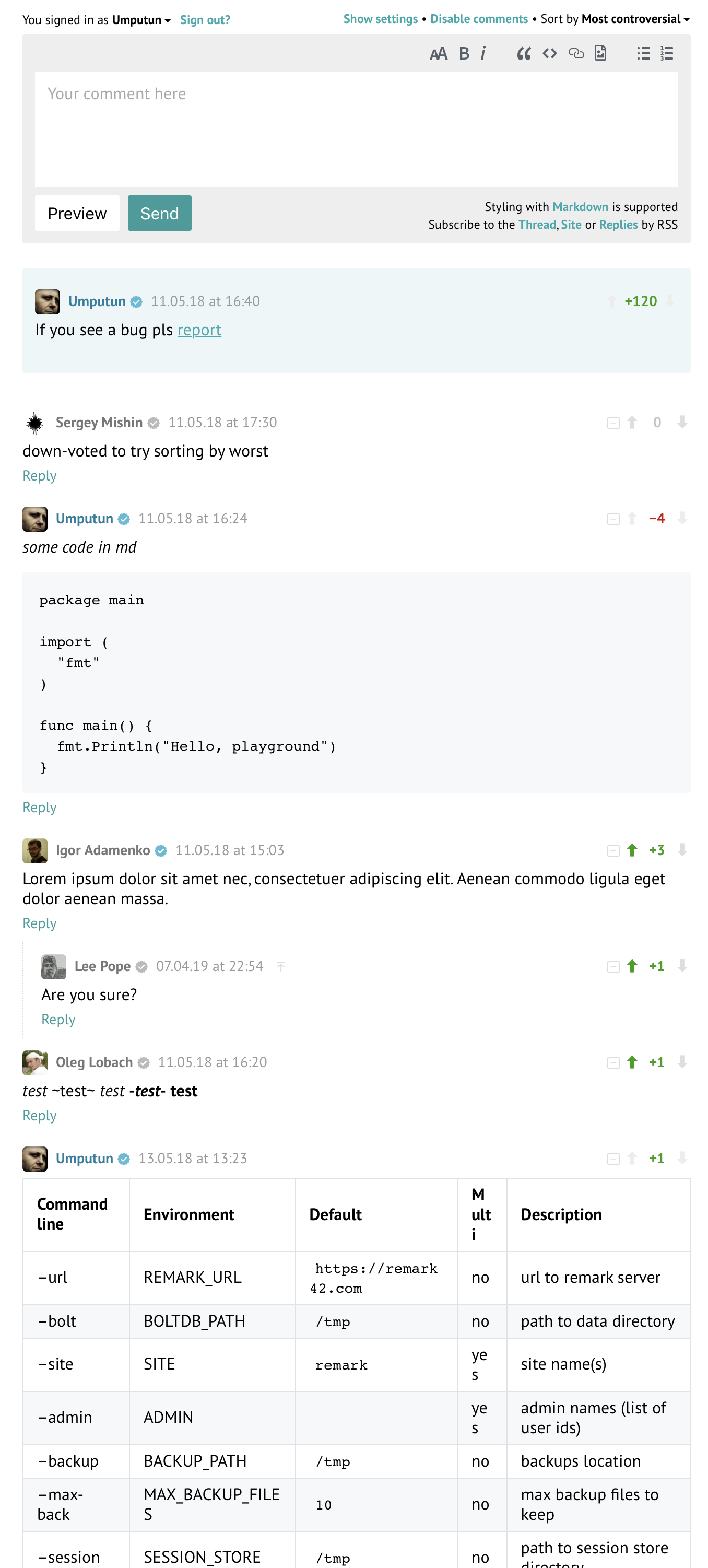
What is remark42?
Remark42 is a small, privacy-minded comment engine you install on your own server and embed in blogs, articles or any page where readers add comments. Visitors sign in through OAuth2 providers (Google, GitHub, Apple, Yandex and the others listed in the authorization manual), by email, or anonymously, and post Markdown comments in multi-level threads with voting, pinning, image upload and a customizable white or dark UI. Moderators delete posts and ban troublemakers, admins receive a ping for every new comment via Telegram, Slack, webhook or email, and readers are told about replies by email or Telegram. Existing discussions can be imported from Disqus and WordPress; data is exported to JSON with automatic backups and served as RSS per site or per post. One instance can host several sites at once. No external database is needed because everything lives in a single data file, so deployment is a docker compose up away, and a self-contained executable plus optional built-in automatic SSL cover Linux, Windows and macOS. A public demo instance lets you try it, and community docs, a Helm chart and a Django integration round out the ecosystem. Twitter sign-in was deprecated in v1.14.0; releases continue, most recently v1.18.0 in October 2026.
remark42 alternatives
 commentoplusplusCommento with out of the box patches and updates to add useful features and fixes. Also with one-click deploy to Heroku so you can get up and running fast.Comparecommentoplusplus with remark42
 public-websites-dockerA Docker Compose guide for self-hosting static sites with Traefik, Matomo analytics, and remark42 comments — all with automatic Let's Encrypt TLS.Comparepublic-websites-docker with remark42
 CommentoPrivacy-focused self-hosted commenting platform. Fast alternative to Disqus with no ads or tracking. Markdown, voting, spam detection, moderation tools, OAuth login.CompareCommento with remark42
 tunan-blogA self-hosted blog platform built with Go and Next.js that includes an admin dashboard, Markdown writing, multilingual posts, and integrated Remark42 comments.Comparetunan-blog with remark42
 TalkyardSelf-hosted open-source community platform combining forum, chat, Q&A, and blog comments — alternative to StackOverflow, Slack, Discourse, Reddit, Disqus.CompareTalkyard with remark42
 CommentoSelf-hosted, open-source commenting platform for your website with markdown, Disqus import, voting, spam detection, moderation tools and OAuth/SSO login.CompareCommento with remark42
 IssoOpen-source, self-hosted commenting server with a SQLite backend that drops in where Disqus used to run: embed one small JS file, moderate via a web admin.CompareIsso with remark42
 openchangelogOpenchangelog transforms Markdown changelogs into a beautiful website with search, password protection, themes, RSS, and GitHub/GitLab/Forgejo/local integrations.Compareopenchangelog with remark42
Should you self-host remark42?
remark42 scores 69/100 on selfhost.directory (how scoring works) and ranks #1 of 5 in Comments. It has 5 651 GitHub stars, +27 in the last 30 days.
It shipped 9 stable releases in the past year. The latest, v1.18.0, came out on 11 October 2026. New versions land roughly every 2 weeks.
Setup is easy: most people get it running in one sitting. An official Docker image is available. It is MIT-licensed and written mostly in Go.
Its closest alternative on selfhost.directory is Artalk (67/100, 2 366 stars). remark42 scores higher overall. See remark42 vs Artalk side by side.
Features
- Anonymous commenting
- Built-in HTTPS with automatic certificates
- Comment Moderation
- Data export and backups
- Email sign-in
- Embedded comment widget
- Image Upload
- Import from Disqus and WordPress
- Markdown editing
- Multi-site Support
- Nested threaded comments
- Notifications
- RSS Feeds
- Social and OAuth2 loginTwitter support was deprecated in 1.14.0.
- Voting and pinning
remark42 README

More in Comments
 ArtalkSelf-hosted comment system in Go and Vanilla JS. Deploy via Docker or binary. Social login, email notifications, markdown, multi-site, data migration.
- CommentoSelf-hosted, open-source commenting platform for your website with markdown, Disqus import, voting, spam detection, moderation tools and OAuth/SSO login.
 CoralSelf-hosted, open-source comment platform from Vox Media for news sites: moderation queues, banned-word lists, Perspective toxicity and Akismet spam filters, SSO.
- IssoOpen-source, self-hosted commenting server with a SQLite backend that drops in where Disqus used to run: embed one small JS file, moderate via a web admin.
0 comments