
Self-host Pulse
v6.8.0Real-time monitoring for Proxmox, Docker and Kubernetes
$ docker run -d --name pulse -p 7655:7655 -v pulse_data:/data -e PULSE_DEPLOYMENT_METHOD=docker_run --restart unless-stopped rcourtman/pulse:vX.Y.Z- Stars
- 7 103
- Ports
- 7655 (Web UI, API and agent ingest), 9091 (Prometheus /metrics listener, bound to loopback by default)
rcourtman/pulse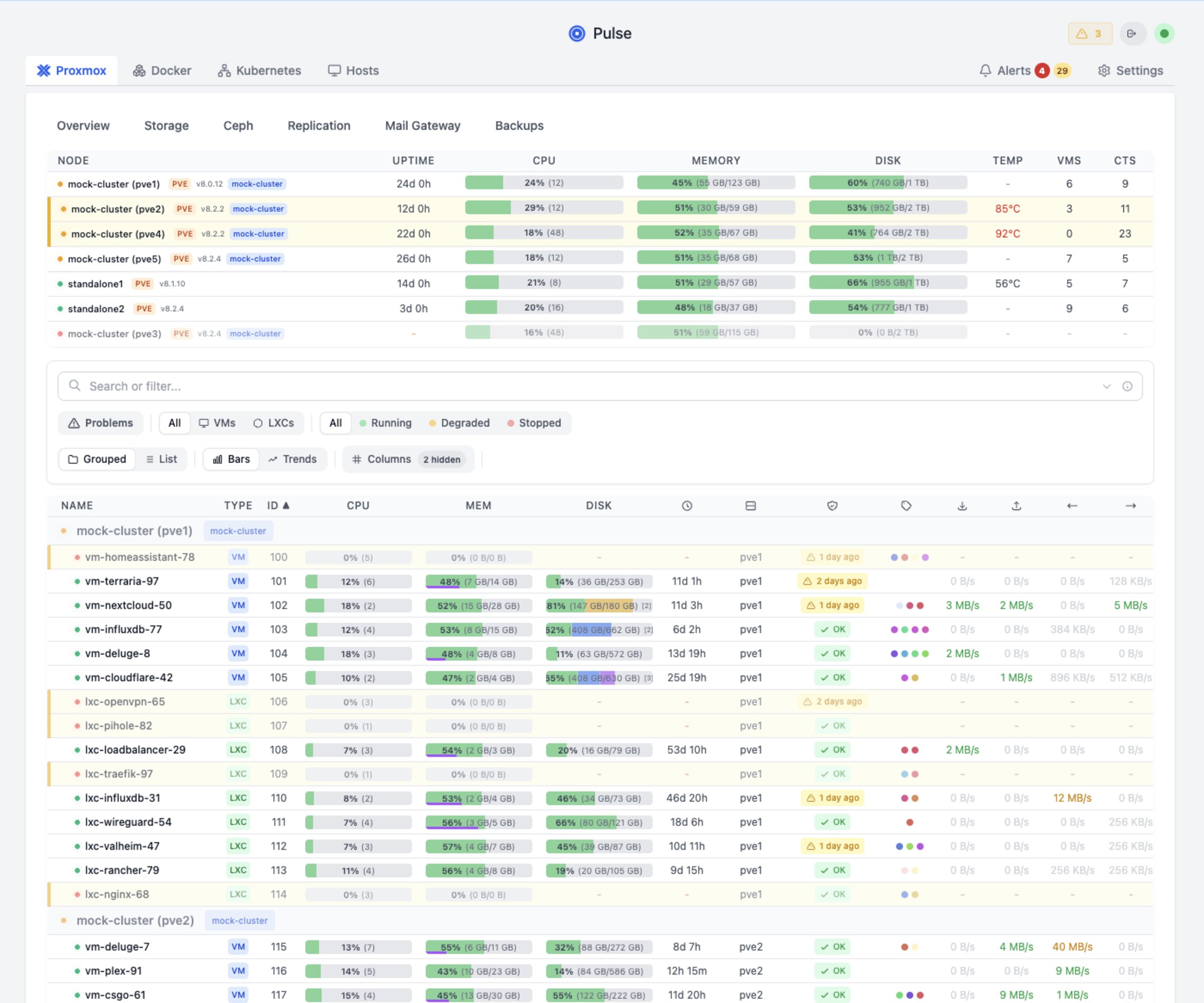


What is Pulse?
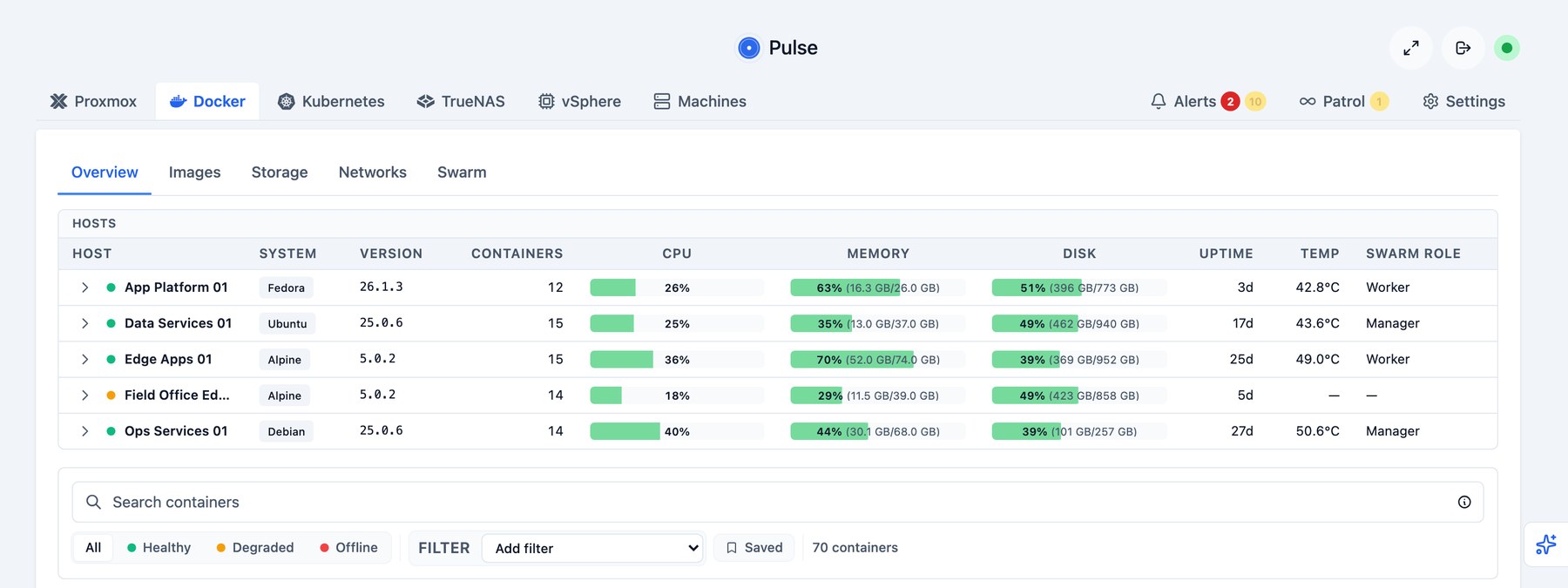
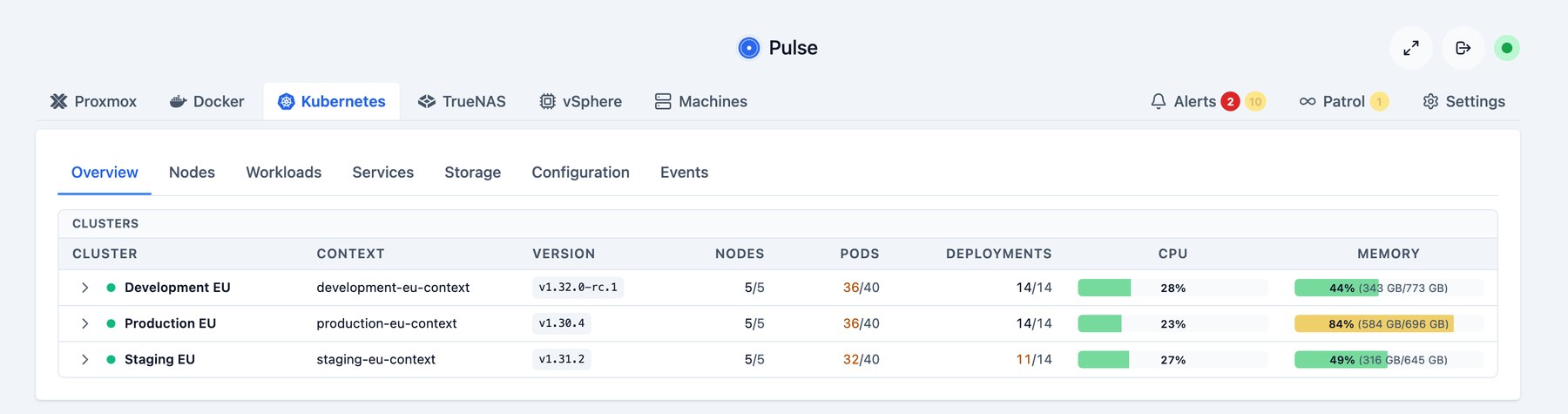
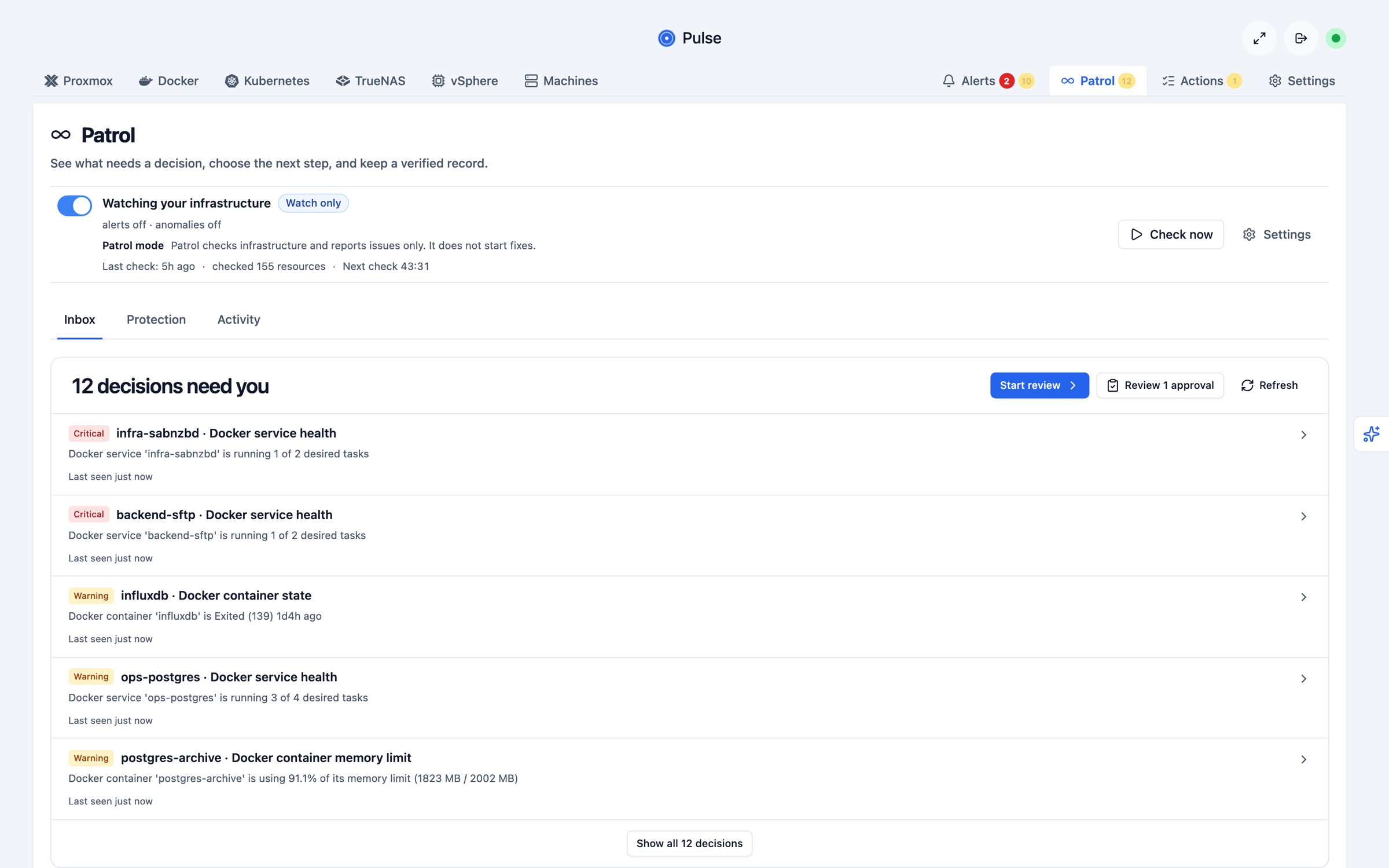
Pulse is an open-source monitoring front end for homelabs and small provider setups, gathering Proxmox VE (plus PBS and PMG), Docker and Podman, Kubernetes, TrueNAS, standalone Linux, Windows and macOS hosts, and early-access vSphere into a single shared resource model with per-platform pages. Threshold alerts carry a built-in buffer so a value hovering near a limit does not repeatedly fire, and delivery reaches Discord, Slack, Telegram, email, webhooks and phone push destinations such as ntfy, Gotify or Pushover. Pulse Patrol walks your estate on a schedule using a local model or your own provider keys, flagging things like failed backup runs, capacity creep and restart loops; investigation and policy-bound automated fixes sit behind the paid tier. You can deploy it with a single container command on port 7655 (first launch uses a bootstrap token), or with Compose, the official Helm chart, or the signature-verified install.sh that builds a Proxmox LXC or a hardened systemd service. An optional unified agent adds host SMART data, temperatures and container telemetry, while Proxmox itself needs only a read-only API token. The MIT-licensed Community build keeps seven days of metric history; Pro raises retention to ninety days and brings RBAC, audit logs, reporting and centralized agent profiles. Relay and the Pulse Mobile companion app stop working after 31 March 2027, so remote access means your own VPN or tunnel.
Pulse alternatives
 WolfStackA self-hosted platform for managing servers, containers, virtual machines, networking, storage, and backups with a 530+ app store, all from one Rust binary.CompareWolfStack with Pulse
 HomelabARR CEA free, open-source dashboard for one-click deployment of 100+ self-hosted apps like Plex, Jellyfin, and Sonarr on your own Linux server via Docker Compose.CompareHomelabARR CE with Pulse
 CortenDeskSelf-hosted RustDesk console bundling ID server, relay, and browser client in one Docker image. Fixes signed-in client issues, adds fleet management, access control.CompareCortenDesk with Pulse
 zpulseA self-hosted monitor that pushes drive health, ZFS state, and I/O metrics from many machines to a central web dashboard via WebSocket, with Gotify notifications.Comparezpulse with Pulse
 ProxmoxMCP-PlusSelf-hosted MCP interface for Proxmox VE VMs and containers with OpenAPI. Supports snapshots, backups, ISO downloads, job tracking.CompareProxmoxMCP-Plus with Pulse
 monoscopeOpen-source, self-hosted observability that keeps logs, metrics and traces in your own S3 buckets, with plain-English queries, scheduled AI agents and session replay.Comparemonoscope with Pulse
 nas-doctorSelf-hosted NAS monitoring with SMART health, Docker, ZFS, UPS tracking, service checks, and Prometheus metrics — runs on Unraid, TrueNAS, Synology, Proxmox, Kubernetes.Comparenas-doctor with Pulse
 homarr-iframesSelf-hosted Go API generating embeddable iFrames for 17+ services like Linkwarden, Vikunja, Overseerr, Sonarr, Radarr, Uptime Kuma — works in any dashboard.Comparehomarr-iframes with Pulse
Should you self-host Pulse?
Pulse scores 71/100 on selfhost.directory (how scoring works) and ranks #2 of 19 in Infrastructure Monitoring. It has 7 103 GitHub stars, +291 in the last 30 days.
It shipped 47 stable releases in the past year. The latest, helm-chart-6.8.0, came out on 13 November 2026.
Setup is easy: most people get it running in one sitting. An official Docker image is available. It is MIT-licensed and written mostly in Go.
Its closest alternative on selfhost.directory is Beszel (82/100, 27 327 stars). It scores higher overall, so compare the two before you pick. See Pulse vs Beszel side by side.
Features
- Alerting with flapping suppression
- Backup, snapshot and replication visibility
- Bring-your-own-key AI analysisWatch-only analysis is free; fixes require Pro.
- Dedicated per-platform views
- MCP adapter for external AI agents
- Metrics history with configurable retentionCommunity keeps 7 days, Pro 90 days.
- Multi-platform infrastructure monitoring
- Node auto-discoveryDisabled by default (DISCOVERY_ENABLED=false).
- Offline / air-gapped operationPaid tiers need activation and periodic HTTPS access to the license server.
- Optional host agent for deeper telemetryProxmox can be monitored API-only with a read-only token and no agent.
- Prometheus metrics endpoint
- RBAC, audit logging and reportingPro tier only.
- REST API
- Scheduled AI health checks (Pulse Patrol)
Pulse README

Real-time Proxmox, Docker and Kubernetes monitoring that finds what needs attention.
Pulse is a self-hosted dashboard and alerting tool for your homelab or infrastructure. Point it at Proxmox, Docker, Kubernetes, TrueNAS, vSphere or your own Linux, Windows and macOS machines, and it shows their health in one place, keeps the history, and tells you when something needs attention: a failed backup, a filling disk, an unhealthy container, a node that dropped offline.
How to install Pulse
Install Pulse with Docker
PULSE_DEPLOYMENT_METHOD, FRONTEND_PORT, PULSE_PUBLIC_URLdocker run -d \
--name pulse \
-p 7655:7655 \
-v pulse_data:/data \
-e PULSE_DEPLOYMENT_METHOD=docker_run \
--restart unless-stopped \
rcourtman/pulse:vX.Y.Z
Open http://<your-ip>:7655 and follow the bootstrap-token setup.
Install Pulse with Docker Compose
PULSE_IMAGE, PULSE_PORT, TZ, PULSE_DEPLOYMENT_METHODservices:
pulse:
image: ${PULSE_IMAGE:-rcourtman/pulse:vX.Y.Z}
container_name: pulse
restart: unless-stopped
ports:
- "7655:7655"
volumes:
- pulse_data:/data
environment:
- PULSE_DEPLOYMENT_METHOD=docker_compose
volumes:
pulse_data:
PULSE_IMAGE lets paid users point the same file at the private Pulse Pro image.
Install Pulse with Helm
helm repo add pulse https://rcourtman.github.io/Pulse
helm repo update
helm upgrade --install pulse pulse/pulse \
  --namespace pulse \
  --create-namespace
The Kubernetes guide covers ingress and persistence configuration.
Install Pulse with Proxmox
PULSE_VERSIONexport PULSE_VERSION=vX.Y.Z
curl -fsSLO "https://github.com/rcourtman/Pulse/releases/download/${PULSE_VERSION}/install.sh" &&
curl -fsSLO "https://github.com/rcourtman/Pulse/releases/download/${PULSE_VERSION}/install.sh.sshsig" &&
ssh-keygen -Y verify \
-f <(printf '%s\n' 'pulse-installer namespaces="pulse-install" ssh-ed25519 AAAAC3NzaC1lZDI1NTE5AAAAIMZd/DaH+BldzOkq1A8KVTcFk73nAyrE8aJOyf7i00jm pulse-installer') \
-I pulse-installer \
-n pulse-install \
-s install.sh.sshsig < install.sh &&
bash install.sh --version "${PULSE_VERSION}"
On Proxmox the installer creates and configures an LXC container; on Linux it installs the server as a systemd service. Host agents are installed separately from the Pulse server's own /install.sh.
How to configure Pulse
PULSE_PUBLIC_URL=Auto-detectedURL for UI links, notifications, and OIDC. For reverse proxies, keep this as the public URL and use `PULSE_AGENT_CONNECT_URL` for agent installs if you need a direct/internal address.FRONTEND_PORT=7655Public listening port (web UI, API, and agent ingest)LOG_LEVEL=infoLog verbosity (see below)LOG_FORMAT=autoLog output format (`auto`, `json`, `console`)DISCOVERY_SUBNET=autoCIDR or `auto`
Pulse releases & version history
Helm chart for Pulse 6.8.0.
✅ Release Asset Validation: PASSED
The required release asset checks passed.
Status: Release asset checks passed ✅
Validated: 2026-11-13 01:29:27 UTC
Workflow: Pulse Release Pipeline #454
Validation Summary
- All required assets present ✓
- Checksums verified ✓
- Version strings correct ✓
- Binary architectures validated ✓
Asset validation alone does not establish installed-service health,
release convergence, clean soak or approval for stable publication.
Pulse v6.8.0 Release Notes
v6.8.0 is a stable minor release. It promotes the v6.8.0-rc.2 release candidate and replaces stable v6.7.0.
Pulse v6.8.0 makes backup problems easier to identify, adds individual sensor limits and improves notification recovery after restarts. It keeps same-named systems separate, reduces routine polling and disk writes, and makes Patrol investigations and settings recovery clearer.
Highlights
- Backups → Backup health now groups protection problems by cause and opens Coverage filtered to affected workloads.
- Alerts → Thresholds → Machine Sensors now lets you set a separate temperature limit for each Linux sensor.
- Backups → Backup servers now shows datastore fill forecasts when a reliable growth trend is available.
What's improved
- Larger fleets need less repeated work. Proxmox, PBS and PMG polling copies less unrelated data. Resource lists, workload charts, custom alert rules and Agent Doctor also avoid repeated work.
- Latest readings stay visible. Resource drawers keep available CPU, memory and other readings when history fails or exceeds your plan, with older readings still labelled.
- Settings offers access recovery. Failed permission checks clear outdated controls and offer retry instead of leaving stale permissions on screen.
- Infrastructure failures explain recovery. Unread connection lists and settings offer retry, with help for saved changes awaiting reload and direct HTTPS recovery that preserves connections and certificate checks.
- Role edits preserve saved choices. Roles keeps permissions outside the shortcuts, inheritance and priority. Inherited administrator grants work while explicit denials still apply.
- Uncertain access changes prompt a check. Roles, User Access, API tokens and SSO require reading saved state before another edit when a change cannot be confirmed, preserving relevant drafts.
- SSO saves protect existing settings. Delayed edits cannot restore older secrets or hidden settings. Failed startup reads block provider changes until an authenticated read recovers the saved configuration.
- Missing organization access has a recovery screen. Users can answer invitations, check access again or sign out. Failed invitation reads offer retry and identify the organization being joined.
- Refreshes preserve unfinished work. Unchanged access checks retain access, sharing, organization and authentication drafts and pending results. Concurrent system saves preserve unrelated fields and reach workspaces still starting.
- Conflicting organization saves preserve current access. Overlapping edits cannot restore removed members, invitations or shares, or recreate a deleted workspace. Reload current details before trying again.
- Docs is easier to use. Load failures explain their cause, retry keeps the guide, heading links restore focus, and wide tables support keyboard scrolling. French is available in supported interface areas and the getting-started guide.
- Needs attention uses the drawer width. Alert details fill available space and wrap into readable rows.
Alerts and notifications
- Queued notifications survive graceful restarts. Pending deliveries and buffered groups retain their work and grouping deadline. Sending resumes after destinations, quiet hours and delivery settings load.
- Restarts preserve notification cooldowns. Delivered active alerts avoid duplicate firing messages during their cooldown. New occurrences, increased severity and new recipients can still notify.
- Long-running alerts keep recovery messages. Cleanup retains recoveries still owed for active alerts and pending work. Changed recipients cannot inherit another destination's delivery record.
- Confirmed deliveries avoid repeat sends. Once provider success is saved, Pulse retries unfinished local bookkeeping without resending. A crash before success is saved can still cause a repeat.
- Shutdown preserves notification handoffs. Monitoring finishes handing pending firing and recovery messages to delivery before stopping it, including when organization access ends.
- Alert history handles storage faults better. Pending events replay after storage recovers. Active alerts and controls survive restarts without resending old notifications.
- Acknowledgements avoid duplicate requests. Individual, group and bulk actions share pending state across navigation. Partial failures report successful and failed counts separately.
- Threshold markers and notes stay accurate. Active-alert dots return to metric rows, including filesystems and disk temperatures. Override notes survive reopening and edits that change only the note.
- Thresholds distinguishes repeated names. Proxmox and Docker names stay readable with details separating namesakes. Searching Docker thresholds no longer places overrides under the wrong host.
- Delivery errors stay readable and private. Recent delivery activity preserves ordinary errors while hiding webhook credentials. Diagnostics omit private destination identifiers, and temporary HTTP clients release completed connections.
- Organization managers can configure destinations. Providers can open client alert settings without instance-wide access. New Apprise command-line targets require an instance administrator, and option-like targets are rejected.
- Unavailable delivery explains recovery. Alerts distinguishes unread settings, storage failures and uncertain alert state while detection continues. Imports say when saved notification settings need a restart.
Disks and storage
- Full disks remain visible in summaries. Compact Proxmox rows show the fullest measured disk despite another missing reading. Wide machine rows keep individual bars, and narrow cells preserve percentages.
- Disk controls show the selected view clearly. Disk, alert and view toggles are easier to distinguish on machine tables.
- VM history keeps readings with their source. Fallback polling cannot record old readings as fresh or allocated capacity as measured filesystem usage. Guest history stays within its Proxmox connection.
- Machine I/O history stays visible. Native disk I/O can appear beside stored CPU history when disk series are missing. Mixed history no longer claims a single source.
- Routine monitoring writes less to disk. Metric samples are normally saved in minute batches and host report bookkeeping is grouped, while chart reads still request fresh data. An abrupt crash can lose the newest buffered minute.
- Saved configuration and agent credentials use safer writes. Private, complete-file replacement protects configuration, bootstrap state and enrollment from interrupted writes and unsafe temporary paths, including relocated agent storage.
Proxmox, PBS and backups
- Backups opens on Coverage. The page places health first, then backup servers and restore points, with consistent metric colours. The restore-points-per-day chart is removed.
- Backup jobs shows two weeks of outcomes. Daily results and last-24-hours totals distinguish failures, warnings, running jobs and missing history. Hover shows details, and selecting a day filters and reveals matching rows.
- PBS job results match each datastore. Backup servers reads GC, prune, verify and sync status directly from PBS. Plain error text counts as failure, while unrelated unclear tasks cannot make every datastore unknown.
- Failed PBS jobs raise datastore alerts. Sync, verify, prune and garbage-collection failures stay separate from guest protection. Known failures survive outages, partial reads, running retries and Pulse restarts.
- Confirmed backups keep their status. Freshly read backups can remain protected when another storage is unreadable. Coverage names unread sources without treating retained entries as fresh confirmation.
- Uncertain backup ownership stays Unknown. Guests that could own an unassigned PBS backup no longer appear definitely unprotected. Removed connections stop leaving stale ownership uncertainty behind.
- Backup servers are grouped by server. Headers show reachability and datastore count. Rows and datastore drawers lead with capacity and jobs, while server CPU, memory and uptime remain in its drawer.
- Restore-point totals count completed backups. By date counts running and failed entries separately, so completed totals agree with Backup health.
- Coverage opens individual restore points. Workload and connection labels lead to expanded rows showing each point, newest backup and failures. Details include location, readable date, size and identifier.
- PBS backups stay with the correct guest. Reused names and VMIDs cannot let another connection claim a backup. Badges, Coverage, datastore counts and Patrol share namespace-aware ownership rules.
- Backup wording separates guest snapshots. PBS restore points are called PBS backups, keeping them distinct from guest snapshots that do not count as independent backups.
- Ceph and node details are more accurate. Standby managers count as running, ERR matches critical filters, and healthy Ceph reports lose old incident details. Node rows include storage alerts, and hardware details show linked-agent power.
TrueNAS, vSphere and Docker
- Namesake TrueNAS systems stay separate. Connections with the same hostname no longer merge into one displayed machine.
- TrueNAS history follows the selected system. Drawer reads query only that appliance and discard results from removed or replaced connections.
- TrueNAS and vSphere editors ignore outdated replies. Tests, saves and access errors stay with the requesting account, workspace and editor. Unread saved settings offer recovery.
- Docker distinguishes same-named hosts. Host lists, selectors and resource tables use each host's identity and show extra details when names repeat.
- Docker health indicators update live. Container row dots follow refreshed health results, and failure words remain readable in narrow rows.
- Container actions explain their results. Start, stop, restart and update feedback says what Docker did and what Pulse confirmed, including failing or still-starting health checks.
- Disabled Docker actions explain why. Live updates refresh refusal reasons, disabled controls expose explanations, and locked update badges point to Remote commands on the affected machine.
- Docker commands reach the host's own agent. Matching names cannot route commands elsewhere. An agent inside a VM remains reachable when its Proxmox node has no agent.
- Guest Docker hosts remain visible. Docker keeps runtimes linked to Proxmox guests, including containers and counts. Separately probed LXCs keep their own host rows.
- LXC Docker discovery uses the guest's own node. Checks require a linked agent on the correct Proxmox connection, skip missing links and no longer pause another namesake node after a failure.
- Docker setup needs fewer privileges. Configuration preparation works without root, Docker or host access and clearly says Pulse has not started. Compose health checks respect HTTPS without masking failures.
- Docker update instructions require recreation. The update overview explains that pulling an image alone does not replace the running Pulse container. Container SSH warnings appear only when SSH actually runs.
Install, updates and agents
- Agent installation reports failures honestly. URL validation precedes service or credential replacement. Failed startup returns an error with log guidance instead of declaring success.
- Server installation protects working services. Uncertain service state stops changes, checks have time limits, and failed replacement writes preserve existing service files.
- Agent profile changes preserve recovery files. Migration requires known collector and helper state, and keeps recovery files until both stop. Unconfirmed removal explains retained files, service state and registration recovery.
- Older NAS utilities and curl work again. Installers handle older text tools and curl versions. Downloads ignore implicit curl settings so local defaults cannot silently change installation requests.
- Container installers download before running. Downloads have size and time limits and are staged privately for syntax checks. The wrapper accepts private token files and rejects empty credential-file arguments.
- Command-access setup preserves credentials. Preparing a replacement token leaves existing agent tokens valid. Concurrent requests no longer create the same install credential twice.
- Agent updates check version and architecture. Downloads must contain the expected release for the intended platform before activation. ARMv6 builds select ARMv6 updates rather than guessing ARMv7.
- Agent updates retain honest outcomes. Binary replacement and persistent NAS copies are more durable. Failed recovery no longer reports an earlier update as newly completed.
- Automatic server updates cannot overlap. Competing runs cannot update the same installation at once. A busy lock or missing flock stops the update before installation changes.
- Unattended update status is more accurate. Failed timer checks report errors. Optional setup failures do not claim updates are enabled, temporary-file cleanup does not stop monitoring, and recovery waits obey elapsed time limits.
- Community-scripts LXC installs are recognised again. Pulse detects the newer update helper and shows suitable controls. Security settings names the current and older Pulse service in restart instructions.
- Update progress stays with the running update. Background checks cannot overwrite progress or final results. Channel changes reach checks consistently, slow connections do not delay shutdown, and replacement assets use private staging.
Pulse Pro, AI and hosted
- Reporting distinguishes outages from empty scope. Failed resource reads offer retry. Earlier-account selections, results and downloads cannot populate the current report, including after live updates reconnect.
- Organization controls use current details. Billing and sharing discard outdated actions after workspace changes or failed reads. Sharing requires a named recipient, and ownership transfers identify the workspace before confirmation.
- Losing workspace access preserves sign-in. Live data disconnects without silently switching workspaces or repeatedly reconnecting. Select another authorized workspace, or reload after access is restored.
- Workspace tools use their own systems. Patrol findings, notifications, learning and guest probes stay in their organization. Infrastructure updates, deployment choices and scheduler health use the selected workspace.
- Patrol follows recurring alerts. Each new firing can trigger investigation even when notifications are off. Runs find the correct resource, and findings that repeat an alert close when that alert clears.
- Patrol checks lasting alerts. In Ask first and Autopilot, alerts still active after 10 minutes can receive one investigation, even below the immediate severity setting, with a limit of four per hour and the alert-trigger switch and filters respected.
- Waiting investigations start when space opens. Patrol keeps findings queued while all investigation slots are busy, prioritizing critical findings and then those waiting longest.
- Patrol shows current action and approval status. Summaries, rows and resource links agree on the next step. Failed approval reads retain known requests and usable findings instead of implying an empty queue or suggesting premature recovery.
- Patrol explains missing command access. Reporting agents with commands off are distinguished from disconnected agents. Patrol names affected hosts and opens the install command with command access selected.
- Patrol notifications follow each finding. Recovery uses resolution and recurrence history, rather than dismissal, snooze or suppression. Stalled resource lookups no longer hold up shutdown.
- Plans & Billing explains more options. Locked history ranges link to plan details, which also introduces the separate Pulse MSP installation and evaluation.
- MSP clients keep monitoring after paid access ends. Clients fall back to Community features. Renewal supports private provider networks, and clients still being created retain credentials for another attempt.
Monitoring and service health
- Buffered reports no longer inflate rates. Machine and Docker disk and network rates use collection times after reconnect. Libvirt CPU and I/O rates use their collection interval and leave invalid intervals unknown.
- System Logs shows connection loss. Connecting, reconnecting and disconnected states replace a misleading Live label. Uncertain access clears buffered lines and offers explicit reconnect.
- Diagnostics and Agent Doctor stay current. Diagnostics clears results when its account, workspace or panel changes and blocks stale exports after failures. Open Doctor rows refresh versions, diagnoses and repair commands.
- Linux sensors report more detail. Agents collect individual temperatures and fan speeds with stable names, including stopped fans and invalid readings. New alerts start disabled, and missing readings cannot close an existing sensor alert.
- Agent links and commands distinguish namesakes. Links survive NAT and reused names, ambiguous matches stay unlinked, and Assistant uses each node's own agent. Separate command sessions reset reconnect delays after a healthy connection.
- Guest reads pause during possible replication freezes. Pulse defers guest-agent commands during discovered replication windows and when replication status cannot be verified.
- Guest filesystem reads run about once a minute. Successful replies are reused between reads with their original observation time and cleared after a guest restart.
- Linked agents avoid extra guest reads. Pulse skips QEMU filesystem queries when the linked agent supplies disks and prefers its current memory reading over reading a guest file.
- Monitoring reloads avoid overlapping writers. Pulse refuses to replace a runtime that has not fully stopped. Retired workspace monitors cannot reopen stores or restart monitoring through late requests.
- Workspace startup leaves other monitoring available. Starting another workspace no longer blocks existing live reads. Discovery avoids racing initialization, and backup polling follows elapsed cycles rather than a shared counter.
- Slower agent reports stay fresh between updates. Agent rows, SMART disks and Unraid storage use the configured reporting interval, avoiding false stale warnings for on-time reports.
- Proxmox temperatures follow the reporting agent. Valid readings from slower agents remain usable without unnecessary SSH checks. Old sibling readings expire even when the Proxmox connection remains live.
Security
- Private responses stop when access ends. History, audit data, configuration exports, reports, support bundles, Assistant results and progress streams recheck the requesting session or token before sending more data.
- Browser data and credentials stay with their owner. Resource lists and audit controls discard old replies after access changes, password changes use the current local account, and uncertain credential changes keep attempted values for recovery.
- Default workspace membership is restricted. In multi-org mode, use Settings → Organization access to manage membership, review migrated local-user grants and explicitly grant proxy users access where needed.
- Access checks cover more requests. Basic authentication respects workspace membership, configuration transfers require management access, and AI review uses action permissions. Unread roles or policy and malformed access edits are refused.
- Proxy credentials cannot authorize cross-site writes. Unapproved origins cannot make browser writes using proxy identity headers, Basic credentials or API tokens, including sites sharing the same parent domain.
- Diagnostics exposes less private data. Support bundles limit configuration and environment fields and show actual versions. Browser diagnostics omit private response bodies, while included server logs still need private handling.
- API clients keep credentials at the configured address. CLI, MCP and external-agent requests refuse redirects to another scheme, host or port. Agent tokens can auto-register only their recorded source.
- Saved keys and approvals survive read failures. Pulse preserves invalid encryption keys for recovery from the original backup, keeps billing secrets when encryption is unavailable, and refuses to replace unread approvals with an empty store.
- AI commands have stronger limits. Read tools block credentials, process environments and database clients, and restrict outbound connections. Command approvals must be marked used on disk before execution, preventing reuse after restart.
- Protected content is safer to open. Downloads and Assistant results reject executable formats, HTML base tags cannot redirect Pulse links, import checks protect passphrase fingerprints, and libraries include HTML security fixes.
- Authentication stays responsive. Slow persistence and token checks no longer block sign-in. Basic API polling avoids browser sessions, unread session files are preserved, and OIDC refresh cannot overwrite a newer session or undo sign-out.
- SSO rejects obsolete login attempts. OIDC and SAML callbacks honor provider removal and policy changes. SAML requires bearer confirmation and a matching audience. Replace RSA PKCS#1 v1.5 key transport with supported encryption.
Other improvements
- Access controls identify saved targets. Users, roles, API tokens, SSO providers, organizations and audit webhooks show their saved identities beside actions. Permissions, destinations and dialog buttons remain reachable in short windows.
- Token details show saved expiry clearly. API Access shows saved expiry without implying a token still has access, keeps custom scopes separate from Full access, and clears old copy feedback when a reveal closes or changes.
- Account controls explain sign-out. Identity and Sign out stay visible. Pulse confirms local closure before proxy navigation and offers recovery without losing drafts. Portal account responses prevent caching.
- API and recovery help preserves access. Examples use private request files and full custom-role replacement, with help for authenticated transfers, client-local recovery and enabling organizations per deployment.
- SSO setup uses the actual login addresses. Registration instructions reflect saved provider details and the public URL. Matching OIDC initialization preserves pending logins, and custom SAML paths stay on the configured host.
- OIDC guidance explains login rules. Saved providers take precedence over environment settings. Deployment-managed providers use their existing configuration, and every non-empty group, domain and email allowlist must match.
- Agent and storage help avoids unnecessary changes. Guidance covers wrong node links, separate Proxmox I/O sources, existing TrueNAS history and persistent metric storage, explaining that changing its path does not move history or reduce writes.
- Privilege-helper updates have instructions. Help and agent logs explain that automatic updates replace only the collector. Update helpers through the agent installer, and use install commands naming the current release.
- MSP setup supports domain-free trials and certificates. Setup collects values before package changes, checks DNS and TLS, and supports DNS or port-80 verification. Moving a trial to your own domain requires agent reinstallation.
- MSP portal errors explain recovery. Plan checks distinguish rejection, rate limits and outages. Forms support Enter without duplicate requests, retain failed client names and open clients without another sign-in. Paid features require a plan.
- MSP guidance clarifies access and networking. Provider access excludes client user and audit administration, read-only details explain restrictions, and overlapping private subnets need distinct reachable addresses or tunnel NAT.
- MCP updates preserve the working adapter. Failed replacement copies leave it intact, downloads have size and time limits, and unsafe destinations are refused. Pro terms explain current AI modes and which can run fixes.
Known issues
- Guest freezes and Windows restarts remain unresolved. Related fixes do not establish safety for every guest. If monitoring was stopped after a guest froze, do not restart it solely to test this beta or release.
- Freeze-enabled backups still need precautions. Stop Pulse server monitoring beforehand. Keep it stopped until independent checks confirm thaw, fresh writes on every backed-up filesystem and workload liveness, regardless of an OK backup result.
- Some freezes have no detectable VM lock. Cloning or disk imports can freeze a VM without detection. Reads already running before a backup lock may collide with thaw, so avoid manual guest-agent probes during freeze or thaw.
- Kubernetes pauses need storage and controller checks. Confirm persistent server storage and prevent controllers replacing stopped pods. Deleting a pod or stopping only the collector does not confirm server polling stopped.
- Some Windows disk readings may remain unavailable. Keep using the working Machines disk view without removing or reinstalling agents, restarting guests or forcing guest-agent checks solely to recover Proxmox readings.
- Elevated server memory remains unresolved. Keep the working setup and compare existing readings at similar uptimes and workloads. Reduced polling work does not establish a lower baseline or require a restart or heap dump solely for this report.
- Previously affected machines still need caution. Keep agents or Patrol disabled after a lockup. Preserve existing evidence privately without re-enabling them, changing GPU load or altering hardware to recreate the incident.
- Resume only previously active monitoring. Avoid hooks that ignore failed stops or restart Pulse after an unanswered thaw check. Restore only previously active services and timers after independent guest checks.
- Agent updates still need a version check. Compare the running agent's reported version with the intended release before treating an update as complete, especially for older installed agents.
- Earlier alert-history gaps cannot be recreated. Preserve existing logs and delivery records after storage failures. A healthy current history store does not establish recovery of previously missing entries.
- Older ARMv6 agents need a manual update. Their updater can still request ARMv7. Use the agent installer's saved-state update flow with the correct architecture while preserving the agent ID and connection state.
Before you upgrade
- Windows Unified Agent binaries are not Authenticode-signed while SignPath remains unavailable and may show an Unknown Publisher warning. Verify downloads with the published checksums and detached signatures.
- Pulse Mobile is being retired on 31 March 2027. It keeps working until then. For alerts on your phone afterwards, add an ntfy, Gotify, or Pushover destination, and open Pulse in your phone's browser. Relay is no longer sold, and existing Relay subscribers now have Pro features at their current price. This release does not require a companion mobile release.
- The rollback target is stable
v6.7.0. On systemd and Proxmox LXC installs, use this command only when/bin/updatewas installed by the Pulse server installer:sudo /bin/update --version v6.7.0to return to the previous stable release. For Docker Compose, pinrcourtman/pulse:6.7.0and recreate the container.
Install
For systemd and Proxmox LXC server updates, use Settings → System → Updates. Use this CLI command only when /bin/update was installed by the Pulse server installer:
sudo /bin/update --version v6.8.0
On Proxmox community-scripts containers, or if you cannot confirm who installed /bin/update, follow the signed server-installer instructions with PULSE_VERSION=v6.8.0. The community-scripts updater can ignore --version.
For Docker:
docker pull rcourtman/pulse:6.8.0
For Docker Compose, update the image to rcourtman/pulse:6.8.0 and recreate the container.
Pulse Pro and Relay customers should continue using the private download page and private runtime image for paid features.
Roll back
The rollback target is v6.7.0:
For systemd and Proxmox LXC servers, use this command only when /bin/update was installed by the Pulse server installer:
sudo /bin/update --version v6.7.0
On Proxmox community-scripts containers, or if you cannot confirm who installed /bin/update, follow the signed server-installer instructions with PULSE_VERSION=v6.7.0. The community-scripts updater can ignore --version.
For Docker Compose, set the Pulse image to the rollback target and recreate the container.
Source comparison
Browse source changes from v6.7.0 to v6.8.0 on GitHub for more detail behind this summary.
This comparison includes internal maintenance. GitHub shows at most 250 commits, so larger comparisons may omit commits.
Helm chart for Pulse 6.7.0.
✅ Release Asset Validation: PASSED
The required release asset checks passed.
Status: Release asset checks passed ✅
Validated: 2026-11-02 01:54:11 UTC
Workflow: Pulse Release Pipeline #446
Validation Summary
- All required assets present ✓
- Checksums verified ✓
- Version strings correct ✓
- Binary architectures validated ✓
Asset validation alone does not establish installed-service health,
release convergence, clean soak or approval for stable publication.
Pulse v6.7.0 Release Notes
v6.7.0 is a stable minor release. It promotes the v6.7.0-rc.1 release candidate and replaces stable v6.6.0.
Pulse v6.7.0 makes backup status clearer when reads fail, dates are uncertain or tasks disagree. It strengthens configuration recovery, restores TrueNAS CORE readings, reduces chart processing and lets external agents read fleet changes and metric history.
Highlights
- Proxmox Backups now counts completed restore points separately from running and failed entries.
- TrueNAS CORE monitoring now loads CPU, memory and History readings previously blocked by rejected reporting requests.
- Settings Recovery now rejects incomplete configuration backups before they can replace existing settings.
What's improved
- Charts need less processing. Workload history uses less decoding, copying and temporary memory. Proxmox live updates also create fewer temporary objects.
- History stays steady while browsing. Drawer charts reserve room for changing values and times. Peak labels stay beside plotted spikes and identify peaks above the plotted average.
- Expanded lists scroll correctly. Platform and backup tables account for expanded details, keeping lower rows reachable without unexpected gaps or jumps.
- Backup browsing survives refreshes. Backups updates readings and badge colours while preserving filters, expanded details, scroll position and chart focus. Keyboard focus follows the inspected point through sorting, date regrouping and failed reads.
- Rows and details stay readable. Machines, Workloads, Infrastructure, thresholds and platform tables keep status cues and actions compact. Detail tables fit their drawer or split pane.
- Controls remain reachable. Settings actions stay visible, deep drawers scroll properly, and Infrastructure and Patrol actions have clearer accessible names. Agent Doctor commands support keyboard scrolling.
- Sorting works from the keyboard. Platform table headings have focusable sort buttons that respond to Enter and Space. Backup summary buttons no longer toggle twice with Space.
- SSO addresses stay readable. Settings keeps complete callback, metadata and ACS URLs beside their copy controls within the panel.
- Dark labels have clearer contrast. Muted text is easier to read in dark mode.
- What's New is easier to scan. After an update, changes appear as plain lists with warnings first, without hidden groups.
- Connection failures preserve saved access. Startup keeps credentials and workspace selection when discovery fails. Sign-in offers a read-only retry, and public Help stays reachable during session-check failures.
- Polling logs are quieter and more private. Routine PBS datastore readings move to debug logging. Failed-response diagnostics record response size instead of copying provider contents into logs.
Alerts and notifications
- Alert History avoids repeated names. Rows show the condition beside the resource without naming it again. Compact actions leave more room for descriptions.
- Deleted destinations stay deleted. Webhook removal confirms success in the editor. Queued deliveries cannot borrow another destination's permission because it shares the same URL.
- Audit webhook drafts survive errors. Rejected entries remain available for correction, and a completed save does not erase a newer draft. Unread destination settings block replacement until they can be loaded.
- Delivery activity supports keyboard browsing. The notification log can be focused and scrolled, and refreshes preserve keyboard position.
- PBS alert timing restarts after gaps. Missing CPU or memory readings interrupt activation and recovery timing without clearing existing warnings.
- Rolling alerts use the right history. Averaged alerts find their own stored readings for host agents, Docker hosts and containers, and Proxmox LXCs, including resources combined with another monitoring source.
- Docker alert controls show their scope. Thresholds removes ineffective runtime switches. Help explains that Offline Alerts covers runtime connectivity, while containers have separate settings.
- Recovery rules are clearer. Troubleshooting explains why falling usage can leave an alert open, including clear thresholds, recovery delays, averaged readings and missing observations.
Disks and storage
- Real container data disks remain visible. Filesystem monitoring includes real mounts under /var/lib/docker and /var/lib/containers while excluding container layers. Help explains missing mounts without asking users to move data.
- Disk totals avoid counting aliases twice. Workloads summaries use the supplied aggregate capacity when available. Individual mount readings and warning colours remain inspectable.
- Disk cards show the correct percentage. Resource disk summaries no longer interpret a usage ratio as an already calculated percentage.
- Missing disk readings stay unknown. Host charts and History no longer record unavailable filesystem usage as zero or substitute an unmeasured live value.
- Disk warnings need recovery evidence. Missing agent filesystems or unavailable Proxmox readings cannot clear alerts or advance confirmation timing. Linked hosts retain the established alert owner to prevent duplicates.
- Storage warnings require usable capacity. Usage thresholds and forecasts ignore missing or contradictory capacity readings. Explicitly disabling a warning still takes effect.
- macOS excludes hidden mounts. Time Machine and other hidden system mounts no longer appear as ordinary disks by default. Explicit disk includes remain available.
- Local backup copies stay independent. Identical paths on separate PVE nodes remain separate copies. Failed reads, disabled storage and running files stay scoped to the correct local disk.
- Archives and snapshots protect the right guest. PVE archive paths identify VM and LXC backups. Reused VMIDs, conflicting file IDs, retained snapshots and unknown archive types cannot give another guest protection credit.
- Backup locations keep their boundaries. Similar repositories on different connections stay separate. Restore evidence names its reading connection, while notices explain that location filters do not recalculate workload-wide protection.
- Guest SMART failures stay visible. A failed scoped read hides cached SMART values instead of presenting them as current. Closing and reopening the drawer preserves the error and recovery path.
- Linux temperatures exclude other sensor units. Fan RPM, voltage and power no longer become Celsius readings. Help shows where existing extra temperatures and fans appear in Machine or Host details, without promising per-sensor alerts.
Proxmox, PBS and backups
- Incomplete reads preserve inventory. Failed, partial or malformed PVE and PBS listings cannot erase retained entries. PBS checks datastore, namespace, group, snapshot and file identities before reconciling history.
- Access refusals remain meaningful. Backup collection stops continuity reads after explicit permission refusals. A readable sibling namespace cannot establish that an unread namespace is empty, and access warnings persist until enumeration recovers.
- Old evidence cannot become fresh again. Retained PVE snapshots and cached PBS backups from failed reads no longer renew protection evidence. Accepted listings survive later timeouts, throttling and optional size-read failures.
- Failed assessments withdraw outdated claims. Coverage rejects failed, malformed, duplicate or inconsistent results and offers Retry. Large fleets use complete batches with limited parallel requests, cancelled when leaving the view.
- Uncertain evidence remains inspectable. Coverage keeps restore details when assessments fail and distinguishes partial history from no backups. Provider reads, job results and restore-point states have separate labels explaining their limits.
- Backup identities and dates are visible. Coverage and By date show native restore-point IDs, locations and reported timestamps without hovering. Coverage also shows assessment, latest-success and verification times.
- Uncertain dates cannot imply protection. Ages, completion labels and verification summaries reject malformed or ambiguous dates. Future dates stay uncertain and identify clocks to check, while recognised older guest IDs still match Coverage.
- Backup activity follows the evidence. Completed jobs clear running indicators. Missing guest results stay Unknown, conflicting task results cannot complete archives, and unread writer lists cannot declare backups failed.
- Activity follows inventory filters. Search, node, type, source, location and verification filters narrow the chart. Day selection narrows only the list, and calendar dates remain correct across clock changes.
- Unknown sizes and retention stay distinct. Charts mark completed points with unknown sizes and show known volume, while restore details distinguish unknown size from zero. Prune retention stays separate from verification, including Not reported.
- Task failures have inspectable details. Coverage shows outcomes, errors, IDs and original task location, including migrated guests. Missing durations stay unknown, uncertain ordering keeps possible latest tasks visible, and Show more limits long lists.
- Cluster trust is editable per endpoint. Settings lets users inspect, test and save certificate trust for existing PVE polling addresses. Other members' trust and disabled collection settings are preserved, and tests identify the address checked.
TrueNAS, vSphere and Docker
- CORE memory separates Free and ARC correctly. Compatible TrueNAS CORE 13 systems supply both values from one authenticated native reading instead of combining differently timed measurements.
- Memory composition is accessible. The TrueNAS Overview memory bar opens a breakdown with the keyboard or a click. Help explains Used, reclaimable ARC cache and Free.
- CORE disk throughput reaches History. TrueNAS Storage retains physical-disk read and write rates through charts and stored history. Help distinguishes individual disk activity from host totals and capacity.
- History finds the correct source. TrueNAS and vSphere drawers preserve the provider's history identity when loading through the resource API.
- Protection dates reflect completed work. Collection time no longer becomes snapshot creation time, including older records. Start times, running replication and malformed dates cannot appear as completed work.
- Undated replication problems stay visible. Failed, warning and running states remain visible without invented dates. A reported success without a known run time stays Unknown.
- Unread protection history stays distinct from empty. TrueNAS Protection rejects malformed or duplicate records, warns when showing retained events and offers Refresh. Help explains snapshot and replication limits.
- Docker updates wait for health checks. Pulse waits up to three minutes for replacement containers' initial checks and detects restarting containers. Verification stays inconclusive while health is still starting.
- Image checks follow local replacements. Docker refreshes cached tag information when a new local image needs comparison, while respecting registry backoff. Manual checks discard older in-flight results rather than restoring stale cache entries.
- Image-check failures open their details. Docker Images makes Check failed a keyboard-accessible button, so errors can be read without hovering.
- Private registry setup is clearer. Docker Help explains HTTPS requirements, agent-local login files and credential helpers, container mounts and login caching. It distinguishes pulls, anonymous checks and cached update results.
- Docker credentials get safer setup guidance. Authentication-file examples refuse symlinks and non-regular files, preserve existing contents and restore private permissions before launch.
Install, updates and agents
- Docker setup preserves existing deployments. The helper stops when Compose configuration already exists, protecting custom ports, mounts, image pins and credentials.
- Docker images avoid repeated large files. Server packaging no longer stores another copy of binaries just to change permissions. Help distinguishes image layers from retained Pulse data without asking users to delete data.
- Installation success requires startup. The server installer stops on directory-setup failures and confirms startup before reporting success. Help distinguishes prepared configuration, a running service and a usable dashboard.
- Agent installer files arrive together. Server installation publishes the served agent scripts as a complete set, preserving recovery files if publication fails.
- Installer snapshots stay private and separate. Configuration copies use private permissions. Rotation preserves unusual path characters, stays within the selected instance and requires ownership evidence before removing older copies.
- Unix setup handles existing permissions. Agent commands recognise passwordless sudo, and non-root preflight handles root-owned installer directories. Moving to the safe profile preserves the hostname already reported.
- Agent updates match the executable version. Checks use the installed binary's version format. Lifecycle discovery also recovers when a peer stream is cancelled.
- Server updates finish reliably. Helper replacement avoids truncating running scripts, and preparation failures preserve helpers. Completion avoids an unsupported API call and checks that the installed executable still matches the running service.
- Installer downloads are bounded. Saved installer and manual-update downloads use HTTPS through redirects and connection and download deadlines. Help explains verification before executing downloaded installers.
- NAS upgrades preserve other startup jobs. Unraid and QNAP updates retain unrelated boot commands and stop on unrecognised arrangements. Unraid removal refuses to affect an unrelated live boot shell.
- Proxmox installation leaves existing guests alone. Creating Pulse no longer performs legacy mount cleanup on other LXCs. Failed or interrupted installs retain the new container for inspection and recovery.
- Removal failures preserve recovery data. Windows keeps files and credentials if unregistration fails, even if its service is gone, and unattended errors exit without a dialogue. Server removal retains configuration until earlier steps succeed.
Pulse Pro, AI and hosted
- Patrol follows the selected resource. Alerts and findings, including demo findings, use consistent identities and group only matching problems. Open work counts, filter badges, approvals and summaries match the resource being browsed.
- Active Docker problems stay open. Patrol skips paid resolution reviews when current container evidence still shows the fault. Missing condition readings or healthy unrelated metrics cannot imply recovery.
- External agents can read recent changes. Community API and MCP tool list_recent_changes expose fleet changes with time, resource, kind and source filters. Results indicate when more changes matched than were returned.
- External agents can read metric history. API and MCP tool get_metric_history return recorded resource metrics under the same limits as Pulse charts, including supported Kubernetes resources.
- Agent event streams announce more changes. API and MCP subscribers receive alerts firing or resolving and resource status changes. Rapid status changes are grouped, with individual transitions available in history.
- External-agent activity is counted separately. Pulse browsing and demo reads do not count as external use. Telemetry counts days with successful agent history reads without including queries, resource IDs or results.
- Workspace agent enrolment works consistently. Install tokens live where agents authenticate. Registration, diagnostics, command permissions and revocation use the same organisation-bound records.
- Workspace recovery stays isolated. Imports reload only the selected organisation, preserve instance-wide settings and avoid copying another workspace's connections or credentials.
- Unread investigations offer a safe retry. Patrol distinguishes failed history and message reads from an absent investigation, labels retained results and blocks another run until history is readable. Retry can recover failed startup reads.
- Licence recovery reports beside its controls. Manual recovery keeps progress and errors visible. Help distinguishes activating a licence from recovering the private runtime.
- AI provider Help explains where data goes. Privacy guidance describes provider processing, local endpoints and retained context, and explains that turning off usage telemetry does not stop AI requests.
- MSP billing respects cancellation. Plans points to Manage billing for renewal or end dates instead of promising renewal. Help explains self-service purchasing, upgrades and applying a purchase.
Monitoring and service health
- Restarted servers show agents awaiting reports. Machines, Infrastructure and resource drawers distinguish saved enrolment from fresh telemetry until the first valid report arrives.
- Silent agents stop supplying live values. Expired reporting stops cached readings from appearing current in charts. Stored history remains available, and open drawers refresh when reporting stops or resumes.
- Missing backup times stay cautionary. Workloads says No completed backup reported rather than implying a guest has never been backed up. A running backup is no longer described as its first.
- Incomplete guest status is rejected. Proxmox responses missing usable status or identifying the wrong guest cannot supply readings or action checks. Healthy powered-state observations reset diagnostic alert runs.
- Cluster startup and links are more reliable. Duplicate clusters consolidate before monitoring and agent registration. Discovered members open their reported Proxmox address when a short hostname would not work in the browser.
- Backup polling stops and resumes cleanly. Expired or stopped scans cancel waiting work. Replacing a connection starts its own scan, and accepted progress survives later log timeouts.
- Busy backup jobs share polling time. PVE rotates unfinished log reads so live jobs stay current without starving ended jobs. Malformed task logs cannot invent guest backup results.
- Replication failures stay visible. Proxmox Replication distinguishes unread inventory from no jobs and offers recovery. Missing or malformed sync times stay Unknown instead of implying a successful run.
- PBS readings preserve uncertainty. Datastore counts stay tied to its server and datastore and distinguish unread from zero. Capacity percentages follow bytes, while memory preserves valid percentages and marks missing readings unavailable or stale.
- Mail Gateway reports useful partial results. Queue totals use Postfix summaries, and delay uses the oldest age band excluding held mail. Optional failures show Degraded without throttling working reads, while parsing errors stay distinct from outages.
- Change history recognises restarts. Uptime resets record guest, node and host restarts. Restarting Pulse avoids rediscovering the fleet and records changes after downtime without inventing their times.
- Optional Proxmox checks back off after refusals. Permission-denied update and guest-memory reads stop retrying every poll. Retained update counts stay stale, and a successful zero count clears the displayed old value.
Security
- CSV text stays text in spreadsheets. Reports, VM inventory and audit exports prevent supplied text from becoming formulas. Audit checks and JSON exports retain original event data.
- Tokens use current permissions. Requests recheck live workspace tokens after configuration changes or revocation. Dashboard and agent event streams end when authority is withdrawn, and invalid explicit tokens cannot fall through to browser sessions.
- Agent access requires appropriate permissions. Non-admin browser and proxy users cannot submit telemetry, acknowledge Docker commands or read agent configuration containing probe credentials.
- Monitoring reads protect execution details. Recent changes and agent action reads hide command text, output and runbook messages unless the caller also has execution permission.
- Oversized security inputs are bounded. Pulse limits decompressed WebSocket messages before buffering them. Updated OIDC key and token verification libraries address security flaws and limit oversized RSA key input.
- Administrative selections must be unambiguous. SSO, access recovery, role checks and audit requests reject conflicting fields or malformed selections. Removing all audit destinations requires an explicit empty list.
- Audit exports have a clear limit. Exports and summaries reject selections above 10,000 events instead of returning partial results. Narrow the time range, event type or user.
- SSO edits preserve saved settings and live sign-ins. Ordinary edits retain advanced options and secrets, while environment-managed providers keep their authority. Name, icon and ordering changes preserve sign-ins and logouts already in progress.
- SSO tests describe their limits. OIDC tests match the sign-in issuer, including trailing slashes, and SAML checks require an identity and usable SSO URL. Tests do not claim a completed sign-in, and provider labels retain complete characters.
- SSO errors preserve useful drafts. Failed saves give readable guidance without automatic write retries. OIDC tests and SAML previews keep private responses out of errors, and preview failures restore focus.
- Local-login Help explains the limit. Hiding the password form does not disable local password authentication or enforce SSO-only access. Guidance identifies the separate administrator recovery path.
- Legacy cleanup preserves recovery access. Cleanup requires complete inventory, protects shared SSH key targets and retains recovery keys when local removal cannot finish.
Other improvements
- Recovery saves related data together. Settings imports commit guest metadata with settings and credentials. Failed writes restore previous files and preserve older recovery backups.
- Repeated imports cannot overwrite newer edits. Concurrent imports are blocked per workspace, and recently submitted backups cannot be applied again for ten minutes.
- Transfers stay with the confirmed workspace. Recovery dialogs show the workspace ID and stop if selection changes. Feedback stays beside the inputs, and saving a token does not repeat the transfer.
- Saved and applied are distinguished. Import errors identify components that did not reload. Uncertain responses warn that changes may already have applied and advise inspecting the destination before repeating the import.
- Backup passphrases are independent. Recovery exports ask users to choose and confirm a backup passphrase of at least 12 characters, rather than suggesting their sign-in password.
- Oversized imports stop before upload. Recovery checks file and request sizes before reading or sending oversized backups, with an error beside the transfer controls.
- Recovery Help explains backup limits. Guides distinguish configuration exports and installer snapshots from full data backups. Migration guidance covers isolated trials, retained storage and handing monitoring over to one server.
- Access settings distinguish failed reads from empty lists. API Tokens offers Retry when inventory fails. User assignments and organisation access stay tied to the current user, workspace and completed read, blocking edits based on stale permissions.
- Unavailable inventory fails clearly. Manual and scheduled VM inventory exports report unavailable source data instead of producing a successful empty download.
- Setup Help explains access choices. Agent examples keep tokens in private files. Guides separate Linux privilege profiles, observer telemetry and Proxmox access, optional guest file reads and filesystem auditing, and container SSH setup restrictions.
- Troubleshooting covers the right checks. Help explains backup disagreements, update failures and stalled dashboards behind proxies. The overnight guide demonstrates agent history tools, the index lists shipped guides, and missing assets return Not Found.
- Private reporting guidance is easier to find. Security Help explains private vulnerability reporting and credential recovery. Configuration Help identifies findings, conversations, tool results and operator notes as private data.
Known issues
- Guest freezes and Windows restarts are not fully resolved. If monitoring was stopped after a guest froze, do not restart it solely to test this beta or this release. Related fixes do not establish recovery for every affected guest.
- Affected backups still need precautions. Stop Pulse server monitoring before a freeze-enabled backup. Keep it stopped until independent checks confirm thaw, fresh writes on every backed-up filesystem and workload liveness, regardless of an OK task.
- Kubernetes pauses need controller and storage checks. Confirm retained server storage before stopping pods, and prevent controllers from replacing them. Deleting a pod or stopping only the collector does not confirm server polling has stopped.
- Windows disk readings can still be unavailable. Use the existing working Machines disk view. Do not remove or reinstall agents, restart guests or force guest-agent checks just to recover Proxmox disk readings.
- Elevated server memory remains unresolved. Chart improvements do not establish a lower baseline. Keep the working setup and report elevated steady usage or continued growth using existing readings at comparable uptimes and workloads.
- Previously affected hosts need caution. If agents or Patrol were disabled after a host lockup, keep that setup. Preserve existing evidence privately, without re-enabling them, changing GPU load or altering hardware just to recreate the incident.
Before you upgrade
- Windows Unified Agent binaries are not Authenticode-signed while SignPath remains unavailable and may show an Unknown Publisher warning. Verify downloads with the published checksums and detached signatures.
- Pulse Mobile is being retired on 31 March 2027. It keeps working until then. For alerts on your phone afterwards, add an ntfy, Gotify, or Pushover destination, and open Pulse in your phone's browser. Relay is no longer sold, and existing Relay subscribers now have Pro features at their current price. This release does not require a companion mobile release.
- The rollback target is stable
v6.6.0. On systemd and Proxmox LXC installs, use this command only when/bin/updatewas installed by the Pulse server installer:sudo /bin/update --version v6.6.0to return to the previous stable release. For Docker Compose, pinrcourtman/pulse:6.6.0and recreate the container.
Install
For systemd and Proxmox LXC server updates, use Settings → System → Updates. Use this CLI command only when /bin/update was installed by the Pulse server installer:
sudo /bin/update --version v6.7.0
On Proxmox community-scripts containers, or if you cannot confirm who installed /bin/update, follow the signed server-installer instructions with PULSE_VERSION=v6.7.0. The community-scripts updater can ignore --version.
For Docker:
docker pull rcourtman/pulse:6.7.0
For Docker Compose, update the image to rcourtman/pulse:6.7.0 and recreate the container.
Pulse Pro and Relay customers should continue using the private download page and private runtime image for paid features.
Roll back
The rollback target is v6.6.0:
For systemd and Proxmox LXC servers, use this command only when /bin/update was installed by the Pulse server installer:
sudo /bin/update --version v6.6.0
On Proxmox community-scripts containers, or if you cannot confirm who installed /bin/update, follow the signed server-installer instructions with PULSE_VERSION=v6.6.0. The community-scripts updater can ignore --version.
For Docker Compose, set the Pulse image to the rollback target and recreate the container.
Source comparison
Browse source changes from v6.6.0 to v6.7.0 on GitHub for more detail behind this summary.
This comparison includes internal maintenance. GitHub shows at most 250 commits, so larger comparisons may omit commits.
AI summary Helm chart updated
Helm chart for Pulse 6.6.0.
@ Every self-hosted release, weekly
One Monday email with the week's stable releases across the directory.
FAQ
What's the refund policy?
There is a 14-day money-back guarantee on self-hosted plans, and MSP plans get 30 days.
What's the difference between Community and Pro?
Community watches infrastructure locally with Patrol findings on your own key and 7-day history; Pro has Patrol investigate alerts, apply fixes under your chosen mode, keep 90-day history and add RBAC, audit logging, reporting and agent profiles.
Does it work offline / air-gapped?
Community core monitoring runs locally and can stay offline after setup, with Ollama for local AI; Pro and Business need activation and periodic HTTPS contact with the license server.
How do I reach Pulse when I'm away from home?
Pulse does not run its own remote-access service; reach it over a VPN or tunnel you already trust, such as Tailscale, WireGuard or Cloudflare Tunnel.
Can I use my own LLM?
Yes, Pulse works with OpenAI, Anthropic Claude, Google Gemini or a local Ollama instance, and the data stays on your own infrastructure.
More in Infrastructure Monitoring
 PVE-UPSSelf-hosted UPS monitor that shuts down Proxmox VE/Backup Server via API tokens. Browser wizard, SNMP/NUT support, no agents or config files.
 racktablesRackTables current development repository
 RackulaRackula is a self-hosted, open-source rack layout designer using real NetBox device images. Plan server racks, export to PNG/PDF/SVG/YAML, and share via URL or QR code.
 ruptimeruptime is a self-hosted, open-source reimplementation of classic Unix r-commands with client-server architecture and encrypted traffic for multi-network monitoring.
 SenchoSelf-hosted, open-source control plane for managing Docker Compose stacks across multiple nodes with a web UI, real-time logs, and fleet-wide orchestration.
 sensu-goSelf-hosted, open-source monitoring with auto-discovery for cloud environments, using service checks and an observability pipeline to collect and transform telemetry.
 ShinkenShinken is a self-hosted, open-source monitoring framework compatible with Nagios config and plugins. Written in Python with distributed architecture.
 skyfloDeprecated open-source AI agent that runs in your Kubernetes cluster to automate infrastructure via a deterministic approval-gated control loop.
 smartctl_exporterSelf-hosted, open-source Prometheus exporter that collects SMART disk health data via smartctl and exposes it as metrics for monitoring storage hardware.
 StylusSelf-hosted status page for home infrastructure that runs scripts to monitor services and generates dynamic dashboards.
 tgbotvpscpSelf-hosted Telegram bot with web dashboard for monitoring and managing multiple VPS servers, featuring real-time metrics, service management, and web terminal.
 tolatoSelf-hosted AI agent for managing server fleets via natural language chat in your coding agent. Uses MCP, includes audit logs, OIDC SSO, and per-node permissions.
0 comments