
Self-host private-gpt
v1.0.1Claude-style API layer for private AI apps on local models
docker run -p 8080:8080 -e OPENAI_API_BASE=http://host.docker.internal:11434/v1 zylonai/private-gpt:latest- Stars
- 57 630
- Port
- 8080 (PrivateGPT HTTP API and built-in /ui workbench (configurable with PORT / --port))
- Requires
- OpenAI-compatible LLM server (Ollama, LM Studio, llama.cpp, vLLM, ...)
zylonai/private-gpt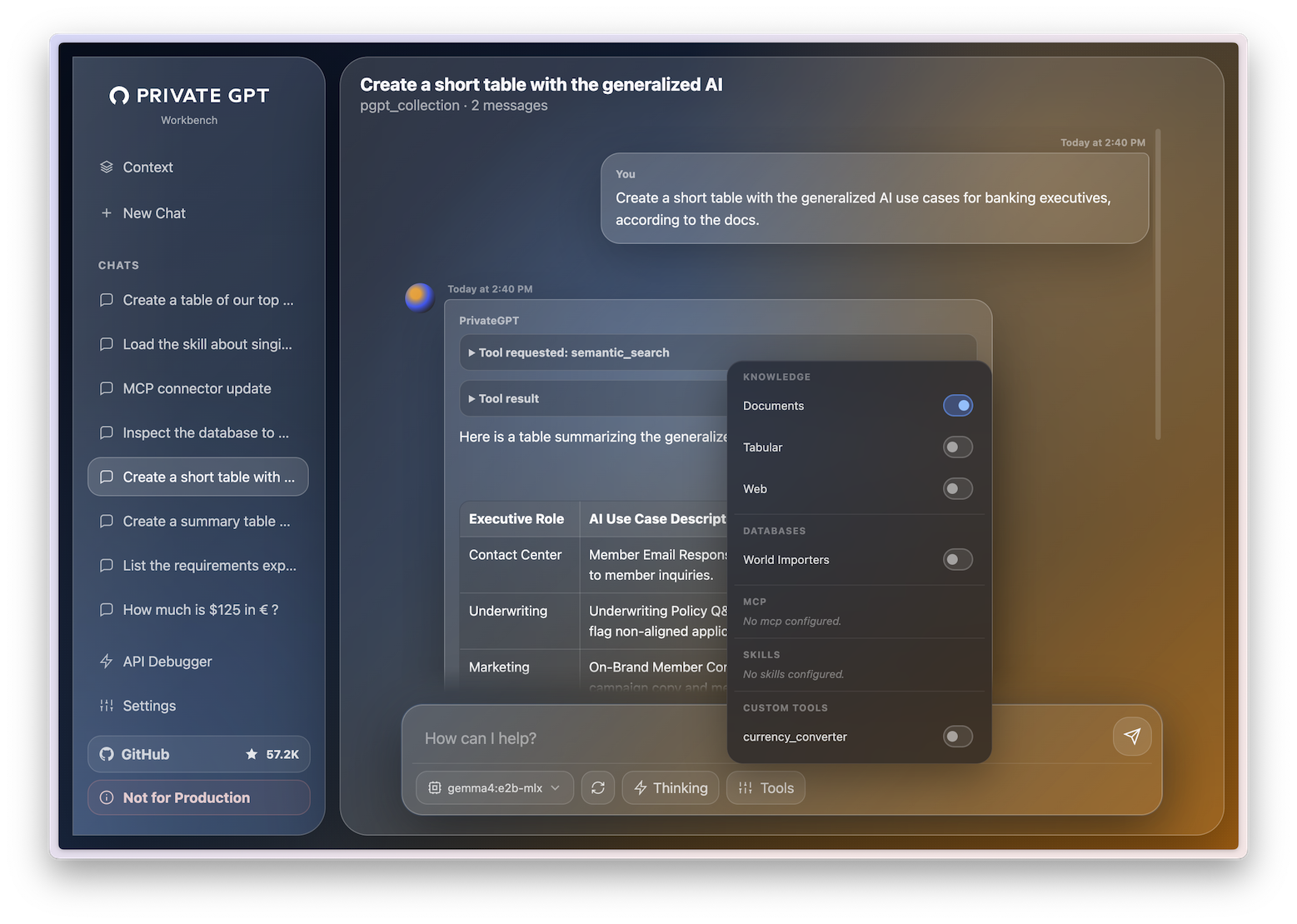
What is private-gpt?
PrivateGPT is an Apache-2.0 application layer for building private AI products on models you host yourself. It never runs inference on its own: you point it at an OpenAI-compatible server — Ollama, LM Studio, llama-server, vLLM or a hosted gateway — through OPENAI_API_BASE, and every model that server reports is registered at startup. What it adds on top is a Claude-style REST API: messages with streaming, background jobs, token counting, embeddings, file and PDF ingestion, citations on retrieved answers, a code-execution sandbox, web search and page fetch, custom tools, remote MCP servers, versioned skills, and built-in querying of SQL databases plus CSV files. The project states plainly that the API is the deliverable and you write the client software; the bundled Workbench served at /ui (chat, uploads, retrieval tests, tool/database/MCP configuration, request debugger) exists for demos and local poking around, keeps chats and settings only inside the client's own storage, and ships without any login, so it belongs on a trusted network. Configuration is a settings.yaml file plus layered settings-{name}.yaml profiles selected with PGPT_PROFILES, and almost every knob is also reachable as an environment variable. Run it with the zylonai/private-gpt container on port 8080, with Homebrew on macOS, or with uv on Linux and Windows, where private-gpt serve brings up the HTTP API and private-gpt worker brings up Celery or ARQ job processing. Retrieval uses Qdrant, which defaults to an on-disk instance (a separate Qdrant server is advised for anything production or multi-instance), and application data such as skill bundles can live in S3-compatible object storage instead of the local filesystem. Version 1.0 is a full rewrite of the 2023 document-chatting original, maintained by the Zylon team, whose commercial platform supplies the enterprise pieces this layer leaves out: LDAP/Active Directory, RBAC, Kubernetes packaging, SIEM audit logs and SharePoint or Confluence connectors.
Should you self-host private-gpt?
private-gpt scores 80/100 on selfhost.directory (how scoring works) and ranks #1 of 7 in LLM Integration. It has 57 630 GitHub stars, +78 in the last 30 days.
It shipped 2 stable releases in the past year. The latest, v1.0.1, came out on 18 June 2026. New versions land roughly every 2 weeks.
Setup is easy: most people get it running in one sitting. An official Docker image is available. It is Apache-2.0-licensed and written mostly in Python.
Its closest alternative on selfhost.directory is Omni (53/100, 819 stars). private-gpt scores higher overall. See private-gpt vs Omni side by side.
Features
- Async / batch message processingRequires a worker (ARQ or Celery).
- Claude/Anthropic-compatible REST API
- Code Execution
- CSV / tabular analysis
- Custom Tools
- Document & PDF ingestion
- Embeddings
- MCP Support
- Model auto-discovery
- RAG with citations
- Streaming Responses
- Web fetch / page extraction
- Workbench UIDemonstrator only, stored in browser localStorage and without access control.
private-gpt README

PrivateGPT is the open-source API layer that turns local models into production AI applications.

Running a model locally is only the first step. To build useful AI applications you need a set of higher-level building blocks. PrivateGPT provides that layer as an open-source API following the Claude API model — so you can build private AI products without rebuilding the same backend primitives from scratch, and without depending on cloud APIs.
Production-tested: PrivateGPT powers Zylon, the on-premise AI platform providing Private AI to enterprises across the globe.
Your app / agent / workflow / UI
              |
        PrivateGPT API
              |
OpenAI-compatible inference server (Ollama, llama.cpp, vLLM, …)
PrivateGPT does not run models itself. It connects to any OpenAI-compatible inference server via
OPENAI_API_BASE. If it implements/v1/chat/completionsand/v1/models, it works.
PrivateGPT ships a built-in workbench UI for testing and demos, available at /ui. The API is the actual product.
- Standard messages API (streaming, async, token counting)
- File and artifact ingestion
- Retrieval with citations and agentic RAG
- Built-in tools mirroring the Claude API (web search, web fetch, code execution)
- Custom tools and MCP connectors
- Structured access to databases and CSVs
- Embeddings and orchestration
For Docker, full installation options, and model configuration see the full Quickstart guide.
Prerequisites: You need a running OpenAI-compatible LLM server. Ollama is the easiest starting point.
1. Install PrivateGPT
# macOS
brew tap zylon-ai/tap
brew install private-gpt
# Linux curl -LsSf https://astral.sh/uv/install.sh | sh uv tool install --python 3.11 \ --find-links https://wheels.privategpt.dev/packages/ \ "private-gpt[core]"
# Windows
powershell -ExecutionPolicy ByPass -c "irm https://astral.sh/uv/install.ps1 | iex"

uv tool install --python 3.11 `
  --find-links https://wheels.privategpt.dev/packages/ `
  "private-gpt[core]"
2. Start your LLM server
# Example with Ollama
ollama pull qwen3.5:35b         # LLM (~24 GB)
ollama pull mxbai-embed-large   # Embeddings (~670 MB)
ollama serve
3. Run PrivateGPT
# macOS / Linux
OPENAI_API_BASE=http://localhost:<llm-port>/v1 \
  OPENAI_EMBEDDING_API_BASE=http://localhost:<embedding-port>/v1 \
  private-gpt serve
# Windows (PowerShell)
$env:OPENAI_API_BASE = "http://localhost:<llm-port>/v1"
$env:OPENAI_EMBEDDING_API_BASE = "http://localhost:<embedding-port>/v1"
private-gpt serve
4. Open the UI
Go to http://localhost:8080/ui. The API is at http://localhost:8080 and follows the Anthropic API spec.

The UI is useful for:
- Sending messages.
- Selecting models from /v1/models.
- Uploading documents.
- Testing retrieval with citations.
- Enabling tools per chat.
- Configuring databases, MCP connectors, skills, and custom tools.
- Inspecting requests and responses through the API Debugger.
This UI is a demonstrator, not the core product. Developers are expected to build their own applications on top of the API. That said, the UI is intentionally polished enough for demos, videos, internal pilots, and quick local usage.
 Claude Desktop / Cowork |
 Microsoft Excel Claude add-in |
 Microsoft Word Claude add-in |
 n8n |
 OpenCode |
 PrivateGPT Workbench |
PrivateGPT works natively as the local backend for the tools developers and end users already use.
| Integration Guide | What it enables |
|---|---|
| Claude Code | Use your local models as the backend for agentic coding in the terminal |
| Claude Desktop / Cowork | Connect the Claude desktop app and Cowork to your private models |
| Claude for Microsoft 365 | Run private AI inside Word, Excel, Outlook, and PowerPoint |
| OpenCode | Local AI coding assistant in the terminal |
Any tool that works with a local OpenAI-compatible provider will also work with PrivateGPT. The list below is non-exhaustive.
| Tool | Link |
|---|---|
| n8n | n8n.io |
| OpenClaw | openclaw.ai |
| Hermes Agent | hermes-agent.dev |
| VS Code | code.visualstudio.com |
| Cline | cline.bot |
PrivateGPT follows the Claude API as the reference for modern AI application APIs. The goal is full coverage where it makes sense for a local, open-source layer.
| Area | Capability | Claude API | PrivateGPT |
|---|---|---|---|
| Models | Model selection | ✅ | ✅ |
| Messages | Messages API | ✅ | ✅ |
| Messages | Streaming | ✅ | ✅ |
| Messages | Batch / async processing | ✅ | ✅ async |
| Messages | Token counting | ✅ | ✅ |
| Knowledge | Files / artifacts | ✅ | ✅ |
| Knowledge | PDF and document ingestion | ✅ | ✅ |
| Knowledge | Retrieval with citations | ✅ | ✅ |
| Knowledge | Embeddings | ✅ | ✅ |
| Tools | Tool use | ✅ | ✅ |
| Tools | Tools in streaming | ✅ | ✅ |
| Tools | Built-in web search | ✅ | ✅ |
| Tools | Web extraction / fetch | ✅ | ✅ |
| Tools | Custom tools | ✅ | ✅ |
| Data | Database querying | Via tools | ✅ built-in |
| Data | CSV / tabular analysis | Via tools / code | ✅ built-in |
| Agents | MCP in the API | ✅ | ✅ |
| Agents | Remote MCP servers | ✅ | ✅ |
| Agents | Skills | ✅ | ⚙️ basic |
| Output | Structured outputs | ✅ | ✅ inference-dependent |
| Models | Vision | ✅ | ✅ model-dependent |
| Optimization | Prompt caching | ✅ | ❌ |
| Reasoning | Extended thinking | ✅ | ✅ |
| Platform | Token-based auth | ✅ | ✅ |
| Platform | OAuth / organizations | ✅ | ❌ |
✅ Supported · ⚙️ Partial / in progress · ❌ Not supported
Contributions are especially welcome in ⚙️ areas.
PrivateGPT started as a proof of concept in 2023: a script that let you chat with your documents, fully offline, with no data leaving your machine. It went viral on GitHub, crossed 50K stars, and became one of the most-watched AI repos of that year.
That early version made one thing clear: there was serious demand for private, local AI that worked without cloud dependencies.
PrivateGPT 1.0 is the evolution of that idea — rebuilt from the ground up as a proper API layer for private AI applications.
More in LLM Integration
 R2RSelf-hosted agentic RAG system with a RESTful API: multimodal ingestion, hybrid search, knowledge graphs, a Deep Research agent, and user & access management.
 ragSelf-hosted, open-source retrieval-augmented generation chat app on txtai and Streamlit: vector RAG plus graph path queries, with your own LLM.
 Resume-MatcherSelf-hosted, open-source AI resume builder that tailors a master resume to each job description with Ollama or any major LLM provider, then exports ATS-friendly PDFs.
 riskkernelRiskKernel is an open-source, self-hosted runtime for AI agents that enforces spending caps, iteration limits, and time bounds with crash recovery and approval gates.
 RouterlySelf-hosted LLM gateway routing requests across AI providers with multi-policy scoring, cost tracking, budget enforcement, and zero infrastructure dependencies.
 Serena-MCPSelf-hosted, open-source MCP toolkit that gives AI coding agents IDE-level symbol retrieval, editing, refactoring and debugging across 40+ languages.
 SimOpen-source, self-hosted AI workspace for teams designing, launching and observing agent workflows, with 1,000+ app connectors, tables, knowledge bases and run logs.
 SourcebotSelf-hosted code search, symbol navigation and AI Q&A spanning every repository you index, with an MCP server that supplies coding agents full codebase context.
 supermemorySelf-hosted AI memory and context server: Supermemory Local extracts facts, builds user profiles, and blends RAG with memory search through one API on port 6767.
 TaskingAIAn open-source, self-hosted BaaS stack for building LLM agents: unified model APIs, RAG, built-in tools and an admin console, deployed with Docker Compose.
 taskview-communitySelf-hosted, source-available project and task manager for software teams: Kanban, dependency graphs, RBAC, SSO, time tracking and an MCP server.
 Theia IDESelf-hosted, open-source alternative to VS Code and GitHub Copilot: a Theia-platform IDE with bring-your-own-key AI, VS Code extensions and desktop or browser deployment.
0 comments