
Self-host Organizr
1.90HTPC and homelab services organizer dashboard
- Stars
- 5 827
- Port
- 80 (HTTP web interface)
ghcr.io/organizr/organizr


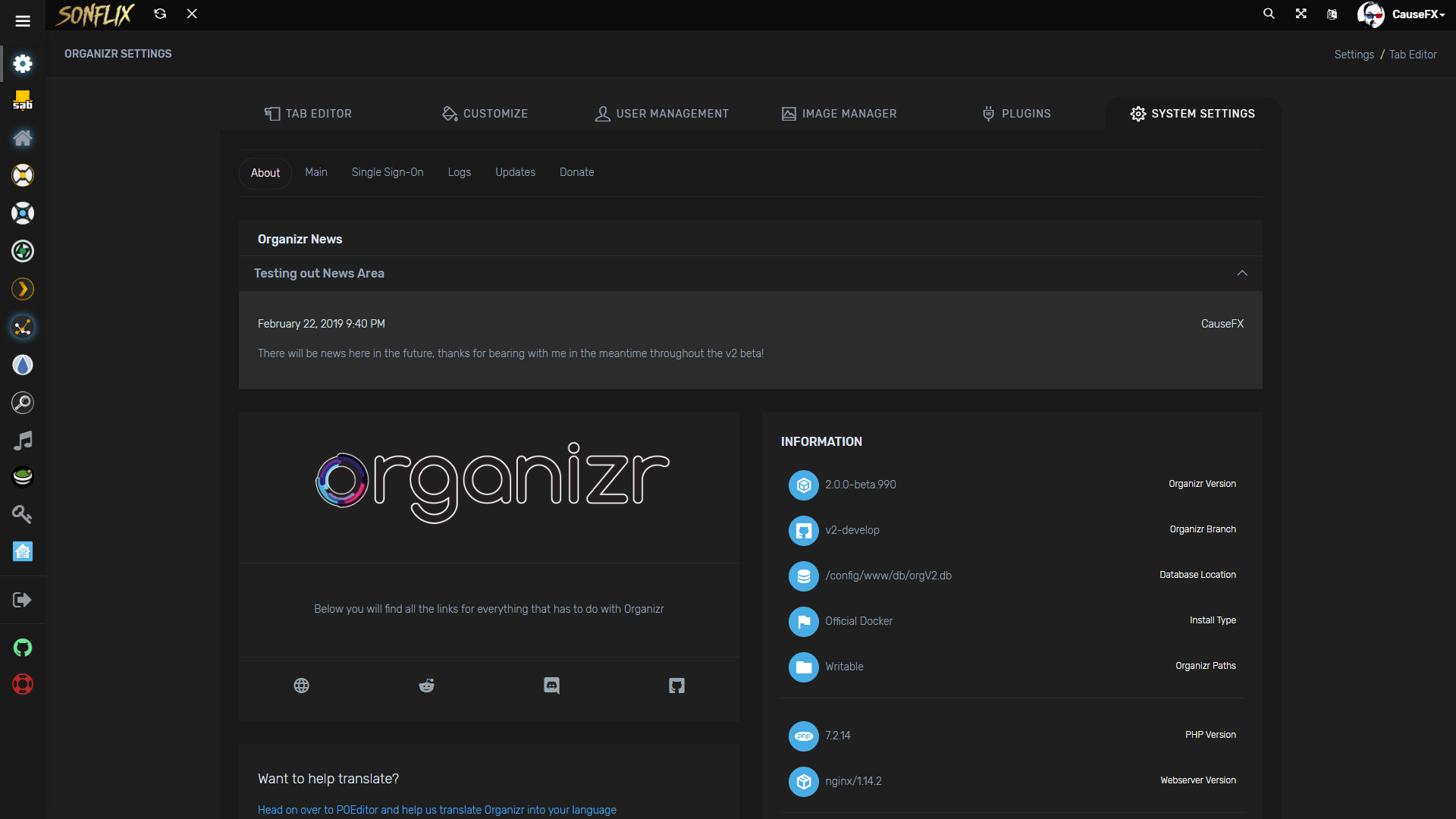
What is Organizr?
Organizr is a PHP-based web application designed to organize multiple HTPC and homelab services into a single customizable dashboard. It allows users to create tabs for various services like Plex, Sonarr, Radarr, CouchPotato, and more. The software supports user management with built-in backend or external authentication via LDAP, Plex, Emby, or sFTP credentials. It runs easily via Docker Compose or manual installation on Linux/Windows systems with Nginx/Apache and PHP.
Organizr alternatives
 lab-dashSelf-hosted dashboard for managing homelab applications with customizable grid layout, service health checks, and PWA support.Comparelab-dash with Organizr
 HomelabARR CEA free, open-source dashboard for one-click deployment of 100+ self-hosted apps like Plex, Jellyfin, and Sonarr on your own Linux server via Docker Compose.CompareHomelabARR CE with Organizr
 Heimdall Application DashboardAn Application dashboard and launcherCompareHeimdall Application Dashboard with Organizr
 HomarrSelf-hosted, open-source homelab dashboard with 80+ service integrations, drag-and-drop boards, built-in OIDC/LDAP auth and a Docker Compose or Helm deployment.CompareHomarr with Organizr
 homescreen-heroSelf-hosted Plex companion automating homescreen rotation with smart groups, per-user targeting, and third-party list sync. Web dashboard with widgets and Plex tools.Comparehomescreen-hero with Organizr
 DasherrDasherr is a self-hosted, open-source dashboard for organizing homelab services with a responsive UI, themes, Glances widgets, and a JSON config with built-in editor.CompareDasherr with Organizr
 arr-dashboardSelf-hosted open-source dashboard for *arr stack, Plex, Jellyfin, Emby, Seerr with global search, library cleanup, TRaSH Guides sync, automated hunting.Comparearr-dashboard with Organizr
 yantrYantr is a self-hosted homelab app store running as a rootless Podman container alongside your Linux OS — no appliance, no root daemon, ~140 MB RAM at idle.Compareyantr with Organizr
Should you self-host Organizr?
Organizr scores 58/100 on selfhost.directory (how scoring works) and ranks #8 of 12 in Web Servers. It has 5 827 GitHub stars, +8 in the last 30 days.
There was no stable release in the past 12 months, so check the repository's recent activity before you rely on it.
Setup is moderate: expect some configuration beyond a single command. An official Docker image is available. It is GPL-3.0-licensed and written mostly in PHP.
Its closest alternative on selfhost.directory is Caddy (89/100, 78 948 stars). It scores higher overall, so compare the two before you pick. See Organizr vs Caddy side by side.
Features
- Custom themes
- Fail2ban Integration
- Gravatar support
- LDAP Authentication
- Multiple login support
- Plex/Emby authentication
- User Management
Organizr README


More in Web Servers
 Static Web ServerA cross-platform, high-performance and asynchronous web server for static files-serving. ⚡
- SurferSurfer is a simple static file server with a web interface and CLI tool for managing files. It supports WebDAV, SFTP, password protection, and dark mode.
 turbocloud-agentTurboCloud Agent is an open-source, self-hosted PaaS for deploying web apps to any Ubuntu 22.04 server with built-in WAF, VPN, load balancing, and CI/CD.
 Vinyl CacheVinyl Cache is a web application accelerator also known as a caching HTTP reverse proxy. It is designed to be installed in front of any server that speaks HTTP and configured to cache the contents, significantly speeding up delivery.
 webdavSelf-hosted, open-source WebDAV server written in Go: basic auth with bcrypt hashes, fine-grained read/create/update/delete rules, built-in TLS, and Docker images.
 WsgiDAVOpen-source, self-hosted WebDAV server written in Python on WSGI: share folders from the command line with SSL, Basic/Digest auth, and a browser directory listing.
 aapanelSimple but Powerful web-based Control Panel
 AgateLightweight self-hosted Gemini server in Rust serving static files with auto TLS certs, virtual hosting, and directory listings.
 AlgernonSelf-hosted, open-source all-in-one Go web server that runs Lua and Teal pages, renders Markdown and templates, and uses Redis or built-in Bolt.
- Apache HTTP ServerApache HTTP Server (httpd) is a fast, reliable, and extensible open-source web server for modern operating systems, supporting virtual hosts, reverse proxy, load balancing, TLS/SSL, HTTP/2, and dynamic module loading.
 CaddyFast and extensible multi-platform HTTP/1-2-3 web server with automatic HTTPS
 CaddyManagerCaddyManager is a self-hosted, open-source web UI for managing multiple Caddy2 servers with SQLite/MongoDB, JWT auth, API keys, audit logs, and Prometheus metrics.
0 comments