
Self-host openvscode-server
openvscode-server-v1.109.5Run VS Code in a browser on your own server
- Stars
- 6 206
- Port
- 3000 (HTTP web interface)
gitpod/openvscode-server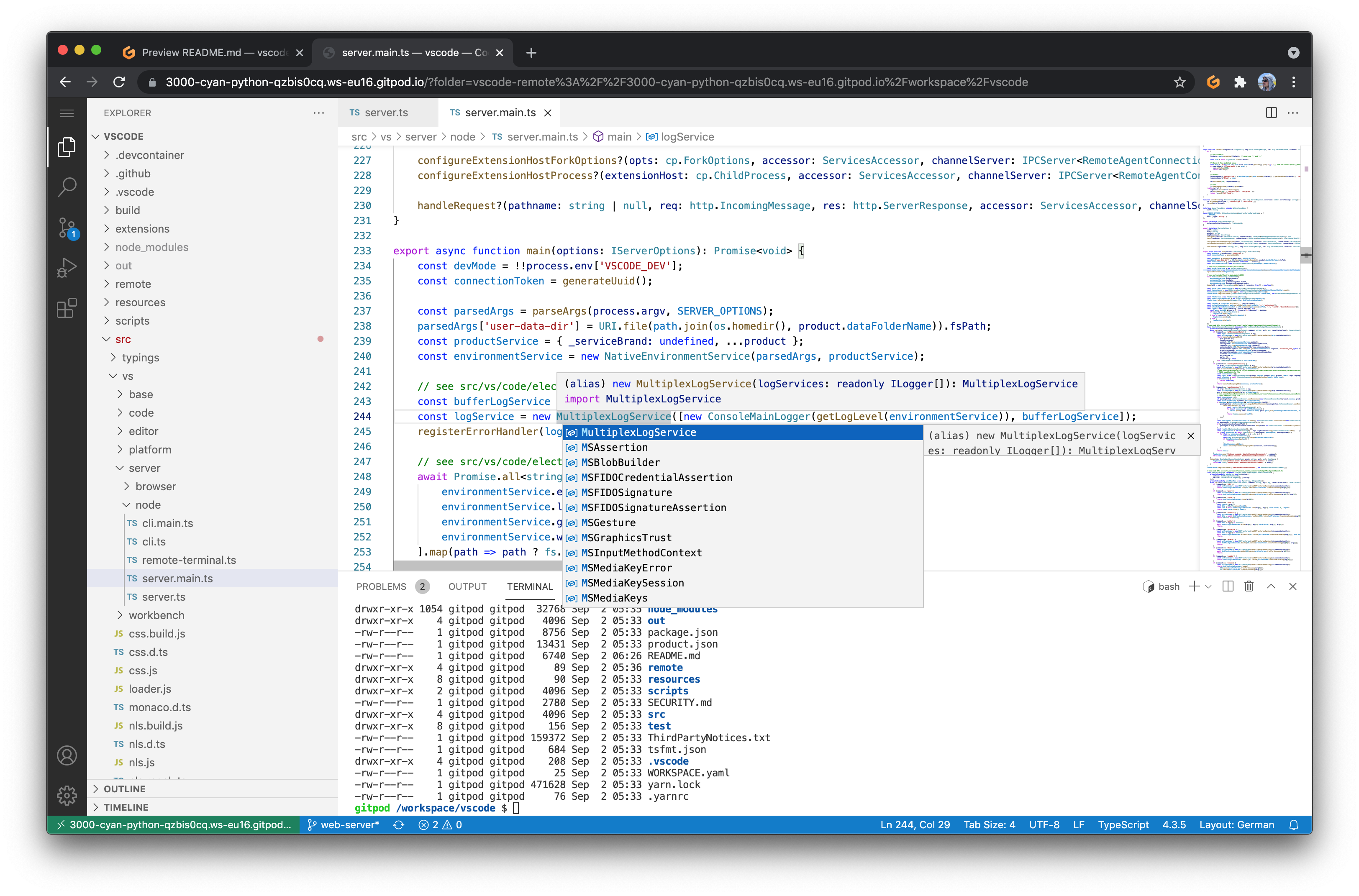
What is openvscode-server?
OpenVSCode Server lets you run Visual Studio Code as a web-accessible service on your own infrastructure. It packages the upstream VS Code server components with minimal changes so you get a familiar IDE experience — file explorer, terminal, extensions, debugging, and language support — entirely in the browser. The project provides official Docker images and Linux tarball releases, making it straightforward to deploy on any server or cloud VM. Authentication is handled via an optional connection token. It's built and maintained by Gitpod and used as the foundation for their cloud IDE platform.
openvscode-server alternatives
 GitWitGitWit is a self-hosted, open-source AI coding platform with a browser-based IDE, live preview, AI chat, and support for Anthropic, OpenAI, and AWS Bedrock.CompareGitWit with openvscode-server
 CoderCoder is an open-source, self-hosted control plane for remote dev environments and AI coding agents, with Terraform-defined workspaces and WireGuard-secured access.CompareCoder with openvscode-server
 pad.wsWhiteboard as an IDE, draw and code in your browserComparepad.ws with openvscode-server
 Open TerminalA self-hosted, open-source terminal server exposing a real remote shell and file APIs over REST for AI agents and automation; deploy via Docker, pip, or uvx.CompareOpen Terminal with openvscode-server
 CodinIT.devSelf-hosted open-source AI full-stack dev platform for building Node.js apps with code generation and 19+ AI providers.CompareCodinIT.dev with openvscode-server
 Theia IDESelf-hosted, open-source alternative to VS Code and GitHub Copilot: a Theia-platform IDE with bring-your-own-key AI, VS Code extensions and desktop or browser deployment.CompareTheia IDE with openvscode-server
 electerm-webelecterm-web is a self-hosted, open-source web terminal and SSH/SFTP client with AI assistance, multi-language support, cloud sync, and responsive mobile design.Compareelecterm-web with openvscode-server
 poolPool is a self-hosted AI coding agent for terminal and ACP-compatible editors, supporting Poolside Platform, OpenRouter, Ollama, and OpenAI-compatible APIs.Comparepool with openvscode-server
Should you self-host openvscode-server?
openvscode-server scores 69/100 on selfhost.directory (how scoring works) and ranks #19 of 167 in Developer Tools. It has 6 206 GitHub stars, +22 in the last 30 days.
It shipped 3 stable releases in the past year. The latest, openvscode-server-v1.109.5, came out on 20 February 2026. New versions land roughly every 6 weeks.
Setup is easy: most people get it running in one sitting. An official Docker image is available. It is MIT-licensed and written mostly in Typescript.
Its closest alternative on selfhost.directory is openhands (87/100, 93 428 stars). It scores higher overall, so compare the two before you pick. See openvscode-server vs openhands side by side.
Features
- Browser-based IDE
- Built-in terminal
- Connection token authentication
- Language Support
- Linux binary releases
- Remote development
- Upstream VS Code compatibility
- VS Code extensions support
openvscode-server README
This project provides a version of VS Code that runs a server on a remote machine and allows access through a modern web browser. It's based on the very same architecture used by Gitpod or GitHub Codespaces at scale.
More in Developer Tools
 OpenWASelf-hosted, open-source WhatsApp API gateway: a REST API plus web dashboard with multi-session support, webhooks and swappable SQLite/PostgreSQL backends.
 open-wearablesOpen-source, self-hosted wearable data platform that unifies Garmin, Oura, Whoop and Apple Health behind one REST API, with webhooks, a portal and an MCP server.
 OperantOperant is a self-hosted AI agent runtime for macOS/Linux that lets multiple LLMs collaborate on coding with hierarchical approval, memory, and a visual workflow editor.
 OperationalSelf-hosted event tracking tool for tech products that sends push notifications for critical events like signups, cronjobs, and webhooks.
 OpikOpik is an open-source, self-hostable LLM observability platform with tracing, evaluation, and production monitoring.
 OrbiOrbi is an open-source, self-hosted software delivery system that turns labeled GitHub Issues into independently reviewed, merged PRs and tagged releases using AI agents.
 orbitSelf-hosted AI gateway connecting private data to local or hosted LLMs via one OpenAI-compatible API with built-in auth, quotas, audit logs, and admin UI.
 orbiterSelf-hosted CMS for Astro with all content in one SQLite file. Standalone admin on port 4322, desktop app, Git sync for static hosting.
 orcOrc Master is a self-hosted, open-source bridge to control local Codex AI agents from Telegram or Slack with session persistence and multi-agent routing.
 OrcaSelf-hosted, open-source agent IDE that runs Claude Code, Codex, or any CLI coding agent in parallel git worktrees on desktop or a headless orca serve server.
 OrcaQOrcaQ is a self-hosted, open-source database editor for PostgreSQL, MySQL, MariaDB, Oracle, SQLite, and Redis with AI-assisted querying and a dark native workspace.
 ORG-2Open-source, self-hosted desktop app that records coding-agent sessions as replayable trajectories, with a Rust harness, launchers for 20+ CLIs, and team review.
0 comments