
Self-host OpenMausBot
v0.1.149Chat app for your own team of local AI agent bots
npm install -g openmausbot- Stars
- 17 912
- CPU
- 2 CPUs
- RAM
- 4 GB of RAM
- Ports
- 8799 (Harness server (HTTP + SSE API and the web UI); the compose stack sets OMB_PORT 8799 on loopback), 8800 (Webhook-only receiver for routine triggers), 80 (Public HTTP(S) entry of the Docker stack, terminated by Caddy running in the server's network namespace), 443 (TLS entry of the Docker stack (Caddy forwards to the loopback server))
- Requires
- Agent engine CLI (Claude Code, Codex or Grok), Node.js
ghcr.io/milind-soni/openmausbot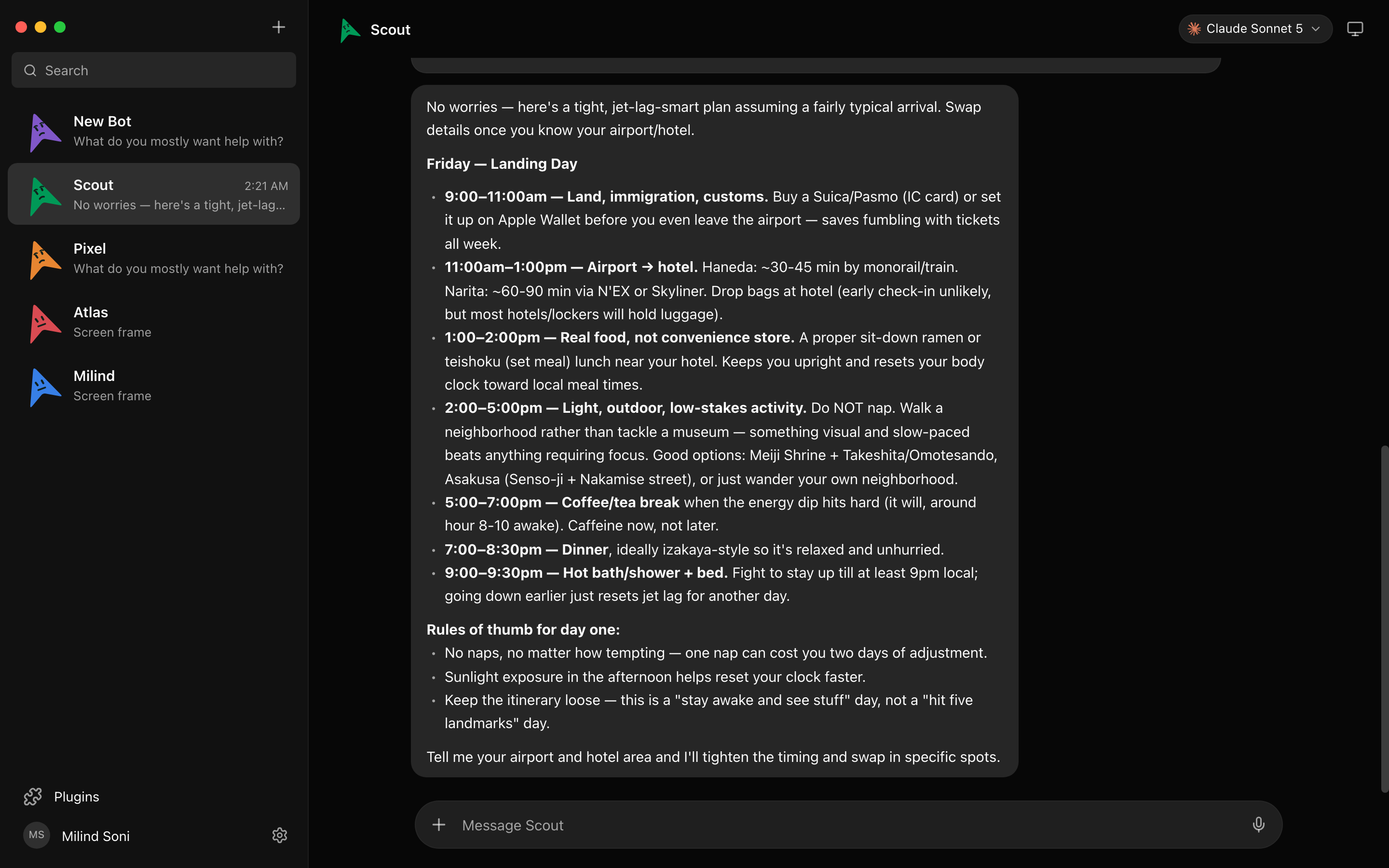
What is OpenMausBot?
OpenMausBot (also known as MausBot) is an Apache-2.0 chat app in which every contact is an autonomous AI agent, pitched as the open replacement for xAI's Grok Bot as well as Meta's Muse, OpenAI's dots, Manus's Cue and Instinct AI. Bots drive CLI engines you already own — claude, codex or grok, plus custom ACP or OpenAI-compatible back ends — and each one keeps its own model, persona, computer and connected apps. Dangerous steps such as shell commands or file edits wait for you as in-chat approve cards. A bot may work on a cloud Linux desktop from Boat, in an isolated local VM, or on your own screen where the platform safety gate is certified. Separate channels split work, personal and project contexts; routines run on calendars or webhook triggers; a complete team of bots travels as one Markdown file; and answers can be read aloud or held as voice calls. Self-hosting means signed desktop builds for macOS, Windows and Ubuntu with the harness baked in, an openmausbot npm package needing Node 24+ for a terminal or VPS, a Docker Compose stack on the published ghcr image with Caddy handling HTTPS, Tailscale or a managed tunnel, or a from-source install. Phones and browsers attach through pairing codes, and transcripts plus keys remain under ~/.openmausbot. The maintainer flags it as early but real: calls stay macOS-only, Ubuntu is beta, and hosted or mobile connectivity is unfinished. Free app, optional paid MausBot Cloud tiers, and a source-available enterprise/ directory.
Should you self-host OpenMausBot?
OpenMausBot scores 82/100 on selfhost.directory (how scoring works) and ranks #8 of 209 in AI Agents. It has 17 912 GitHub stars, +12 612 in the last 30 days.
It shipped 40 stable releases in the past year. The latest, v0.1.149, came out on 8 November 2026. New versions land roughly every 1 days.
Setup is moderate: expect some configuration beyond a single command. An official Docker image is available. It is Apache-2.0-licensed and written mostly in Typescript.
Its closest alternative on selfhost.directory is Rakazo (82/100, 7 525 stars). OpenMausBot scores higher overall. See OpenMausBot vs Rakazo side by side.
Features
- Action approval cardsApproval coverage depends on the engine and tool.
- AI agent chat (bots as contacts)
- Bring-your-own agent CLI engines
- Channels per context
- Computer use (cloud desktop / local VM / host control)Host control is opt-in on macOS and Ubuntu Xorg; disabled on Ubuntu Wayland.
- Connected apps marketplaceRequires an optional Composio project key.
- Headless CLI for scripts and CI
- Local-first storage with optional anonymous analytics
- MCP server for external orchestrationDoes not expose approval grants, deletion, settings, credentials or computer lifecycle.
- Multilingual UI (10 languages)Some translations are still incomplete.
- Per-bot model selection
- Scheduled and webhook-triggered routinesWebhook delivery uses the local receiver, not an always-on hosted relay.
- Server deployment with device pairing
- Team sharing and import
- Voice replies and callsCalls are macOS-only for now; hosted voices need an API key.
OpenMausBot README
The open-source Grok Bot alternative: your own team of AI bots, in a chat app.
openmausbot.com · Download · Open source Grok Bot alternative, compared
OpenMausBot is an open-source Grok Bot alternative: an independent project inspired by Grok Bot, and the open-source alternative to Meta Muse, OpenAI dots and Cue by Manus — bring-your-own-agent, local-first, on the models you already have. Also known as MausBot; formerly OpenGrokBot. Not affiliated with xAI, Meta, OpenAI or Manus.
Every bot in the sidebar is a real agent — Claude or Codex running locally under the hood — with its own personality, its own model, its own cloud computer, and its own connected apps. Talk to them like contacts. Watch them work. Approve what matters.
latest release · macOS: Apple silicon & Intel · signed & notarized .dmg · Windows: x64 installer · Ubuntu 24.04 x64: .deb or AppImage beta · all releases
Powered by boat.dev


⚠️ No affiliation with any cryptocurrency. OpenMausBot has no token. Any coin using the OpenMausBot, Maus, or SupaMaus name is not created, endorsed, or affiliated with this project or its maintainer. I have received no tokens, payment, or allocation from anyone, and I will not be endorsing any token.
One assistant in one box is the wrong shape for agents. OpenMausBot is an independent, open-source project inspired by Grok Bot — it keeps the idea (AI as a messaging app: a roster of bots you chat with, each with its own personality, memory of its thread, model, computer, and apps) and rebuilds it open, local-first, and on the agents you already have:
- Bring your own agents. Bots run on the
claude,codex, andgrokCLIs installed on your own machine — your existing logins and subscriptions, no new accounts, no proxy in the middle. Point any engine at a custom CLI binary (a versioned build or wrapper) in Settings → Engines. - Local first. One small harness server on
127.0.0.1owns every agent process. Transcripts, keys, and events live in~/.openmausbot, not a cloud. - Agents with hands. Each bot can use a cloud Linux desktop, an isolated Local VM, or—where the platform safety boundary is currently certified—your own computer, plus 500+ apps through Composio. Host control is available on macOS and Ubuntu Xorg after explicit opt-in. Ubuntu Wayland host control remains disabled while issue #345 is resolved.
Four closed personal-agent products shipped in seven weeks of 2026, and each one keeps the model, the computer and your data on its maker's side of the line. OpenMausBot is the open-source version of that shape: a team of agents in a chat app, each with its own model, its own computer and its own connected apps, running on your machine under Apache 2.0. If you searched for an open Muse, open dots, an open-source Grok Bot, an open Instinct or an open Cue, this is the repository.
| Looking for | What it is | How OpenMausBot differs | Read more |
|---|---|---|---|
| Open source Grok Bot | xAI's roster of bots on one shared cloud computer, Grok only, from a SuperGrok or Cursor plan | Same roster shape; any model per bot; your own machine; approval cards | Grok Bot vs OpenMausBot |
| Open Muse | Meta's single personal agent in a Meta cloud VM, US and Canada only | A team instead of one agent; runs anywhere; data in ~/.openmausbot |
Meta Muse alternative |
| Open dots | OpenAI's always-on agent inside ChatGPT, GPT only, Pro and Business Premium plans | Several agents; your Claude, ChatGPT or Grok login; no plan required | OpenAI dots alternative |
| Open Cue | Manus's invite-only agents with their own phone, email and wallet | No invite; OAuth instead of passwords; open source | Cue by Manus alternative |
| Open Instinct | Spear Street's invite-only agent that holds your passwords on a cloud computer | Ask for approval when you want it; signs in over OAuth; your machine | Instinct AI alternative |
All five side by side: Muse vs Grok Bot vs Dots vs Cue, and a decision guide in five questions: Which AI agent should I use?
|
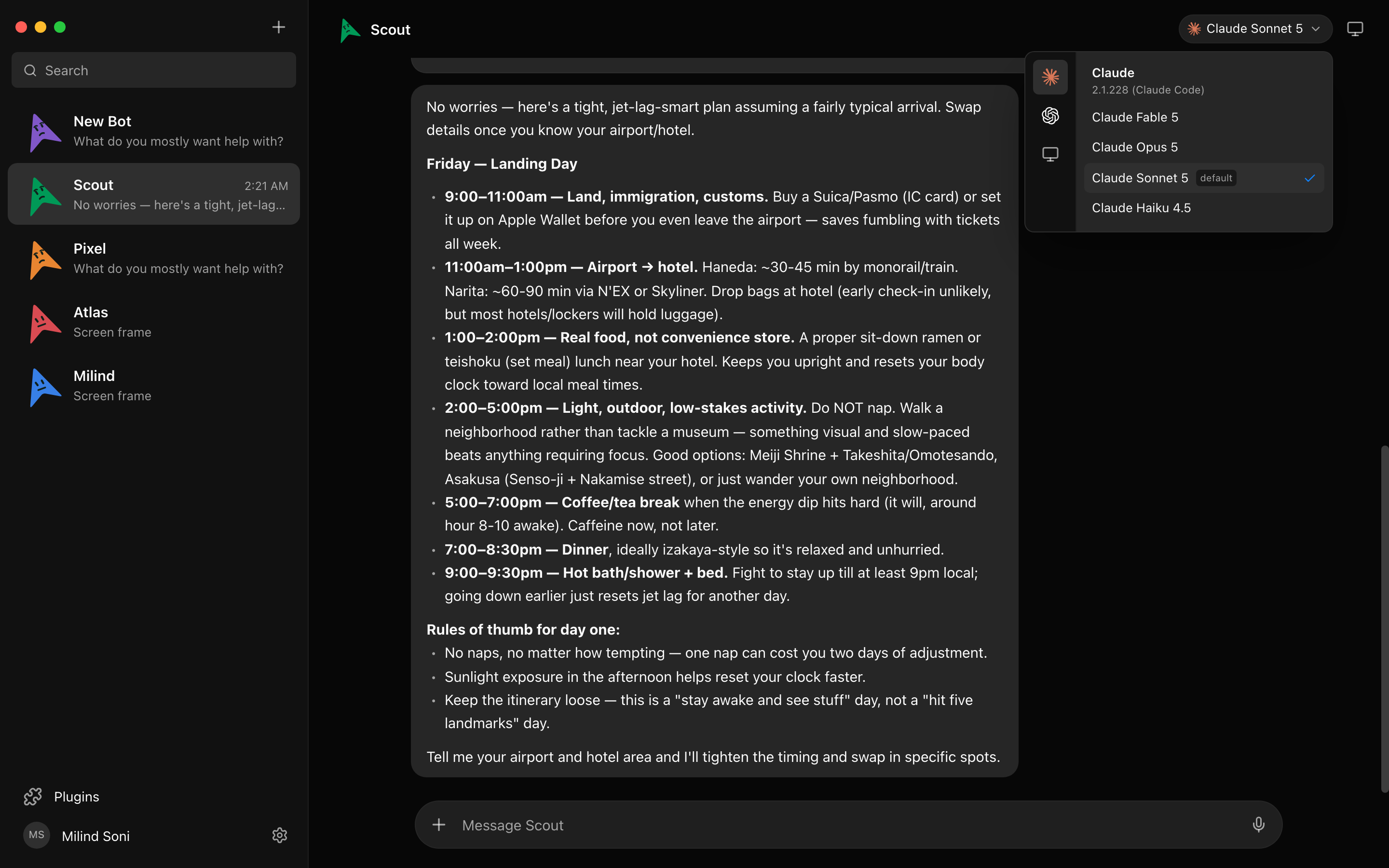
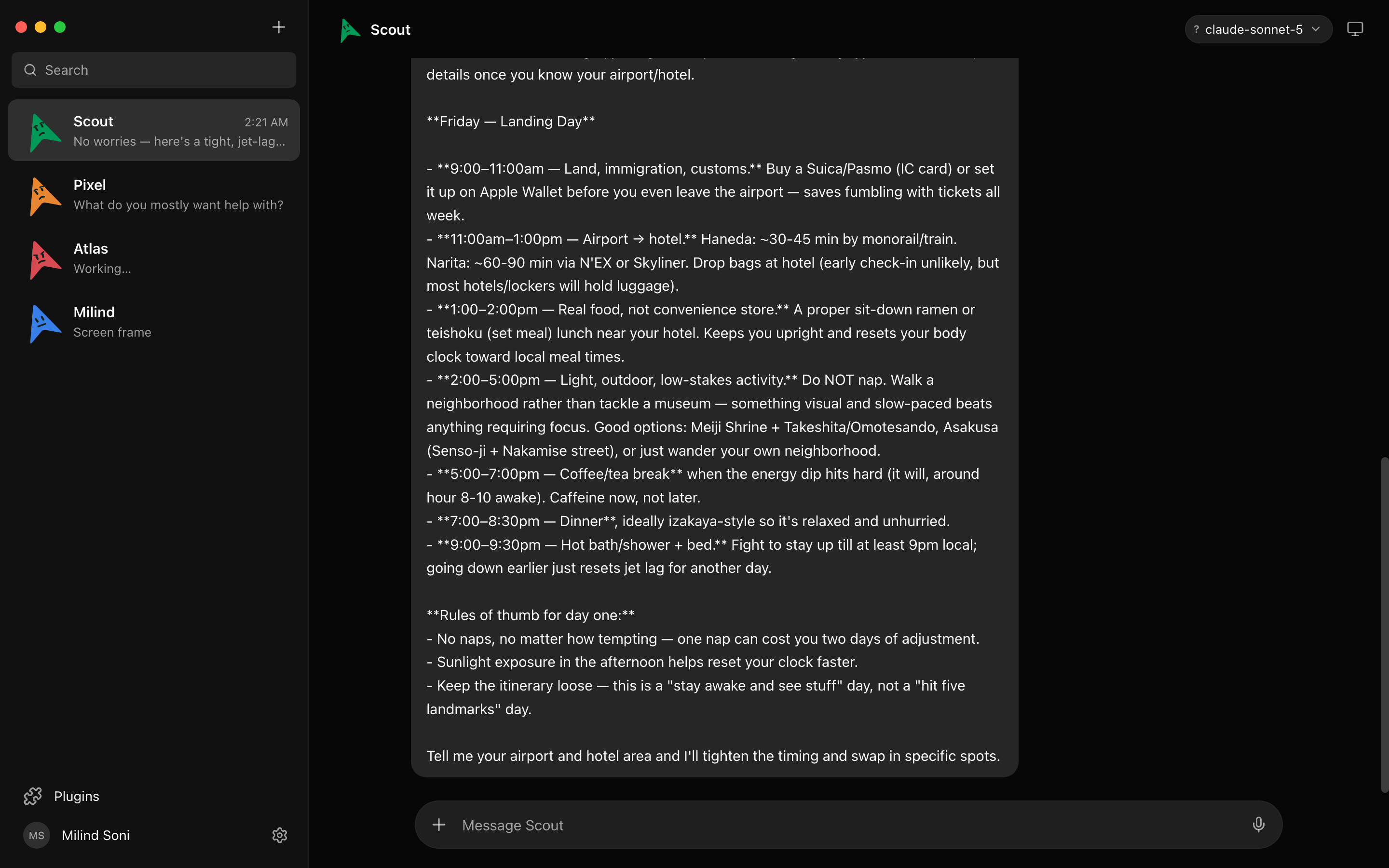
A model picker with a provider rail — Claude and Codex models side by side, defaults marked, unavailable providers dimmed with the reason. Switch a bot's model mid-conversation. 
|
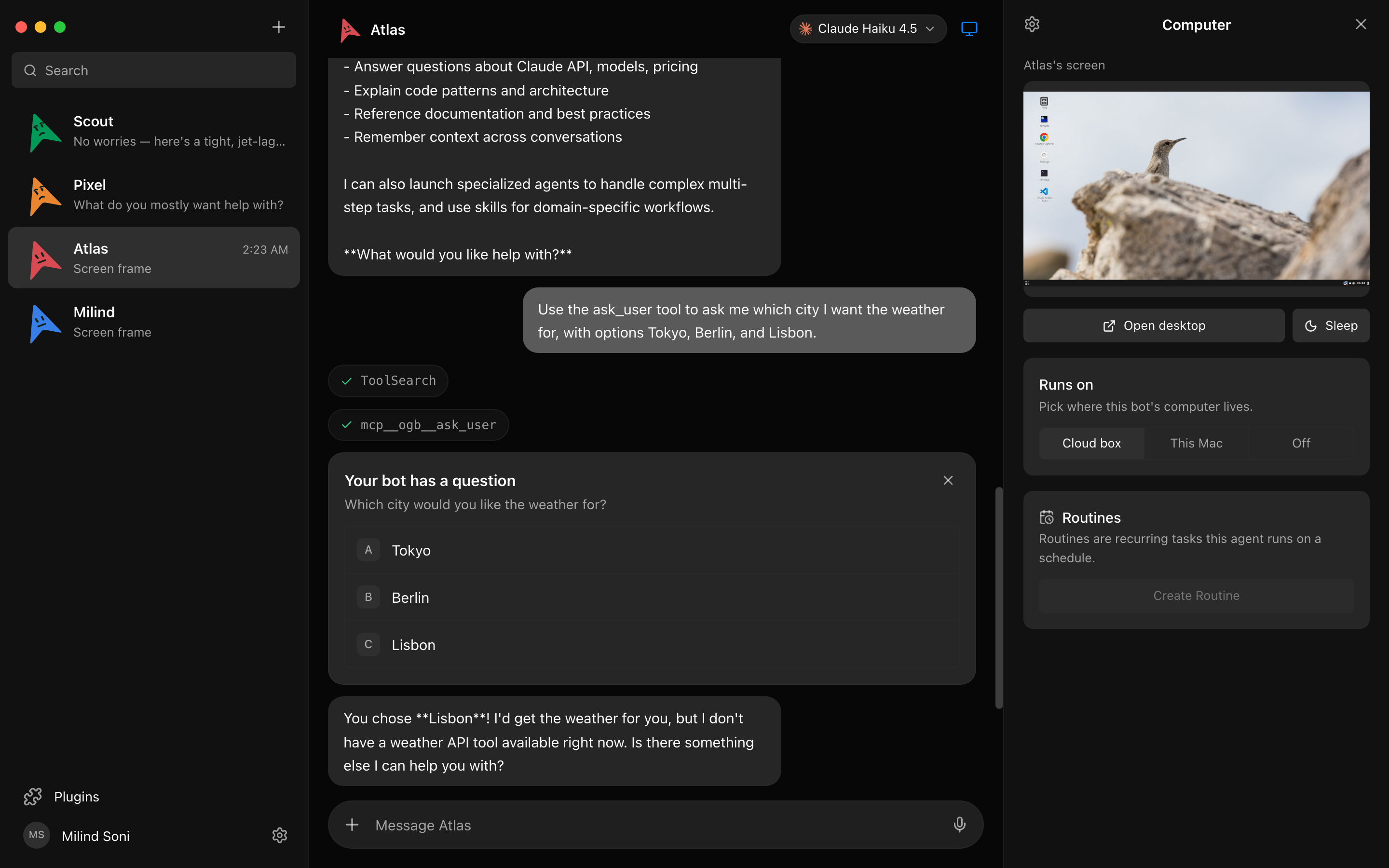
Open the Computer panel and the bot's cloud desktop spins up on its own — live screen preview while it works, "Open desktop" to take over in your browser, or point the bot at this Mac instead. 
|
|
Shell commands, file edits, and questions surface as inline cards — Allow / Deny / answer in chat. A permission broker turns every risky action into a decision you make, for cloud and local computers alike. 
|
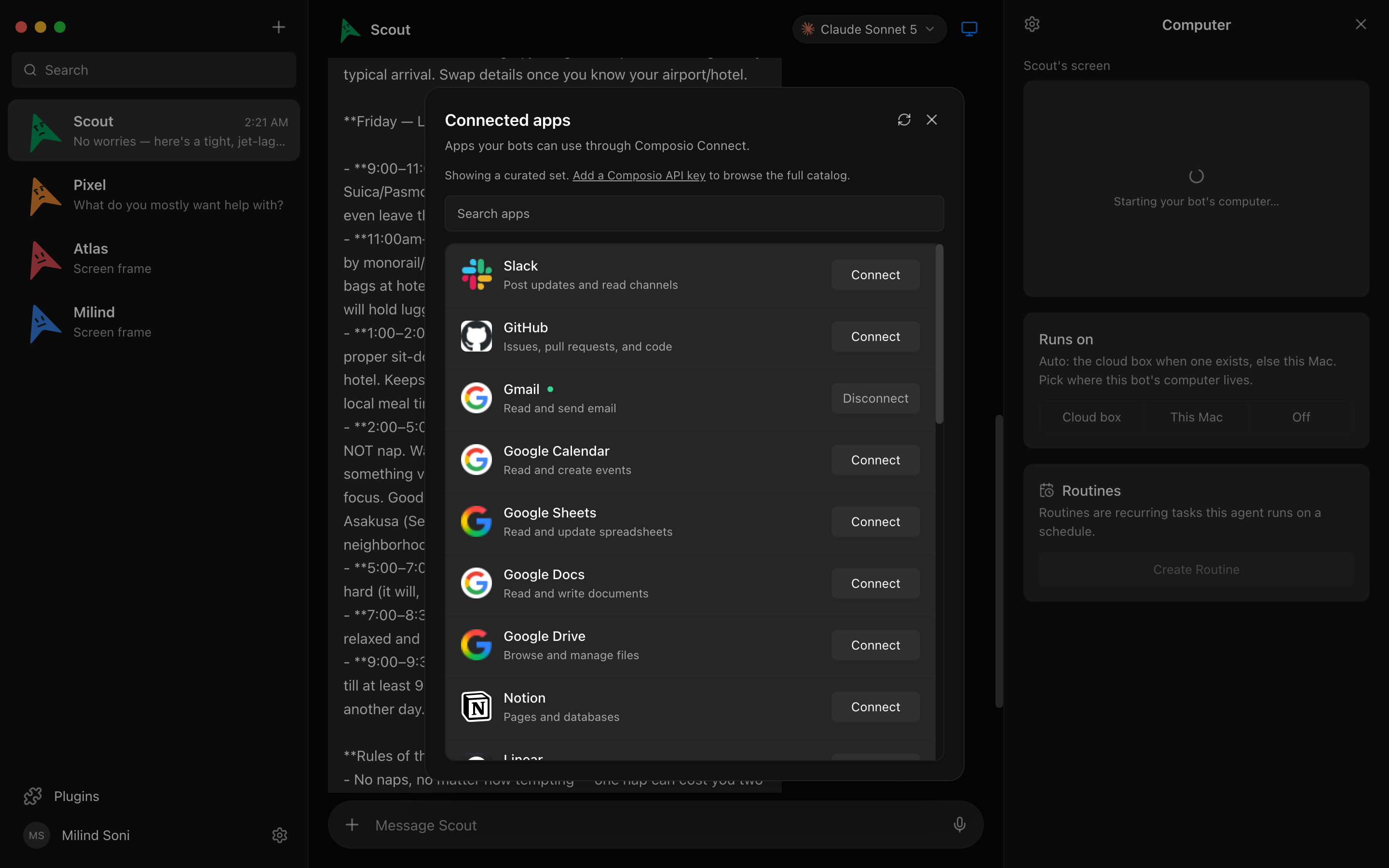
A one-click marketplace over Composio Sessions: Gmail, Slack, GitHub, Notion, Linear and hundreds more. OAuth once, and every bot can use them as tools. 
|
|
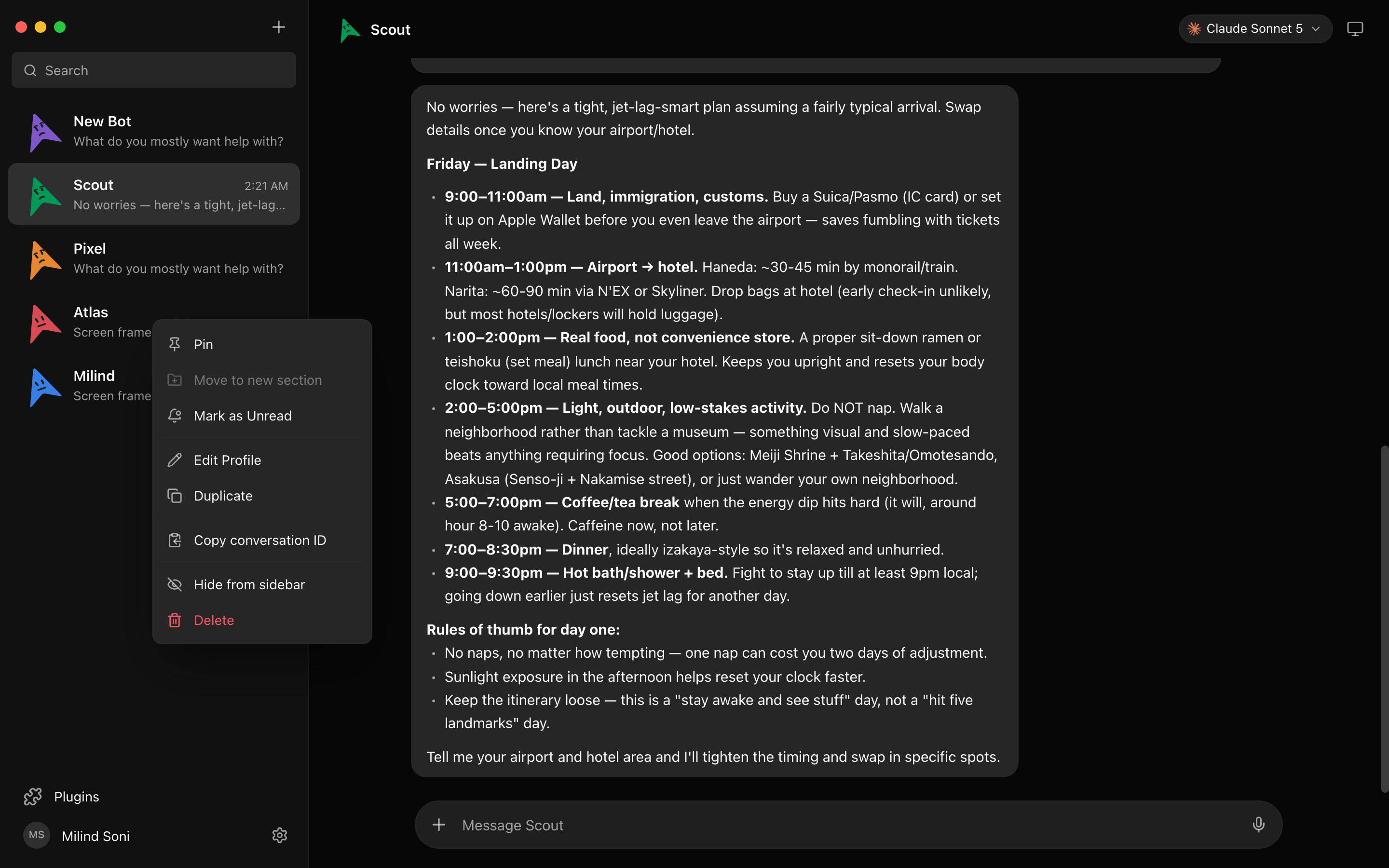
Right-click any bot: pin, mark unread, edit profile, duplicate, copy conversation ID, hide, delete. It's a messaging app — your agents behave like contacts. 
|
Paste credentials in App Settings — they persist locally and the provider fleet hot-reloads instantly. Secrets are write-only: the UI only ever sees "configured" flags. 
|
Keep Work, Personal, and each project in separate channels without cloning your bots. Every channel has its own transcript, shared instructions, working folder, responder rules, and editable bot roster. File a channel and its bots under a named context, then rename it or change its members whenever the team changes.
Add a TypeSafe Jev key, or an OpenRouter key and model, in Settings → Decision model and rooms set to Auto pick the bot that fits each un-mentioned message in a few hundred milliseconds, falling back to the room's lead whenever the decision model is off or unsure. See docs/decision-model.md.
Browse outcome-driven teams on BotMRR, then choose Add to OpenMausBot. The app
opens a review screen before creating the bots, Chief of Staff, channels, playbooks, connector checklist,
and suggested routines. You can also import the same .md file from disk or paste its public GitHub URL
in Teams → Import.
The format stays portable: OpenMausBot reads the structured YAML frontmatter for a reliable one-click install, while Grok, Claude, ChatGPT, and people can follow the ordinary Markdown playbook. Connections remain off until you approve them, routines arrive paused, and packages never carry credentials, conversations, permissions, memory, or computer access. Browse the open-source playbook repository or read its portable format.
Right-click a department and choose Share department… (or use Templates → Share) to save the whole department as one file: its bots with their instructions, pictures and skills, group chats, routines, shared instructions, Chief of Staff, connection slots and each bot's starter notes (untick them to leave them out). The dialog shows exactly what the file holds before you save it. Chat history, keys and passwords, model choices and computers never go in, and anything that looks like a secret is removed from the text. Whoever imports it gets new bots on Ask, skills switched off and routines paused. See docs/team-sharing.md. Desktops connected to an organization also get Templates → From {Organization}: the packages its Admin shares, added with one click, skills switched on. See docs/org-library.md. Your New bot defaults can travel too, as a preset bot that appears in New bot (in a team file, or on their own with Share as preset…). See docs/presets.md.
Press the speaker on any reply, or switch a bot to read its answers out as they land — so you can listen to what ran overnight while you make breakfast. Hit call and it's a conversation: it hears you, tells you what it's doing while it works, and asks for approvals out loud.
Choose ElevenLabs, Fish Audio, Grok (xAI), built-in Mac voices, or a local Chatterbox server in an agent profile. Paste a cloud key once when needed, pick a voice, and every bot can talk. Give a bot its own voice and a channel stops sounding like one person.
For Grok, save your xAI API key in Settings → Connections, then choose Grok (xAI) and a voice under the bot’s Voice & alerts. It reuses that host-side key and returns MP3 audio for spoken replies and calls. Language is detected automatically from the reply text; quality varies outside xAI’s officially supported languages. This adds speech synthesis to the existing call flow; microphone transcription remains unchanged.
Also in the box: streaming replies with tool-run activity chips · dictation from the composer mic (on-device Apple speech recognition on macOS, Fish Audio speech-to-text on Windows and Linux, in the desktop app) · SupaMaus cursor mascots with role-aware expressions · screenshots of the bot's work folded into the transcript.
| Service | Purpose |
|---|---|
| Claude · Codex · Grok | The agents behind every bot, run through their local CLIs |
| Electron | Desktop shells for macOS, Windows, and Ubuntu |
| React + Vite + Tailwind CSS | The chat app UI and its build |
| Boat (boat.dev) | Each bot's cloud computer · our sponsor |
| Composio | Connected apps — Gmail, Slack, GitHub, and more |
| Cua Driver | Native computer use on your own machine |
| ElevenLabs · Fish Audio | Hosted voices for bots that talk back |
| GitHub Sponsors | One-time and monthly project support |
Two processes. The app holds no transports of its own — it sends typed commands over HTTP and folds one SSE event stream into state. The harness server owns every agent process and normalizes each provider's native protocol into one canonical runtime event stream (logged per-thread as NDJSON).
flowchart LR
    subgraph app ["App — React + Tailwind (5199)"]
        UI[Chat UI · model picker · computer panel]
    end
    subgraph server ["Harness server (127.0.0.1:8799)"]
        REG[Driver registry] --> BUS[Event bus → SSE]
        BROKER[Permission broker]
    end
    subgraph agents ["Agents on your computer"]
        CL[claude CLI]
        CX[codex CLI]
        GR[grok CLI]
    end
    UI -- "HTTP commands" --> server
    BUS -- "one SSE stream" --> UI
    REG --> CL & CX & GR
    CL & CX & GR -- "permission requests" --> BROKER
    server -- "Boat API" --> BOAT[("Cloud computer<br/>boat.dev")]
    server -- "Composio Session" --> APPS[("Gmail · Slack · GitHub · …")]
| Layer | Where | What it does |
|---|---|---|
| Drivers | server/drivers/ |
One per provider: Claude, Codex, and Grok Build over their local CLIs (stream-JSON / JSON-RPC / ACP), plus a cloud-computer agent. Unknown drivers degrade to "unavailable", never crash the fleet. |
| Harness | server/harness/ |
Registry (configs → live instances) and the fan-in event bus every client folds. |
| API | server/index.ts |
Bots, turns, approvals, model catalog, computer lifecycle, connectors, config — HTTP + SSE. |
| Voice | server/tts/ |
ElevenLabs, Fish Audio, Grok (xAI), built-in Mac voices, or local Chatterbox. Cloud keys stay on the harness; markdown is rewritten into something worth hearing before it is spoken. |
| App | src/ |
The chat shell. Server-backed store, one reducer, zero client-side transports. |
| Desktop | electron/ |
macOS, Windows, and Ubuntu shells with an embedded harness and platform capabilities; Apple speech stays macOS-only, Ubuntu Xorg has opt-in local control, and Wayland remains fail-closed. |
OpenMausBot ships a stdio MCP server for external clients such as Claude Desktop and Cursor. It exposes a deliberately bounded team control plane: inspect bots and channels, read/search compact transcript pages, create and configure bots/channels/tasks, send work, wait for completion, switch models, and interrupt turns. It does not expose approval grants, deletion, arbitrary settings, credentials, or computer lifecycle.
See MCP server setup and tool reference.
The openmausbot command drives a running workspace without a screen: set a
team up from a file, give a bot one job, wait until it and every teammate it
asked are done, and export what they made. One JSON document with --json,
and exit codes a script can branch on.
openmausbot team apply team.yaml
openmausbot run "Room Lead" "Rehearse the launch of https://example.com" --export ./out
See Run OpenMausBot from scripts and CI.
Released builds (latest release): the harness server is embedded, so no separate server setup is required.
| Download | Install | |
|---|---|---|
| macOS (Apple silicon) | OpenMausBot.dmg | Drag it to Applications, open it. Signed & notarized. |
| macOS (Intel) | OpenMausBot-intel.dmg | Same app, built for Intel Macs. Signed & notarized. |
| Windows (x64) | OpenMausBot-setup.exe | Run it — one-click, per-user, no admin rights. The installer isn't code-signed yet, so SmartScreen shows "unknown publisher": More info → Run anyway. |
| Ubuntu 24.04 (x64) | OpenMausBot-amd64.deb · OpenMausBot.AppImage | Install the .deb with APT (recommended), or make the AppImage executable and run it. Beta; GNOME is the supported desktop. |
See the Ubuntu Desktop guide for installation, capabilities, and troubleshooting. Any desktop build can also pair as a client to another Windows, macOS, or Ubuntu host over Tailscale; see desktop-to-desktop companion mode.
From source:
git clone https://github.com/milind-soni/OpenMausBot && cd OpenMausBot
pnpm install

pnpm dev:server    # harness server → 127.0.0.1:8799
pnpm dev           # app → http://127.0.0.1:5199
pnpm dev:desktop   # Electron shell; keep the two commands above running
Requirements: macOS, Windows, or Ubuntu 24.04 x64, Node 24+, pnpm, and at least one agent CLI — claude,
codex, or grok — installed and logged in. They appear
in the model picker automatically.
Package the desktop application:
pnpm package:mac      # macOS: DMG + ZIP; requires Swift/Xcode tools
pnpm package:win      # Windows: installer + ZIP
pnpm package:linux    # Ubuntu x64: .deb + AppImage + verified CUA runtime
| Capability | macOS | Ubuntu 24.04 Xorg | Ubuntu 24.04 Wayland |
|---|---|---|---|
| Packaged app, embedded harness, local agent CLIs | Supported | Beta | Beta |
| Composio and Boat/cloud computers | Supported | Beta | Beta |
| Explicit preview-only local screen capture | Supported | Beta | Beta |
| Bot control of this computer | Supported | Beta, explicit opt-in | Disabled: Wayland safety gate |
| Native on-device dictation | Supported | Planned | Planned |
| Dictation and Take turns calls through Fish Audio (needs a Fish Audio key) | Not used, on-device instead | Supported | Supported |
The Linux preview is user-initiated and never enables local bot control or Auto routing. On Xorg, the reviewed Cua Driver 0.19.3 runtime starts only after explicit opt-in and without its full-screen cursor overlay. On Wayland the app never starts it and clears legacy opt-ins while that real-seat safety gate remains unresolved. Chat, preview, Cloud, and Local VM remain available on both sessions. See the Ubuntu Desktop guide and tracking issues #29, #345, and #113.
The Linux packager downloads only the tag-pinned upstream archive during the build, verifies its size, SHA-256,
complete member allowlist, and inner executable hashes, then packages only the CLI and cursor-theme sidecar. The
installed app never downloads or self-updates native automation code. Cua's MIT notice, Inter's SIL OFL, a generated
third-party license report, and a CycloneDX inventory ship with the runtime. See
third_party/cua-driver/ for the reviewed provenance record.
These credentials are optional — local chat works without them. Paste a key once in App Settings (gear in the sidebar footer) when you want to enable its integration:
| Credential | What it enables | Where to get it |
|---|---|---|
Composio project key (ak_…) |
Connect Gmail, GitHub, Slack, Notion, and other apps to your bots | OpenMausBot Composio setup |
| Boat API key | Give bots an isolated remote Linux computer with a desktop and terminal | Boat API key guide |
| ElevenLabs key | Read replies aloud, and call your bots | ElevenLabs API keys |
| Fish Audio key | Read replies aloud with Fish Audio voices, and call your bots | Fish Audio API keys |
Composio and Boat are third-party services with their own accounts and terms. Boat is a paid service after its trial, and using a cloud computer may incur charges.
pnpm typecheck     # app + server
pnpm test          # unit, driver, API, and desktop capability tests
pnpm build         # typecheck + production build
pnpm check:electron # syntax-check Electron main/preload files
pnpm package:win   # Windows installer + zip → release/
pnpm package:linux # Ubuntu x64 .deb + AppImage → release/
A trigger is "when something happens, a bot does something". Tell a bot "every weekday at 9, send me a summary
of my inbox" or "whenever our form calls, draft a reply" and it sets the trigger up in that turn with
its trigger tool (no confirmation; the chat shows a live card with Edit, Pause and Undo). Triggers, first in
the sidebar, lists every schedule and webhook, with a calendar and the run history. Bots manage them with
trigger_info (list, app events), trigger (create, update, pause, resume, run now) and delete_trigger; a webhook a bot makes never shows the bot its secret:
the person copies the link from the card or the Triggers page.
Schedules (routines) can run once, on selected weekdays, or every 5–1,440 minutes, using either a bot's configured model/computer or the Cloud VM runner. Interval schedules stay aligned to their chosen start time and skip an occurrence when the previous run is still active, so slow work cannot build an unbounded queue. A separate optional Advanced run limit can safely stop stuck work; no timeout is imposed unless one is chosen. The existing duration field remains calendar/display metadata. Webhook triggers are independent from schedules but reuse the same queued task executor and calendar receipts.
App events start a bot when something happens in a connected app ("whenever I get an email from Acme, draft
a reply"). The bot finds the app's events with trigger_info (action: "events") and calls trigger with
action: "create" and when: "app_event"; the person can also choose New → Set it up yourself → When something happens in an app.
Composio sends each event to OpenMausBot's connected-apps service, which queues it; the app collects the queue
with a long poll, so a desktop needs no public address and events wait while it is closed. Gmail is checked every
15 minutes; Slack, GitHub and other push apps arrive at once. A desktop keeps up to 500 events a day and a paid
Cloud 2,000; what is skipped shows on the automation. App events need the included connected apps: a server
using its own Composio key cannot watch apps yet. Details: docs/composio.md.
OpenMausBot starts a webhook-only receiver on 127.0.0.1:8800 by default (or one port above OMB_PORT).
Set OMB_WEBHOOK_PORT to choose another port. A webhook secret is shown once when the trigger is created
or rotated. Bearer authentication is recommended so the secret stays out of request URLs and most access
logs; a single capability URL remains available for senders that cannot configure headers. The receiver
exposes only /health and secret /hooks/... endpoints; it never exposes the app's broader API.
OpenMausBot must remain running to accept a delivery. For public internet delivery, proxy only this
dedicated receiver through a hosted relay or a tool such as Tailscale Funnel.
Early but real — the loop works end to end: message → agent → streamed reply → tools → approvals →
computer use. macOS, Windows, and Ubuntu 24.04 x64 have released builds; Ubuntu remains a beta with the
capability limits above. Rough edges to expect: hosted/mobile connectivity is still being built, and webhook
triggers currently use the local receiver rather than an always-on hosted relay.
Hosted voice needs an ElevenLabs, Fish Audio, or xAI key; built-in Mac and local Chatterbox voices need no cloud key. Take-turns calls and the composer mic listen on-device on macOS and through Fish Audio speech-to-text on Windows and Linux (the same Fish Audio key as voices). See docs/voice-mode.md for the design and the known gaps.
Contributions welcome — the driver SPI in server/contracts.ts is deliberately
small; adding a provider is one file in server/drivers/ plus a one-line registration.
No code needed at all for your own engines: any ACP-speaking CLI or OpenAI-compatible endpoint
plugs in through config — see docs/custom-engines.md.
Users can add their own MCP tool servers with zero code via docs/custom-mcp-servers.md.
To run bots on OpenRouter, Fireworks AI, DeepSeek, Cline or your own OpenAI- or Anthropic-compatible provider,
see Other model providers.
Usage analytics are optional and anonymous: product events and a once-a-day count of what is set up, never keys,
names, addresses or conversations. Turn them off in Settings → General → Usage analytics;
docs/analytics.md lists every event and property.
OpenMausBot is free and open source. If it does real work for you, you can support its development through GitHub Sponsors with a one-time contribution or a monthly sponsorship. Your support helps fund ongoing development and maintenance; OpenMausBot remains free and open source.
With Node 24 or newer, install once and run:
npm install -g openmausbot
openmausbot
Or use npx openmausbot without a global install. First launch guides you with
arrow-key choices: choose AI access, sign in or paste a hidden API key, choose
a model, and optionally connect a phone. Next time, the same command reuses your
saved setup and opens OpenMausBot on this computer. Keep the terminal open; Ctrl-C stops
the server, not your saved work. Use --no-open to skip opening the browser.
Phone access is optional and defaults to skipping. Choose an explicitly
approved managed public HTTPS endpoint protected by pairing, an existing
Tailscale connection, or your own HTTPS reverse proxy. Both native apps pair from
this flow: the QR is an app link when you are connecting an Android phone, and the
iOS app takes either that or the web link. A browser works on either phone. A phone
cannot use a localhost link. --local ignores saved remote access for one launch;
--no-pair suppresses phone prompts and invitations but does not disable a saved
remote connection.
The web UI can also be installed from Safari or Chrome as a standalone phone app. See Install the phone web app for Home Screen installation and pairing.
Run openmausbot setup to reconfigure without resetting bots or conversations;
the saved model default applies only to new bots. Native setup confirms provider
sign-in; API setup asks before a potentially billable test message. API keys are
saved as plaintext, not encrypted, in private config.json (0600 on Unix).
See the short setup guide for account differences,
phone choices, credential storage, and cancellation.
For a server on a VPS or an always-on computer, run npx openmausbot serve
with one way in: --public-url behind your own cloudflared, Caddy or nginx,
--domain for a certificate on your own domain, --tailscale for your
tailnet, --lan for this network only, or --tunnel (after
npx openmausbot login) for a free MausBot web address. It prints one
pairing link; paste it into the desktop app under + → Connect to a
server. The short path for each install method (npx, Docker, a service) is
at the top of docs/self-hosting.md; a server from
scratch is docs/deploy-vps.md.
Apache License 2.0 © 2026 Milind Soni and OpenMausBot contributors,
except enterprise/, which is source-available under its
own license; delete that folder and what remains is the
open-source edition. Details, including how contributions are signed off, are
in LICENSING.md.
Packaged Cua Driver components retain their upstream MIT, SIL OFL 1.1, MPL-2.0, and other dependency terms;
the corresponding notices, license texts, source locations, and SBOM are in
third_party/cua-driver/ and ship beside the native runtime.
OpenMausBot is an independent, open-source project inspired by Grok Bot. It is not affiliated with, endorsed by, or associated with xAI; "Grok" is a trademark of its respective owner.
FAQ
Where can I get help?
Follow the download page install instructions, ask in Discord support, or file a GitHub issue with OS, app version and reproduction steps after removing private data.
What happens when my computer is off?
Bots on that machine stop working while it is asleep or offline, so an always-on host (your own server or the optional paid Cloud workspace) is needed.
Does the phone app run my bots?
No — the phone app is a companion that connects to the computer or server hosting your bots; pairing does not move bots to the cloud.
Is my data local or in the cloud?
The desktop app keeps conversation and workspace data on your computer, while prompts go to the model provider you choose; a Cloud workspace stores its data on the hosted server.
What can a bot access, and when does it ask for approval?
It depends on the engine, working folder, connected apps and permissions you enable; supported actions can show approval requests, though not every action is guaranteed to pause.
Do I need to connect Gmail, Slack, or a cloud computer?
No — you can just chat with a bot on one connected provider and add apps or computer access only when a task needs them.
Which platforms can I use?
Desktop installers exist for macOS (Apple silicon and Intel), 64-bit Windows and x86-64 Linux, with Android and iOS companion apps.
Can I try Cloud for free?
Yes, each Cloud plan begins with a 3-day trial including $5 of Claude credit; the card is charged on day 4 unless you cancel first.
What is free, and what do I pay for?
The desktop and companion apps are free under Apache-2.0; model usage comes from your own provider account or key, and cloud hosting and some optional services cost extra.
More in AI Agents
 OpenOutreachOpen-source, self-hosted CLI that pulls B2B prospects from a licensed data source, has an LLM vet each one with a written reason, and cold-emails the fits.
 Open-Poe-AIOpen AI Agents Hub is a self-hosted, open-source platform for building and chatting with AI agents — LLM chat and media generation from one web interface.
 open-tagSelf-hosted open-source team chat where people and AI agents work together in channels, threads, and task boards.
 Open TerminalA self-hosted, open-source terminal server exposing a real remote shell and file APIs over REST for AI agents and automation; deploy via Docker, pip, or uvx.
 OpenVikingOpenViking gives AI agents one self-hosted, browsable viking:// filesystem for memory, knowledge RAG and skills; open-source (AGPL-3.0), deployed via Docker or pip.
 OpenWorkSelf-hosted and open-source, this Electron workspace puts AI agents to work on local files; over 50 providers, Ollama support, and a self-hosted Den control plane.
 OperantOperant is a self-hosted AI agent runtime for macOS/Linux that lets multiple LLMs collaborate on coding with hierarchical approval, memory, and a visual workflow editor.
 OpikOpik is an open-source, self-hostable LLM observability platform with tracing, evaluation, and production monitoring.
 OrcaSelf-hosted, open-source agent IDE that runs Claude Code, Codex, or any CLI coding agent in parallel git worktrees on desktop or a headless orca serve server.
 ORG-2Open-source, self-hosted desktop app that records coding-agent sessions as replayable trajectories, with a Rust harness, launchers for 20+ CLIs, and team review.
 os1OS1 is a self-hosted, open-source AI platform with autonomous agents, deep research, real-time collaborative chats, and a PWA workspace. Full data control, extensible.
 os-modaA self-hosted NixOS operating system where an AI agent manages your server through structured tools, with tamper-proof audit logs and instant rollback.
0 comments