
Self-host NodeBB
v4.16.8Real-time Node.js forum with websockets and plugins
- Stars
- 15 248
- RAM
- 512MB RAM
- Port
- 4567 (HTTP port NodeBB binds to (web installer and forum))
ghcr.io/nodebb/nodebb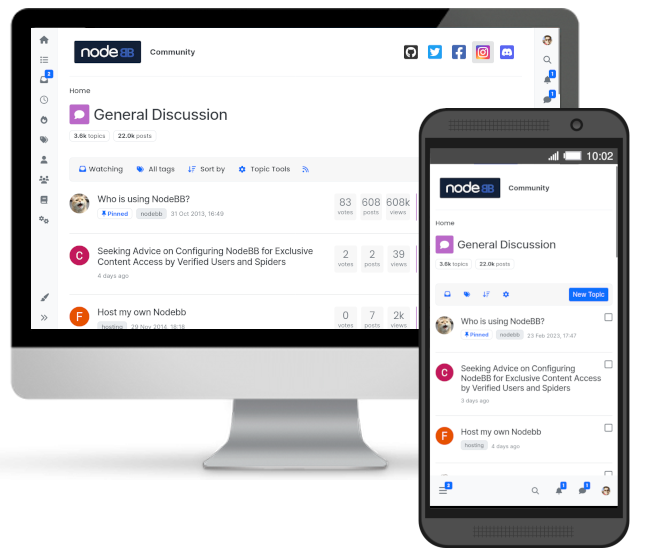


What is NodeBB?
NodeBB is forum software that runs on Node.js, aimed at communities wanting a traditional categorical bulletin board with live behaviour: websocket-driven instant interactions, notifications and streaming of conversations, private messaging, topic tags, and per-category role-based permissions. Capabilities beyond that core are installed as third-party plugins, and appearance is handled by themes; the base theme is built on Bootstrap 5. Instances can speak ActivityPub to reach the wider fediverse, including Mastodon users, and administrators manage settings through a control panel while programs use the read and write REST APIs. The project also documents built-in multilingual interfaces, GDPR compliance, and SEO-oriented URLs and markup. To operate it yourself, clone the repository and run ./nodebb setup followed by ./nodebb start (server options live in config.json), or use the bundled Dockerfile and docker-compose with a mongo, postgres or redis profile. It needs Node.js 22 or newer, one of MongoDB 5+, Redis 7.2+ or PostgreSQL, and at least 512MB of RAM. NodeBB is released under GPL-3.0 and free to self-host; the company also sells hosted forum subscriptions and enterprise work such as migrations and custom themes, and the container documentation is community-maintained.
NodeBB alternatives
 DiscourseDiscourse is a self-hosted, open-source community forum platform with built-in real-time chat, theming, and plugins. Powers 22,000+ communities with full data ownership.CompareDiscourse with NodeBB
 NodyxNodyx is a self-hosted, open-source community platform with forums, chat, voice, whiteboard and homepage. One-command install with relay for zero-port hosting. AGPL-3.0.CompareNodyx with NodeBB
 MastodonOpen-source self-hosted microblogging server that federates over ActivityPub, with chronological timelines, media posts, moderation tools and an OAuth2 REST API.CompareMastodon with NodeBB
 storydenSelf-hosted open-source forum and knowledge library for communities to own their conversations and data with optional AI features.Comparestoryden with NodeBB
 LemmySelf-hosted, open-source fediverse link aggregator and forum: federated communities, upvotes, threaded comments, mod logs. Built in Rust, deployed via Docker or Ansible.CompareLemmy with NodeBB
 Glitch-SocMastodon Glitch Edition is a self-hosted, open-source ActivityPub microblogging server adding experimental features like Markdown posts and advanced theming to Mastodon.CompareGlitch-Soc with NodeBB
 nostreamOwn a relay for social network nobody can switch offComparenostream with NodeBB
 TinodeA self-hosted, open-source instant messaging platform: Go server plus Android, iOS, web and command-line clients, group chat, WebRTC calls and chatbots.CompareTinode with NodeBB
Should you self-host NodeBB?
NodeBB scores 73/100 on selfhost.directory (how scoring works) and ranks #4 of 75 in Social Networks & Forums. It has 15 248 GitHub stars, +15 in the last 30 days.
It shipped 34 stable releases in the past year. The latest, v4.16.8, came out on 12 November 2026. New versions land roughly every 5 days.
Setup is moderate: expect some configuration beyond a single command. An official Docker image is available. It is GPL-3.0-licensed and written mostly in JavaScript.
Its closest alternative on selfhost.directory is Mastodon (84/100, 50 599 stars). It scores higher overall, so compare the two before you pick. See NodeBB vs Mastodon side by side.
Features
- ActivityPub Federation
- Administrative control panel
- Built-in chat / instant messaging
- GDPR Compliance
- Internationalization
- Plugin System
- Real-time post streaming
- REST API
- Role-based permissions
- SEO-friendly URLs and markup
- Single Sign-On
- Social feed view option
- Tags
- Theming
NodeBB README


NodeBB Forum Software is powered by Node.js and supports either Redis, MongoDB, or a PostgreSQL database. It utilizes web sockets for instant interactions and real-time notifications. NodeBB takes the best of the modern web: real-time streaming discussions, mobile responsiveness, and rich RESTful read/write APIs, while staying true to the original bulletin board/forum format → categorical hierarchies, local user accounts, and asynchronous messaging.
FAQ
How do I upgrade my NodeBB to a newer version?
Follow the dedicated "Upgrading NodeBB" page in the official documentation, which is also the place to look when something breaks after an upgrade.
How do I reset the admin password?
The CLI can reset any user's password with ./nodebb user reset <uid> --password <new-password>; the admin account is user id 1 by default.
How do I start/stop/restart NodeBB?
Use the bundled ./nodebb executable, which has start, stop, restart, status and log subcommands along with setup, install, build, upgrade and user management.
More in Social Networks & Forums
- NoosferoSelf-host the open-source Noosfero web social platform on your own Debian server, with XMPP chat, feeds, Solr search indexes and multi-site tenants.
 Nostr NestsNests is a self-hosted, open-source platform for live audio conversations — podcasts, group chats, music jams, and conferences — built on Nostr with MoQ.
 nostr-rs-relay-composeA Docker Compose deployment that runs the Rust-based nostr-rs-relay with Traefik for TLS termination, letting you host your own Nostr relay on your infrastructure.
 nostrudelSelf-hosted, open-source nostr web client for exploring the protocol with detailed event viewing and browser extension signer support.
 OSSNOSSN is an open-source, self-hosted PHP social network engine with profiles, groups, live chat, photo albums and blogs, a Facebook alternative you run on your own server.
 pdsBluesky PDS is an open-source, self-hosted Personal Data Server: run your own account host that federates with the AT Protocol network, installed via Docker Compose.
 PeergosSelf-hosted, open-source p2p drive with post-quantum end-to-end encryption: hidden file names, sizes and contacts, secret links, folder sync, chat and social feed.
 pH7BuilderSelf-hosted, open-source PHP 8.2+ platform for white-label dating sites and social networks with full data ownership, MIT licensed.
 PhanpyPhanpy is a self-hosted, open-source Mastodon web client with a minimalistic design, multi-account support, nested threads, and multi-column layouts.
 PhotonPhoton is a self-hosted, open-source web client for Lemmy and PieFed with modern UI, multi-account support, and extensive customization.
 phpBBSelf-hosted, open-source forum software written in PHP, with admin and moderator panels, styles, extensions, language packs, search indexes and CAPTCHA anti-spam.
- PieFedPieFed is an open-source, self-hosted fediverse forum and link aggregator in Python/Flask with topics, polls, community wikis and first-rate moderation tools.
0 comments