
Self-host Locust
2.47.0Load-test any system with plain Python scripts
docker run -p 8089:8089 -v $PWD:/mnt/locust locustio/locust -f /mnt/locust/locustfile.py- Stars
- 28 282
- Ports
- 8089 (Web interface / stats UI (master node)), 5557 (Port the distributed master node listens on for workers)
- Requires
- Python
locustio/locust


What is Locust?
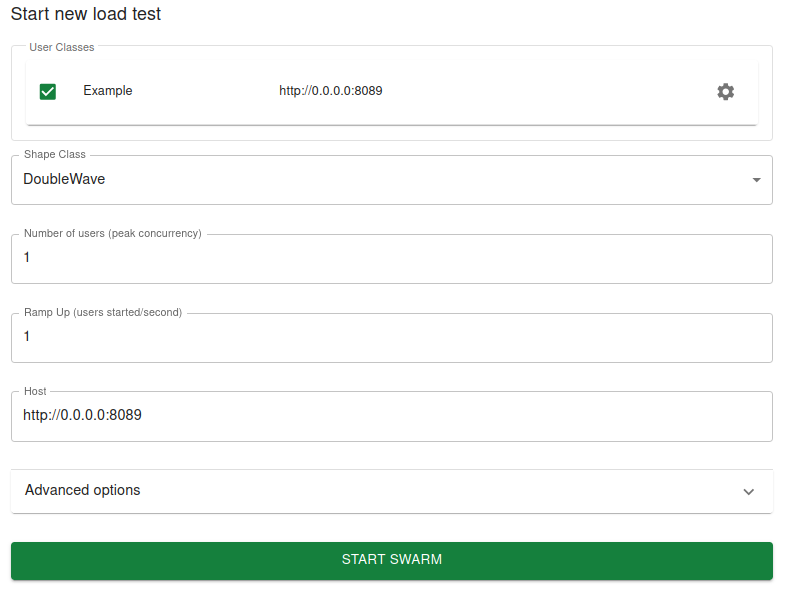
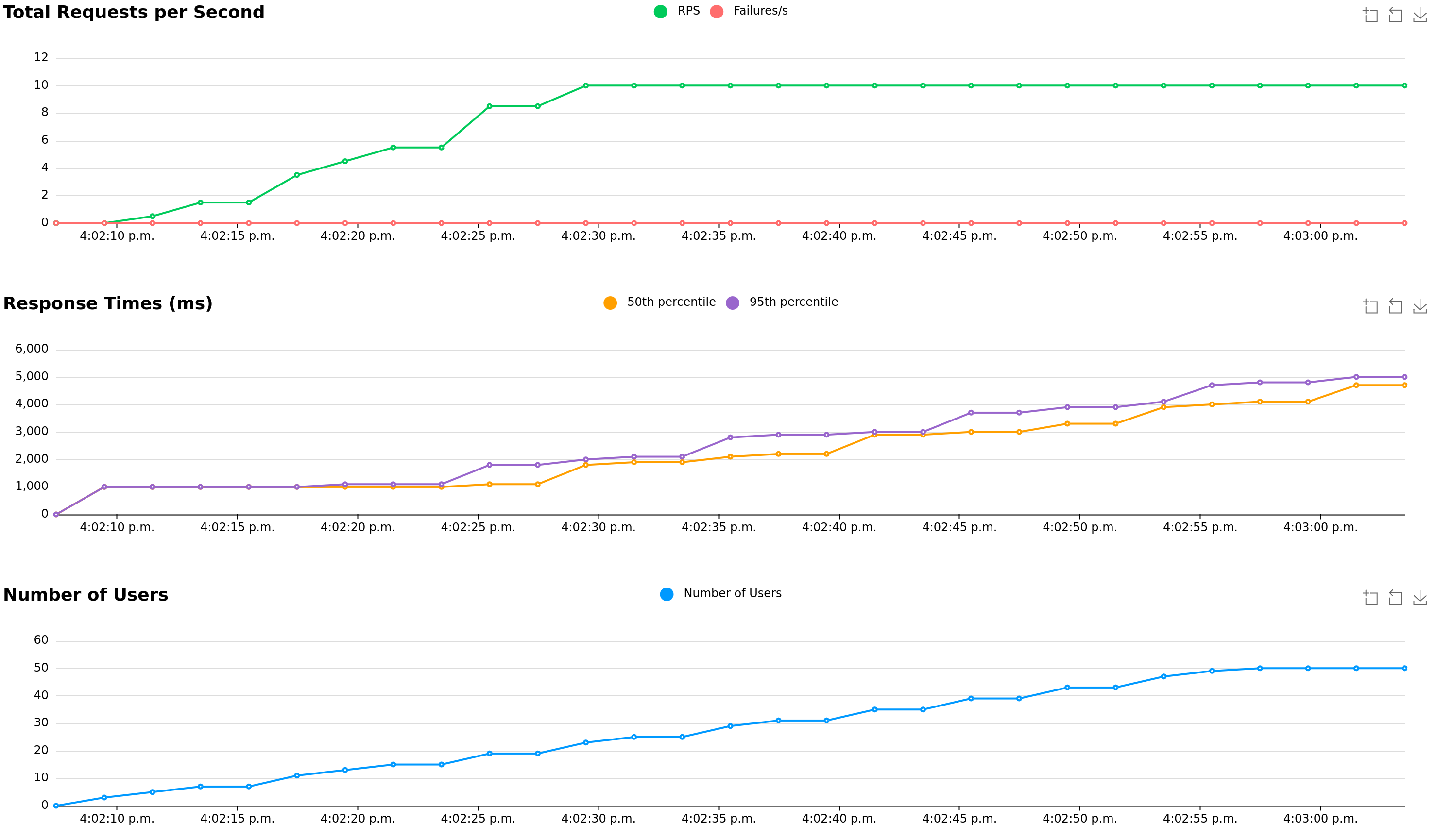
Locust is an open-source load and performance testing tool whose scenarios are ordinary Python code: you subclass a User type, decorate methods as tasks, and Locust runs every simulated user as a lightweight coroutine, so tests live in your normal IDE and version control. HTTP/HTTPS is built in and anything else (gRPC, SocketIO, MQTT, XML-RPC, an SDK) is covered by wrapping a client library and firing request events. Runs are driven either from a browser UI on port 8089 that charts requests per second, response times and failures live and lets you change the load mid-test, or headless with -u/-r/-t flags for CI pipelines. Load generation scales out from one master to many worker processes or machines, with --processes auto-forking workers and an optional Kubernetes operator that models tests as custom resources. Results go to CSV files, JSON on stdout, or a standalone HTML report, and optional instrumentation can export traces, metrics and logs. Install it with pip (or uvx), use the locustio/locust image, or the locustio/locust-otel image with the telemetry extras pre-installed. The code base is deliberately small: many extras come from community extensions, and Microsoft sponsors maintenance while offering a managed service that runs Locust scripts.
Locust alternatives
 graphql-meterSelf-hosted GraphQL load testing platform that auto-discovers schema operations and runs tests via Locust or k6 with live monitoring and run comparison.Comparegraphql-meter with Locust
 Hoppscotch Community EditionSelf-hosted, open-source API development ecosystem for testing REST, GraphQL, WebSocket, and MQTT APIs — a lightweight Postman alternative with PWA and desktop apps.CompareHoppscotch Community Edition with Locust
 KeployOpen-source record-and-replay testing tool that turns live API, database and queue traffic into runnable tests and mocks; self-hosted via a CLI agent.CompareKeploy with Locust
 HoppscotchOpen-Source API Development Ecosystem • https://hoppscotch.io • Offline, On-Prem & Cloud • Web, Desktop & CLI • Open-Source Alternative to Postman, InsomniaCompareHoppscotch with Locust
 WebHook TesterSelf-hosted, open-source tool for testing and debugging webhooks with customizable responses, WebSocket notifications, and multiple storage backends.CompareWebHook Tester with Locust
 corootSelf-hosted, open-source APM and observability platform where eBPF agents capture every telemetry signal without code changes, with service maps and SLO alerting.Comparecoroot with Locust
 prefectPrefect is a self-hosted, open-source workflow orchestration framework turning Python functions into production data pipelines with scheduling, retries, and caching.Compareprefect with Locust
 checkmateSelf-hosted, open-source uptime and infrastructure monitor: HTTP, ping, DNS, Docker and gRPC checks with incidents, status pages and Slack or email alerts.Comparecheckmate with Locust
Should you self-host Locust?
Locust scores 78/100 on selfhost.directory (how scoring works) and ranks #1 of 10 in Testing. It has 28 282 GitHub stars, +82 in the last 30 days.
It shipped 20 stable releases in the past year. The latest, 2.47.0, came out on 21 October 2026. New versions land roughly every 2 weeks.
Setup is easy: most people get it running in one sitting. An official Docker image is available. It is MIT-licensed and written mostly in Python.
Its closest alternative on selfhost.directory is Keploy (78/100, 19 765 stars). Locust scores higher overall. See Locust vs Keploy side by side.
Features
- Adjustable load during a runAlso possible in headless mode via w/W/s/S keyboard input.
- CSV results export
- Custom load shapes
- Distributed load generation
- Headless command-line mode
- HTML Report
- HTTPS for the web UI
- JSON stats output
- Kubernetes operator
- Multi-protocol extensibility
- Pytest-style test filesMarked experimental; weighting is not supported and it only applies when no regular User classes exist.
- SocketIO clientDocs mark SocketIO support as experimental.
- Task tagging
- Web-based UI with live statistics
Locust README

Locust is an open source performance/load testing tool for HTTP and other protocols. Its developer-friendly approach lets you define your tests in regular Python code.
Locust tests can be run from command line or using its web-based UI. Throughput, response times and errors can be viewed in real time and/or exported for later analysis.
You can import regular Python libraries into your tests, and with Locust's pluggable architecture it is infinitely expandable. Unlike when using most other tools, your test design will never be limited by a GUI or domain-specific language.
To get started right away, head over to the documentation.
If you want your users to loop, perform some conditional behaviour or do some calculations, you just use the regular programming constructs provided by Python. Locust runs every user inside its own greenlet (a lightweight process/coroutine). This enables you to write your tests like normal (blocking) Python code instead of having to use callbacks or some other mechanism. Because your scenarios are “just python” you can use your regular IDE, and version control your tests as regular code (as opposed to some other tools that use XML or binary formats)
from locust import HttpUser, task, between


class QuickstartUser(HttpUser):
    wait_time = between(1, 2)

    def on_start(self):
        self.client.post("/login", json={"username": "foo", "password": "bar"})

    @task
    def hello_world(self):
        self.client.get("/hello")
        self.client.get("/world")

    @task(3)
    def view_item(self):
        for item_id in range(10):
            self.client.get(f"/item?id={item_id}", name="/item")
Locust makes it easy to run load tests distributed over multiple machines. It is event-based (using gevent), which makes it possible for a single process to handle many thousands concurrent users. While there may be other tools that are capable of doing more requests per second on a given hardware, the low overhead of each Locust user makes it very suitable for testing highly concurrent workloads.
Locust has a user friendly web interface that shows the progress of your test in real-time. You can even change the load while the test is running. It can also be run without the UI, making it easy to use for CI/CD testing.
FAQ
Other questions and issues
Ask on Locust's Discord, check the GitHub issue list, or search and post on Stack Overflow.
Locust web UI doesn’t show my tasks running, says 0 RPS
Locust only records what you tell it: HttpUser with self.client fires the events for you, but a plain User or other client code must fire request events itself.
How to run a Docker container of Locust in Windows Subsystem for Linux (Windows 10 users)?
Under WSL you need one extra step compared to the usual docker run: copy the locustfile into a Windows-side folder and mount that folder into the container.
Create a Locust file based on a recorded browser session
Use the community tool har2locust to turn a recorded browser (HAR) session into a locustfile.
Basic auth (Authorization header) does not work after redirection
The underlying requests behaviour drops the authorization header when the domain changes, so turn off allow_redirects, follow the redirects yourself and re-inject the header.
Control headers or other things about my HTTP requests
Locust's HttpUser client inherits from requests, so nearly all of its parameters and methods work; check the requests docs and Stack Overflow first.
Clear cookies, to make the next task iteration seem like a new user to my system under test
Call self.client.cookies.clear() at the end of the task.
Resolve errors that occur during load (error 5xx, Connection aborted, Connection reset by peer, etc)
Look at your server's logs first: if the system behaves fine at low load, the problem is almost certainly in the system you are testing rather than in Locust.
More in Testing
 mailcueMailCue is a self-hosted, open-source email testing server with Postfix, Dovecot, DKIM, DMARC, SpamAssassin, REST API, and React UI in one Docker container.
 MailHogOpen-source SMTP testing tool: capture outgoing mail in a web UI or JSON API, release it to a real server. Runs self-hosted as a single binary or Docker image.
 MailpitAn open-source SMTP mail catcher for developers: a self-hosted single binary or Docker image with a web UI, REST API, POP3 server and HTML, link and spam checks.
 MQTTX WebOpen-source MQTT 5.0 client toolbox: desktop app, CLI and a Docker-deployable web client for pub/sub testing, scripting, simulation and broker benchmarks.
 pixeleyePixeleye is a self-hosted, open-source visual testing platform for reviewing UI changes across browsers and devices with testing framework integrations.
 Request BasketsSelf-hosted HTTP requests collector for testing webhooks, notifications, and REST clients. Provides RESTful API and simple web UI, replacing RequestBin service.
 RocketshipRocketship is an open-source, self-hosted QA testing framework for coding agents to write and run end-to-end web tests using declarative YAML and plugins.
 tapflowOpen-source, self-hosted stand-in for Appetize or BrowserStack App Live: a relay plus macOS agents drive simulators and emulators your team tests in a browser.
 VeridropSelf-hosted, open-source tool that probes Claude, OpenAI and Gemini API relay endpoints to expose swapped models, stripped features and bogus token billing.
- WebHook TesterSelf-hosted, open-source tool for testing and debugging webhooks with customizable responses, WebSocket notifications, and multiple storage backends.
 ZealotSelf-hosted, open-source beta app distribution server for iOS, Android, macOS, Windows and Linux builds, with OTA install pages, webhooks and a fastlane plugin.
 Aerokube MoonMoon is a self-hosted commercial browser automation platform for Kubernetes/OpenShift running Selenium, Playwright, Cypress, and Puppeteer tests.
0 comments