
Self-host LightRAG
v1.5.7Graph-based RAG framework with server, WebUI and API
$ uv tool install "lightrag-hku[api]"- Stars
- 40 641
- Port
- 9621 (LightRAG API server / WebUI; Docker Compose maps ${HOST:-0.0.0.0}:${PORT:-9621}:9621)
ghcr.io/hkuds/lightrag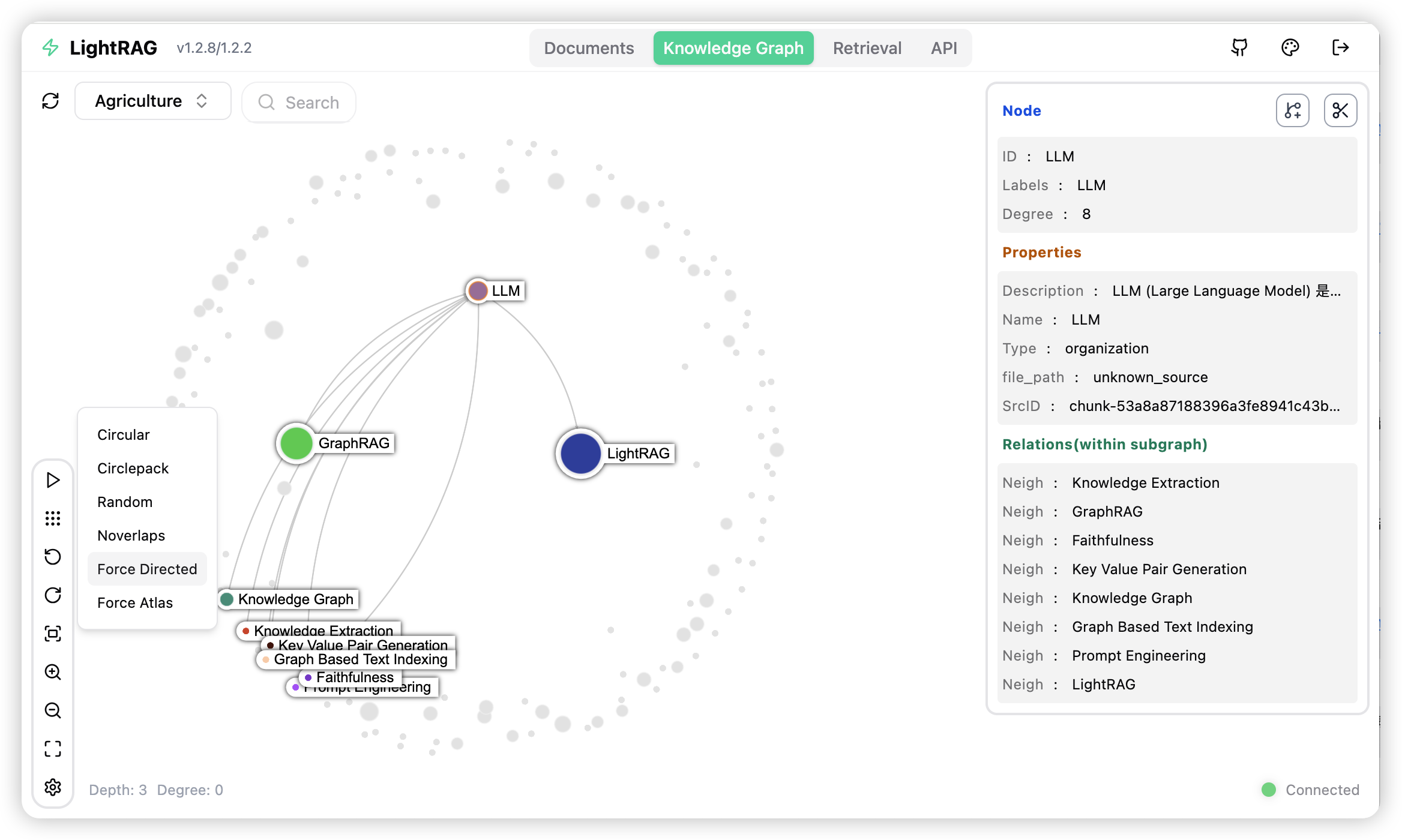
What is LightRAG?
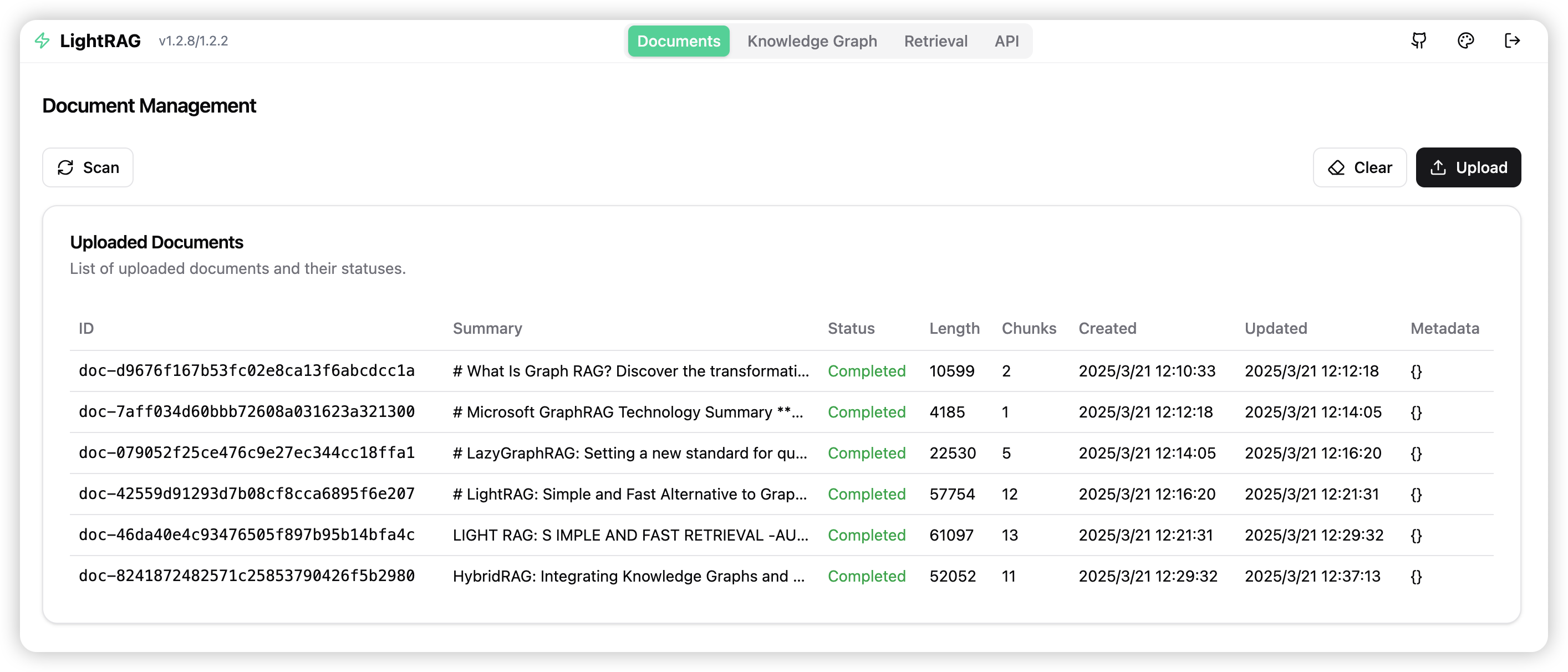
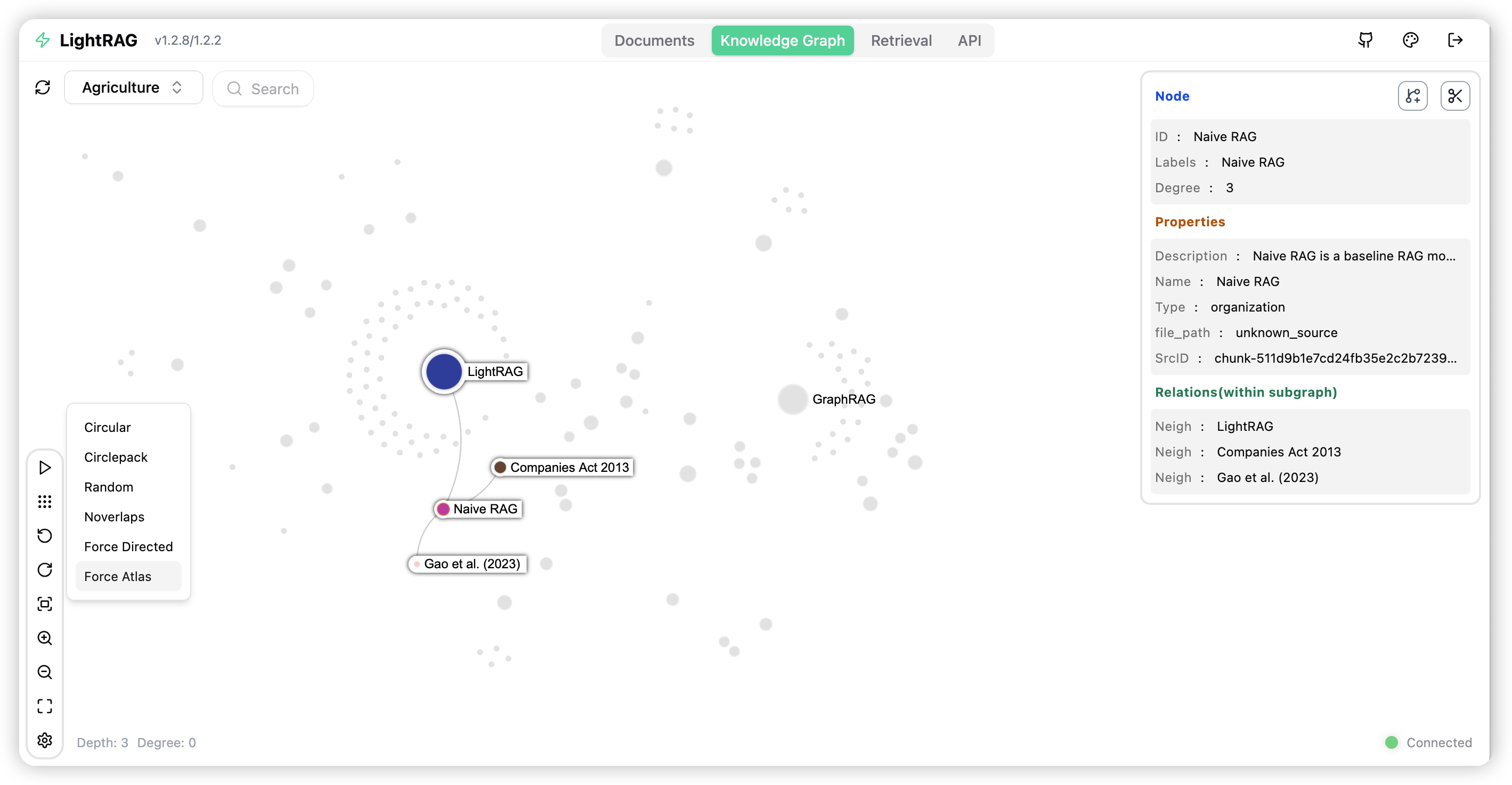
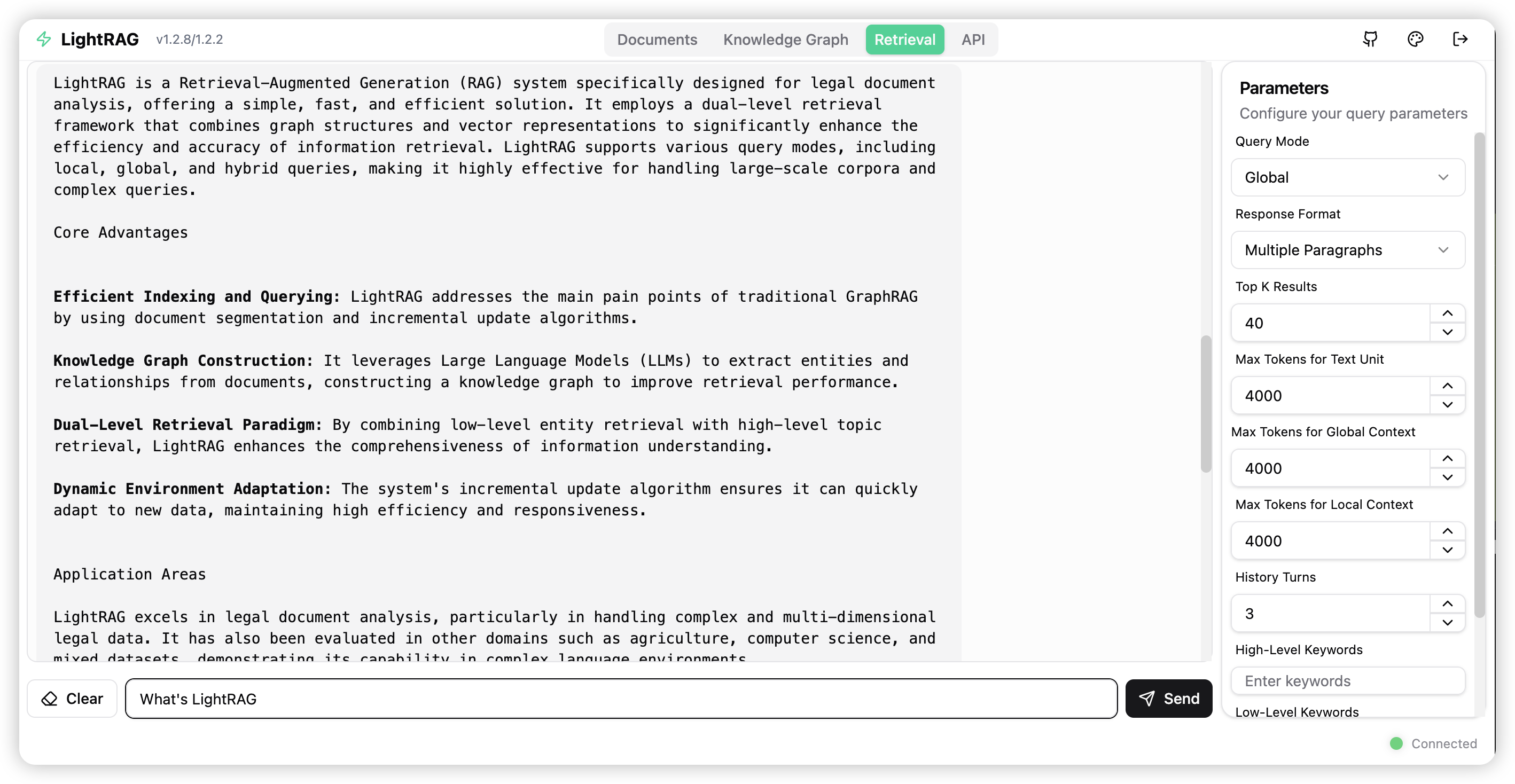
LightRAG is an open-source retrieval-augmented generation framework from HKU's Data Intelligence Lab that folds a knowledge graph into document indexing and retrieval instead of relying on flat text chunks alone. Its dual-level retrieval mechanism merges low-level entity lookups with high-level relationship context, selectable through five query modes (local, global, hybrid, naive and mix, with mix as the default), and reranking can be layered on top. Indexing handles incremental updates and document removal, rebuilding affected entities and relations from the cache built during indexing. The bundled server adds a browser admin console at /webui, a query-only /workspace entry, a full REST API, and an Ollama-compatible endpoint so chat front ends can call it like a model. Install it from PyPI and launch lightrag-server, build it from source with uv, or run the ghcr.io/hkuds/lightrag container through Docker Compose; almost everything is configured by environment variables in a .env file. LLM, embedding, rerank and vision models come from pluggable providers, and roles can use different models. The default KV/vector/graph stores are in-memory with file persistence and are described as fit only for testing, so PostgreSQL (or MongoDB or OpenSearch) is recommended for production, with Milvus, Qdrant, Neo4j, Memgraph and Redis available for individual storage types. Document parsing routes through MinerU, Docling or the native engine, covering images, tables and formulas.
LightRAG alternatives
 gpt-researcherSelf-hosted, open-source deep research agent: a planner splits your question, parallel researchers scan 20+ web or local sources, and it writes a cited report.Comparegpt-researcher with LightRAG
 frank-botFrank Bot is a self-hosted, open-source RAG chatbot using ChromaDB and Anthropic Claude. Designed for Australian workplaces with 12 industry-tuned vertical personalities.Comparefrank-bot with LightRAG
 paperless-iqPaperless IQ is a self-hosted AI add-on for Paperless-NGX adding metadata tagging, RAG search, vision analysis, and approval workflow — supports Ollama, Anthropic, OpenAIComparepaperless-iq with LightRAG
 LangfuseLangfuse is a self-hosted, open-source LLM engineering platform for tracing, prompt management, evaluations, and analytics — used by 50,000+ companies.CompareLangfuse with LightRAG
 supermemorySelf-hosted AI memory and context server: Supermemory Local extracts facts, builds user profiles, and blends RAG with memory search through one API on port 6767.Comparesupermemory with LightRAG
All self-hosted alternatives to HyDE → All self-hosted alternatives to Microsoft GraphRAG → All self-hosted alternatives to NaiveRAG →
Should you self-host LightRAG?
LightRAG scores 82/100 on selfhost.directory (how scoring works) and ranks #2 of 7 in RAG. It has 40 641 GitHub stars, +642 in the last 30 days.
It shipped 11 stable releases in the past year. The latest, v1.5.7, came out on 2 September 2026. New versions land roughly every 8 days.
Setup is moderate: expect some configuration beyond a single command. An official Docker image is available. It is MIT-licensed and written mostly in Python.
Its closest alternative on selfhost.directory is WeKnora (84/100, 37 107 stars). It scores higher overall, so compare the two before you pick. See LightRAG vs WeKnora side by side.
Features
- Configurable text chunking strategies
- Dual-level retrieval
- Evaluation and tracing
- Incremental indexing and document deletion
- Interactive setup wizard
- Knowledge-graph augmented retrieval
- Multimodal document processing
- Ollama-compatible API
- Pluggable storage backends
- Reranking
- REST API
- Role-specific LLM configuration
- Source citations
- User login and API-key protectionAccount setup is admin credentials in the environment only; a full account system is not implemented yet.
- Web UI
LightRAG README

How to install LightRAG
Install LightRAG with Docker Compose
LLM_BINDING, LLM_MODEL, LLM_BINDING_API_KEY, EMBEDDING_BINDING, EMBEDDING_MODEL, PORTgit clone https://github.com/HKUDS/LightRAG.git
cd LightRAG
cp env.example .env # Update the .env with your LLM and embedding configurations
# modify LLM and Embedding settings in .env
docker compose up
Uses ghcr.io/hkuds/lightrag:latest and publishes port 9621; data lives in ./data/rag_storage and ./data/inputs.
Install LightRAG with Windows
HOST, PORT, LIGHTRAG_API_KEY, AUTH_ACCOUNTS, TOKEN_SECRET### Install LightRAG Server as tool using uv (recommended)
uv tool install "lightrag-hku[api]"
### Or using pip
# python -m venv .venv
# source .venv/bin/activate # Windows: .venv\Scripts\activate
# pip install "lightrag-hku[api]"
# Setup env file
# Obtain the env.example file by downloading it from the GitHub repository root
# or by copying it from a local source checkout.
cp env.example .env # Update the .env with your LLM and embedding configurations
# Launch the server.
Launched with the `lightrag-server` command; binds to 0.0.0.0 by default, so configure authentication before exposing it. A Gunicorn multiprocess mode (`lightrag-gunicorn --workers 4`) is offered as production mode and is not supported on Windows.
How to configure LightRAG
HOSTServer Configuration HOST binds to all network interfaces (0.0.0.0) by default. SECURITY: only expose 0.0.0.0 together with LIGHTRAG_API_KEY or AUTH_ACCOUNTS (see "Login and API-Key Configuration" below). Without authentication, a server on 0.0.0.0 grants anyone on the network full access to your documents and knowledge graph. Bind to 127.0.0.1 for local-only access.PORT=9621WEBUI_TITLE=My Graph KBDeployment name shown in WebUI headers, on the login page, and as the browser tab title. Leave unset to keep the default 'LightRAG'.WEBUI_DESCRIPTION=Simple and Fast Graph Based RAG SystemWORKERS
LightRAG releases & version history
Important Notes
New Feature: Add end-user-facing entry point to WebUI
v1.5.7 adds a second, end-user-facing entry — /workspace — together with the branding and prompt controls a deployment needs before it can be handed to real users.
- A query-only entry for end users:
/workspace - Customizable welcome, login and empty-state pages
- A global
USER_PROMPT_PREFIX
/workspace UI shows the chat surface and nothing else — no document management, no knowledge graph, no API-docs links — and is built for mobile use. Point UI_TEMPLATES_DIR at a small directory of Markdown files plus a manifest.json, and LightRAG serves your welcome page, login-page blurb, query empty state, brand logo and copyright line — in several languages, without rebuilding the WebUI. A locale that declares both a login blurb and an agreement document also switches on a login consent checkbox. A ready-to-copy bundle ships in docs/ui_templates_example/.
USER_PROMPT_PREFIX (or USER_PROMPT_PREFIX_FILE for long, multi-paragraph text) prepends deployment-wide instructions to every request's user_prompt. It gives the operator one place to set the LLM's role, tone and output format — Mermaid diagrams, LaTeX delimiters, citation style — for both UI entries and the API alike. Requests can never read or replace it; only the API field disable_user_prompt_prefix opts out.
For more information, please refer to:
docs/LightRAG-API-Server.md— § The/workspaceQuery Entrydocs/UserDefinedUI.md— the complete UI customization guide, plusdocs/ui_templates_example/README.md—USER_PROMPT_PREFIX/USER_PROMPT_PREFIX_FILE
What's New
- Add an offline tool to migrate a graph from Apache AGE to PostgreSQL tables by @ysys143 in #3620
- feat: support graph-first ingestion with deferred vector indexing by @letsgetai in #3473
- feat: add explicit custom chunking selector by @er-s-an in #3665
- feat(api): add ENABLE_API_DOCS switch for API documentation exposure by @danielaskdd in #3672
- perf(nano): defer vector deletes to flush time by @0xPabloxx in #3680
- perf(faiss): defer vector deletes to flush time by @yzxcj797 in #3693
- feat(Bedrock): Allow Bedrock default credential providers by @a-bruhn in #3726
- feat(ollama): report token usage through the TokenTracker contract by @YashvantHange in #3747
- feat(webui): standalone /workspace query entry for end users (dual-entry WebUI) by @danielaskdd in #3729
- feat(webui): add a login-page consent gate driven by the UI bundle by @danielaskdd in #3755
- feat(webui): use WEBUI_TITLE as the browser tab title by @danielaskdd in #3763
- Add user-defined UI customization bundle support (UI_TEMPLATES_DIR) by @danielaskdd in #3765
- Use custom logo and deployment title on login page by @danielaskdd in #3768
- feat(webui): customer-defined copyright line at the foot of the pre-login pages by @danielaskdd in #3773
- feat(query): Add global user prompt prefix feature with cache partitioning by @danielaskdd in #3781
- refactor: remove the deprecated GET /documents listing and get_docs_by_status by @danielaskdd in #3788
What's Changed
- fix(kg): return copies from NetworkXStorage get_node and get_edge by @santhreal in #3588
- fix(operate): compute most common entity type and normalize keywords on rebuild by @santhreal in #3589
- fix(kg): return boolean values from get_all_update_flags_status by @santhreal in #3590
- fix(utils): split GRAPH_FIELD_SEP in merge_source_ids by @santhreal in #3592
- fix(utils): correct docstring example and harden compute_incremental_chunk_ids by @santhreal in #3591
- fix(parser): bound native markdown image downloads per document (GHSA-25c3-j78v-83qx) by @danielaskdd in #3605
- fix(kg): hydrate track docs via shared row helper and catch TypeError by @santhreal in #3595
- fix(kg): make get_knowledge_graph truncation deterministic across graph backends by @santhreal in #3593
- fix(security): bound DOCX decompression and contain sidecar image paths by @danielaskdd in #3614
- fix(rebuild_vdb): drop lossy agtype quote-strip that corrupts quote-bearing entity_ids by @ysys143 in #3587
- fix(extraction): surface token-limit truncation and fail on empty truncated responses by @pengpengyi92 in #3607
- build(deps): bump the github-actions group with 2 updates by @dependabot[bot] in #3616
- fix(parser): enforce OOXML member and DOCX image budgets by @danielaskdd in #3619
- fix(graph): validate attributes on the manual entity/relation APIs (GHSA-c922-pw4m-4wcv) by @danielaskdd in #3623
- fix(kg): enforce the graph-attribute contract in the backends that need it by @danielaskdd in #3624
- fix(api): reject unstorable characters in a document source by @danielaskdd in #3626
- fix(graph): preserve self-loops on entity rename by @pengpengyi92 in #3622
- fix(graph): reject self-loop relations at the manual write paths by @danielaskdd in #3625
- perf(kg): drop the seed-degree round trip from PGTable traversal by @ysys143 in #3618
- fix(milvus): page vector/id lookups to respect the gRPC response ceiling #3584 by @El-Tatane in #3629
- fix: forward embedding_dim to Ollama's embed API by @Vishwamitra in #3604
- fix: disable thinking for Ollama extract/keyword roles by default by @Vishwamitra in #3599
- fix(base): tolerate undeclared fields when rehydrating DocProcessingStatus by @qianheng-aws in #3633
- fix(llm): close OpenAI stream/client when GeneratorExit interrupts a mid-COT close by @AmirF194 in #3635
- fix(api): fail fast for custom Ollama embedding dimensions by @pengpengyi92 in #3636
- build(deps-dev): bump the build-tools group in /lightrag_webui with 5 updates by @dependabot[bot] in #3641
- build(deps): bump the react group across 1 directory with 3 updates by @dependabot[bot] in #3639
- build(deps): bump lucide-react from 1.26.0 to 1.29.0 in /lightrag_webui in the ui-components group by @dependabot[bot] in #3640
- build(deps): bump the content-rendering group across 1 directory with 2 updates by @dependabot[bot] in #3642
- build(deps): bump the frontend-minor-patch group across 1 directory with 4 updates by @dependabot[bot] in #3643
- fix(kg): refuse PGGraphStorage on Apache AGE >= 1.8.0, which crashes the backend by @ysys143 in #3621
- Refactor/parser cancellation exception rename by @MasaSN in #3637
- refactor(neo4j): clarify batch edge read contract by @danielaskdd in #3648
- Add an offline tool to migrate a graph from Apache AGE to PostgreSQL tables by @ysys143 in #3620
- fix(api): preserve source files when deleting duplicate markers by @pengpengyi92 in #3632
- docs: fix broken example links in programming guide by @Shizoqua in #3649
- docs: fix outdated defaults and env var names by @Shizoqua in #3653
- fix(parser): bound external result downloads for MinerU and Docling by @Shizoqua in #3638
- fix(webui): harden graph type color resolution against reserved property names by @danielaskdd in #3655
- docs(env.example): add the missing EXTRACT role variables by @torvalstrom in #3651
- fix(lmdeploy): preserve do_sample setting by @Shizoqua in #3654
- fix(parser): prevent quadratic Markdown image parsing by @danielaskdd in #3656
- feat: support graph-first ingestion with deferred vector indexing by @letsgetai in #3473
- fix(api): generalize EMBEDDING_DIM startup guard to all embedding bindings by @ClaireXi99 in #3646
- docs: document OrcaRouter as an OpenAI-compatible LLM binding by @Marc-oss-hub in #3650
- fix: warn when selectors bypass custom chunking by @er-s-an in #3662
- fix(chunker): reject negative token overlap by @Shizoqua in #3663
- fix(rerank): reject negative chunk overlap by @Shizoqua in #3667
- fix(lollms): honour configured binding host by @Shizoqua in #3668
- feat: add explicit custom chunking selector by @er-s-an in #3665
- build(deps): update openai requirement from <3.0.0,>=2.0.0 to >=2.0.0,<4.0.0 by @dependabot[bot] in #3670
- feat(api): add ENABLE_API_DOCS switch for API documentation exposure by @danielaskdd in #3672
- fix(merge): amerge_entities relation weight must track distinct-source count, not max by @AmirF194 in #3674
- fix(postgres): make AGE graph initialization idempotent by @danielaskdd in #3677
- fix(hf): exclude padding tokens from embedding pooling by @Shizoqua in #3675
- fix(kg): rank BFS levels by degree then label on mongo and opensearch by @Dhruv-kys in #3652
- Fix chunk-tracking reseed: distinguish absent row from present-but-empty row (#3609) by @jaideeppyne in #3660
- fix(graph): enforce relation evidence weight floor by @danielaskdd in #3676
- fix(hf): place generation inputs on model device by @Shizoqua in #3678
- fix(hf): honor generation token limits by @Shizoqua in #3687
- fix(lmdeploy): honor native max_new_tokens by @Shizoqua in #3689
- fix(ollama): map max_tokens to num_predict by @Shizoqua in #3690
- build(deps): bump lucide-react from 1.29.0 to 1.31.0 in /lightrag_webui in the ui-components group by @dependabot[bot] in #3682
- build(deps-dev): bump the build-tools group in /lightrag_webui with 2 updates by @dependabot[bot] in #3683
- build(deps): bump the frontend-minor-patch group in /lightrag_webui with 4 updates by @dependabot[bot] in #3684
- build(deps): bump react-dropzone from 15.0.0 to 19.1.1 in /lightrag_webui by @dependabot[bot] in #3685
- fix(gemini): map max_tokens to max_output_tokens by @AmirF194 in #3696
- fix(lollms): map max_tokens to n_predict by @Shizoqua in #3692
- test(utils): cover validate_file_path_security and subtract_source_ids by @YashvantHange in #3702
- fix(faiss): materialize an overwrite in one atomic rebuild by @danielaskdd in #3705
- fix(kg): keep unsaved upserts as a redo log and replay them after a reload by @danielaskdd in #3709
- fix(llm): close OpenAI stream on GeneratorExit during error-path COT close by @JessYanCoding in #3713
- fix(openai): encode embedding input with disallowed_special=() by @danielaskdd in #3718
- fix(embeddings): keep provider API keys request-local by @pengpengyi92 in #3717
- chore(deps): allow pandas 3.x by @danielaskdd in #3719
- fix(tokenizer): bisect the prefix bracket instead of clamping to one char by @JessYanCoding in #3722
- fix(pipeline): keep generated failure summary within varchar(255) by @danielaskdd in #3735
- fix(llm): stop retrying permanent spend-stop 429s (LiteLLM budget_exceeded / OpenAI insufficient_quota) by @danielaskdd in #3736
- fix(extraction): stop dumping full chunk id list in KEEP skip log by @danielaskdd in #3737
- build(deps-dev): bump @types/react-dom from 19.2.4 to 19.2.5 in /lightrag_webui in the react group by @dependabot[bot] in #3730
- build(deps): bump lucide-react from 1.31.0 to 1.33.0 in /lightrag_webui in the ui-components group by @dependabot[bot] in #3731
- build(deps-dev): bump the build-tools group in /lightrag_webui with 2 updates by @dependabot[bot] in #3732
- build(deps): bump mermaid from 11.16.1 to 11.17.0 in /lightrag_webui in the content-rendering group across 1 directory by @dependabot[bot] in #3733
- build(deps): bump the frontend-minor-patch group across 1 directory with 4 updates by @dependabot[bot] in #3734
- fix(kg): save FaissVectorDBStorage off the event loop by @danielaskdd in #3742
- fix: move file-backend persistence off the event loop by @danielaskdd in #3740
- fix: keep LoLLMs stream session alive by @gry67673905 in #3741
- fix(webui): keep the document list refreshing when the backend stalls by @danielaskdd in #3743
- fix: accept valid empty JSON extraction results in cache rebuild by @AmirF194 in #3745
- fix(extraction): report an unparseable rebuild payload once, not twice by @danielaskdd in #3749
- 🐛 fix(webui): stop the conversation area from scrolling horizontally on phones by @danielaskdd in #3750
- Fix WebUI document refresh after BFCache restore by @danielaskdd in #3751
- fix(webui): show workspace description in tooltip by @danielaskdd in #3769
- fix(setup): enable UI templates in compose by @danielaskdd in #3770
- fix(setup): close the lightrag service at any top-level compose key by @danielaskdd in #3772
- refact(webui): Let the bundle name and render the login consent document by @danielaskdd in #3771
- fix(query): enforce meaningful RAG query length by @danielaskdd in #3776
- fix(query): refuse empty prompts and stop walking whole queries by @danielaskdd in #3780
- fix(reproduce): batch_eval.py always exits with TypeError — give it a CLI by @Anai-Guo in #3779
- refact(test): add React component tests and test harness isolation checks by @danielaskdd in #3783
- fix: read evaluation datasets as UTF-8 by @zjn20030811 in #3782
- Fail legibly when bun test runs without the DOM preload by @danielaskdd in #3784
- perf(chunker): defer whole-document encode to the fixed-window path by @hata33 in #3758
- refac(test): convert five source-text WebUI tests to real renders by @danielaskdd in #3786
- refactor(webui): drop the buildLegacyDocs compatibility layer left over from GET /documents by @danielaskdd in #3791
- test(webui): stop replacing the window global in the workspace entry test by @danielaskdd in #3793
- fix(export): stop aexport_data crashing on backends without client_storage by @danielaskdd in #3785
- perf(operate): encode chunk-invariant extraction prompts once per run by @hata33 in #3760
- test(extraction): pin the gleaning guard arithmetic and lazy invariant precompute by @danielaskdd in #3787
- docs: clarify file processing concurrency limits by @danielaskdd in #3794
- test(webui): finish converting source-text tests to real renders by @danielaskdd in #3792
- chore(deps): update anthropic requirement from <1.0.0,>=0.18.0 to >=0.18.0,<2.0.0 by @dependabot[bot] in #3795
- chore(deps): widen spacy ceiling to <3.8.17, lock to 3.8.16 by @danielaskdd in #3797
- docs(workspace): document the query entry, and show its parameter scope in the WebUI by @danielaskdd in #3798
New Contributors
- @El-Tatane made their first contribution in #3629
- @Vishwamitra made their first contribution in #3604
- @qianheng-aws made their first contribution in #3633
- @AmirF194 made their first contribution in #3635
- @MasaSN made their first contribution in #3637
- @Shizoqua made their first contribution in #3649
- @torvalstrom made their first contribution in #3651
- @letsgetai made their first contribution in #3473
- @ClaireXi99 made their first contribution in #3646
- @Marc-oss-hub made their first contribution in #3650
- @er-s-an made their first contribution in #3662
- @Dhruv-kys made their first contribution in #3652
- @jaideeppyne made their first contribution in #3660
- @YashvantHange made their first contribution in #3702
- @0xPabloxx made their first contribution in #3680
- @yzxcj797 made their first contribution in #3693
- @JessYanCoding made their first contribution in #3713
- @gry67673905 made their first contribution in #3741
- @Anai-Guo made their first contribution in #3779
- @zjn20030811 made their first contribution in #3782
Full Changelog: v1.5.6...v1.5.7
Important Notes
Introducing PGTableGraphStorage, a new graph storage backend built on native PostgreSQL tables. By eliminating the dependency on Apache AGE, it not only simplifies deployment but also delivers significantly higher graph storage performance with reduced storage footprint. It will replace the AGE-based PGGraphStorage as the preferred graph storage solution for PostgreSQL. This makes PostgreSQL the go-to all-in-one backend database for LightRAG, enabling a single database to cover all four storage types.
What's New
- feat(kg): add PGTableGraphStorage — PostgreSQL-native graph backend (no AGE dependency) by @ysys143 in #3103
- docs(pipeline): rewrite the dedup and concurrency chapters from a user's view by @danielaskdd in #3583
What's Changed
- Implement fail-closed recovery proof for whole-document purge by @danielaskdd in #3535
- docs: fix broken links and correct VLM gating semantics by @danielaskdd in #3539
- docs: extract parser service deployment runbooks by @danielaskdd in #3540
- docs: restructure FileProcessingPipeline into a usable guide by @danielaskdd in #3541
- docs: fix documentation typos, grammar errors, and incorrect warning messages by @Rythamo8055 in #3538
- feat(utils): bound thread-pool submission and pin the tokenizer contract by @danielaskdd in #3543
- fix(deps): sync uv.lock with the tiktoken floor and correct the restore rationale by @danielaskdd in #3546
- fix(api): bound request bodies and take token counting off the event loop by @danielaskdd in #3544
- fix(pipeline): take chunking off the event loop and bound the separator cascade by @danielaskdd in #3547
- build(deps): bump actions/stale from 10 to 11 in the github-actions group by @dependabot[bot] in #3549
- fix(chunker): cache separator normalization warnings by @danielaskdd in #3550
- fix(utils): strip whitespace before bool env conversion by @santhreal in #3554
- fix(kg): set is_truncated when get_knowledge_graph hits max_nodes by @santhreal in #3558
- fix(utils): return 0.0 from cosine_similarity on non-finite vectors by @santhreal in #3553
- fix(kg): report is_truncated correctly in mongo/neo4j/opensearch BFS fallbacks by @danielaskdd in #3564
- feat(tokenizer): safe encode-verified split/truncate contract, replacing #3559 by @danielaskdd in #3565
- fix(milvus): escape quotes and backslashes in filter ids by @santhreal in #3555
- fix(graph): normalize manually managed entity names by @danielaskdd in #3566
- fix(kg): return copies from JsonDocStatusStorage reads by @santhreal in #3556
- fix(kg): deep-copy JsonKVStorage read results to prevent aliasing by @danielaskdd in #3567
- fix(operate): return [] when extract_entities gets no chunks by @santhreal in #3557
- fix(kg): address PGTableGraphStorage review findings — startup scans, read fan-out, docs, CI reach by @danielaskdd in #3568
- Reject unsafe upload filenames and use secure opener to prevent traversal/symlink attacks by @danielaskdd in #3570
- fix(docker): install libcairo2 so native md SVG rasterization works by @danielaskdd in #3572
- fix(api): clean up startup dependency warnings (SVG rasterizer + smart_heading) by @danielaskdd in #3573
- Port graph storage contract tests to pg_smoke suite by @danielaskdd in #3575
- test(kg): non-interactive CLI for test_graph_storage.py, fix swallowed failures, drop redundant pg-smoke step by @danielaskdd in #3578
- fix(rerank): validate results at query boundary by @pengpengyi92 in #3574
- refactor(tools): make tiktoken and spaCy cache downloads independent by @danielaskdd in #3580
- fix(rerank): Rank isolated entities in get_popular_labels, stop dropping edges, unify the graph read contract by @danielaskdd in #3581
- fix(parser): preserve skipped Markdown heading hierarchy by @Iams4kura in #3582
New Contributors
- @Rythamo8055 made their first contribution in #3538
- @pengpengyi92 made their first contribution in #3574
- @Iams4kura made their first contribution in #3582
Full Changelog: v1.5.5...v1.5.6
🎉 AddSmart Heading Recognition Feature For Word Document
Starting from v1.5.5, LightRAG's built-in DOCX parser introduces the Smart Heading feature -- enabling better section-based chunking even for poorly formatted DOCX documents.
Many DOCX documents have visually clear section structures but lack properly configured Word outline levels, or retain incorrect heading styles from editing, copying, and concatenation processes. In the past, these issues could cause section titles to be treated as body text, or regular text to be misidentified as headings, resulting in chunking boundaries that deviate from the document's true semantic sections. For P chunking strategies that rely on heading structures, this creates fragmented context or mixed content from different sections, affecting subsequent indexing and retrieval.
Smart Heading targets such poorly formatted but semantically clear documents, restoring their true heading structures as much as possible:
- Recover Missing Section Titles: Identify content that visually appears as titles but lacks properly configured outline levels, reducing loss of section structures.
- Reduce False Positives of Body Text as Headings: Restore regular body text, complete clauses, captions, dates, and version notes that incorrectly carry heading styles back to body text, avoiding meaningless chunking boundaries.
- Improve Inconsistent Heading Hierarchies: Reduce issues such as inconsistent sibling heading levels, inverted parent-child hierarchies, and skipped levels, making section structures more coherent.
- Distinguish Multiple Contents in Merged Documents: Identify main titles and document boundaries of each piece of content, preventing section level interference between different documents.
- Reduce Noise from Long Tables of Contents: Compress excessively long table of contents, minimizing the interference of duplicate information on indexing and retrieval.
By providing more reliable section structures for subsequent chunking, Smart Heading helps maintain semantic associations between titles and their corresponding body text, making chunking results align better with the document's original content organization.
Smart Heading is an optional capability of the Native DOCX parser and requires activation to take effect. For enabling and configuration instructions, please refer to: docs/FileProcessingPipeline / 中文版.
What's New
- perf(operate): tokenize each description once in entity/relation summary map-reduce by @hata33 in #3359
- ✨feat(parser): opt-in smart heading discovery for native docx (smart_heading engine param) by @danielaskdd in #3364
- feat(setup): add Apple container orchestrator for the storage stack by @anthonykurtdavid in #3347
- feat: display server-side query response time & first-token time in WebUI by @hata33 in #3387
- refact(shared-storage): make keyed-lock release cancellation-safe by @danielaskdd in #3407
- refact(pipeline): dead-worker recovery for multiprocess keyed locks by @danielaskdd in #3408 #3409 #3413 #3415 #3431
- ✨ perf(shared_storage): cut manager RPCs in update flags, namespace lookup, status API by @danielaskdd in #3434 #3436 #3439
- refact(pipeline): workspace-scoped pipeline ingress infrastructure by @danielaskdd in #3458 #3459 #3465 #3466 #3467
- ✨ refac(pipeline): bounded Resident Set Size (RSS) for pipeline processing by @danielaskdd in #3483 #3484 #3485 #3486 #3481 #3487 #3488 #3489 #3497
What's Changed
- fix(webui): restore edges after a drag that ends without camera animation by @danielaskdd in #3325
- fix(api): warn when the server is network-exposed without authentication (GHSA-mmg5-8x8q-v934) by @danielaskdd in #3328
- fix(external): prevent task ID URL path injection by @VectorPeak in #3324
- 🔒 fix(api): gate /health configuration disclosure behind authentication (#3294) by @danielaskdd in #3329
- 🔒 fix(docker): patch dependency CVEs, run as non-root, pin bookworm base (#3296) by @danielaskdd in #3330
- Fix docs links and environment typos by @Wenjunyun123 in #3333
- chore(deps): bump react-router-dom from 7.17.0 to 7.18.0 in /lightrag_webui in the react group by @dependabot[bot] in #3334
- chore(deps): bump the ui-components group in /lightrag_webui with 12 updates by @dependabot[bot] in #3335
- chore(deps): bump the frontend-minor-patch group across 1 directory with 2 updates by @dependabot[bot] in #3337
- docs(webui): document Bun 'bin metadata file' error on WSL by @danielaskdd in #3339
- chore(deps): bump actions/cache from 5 to 6 in the github-actions group by @dependabot[bot] in #3343
- docs: add LLM timeout troubleshooting to Key Configuration Guide by @danielaskdd in #3345
- docs(api-server): clarify X-API-Key and Authorization are mutually exclusive per request, fixes #2632 by @hata33 in #3358
- chore(deps-dev): bump the ui-components group in /lightrag_webui with 2 updates by @dependabot[bot] in #3348
- chore(deps): bump mermaid from 11.15.0 to 11.16.0 in /lightrag_webui in the content-rendering group by @dependabot[bot] in #3350
- chore(deps-dev): bump the build-tools group across 1 directory with 5 updates by @dependabot[bot] in #3361
- chore(deps): bump the frontend-minor-patch group across 1 directory with 3 updates by @dependabot[bot] in #3351
- fix(kg): close Milvus and Qdrant clients in finalize() to release connections by @hata33 in #3360
- chore(deps): add httpx2 test dependency for starlette testclient by @danielaskdd in #3366
- docs(rerank): document qwen3-rerank via cohere binding (flat format) by @danielaskdd in #3368
- test: isolate Bedrock health auth env by @danielaskdd in #3369
- fix(llm): close AsyncOpenAI client in nvidia_openai_embed by @hata33 in #3371
- 📝 docs(contributing): require English for Git commit messages by @danielaskdd in #3390
- chore(deps): bump react-router-dom from 7.18.0 to 7.18.1 in /lightrag_webui in the react group by @dependabot[bot] in #3383
- chore(deps): bump the ui-components group in /lightrag_webui with 11 updates by @dependabot[bot] in #3384
- chore(deps-dev): bump the build-tools group in /lightrag_webui with 3 updates by @dependabot[bot] in #3385
- fix: preserve cached xlsx formula values by @eteriall in #3375
- fix: handle docling JSON result envelopes by @ekkoitac in #3344
- fix(kg): release Redis client and pool reference in finalize() by @hata33 in #3370
- fix(chunker): reject chunk_overlap >= chunk_size in token windowing by @santhreal in #3396
- fix(concurrency): propagate enqueuer's contextvars into priority queue workers by @freya0926 in #3386
- fixed an issue where js protoype names would lead to the graph not being rendered by @Xaverrrrr in #3357
- fix(opensearch): handle DocStatus bulk item failures by @VectorPeak in #3354
- Fix description accumulation on reprocess in merge_nodes_and_edges by @santhreal in #3395
- fix(core): guard entity_vdb.upsert on edge-merge new-endpoint path (#3367) by @danielaskdd in #3398
- fix(core): stop reprocess accumulation of edge weights (#3367) by @danielaskdd in #3399
- Fix ainsert_custom_chunks silently skipping knowledge-graph build by @santhreal in #3394
- fix(core): make ainsert_custom_chunks respect the pipeline busy contract (#3352) by @danielaskdd in #3401
- fix: expose thinking token budget in role config by @Sanjays2402 in #3406
- chore(deps): bump the ui-components group in /lightrag_webui with 10 updates by @dependabot[bot] in #3410
- chore(deps-dev): bump the build-tools group in /lightrag_webui with 3 updates by @dependabot[bot] in #3411
- chore(deps): bump the frontend-minor-patch group in /lightrag_webui with 3 updates by @dependabot[bot] in #3412
- fix(share-storage): Improve shared-storage state atomicity and organization by @danielaskdd in #3417
- refact(core): recoverable document mutations — write-ahead anchors, journaled custom chunks, scan rollback (#3400, all 5 phases) by @danielaskdd in #3416
- fix(qdrant): recover vectors when payload id is missing by @VectorPeak in #3362
- fix(rerank): raise ValueError for max_tokens < 1 by @santhreal in #3419
- fix(utils): return [] for non-positive split_text_by_token_limit budget by @santhreal in #3420
- fix(utils): return 0.0 for cosine_similarity on zero vectors by @santhreal in #3421
- fix(api): Stop Leaking Raw Exception Text Through Raw Exception Messages in API Error Responses (CWE-209) by @danielaskdd in #3422
- fix(auth): constant-time plaintext password comparison (GHSA-c759-cx9p-mrwq) by @danielaskdd in #3423
- feat(api): rate-limit /login to stop brute-force attacks (GHSA-frch-4w6v-q5xx) by @danielaskdd in #3424
- fix(parser): block IPv6-transition SSRF bypass of native-md image guard by @danielaskdd in #3426
- fix(postgres): harden _dollar_quote against seam-collision breakout by @danielaskdd in #3427
- perf(kg): snapshot JSON storage with DictProxy.copy() instead of dict(proxy) by @danielaskdd in #3433
- fix(utils): reject non-finite values in parse_optional_float by @santhreal in #3430
- fix(webui): sanitize untrusted chat Markdown to block stored XSS (GHSA-xpjq-3w4w-w5wr) by @danielaskdd in #3437
- fix(webui): show instantaneous lock counts as m_lock/a_lock in status card by @danielaskdd in #3440
- test(pipeline): mark pipeline tests offline for CI by @ysys143 in #3441
- refactor(pipeline): operation-scoped lock-free logger for hot pipeline-status logging by @danielaskdd in #3432
- fix(llm): do not cache token-limit-truncated LLM responses by @DivyaNarahari97 in #3446
- test(pipeline): cover audit_kg_integrity's orphan detection path by @ysys143 in #3443
- fix(lightrag): fall back when COSINE_THRESHOLD env is empty by @santhreal in #3447
- fix(llm): extend truncation marker to gemini/ollama/bedrock and the multimodal analysis cache by @danielaskdd in #3448
- fix(multimodal): keep EXTRACT prompt within budget and reject starved content by @santhreal in #3428
- fix(utils): keep spaced <|> out of tuple delimiter repair by @santhreal in #3438
- fix(utils): close compute_args_hash cache-key collision via length-prefixed encoding by @hata33 in #3435
- fix(json): unify LLM JSON object recovery into tolerant_load_json_dict by @danielaskdd in #3449
- ci: install offline-test deps via uv sync --frozen (lockfile) by @danielaskdd in #3450
- fix(parser): fall back when CHUNK_R_SEPARATORS env is empty by @santhreal in #3452
- fix(lightrag): fall back when env-backed int defaults are empty by @santhreal in #3451
- test: stabilize pytest isolation and spaCy model gating by @danielaskdd in #3453
- fix(llm): honor LLM_TIMEOUT in Bedrock driver and server wiring by @danielaskdd in #3454
- 🐛 fix(parser): keep drawing path local-only, carry external image refs in src by @danielaskdd in #3455
- refact(api): expose supported file types + parser capability matrix to WebUI by @danielaskdd in #3457
- fix(base): fall back when QueryParam env-backed ints are empty by @santhreal in #3461
- fix(utils): treat empty JSON store files as missing by @santhreal in #3462
- fix(parser): fall back when CHUNK_V_BUFFER_SIZE env is empty by @santhreal in #3463
- fix(api): reject query text that strips below min_length by @santhreal in #3468
- fix(api): reject whitespace-only insert text bodies by @santhreal in #3469
- ✅ test: heal module identity and derive the Bedrock args rig from the real parser (LR2 P0) by @danielaskdd in #3482
- 🐛 fix(api): stop serving when the gunicorn master is gone by @danielaskdd in #3494
- build(deps): bump actions/setup-python from 6 to 7 in the github-actions group by @dependabot[bot] in #3495
- build(deps): bump the ui-components group in /lightrag_webui with 13 updates by @dependabot[bot] in #3474
- build(deps): bump react-i18next from 17.0.9 to 17.0.11 in /lightrag_webui in the frontend-minor-patch group across 1 directory by @dependabot[bot] in #3476
- build(deps-dev): bump @types/node from 25.9.5 to 26.0.1 in /lightrag_webui by @dependabot[bot] in #3477
- build(deps-dev): bump the build-tools group across 1 directory with 6 updates by @dependabot[bot] in #3500
- fix(pipeline): fall back when VLM image budget envs are empty by @santhreal in #3464
- fix(api): require string content on query conversation_history messages by @santhreal in #3491
- fix(utils): fall back when float env values are non-finite by @santhreal in #3492
- fix(operate): keep default weight when relationship description is numeric by @santhreal in #3490
- 🐛 fix(api): stop the ollama bracket prompt from corrupting the query by @gaurav0107 in #3498
- fix(api): reject whitespace-only graph entity names by @santhreal in #3471
- fix(utils): return no chunks for non-positive weighted polling max by @santhreal in #3493
- fix(api): reject non-finite semantic breakpoint amounts by @santhreal in #3470
- Fix multimodal analysis cache migration by @danielaskdd in #3504
- fix(api): migrate to standalone uvicorn worker by @danielaskdd in #3506
- fix(api): stream directory scan entries by @danielaskdd in #3507
- refact(chunker): scan all blocks for references by default by @danielaskdd in #3508
- fix(webui): reliable follow-scroll recovery and jump-to-bottom button by @danielaskdd in #3509
- fix(operate): partition the query answer cache by conversation_history by @danielaskdd in #3510
- fix(parser): fall back when CHUNK_* size/overlap envs are empty by @santhreal in #3460
- fix(operate): iterate
taskslist, notdoneset, when collecting chunk_results by @marsch in #3512 - fix(retrieval): improve diagnostics for missing chunk vectors by @chakshu-dhannawat in #3479
- docs: import AGENTS.md in Claude Code by @jasonewillis in #3517
- fix(parser): configure optional Docling suffixes by @bm1016bm-svg in #3501
- fix(rerank): ignore out-of-bounds document indices in chunk score aggregation by @santhreal in #3514
- fix(pipeline): fall back to sidecar LaTeX when equation field is omitted or aliased by @Solaris-star in #3515
- feat(parser): configure optional MinerU suffixes by @danielaskdd in #3520
- fix(parser): stop reading a space-padded signature(落款) as a centered heading by @danielaskdd in #3521
- fix(parser): stop a merge from stranding an outline heading; render CJK counting numFmt by @danielaskdd in #3526
- fix(rerank): safely handle None index or score in aggregate_chunk_scores by @santhreal in #3518
- build(deps): bump the react group in /lightrag_webui with 2 updates by @dependabot[bot] in #3522
- build(deps): bump the ui-components group in /lightrag_webui with 13 updates by @dependabot[bot] in #3523
- build(deps-dev): bump @types/node from 26.0.1 to 26.1.1 in /lightrag_webui in the frontend-minor-patch group by @dependabot[bot] in #3525
- build(deps): bump katex from 0.17.0 to 0.18.1 in /lightrag_webui in the content-rendering group across 1 directory by @dependabot[bot] in #3524
- feat(parser): record numbering counts past a converter's domain by @danielaskdd in #3528
- fix(parser): stop a heavy member from swamping an outline merge owner by @danielaskdd in #3527
- fix(rerank): guard malformed provider results by @danielaskdd in #3529
- fix(api): remove user-supplied sentence_split_regex (ReDoS, GHSA-32jh-39m7-8x84) by @danielaskdd in #3530
- fix(api): bound the token-renewal cache and stop pre-authorization writes (GHSA-3wg5-5w54-3rfm) by @danielaskdd in #3531
- fix(docx): tolerate editorial drift in title-block locate-back by @danielaskdd in #3532
- fix(pipeline): keep the in-batch feeder alive while auto-rescan is dirty by @danielaskdd in #3533
- fix(api): match WHITELIST_PATHS against the route path, not the mounted path by @danielaskdd in #3534
New Contributors
- @Wenjunyun123 made their first contribution in #3333
- @hata33 made their first contribution in #3358
- @eteriall made their first contribution in #3375
- @ekkoitac made their first contribution in #3344
- @santhreal made their first contribution in #3396
- @anthonykurtdavid made their first contribution in #3347
- @freya0926 made their first contribution in #3386
- @Sanjays2402 made their first contribution in #3406
- @ysys143 made their first contribution in #3441
- @DivyaNarahari97 made their first contribution in #3446
- @gaurav0107 made their first contribution in #3498
- @marsch made their first contribution in #3512
- @chakshu-dhannawat made their first contribution in #3479
- @jasonewillis made their first contribution in #3517
- @bm1016bm-svg made their first contribution in #3501
- @Solaris-star made their first contribution in #3515
Full Changelog: v1.5.4...v1.5.5
What's New
- feat(parser): native engine support for Markdown parsing, including embedded base64 images and
.textpackbundle image integration by @danielaskdd in #3280 - feat(parser): per-file engine parameters via hint/rule (Phase 2 — MinerU + Docling) by @danielaskdd in #3284
- perf(webui): made graph rendering more efficient -> large knowledge graphs now usable by @Xaverrrrr in #3304
What's Changed
- Add parameterized parser hints for chunk strategy tuning by @danielaskdd in #3282
- feat(chunker): add drop_references option to P chunking strategy by @danielaskdd in #3285
- feat(webui): reorder query modes and warn on lower-quality modes by @danielaskdd in #3287
- fix(mineru): drop page_number items from blocks content by @danielaskdd in #3288
- fix(storage): handle set ids in delete (Issue #3286) by @danielaskdd in #3289
- Fixed typo (Dokcer -> Docker) by @aleksvujic in #3291
- refactor(parser): move all chunking out of the docx parser by @danielaskdd in #3295
- fix(api): stop guest tokens from bypassing X-API-Key auth by @danielaskdd in #3319
- fix(api): don't pair wildcard CORS origin with credentials by @danielaskdd in #3317
- docs(README): add optional HVTracker trust badge by @danielaskdd in #3320
- fix(sidecar): prevent path traversal in asset materialization by @VectorPeak in #3316
New Contributors
- @VectorPeak made their first contribution in #3316
Full Changelog: v1.5.3...v1.5.4
⚠️ Upgrade Notes (existing Milvus deployments)
Due to PR #3228, upgrading an existing Milvus deployment triggers a one-time automatic migration on the next initialize_storages(): the legacy collection is copied into the new model-suffixed collection (schema-upgraded and byte-truncated) before the service becomes ready. Plan for the extra startup time and write throughput on large collections.
- The migration runs only once. After the suffixed collection exists, every subsequent startup validates and loads it directly and does not re-scan or re-migrate the legacy collection.
- The legacy data is never deleted automatically. For safety the old {workspace}_{namespace} collection is kept, not dropped, so vector storage is temporarily duplicated after the upgrade. This is intentional — the migration does not reclaim the space for you.
- Action required: once you have confirmed the migration succeeded and the new system works correctly against the model-suffixed collection, manually drop the old {workspace}_{namespace} collection yourself to reclaim storage. Until you do, the duplicated vectors remain on disk.
- Legacy collections whose data is incompatible (different vector dimension, or an old simple schema with no vector field) are not migrated; a fresh suffixed collection is created instead and the legacy data is left untouched.
What's New
- feat(tools): add offline VDB rebuild for vector drift recovery by @danielaskdd in #3243
- feat(concurrency): make MAX_ASYNC a true cross-worker limit under gunicorn + aggregated queue stats by @danielaskdd in #3253
- refact(Milvus): Fix Milvus dynamic field overflow + isolate collections by embedding model by @ye-guan-xing in #3228
What's Changed
- fix(pipeline): retry malformed multimodal analysis JSON by @danielaskdd in #3242
- Add workspace path traversal validation by @danielaskdd in #3244
- 🐛 fix(mongo): close MongoClient on ClientManager release by @skymacro in #3251
- Fix Qdrant/PostgreSQL resurrecting cleared data: clear workspace's legacy rows on drop by @danielaskdd in #3254
- fix(neo4j): bind APOC labelFilter as parameter to prevent Cypher injection by @danielaskdd in #3257
- fix(milvus): survive transient connection failures during schema migration by @danielaskdd in #3258
- fix(milvus): bound data-node memory during schema migration (OOM mitigation) by @danielaskdd in #3259
- fix(milvus): load source collection before migration query_iterator by @danielaskdd in #3260
- refactor(concurrency): use asyncio.get_running_loop().time() in async contexts by @danielaskdd in #3264
- feat(status): show server mode (uvicorn/gunicorn) and worker count by @danielaskdd in #3265
- feat(webui): inject two one-time system-suggested user prompts by @danielaskdd in #3266
- chore(deps): bump the react group in /lightrag_webui with 2 updates by @dependabot[bot] in #3247
- chore(deps): bump the frontend-minor-patch group across 1 directory with 3 updates by @dependabot[bot] in #3250
- chore(deps-dev): bump typescript-eslint from 8.60.0 to 8.60.1 in /lightrag_webui in the build-tools group by @dependabot[bot] in #3249
- chore(deps): bump the ui-components group across 1 directory with 13 updates by @dependabot[bot] in #3270
- fix(parser): strip C0 control separators from parsed body before persist by @danielaskdd in #3272
- chore(pipeline): remove dead _write_lightrag_document_from_content_list by @danielaskdd in #3273
- fix(bedrock): use modelId for Cohere embeddings invoke_model call by @kimnamu in #3268
- fix: centralize sync-wrapper event-loop guard with accurate errors by @danielaskdd in #3271
- fix(mineru): surface backend transport failures in doc_status error_msg by @danielaskdd in #3274
- fix(llm): close Anthropic AsyncClient on error and non-streaming return by @skymacro in #3261
- fix: DRY refactor of WebUI NDJSON stream parsing by @returnSGD in #3269
- chore: bump pre-commit hooks (ruff v0.6.4 → v0.15.17) and reformat by @danielaskdd in #3276
- docs: add Japanese README by @eltociear in #3275
New Contributors
- @ye-guan-xing made their first contribution in #3228
- @skymacro made their first contribution in #3251
- @kimnamu made their first contribution in #3268
- @returnSGD made their first contribution in #3269
Full Changelog: v1.5.2...v1.5.3
@ Every self-hosted release, weekly
One Monday email with the week's stable releases across the directory.
More in RAG
 llm-appOpen-source, self-hosted template collection that streams your files, Google Drive or S3 into live RAG, vector-store and enterprise-search APIs.
 LongMemoryLongMemory is an open-source, self-hosted memory engine for AI agents: temporal recall, SQLite storage, MCP server, HTTP API, CLI and a dashboard.
 maxkbSelf-hosted, open-source AI agent platform: build RAG knowledge-base chatbots, orchestrate workflows with MCP tools, and embed Q&A into your own apps.
 memgraphSelf-hosted, open-source in-memory graph database with Cypher, vector indexes and the MAGE algorithm library for GraphRAG and real-time graph analytics.
 memory-osSelf-hosted, open-source memory stack for Hermes Agent: seven layers adding Qdrant vector search, SQLite fact storage with trust scores, and automatic context injection.
 Onyx Community EditionOpen-source, self-hosted AI enterprise search and chat: connectors index 50+ apps with permissions, then RAG search, custom agents and LLM chat run on any provider.
 OpenVikingOpenViking gives AI agents one self-hosted, browsable viking:// filesystem for memory, knowledge RAG and skills; open-source (AGPL-3.0), deployed via Docker or pip.
 orbitSelf-hosted AI gateway connecting private data to local or hosted LLMs via one OpenAI-compatible API with built-in auth, quotas, audit logs, and admin UI.
- paperless-iqPaperless IQ is a self-hosted AI add-on for Paperless-NGX adding metadata tagging, RAG search, vision analysis, and approval workflow — supports Ollama, Anthropic, OpenAI
 PharosSelf-hosted, open-source RAG system with multi-format document ingestion, hybrid retrieval, enterprise ACL, and dual HTTP + MCP exits for team knowledge bases.
 private-gptOpen-source Claude-compatible API layer adding RAG with citations, tools, MCP and SQL queries to any local model server, plus a self-hosted workbench UI.
 qurioQurio is a self-hosted, open-source RAG engine that ingests docs and code locally, then serves grounded context to AI coding assistants via MCP to prevent hallucinations.
0 comments