
Self-host label-studio
1.23.2Open-source labeling and annotation tool for ML data
$ docker run -it -p 8080:8080 -v $(pwd)/mydata:/label-studio/data heartexlabs/label-studio:latest- Stars
- 28 669
- RAM
- 8GB RAM minimum (16GB RAM recommended)
- Port
- 8080 (Default web UI port for the Label Studio server)
heartexlabs/label-studio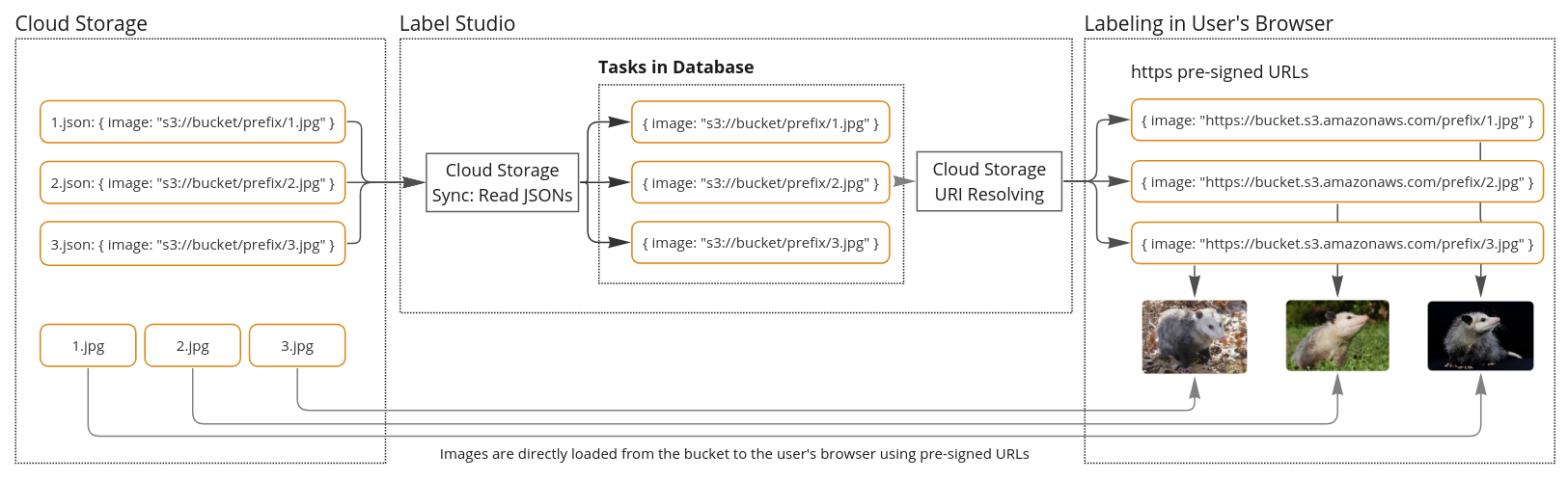
What is label-studio?
Label Studio is an open-source data labeling and annotation server for machine learning teams: it lets annotators label images, audio, text, HTML, video and time-series data through a browser UI and export the results in model-ready formats such as JSON, COCO and Pascal VOC. Projects are set up from a large template library or from a custom XML-style labeling configuration, and the Data Manager view helps you browse, filter and manage tasks. Machine learning backends can be connected with its SDK for pre-labeling, prediction comparison and active-learning loops, and a REST API, Python SDK and webhooks make it easy to embed into an existing pipeline. Cloud sources (Amazon S3, Google Cloud Storage, Azure Blob, Databricks, Redis, local directories) can be synced instead of uploading files. You run it yourself with pip (Python), with the heartexlabs/label-studio Docker image on port 8080, with a Docker Compose stack that adds Nginx and PostgreSQL, or on Kubernetes via Helm; SQLite is the default store and PostgreSQL is recommended at production scale. The Community edition has no role-based access control, workspaces, review workflows, SSO or LLM prompting features; those are paid Starter Cloud and Enterprise editions.
label-studio alternatives
 ArgillaOpen-source, self-hosted collaboration tool where AI engineers and domain experts label, curate and export high-quality datasets for NLP, LLM and multimodal work.CompareArgilla with label-studio
 Transformer LabSelf-hosted, open-source ML platform to train, fine-tune, evaluate and serve LLMs, diffusion and audio models locally or across GPU clusters.CompareTransformer Lab with label-studio
 sdnextSelf-hosted, open-source Stable Diffusion web UI to generate, caption, upscale and edit images and video, with many GPU backends and model quantization for low VRAM.Comparesdnext with label-studio
 Whisper-WebUISelf-hosted Gradio web UI that turns Whisper speech recognition into an easy subtitle generator: transcribe files, YouTube links or microphone.CompareWhisper-WebUI with label-studio
 InvokeAISelf-hosted, open-source AI image generation studio with a layered Unified Canvas, node-based workflows, ControlNet, and broad local model support from SD 1.5 to Flux.CompareInvokeAI with label-studio
 Big-AGISelf-hosted, open-source AI workspace for experts: run 2 to 24 models in parallel with Beam, personas, image generation, voice and BYO API keys via Docker.CompareBig-AGI with label-studio
 app.enfugue.aiSelf-hosted open-source web app for studio-quality AI image/video generation with Stable Diffusion, unified pipeline, CivitAI browser, optional auth, and JSON API.Compareapp.enfugue.ai with label-studio
 LibreDB StudioSelf-hosted, open-source SQL IDE covering 41 database engines in one browser tab, with OIDC SSO, RBAC, query auditing and an AI query agent — MIT licensed.CompareLibreDB Studio with label-studio
Should you self-host label-studio?
label-studio scores 80/100 on selfhost.directory (how scoring works) and ranks #1 of 3 in Data Collection. It has 28 669 GitHub stars, +261 in the last 30 days.
It shipped 4 stable releases in the past year. The latest, 1.23.2, came out on 29 September 2026. New versions land roughly every 2 months.
Setup is easy: most people get it running in one sitting. An official Docker image is available. It is Apache-2.0-licensed and written mostly in Typescript.
Its closest alternative on selfhost.directory is Argilla (63/100, 5 196 stars). label-studio scores higher overall. See label-studio vs Argilla side by side.
Features
- Annotation export
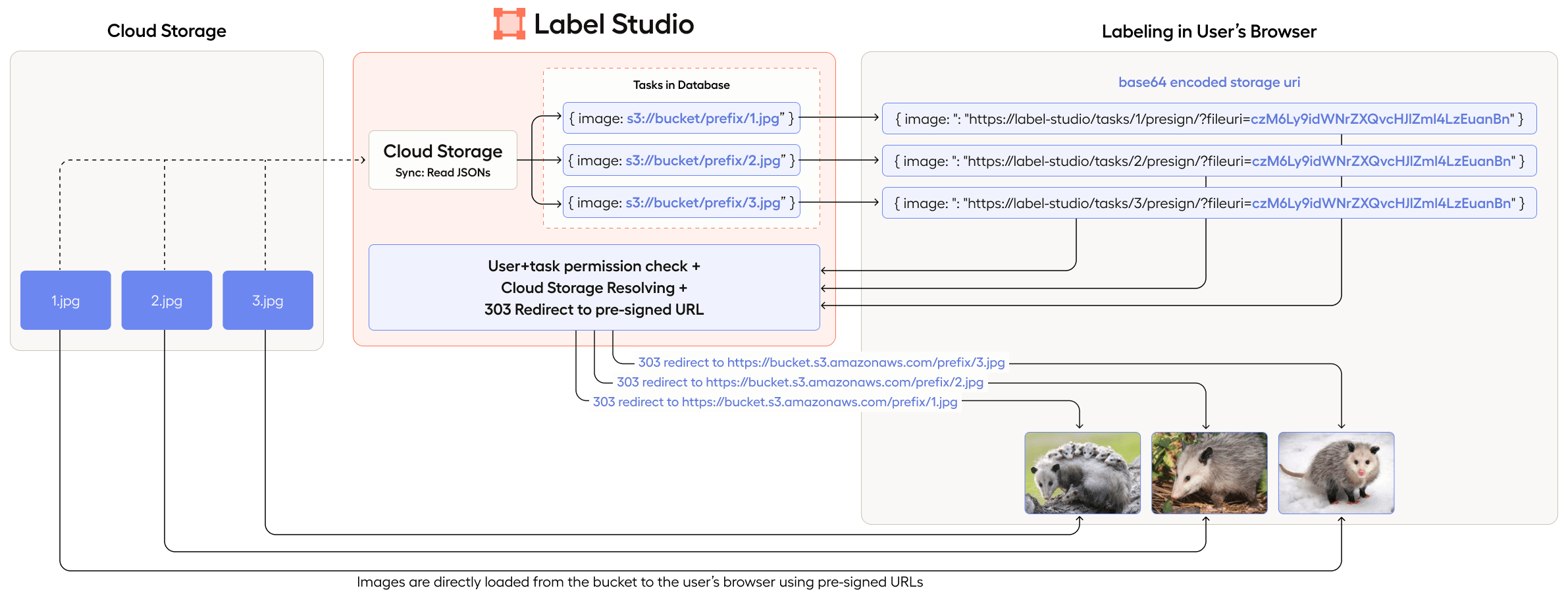
- Cloud storage import and sync
- Customizable labeling interface
- Custom ML backends
- Data exploration view
- Import pre-annotations
- ML model pre-labelingActive learning loops are Enterprise-only.
- Multi-modal data labeling
- Multiple projects
- Multi-user annotation accounts
- Project Templates
- REST API
- Webhooks
label-studio README


Website • Docs • Join Slack Community
Label Studio is an open source data labeling tool. It lets you label data types like audio, text, images, videos, and time series with a simple and straightforward UI and export to various model formats. It can be used to prepare raw data or improve existing training data to get more accurate ML models.
How to install label-studio
Install label-studio with Docker
LABEL_STUDIO_HOST, LABEL_STUDIO_PORT, LABEL_STUDIO_LOCAL_FILES_SERVING_ENABLED, LABEL_STUDIO_LOCAL_FILES_DOCUMENT_ROOTdocker pull heartexlabs/label-studio:latest
docker run -it -p 8080:8080 -v $(pwd)/mydata:/label-studio/data heartexlabs/label-studio:latest
Access at http://localhost:8080; mounted files must have permissions for UID 1001.
Install label-studio with Docker Compose
DJANGO_DB, POSTGRE_HOST, POSTGRE_NAME, POSTGRE_USER, POSTGRE_PASSWORD, POSTGRE_PORT, LABEL_STUDIO_HOST, JSON_LOG, POSTGRES_DATA_DIRdocker-compose up
Production-ready stack of Label Studio + Nginx + PostgreSQL; docker-compose.minio.yml adds MinIO for local S3.
Install label-studio with Kubernetes
helm repo add heartex https://charts.heartex.com/
helm repo update heartex
helm install <RELEASE_NAME> heartex/label-studio -f ls-values.yaml
Helm 3 chart; set the LABEL_STUDIO_HOST and SSRF_PROTECTION_ENABLED environment values for production.
Install label-studio with pip
LABEL_STUDIO_DATABASE, LABEL_STUDIO_BASE_DATA_DIR, LABEL_STUDIO_PORT, LABEL_STUDIO_HOST, LABEL_STUDIO_USERNAME, LABEL_STUDIO_PASSWORD, LABEL_STUDIO_USER_TOKEN# Requires Python >=3.10
pip install label-studio
# Start the server at http://localhost:8080
label-studio
Install label-studio with Homebrew
brew tap humansignal/tap
brew install humansignal/tap/label-studio
label-studio
Requires the Brew package manager; browser opens http://localhost:8080 automatically.
How to configure label-studio
LABEL_STUDIO_HOST=''Specify the hostname to use to generate links for imported labeling tasks or static loading requirements. Leave empty to make all paths relative to the root domain. For example, specify "https://77.42.77.42:1234" or "http://ls.example.com/subdomain/". See Run Label Studio with an external domain name on this page.DJANGO_DB=defaultSelects the database backend in the Docker Compose stack (default is PostgreSQL, sqlite for SQLite).values: default / sqlite
POSTGRE_NAME=postgresDatabase name used by the app container.POSTGRE_USER=postgresDatabase user used by the app container.POSTGRE_PASSWORDDatabase password for the app container.
label-studio releases & version history
⚠️ Upgrade notes
- pip installs: rotate your
SECRET_KEYif other users on the machine can read your data directory. Older versions saved the generatedSECRET_KEYin<data_dir>/.env(~/.local/share/label-studio/.envon Linux) with permissions that let any local user read it. This release makes the file readable only by its owner, but a key that may already have been read stays valid until you change it. To rotate it, delete theSECRET_KEYline from.env(or set a newSECRET_KEYenvironment variable) and restart. Everyone will need to log in again, and existing access tokens stop working. - Image exports skip media on private networks. When
SSRF_PROTECTION_ENABLED=true(the default),COCO_WITH_IMAGES,YOLO_WITH_IMAGESandYOLO_OBB_WITH_IMAGESexports no longer download media from private or local network addresses. The export still completes, but those images are left out of the archive. If your task media is hosted on an internal server, setUSE_DEFAULT_BANNED_SUBNETS=falseand list only the ranges you want blocked inUSER_ADDITIONAL_BANNED_SUBNETS, or setSSRF_PROTECTION_ENABLED=false. - Set
LABEL_STUDIO_HOSTso image exports can include uploaded files. Exports now download files from Label Studio itself only when its address can be trusted: whenLABEL_STUDIO_HOSTis set, or whenALLOWED_HOSTSis restricted. On a default install with neither, uploaded files that aren't on the local disk (for example, when the default storage is S3, GCS or Azure) are left out of image exports. - Uploaded HTML, SVG and XML files open in a sandbox. When these files are opened from
/storage-data/uploaded/, they are served withContent-Security-Policy: sandbox, so scripts inside them don't run. Images, PDFs, audio and video aren't affected. If you run your own reverse proxy instead of the bundled nginx config, add the same header for these content types. See the$uploaded_file_cspmap indeploy/default.conf.
Security
- The generated
SECRET_KEYfile (<data_dir>/.env) is now created readable only by its owner, and an existing file is restricted on startup. The data directory is also created readable only by its owner. - S3-compatible storage endpoints are now checked for private or local addresses every time a connection is opened, not only when the storage is saved. This blocks DNS rebinding. Storages saved before this check existed are also re-checked.
- Image exports now block media URLs that point at private or local network addresses.
- Image exports no longer send the organization owner's API token to a host taken from the request's
Hostheader. - Uploaded HTML, SVG and XML files served from
/storage-data/uploaded/are sandboxed, both when Django serves them directly and when they are served through the bundled nginx.
This is a security-focused patch release. Please read the upgrade notes before you upgrade.
⚠️ Upgrade notes
-
PostgreSQL 14 or higher is now required. Label Studio now runs on Django 5.2, which doesn't support PostgreSQL 13 or older.
-
New secure defaults:
SSRF_PROTECTION_ENABLED=true: outbound requests to private or local network addresses are blocked. This affects URL imports, webhooks, S3-compatible endpoints, and Redis storage.ML_BLOCK_LOCAL_IP=true: ML backends onlocalhostor a private network are blocked.DEBUG_MODAL_EXCEPTIONS=false: error details are no longer shown in the UI.
If your ML backend, MinIO, Redis, or webhook receiver runs on a local or private network, set
SSRF_PROTECTION_ENABLED=falseand/orML_BLOCK_LOCAL_IP=false. Alternatively, keep the protection on and change the blocked ranges withUSE_DEFAULT_BANNED_SUBNETSandUSER_ADDITIONAL_BANNED_SUBNETS.
Security
- Stronger SSRF protection for ML backends, webhooks, cloud storage, and URL imports.
- Tighter permission checks when you create storages, webhooks, and ML backends, and when you delete users.
- Fixed access checks for local file storage and Data Manager filters.
- Improved HTML sanitization in the labeling interface.
Helm Chart version: 2.0.0
🌟 What's new
🎉 New features
🎨 Annotate images with vector lines
There are two new tags for image annotation: Vector and VectorLabels.
You can use these tags for point-based vector annotation (polylines, polygons, skeletons).

✅ Feature updates
🪄 Interactive view for task source
When clicking Show task source <> from the Data Manager, you will see a new Interactive view. (#9245, #9318)
From here you can filter, search, and expand/collapse sections in the task source. You can also selectively copy sections of the JSON.
You can also now toggle whether to show the resolved URIs.

📌 Data Manager filter enhancements
Data Manager filters have the following enhancements (#9488):
- New copy and paste actions that you can use to copy filters between tabs within the same project or to tabs within other projects (any inapplicable fields will be automatically removed when pasting between projects).
- The ability to copy filters as JSON so that you can edit them elsewhere.
- The three most recent filter selections will appear at the top of the drop-down menu.
- When adding new filters, it will pre-populate with your most recent selections.


🎯 Context menu for Data Manager rows
When you right-click a Data Manager row, you will now see a context menu (#9386):

🔎 Press Ctrl + F to search the Code tab
When working in the template builder, you can now use Ctrl + F to search the your labeling configuration XML (#9346, #9424).

↔️ Resize panel widths in the template builder
You can now click and drag to adjust panel widths when configuring your labeling interface (#9171).
2-33-code.mp4
⬆️ Use Shift to select multiple Data Manager rows
You can now select a Data Manager row, and then while holding shift, select another Data Manager row to select all rows between your selections (#9067).
🧩 Task navigation and ID moved to the bottom of the labeling interface
To better utilize space, the annotation ID and the navigation controls for the labeling stream have been moved to below the labeling interface (#8822).

✨ Miscellaneous UX/UI improvements
-
The Recent Projects list on the Home page will now include the most recently visited projects at the top of the list instead of pinned projects (#8993).
-
How time is displayed across the app has been standardized to use the following format (#9134):
[n]h [n]m [n]sFor example: 10h 5m 22s
-
When you hover over an annotation tab in Quick View, you will now see metadata for the annotation (#9140).

-
For YOLO, COCO, and VOC conversion warnings, the task_id is now used instead of the sequence number to improve clarity (#9248, #9269).
-
It is now clearer how to access the task summary view. The icon has been replaced with a Compare All button (#9271).
-
Text area components have an updated appearance and guidance text (#9319).
-
Improved how timeouts for exports are handled and communicated in the UI (#9063).
-
Improved visual contrast to between active and inactive tabs on the Data Manager (#9423).
📦 SDK improvements
- The Membership detail endpoint now includes
created_projectsandcontributed_to_projectsfields. - In the Membership list endpoint, fields nested under
userhave been deprecated and promoted to the root of the response. - Optimizations have been made to both endpoints (#9066).
🚀 Performance improvements and optimizations
- Improved performance when clicking between different tasks in the Data Manager to open the Quick View interface (#9495, #9498).
🔒 Security
- Fixed an XSS issue with custom hotkeys (#9084).
🚨 Breaking changes
Starting with this release, we will be using an Alpine Docker image. Previously we used Debian Trixie. (#9108)
If you build on top of our image, update your FROM line and replace apt-get with apk.
🐞 Bug fixes
-
Fixed an issue affecting how filter values appeared (#8995).
-
Fixed an issue where embedded YouTube videos were not working in
<HyperText>tags (#9003). -
Fixed an issue where import jobs through the API could fail silently (#9010, #9043).
-
Fixed an issue where the Copy region link action from the overflow menu for a region disappeared on hover (#9016).
-
Fixed an issue with prediction validation for the Ranker tag (#9012, #9044).
-
Fixed an issue with missing images when exporting YOLO/COCO formats when images were uploaded through the UI (#9058).
-
Fixed an issue where SDK calls using PATs could not handle trailing slashes in the base URL (#9099).
-
Fixed an issue with how the Enterprise tag appeared on templates when creating a project (#9120).
-
Fixed an issue that prevents loading Label Studio in an airgapped environment (#9136).
-
Fixed a small UI issue in Firefox related to horizontal scrolling (#9131).
-
Fixed an issue with row margins in the Data Manager (#9162).
-
Fixed an issue where extra space appeared at the end of Data Manager table rows (#9210).
-
Fixed an issue with default permissions with using Docker (#9243).
-
Fixed an issue with the
ls.ml.listSDK endpoint (#9249). -
Fixed an issue with a validation error when importing HypertextLabels predictions (#9282).
-
Fixed an issue where multi-channel time series plots introduced left-margin offset causing x‑axis misalignment with standard channel rows (#9296).
-
Fixed an issue with the autocomplete pop-up width when editing code under the Code tab of the labeling configuration (#9317).
-
Fixed an issue where Ranker tag styling was broken (#9330).
-
Fixed an issue where, when importing predictions with
PolygonLabels/RectangleLabels, users would see an error if their labeling config usedPolygon/Rectangle+Labelstags instead (#9364). -
Fixes spacing of items on data manager/project dropdowns and spacing of tabs (#9422).
-
Fixed an issue where the
minPlaybackSpeedparameter could be configured with a value greater than thedefaultPlaybackSpeedparameter on the Video tag (#9387). -
Fixed an issue with importing predictions for BrushLabels (#9453).
🤩 Contributors
❤️ HumanSignal team
- @ricardoantoniocm
- @makseq
- @mcanu
- @yyassi-heartex
- @matt-bernstein
- @nikitabelonogov
- @nick-skriabin
- @hakan458
- @bmartel
- @nass600
- @hlomzik
- @farioas
Full Changelog: tags/1.22.0...1.23.0
This changelog was updated in response to a push of 2a9bfbc
Workflow run
Jira Release Issues 1.23.0 FilterTurned off Feature Flags (111)
- feat_front_dev_1752_notification_links_in_label_and_review_streams
- feat_front_dev_3260_alternative_shortcuts_for_video_naviagtion
- feat_front_dev_399_lock_interface_when_trial_expired_short
- feat_optic_1098_annotation_history_lead_time_charts
- feat_utc_554_agreement_v2_in_task_summary_view
- ff_back_2004_async_review_24032022_short
- ff_back_2884_comments_notifications_02092022_short
- ff_back_DEV_3374_review_query_160922_short
- ff_back_dev_1948_reviewed_status_16052022_short
- ff_back_dev_2362_project_credentials_060722_short
- ff_back_experimental_features
- ff_front_dev_1442_unselect_shape_on_click_outside_080622_short
- ff_front_dev_1480_created_on_in_review_180122_short
- ff_front_dev_1682_model_version_dropdown_070622_short
- ff_front_dev_2186_comments_for_update
- ff_front_dev_2671_anchor_rotate_bbox_010722_short
- ff_front_optic_1610_ask_ai_questions
- fflag-feat-dev-2887-comments-ui-editor-short
- fflag-feat-dev-3034-comments-with-drafts-short
- fflag-feat-front-dev-2866-free-trial-invite-short
- fflag-feat-front-dev-3051-trial-experience
- fflag_all_feat_utc_112_open_in_starter_cloud
- fflag_all_feat_utc_204_users_performance_improvements_in_dm_for_large_orgs
- fflag_all_feat_utc_274_permissions_improvements
- fflag_dev_disable_polling_killswitch_short
- fflag_feat_all_dia_1576_prompts_easy_breezy_onboarding_long
- fflag_feat_all_dia_1576_prompts_easy_breezy_onboarding_short_async_presets_ks
- fflag_feat_all_dia_1700_pinned_organization_sidebar
- fflag_feat_all_dia_2067_tasks_table_component
- fflag_feat_all_dia_835_prompter_workflow_long
- fflag_feat_all_fit_1137_annotation_time
- fflag_feat_all_fit_1304_strict_overlap
- fflag_feat_all_fit_1443_analytics_label_distribution_page
- fflag_feat_all_fit_524_review_time_chart
- fflag_feat_all_fit_725_command_palette_short
- fflag_feat_all_fit_730_review_time_column
- fflag_feat_all_fit_778_analytics_short
- fflag_feat_all_fit_866_analytics_overview_short
- fflag_feat_all_leap_1534_custom_task_lock_timeout_short
- fflag_feat_all_lops_315_temp_datasets_limitations_short
- fflag_feat_all_lops_e_3_datasets_short
- fflag_feat_all_lsdv_e_295_project_level_roles_via_saml_scim_ldap_short
- fflag_feat_all_optic_1354_sum_annotation_region_count_short
- fflag_feat_all_utc_222_prompts_api_keys_enterprise_only
- fflag_feat_back_dev_3756_queue_enrollment_min_short
- fflag_feat_back_lsdv_3958_server_side_encryption_for_target_storage_short
- fflag_feat_back_lsdv_4932_enable_memory_profiler
- fflag_feat_back_lsdv_5307_import_reviews_drafts_29062023_short
- fflag_feat_back_optic_1579_force_memory_profiler
- fflag_feat_back_optic_428_scim_multi_mapping
- fflag_feat_back_org_excluded_from_custom_scripts_validation_short
- fflag_feat_backend_optic_427_org_member_role_throttling_short
- fflag_feat_bros_12_support_reports
- fflag_feat_bros_193_new_cloud_storage_providers_short
- fflag_feat_dev_2755_regions_list_grouped_by_labels_with_ordered_collapse_short
- fflag_feat_dia_1661_improve_prompts_discovery_and_conversion
- fflag_feat_dia_1697_product_tour_short
- fflag_feat_dia_1920_project_creation_sample_data_short
- fflag_feat_dia_1925_view_sample_raw_json_short
- fflag_feat_fit_1424_analytics_saved_views
- fflag_feat_fit_449_datamanager_filter_members_short
- fflag_feat_fit_528_icon_menu_short
- fflag_feat_fit_52_label_studio_enterprise_embed
- fflag_feat_fit_568_finite_state_management
- fflag_feat_fit_710_fsm_state_fields
- fflag_feat_front_bros_371_new_pdf_tag_short
- fflag_feat_front_bros_779_reactcode_iframe_pool
- fflag_feat_front_dev-2536_comment_notifications_short
- fflag_feat_front_dev_3051_trial_experience_short
- fflag_feat_front_dia_1747_projects_list_banner
- fflag_feat_front_leap_1173_disable_postpone_skip_short
- fflag_feat_front_leap_482_self_serve_short
- fflag_feat_front_lops_134_find_similarity_29082023_short
- fflag_feat_front_optic_optic_1442_hubspot_talk_to_sales_modal_short
- fflag_feat_optic_1025_zendesk_widget_integration
- fflag_feat_optic_378_limit_projects_per_page_to_ten_short
- fflag_feat_optic_650_target_storage_task_format_long
- fflag_feat_root_47_plugins_without_eval
- fflag_feat_slack_integration
- fflag_feat_utc_161_bulk_queue_total_11072025_short
- fflag_feat_utc_210_prediction_validation_15082025
- fflag_feat_utc_239_filterable_agreement_column_short
- fflag_feat_utc_384_manage_members_v2
- fflag_feat_utc_478_user_tags_management
- fflag_feature_all_optic_1421_cold_start_v2
- fflag_feature_all_optic_1541_performance_score_on_latest_review_short
- fflag_fix_all_fit_287_preview_performance_improvements
- fflag_fix_all_fit_720_lazy_load_annotations
- fflag_fix_all_leap_877_annotator_membership_api_03042024_short
- fflag_fix_all_lsdv_4813_async_export_conversion_22032023_short
- fflag_fix_all_lsdv_4896_dm_actions_to_reviewers_20230403_short
- fflag_fix_all_optic_18_dashboard_label_distribution_chart_async_22082023_short
- fflag_fix_all_optic_79_task_count_is_wrong_short
- fflag_fix_back_4620_memory_efficient_predictions_import_08012025_short
- fflag_fix_back_dev_3668_review_stream_optimizaion_short
- fflag_fix_back_dev_4174_overlap_issue_experiments_10012023_short
- fflag_fix_back_dev_4185_next_task_additional_logging_long
- fflag_fix_back_lsdv_4523_show_overlap_first_order_27022023_short
- fflag_fix_back_lsdv_5425_1_enable_permissions_restrictions_for_annotators_long
- fflag_fix_back_plt_825_rate_limiter_debug_14072025_short
- fflag_fix_bros_113_members_user_order_20250816
- fflag_fix_bros_528_num_tasks_with_annotations_short
- fflag_fix_front_dev_2918_labeling_filtered_paragraphs_250822_short
- fflag_fix_front_fit_31_synced_media_buffering
- fflag_fix_front_leap_443_select_annotation_once
- fflag_fix_front_lsdv_4600_lead_time_27072023_short
- fflag_fix_optic_1259_lse_projects_read_apis_use_replica_short
- fflag_front_dia_1150_ddisco_sneak_preview
- fflag_root_45_better_user_filter
- fflag_utc_428_consensus_control_tag_agreement
- fix_backend_dev_3134_exclude_deactivated_users
Helm Chart version: 1.11.6
🌟 What's new
🎉 New features
🏷️ New Markdown tag
There is a new tag, which you can use to add content to your labeling interface. (#8572)
For example, adding the following to your labeling interface:
<View> <Markdown> ## Heading 2 ### Heading 3 - bullet point one - bullet point two **Bold text** and *italic text* `inline code` ``` code block ``` [Link](https://humansignal.com/changelog/)  </Markdown> </View>
Produces this:

✅ Feature updates
⬆️⬇️ Sort video, audio, and timeseries regions by start time
You can now sort regions by media start time. (#8418)
Previously you could sort by time, but this would reflect the time that the region was created. The new option reflects the start time in relation to the media.
media-start-time-sort.mp4
📁 Improved Local Storage setup process
This release improves numerous Local Storage setup improvements to help make the process easier for users. (#8891)
Changes include:
- When entering the absolute local path in the storage modal, trailing slashes will be automatically removed to prevent an error.
- Normalized slashes when saving the absolute local path to prevent confusion between Unix and Windows environments.
- If you create folders named "my-data" or "label-studio-data" and run the label-studio command in the parent directory, the
LOCAL_FILES_DOCUMENT_ROOTandLOCAL_FILES_SERVING_ENABLEDvariables will be automatically set to point to those folders. - Improved error messages when the absolute local path does not include a subdirectory but matched the local files document root.
- When the local files document root is set, the absolute local path is automatically preloaded with the appropriate path.
❗️ Additional validation when performing destructive actions in projects
When deleting a project, resetting the project cache, or dropping all project tabs, users will now be asked to enter text in the confirmation window (#8623):

⚙️ Improved annotation tabs
Annotation tabs have the following improvements (#8840):
- To improve readability, removed the annotation ID from the tab and truncated long model names.
- Added two new options to the overflow menu for the annotation tab:
- Copy Annotation ID - To copy the annotation ID that previously appeared in the tab
- Show Other Annotations Open the annotation comparison view.

📐 Compact display for Data Manager columns
There is a new option to select between the default column display and a more compact version. (#8719)

🔈 Skip decoding audio files
Added a none option for the decoder param for Audio tags, which will allow you to skip audio decoding for use cases that require labeling on the timeline but the file size is far too large to decode at one time. (#8697)
🎬 New parameters for the Video tag
The Video tag now has the following optional parameters (#8548):
defaultPlaybackSpeed- The default playback speed when the video is loaded.minPlaybackSpeed- The minimum allowed playback speed.
The default value for both parameters is 1.
🔑 Personal Access Token support for ML backends
Previously, if using a machine learning model with a project, you had to set up your ML backend with a legacy API token.
You can now use personal access tokens as well. (#8783)
✨ Miscellaneous UX/UI improvements
-
Updated the font size variables. (#8724)
-
Improved the Cloud Storage page with a better explanation and link to docs. (#8716)
-
Refactored modal components. (#8626)
-
Set
smoothing=falseby default when using Bitmask. (#8374) -
Improved how long labels wrap in taxonomy options (#8317)
🐞 Bug fixes
-
Fixed an issue where the Info panel was showing conditional choices that were not relevant to the selected region. (#8301)
-
Fixed an issue where the Copy button was not showing the correct state in some instances. (#8238)
-
Fixed an issue with the disabled state style for the Taxonomy tag on Dark Mode. (#8327)
-
Fixed an issue with the
/versionpage. (#8343) -
Fixed an issue where image labeling was broken in the Label Studio Playground. (#8372)
-
Fixed an issue where the Data Manager appeared empty when using the browser back button to navigate there from the Settings page. (#8386, #8444)
-
Fixed an issue where clicking the Label All Tasks drop-down would display the menu options in the wrong spot. (#8385)
-
Fixed an issue where export conversions would not run if a previous attempt had failed. (#8412)
-
Fixed an issue where videos could not be displayed inside collapsible panels within the labeling config. (#8447)
-
Fixed an issue where API taxonomies were not loading correctly. (#8508)
-
Fixed an issue where the Scan all subfolders toggle was appearing for all cloud storage types, even though it is only applicable for a subset. (#8506 #8539)
-
Fixed an issue with prediction validation for per-region labels. (#8557)
-
Fixed an issue where importing a CSV would fail if semicolons were used as separators. (#8569)
-
Fixed an issue with multiple annotation tabs to make the active tab easier to identify. (#8585)
-
Fixed an issue where Personal Access Tokens were disabled by default in new organizations. (#8577)
-
Fixed an issue where webp images would not render. (#8597)
-
Fixed an issue where the app page title was not updating in the browser tab. (#8610)
-
Fixed some minor visual issues with filters. (#8650)
-
Fixed an issue with duplicated text area values when using the
valueparameter. (#8667) -
Fixed a small visual issue with the bottom border of the Data Manager. (#8695)
-
Fixed an issue where the style of the Create Project header was broken. (#8723)
-
Fixed an issue where when video labeling with rectangles, resizing or rotating them were not updating the shapes in the correct keyframes. (#8730)
-
Fixed an issue with dataRange when grouping TimeSeries channels. (#8718)
-
Fixed an issue with empty redirections when attempting to access non-existent projects. (#8746)
-
Fixed an issue where the style of the tooltip info icons on the Cloud Storage status card was broken. (#8759)
-
Fixed an issue when exporting annotations that include a null result. (#8755)
-
Fixed an issue with the drop-down height when selecting columns in Data Manager filters. (#8806)
-
Fixed an issue where Label Studio would automatically try to use any running Redis instance. (#8884)
-
Fixed an issue that prevented scrolling the filter column drop-down after clear a previous search. (#8881)
-
Fixed an issue where conversion jobs were failing for YOLO exports. (#8914)
-
Fixed an issue where PDFs were not filling the full height of the canvas. (#8894)
-
Fixed an issue where Submit and Skip buttons were hidden if opening the labeling stream when previously viewing annotation comparisons. (#8953)
🤩 Contributors
❤️ HumanSignal team
- @nass600
- @hlomzik
- @makseq
- @nick-skriabin
- @bmartel
- @ricardoantoniocm
- @luarmr
- @matt-bernstein
- @yyassi-heartex
- @mcanu
- @niklub
- @hakan458
- @jombooth
- @Gondragos
Full Changelog: tags/1.21.0...1.22.0
This changelog was updated in response to a push of 090298d
Workflow run
Jira Release Issues 1.22.0 FilterTurned off Feature Flags (113)
- feat_all_optic_71_dashboard_multiple_labeling_group_support_v1_01092023_short
- feat_front_dev_1752_notification_links_in_label_and_review_streams
- feat_front_dev_3260_alternative_shortcuts_for_video_naviagtion
- feat_front_dev_399_lock_interface_when_trial_expired_short
- feat_optic_1098_annotation_history_lead_time_charts
- ff_back_2004_async_review_24032022_short
- ff_back_2884_comments_notifications_02092022_short
- ff_back_DEV_1711_review_queue_140222_short
- ff_back_DEV_3374_review_query_160922_short
- ff_back_dev_1948_reviewed_status_16052022_short
- ff_back_dev_2362_project_credentials_060722_short
- ff_back_experimental_features
- ff_front_dev_1442_unselect_shape_on_click_outside_080622_short
- ff_front_dev_1480_created_on_in_review_180122_short
- ff_front_dev_1682_model_version_dropdown_070622_short
- ff_front_dev_2186_comments_for_update
- ff_front_dev_2671_anchor_rotate_bbox_010722_short
- ff_front_optic_1610_ask_ai_questions
- fflag-feat-dev-2887-comments-ui-editor-short
- fflag-feat-dev-3034-comments-with-drafts-short
- fflag-feat-front-dev-2866-free-trial-invite-short
- fflag-feat-front-dev-3051-trial-experience
- fflag_all_feat_utc_112_open_in_starter_cloud
- fflag_all_feat_utc_204_users_performance_improvements_in_dm_for_large_orgs
- fflag_all_feat_utc_274_permissions_improvements
- fflag_dev_disable_polling_killswitch_short
- fflag_feat_all_dia_1576_prompts_easy_breezy_onboarding_long
- fflag_feat_all_dia_1576_prompts_easy_breezy_onboarding_short_async_presets_ks
- fflag_feat_all_dia_1700_pinned_organization_sidebar
- fflag_feat_all_dia_2067_tasks_table_component
- fflag_feat_all_dia_835_prompter_workflow_long
- fflag_feat_all_fit_524_review_time_chart
- fflag_feat_all_fit_725_command_palette_short
- fflag_feat_all_fit_730_review_time_column
- fflag_feat_all_fit_778_analytics_short
- fflag_feat_all_fit_866_analytics_overview_short
- fflag_feat_all_leap_1534_custom_task_lock_timeout_short
- fflag_feat_all_lops_315_temp_datasets_limitations_short
- fflag_feat_all_lops_e_3_datasets_short
- fflag_feat_all_lsdv_e_295_project_level_roles_via_saml_scim_ldap_short
- fflag_feat_all_optic_1354_sum_annotation_region_count_short
- fflag_feat_all_utc_222_prompts_api_keys_enterprise_only
- fflag_feat_back_dev_3756_queue_enrollment_min_short
- fflag_feat_back_lsdv_3958_server_side_encryption_for_target_storage_short
- fflag_feat_back_lsdv_4932_enable_memory_profiler
- fflag_feat_back_lsdv_5307_import_reviews_drafts_29062023_short
- fflag_feat_back_optic_1579_force_memory_profiler
- fflag_feat_back_optic_428_scim_multi_mapping
- fflag_feat_back_org_excluded_from_custom_scripts_validation_short
- fflag_feat_backend_optic_427_org_member_role_throttling_short
- fflag_feat_bros_12_support_reports
- fflag_feat_bros_193_new_cloud_storage_providers_short
- fflag_feat_dev_2755_regions_list_grouped_by_labels_with_ordered_collapse_short
- fflag_feat_dia_1661_improve_prompts_discovery_and_conversion
- fflag_feat_dia_1697_product_tour_short
- fflag_feat_dia_1920_project_creation_sample_data_short
- fflag_feat_dia_1925_view_sample_raw_json_short
- fflag_feat_fit_449_datamanager_filter_members_short
- fflag_feat_fit_528_icon_menu_short
- fflag_feat_fit_52_label_studio_enterprise_embed
- fflag_feat_fit_568_finite_state_management
- fflag_feat_fit_710_fsm_state_fields
- fflag_feat_front_bros_371_new_pdf_tag_short
- fflag_feat_front_dev-2536_comment_notifications_short
- fflag_feat_front_dev_3051_trial_experience_short
- fflag_feat_front_dia_1747_projects_list_banner
- fflag_feat_front_leap_1173_disable_postpone_skip_short
- fflag_feat_front_leap_482_self_serve_short
- fflag_feat_front_lops_134_find_similarity_29082023_short
- fflag_feat_front_optic_optic_1442_hubspot_talk_to_sales_modal_short
- fflag_feat_front_prod_281_project_list_search_19072023_short
- fflag_feat_optic_1025_zendesk_widget_integration
- fflag_feat_optic_161_project_settings_for_low_agreement_threshold_score_short
- fflag_feat_optic_378_limit_projects_per_page_to_ten_short
- fflag_feat_optic_650_target_storage_task_format_long
- fflag_feat_optic_67_drag_and_drop_charts
- fflag_feat_root_47_plugins_without_eval
- fflag_feat_utc_161_bulk_queue_total_11072025_short
- fflag_feat_utc_210_prediction_validation_15082025
- fflag_feat_utc_239_filterable_agreement_column_short
- fflag_feat_utc_320_use_precomputed_agreement_score_short
- fflag_feat_utc_365_include_all_controls_in_agreement
- fflag_feat_utc_384_manage_members_v2
- fflag_feature_all_optic_1421_cold_start_v2
- fflag_feature_all_optic_1541_performance_score_on_latest_review_short
- fflag_fix_all_leap_877_annotator_membership_api_03042024_short
- fflag_fix_all_lsdv_4813_async_export_conversion_22032023_short
- fflag_fix_all_lsdv_4896_dm_actions_to_reviewers_20230403_short
- fflag_fix_all_lsdv_4971_async_reimport_09052023_short
- fflag_fix_all_optic_18_dashboard_label_distribution_chart_async_22082023_short
- fflag_fix_all_optic_79_task_count_is_wrong_short
- fflag_fix_back_4620_memory_efficient_predictions_import_08012025_short
- fflag_fix_back_dev_3668_review_stream_optimizaion_short
- fflag_fix_back_dev_4174_overlap_issue_experiments_10012023_short
- fflag_fix_back_dev_4185_next_task_additional_logging_long
- fflag_fix_back_lsdv_4523_show_overlap_first_order_27022023_short
- fflag_fix_back_lsdv_5425_1_enable_permissions_restrictions_for_annotators_long
- fflag_fix_back_plt_825_rate_limiter_debug_14072025_short
- fflag_fix_bros_113_members_user_order_20250816
- fflag_fix_bros_528_num_tasks_with_annotations_short
- fflag_fix_font_lsdv_3009_draft_saving_stuck_130223_short
- fflag_fix_front_dev_2918_labeling_filtered_paragraphs_250822_short
- fflag_fix_front_fit_31_synced_media_buffering
- fflag_fix_front_leap_443_select_annotation_once
- fflag_fix_front_lsdv_4600_lead_time_27072023_short
- fflag_fix_optic_1259_lse_projects_read_apis_use_replica_short
- fflag_front_dia_1150_ddisco_sneak_preview
- fflag_root_212_reduce_importstoragelink_counts
- fflag_root_223_optimize_delete_predictions
- fflag_root_43_prediction_results_filter
- fflag_root_45_better_user_filter
- fflag_utc_428_consensus_control_tag_agreement
- fix_backend_dev_3134_exclude_deactivated_users
Helm Chart version: 1.11.3
🌟 What's new
🎉 New features
🖌 Bitmask support for precise image annotation
There is a new BitmaskLabels tag to support pixel-level image annotation using a brush and eraser. This new tag allows for highly detailed segmentation using brush-based region and a cursor that reflects brush size down to single pixels for fine detail. We’ve also improved performance so it can handle more regions with ease. (#7766 #7799 #7852)
Additionally, Mac users can now use two fingers to pinch zoom and pan images for all annotation tasks.
bitmask.mp4
🔤 Custom global hotkeys
You can now configure global hotkeys for each user account. These are available from the Account & Settings page. (#7784)

✅ Feature updates
▶️ One-click annotation for audio-text dialogues
When labeling paragraphs in dialogue format (layout="dialogue"), you can now apply labels at an utterance level. (#8037)
There is a new button that you can click to apply the selected label to the entire utterance. You can also use the pre-configured Command + Shift + A hotkey:

⚙️ Settings for TimelineLabels configurations
When you are using a labeling configuration that includes <TimelineLabels>, you will now see a settings icon. (#8011)
From here you can specify the following:
- Playback speed for the video
- Whether to loop timeline regions

↕️ Adjustable height for audio players
While you can still adjust the default height in the labeling configuration, now users can drag and drop to adjust the height as needed. (#8116 #8138)
2_29_adjust.mp4
✏️ Apply labels from multiple <Labels> controls
When you have a labeling configuration that includes multiple <Labels> blocks, like the following:
<View>
<Text name="text" value="$text" granularity="word"/>
<Labels name="category" toName="text" choice="single">
  <Label value="Animal" background="red"/>
  <Label value="Plant" background="darkorange"/>
</Labels>
<Labels name="type" toName="text" choice="single">
  <Label value="Mammal" background="green"/>
  <Label value="Reptile" background="gray"/>
  <Label value="Bird" background="blue"/>
</Labels>
</View>
You can now choose multiple labels to apply to the selected region. (#8162)
2-29-multilabels.mp4
⏱ Support for high-frequency rate time series data
You can now annotate time series data on the sub-second decimal level. (#8056)
Note: Your time format must include .%f to support decimals.
For example:
timeFormat="%Y-%m-%d %H:%M:%S.%f"
Special thanks to @dronishe for reporting this issue (7948)

☁️ Improved cloud storage modal
When adding cloud storage, the modal has now been redesigned to add clarity and additional guidance to the process. (#8007 #8057)
For example, you can now preview a list of files that will be imported in order to verify your settings.


🧩 Improved UI for empty Data Manager
When loading the Data Manager in which you have not yet imported data, you will now see a more helpful interface. (#8149)

🔳 Snap bounding boxes to pixels
The <Rectangle> and <RectangleLabels> tags now include the snap parameter, allowing you to snap bounding boxes to pixels. (#8045)
Tip: To see a pixel grid when zoomed in on an image, you must disable pixel smoothing. This can be done as a parameter on the <Image> tag or from the user settings.
📌 Define the default collapsed state
The <Collapse> tag now includes an open parameter. You can use this to specify whether a content area should be open or collapsed by default. (#7993)
🌈 Configure whether to display spectrograms in the labeling configuration
There is a new spectrogram parameter for the <Audio> tag, allowing you to show spectrograms by default. (#7762 #7788)
⭐️ SDK 2.0.x
We released a new version of the SDK, with multiple functional and documentation enhancements.
✨ Miscellaneous UX improvements
-
Removed the default zoom level calculation for Audio, allowing it to render the full waveform by default. (#7980)
-
Removed repetitive headers from Info and History panels in the labeling interface. (#7832)
💪 Performance improvements and optimizations
Multiple performance optimizations, fine-tuning, and dependency cleanup. (#8105, #8102, #7926)
⚠️ Breaking changes
-
/api/projects/{project_id}/exportis now deprecated. (#7967) -
The page size for
/api/projectsAPI is now limited to 100 projects. (#7936) -
SDK 2.0 included several breaking changes.
🔒 Security
-
Fixed a Koa.js XSS vulnerability tied to a redirect function. (#7927)
-
Added improved password validation. (#7859)
-
Removed unsafe-eval from default CSP configuration. (#7776)
🐞 Bug fixes
-
Fixed various UI issues associated with tooltips and buttons. (#8049, #8158, #8058, #8009, #8070)
-
Fixed various UI issues for dark mode. (#7990, #7985, #7867)
-
Fixed an issue where predictions with empty results could not pass validation. (#8269)
-
Fixed an issue where audio and video would be out of sync when working with lengthy videos. (#7633)
-
Fixed an issue where, when zoomed in, bounding boxes would shift after being flipped. (#8148)
-
Fixed an issue where an empty Import modal would be shown briefly when uploading a file. (#8155)
-
Fixed an issue with duplicate entries when filtering for annotators from the Data Manager. (#8202)
-
Fixed an issue where long storage titles prevented users from accessing the overflow menu. (#8137)
-
Fixed an issue where imported child choices were not selectable when using the
leafsOnlyparameter for taxonomies. (#8146) -
Fixed an issue with labeling
TextorHypertextwith multipleTaxonomytags at the same time. (#8103) -
Fixed an issue where the taxonomy drop-drop down was not displaying in the labeling interface preview. (#7881)
-
Fixed an issue where the focus was lost when entering a character on the webhook header fields. (#8077)
-
Fixed an issue that would sometimes render a user in the Data Manager without a display name. (#8081)
-
Fixed an issue affecting manually entering the end time for an audio region. (#7829)
-
Fixed an issue where autocomplete was not working when configure the labeling interface as part of the create project workflow. (#8072)
-
Fixed an issue where the layout was incorrect when pinning Data Manager filters to the sidebar. (#8061)
-
Fixed an issue where resizing the labeling interface area would not resize the video player. (#8038)
-
Fixed an issue where a blank avatar would display in the Data Manager when more than 10 annotators had worked on a task. (#8026)
-
Fixed an issue were api/tasks would time out with a large number of annotations. (#8005)
-
Fixed an issue where text in a
<TextArea>field was still submitted even if the field was conditionally hidden. (#7982) -
Fixed an issue where multichannel timelines would display on initial load. (#7984)
-
Fixed an issue where the error indicator was not visible when creating a project. (#7964)
-
Fixed an issue that caused avatars to overflow the table cell in the Data Manager. (#7932)
-
Fixed an issue where users were able to improperly modify regions and add polygon points when using Compare all annotations on a task. (#7907, #7900)
-
Fixed an issue where time series charts were not always properly displayed in the playground. (#7918)
-
Fixed an issue that where the data import page did not display correctly after importing a CSV file. (#7898)
-
Fixed an issue that prevented audio regions from being visualized over the full interface in split channel mode. (#7848)
-
Fixed an issue where audio failed to render the full waveform when zoomed out at the page level. (#7854 #7857)
-
Fixed an issue where filters disappeared in the Data Manager and could not be edited after changes to filters or columns. (#7843)
-
Fixed an issue where RichText Tags were not rendering correctly on Firefox due to cross-browser compatibility problems. (#7866)
-
Fixed an issue causing vertical displacement of TimeSeries charts with large datasets and specific zoom levels, sometimes shifting the chart beyond the visible screen area. (#7833)
-
Fixed an issue with incorrect rendering height of split channel audio. (#7820)
-
Fixed an issue where docs links opened in the same window instead of a new tab. (#7806)
-
Fixed an issue where creating a new tab in the Data Manager caused the tab to move to the front after refreshing the page. (#7819)
-
Fixed an issue that prevented the Allow drawing outside of video boundaries setting from functioning correctly. (#7816)
-
Fixed an issue where displaying a large amount of data in
TimeSeriesusing theTimeSeriesVisualizercomponent caused problems. (#7800)
🤩 Contributors
💡 Community contributions
❤️ HumanSignal team
- @nick-skriabin
- @deppp
- @cloudmark
- @Gondragos
- @asynclizard
- @niklub
- @ricardoantoniocm
- @bmartel
- @triklozoid
- @makseq
- @wesleylima
- @nass600
- @jombooth
- @yyassi-heartex
- @carly-bartel
- @hlomzik
- @luarmr
Full Changelog: tags/1.20.0...1.21.0
This changelog was updated in response to a push of 5c98832
Workflow run
Jira Release Issues 1.21.0 FilterTurned off Feature Flags (95)
- feat_all_optic_71_dashboard_multiple_labeling_group_support_v1_01092023_short
- feat_front_dev_1752_notification_links_in_label_and_review_streams
- feat_front_dev_3260_alternative_shortcuts_for_video_naviagtion
- feat_front_dev_399_lock_interface_when_trial_expired_short
- feat_optic_1098_annotation_history_lead_time_charts
- ff_back_2004_async_review_24032022_short
- ff_back_2884_comments_notifications_02092022_short
- ff_back_DEV_1711_review_queue_140222_short
- ff_back_DEV_3374_review_query_160922_short
- ff_back_dev_1948_reviewed_status_16052022_short
- ff_back_dev_2362_project_credentials_060722_short
- ff_back_dev_4664_remove_storage_file_on_export_delete_29032023_short
- ff_back_experimental_features
- ff_front_dev_1442_unselect_shape_on_click_outside_080622_short
- ff_front_dev_1480_created_on_in_review_180122_short
- ff_front_dev_1682_model_version_dropdown_070622_short
- ff_front_dev_2186_comments_for_update
- ff_front_dev_2671_anchor_rotate_bbox_010722_short
- ff_front_optic_1610_ask_ai_questions
- fflag-feat-dev-2887-comments-ui-editor-short
- fflag-feat-dev-3034-comments-with-drafts-short
- fflag-feat-front-dev-2866-free-trial-invite-short
- fflag-feat-front-dev-3051-trial-experience
- fflag_all_feat_utc_112_open_in_starter_cloud
- fflag_all_feat_utc_204_users_performance_improvements_in_dm_for_large_orgs
- fflag_feat_all_dia_1576_prompts_easy_breezy_onboarding_long
- fflag_feat_all_dia_1576_prompts_easy_breezy_onboarding_short_async_presets_ks
- fflag_feat_all_dia_1700_pinned_organization_sidebar
- fflag_feat_all_dia_2067_tasks_table_component
- fflag_feat_all_dia_835_prompter_workflow_long
- fflag_feat_all_leap_1534_custom_task_lock_timeout_short
- fflag_feat_all_lops_315_temp_datasets_limitations_short
- fflag_feat_all_lops_e_3_datasets_short
- fflag_feat_all_lsdv_e_295_project_level_roles_via_saml_scim_ldap_short
- fflag_feat_all_optic_1354_sum_annotation_region_count_short
- fflag_feat_all_utc_222_prompts_api_keys_enterprise_only
- fflag_feat_back_dev_3756_queue_enrollment_min_short
- fflag_feat_back_lsdv_3958_server_side_encryption_for_target_storage_short
- fflag_feat_back_lsdv_4932_enable_memory_profiler
- fflag_feat_back_lsdv_5307_import_reviews_drafts_29062023_short
- fflag_feat_back_optic_1579_force_memory_profiler
- fflag_feat_back_optic_428_scim_multi_mapping
- fflag_feat_backend_optic_427_org_member_role_throttling_short
- fflag_feat_bros_193_new_cloud_storage_providers_short
- fflag_feat_dev_2755_regions_list_grouped_by_labels_with_ordered_collapse_short
- fflag_feat_dia_1661_improve_prompts_discovery_and_conversion
- fflag_feat_dia_1697_product_tour_short
- fflag_feat_dia_1920_project_creation_sample_data_short
- fflag_feat_dia_1925_view_sample_raw_json_short
- fflag_feat_fit_449_datamanager_filter_members_short
- fflag_feat_fit_528_icon_menu_short
- fflag_feat_fit_52_label_studio_enterprise_embed
- fflag_feat_front_bros_194_custom_tags_short
- fflag_feat_front_dev-2536_comment_notifications_short
- fflag_feat_front_dev_3051_trial_experience_short
- fflag_feat_front_dia_1747_projects_list_banner
- fflag_feat_front_leap_1173_disable_postpone_skip_short
- fflag_feat_front_leap_482_self_serve_short
- fflag_feat_front_lops_134_find_similarity_29082023_short
- fflag_feat_front_optic_optic_1442_hubspot_talk_to_sales_modal_short
- fflag_feat_front_prod_281_project_list_search_19072023_short
- fflag_feat_optic_1025_zendesk_widget_integration
- fflag_feat_optic_161_project_settings_for_low_agreement_threshold_score_short
- fflag_feat_optic_378_limit_projects_per_page_to_ten_short
- fflag_feat_optic_650_target_storage_task_format_long
- fflag_feat_optic_67_drag_and_drop_charts
- fflag_feat_root_47_plugins_without_eval
- fflag_feat_utc_161_bulk_queue_total_11072025_short
- fflag_feat_utc_210_prediction_validation_15082025
- fflag_feature_all_optic_1421_cold_start_v2
- fflag_feature_all_optic_1541_performance_score_on_latest_review_short
- fflag_fix_all_leap_877_annotator_membership_api_03042024_short
- fflag_fix_all_lsdv_4813_async_export_conversion_22032023_short
- fflag_fix_all_lsdv_4896_dm_actions_to_reviewers_20230403_short
- fflag_fix_all_lsdv_4971_async_reimport_09052023_short
- fflag_fix_all_optic_18_dashboard_label_distribution_chart_async_22082023_short
- fflag_fix_all_optic_79_task_count_is_wrong_short
- fflag_fix_back_4620_memory_efficient_predictions_import_08012025_short
- fflag_fix_back_dev_3668_review_stream_optimizaion_short
- fflag_fix_back_dev_4174_overlap_issue_experiments_10012023_short
- fflag_fix_back_dev_4185_next_task_additional_logging_long
- fflag_fix_back_lsdv_4523_show_overlap_first_order_27022023_short
- fflag_fix_back_lsdv_5425_1_enable_permissions_restrictions_for_annotators_long
- fflag_fix_back_plt_825_rate_limiter_debug_14072025_short
- fflag_fix_bros_113_members_user_order_20250816
- fflag_fix_font_lsdv_3009_draft_saving_stuck_130223_short
- fflag_fix_front_dev_2918_labeling_filtered_paragraphs_250822_short
- fflag_fix_front_fit_31_synced_media_buffering
- fflag_fix_front_leap_443_select_annotation_once
- fflag_fix_front_lsdv_4600_lead_time_27072023_short
- fflag_fix_optic_1259_lse_projects_read_apis_use_replica_short
- fflag_front_dia_1150_ddisco_sneak_preview
- fflag_root_43_prediction_results_filter
- fflag_root_45_better_user_filter
- fix_backend_dev_3134_exclude_deactivated_users
@ Every self-hosted release, weekly
One Monday email with the week's stable releases across the directory.
More in Data Collection
 Open Data CaptureOpen Data Capture is a self-hosted, open-source web platform for clinical questionnaires and interactive tasks, with hash-based patient IDs and multilingual support.
 open-wearablesOpen-source, self-hosted wearable data platform that unifies Garmin, Oura, Whoop and Apple Health behind one REST API, with webhooks, a portal and an MCP server.
 TelegrafOpen-source, self-hosted telemetry agent that collects, processes and writes metrics and logs via 300+ plugins, shipped as a single static binary configured in TOML.
- ArgillaOpen-source, self-hosted collaboration tool where AI engineers and domain experts label, curate and export high-quality datasets for NLP, LLM and multimodal work.
 CrawlabCrawlab is a self-hosted, open-source platform for managing distributed web crawlers and spiders in any language or framework, scaling across master and worker nodes.
 FredyFredy monitors 29 European property portals, deduplicates listings, calculates affordability and travel times, sends notifications via Slack, Telegram, Email, Discord.
 HeyFormSelf-hosted, open-source form builder for conversational surveys, quizzes and polls, with conditional logic, webhooks, analytics, CSV export and OIDC single sign-on.
0 comments