
Self-host kotaemon
v0.12.0RAG chat UI for question answering over your own documents
- Stars
- 25 910
- Port
- 7860 (Gradio web UI (set via GRADIO_SERVER_PORT=7860, published as -p 7860:7860))
ghcr.io/cinnamon/kotaemon

What is kotaemon?
kotaemon is an open-source RAG interface from Cinnamon, licensed under Apache-2.0, that lets end users do question answering over their own documents and lets developers build custom retrieval pipelines on top of it. The stock pipeline pairs a full-text retriever with a vector one and adds a re-ranking stage, and answers arrive with detailed citations you can inspect inside an in-browser PDF viewer that highlights the source passages. Multi-modal parsing covers figures and tables, with selectable loaders for Azure Document Intelligence, Adobe PDF Extract, Docling and PaddleOCR. Complex questions can be split into sub-questions, and ReAct and ReWOO agent pipelines are included. Models are managed on a Resources tab that covers hosted APIs (OpenAI, Azure OpenAI, Cohere, Groq) as well as local ones served by Ollama or llama-cpp-python. Several people can log in, keep private or public file collections and share chats. Graph-based indexing is offered as an example strategy; the official Microsoft implementation is limited to OpenAI and Ollama endpoints, while Nano GraphRAG is the recommended variant, switched on through environment flags such as USE_NANO_GRAPHRAG. Running it yourself means the GHCR container (lite, full or ollama builds), a Python source install with uv or conda, or the release zip with a per-OS setup script; the ./ktem_app_data directory holds everything the app stores and is what you copy when moving an installation.
kotaemon alternatives
 Paperless-AIAI extension for Paperless-ngx providing automatic document classification and semantic search using OpenAI-compatible APIs and Ollama for natural language queries.ComparePaperless-AI with kotaemon
 maxkbSelf-hosted, open-source AI agent platform: build RAG knowledge-base chatbots, orchestrate workflows with MCP tools, and embed Q&A into your own apps.Comparemaxkb with kotaemon
 OpenDocumentsOpen-source RAG system you run on your own hardware that indexes files from GitHub, Notion, Drive, Confluence, S3, and local folders, answering questions with citations.CompareOpenDocuments with kotaemon
 QA-PilotQA-Pilot is a self-hosted, open-source chat app that helps developers understand GitHub code repositories using local or cloud LLMs with code graph visualization.CompareQA-Pilot with kotaemon
 vortexSelf-hosted RAG application for document chat with multiple LLM providers. Combines vector and keyword search, re-ranks results, and shows source citations.Comparevortex with kotaemon
 CasibaseOpen-source personal AI assistant with RAG knowledge bases, MCP tool use and autonomous agent loops; one self-hosted binary with 30+ model providers, SSO and audit logs.CompareCasibase with kotaemon
 Text Generation WebUIAn open-source, self-hosted LLM chat app you run on your own machine: vision input, tool-calling, LoRA fine-tuning, and an OpenAI/Anthropic-compatible API.CompareText Generation WebUI with kotaemon
 libre-chatLibre Chat is a self-hosted, open-source chatbot web service powered by local LLMs like Mixtral or Llama 2, with web UI, API, streaming responses, and document-based QA.Comparelibre-chat with kotaemon
Should you self-host kotaemon?
kotaemon scores 77/100 on selfhost.directory (how scoring works) and ranks #6 of 68 in AI Chat. It has 25 910 GitHub stars, +114 in the last 30 days.
It shipped 4 stable releases in the past year. The latest, v0.12.0, came out on 31 May 2026. New versions land roughly every 3 weeks.
Setup is easy: most people get it running in one sitting. An official Docker image is available. It is Apache-2.0-licensed and written mostly in Python.
Its closest alternative on selfhost.directory is LibreChat (85/100, 47 081 stars). It scores higher overall, so compare the two before you pick. See kotaemon vs LibreChat side by side.
Features
- Agent-based reasoning
- Chat with documents (RAG)
- Citations with in-browser PDF preview
- Configurable retrieval and prompts UI
- GraphRAG indexingOfficial MS GraphRAG indexing needs an OpenAI or Ollama endpoint.
- Local LLM Support
- Multi-modal document QA
- Multi-user accounts and shared collections
- OCR and document parsing options
- Pluggable document and vector stores
- Question decomposition
- Web search retrieval
kotaemon README
An open-source clean & customizable RAG UI for chatting with your documents. Built with both end users and developers in mind.

Live Demo #1 | Live Demo #2 | Online Install | Colab Notebook (Local RAG)
User Guide | Developer Guide | Feedback | Contact
This project serves as a functional RAG UI for both end users who want to do QA on their
documents and developers who want to build their own RAG pipeline.
+----------------------------------------------------------------------------+
| End users: Those who use apps built with `kotaemon`.                       |
| (You use an app like the one in the demo above)                            |
|     +----------------------------------------------------------------+     |
|     | Developers: Those who built with `kotaemon`.                   |     |
|     | (You have `import kotaemon` somewhere in your project)         |     |
|     |     +----------------------------------------------------+     |     |
|     |     | Contributors: Those who make `kotaemon` better.    |     |     |
|     |     | (You make PR to this repo)                         |     |     |
|     |     +----------------------------------------------------+     |     |
|     +----------------------------------------------------------------+     |
+----------------------------------------------------------------------------+
- Clean & Minimalistic UI: A user-friendly interface for RAG-based QA.
- Support for Various LLMs: Compatible with LLM API providers (OpenAI, AzureOpenAI, Cohere, etc.) and local LLMs (via
ollamaandllama-cpp-python). - Easy Installation: Simple scripts to get you started quickly.
- Framework for RAG Pipelines: Tools to build your own RAG-based document QA pipeline.
- Customizable UI: See your RAG pipeline in action with the provided UI, built with Gradio
.
- Gradio Theme: If you use Gradio for development, check out our theme here: kotaemon-gradio-theme.
-
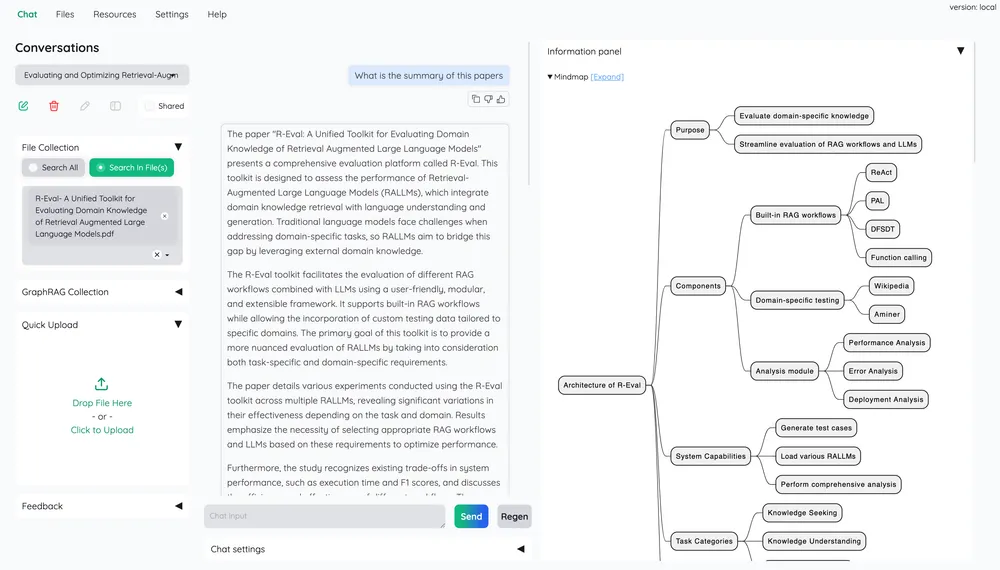
Host your own document QA (RAG) web-UI: Support multi-user login, organize your files in private/public collections, collaborate and share your favorite chat with others.
-
Organize your LLM & Embedding models: Support both local LLMs & popular API providers (OpenAI, Azure, Ollama, Groq).
-
Hybrid RAG pipeline: Sane default RAG pipeline with hybrid (full-text & vector) retriever and re-ranking to ensure best retrieval quality.
-
Multi-modal QA support: Perform Question Answering on multiple documents with figures and tables support. Support multi-modal document parsing (selectable options on UI).
-
Advanced citations with document preview: By default the system will provide detailed citations to ensure the correctness of LLM answers. View your citations (incl. relevant score) directly in the in-browser PDF viewer with highlights. Warning when retrieval pipeline return low relevant articles.
-
Support complex reasoning methods: Use question decomposition to answer your complex/multi-hop question. Support agent-based reasoning with
ReAct,ReWOOand other agents. -
Configurable settings UI: You can adjust most important aspects of retrieval & generation process on the UI (incl. prompts).
-
Extensible: Being built on Gradio, you are free to customize or add any UI elements as you like. Also, we aim to support multiple strategies for document indexing & retrieval.
GraphRAGindexing pipeline is provided as an example.

If you are not a developer and just want to use the app, please check out our easy-to-follow User Guide. Download the
.zipfile from the latest release to get all the newest features and bug fixes.
- Python >= 3.10
- Docker: optional, if you install with Docker
- Unstructured if you want to process files other than
.pdf,.html,.mhtml, and.xlsxdocuments. Installation steps differ depending on your operating system. Please visit the link and follow the specific instructions provided there.
-
We support both
lite&fullversion of Docker images. Withfullversion, the extra packages ofunstructuredwill be installed, which can support additional file types (.doc,.docx, ...) but the cost is larger docker image size. For most users, theliteimage should work well in most cases.-
To use the
fullversion.docker run \ -e GRADIO_SERVER_NAME=0.0.0.0 \ -e GRADIO_SERVER_PORT=7860 \ -v ./ktem_app_data:/app/ktem_app_data \ -p 7860:7860 -it --rm \ ghcr.io/cinnamon/kotaemon:main-full
-
To use the
fullversion with bundled Ollama for local / private RAG.# change image name to docker run <...> ghcr.io/cinnamon/kotaemon:main-ollama
-
To use the
liteversion.
 # change image name to
 docker run <...> ghcr.io/cinnamon/kotaemon:main-lite
-
-
We currently support and test two platforms:
linux/amd64andlinux/arm64(for newer Mac). You can specify the platform by passing--platformin thedocker runcommand. For example:# To run docker with platform linux/arm64 docker run \ -e GRADIO_SERVER_NAME=0.0.0.0 \ -e GRADIO_SERVER_PORT=7860 \ -v ./ktem_app_data:/app/ktem_app_data \ -p 7860:7860 -it --rm \ --platform linux/arm64 \ ghcr.io/cinnamon/kotaemon:main-lite -
Once everything is set up correctly, you can go to
http://localhost:7860/to access the WebUI. -
We use GHCR to store docker images, all images can be found here.
-
Clone the repository:
git clone https://github.com/Cinnamon/kotaemon cd kotaemon -
Setup the environment:
-
Option 1: Using uv (recommended)
uv sync --python 3.10 source .venv/bin/activate -
Option 2: Using conda
conda create -n kotaemon python=3.10
conda activate kotaemon

pip install -e "libs/kotaemon[all]"
pip install -e "libs/ktem"
-
Create a
.envfile in the root of this project. Use.env.exampleas a template.The
.envfile is there to serve use cases where users want to pre-config the models before starting up the app (e.g. deploy the app on HF hub). The file will only be used to populate the db once upon the first run, it will no longer be used in consequent runs. -
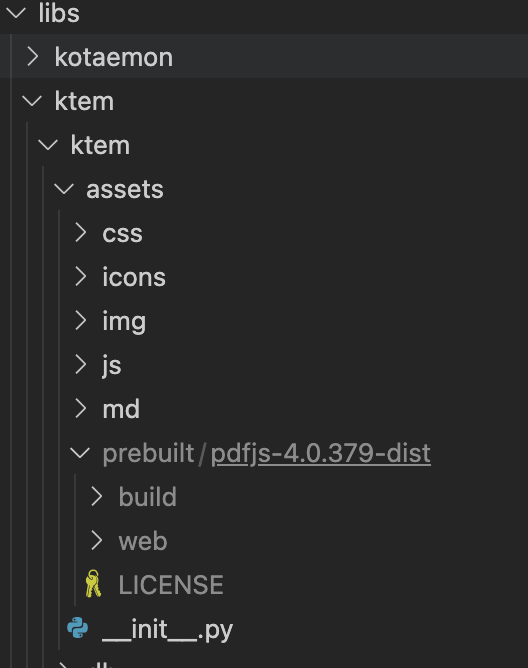
(Optional) To enable in-browser
PDF_JSviewer, download PDF_JS_DIST then extract it tolibs/ktem/ktem/assets/prebuilt.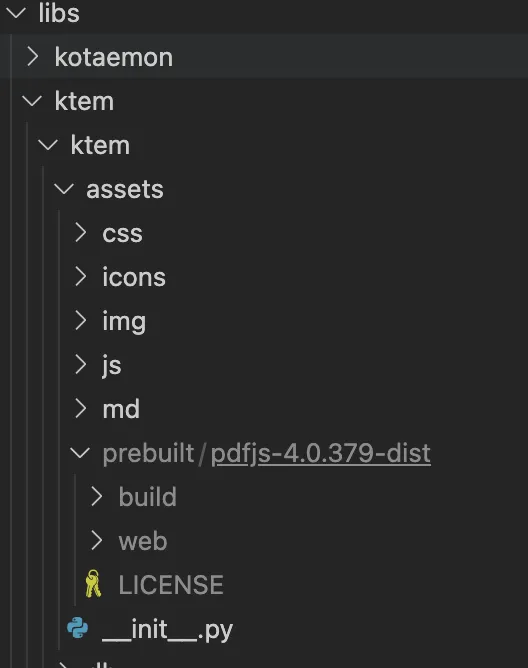
-
Start the web server:
python app.py
- The app will be automatically launched in your browser.
- Default username and password are both
admin. You can set up additional users directly through the UI.
-
Check the
Resourcestab andLLMs and Embeddingsand ensure that yourapi_keyvalue is set correctly from your.envfile. If it is not set, you can set it there.
Note
Official MS GraphRAG indexing only works with OpenAI or Ollama API. We recommend most users to use NanoGraphRAG implementation for straightforward integration with Kotaemon.
Setup Nano GRAPHRAG
- Install nano-GraphRAG:
pip install nano-graphrag nano-graphraginstall might introduce version conflicts, see this issue- To quickly fix:
pip uninstall hnswlib chroma-hnswlib && pip install chroma-hnswlib
- To quickly fix:
- Launch Kotaemon with
USE_NANO_GRAPHRAG=trueenvironment variable. - Set your default LLM & Embedding models in Resources setting and it will be recognized automatically from NanoGraphRAG.
Setup LIGHTRAG
- Install LightRAG:
pip install git+https://github.com/HKUDS/LightRAG.git LightRAGinstall might introduce version conflicts, see this issue- To quickly fix:
pip uninstall hnswlib chroma-hnswlib && pip install chroma-hnswlib
- To quickly fix:
- Launch Kotaemon with
USE_LIGHTRAG=trueenvironment variable. - Set your default LLM & Embedding models in Resources setting and it will be recognized automatically from LightRAG.
Setup MS GRAPHRAG
-
Non-Docker Installation: If you are not using Docker, install GraphRAG with the following command:
pip install "graphrag<=0.3.6" future -
Setting Up API KEY: To use the GraphRAG retriever feature, ensure you set the
GRAPHRAG_API_KEYenvironment variable. You can do this directly in your environment or by adding it to a.envfile. -
Using Local Models and Custom Settings: If you want to use GraphRAG with local models (like
Ollama) or customize the default LLM and other configurations, set theUSE_CUSTOMIZED_GRAPHRAG_SETTINGenvironment variable to true. Then, adjust your settings in thesettings.yaml.examplefile.
See Local model setup.
These options are available:
- Azure Document Intelligence (API)
- Adobe PDF Extract (API)
- Docling (local, open-source) – see integrations/docling.md for Kotaemon-specific setup.
- PaddleOCR (local, open-source) – see integrations/paddle_ocr.md for Kotaemon-specific setup.
Select corresponding loaders in Settings -> Retrieval Settings -> File loader
-
By default, all application data is stored in the
./ktem_app_datafolder. You can back up or copy this folder to transfer your installation to a new machine. -
For advanced users or specific use cases, you can customize these files:
flowsettings.py.env
This file contains the configuration of your application. You can use the example here as the starting point.
Notable settings
# setup your preferred document store (with full-text search capabilities)
KH_DOCSTORE=(Elasticsearch | LanceDB | SimpleFileDocumentStore)

# setup your preferred vectorstore (for vector-based search)
KH_VECTORSTORE=(ChromaDB | LanceDB | InMemory | Milvus | Qdrant)

# Enable / disable multimodal QA
KH_REASONINGS_USE_MULTIMODAL=True

# Setup your new reasoning pipeline or modify existing one.
KH_REASONINGS = [
    "ktem.reasoning.simple.FullQAPipeline",
    "ktem.reasoning.simple.FullDecomposeQAPipeline",
    "ktem.reasoning.react.ReactAgentPipeline",
    "ktem.reasoning.rewoo.RewooAgentPipeline",
]
This file provides another way to configure your models and credentials.
Configure model via the .env file
-
Alternatively, you can configure the models via the
.envfile with the information needed to connect to the LLMs. This file is located in the folder of the application. If you don't see it, you can create one. -
Currently, the following providers are supported:
-
OpenAI
In the
.envfile, set theOPENAI_API_KEYvariable with your OpenAI API key in order to enable access to OpenAI's models. There are other variables that can be modified, please feel free to edit them to fit your case. Otherwise, the default parameter should work for most people.OPENAI_API_BASE=https://api.openai.com/v1 OPENAI_API_KEY=<your OpenAI API key here> OPENAI_CHAT_MODEL=gpt-3.5-turbo OPENAI_EMBEDDINGS_MODEL=text-embedding-ada-002
-
Azure OpenAI
For OpenAI models via Azure platform, you need to provide your Azure endpoint and API key. You might also need to provide your developments' name for the chat model and the embedding model depending on how you set up Azure development.
AZURE_OPENAI_ENDPOINT=
AZURE_OPENAI_API_KEY=
OPENAI_API_VERSION=2024-02-15-preview
AZURE_OPENAI_CHAT_DEPLOYMENT=gpt-35-turbo
AZURE_OPENAI_EMBEDDINGS_DEPLOYMENT=text-embedding-ada-002
-
Local Models
-
Using
ollamaOpenAI compatible server:-
Install ollama and start the application.
-
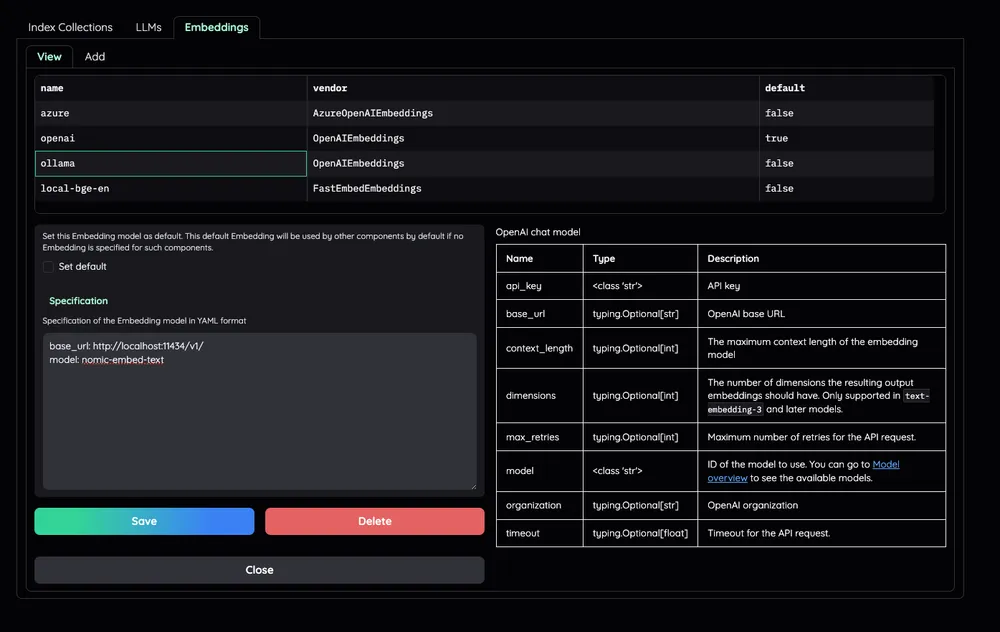
Pull your model, for example:
ollama pull llama3.1:8b
ollama pull nomic-embed-text
-
Set the model names on web UI and make it as default:
-
-
Using
GGUFwithllama-cpp-pythonYou can search and download a LLM to be ran locally from the Hugging Face Hub. Currently, these model formats are supported:
-
GGUF
You should choose a model whose size is less than your device's memory and should leave about 2 GB. For example, if you have 16 GB of RAM in total, of which 12 GB is available, then you should choose a model that takes up at most 10 GB of RAM. Bigger models tend to give better generation but also take more processing time.
Here are some recommendations and their size in memory:
-
Qwen1.5-1.8B-Chat-GGUF: around 2 GB
Add a new LlamaCpp model with the provided model name on the web UI.
-
-
-
- Check the default pipeline implementation in here. You can make quick adjustment to how the default QA pipeline work.
- Add new
.pyimplementation inlibs/ktem/ktem/reasoning/and later include it inflowssettingsto enable it on the UI.
- Check sample implementation in
libs/ktem/ktem/index/file/graph
(more instruction WIP).
Please cite this project as
@misc{kotaemon2024,
    title = {Kotaemon - An open-source RAG-based tool for chatting with any content.},
    author = {The Kotaemon Team},
    year = {2024},
    howpublished = {\url{https://github.com/Cinnamon/kotaemon}},
}
More in AI Chat
 kynsKYNS is a self-hosted, open-source AI chat platform on LibreChat with uncensored chat, image generation, web search, and 24-hour auto-deletion.
 lemonadeSelf-hosted, open-source local AI server that runs LLM, vision, image, speech, and transcription models on your own GPU or NPU and serves them through OpenAI-style APIs.
- libre-chatLibre Chat is a self-hosted, open-source chatbot web service powered by local LLMs like Mixtral or Llama 2, with web UI, API, streaming responses, and document-based QA.
 LibreChatSelf-hosted open-source AI chat unifying OpenAI, Anthropic, Google, Azure, AWS, and local models with agents, code interpreter, artifacts, MCP, and enterprise auth.
 Life K-LineLife K-Line is a self-hosted, open-source web app combining Chinese BaZi astrology with AI to visualize life fortune as interactive K-line charts.
 LimeBot-OSSelf-hosted agentic AI assistant with persistent memory, web dashboard, Discord/WhatsApp/Telegram support, and universal LLM compatibility via LiteLLM.
 llama-gptSelf-hosted, open-source ChatGPT-style chatbot that runs Llama 2 and Code Llama locally, with a web chat UI and an OpenAI-compatible API.
 llms.pySelf-hosted, open-source alternative to ChatGPT, OpenRouter and Open WebUI: one gateway with CLI, API and web UI for text, image and audio across 530+ models.
 LocalGPTSelf-hosted, open-source AI assistant with persistent memory and a desktop app that turns prompts, documents, or songs into explorable 3D worlds with full history.
 LumenLumen is a self-hosted AI gateway. It provides a web chat interface and an OpenAI-compatible API proxy/
 MemorwiseSelf-hosted NotebookLM alternative for document chat with any LLM. Drop in files/links — local RAG Q&A, knowledge graphs, flashcards, quizzes, audio. One command.
 microclawSelf-hosted Rust agent platform with Server, Work desktop app, and SDK sharing one Agent Engine for multi-step tools, memory, and chat automation.
0 comments