
Self-host Kanboard
v1.2.57Minimalist Kanban boards for project management
docker run -d --name kanboard -p 80:80 -t kanboard/kanboard:v1.2.45- Stars
- 9 959
- Ports
- 80 (HTTP, web UI served by the container (mapped as "80:80")), 443 (HTTPS inside the official image, with certificates in /etc/nginx/ssl)
- Requires
- PHP
docker.io/kanboard/kanboard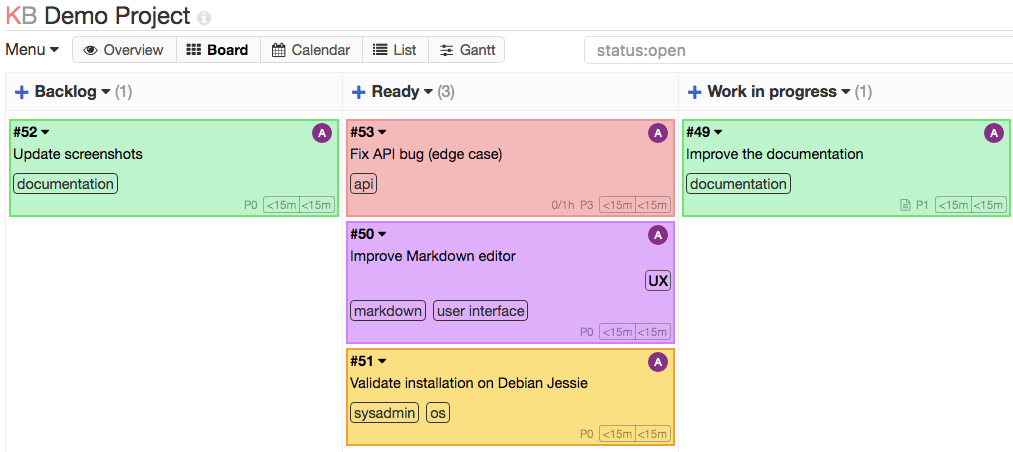



What is Kanboard?
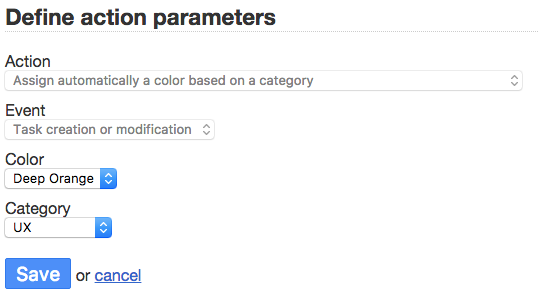
Kanboard is a MIT-licensed web application for managing work with the Kanban method: drag-and-drop boards whose columns you can add, rename or remove, work-in-progress caps that highlight an overloaded column, swimlanes, subtasks, attachments, comments and Markdown in task descriptions. A small query language with custom filters lets you look up items by assignee, category, description or due date, and event-driven automatic actions apply changes such as reassignment, colour or category updates without manual clicks. The feature set is deliberately kept small and simple, and the project is in maintenance mode: the lead developer ships only small fixes while community pull requests are still accepted and regular releases keep coming. People can sign in with local accounts, an LDAP or Active Directory server, social OAuth2 back-ends such as Google, GitHub or GitLab, or headers passed by a reverse proxy; TOTP two-factor authentication, email notifications, a JSON-RPC API and webhooks are also available. Self-hosting is straightforward: unzip a release into a PHP 8.1+ web server (SQLite is the default store, PostgreSQL is recommended for bigger teams), or run the published container with volumes for data, plugins and TLS certificates, setting any configuration option through environment variables.
Kanboard alternatives
 taskview-communitySelf-hosted, source-available project and task manager for software teams: Kanban, dependency graphs, RBAC, SSO, time tracking and an MCP server.Comparetaskview-community with Kanboard
 taskcafeTaskcafe is an open-source, self-hosted project management tool built around Kanban boards, with teams, personal projects, labels, checklists and task activity.Comparetaskcafe with Kanboard
 OpenProjectSelf-hosted, open-source project management tool: Gantt timelines, Scrum and Kanban boards, time and cost reports, wikis, meetings and forums.CompareOpenProject with Kanboard
 scrumboyOpen-source self-hosted Kanban project management with customizable boards, sprints, analytics, OIDC/SSO, Trello import and an MCP server for AI agents.Comparescrumboy with Kanboard
 open-sparrowOpenSparrow is a self-hosted, open-source PHP platform generating CRUD apps, dashboards, calendars from JSON schema on PostgreSQL. Includes RAG, workflows, Kanban, 2FA.Compareopen-sparrow with Kanboard
 LeantimeSelf-hosted, open-source project management system with kanban, gantt, sprints, timesheets, wikis and goals, built around ADHD, dyslexia and autism.CompareLeantime with Kanboard
 LeantimeSelf-hosted project management for non-PMs with neurodivergent-friendly design, offering Kanban, Gantt, time tracking, wikis, and LDAP/OIDC auth.CompareLeantime with Kanboard
 rebacklogsRe:Backlogs is a self-hosted, open-source project management tool with Backlogs, Sprints, Kanban boards, theming, and real-time updates.Comparerebacklogs with Kanboard
Should you self-host Kanboard?
Kanboard scores 69/100 on selfhost.directory (how scoring works) and ranks #1 of 7 in Kanban. It has 9 959 GitHub stars, +59 in the last 30 days.
It shipped 9 stable releases in the past year. The latest, v1.2.57, came out on 31 October 2026. New versions land roughly every 4 weeks.
Setup is easy: most people get it running in one sitting. An official Docker image is available. It is MIT-licensed and written mostly in PHP.
Its closest alternative on selfhost.directory is planka (68/100, 12 681 stars). Kanboard scores higher overall. See Kanboard vs planka side by side.
Features
- Attachments and comments
- Automatic actions
- Email notifications
- Kanban board with drag-and-drop
- LDAP Authentication
- Markdown task descriptions
- OAuth2 single sign-on
- Plugin System
- Search and custom filters
- Subtasks
- Swimlanes
- Time Tracking
- Two-factor authentication
- Work-in-progress limits
Kanboard README
Kanboard is project management software that focuses on the Kanban methodology.
This application is in maintenance mode. What does it mean?
Citing Wikipedia:
In the world of software development, maintenance mode refers to a point in a computer program's life when it has reached all of its goals and is generally considered to be "complete" and bug-free. The term can also refer to the point in a software product's evolution when it is no longer competitive with other products or current with regard to the technology environment it operates within.
FAQ
Why is there no official native mobile application?
Native apps for every platform would need far more resources and separate store costs, so this is left to the community; the responsive web UI is usable on phones although small screens are impractical for boards.
How to change the attachment size limit?
Upload size is limited by PHP and the web server, not Kanboard: raise upload_max_filesize and post_max_size in php.ini, and client_max_body_size on Nginx.
How to solve database migration issues?
Migrations run automatically on upgrade inside a transaction with rollback; the schema version lives in schema_version (PostgreSQL/MySQL) or user_version (SQLite).
I get a blank page after installing or upgrading Kanboard
Check that all requirements are installed, look at the PHP and Apache error logs, verify file permissions and reload the web server or PHP-FPM when aggressive opcode caching is used.
How to test Kanboard with PHP's built-in web server?
Unzip the release, enter the directory and run the built-in PHP server on localhost:8000, then open it in your browser.
Authentication failure with the API and Apache + PHP-FPM
php-cgi under Apache does not forward HTTP Basic credentials to PHP; add rewrite rules to .htaccess that pass the Authorization header through.
Why does the URL seem wrong (&) and result in "Page not found"?
Your PHP arg_separator.output is not the default; set it to "&" in php.ini or override it with a .htaccess php_value directive.
How to display a link to the task in notifications?
Set the URL of your installation in the Application Settings, including the trailing slash; without it no links are rendered.
Can you recommend a web hosting provider for Kanboard?
Any reliable VPS provider works; pick one with fast disk I/O because the default database is SQLite, and avoid shared hosting or shared NFS mounts.
More in Kanban
 KaneoOpen-source, self-hosted project tracker for teams: kanban boards, Gantt and calendar views, a backlog, time tracking, and free single sign-on via OAuth or OIDC.
 KittyClawSelf-hosted kanban where AI agents (Claude, Codex, Grok, Mistral, Ollama) work alongside humans with pipelines, processors, live streaming, and MCP server.
- LeantimeSelf-hosted, open-source project management system with kanban, gantt, sprints, timesheets, wikis and goals, built around ADHD, dyslexia and autism.
- OpenProjectSelf-hosted, open-source project management tool: Gantt timelines, Scrum and Kanban boards, time and cost reports, wikis, meetings and forums.
 OverClickOverClick is a self-hosted, open-source Kanban board for hybrid human-AI teams where AI agents claim and execute tasks via MCP, reporting token usage and time per card.
 pacaSelf-hosted and open-source Scrum tooling: AI agents share the board and the sprint with people, plus IAM-style role policies and WASM plugins.
 plankaElegant open source project tracking. Self-hosted Kanban for teams — free Community edition, with PLANKA Pro for organisations.
- taskcafeTaskcafe is an open-source, self-hosted project management tool built around Kanban boards, with teams, personal projects, labels, checklists and task activity.
 Tasks.mdA self-hosted, open-source Kanban board that stores tasks as Markdown files on disk. Runs in a single Docker container with PWA support, dark mode, and multilingual UI.
 TickySelf-hosted open-source Kanban board with projects, time tracking, labels, attachments, reminders, dark mode, and offline operation.
 trello-clone-laravel-8-open-sourceSelf-hosted Laravel 8 project management tool cloning Trello with Jalali, Gregorian, and Hijri calendars, admin panels, and role-based access.
 4ga Boards4ga Boards is a self-hosted, open-source kanban tool with realtime collaboration, dark mode, SSO, and multi-level hierarchy for teams.
0 comments