
Self-host imgproxy
v4.0.22Fast, secure standalone image resize and conversion server
docker run -p 8080:8080 -it ghcr.io/imgproxy/imgproxy:latest- Stars
- 11 184
- Port
- 8080 (HTTP image processing API (IMGPROXY_BIND default ":8080"))
ghcr.io/imgproxy/imgproxy

What is imgproxy?
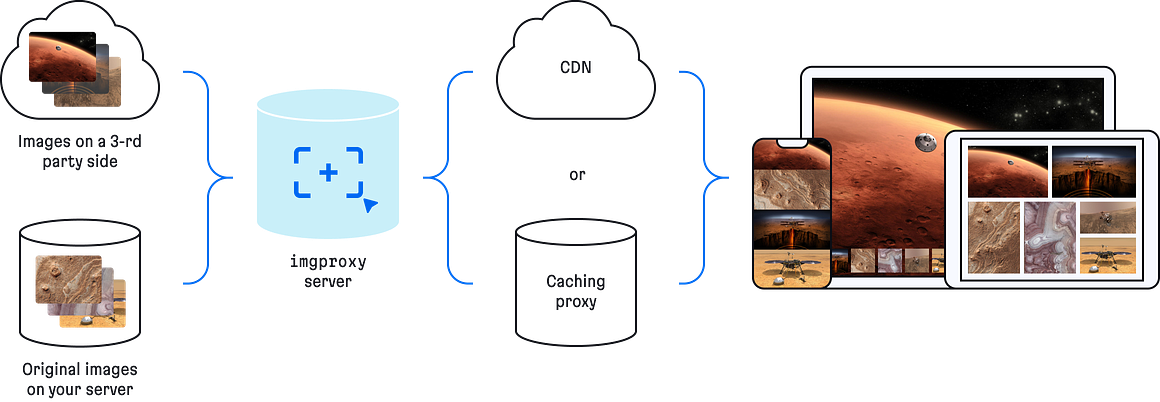
imgproxy is an HTTP image processing server: you give it a source image URL plus processing options encoded in the request path, and it downloads, transforms and returns the result, so application code no longer has to pre-generate image variants. It is built on libvips for speed and a low memory footprint, and handles resizing, cropping, rotation, padding, watermarking, filters, conversion between the common raster formats, metadata and color-profile stripping, presets, smart cropping and auto-quality against a target file size. Security is a stated focus: HMAC-signed URLs, encrypted source URLs, protection with an HTTP Authorization header, limits on source resolution, file size, allowed hosts and allowed processing options, and SVG sanitization. Sources can be HTTP(S) URLs, local files, or buckets in several object stores; metrics and errors can be exported to common monitoring services. You run it with a single Docker container on port 8080, with the official Helm chart, as DEB/RPM/TAR packages exported from the image, from Homebrew or AUR, or built from source, and everything is tuned with IMGPROXY_* environment variables. The project is open-core: a paid Pro edition adds video, PDF and Photoshop previews, AI object-detection cropping, advanced compression and GIF-to-MP4 conversion. imgproxy itself has no HTTPS or internal cache, so a reverse proxy and a CDN are expected in front of it.
imgproxy alternatives
 kriti-imagesSelf-hosted Go image transformation service with URL-based API for real-time processing, replacing commercial services like Cloudflare Images.Comparekriti-images with imgproxy
 imgpushimgpush is a minimalist self-hosted image service with a simple API for uploading, converting, and resizing user images like avatars, plus rate limiting and S3 storage.Compareimgpush with imgproxy
 ImageFlowSelf-hosted, open-source image management and delivery platform that converts to WebP/AVIF, serves device-aware images, and offers a random-image API with tag filters.CompareImageFlow with imgproxy
 PicsurPicsur is a self-hosted, open-source image sharing service in the spirit of Imgur, with format conversion, image editing, expiring uploads and a ShareX endpoint.ComparePicsur with imgproxy
 next-image-transformationOpen-source, self-hosted image optimization service that replaces Vercel's Next.js image optimization, forwarding resize, crop and quality requests to Imgproxy.Comparenext-image-transformation with imgproxy
 openinaryOpen-source, self-hosted Cloudinary alternative for on-the-fly image/video transforms, S3 storage, and edge caching — run via Docker.Compareopeninary with imgproxy
 immich-upload-optimizerSelf-hosted proxy for Immich that intercepts uploads and compresses images/videos using JPEG-XL, Caesium, and HandBrake to save storage space.Compareimmich-upload-optimizer with imgproxy
 iipsrviipsrv is a self-hosted, open-source FastCGI image server that streams and zooms gigapixel-scale images via IIIF, IIP, Zoomify, and DeepZoom protocols.Compareiipsrv with imgproxy
All self-hosted alternatives to Image processing SaaS (third-party transformation APIs) → All self-hosted alternatives to In-application image processing libraries and CLI tools →
Should you self-host imgproxy?
imgproxy scores 72/100 on selfhost.directory (how scoring works) and ranks #3 of 13 in Image Processing. It has 11 184 GitHub stars, +76 in the last 30 days.
It shipped 25 stable releases in the past year. The latest, v4.0.22, came out on 5 November 2026. New versions land roughly every 5 days.
Setup is easy: most people get it running in one sitting. An official Docker image is available. It is Apache-2.0-licensed and written mostly in Go.
Its closest alternative on selfhost.directory is Rembg (79/100, 25 376 stars). It scores higher overall, so compare the two before you pick. See imgproxy vs Rembg side by side.
Features
- Auto-quality by file sizeDSSIM-based autoquality is a Pro feature
- Cropping and trimming
- Fallback image
- Health check endpoint
- Image Filters
- Image format conversionVideo, PDF and Photoshop previews require imgproxy Pro
- Image rotation
- Metadata stripping
- Object detection and AI croppingimgproxy Pro only
- On-the-fly image resizing
- Processing presets
- Signed URLsDisabled by default; recommended in production
- Smart cropAdvanced smart crop and AI object-oriented crop are Pro features
- Source URL Encryption
- WatermarkingCustom per-request watermarks, text watermarks, shadow and rotating watermarks are Pro features
imgproxy README

Website | Blog | Documentation | imgproxy Pro
FAQ
Do you have the Enterprise plan?
There is no "Enterprise" tier as such; custom large-scale needs are handled by contacting the team, with a demo and extended trial access.
What happens if I miscalculate my workers?
Pro licenses use soft limits, so short overages for traffic spikes or migrations are fine and the license can be adjusted.
You price imgproxy Pro by workers. How does it work?
A worker processes one image at a time, and the default worker count is twice the number of CPU cores; extra requests beyond the workers are queued rather than dropped.
How does your pricing model work?
Pro is priced by the number of concurrent image processing workers across your instances, from $49/month or $499/year for 16 workers; the open-source version stays free.
Can I try imgproxy Pro for free?
Yes, by filling in the request form you get full Pro access under a trial license.
Do I need the imgproxy Pro subscription? What do I pay for, compared to open source version?
Pro is recommended once you need its extra features such as custom watermarks, video previews, advanced compression or AI crop; you pay for those features, hardened releases and priority support.
What about competing self-hosted solutions?
The project says it doubles down on security, speed, configuration and a lean memory footprint, thanks to libvips, and points to its own benchmark of image processing servers.
Can't I just use the default image transformation solution from my CDN provider?
CDN image transformation is billed per processed file and is described as a thin side product; imgproxy recommends keeping your CDN in front so only cold-cache requests reach imgproxy.
Why not just use a third-party image processing SaaS through an API?
The FAQ says SaaS pricing scales badly, external processing can become a performance bottleneck and creates data-protection concerns, while imgproxy keeps storage, caching and delivery under your control.
Is hosting included?
No. You choose your own hosting for storing images and for running the imgproxy instances.
How do I download and install imgproxy or imgproxy Pro?
The open-source build is pulled for free from GitHub Container Registry; purchasing Pro gives access to a private Docker registry with the advanced-feature build, and a 14-day trial is available on request.
Why use imgproxy?
The project argues that offloading image processing to a separate service with a simple HTTP API is more resilient, maintainable, scalable and cheaper than bespoke in-app processing.
Do I need imgproxy?
If you serve images to users and care about response times and cloud bills, imgproxy is presented as a fit; besides static formats it also handles GIFs, video files and PDFs.
More in Image Processing
- immich-upload-optimizerSelf-hosted proxy for Immich that intercepts uploads and compresses images/videos using JPEG-XL, Caesium, and HandBrake to save storage space.
- kriti-imagesSelf-hosted Go image transformation service with URL-based API for real-time processing, replacing commercial services like Cloudflare Images.
 krokiOpen-source, self-hosted diagram API that turns text into images using 30+ engines such as PlantUML, Mermaid, GraphViz and D2, deployed with Docker or Kubernetes.
 LLMII (ImageIndexer)Self-hosted desktop app using a local vision LLM to caption and keyword images, embedding results in standard metadata fields for any photo manager.
 MazanokeSelf-hosted, open-source image optimizer that compresses, resizes and converts JPG, PNG, WebP, HEIC and more entirely on-device, with offline PWA use and EXIF stripping.
 moocupMoocup is a self-hosted, open-source visual editor that lets you drop a screenshot, apply styles and background gradients, and export polished mockups in seconds.
- next-image-transformationOpen-source, self-hosted image optimization service that replaces Vercel's Next.js image optimization, forwarding resize, crop and quality requests to Imgproxy.
- openinaryOpen-source, self-hosted Cloudinary alternative for on-the-fly image/video transforms, S3 storage, and edge caching — run via Docker.
 PictSharePictShare is a self-hosted, open-source media hosting service for images, GIFs, MP4s, audio, and text bins with a simple upload API and no database required.
 pi-timoloSelf-hosted Raspberry Pi security monitoring using picamera and OpenCV. Creates timelapse videos, motion tracking, and low-light night vision images with rclone sync.
 RembgOpen-source, self-hosted background remover: a Python library, CLI and HTTP server that cuts subjects out of images using switchable ONNX models.
 ReubahSelf-hosted web tool for converting documents and processing images with support for multiple formats including JPG, PNG, WebP, PDF, DOCX, and more.
0 comments