
Self-host gpt-researcher
v3.8.0Autonomous AI research agent that writes cited deep reports
pip install gpt-researcher- Stars
- 30 671
- Ports
- 8000 (FastAPI backend / Python server (also serves the lightweight static frontend)), 3000 (Next.js frontend app)
gptresearcher/gpt-researcher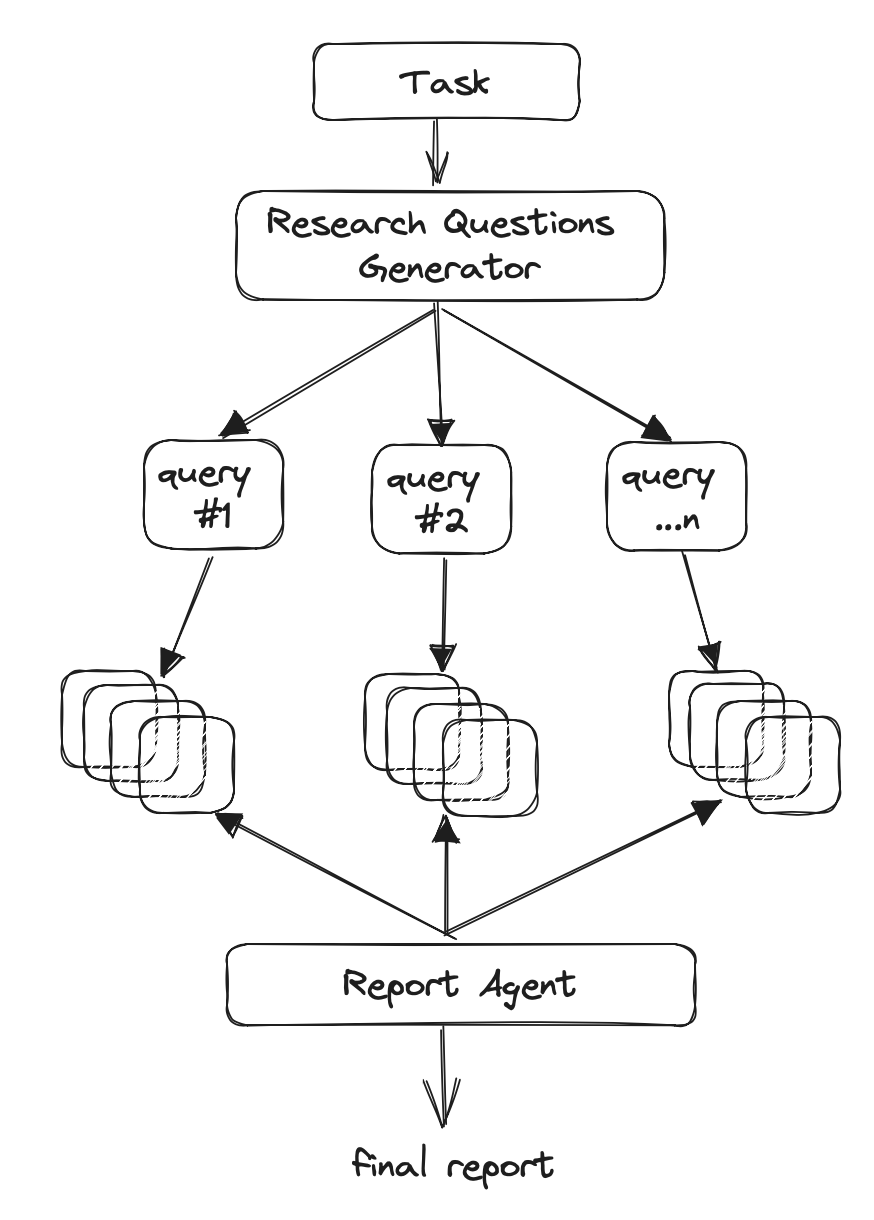

What is gpt-researcher?
GPT Researcher is an autonomous deep-research agent that turns a single question into a detailed, cited report of 2,000+ words. A planner agent generates sub-questions, execution agents scrape and summarise sources in parallel — 20+ retrievers such as Tavily, Bing, Google, DuckDuckGo, SearXNG, arXiv and PubMed are available, and MCP servers or your own files can feed the research too — while a publisher merges the findings; scraped passages are first trimmed by a Jev, BM25 or embeddings context filter. Any LLM provider works: OpenAI, Anthropic, Google, Groq, Mistral, DeepSeek, or local models via Ollama and a custom OPENAI_BASE_URL. Reports export to PDF, Word, Markdown, JSON and CSV. You can use it as a Python package (pip install gpt-researcher), from the CLI, as a FastAPI server with a lightweight static or a Next.js frontend, or through Docker Compose, where outputs, logs and a my-docs folder are mounted as volumes. Recursive deep research with configurable depth, multi-agent LangGraph/AG2 workflows, inline AI image generation with Gemini, and LangSmith tracing round it out. The code is Apache-2.0 licensed, and the README calls the project experimental, shipped as-is without warranty.
Should you self-host gpt-researcher?
gpt-researcher scores 80/100 on selfhost.directory (how scoring works) and ranks #5 of 68 in AI Chat. It has 30 671 GitHub stars, +693 in the last 30 days.
It shipped 13 stable releases in the past year. The latest, v3.8.0, came out on 9 November 2026. New versions land roughly every 4 weeks.
Setup is moderate: expect some configuration beyond a single command. An official Docker image is available. It is Apache-2.0-licensed and written mostly in Python.
Its closest alternative on selfhost.directory is LibreChat (85/100, 47 100 stars). It scores higher overall, so compare the two before you pick. See gpt-researcher vs LibreChat side by side.
Features
- Agent tracing / observability
- AI-generated inline imagesRequires GOOGLE_API_KEY and IMAGE_GENERATION_ENABLED=true.
- Context relevance filtering
- Deep research (recursive)
- Local Document Research
- MCP server and client
- Multi-source Aggregation
- Parallel multi-agent research
- Pluggable LLM and retriever choice
- Python library and CLI
- Report export formats
- REST API backend
- Web scraping with JavaScript
- Web UI (static and Next.js)
gpt-researcher README

GPT Researcher the first open deep research agent designed for both web and local research on any given task.
The agent produces detailed, factual, and unbiased research reports with citations. GPT Researcher provides a full suite of customization options to create tailor made and domain specific research agents. GPT Researcher goes well beyond RAG: planner and execution agents break each task into research questions, decision models keep only the context that is actually useful for answering them, multi-agent workflows coordinate specialized agents from planning to publication, and recursive deep research explores a topic in both breadth and depth. Research runs in parallel, which keeps it fast, stable and reliable, and reduces misinformation.
Our mission is to empower individuals and organizations with accurate, unbiased, and factual information through AI.
- Objective conclusions for manual research can take weeks, requiring vast resources and time.
- LLMs trained on outdated information can hallucinate, becoming irrelevant for current research tasks.
- Current LLMs have token limitations, insufficient for generating long research reports.
- Limited web sources in existing services lead to misinformation and shallow results.
- Selective web sources can introduce bias into research tasks.

Extend Claude's deep research capabilities by installing GPT Researcher as a Claude Skill:
npx skills add assafelovic/gpt-researcher
Once installed, Claude can leverage GPT Researcher's deep research capabilities directly within your conversations.
The core idea is to utilize 'planner' and 'execution' agents. The planner generates research questions, while the execution agents gather relevant information. The publisher then aggregates all findings into a comprehensive report.

Steps:
- Create a task-specific agent based on a research query.
- Generate questions that collectively form an objective opinion on the task.
- Use a crawler agent for gathering information for each question.
- Summarize and source-track each resource.
- Filter and aggregate summaries into a final research report.
- 📝 Generate detailed research reports using web and local documents.
- 🖼️ Smart image scraping and filtering for reports.
- 🍌 AI-generated inline images using Google Gemini (Nano Banana) for visual illustrations.
- 📜 Generate detailed reports exceeding 2,000 words.
- 🌐 Aggregate over 20 sources for objective conclusions.
- 🎯 Smart context filtering with Jev, with no API key or embeddings required by default.
- 🖥️ Frontend available in lightweight (HTML/CSS/JS) and production-ready (NextJS + Tailwind) versions.
- 🔍 JavaScript-enabled web scraping.
- 📂 Maintains memory and context throughout research.
- 📄 Export reports to PDF, Word, and other formats.
See the Documentation for:
- Installation and setup guides
- Configuration and customization options
- How-To examples
- Full API references
-
Install Python 3.12 or later. Guide.
-
Clone the project and navigate to the directory:
git clone https://github.com/assafelovic/gpt-researcher.git cd gpt-researcher -
Set up API keys by exporting them or storing them in a
.envfile.export OPENAI_API_KEY={Your OpenAI API Key here} export TAVILY_API_KEY={Your Tavily API Key here}
(Optional) For enhanced tracing and observability, you can also set:
# export LANGCHAIN_TRACING_V2=true
# export LANGCHAIN_API_KEY={Your LangChain API Key here}
For custom OpenAI-compatible APIs (e.g., local models, other providers), you can also set:
export OPENAI_BASE_URL={Your custom API base URL here} -
Install dependencies and start the server:
pip install -r requirements.txt
python -m uvicorn main:app --reload
Visit http://localhost:8000 to start.
For other setups (e.g., Poetry or virtual environments), check the Getting Started page.
pip install gpt-researcher
...
from gpt_researcher import GPTResearcher

query = "why is Nvidia stock going up?"
researcher = GPTResearcher(query=query)
# Conduct research on the given query
research_result = await researcher.conduct_research()
# Write the report
report = await researcher.write_report()
...
For more examples and configurations, please refer to the PIP documentation page.
GPT Researcher supports MCP integration to connect with specialized data sources like GitHub repositories, databases, and custom APIs. This enables research from data sources alongside web search.
export RETRIEVER=tavily,mcp # Enable hybrid web + MCP research
from gpt_researcher import GPTResearcher
import asyncio
import os

async def mcp_research_example():
    # Enable MCP with web search
    os.environ["RETRIEVER"] = "tavily,mcp"

    researcher = GPTResearcher(
        query="What are the top open source web research agents?",
        mcp_configs=[
            {
                "name": "github",
                "command": "npx",
                "args": ["-y", "@modelcontextprotocol/server-github"],
                "env": {"GITHUB_TOKEN": os.getenv("GITHUB_TOKEN")}
            }
        ]
    )

    research_result = await researcher.conduct_research()
    report = await researcher.write_report()
    return report
For comprehensive MCP documentation and advanced examples, visit the MCP Integration Guide.
GPT Researcher can automatically generate and embed AI-created illustrations in your research reports using Google's Gemini models (Nano Banana).
# Enable in your .env file
IMAGE_GENERATION_ENABLED=true
GOOGLE_API_KEY=your_google_api_key
IMAGE_GENERATION_MODEL=models/gemini-2.5-flash-image
When enabled, the system will:
- Analyze your research context to identify visualization opportunities
- Pre-generate 2-3 relevant images during the research phase
- Embed them inline as the report is written
Images are generated with dark-mode styling that matches the GPT Researcher UI, featuring professional infographic aesthetics with teal accents.
Learn more about Image Generation in our documentation.
GPT Researcher now includes Deep Research - an advanced recursive research workflow that explores topics with agentic depth and breadth. This feature employs a tree-like exploration pattern, diving deeper into subtopics while maintaining a comprehensive view of the research subject.
- 🌳 Tree-like exploration with configurable depth and breadth
- ⚡️ Concurrent processing for faster results
- 🤝 Smart context management across research branches
- ⏱️ Takes ~5 minutes per deep research
- 💰 Costs ~$0.4 per research (using
o3-minion "high" reasoning effort)
Learn more about Deep Research in our documentation.
Every research run scrapes dozens of pages, and only some of each page helps answer the question. Before anything reaches the LLM, GPT Researcher decides which passages to keep. By default it uses Jev by TypeSafe, a model that scores how useful each passage is for the question, rather than how similar its words or embedding are.
Jev's context is 59% more relevant than embeddings, at the same cost (73% of kept passages relevant vs 46%). We benchmarked every option on 28 research tasks, replaying the same scraped sources so that only the filter changed:
| Context filter | Relevant passages kept | Head-to-head vs embeddings | Filter time | Cost per report | Needs |
|---|---|---|---|---|---|
| Jev (default) | 73% | 15 wins · 10 ties · 3 losses | 1.7s | $0.115 | TYPESAFE_API_KEY |
| Keyword (fallback) | 51% | 14 wins · 8 ties · 6 losses | 0.02s | $0.116 | nothing |
| Embeddings | 46% | — | 1.0s | $0.117 | an embedding provider |
| No filter | — | 13 wins · 11 ties · 4 losses | — | $0.192 | nothing |
Writing the report takes ~45s whichever filter you use, so a run's total time moves only by the filter step. Passing every page unfiltered writes the broadest reports on open-ended questions, but costs 65% more.
Nothing is required. With a TYPESAFE_API_KEY, Jev is used. Without one, or if a Jev call fails, GPT Researcher falls back to keyword (BM25) ranking, which runs locally with no API key, model or embeddings. Embeddings remain available as an option.
export TYPESAFE_API_KEY=...   # use Jev (the default when a key is set)
export CONTEXT_FILTER=auto    # auto | jev | keyword | embeddings | none
See the Context Filter docs and the full benchmark for method, caveats and how to reproduce it.
Step 1 - Install Docker
Step 2 - Clone the '.env.example' file, add your API Keys to the cloned file and save the file as '.env'
Step 3 - Within the docker-compose file comment out services that you don't want to run with Docker.
docker-compose up --build
If that doesn't work, try running it without the dash:
docker compose up --build
Step 4 - By default, if you haven't uncommented anything in your docker-compose file, this flow will start 2 processes:
- the Python server running on localhost:8000
- the React app running on localhost:3000
Visit localhost:3000 on any browser and enjoy researching!
You can instruct the GPT Researcher to run research tasks based on your local documents. Currently supported file formats are: PDF, plain text, CSV, Excel, Markdown, PowerPoint, and Word documents.
Step 1: Add the env variable DOC_PATH pointing to the folder where your documents are located.
export DOC_PATH="./my-docs"
Step 2:
- If you're running the frontend app on localhost:8000, simply select "My Documents" from the "Report Source" Dropdown Options.
- If you're running GPT Researcher with the PIP package, pass the
report_sourceargument as "local" when you instantiate theGPTResearcherclass code sample here.
We've moved our MCP server to a dedicated repository: gptr-mcp.
The GPT Researcher MCP Server enables AI applications like Claude to conduct deep research. While LLM apps can access web search tools with MCP, GPT Researcher MCP delivers deeper, more reliable research results.
Features:
- Deep research capabilities for AI assistants
- Higher quality information with optimized context usage
- Comprehensive results with better reasoning for LLMs
- Claude Desktop integration
For detailed installation and usage instructions, please visit the official repository.
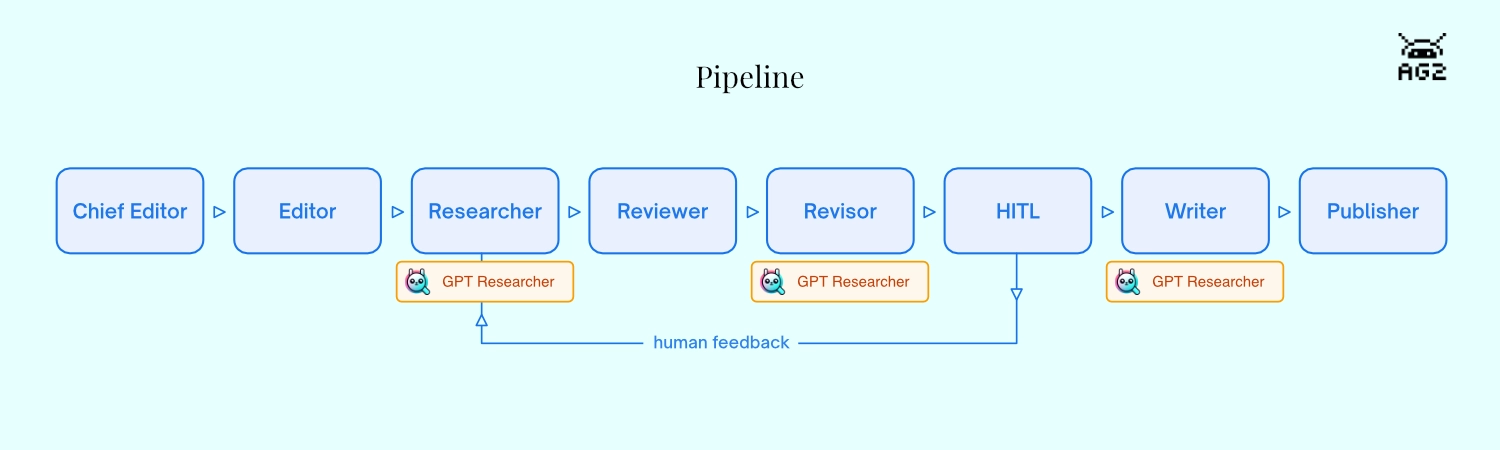
As AI evolves from prompt engineering and RAG to multi-agent systems, we're excited to introduce multi-agent assistants built with LangGraph and AG2.
By using multi-agent frameworks, the research process can be significantly improved in depth and quality by leveraging multiple agents with specialized skills. This project showcases how a team of AI agents can work together to conduct research on a given topic, from planning to publication.
An average run generates a 5-6 page research report in multiple formats such as PDF, Docx and Markdown.
Check it out here or head over to our documentation for LangGraph and AG2 for more information.
GPT Researcher supports LangSmith for enhanced tracing and observability, making it easier to debug and optimize complex multi-agent workflows.
To enable tracing:
- Set the following environment variables:
export LANGCHAIN_TRACING_V2=true
export LANGCHAIN_API_KEY=your_api_key
export LANGCHAIN_PROJECT="gpt-researcher"
- Run your research tasks as usual. All LangGraph-based agent interactions will be automatically traced and visualized in your LangSmith dashboard.
GPT-Researcher now features an enhanced frontend to improve the user experience and streamline the research process. The frontend offers:
- An intuitive interface for inputting research queries
- Real-time progress tracking of research tasks
- Interactive display of research findings
- Customizable settings for tailored research experiences
Two deployment options are available:
- A lightweight static frontend served by FastAPI
- A feature-rich NextJS application for advanced functionality
For detailed setup instructions and more information about the frontend features, please visit our documentation page.
We highly welcome contributions! Please check out contributing if you're interested.
Please check out our roadmap page and reach out to us via our Discord community if you're interested in joining our mission.
- Community Discord
- Author Email: assaf.elovic@gmail.com
This project, GPT Researcher, is an experimental application and is provided "as-is" without any warranty, express or implied. We are sharing codes for academic purposes under the Apache 2 license. Nothing herein is academic advice, and NOT a recommendation to use in academic or research papers.
Our view on unbiased research claims:
- The main goal of GPT Researcher is to reduce incorrect and biased facts. How? We assume that the more sites we scrape the less chances of incorrect data. By scraping multiple sites per research, and choosing the most frequent information, the chances that they are all wrong is extremely low.
- We do not aim to eliminate biases; we aim to reduce it as much as possible. We are here as a community to figure out the most effective human/llm interactions.
- In research, people also tend towards biases as most have already opinions on the topics they research about. This tool scrapes many opinions and will evenly explain diverse views that a biased person would never have read.

FAQ
Are there usage limits?
The software itself imposes none; you are only bounded by your providers' rate limits.
Will my data leave my machine?
Only requests to whichever LLM and retriever providers you configure; a local model plus SearXNG keeps everything on your infrastructure.
Is GPT Researcher free forever?
The open-source project stays MIT-licensed; any future managed offering would be separate from it.
What do I need to run it?
Python 3.11 or newer, an API key for an LLM provider and one for a retriever; providers are swapped via environment variables, including local models through Ollama.
Can GPT Researcher research my own documents?
Yes, it can work purely from local files or combine them with web sources in one report.
How do I host GPT Researcher myself?
Install the pip package and call it from code, or clone the repo and start the FastAPI server with uvicorn, or use the Docker image.
How does GPT Researcher compare to Perplexity or OpenAI Deep Research?
It took first place on CMU's DeepResearchGym benchmark ahead of both, and unlike those products its LLM, retriever and deployment are under your control.
Is GPT Researcher free?
Yes, it is free to use; the only costs are your LLM and search API provider bills.
How do I use GPT Researcher with Claude or ChatGPT?
Through the separate gptr-mcp MCP server, which registers in Claude Desktop, Cursor, custom GPTs or n8n and exposes tools such as deep_research and quick_search.
What is GPT Researcher?
An open-source autonomous research agent that reads many web sources in parallel and writes a cited report, working with any LLM and any retriever.
More in AI Chat
 GuaardvarkSelf-hosted AI studio on your own GPU: chat with your files (RAG), screen and browser agents, coding swarms, LoRA training, an MCP server for Claude Code and Cursor, and local video, image, music and voice generation. No telemetry.
 hal0hal0 is a self-hosted, open-source AI inference platform turning a Linux machine into a private OpenAI-compatible appliance.
 hermesclawSelf-hosted Python proxy running Hermes Agent, OpenClaw, and OpenCode on one WeChat account via iLink polling, local proxies, and ACP bridge.
 hermes-studioEkko Studio unites chat agents and 14 coding CLIs in one self-hosted web console with group chat, visual workflows, profiles, voice, and device sync.
 Hermes SuiteSelf-hosted Docker/Podman image combining Hermes AI agent gateway, browser chat WebUI, and monitoring dashboard in one container.
 Hermes-WorkspaceHermes Workspace is a self-hosted, open-source web UI command center for AI agents — combining chat, terminal, memory, skills, and multi-agent orchestration.
 hivekeepSelf-hosted AI agent team with persistent memory, collaboration, custom tools, and 6 messaging channels — all in one container.
 HiveMtkSelf-hosted AI marketing SCRM unifying 10+ channels with ReAct agents (45 tools) and local LLM inference. Zero data egress, AGPL-3.0 licensed.
 homellmRun your own ChatGPT alternative with this Docker Compose stack combining Open WebUI, LiteLLM, and Traefik for multi-provider LLM access and token tracking.
 ibl.ai/osibl.ai/os is a self-hosted, open-source AI agent platform for building and deploying customizable conversational agents with multi-LLM support, RAG, voice, analytics.
 iClawSelf-hosted AI workspace with ChatGPT-style UI for OpenClaw, isolated projects, Docker sandboxing, and encrypted chat sharing.
 inquisitiveSelf-hosted personal knowledge base with local LLM chat and RAG for notes, documents, and web links. Runs via Python, FastAPI, Streamlit, and Ollama.
0 comments