
Self-host Gitness
v2.28.2Git hosting, CI/CD, dev environments, artifact registries
docker run -d -p 3000:3000 -p 3022:3022 -v /var/run/docker.sock:/var/run/docker.sock -v /tmp/harness:/data --name harness --restart always harness/harness- Stars
- 38 881
- Ports
- 3000 (HTTP server (web UI, API, git clone URLs); settable via GITNESS_HTTP_PORT), 3022 (mapped in the documented docker run command alongside 3000)
harness/harness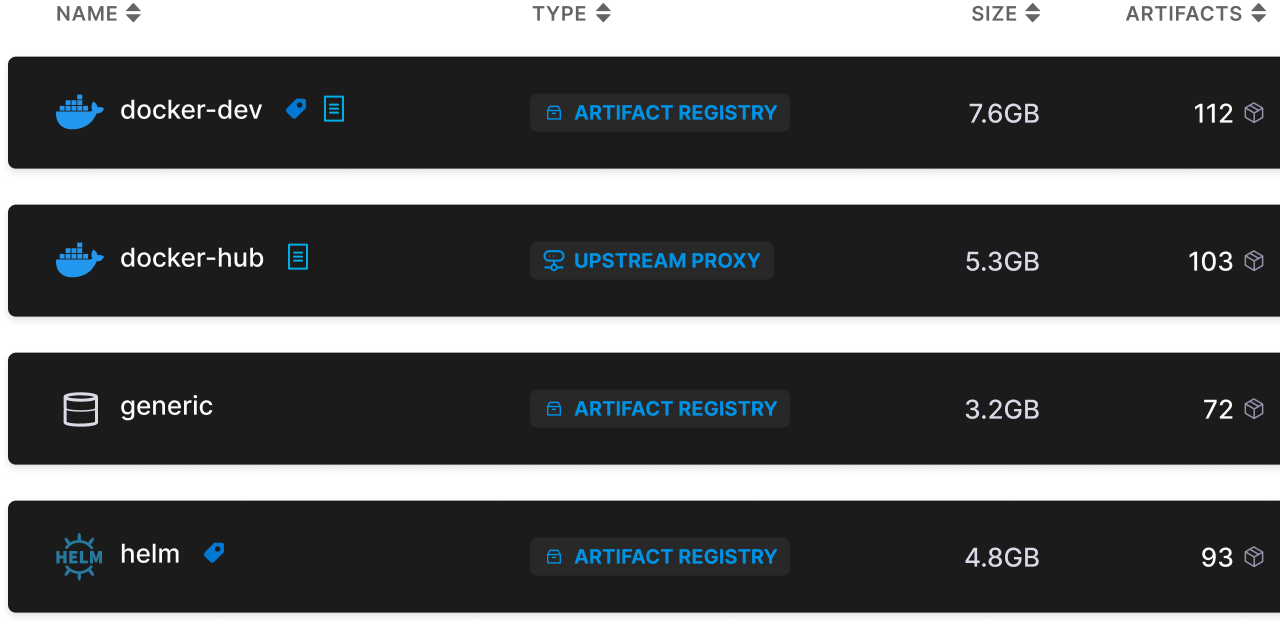
What is Gitness?
Harness Open Source is an Apache-2.0 licensed DevOps platform from Harness, aimed at engineering teams that want code hosting and delivery automation on their own hardware. A single container bundles Git repositories with pull requests, code reviews, protected branches and quality gates; YAML pipelines whose steps run inside Docker containers; on-demand Gitspaces development environments you can connect an IDE to; and an artifact registry covering Docker images, Helm charts and generic packages, including an upstream proxy. A migration feature can bring in projects from services such as GitHub, GitLab, Bitbucket or CircleCI in one click. Self-hosting is a single docker run mapping ports 3000 and 3022, mounting the Docker socket for pipeline execution and a volume at /data for storage; an embedded SQLite database is used by default and Postgres is optional. A full web UI, a Swagger-documented REST API and a small command-line tool named gitness round out the toolset. Development happens on the main branch with regular v2.x releases; the older Drone CI code continues as a separate feature branch.
Gitness alternatives
 GitWitGitWit is a self-hosted, open-source AI coding platform with a browser-based IDE, live preview, AI chat, and support for Anthropic, OpenAI, and AWS Bedrock.CompareGitWit with Gitness
 GitLab-CESelf-hosted, open-source DevOps platform for Git repositories, merge requests, CI/CD pipelines, issue boards and wikis, with free CE and paid Premium/Ultimate tiers.CompareGitLab-CE with Gitness
 GiteaGitea is a self-hosted, open-source Git platform with code hosting, CI/CD, package registries, issues, and project management — a lightweight GitHub alternative.CompareGitea with Gitness
 dockgeA self-hosted, open-source web UI for Docker Compose stacks: create, edit and deploy compose.yaml files, with a live web terminal and multi-host agents.Comparedockge with Gitness
 swiftwaveSwiftWave: self-hosted open source PaaS for deploying apps on any server. Alternative to Heroku/Netlify/Render with 1GB RAM min and integrated app store.Compareswiftwave with Gitness
 dockhandDockhand is a self-hosted Docker management platform with real-time container monitoring, Compose orchestration, Git deployments, and SSO. Free for homelabs under BSL 1.1Comparedockhand with Gitness
 CodinIT.devSelf-hosted open-source AI full-stack dev platform for building Node.js apps with code generation and 19+ AI providers.CompareCodinIT.dev with Gitness
 DiggerOpen-source Terraform CI/CD that plans and applies inside your existing CI, with PR comments, drift detection, OPA policies and a self-hosted orchestrator backend.CompareDigger with Gitness
Should you self-host Gitness?
Gitness scores 80/100 on selfhost.directory (how scoring works) and ranks #2 of 15 in Code Hosting. It has 38 881 GitHub stars, +386 in the last 30 days.
It shipped 6 stable releases in the past year. The latest, v2.28.2, came out on 20 April 2026. New versions land roughly every 2 weeks.
Setup is easy: most people get it running in one sitting. An official Docker image is available. It is Apache-2.0-licensed and written mostly in Go.
Its closest alternative on selfhost.directory is Gitea (89/100, 59 009 stars). It scores higher overall, so compare the two before you pick. See Gitness vs Gitea side by side.
Features
- Artifact Registry
- CI/CD Pipelines
- CLI
- Hosted development environments (Gitspaces)
- Notifications and alerts
- One-click migration from other forges
- Pipeline templates
- Protected branches
- Pull requests and code review
- Quality Gates
- REST API
- Secret scanning
- Source code management
- Upstream proxy registry
- Web UI
Gitness README
Harness Open Source is an open source development platform packed with the power of code hosting, automated DevOps pipelines, hosted development environments (Gitspaces), and artifact registries.
Harness Open source is an open source development platform packed with the power of code hosting, automated DevOps pipelines, Gitspaces, and artifact registries.
FAQ
How can I handle SSL errors when using the default clone task?
Set clone.insecure=true to bypass them, or configure the Docker environment to trust the required certificates.
Can I override the default cloning task image used by Harness?
Yes; make the desired image available in the local Docker cache or use a Docker registry mirror, and Harness will use the locally cached image.
How can I avoid Harness from pulling the :latest tag of an image?
Use a specific version tag instead of :latest, or add pull: if-not-exists to the pipeline step so the image is only pulled when not already cached locally.
What images are required to run Harness Open Source offline?
The only essential image for running pipelines is drone/git; plugin images are optional.
How can I run Harness Open Source in an offline environment without internet access?
Pre-pull the needed Docker images on an online machine, export them with docker save and import them with docker load in the offline environment, or configure the Docker daemon to use a local registry mirror.
More in Code Hosting
 GitusGitus is a self-hosted, open-source Git forge in Go with no JavaScript, featuring a web installer, SSH access, issues, pull requests, and experimental webhooks.
 GogsA lightweight, open-source, self-hosted Git service written in Go: repos, issues, pull requests, wikis and LDAP login, run from one binary or a Docker image.
 harnessSelf-hosted, open-source DevOps platform: Git hosting with pull requests, CI/CD pipelines, Gitspaces dev environments, and Docker and Helm artifact registries.
 legitOpen-source, self-hosted browsing UI for Git repos, built in Go: serves bare repositories from a folder with custom templates, README rendering and HTTP cloning.
 OneDevOneDev is a powerful and simple DevOps platform that integrates Git server, Kanban, CI/CD, and package registries into a seamless experience.
- PagurePagure is a lightweight, git-centered forge for hosting projects with documentation, ticketing, and pull-request mechanisms.
 rgitSelf-hosted, open-source Git web interface in Rust using RocksDB caching and gitoxide for fast browsing with dark mode.
- RhodeCodeRhodeCode is an open-source, self-hosted platform for unified repository management, supporting Git, Mercurial, and Subversion. It provides enterprise-grade security, code review, workflow automation, and permission management for teams.
 Roundup Issue TrackerRoundup is a highly customizable issue-tracking system with command-line, web, REST, XML-RPC, and e-mail interfaces. It is designed to be easy to install and use, and can be adapted to various use cases.
 scm-managerSelf-hosted open-source repository manager for Git, Mercurial and Subversion with web UI, REST API, and plugin system.
 self-forgeself-forge mirrors public GitHub repos and serves them via a minimal, server-rendered web UI with no JavaScript or CSS.
 BuzzOpen-source, self-hosted Nostr relay workspace where people and AI agents share channels, threads, canvases, voice huddles, YAML workflows and git hosting.
0 comments