
Self-host Freqtrade
2026.10Open-source crypto trading bot with backtesting and ML
$ docker compose up -d- Stars
- 56 945
- CPU
- 2vCPU
- RAM
- 2GB RAM
- Storage
- 1GB disk space
- Port
- 8080 (REST API / freqUI, bound to localhost by default in the shipped docker-compose (host mapping 127.0.0.1:8080:8080))
freqtradeorg/freqtrade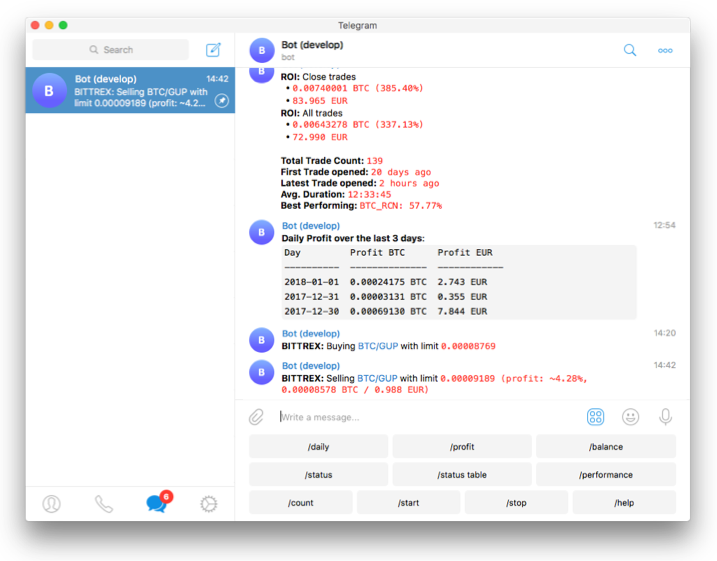



What is Freqtrade?
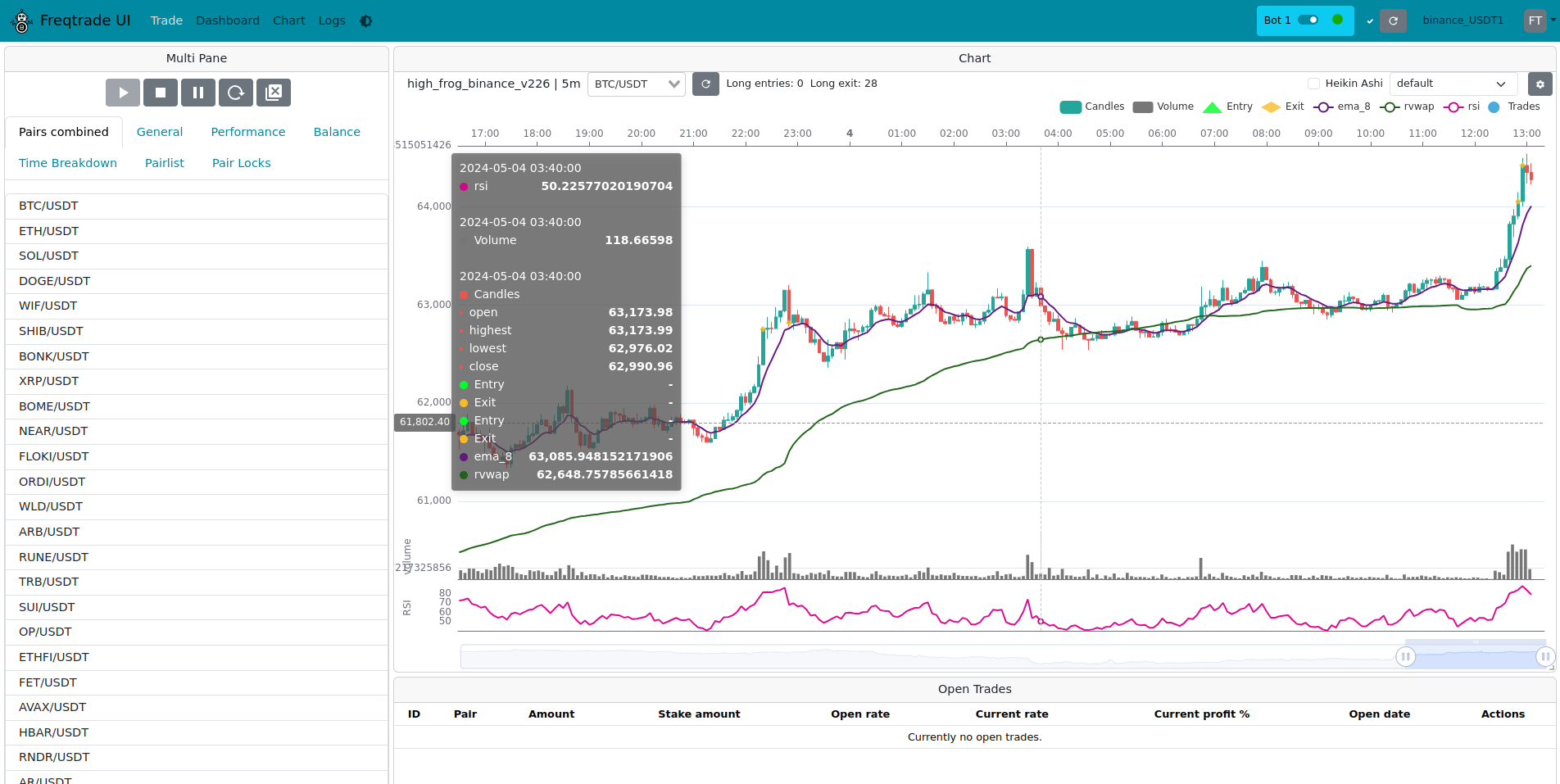
Freqtrade is a free and open-source Python bot for automated cryptocurrency trading, aimed at users comfortable writing and testing their own strategies in Python. It connects to major spot and futures exchanges (Binance, Kraken, OKX, Bybit, Bitget, Gate, HTX, Hyperliquid and others via ccxt), keeps its trade history in a local SQLite file, and can simulate trading in dry-run mode before any real money is involved. Strategies are Python classes that can be validated with the built-in backtesting engine, tuned through a machine-learning hyperopt module, or made self-adapting with FreqAI, which continuously retrains models on live market data. A built-in REST API and the bundled freqUI web interface let you monitor positions, balances and performance from the browser, and a Telegram bot exposes commands to start, stop and inspect the trader remotely. Webhooks and a producer/consumer data stream let you push bot messages elsewhere. Installation is documented with a Docker Compose quickstart, native setup scripts for Linux/macOS (./setup.sh) and Windows (./setup.ps1), a Conda path, and Raspberry Pi notes; the project recommends an NTP-synced clock and at least 2 GB of RAM, and stresses that results are not guaranteed and software is used at your own risk.
Freqtrade alternatives
 adamant-tradebotFree, open-source, self-hosted liquidity tool for token projects to improve CEX market quality — order book depth, tighter spreads, live trading — no third-party custody.Compareadamant-tradebot with Freqtrade
 openalgoSelf-hosted, open-source (AGPL-3.0) algo trading platform: one unified API across 37 broker plugins, plus charting, no-code Flow, options analytics and sandbox.Compareopenalgo with Freqtrade
 NOFXSelf-hosted AI trading terminal using LLMs to make futures market decisions. Replaces manual trading bots with verifiable risk limits enforced by Go runtime.CompareNOFX with Freqtrade
 TradeTallySelf-hosted trading journal with unlimited trades, multi-broker import, behavioral analytics, AI insights, and native iOS app. Open-source TraderVue alternative.CompareTradeTally with Freqtrade
 tradingview-webhook-to-bybit-liteSelf-hosted Flask service that receives TradingView webhook alerts and executes trades on Bybit with paper/live modes, payload validation, and duplicate protection.Comparetradingview-webhook-to-bybit-lite with Freqtrade
 the0Self-hosted open-source platform for deploying algorithmic trading bots in 7 languages with scheduling, state, logs, metrics, and live dashboards.Comparethe0 with Freqtrade
 TradingAgentsSelf-hosted, open-source multi-agent LLM framework that mimics a trading desk: analyst, researcher, trader and risk agents debate a ticker and output a decision.CompareTradingAgents with Freqtrade
 openlegionSelf-hosted platform for isolated AI agent teams with credential vaulting, spend limits, and a web dashboard — free for internal use under a source-available license.Compareopenlegion with Freqtrade
Should you self-host Freqtrade?
Freqtrade scores 87/100 on selfhost.directory (how scoring works) and ranks #1 of 44 in Cryptocurrency. It has 56 945 GitHub stars, +1 272 in the last 30 days.
It shipped 11 stable releases in the past year. The latest, 2026.10, came out on 30 October 2026. New versions land roughly every 4 weeks.
Setup is moderate: expect some configuration beyond a single command. An official Docker image is available. It is GPL-3.0-licensed and written mostly in Python.
Its closest alternative on selfhost.directory is Bitcoin Core (86/100, 90 691 stars). Freqtrade scores higher overall. See Freqtrade vs Bitcoin Core side by side.
Features
- Adaptive ML strategies (FreqAI)Dedicated docker image tags exist for FreqAI, PyTorch and reinforcement learning.
- Backtesting
- Built-in web UI
- Dry-run / paper trading
- Dynamic pair whitelist/blacklist
- Fiat profit display
- Performance reporting
- Plotting / chartingRequires the *_plot docker image variant.
- Producer/consumer data streaming
- REST API
- Short sellingFutures trading supported only for selected exchanges.
- SQLite persistence
- Strategy optimization by machine learning
- Telegram control
- Webhook Notifications
Freqtrade README


How to install Freqtrade
Install Freqtrade with Docker Compose
mkdir ft_userdata
cd ft_userdata/
# Download the docker-compose file from the repository
curl https://raw.githubusercontent.com/freqtrade/freqtrade/stable/docker-compose.yml -o docker-compose.yml
# Pull the freqtrade image
docker compose pull
# Create user directory structure
docker compose run --rm freqtrade create-userdir --userdir user_data
# Create configuration - Requires answering interactive questions
docker compose run --rm freqtrade new-config --config user_data/config.json
Then launch with docker compose up -d.
Official image on Docker Hub; recommended for Raspberry Pi and ARM64 systems.
Install Freqtrade with Linux
# update repository
sudo apt-get update
# install packages
sudo apt install -y python3-pip python3-venv python3-dev python3-pandas git curl
# Download `develop` branch of freqtrade repository
git clone https://github.com/freqtrade/freqtrade.git
# Enter downloaded directory
cd freqtrade
# your choice (1): novice user
git checkout stable
# --install, Install freqtrade from scratch
./setup.sh -i
Activate the virtual environment with `source ./.venv/bin/activate` before running.
Install Freqtrade with Windows
Set-ExecutionPolicy -ExecutionPolicy Bypass
cd freqtrade
. .\setup.ps1
# activate virtual environment
. .\.venv\Scripts\Activate.ps1
May require Microsoft Visual C++ Build Tools for compiled packages; WSL2 or docker compose suggested as alternatives.
Install Freqtrade with macOS
# --install, Install freqtrade from scratch
./setup.sh -i
Debian, Ubuntu or MacOS; Homebrew-based dependency install also documented.
Install Freqtrade with Raspberry Pi
sudo apt-get install python3-venv libatlas-base-dev cmake curl libffi-dev
# Use piwheels.org to speed up installation
sudo echo "[global]\nextra-index-url=https://www.piwheels.org/simple" > tee /etc/pip.conf
git clone https://github.com/freqtrade/freqtrade.git
cd freqtrade
bash setup.sh -i
Native install can take multiple hours; docs recommend the pre-built docker image for Raspberry Pi, and advise against running hyperopt on it.
How to configure Freqtrade
max_open_tradesRequired. Number of open trades your bot is allowed to have. Only one open trade per pair is possible, so the length of your pairlist is another limitation that can apply. If -1 then it is ignored (i.e. potentially unlimited open trades, limited by the pairlist). More information below. Strategy Override. Datatype: Positive integer or -1.stake_currencyRequired. Crypto-currency used for trading. Datatype: Stringstake_amountRequired. Amount of crypto-currency your bot will use for each trade. Set it to "unlimited" to allow the bot to use all available balance. More information below. Datatype: Positive float or "unlimited".tradable_balance_ratioRatio of the total account balance the bot is allowed to trade. More information below. Defaults to 0.99 99%). Datatype: Positive float between 0.1 and 1.0.available_capitalAvailable starting capital for the bot. Useful when running multiple bots on the same exchange account. More information below. Datatype: Positive float.
Freqtrade releases & version history
Highlighted changes
- Add Orderbook websocket support.
- Fully Decouple bot from RPC messaging for more reliable bot loop execution.
- Parameter values are now kept per strategy instance. Access them through
self.<param>.value, not through the class. - Armv7 (raspberry 32bit) image updated to python 3.13.
- Dropped support for python 3.11.
- Support changing strategy parameters from Backtesting UI (
webservermode only). - FreqUI will now use the backtested strategy to plot in backtest mode (
webservermode only). backtesting-show --export-paramsnow writes the parameters from a backtest back to the strategy.- Improved efficiency for
AgeFilterdoing fewer calls for validated pairs.
Sponsor
You can sponsor the work on freqtrade via the following links:
- froggleston (FTUI) https://github.com/sponsors/froggleston/
- robcaulk (freqAI) https://github.com/sponsors/robcaulk/
- xmatthias (freqtrade and freqUI): https://github.com/sponsors/xmatthias/
New Contributors
- @Siegelth made their first contribution in #13657
- @Jhacarreiro made their first contribution in #13662
- @Bortlesboat made their first contribution in #13678
- @lizimu1013 made their first contribution in #13697
- @louisvikk6-max made their first contribution in #13681
- @M1ch43lV made their first contribution in #13719
How to update
As always, you can update your bot using one of the following commands:
docker-compose
docker-compose pull
docker-compose up -d
Installation via setup script
# Deactivate venv and run
./setup.sh --update
Plain native installation
git pull
pip install -U -r requirements.txt
Expand full changelog
4a39de1a5 chore: bump version to 2026.10
be53411c7 chore: remove reduced excludes
686e59b99 chore(deps): update python docker tag to v3.14.10
4209674c0 chore(deps): update python docker tag to v3.13.18
de1f3bb5a chore: update binance leverage tiers
d4d48db16 Drop the get_rate assertion, it is not part of the call path anymore
0b3ef98dc Pass the placed price to emergency_exit when the cancelled order has none
4c3e11286 chore: format CI yaml files
dafa0b6f4 test: fix random, timing based test failure
953d0c2ba fix: avoid attribute error
91aa6b6b2 Fix emergency exit crash when the cancelled order has no price
43b62f22f chore(deps): update python non-major dependencies
ce2246364 chore(deps): update dependency filelock to v4.2.1 [security]
c8a1e03e2 chore(deps): update dependency ubuntu to v26
1948b0f75 chore(deps): update zizmorcore/zizmor-action action to v0.7.1
c5bdef921 chore(deps): update pre-commit hooks
f95ca1508 chore(deps): update ruff to v0.17.1
826d54c38 chore(deps): update python non-major dev dependencies
8eb66c7ad chore(deps): update dependency ccxt to v4.5.90
a20c63bcb test: add test for expired fuding_fee history
ba9f6def4 fix: loop funding history if older than 1 request
150a10bc2 fix: humanize for daylight-saving periods
9830ab1c1 chore: don't sanitize None values.
451047bf0 fix: ensure ccxt config values are sanitized correctly
0ff5765e2 fix: dry-run should remove ccxt keys, too
337415d8b test: add test for ccxt credential sanitization.
4e902c305 fix: sanitize keys passed directly to ccxt
70ac586fa chore: improved new-config for stake-amount handling
e8c87670e test: explicitly test exchange_requires_password
6815c6636 feat: reliably ask for api key password if ccxt requires that
8cf9136ab chore: delist kucoineu (aligned with ccxt)
d2b9b4063 fix: exchange class mapping typo
66757ee65 chore: remove bittrex config template
1a744e30e chore: remove bittrex references ni tests and docstrings
b463578dc Fix Gate and HTX config templates and complete credential escaping
2afb514fd avoid using shift just to fetch 1 older row
12e0878f8 docs: fix some typos
781c57b5b chore: fix some spelling/grammar errors
1742ce5f8 test: remove useless testcase
e61aba76d chore: simplified comment
fdb1db4bd chore: relax cerfiti "exclude newer" constraints
017e3e686 chore(deps): update dependency certifi to v2026.10.19 [security]
e203fab3a chore: move constraints.python config to parent repo
0aad78a9b chore: update ta-lib prebuilt arm binary
382f2a0e6 fix: set OHLCV refresh time from the converted dataframe
af1dff103 chore: update binance leverage tiers
ebdf7fd63 chore(deps): update dependency ta-lib to v0.8.2
e480d5e62 chore(deps): update dependency ccxt to v4.5.89
22ee787c5 use stoploss of 0 for min stake
24bc3d19d min and max stake on backtest should also take leverage into account
0db79d391 chore: code clarity/understandability
b0a675214 fix: add value validation to ShuffleFilter
5a45d581e fix: don't use & for comparisons
98aa936a5 chore: improve wording / error messages
9e1ebde1a update tests' wording
e5061a27a use simpler list deduplication
403fee5c4 add pairlist name on exception message
51f18294a chore: re-enable ruff DTZ
4a740ac35 chore: revert python bump
a2995e693 add tests
95daab65d validate custon enum value on pairlist
a7c67f5e2 chore(deps): update ruff to v0.17.0
64d748b72 chore(deps): update dependency gymnasium to v1.4.0
f35edf325 chore(deps): update python non-major dev dependencies
0bc399e89 chore(deps): update python non-major dependencies
9177d78a3 chore(deps): update python docker tag to v3.14.8
b70d9f8f8 chore(deps): update github-actions non-major dependencies
46ff148a6 create new function to decrease complexity
b3daf68d9 fix bug when multiple categories are used
b8ca1a9fc fix: stoploss on exchange fill funding fee handling
bee01de70 test: fix test encoding for windows
84e5657e6 test: update online okx tests
af45c029d test: update some tests for new okx behavior
aff00f3dd fix: okx leverage tiers are in contracts and base currency
96256ae01 chore: renovate - split armhf dockerfile updates
86397af3e Fix configuration generation and nested token redaction
21cc906d6 chore(deps): update dependency ccxt to v4.5.88
d9d1644c9 fix: don't round up exact prices in significant digits mode
6fffda776 test: update tests for file loading fix
19f11e371 fix: loading of corrupted parameters file
7f5e86022 fix: round decimal parameters before setting them
0a577781c chore: Update pyarrow wheel to 26.0.0
5d4d5955a chore(deps): update dependency pyarrow to v26
f304620bc test: update tests for new response codes
b76100a55 fix: raise ConfigurartionError if overrides are invalid
fcdd8c428 feat: warn when parameters are provided that are out of range
730843ec3 refactor: simplify parameter input schemas
15cdd90c6 chore: cleanup unreachable code
dee1f1171 feat: be verbose when no parameter is found
cb9d04724 test: update test with valid params
85795e38a fix: don't allow invalid parameters
393a730fd fix: Update to new code pattern
af2f4bbf5 test: api-params should reject invalid parameters.
a767b3451 fix: reject invalid overrides
a8425a7e8 fix: don't log when zip file has no parameters
13b8d4002 fix: default backtest to spot for when not explicitly set
19f9f8501 test: add test for pair_history from backtest
7a22c20cb feat: Add endpoint for pair_history from backtest result
b85a96f1c test: backtest-show with export parameters
66907bc9d docs: document backtest-show behavior
70474f75a chore: auto-export backtest-show command
b2097832c feat: Add parameter export to backtest-show
1f82a6108 refactor: expose get_backtest_filename from the module
1ef07adfa test: add tests for bt_strategy_dir context manager
0a590a3ef feat: extract strategy/parameters from zip file
129d3d19d test: add test for strategy optimization
4cf7983c8 fix: correctly save modified strategy params
e3abd2ce6 test: strategy-run_id detection from dynamic params
7176dfffb fix: Dynamic params should be considered for caching
8d95cfa84 test: update strategy_params calls
f502f1ece feat: Update parameters file in backtest result
a4691ca7d refactor: split Hyperopt serialization
0ce8675c5 feat: add space to parameter input for strategy parameters
0f41ed185 chore: clarify variable naming
98eff5acd feat: bump api_version to 2.51
5f8cee912 test: add test for backtest api overwrites
dd2cde3db feat: add parameter overrides to API backtesting
f3c311964 test: add test for pair_history param update
4e9de660a feat: add Strategy parameter loading to pair_history endpoint
a1cd4f09b feat: add Strategy Inputparameter schemas
db95b10a3 chore: update renovate config
dd88ab3a6 chore: renovate link to github, not local
60fa47194 fix: slightly different variant to generate message
8308ecf0a fix: log when pairs without data are removed
9430a4a6a feat: improved removal message wording
a7be5e8fa chore: increase offset for a bit more safety margin
d62d6fed3 test: additional tests for Agefilter
7815e4de4 test: update tests for new AgeFilter behavior
f94725087 chore: simplify condition
54bf5f374 feat: improve AgeFilter logic
32698fb40 chore: update binance leverage tiers
183351d57 fix: only fetch leverage tiers for active markets
191f71de5 chore: reduce severity of orderbook staleness message
9f54ebfa0 fix: add  ohlcv_volume_in_contracts for Volumepairlist
6afd6776c chore: align ohlcv and orderbook cancel behavior
8d735173a chore: unwatch should get a timeout
82e4c9604 chore: add authorized_only to all telegram endpoints
0becb6b54 fix: rollback telegram customData sessions
070727f95 fix: rollback customData session
93efa8480 make sure no false positive in comparison between bool and int
f271f0113 chore: improve LowProfitPairs lock reason message
32bf4d81d typo
4811e966f protect agains trade-limit 0
f4471bf7d allow matching None, "", False and 0
4eb522769 chore(deps): cleanup numpy version split
b1908aff8 chore: revert bumps to orjson and certifi
152c63e66 chore(deps): Apply pre-commit types update
3f2476583 chore(deps): update python non-major dev dependencies
81fbd84c8 chore(deps): update python non-major dependencies
a179f5cf1 chore(deps): update freqai dependencies
291ba9b50 Fix percentage conversion for aggregated mix tags
8b23256ec fix: reset realized profit after offsetting partial exits
d636f8e47 fix: missing fstring in Agefilter
cde4437e9 make the trade count also honor only_per_side setting
fa5dc3938 fix: reject unsupported future Python versions
72c49b882 fix: reject unsupported Python versions in setup
9a2f03a6b chore: renovate -> run pyarrow in a separate group
e99c82e38 test: add test handling binance exchange errors
a1622c9d5 fix: handle exchange errors on binance trade_history download
2f25a6f2e chore: update web-proxy-ip
fccc94d9b test: enhance test coverage of rpc_emc
464d31e18 test: add test for new behavior
eea79443c fix: EMC - fall back to initial instead of a 1500 default
093e493c0 chore: Add minimum value, document.
0b68d1c22 chore: improved naming for renovate groups
038233bf2 make sure initial_candle_limit is used
2cdfc2325 chore: improved renovate config
d29b87e9a chore: remove duplicate dependency entries
c4b851adc fix: correct filter logic
51121200d test: update order not found startup test
dac0a2baf chore(deps): make sure all requirements files are detected
2827c8208 return empty list on no data instead of 404
b6dbe6ec6 chore: remove scipy platform constraint
65e3bea30 chore(deps): Apply pre-commit types update
a99a39dff chore(deps): update scipy
7b222fc16 chore: fix renovate config
df11a9af7 chore: drop Python 3.11 constraint in Renovate configuration
63f4d4a83 test: remove test fluke due to hour rollover
d77ea1692 fix and improve test on 1 missing coverage
43b400dcd add comment on test
3a73cdfe8 chore: update binance leverage tiers
116cda786 fix bug when first open trade has no requested custom data
18d527cf2 update cd_type on setter
52e7f6f9f fix: no wildcards in custom_data queries
e1d58f84b add api_server.ws_token
6126fd5a8 add api_server.jwt_secret_key as sensitive key
b7fad51e3 docs: update rpi doc wording
ccc94700c chore: bump renovate.json version constraint to 3.12
021a0f89a chore: Improved type syntax for 3.12
797f59257 chore: type modernization
acbaeb1b2 docs: bump docs for 3.12+ reality
6a657b67f chore: disalbe CI on 3.11
f3ec9796f chore: Remove python 3.11 from docs and setup scripts
24aca66af docs: improved raspberry documentation
1c9c206d2 docs: fix raspbian documentation bug
a6a2ac681 chore: drop readthedocs file
f90146c7d chore: make sure to install deps for supported versions
f331805de chore: bump Dockerfile to 3.13.16
61d6131ad chore: minor cleanups
db7645bca test: improve online test performance
a0074c53c chore: workaround for scipy
8494a2f22 chore: update pre-commit hooks
4cd6e31da chore: bump numpy on armh7l to 2.4.5
c25135717 chore: add 3.13 wheels, remove 3.11 wheels
a859a8f6e chore: Renovate should consider supported versions
00aaa1f34 chore: bump pyarrow wheel
e4be0f258 chore: bump pi image to trixie
35495b244 chore: simplify docker install
16cdadff4 chore: bump armhf dockerfile to python 3.13
ede1608b0 chore: add pyarrow 3.13 armv7 wheel
545f99f31 chore: stick to xgboost 3.2.0 for now
77ce1402b chore: remove unnecessary mypy plugin
7b1a53c57 chore: downgrade a few packages for compatibility
fe6b57a1d chore: bump scipy and scipy-stubs together
46acf3c8d chore: revert scipy-stubs for now
58dd94caf chore(deps): Apply pre-commit types update
68c6b8081 chore(deps): Apply pre-commit types update
c77c1d56c chore(deps): update python non-major dev dependencies
4dfe76b15 chore(deps): update python non-major dependencies
f4d178f46 chore(deps): update dependency python to 3.14
d477b53bf chore: update ta-lib wheel
3930b03f7 chore(deps): update dependency ta-lib to v0.8.1
1a4fff8c5 chore(ci): mypy type version update - include renovate
ef960437b chore: remove dependabot, explicit schedule
0d23788a5 chore: Add .github/renovate.json
45d486b12 chore: bump small jobs to ubuntu 24.04
fd0497b1f chore: test on macos-26
ffa803682 chore: remove deprecated macos-14 image
990828d19 chore(deps): bump pyjwt
44e77d7bc chore: bump urllib to 2.8.0
53e09bc9b chore: bump ccxt to 4.5.85
3db1a1ced chore: move comment to the call
dd29251c6 chore: don't update wallets if not needed
27d7e01b5 test: add test for hyper params shared base class leaking
3982128e3 test: open_interest online fix
6951a63ab chore: update binance leverage tiers
a14b0e198 docs: note strategy parameter access behavior
a5a652214 fix: prevent parameters leaking through base classes
22f2d3b15 test: update test for improved queue shutdown
7cfc492ee fix: improved cleanup to avoid thread leaking (or sending messages after a reload)
52195f7ab fix: don't warn on 0 queue size
ab0bce3f7 test: add tests for msg queue
b9edaccfc test: flush queue for telegram tests
d7331939e feat: use queue to decouple RPC from bot operations
3321fe54c test: update test for messageStream changes
358a71e3b fix: call publish message set_result on loop thread
f6a7b767a fix: remove coinex from online tests
2c43162e5 chore: bump develop version to 2026.10-dev
ea4f84ee4 refactor: improved naming and log output for ohlcv ws
902d014e4 fix: improved cleanup
fa8d63d46 test: improve ws orderbook tests
0926be9a5 feat: per exchange orderbook subscribe limit
76310ea5d chore: avoid log spam in ws failure mode
ff7e5c4e0 chore: fix typecheck
d84599325 test: improved ws_orderbook test
2f70d1786 fix: prevent mid-update responses from orderbook
e1d8658c8 chore: improved comment wording
8101d8c23 chore: disable hyperliquid orderbook websocket
52a2aa54a test: add test for unwatch_while_stopping
dbc908b0e fix: implement shutdown guard
c54b6b0d9 fix: legacy configurations shouldn't break
e9f88ce47 test: stabilize orderbook online test
992320396 fix: upper l2 limit for okx
02d91393e test: fix watch ohlcv online test
604b6ede9 test: add exchange_ws unwatch tests
4eaaf015e test: update tests for websocket limit handling
8084e164b feat: improve unsubscribe resiliance
f3f116c8f feat: ws orderbook respects limit now
b8f21f816 chore: improved ws cleanup
c226a7191 test: update test mistake
fa3a1ead4 feat: enable orderbook websocket support for binance futures
c034651fe chore: Improved debug log output
dc87b9748 test: update websocket orderbook tests
10bdd6be5 feat: add orderbook staleness
c2d1190a4 fix: skip empty orderbook objects
05a17d579 test: add orderbook online test
20b6d6c86 test: add tests for watch orderbook
429229cdd feat: extract ob watch timeout for now
a7d8f36da test: add test for enable_per_stream
56754fad3 feat: allow users to disable websockets per stream
061480887 fix: return correct websocket type
2bdaac4c0 feat: allow individual ws disabling by stream
89ef9cb0d feat: enhance orderbook websocket behavior
b420a3893 feat: Add orderbook websocket support
Highlighted changes
- Add time offset check against exchange clock.
- Add support for open interest data as informative pair (for exchanges that support this).
- Startup now fails if the strategy requests informative candle types the exchange doesn't support (e.g.
open_interest). - freqUI: Show available free balance in force-entry form.
- Add configurable liquidation warning messages in futures mode.
- Add
delete_custom_data()support to allow removing data from trades again. - Improved refresh logic for pairs with little activity.
- Security hardening in several places (config output redaction, freqAI identifier path traversal).
- Fixed funding fees being reset to 0 when a filled order is reprocessed.
- Fixed wallet handling for cross-margin bots.
Sponsor
You can sponsor the work on freqtrade via the following links:
- froggleston (FTUI) https://github.com/sponsors/froggleston/
- robcaulk (freqAI) https://github.com/sponsors/robcaulk/
- xmatthias (freqtrade and freqUI): https://github.com/sponsors/xmatthias/
New Contributors
- @svenmittner made their first contribution in #13531
How to update
As always, you can update your bot using one of the following commands:
docker-compose
docker-compose pull
docker-compose up -d
Installation via setup script
# Deactivate venv and run
./setup.sh --update
Plain native installation
git pull
pip install -U -r requirements.txt
Expand full changelog
0d7510da3 fix: remove coinex from online tests
30afbfa3b chore: bump version to 2026.9
3e74d86a9 chore: update pre-commit hooks
30c00ed63 fix: proactively protect from session errors on shutdown
dcadba2d5 chore: Remove "newer package" excludes, add virtualenv
bff1e31a1 chore: delist bitmex
b8022cbf4 chore(deps): bump ccxt from 4.5.83 to 4.5.84
830748dc7 chore(deps): bump codecov/codecov-action from 7.1.0 to 7.1.1
08d3d99a3 chore(deps): bump astral-sh/setup-uv from 10.1.0 to 10.2.0
e48de8f1c chore(deps): bump the docker group with 2 updates
d2d9af885 chore(deps): Apply pre-commit types update
6811ed80d chore(deps): bump pymdown-extensions from 11.0.2 to 12.0.1
3b6cd5ad4 chore(deps): bump filelock from 3.32.6 to 4.0.1
11642c514 chore(deps-dev): bump ruff from 0.16.7 to 0.16.8
a2ead3b96 chore(deps): bump cachetools from 7.1.8 to 7.2.0
75c0fa819 chore(deps): bump plotly from 7.0.0 to 7.1.0
a086a85d8 chore(deps): bump uvicorn from 0.52.4 to 0.53.0
56dadb7d9 chore(deps): bump sqlalchemy from 2.0.52 to 2.0.54
a2f8703fa chore(deps): bump pandas from 3.0.5 to 3.0.6
d6c736fc1 docs: improve docs for open interest data
5284e4d27 fix: check contracts to verify for position openness
548cd47b1 chore: update binance leverage tiers
bfd88c97a docs: update rateLimit docs to warn from changing them.
d7b38e989 docs: formatting / wording
6637d6212 chore: bump ccxt to 4.5.83
698b96203 fix: don't drop funding-fee candle in data-download
06ef42228 test: add test for model identifier path traversal
9cf942017 fix: don't allow freqAI model identifiers outside of model directory
33e32a52b feat: add "is_path_in_dir" helper
fd0e573ac test: update test ensuring strategy params are typed correctly
b748e66b6 test: fix base64 strategy test
4927aa117 feat: use Pydantic custom validator to ensure non-base64 strategies
5e921cced chore: skip dependant in codespell
08e08046e test: improve test safety for base64 strategies
6316314a6 chore: minor code improvement in variable naming
35901ddcd test: freeze time in open interest refresh test
14909b500 fix: always drop last candle for historic parallel download.
6bfcc21a3 docs: more precise developer doc wording
448415cf1 fix: clamp grace_period to half a candle length
b394adc6b test: add test-case for mid-candle poll
a0668815d fix: add max-poll time to avoid very outdated longer candles (1h+)
ab63965cd fix: improved handling of last candle drops
4b1d9ac95 test: improved test for empty candle edgecase
1bd151212 test: update tests for new grace period behavior
e5e335174 Fix: improve refresh-logic for another edge-case
c1dde7ade test: add test for "stale" response
2f7a730d0 fix: improved refresh logic for edgecase
bd763ca37 test: improved refresh tests
0aa06a956 docs: update docs for grace_secs
674dfb80c fix: improved refresh logic for some edge cases
456ff31bf chore: update pre-commit hooks
b9a35b602 Add base64 verification to plot_config
62c30525a docs: ensure ta-lib BBAND defines timeperiod
3988fbe37 chore: add ta-lib 0.8.0 armhf wheel
0d5f7cc2f chore(deps): bump scikit-learn from 1.9.0 to 1.9.1
ffd80a134 chore(deps): bump optuna from 4.9.0 to 5.0.0
7c728364f chore(deps): bump ta-lib from 0.7.1 to 0.8.0
6d6adf009 test: extend timeframe rounding tests to week, month and Year
39aa011b6 chore(deps): bump astral-sh/setup-uv from 10.0.1 to 10.1.0
90d42a2e8 chore(deps): bump zizmorcore/zizmor-action from 0.6.3 to 0.6.4
3517fde5b chore(deps): bump codecov/codecov-action from 7.0.0 to 7.1.0
c03a8cfc4 chore(deps): bump filelock from 3.32.5 to 3.32.6
4838eee7f chore(deps): bump tqdm from 4.70.0 to 4.70.1
c67068974 chore(deps-dev): bump ruff from 0.16.6 to 0.16.7
dec0fd4bc chore(deps): bump ccxt from 4.5.78 to 4.5.81
aa46a8d89 chore(deps-dev): bump time-machine from 3.5.0 to 3.5.1
80037e823 chore(deps-dev): bump build from 1.6.0 to 1.6.1
ccf78832b chore(deps): bump pyjwt from 2.13.0 to 2.14.0
06831520b refactor: improve hyperopt_tools reusability
2f509e18e docs: add documentation for delete_custom_data
7024a2a1f test: test delete_custom_data with/without database
2a3bca6cb feat: add delete_custom_data
53998f425 docs: sharpen max_stake_amount explanation
3774521e7 fix: valid-pair combination should respect trade mode
d7bb0f277 test: get_valid_pair_combination ordering
c63db7051 chore: update binance leverage tiers
a6d34ee14 chore: update pre-commit hooks
400d39eb2 chore: use cloudpickle directly
b1c84f513 chore: explicitly depend on cloudpickle
f24ae05c0 chore(deps): bump docker/setup-qemu-action in the docker group
eccebfcd9 chore(deps): Apply pre-commit types update
f89a4264b chore(deps): bump torch from 2.13.0 to 2.14.0
ed1c6defb chore(deps): bump joblib from 1.5.3 to 1.6.0
ea5e492b9 chore(deps): bump cachetools from 7.1.7 to 7.1.8
ad6d6d9af chore(deps): bump ccxt from 4.5.77 to 4.5.78
fd7f1f124 chore(deps): bump python-rapidjson from 1.23 to 1.25
bcb931f10 chore(deps): bump filelock from 3.32.4 to 3.32.5
f9260348e chore(deps-dev): bump ruff from 0.16.5 to 0.16.6
f70ce7f56 chore(deps-dev): bump types-requests in the types group
c064be532 chore: move comment to docstring
4be6a96c0 docs: add experimental warning to documentation
d41ba4aa8 test: update tests for open order exclusion
bbe0a0804 fix: exclude orders with open exit orders
20427d74c test: update tests
951707f04 docs: update docs for improved behavior
91f53b425 chore: auto-export schema
1297a5de6 fix: improved behavior for cross margin
d6a0721d5 fix: improve date resilience for freqAI
77d005e12 chore: limit warn_ratio to 0.99
5be3abf5b test: additional tests for liquidation warnings
a58f6cf9a test: improve liquidation warning tests
61f8975f8 chore: improved resiliance of liquidation warning
18de327bc chore: minor adjustments
a431e9eca chore: extract json schema
dbb881b79 chore: add default to liquidation_buffer schema
5df94820a feat: update config schema
cf966da7d docs: add documentation for liquidation warnings
ced50f88d test: add telegram liquidation test
fdeabf6d5 feat: telegram liquidation message
414b2395f test: add liquidation warning test
32fd5a79c feat: implement liquidation warning to freqtradebot
d9ab920d7 feat: add LiquidationWarningMessage base types
243ddaef4 test: remove binanceus temporary skip
2953fbdf6 test: add test for None Fee (out of ccxt)
09a4362ef fix: ensure fee is never None
d2b3aad1a chore: update binance leverage tiers
3d31927c8 docs: update lookahead analysis docs
6fac8ddb2 feat: add proxy_coin to show_config
057c3d4b9 chore: update pre-commit hooks
0fe47b351 fix: set pricing_side alongside order_type
c2a826107 test: add dca cancel test
6f2d9f219 fix: consider existing trade-amount for entry cancels
a57046734 chore(deps): bump ccxt from 4.5.76 to 4.5.77
ebf31ea83 chore(deps): bump zizmorcore/zizmor-action from 0.6.2 to 0.6.3
aa4791fcc chore(deps): bump plotly from 6.9.0 to 7.0.0
1a3ed89ee chore(deps-dev): bump time-machine from 3.4.0 to 3.5.0
e2e19b07f chore(deps-dev): bump build from 1.5.0 to 1.6.0
377d12275 chore(deps): bump websockets from 17.0.1 to 17.1
3ef7c50f2 chore(deps): bump pydantic from 2.13.4 to 2.13.5
a118c785d chore(deps-dev): bump ruff from 0.16.4 to 0.16.5
81311b550 chore(deps): bump cryptography from 50.0.0 to 50.0.1
202c1c429 chore: add explaining comment for schedule
5f2a92c5f test: add test for ft_scheduler
81a2cd162 fix: Improved error handling for scheduled jobs
29186a9a0 fix: redact coingecko api_keys
58b263fd1 docs: fix missing verb in CONTRIBUTING.md AI section
93076c10f test: add test for check_time_offset
ded215b47 feat: warn about time offsets between hots and exchange
39e8ac91f refactor: refactor exchange_utils tests to use date helpers
9bced0f5b chore: code quality around exceptions
d49744d29 chore: simplify collapsible if statement
294274c5a chore: simplify if statements
aed058e30 chore: drop `.keys()` where it's not necessary
ed0a9e982 chore: ignore only some SIM checks
9bb5d23b7 chore: code simplification
58830714d chore: simplify further odd if statements
8034b5e90 chore: remove unnecessary True if ... else False statements
3816d405e chore: some code simplifications
cf9498a49 update tests
9ffa25e2b re-implement OB to df
7c26eb0da handle None
452856009 fix naming
e8522ba1f chore: update binance leverage tiers
d8057e82e simplify _check_depth_of_market calculation
2bb751717 fix mypy
7786e065b more cached
edaad6311 reduce from 4 to 2 dataframe scanning
b15cc1ecc test: drop unused mock usages
89c72ed9e test: reset further flags in finally to avoid test leaks
e28f7e26a fix: move strategy_safe_wrapper to analyze_ticker_internal
cab0ec50d fix: don't overwrite an order's funding fee when the order is reprocessed
747c53d29 fixes
1078993eb test: skip failing binanceus test for now
2a5b89a19 perf: improved funding fee calculation for backtest
7f6179c79 chore(ci): implement ruffs self-references to actions
bc919d50d chore: update pre-commit hooks
592c18a89 feat: new-config should require 6 characters as api password.
9253afe98 chore(deps): bump re-actors/alls-green from 1.2.2 to 1.3.0
7a3f6c1f5 chore(deps): bump filelock from 3.32.3 to 3.32.4
56e6fe5b8 chore(deps): bump cmaes from 0.13.0 to 0.13.1
dbf1805a1 chore(deps): bump pymdown-extensions from 11.0.1 to 11.0.2
c13c1df89 chore(deps-dev): bump ruff from 0.16.3 to 0.16.4
5fc5faeae chore: bump version to 2026.9-dev
cbb433d02 revert to args_list
39a488906 assume dataframe is still date sorted
b2e2e2fcd chore: bump minimum version of ccxt to 4.5.76
2be9c26e0 test: improve online test for open-interest rates
a28881165 test: add tests for exchange part of open_interest interface
cd8248526 docs: update commands exports
6070a238a feat: fail startup when an invalid candle-type is requested.
0b68b3b49 test: open interest test updates
6f35bdefb test: add online tests for open interest data
ce680b400 docs: add documentation for open interest data
fedf43bee feat: add open_interest as candle type
Highlighted changes
- Added
@informativecall caching (⚠️this is a behavioral change enabled by default - but will only impact strategies that do non-dataframe operations as part of an@informativedecorated function). - Pairlists:
VolatilityFilter- Supportlookback_periodandlookback_timeframe.RangeStabilityFilter- Supportlookback_periodandlookback_timeframe.VoliatilityFilter- slight behavior change after fixing a bug causing the first row in lookbacks to always be 0. Results will slightly change due to that - as the average now no longer includes an additional “0” line.- Improved and aligned wording for pairlist filters with lookback parameters.
- Issue a warning during hyperopt when Parameters values are used during
populate_indicators. - Enhanced detailed formats for
--timerange- supporting Hour/Minute based inputs in human readable form (e.g.—timerange 20260101T1500-20260602). - Remove Bitmart support and references (it ceased operations end of July).
Sponsor
You can sponsor the work on freqtrade via the following links:
- froggleston (FTUI) https://github.com/sponsors/froggleston/
- robcaulk (freqAI) https://github.com/sponsors/robcaulk/
- xmatthias (freqtrade and freqUI): https://github.com/sponsors/xmatthias/
New Contributors
How to update
As always, you can update your bot using one of the following commands:
docker-compose
docker-compose pull
docker-compose up -d
Installation via setup script
# Deactivate venv and run
./setup.sh --update
Plain native installation
git pull
pip install -U -r requirements.txt
Expand full changelog
9775bb7e9 chore: bump version to 2026.8
cadc05eba chore: remove missleading parameter
892be4a08 docs: add note about backtest result caching
997ef6e36 test: add hyperopt_logger test
9112e674e fix: don't reassign log queue in hyperopt unconditionally
135220c02 fix: docstring with merge hint
1d8663b1a feat: update candle_type docstring
c59ce4615 chore(deps): bump uvicorn from 0.52.3 to 0.52.4
432a9d618 chore(deps): bump ccxt from 4.5.75 to 4.5.76
40ae81ce1 chore: update binance leverage tiers
922ab09d2 chore: update pre-commit hooks
160c23cc1 fix: avoid fragmented dataframe, fix mean calculation problem
4fab1d983 test: update test to verify 13481
70dfd76d9 chore(deps-dev): bump ruff from 0.16.2 to 0.16.3
78841fa48 chore(deps): bump astral-sh/setup-uv from 9.0.0 to 10.0.1
4c7af7096 chore(deps): bump docker/setup-buildx-action in the docker group
cfa58f8ed chore(deps): bump filelock from 3.32.2 to 3.32.3
7ae57e11c chore(deps): bump ccxt from 4.5.74 to 4.5.75
30ae2c1fa chore(deps): Apply pre-commit types update
2b54bc438 chore(deps): bump uvicorn from 0.52.1 to 0.52.3
1ef4b202e chore(deps): bump sqlalchemy from 2.0.51 to 2.0.52
dd84b8a17 chore(deps-dev): bump mypy from 2.3.0 to 2.3.1
10db8654c chore: fix devcontainer build
c8b7e7678 test: remove get_mock_coro in favor of AsyncMock
eb334b77d chore: bump api_version to 2.50 to indicate timerange minute support
6ace4cfac docs: Update docs typos
b6e0febde chore: add Agents stuff to gitignore
914af5e7f chore: update command partials with new help docstring
762a62c75 docs: update documentation for new timerange format support
cb3faa377 test: add tests for new timerange formats
dfa9d0442 feat: improved UX for hour/minute based timeranges
8624a8510 docs: improve funding rate documentation
9f829f204 fix: unknown file layouts should be treated as empty when loading files
b96655b34 chore: improved docstring
f567681ca test: explicit funding-rate informative caching test
0d0e7d6a7 test: update further tests for new dataload behavior
a2d112ded test: update a couple tests for new funing-fee behvior
883cf9e84 test: update ccxt online test for new funding-rate behavior
597222ab8 docs: update docs for funding rate behavior change
2776f7274 feat: normalize columns on load
7c4392885 feat: create "empty_dataframe" helper
42e0ff3c4 feat: informative decorator must be aware of different candle definitions
350a56858 feat: update Exchange code to use new candle col mapping
059504e8c feat: Initial steps to have columns per candle type
e7622ba88 test: Update historic_predictions repair tests
1fa7e3470 fix: update historic prediction dtypes
46d87f1a4 fix: pandas empty value should be nan, not None
4a9401e0e test: add parametrized freqAI test for prediction appending
047e5cca4 fix: improve freqAI behavior after downtime
73b23ef96 core: improved docstring
d8f7fb170 test: add test for freqAI candle reprocessing
1b91e04a3 fix: don't append the same candle twice to historic predictions
3c64bf187 test: freqAI historic data repair
7d403867f fix: repair duplicated candles in historic predictions on load
4286dd9d2 test: add test for initial return values gap
90db9286c fix: cut historic prediction overlap by date, not by row count
b6137585d chore: update binance leverage tiers
b3404c9d8 test: improve ccxt shutdown tests
6e26ff12a refactor: simplify shutdown code
41dbe059a chore: prevent new WS subscriptions during shutdown
51685f531 chore: extract regex substitutes for shorten_date
df2804b68 chore: only compile regex once per datahandler
26810e950 fix: properly handle websocket disconnects
3f0c7915b fix: don't rebuild pair regex per pair or call.
fcab57778 directly use Pattern for fullmatch
406a4df98 chore: update pyarrow wheel to 25.0.1
a3be6726f chore(deps-dev): bump time-machine from 3.3.1 to 3.4.0
b96377013 chore(deps): bump ccxt from 4.5.73 to 4.5.74
53ca3c0f7 chore(deps): bump pyarrow from 25.0.0 to 25.0.1
ca8c628f7 chore(deps-dev): bump pre-commit from 4.6.1 to 4.6.2
3d9aee615 chore: update pre-commit hooks
ba634ac40 feat: align wording for pairlist lookback ranges
3cfe79264 feat: warn about odd configurations
93dc807d2 chore: improve errors for improved UX
b740ad756 test: ensure correct default applies to pairlists
c5508287a refactor: extract pairlist lookback parameter config
bfc74f1cd fix: disallow ambiguous config
a0a382169 test: necessary adjustments to pairlist tests
a35c3ad68 refactor: extract lookback_days pairlist resolution
d5a3e41c5 test: add test for "volumepairlist no range" configs
165c0f820 fix: don't fallback when lookback_timeframe is set
a92f7e83f test: update tests for Volatility and RangeStability filters
dadbcb707 docs: update documentation for Lookback and Rangestability filter changes
6b4dc52ea feat: support lookback_period for VolatilityFilter
7307983f1 feat: support lookback_period for RangeStabilityFilter
2c4373a0d refactor: use existing helpers to calculate since_ms
125b83ed0 test: adapt exchange test for new variant
0cef9a38c chore: Improved method call ergonomics
1792480a7 test: update test to test for cache growth
7805c1218 fix: slow cache leak when using short timeframes in pairlists
f76b2fab4 test: improved test coverage
cd7c80806 chore: minor correctness fixes
0ce6e6d8f test: update test wording to "api_key" instead of "key"
f67dec911 test: improve test setup
21c8ed815 chore: api_key wording for new-config
ed367cbae test: update test setups for api_key wording
f8ad75c41 chore: update config schema to include api_key
b1c7f27c8 docs: update documentation to use api_key (over key)
2a0888144 chore: update example configs for api_key wording
03c4b7716 chore: allow null for api Keys
7bbe5e773 fix: default credentials to None if empty
0f72062ca chore(deps): bump ccxt from 4.5.71 to 4.5.73
5205f7b16 chore(deps): Apply pre-commit types update
42c4284f6 chore(deps-dev): bump ruff from 0.16.1 to 0.16.2
b151bd12e chore(deps-dev): bump time-machine from 3.3.0 to 3.3.1
62b6035e4 chore(deps): bump packaging from 26.2 to 26.3
58ef70c3b chore(deps-dev): bump types-python-dateutil in the types group
e4092e1b8 fix: keyerror on shutdown
2adb0edd3 chore: remove odd cleanups against wrong cache
895680a8c refactor: improved readability for backoff calc
1c8edfe4d fix: overflow in CAGR
a1c4355e6 chore: update binance leverage tiers
0c3a6fb75 test: add autouse fixture to close open db sessions
d506a3da2 test: remove pointless/wrong typehint
d117ab17d test: skip ResourceWarning tests
90e914ae5 fix: remove debug level symbol exclusion
ebfc9f28e chore: update pre-commit hooks
014079172 chore(deps): bump zizmorcore/zizmor-action from 0.6.1 to 0.6.2
a1e4c1a9b chore(deps): bump pypa/gh-action-pypi-publish from 1.14.1 to 1.14.2
68513987c chore(deps): bump docker/login-action in the docker group
ccb570727 chore(deps): bump cachetools from 7.1.6 to 7.1.7
4d229cffc chore(deps): bump websockets from 16.1.1 to 17.0.1
518e9d571 chore(deps-dev): bump time-machine from 3.2.0 to 3.3.0
4eae455e0 chore(deps): bump fastapi from 0.140.13 to 0.141.1
266578ea5 chore(deps): bump markdown from 3.10.2 to 3.10.3
44cfe70b1 chore(deps): bump uvicorn from 0.51.0 to 0.52.1
b38d44f93 chore(deps): bump filelock from 3.32.0 to 3.32.2
8f118d0b9 docs: update documentation wording
3a094a140 fix: avoid unnecessary copy operation
ad56c205a chore: minor nitpicks
92e24e594 chore: tighten some types
69cc59680 test: split tests into 2
e9a04fde1 test: simplify test setup for test strategy
89d469fe6 fix: add libatomic1 to armhf image
a4178d570 chore(ci): reenable prune-cache: true for UV actions
1ee0eb754 chore(ci): use dynamic cache fix
800989ace chore: update issue templates with clearer AI communication guidelines
c4d3a5e6c chore: use 3.14 for online tests and coverage tests
834f7e536 chore: bump docker image to 3.14.7
5a9662cb3 chore: update binance leverage tiers
a765493e1 refactor: use .items() where possible
649af43f0 refactor: simplify a couple collection calls
dd0b2f92a refactor: simplify a couple collection calls
ae738201f chore: improved ruff lint rules
500c793b8 fix: Unused loop variables
5522e789b fix: autoformat
506ecbade refactor: simplify some code, remove PLR exclusion
c94fdd810 fix: use sys.exit
e2ea7846c fix: don't overwrite incomming arg
d2830b73c chore: temporary exclude cryptography from newer package rule
b9a2c58fc docs: remove bitmart from readme
42ceb9a04 chore(deps): bump cryptography in the pip group across 1 directory
695cab2f0 chore(deps): bump aiohttp from 3.14.1 to 3.14.3
b16477cb3 docs: remove bitmart references
75b5b1830 chore: delist bitmart (aligned with ccxt delisting)
94e683007 using time-based LRUcache to clear old entries
b1d229af5 chore(deps): bump fastapi from 0.140.0 to 0.140.13
c315e52b8 chore(deps): bump tqdm from 4.69.1 to 4.70.0
81225acc4 chore(deps): bump ccxt from 4.5.70 to 4.5.71
aac6063de chore: autoformat
6c8fea164 chore: fix useless returns
f2a89da61 chore: remove empty comments
73208e8ab fix: minor problem in rich logger
79078fb5c fix: flaky emc test by properly mocking threading
835220ad7 chore: temporarily exclude some new ruff rules
537331dcc chore: add ruff test exclusions
c6a34dfeb chore: exclude markdown files
b8e9d13e9 chore: bump ruff to 0.16.1
b5dc2e13b chore: bump pre-commit ruff to 0.16.1
ec5dede4b chore: use timezone aware datetime objects
a9edf3072 chore: update pre-commit hooks
5c243ddb8 fix: remove redundant typehints
b9e3634d9 fix: apply FURB ruff rule
cb5a219d7 fix: don't return from __init__
d1f25953f fix: proper check against "isnan"
3a5cd2916 fix: subprocess.run -> check=True
154939ca2 fix: use .values() where possible
b4cb41059 test: remove duplicate test cases
ff4461732 fix: no implicit string concat
e9a77c51b fix: unnecessary explicit "return None"
722efecd0 fix: Unnecessary statements
4350f1de5 fix: executable files without shebang
4be770c13 fix: proper sorting of type union
200057639 chore(deps-dev): bump ruff from 0.15.22 to 0.16.0
2ffbe8cb3 fix: handle_on_exchange error problematic order attachement
d721d7f38 test: add test for order duplication in order recovery
cfd83c7e2 feat: Add filter by orderid/pair function
bb338e293 remaining test
364d75ff4 update test
dca7133e7 new human-created test
709d5cf2d chore(deps): bump prompt-toolkit from 3.0.52 to 3.0.53
7ae66cb3a simplify inf return
133307181 chore(deps): bump zizmorcore/zizmor-action from 0.6.0 to 0.6.1
b49a2bdfb chore(deps): bump astral-sh/setup-uv from 8.3.2 to 9.0.0
a5c986973 chore(deps): bump docker/login-action in the docker group
d7a8a359b chore(deps): bump pytz from 2026.2 to 2026.3.post1
06f6a5881 chore(deps): bump filelock from 3.31.1 to 3.32.0
96c3ba8d3 chore(deps): bump pandas from 3.0.3 to 3.0.5
c8752e1f7 chore(deps): bump ccxt from 4.5.68 to 4.5.70
c431ccaf5 chore(deps): bump fastapi from 0.139.2 to 0.140.0
ef223b596 chore(deps): bump tqdm from 4.69.0 to 4.69.1
99e6c0cff chore(deps): bump cachetools from 7.1.4 to 7.1.6
6d9b26545 chore(deps): bump technical from 1.6.0 to 1.7.0
2fc6d3388 chore(deps-dev): bump pre-commit from 4.6.0 to 4.6.1
b4aad0ec5 use dataclass as key for readability
39fa8d539 use a fixed column name for inf merge, and make the name exclusive
234521532 fix: rollback on error in handle_on_exchange_error
731a99be1 test: add test case for #13399
cdf299732 feat: warn when optimized parameters are used during indicator calculation
e2a264500 chore: revert problematic change
565c82525 test: wallet balance normalization
d9fb5751a fix: normalize wallet quote balance for affected exchanges
4c7b0bcaa feat: positionWallet should keep unrealized Pnl (if the exchange provides it)
537af3aaa test: add explicit test for balance_includes_pnl
6cf932f53 feat: add balance_includes_unrealized_pnl flag
2c9328b33 chore: bump dev version to 2026.8-dev
d926d6ae8 fix spelling
a755008a6 add test aout date_merge column name
285125095 update tests, adding comments
b6a67c858 fix ruff
c8b7810b8 update test and docs
8bcf2b35a always copy dataframe
300083ab5 make the cache opt-out, add tests and docs
d7ff4ca95 cache informative, first try
ed739eccd perf: optimize DataFrame operations in FreqaiDataKitchen
Highlighted changes
- Backtesting performance improvements (when used with
--export signals). - Implement timerange filtering for trades in parquet format.
- Drop recommendation for parquet and feather, favoring feather only based on performance tests.
- Implement arrow based filtering for ohlcv data (feather and parquet).
- OKX / MyOKX - support both stop-market and stop-limit orders.
- FreqAI: support backtesting pairs with partial data availability (later listing date than other pairs).
- Deprecate importing qtpylib from
freqtrade.vendorforfrom technical import qtpylib. - Several minor performance enhancements.
Sponsor
You can sponsor the work on freqtrade via the following links:
- froggleston (FTUI) https://github.com/sponsors/froggleston/
- robcaulk (freqAI) https://github.com/sponsors/robcaulk/
- xmatthias (freqtrade and freqUI): https://github.com/sponsors/xmatthias/
New Contributors
- @ch99q made their first contribution in #13304
- @StaryMoon made their first contribution in #13320
- @n0099 made their first contribution in #13333
- @Zavianx made their first contribution in #13143
- @mkzung made their first contribution in #13361
- @XiaoXKKK made their first contribution in #13335
- @halmisen made their first contribution in #13319
How to update
As always, you can update your bot using one of the following commands:
docker-compose
docker-compose pull
docker-compose up -d
Installation via setup script
# Deactivate venv and run
./setup.sh --update
Plain native installation
git pull
pip install -U -r requirements.txt
Expand full changelog
158b380d6 chore: bump version to 2026.7
b084fb206 test: improve test for get_conversation_rate
311654802 fix: get_conversation_rate when rate is None
02ff7c4a2 fix: don't persist 0 balances to wallet history
6688845b4 chore: update ta_lib armhf wheel to 0.7.1
b15c1320c chore: update binance leverage tiers
1b9e1dcf2 fix: hyperliquid properly set lastTradeTimstamp
3d972a32f test: update trade_parallelism test
ccf0f1b8d feat: include funding_fees in wallet migration
be7d603ce fix: ensure handle_on_exchange works if no order is found
a52c3b718 fix: wrong telegram help description
7d1b99a0e chore: pin ruff to 0.15.22 for now (aligned with dependencies).
9590f33ec chore: update pre-commit hooks
398188fc6 chore(deps-dev): bump mypy from 2.2.0 to 2.3.0
45b23fec7 chore(deps): bump ta-lib from 0.6.8 to 0.7.1
31f0099b5 chore(deps): bump the actions group across 1 directory with 2 updates
1bf74491c chore(deps): bump filelock from 3.31.0 to 3.31.1
fcbbd1bcd chore: move dependabot time
47c2b5cad chore(deps): Apply pre-commit types update
6c290445a chore(deps): bump tqdm from 4.68.4 to 4.69.0
3685eb3dd chore(deps): bump ccxt from 4.5.67 to 4.5.68
c98313f87 chore(deps): bump websockets from 16.1 to 16.1.1
2c20a03e5 chore(deps): bump fastapi from 0.139.0 to 0.139.2
8d42195a0 chore(deps): bump numexpr from 2.14.1 to 2.14.2
0d92cc311 chore(deps): bump pypa/gh-action-pypi-publish from 1.14.0 to 1.14.1
ab0eb0f00 chore(deps): bump zizmorcore/zizmor-action from 0.5.7 to 0.6.0
3ea88afb8 chore(deps-dev): bump ruff from 0.15.21 to 0.15.22
a04b1ef93 chore(deps): bump lightgbm from 4.6.0 to 4.7.0
7ee950120 chore(deps): bump filelock from 3.29.7 to 3.31.0
3cc163ee8 chore(deps): bump mkdocs-material in the mkdocs group
e645c21ba chore(deps-dev): bump the types group with 2 updates
d9e1cf17a feat: fix dtype on historic predictions load
f5dfa6c27 test: add tests for problematic merge scenarios
3e4a5a833 fix: problematic merge due to mismatched date types
98dedb87e test: add test for row alignment
2742872f4 fix: additional row misalignment on mal-treated dataframes
a1dff2465 chore: improve clarity by removing redundant variable alias
eb8871a77 fix: improve resilience against strategies that drop rows
d5979d676 test: add explicit test for attach_return_values_to_return_dataframe
2f2045988 fix: use pd.merge instead of concat to ensure date alignment
4f8996228 chore: improved typing
3d80e5817 test: add test for edge-case fix
d9cf1f7fa fix: address pr comments
2708d0bdc chore: update contributing.md for AI contributions
7f65fc438 fix: re-map closed orders without average to open
d929a092f test: test for explicit marginMode exception
dda1fcb49 fix: MarginModeAlreadySet can always be skipped.
32be32bf1 refactor: use f-string for warning
ff0d519b1 test: add binance futures order parsing test
bac5c06c1 chore: update binance leverage tiers
69fc84835 chore: switch backtestoutput datetime format to RFC3339
94071960d test: fix leaking warning state
f1117aee8 fix: switch indicator warning to a user-visible warning type
2abf3c81a chore: update pre-commit hooks
26c7f3acf chore: update pyarrow wheel to 25.0.0
af241006b chore(deps-dev): bump mypy from 2.1.0 to 2.2.0
2f52808a0 chore(deps): Apply pre-commit types update
7a38cefc9 chore(deps): bump tqdm from 4.68.3 to 4.68.4
0f0ab88d8 chore(deps): bump plotly from 6.8.0 to 6.9.0
3082c1c7c chore(deps): bump filelock from 3.29.5 to 3.29.7
b667788b6 chore(deps): bump ccxt from 4.5.64 to 4.5.67
bb23ec602 chore(deps): bump websockets from 16.0 to 16.1
f950577ae chore(deps): bump astral-sh/setup-uv from 8.3.0 to 8.3.2
a58fb6690 chore(deps): bump pyarrow from 24.0.0 to 25.0.0
fad8a639f chore(deps): bump uvicorn from 0.50.0 to 0.51.0
f53c7ee07 chore(deps-dev): bump ruff from 0.15.20 to 0.15.21
f23ae1264 chore(deps-dev): bump types-requests in the types group
398e722e5 feat: add deprecation warning for freqtrade.vendor.qtpylib imports
5bd49d5d8 test: switch test code to use technical's qtpylib directly
13daf1d30 feat: remove duplicate qtpylib indicators
c29cebc50 docs: move stoploss tip to the top of "okx" section
590d3e1a5 feat(okx): extend stop-market support to spot
425228ab7 fix: remove pointless debug message
b25a0721a test(okx): reuse stop params exchange instance
5ec8d6000 Fix strip_trailing_zeros corrupting integer strings
8694ac3ff test(okx): document deterministic exchange cleanup
2fced2bfc test: improve freqAI regression test
e2841090c test(okx): close exchange in market stop test
d93766654 feat(okx): support futures stop-market orders
abfd6b309 fix: save feature list to enable freqUI
f8579a657 chore(deps): bump torch in the pip group across 1 directory
d8fe5cf2f docs: add link to ta-lib.org for better indicator docs
486c92120 chore: update binance leverage tiers
ee2c9c926 chore: remove unused logger
9a104893d test: enhance arrow handler testing
0ca07810b fix: capture ArrowException specifically
8413f6b44 refactor: remove unreachable branch
c7a2c661a fix: align arrow_trades_filter
85471c472 docs: update data comparison documentation
ac576ee29 refactor: rename build_arrow_filter for clarity
32c39e16b test: add tests for ohlcv pushdown
a0b492a1b test: use mocker.patch for mocking
2368655a3 test: update error case test
680bccefb feat: use arrow datareader fo ohlcv
3fc76d218 test: update test for new import path
618285237 refactor: combine feather and parquet datahandlers
25dc85994 test: disable aiohttp test warning on 3.14
b8f53ef27 chore: update pre-commit hooks
4ef58903c chore: improve log output for exchange loading
601dc183e chore: add kucoineu class mapping
ef52f50db fix: wrong candle-start calculation for orderflow
41a0d5b92 test: Update test for +1 behavior
686405543 chore: add Docstring for needed_candle_for_trades_ms
630fc4488 test: add explicit test for needed_candle_for_trades_ms
1688123c2 chore(deps): bump uvicorn from 0.49.0 to 0.50.0
be08841f5 chore(deps): bump humanize from 4.15.0 to 4.16.0
a3f37c86f chore(deps): bump fastapi from 0.138.1 to 0.139.0
de0aedf86 chore(deps): bump astral-sh/setup-uv from 8.2.0 to 8.3.0
2f8aca407 chore(deps): bump pymdown-extensions from 11.0 to 11.0.1
03a6f5c1b chore(deps): bump tensorboard from 2.20.0 to 2.21.0
9a4c86af0 chore(deps): bump filelock from 3.29.4 to 3.29.5
de72bf396 chore(deps): bump the docker group with 3 updates
86671a83c chore: Add save_backtest_models to freqai example config
09638ab4d test: add explicit test for timerange.copy
c7be0eec6 chore: minor adjustment
813d857c4 fix
1641098cb forgotten change
6c6d0d4f6 fix weird ruff error
497ebbae9 add copy method inside TimeRange class
547385b0f fix comment
2226e0ae8 use copy on TimeRange
3392b322a Update AgeFilter.py
04cf2d331 Update StaticPairList.py
673d2fc5b Update IPairList.py
0b966a49e Update backtest_result_type.py
00b6ec8c7 address comments, modify tests
19c13026a chore: don't overwrite inbound variable
145dcf642 fix: sanitize non-finite values in json exports
6722775c4 remove unecessary deepcopy
f04d4d86b fix: switch to Install-PSResource for windows pester install
8fa99b31a chore: minor nitpick adjustment
68cae7e21 move pair lock check above free_trade_slots check
bce3a39cd test: don't reassign variable
3ee98f79c revert if signal block
eda817d33 fix num of complex
69145efea reduce number of calls to get free open trades
7d4c29c0e address comments
ddc8fa536 fix precommit
93bdff833 move new tests on test_persistence file, rework teh new tests
fbd9cd889 test: add test for new trimming warning.
738aa4a69 feat: add warning when trimming leads to no left data
2bd60670f test: fix failing test due to changed behavior
a15aa18f8 fix: if canceling an open order fails, don't place a new order
023353454 test: add test-case for behavior shown in #13332
5549c189b chore: align dependencies with pyproject.toml dependencies
5e965389d chore: move `scipy` from `optional-dependencies.hyperopt` to `dependencies`
da592ff52 chore: update binance leverage tiers
9864883b8 chore(deps): bump pymdown-extensions from 10.21.3 to 11.0
4d8fa4bfd chore(deps): bump stefanzweifel/git-auto-commit-action
0885fe0f7 chore(deps-dev): bump ruff from 0.15.18 to 0.15.20
a6301b52b chore(deps): bump fastapi from 0.138.0 to 0.138.1
0ab604c38 chore(deps): bump ccxt from 4.5.61 to 4.5.64
61569f770 chore(deps): bump actions/setup-python in the actions group
b2a7657f1 Fix FreqAI PyTorch docs wording
3640172b8 perf: vectorize signal/rejected candle export in backtesting reports
837a95b8e chore: update binance leverage tiers
2ece16f6c fix ruff
e61c53fdb add tests
b38a9cc37 iterate orders once instead of max 3 times
e38379244 loop orders only once
dcf6922fa round float directly
2463187a0 chore: update pre-commit hooks
521129877 order_obj can't be null
7450331d2 test: simplify assert and test comment
efd9cbcda chore: simplify patch and remove odd statement in docstring
72e22865f test: cover dynamic-pairlist re-entry with aligned data and real filters
3806484ac fix: advance re-entered pair to the current candle, not one before
0243512f9 fix: dynamic-pairlist backtesting replays stale candles on re-entry
ef96aa02c docs: document bybit EU as supported
665332366 feat: add bybit EU exchange mapping
dee5fbbc7 docs: document gate EU as supported
dfd448d78 feat: add gate EU exchange mapping
59db4ca73 add test for early exit on replace_order
db83b0846 chore: bump version to 2026.7-dev
7bee18b3f chore(deps): bump the gymnasium group across 1 directory with 3 updates
14ac8eda7 chore: be more precise in gh actions pin
907e2001f chore(deps): bump fastapi from 0.137.0 to 0.138.0
4ec132946 chore(deps): bump torch from 2.12.0 to 2.12.1
f5d85c245 chore(deps): bump certifi from 2026.5.20 to 2026.6.17
86c0e08d3 chore(deps): bump zizmorcore/zizmor-action from 0.5.6 to 0.5.7
5664a8b0d chore(deps-dev): bump pytest from 9.1.0 to 9.1.1 in the pytest group
a33d4b062 chore(deps): bump actions/checkout in the actions group
432cf6913 2 more moves
9973ab53b add early order_obj check before fetching things
e73d78613 move order_amount calc after ealy exit check, move trade_base_currency get when it's needed
70948da2d move current_profit calc when it's needed
e8ce792e6 move minstake calcs only if filled is more than 0
b91aa38cb move min exit stake calc only when user want to decrease position
681a39061 check free slot before pulling dataframe
577958960 fix: handle failed freqai backtest training
Highlighted changes
- Backtesting performance improvements (in combination with
--timeframe-detail). - Backtesting now shows a Progress bar while running.
- Improved freqUI chart in webserver mode (no more inactive pairs in live mode).
- Added P-Value to backtest metrics.
- Add progressbar to
lookahead-analysis. - Added Progressbar to
recursive-analysis. - Add lookahead bias and recursive analysis views to freqUI.
Sponsor
You can sponsor the work on freqtrade via the following links:
- froggleston (FTUI) https://github.com/sponsors/froggleston/
- robcaulk (freqAI) https://github.com/sponsors/robcaulk/
- xmatthias (freqtrade and freqUI): https://github.com/sponsors/xmatthias/
New Contributors
- @xujiantop-crypto made their first contribution in #13217
- @yongzhe2160cs made their first contribution in #13227
How to update
As always, you can update your bot using one of the following commands:
docker-compose
docker-compose pull
docker-compose up -d
Installation via setup script
# Deactivate venv and run
./setup.sh --update
Plain native installation
git pull
pip install -U -r requirements.txt
Expand full changelog
d5d202bbf chore: bump version to 2026.6
ef78ffe64 chore(deps): Apply pre-commit types update
9527dae74 chore(deps): bump tqdm from 4.68.2 to 4.68.3
3e3da3f6e chore(deps): bump sqlalchemy from 2.0.50 to 2.0.51
15dbd6198 chore(deps): bump ccxt from 4.5.59 to 4.5.61
68cb56fc2 chore(deps-dev): bump ruff from 0.15.17 to 0.15.18
ad70b49e2 test: remove unnecessary fixture
f7eea893f chore: extract json schema
9d25086da fix: add missing properties to schema validation
e876914d2 refactor: combine analysis function run
f383e1500 feat: reduce code duplication between endpoints
98844c1fc refactor: combine analysis API endpoints to one file
4866394d9 test: simplify nonexisting job calls
2e0fe39a1 chore: simplify api
9698bc0d2 chore: improved type-safety in background-tasks api
acd3dfeed chore: remove unused import
a2c68534d chore: minor cleanups
bf1b2d234 test: test background job deletion
be0573b7a feat: delete all background jobs
78674b40b test: add explicit test for background API
8a2b58e86 test: add basic background job deletion test
e64d6803c feat: add backgroundjob deletion endpoint
0395a6654 test: fix recursive analysis tests
78e2b7adf feat: return recursive-analysis values as float
4224bf2e5 feat: better type bg job categories
3f61a8c9e fix: backtesting and analysis can't run in parallel
46d0c6759 docs: update Docs for freqUI availability
deafb78d3 test: add recursive analysis as endpoint test
ae7da8351 test: add lookahead analysis API endpoint tests
86f4353cc feat: add lookahead analysis API endpoints
bfa7b16cc feat: add recursive analysis api endpoints
bdb6282ad feat: add basics for lookahead and recursive analysis via API
7a8e74bb5 test: update tests for mandatory progress bar
3238e2da5 refactor: simplify start interface and progress handling
b5f9b9793 test: Update tests for added progressbar
c66e1b2b3 feat: add progress bar to lookahead analysis
889eb9eb0 feat: add progress bar to recursive analysis
9ab8d086c chore: update binance leverage tiers
f81efbd80 chore: update pre-commit hooks
3f5062e69 chore(deps): bump cryptography from 48.0.1 to 49.0.0
01ef3bcdb chore(deps-dev): bump pytest in the pytest group across 1 directory
72dd7b16e chore(deps): bump filelock from 3.29.1 to 3.29.4
a690fac08 chore(deps): bump tqdm from 4.68.1 to 4.68.2
b747fb692 chore(deps): bump ccxt from 4.5.58 to 4.5.59
0124bb71e chore(deps): bump fastapi from 0.136.3 to 0.137.0
3944ca1e1 chore(deps-dev): bump ruff from 0.15.16 to 0.15.17
796128d80 chore(deps): bump python-telegram-bot from 22.7 to 22.8
5d16e85bc chore(deps-dev): bump pip-audit from 2.10.0 to 2.10.1
f77facc14 feat: run p_value test per line
e1c535726 test: reduce test comment verbosity
1a1454116 docs: regenerate p-value example from actual backtest run
07b9491ea Use scipy.stats.ttest_1samp for p-value; move scipy to requirements.txt
1c4d33cd4 chore: simplify execute_entry logic
33ec55fee test: add test for funding fee DCA entry
890f30eff fix: don't add additional amount  to funding fee calculation
382d93068 Address review on mean profit p-value metric
a29762684 chore: update jwt secret in test config file
76956206e chore: update binance leverage tiers
bb181c79b chore: remove aiohttp exclude-newer
2d233db07 chore(deps): bump cryptography in the pip group across 1 directory
35293a040 chore: use github's ARM runners
c3fefbdad chore: reduce test matrix
76aa4e8d3 feat: run CI against ubuntu 26.04 and 24.04 arm
310de888e chore: update pre-commit hooks
cca02788b test: use aster instead of wavesexchange
bf4835af2 chore(deps): bump ccxt from 4.5.57 to 4.5.58
5e99212de chore(deps): bump optuna from 4.8.0 to 4.9.0
93bc14d56 chore(deps): bump scikit-learn from 1.8.0 to 1.9.0
6c1796898 chore(deps): bump plotly from 6.7.0 to 6.8.0
b1191838b chore(deps): bump tqdm from 4.67.3 to 4.68.1
50c7b47ce chore(deps): bump uvicorn from 0.48.0 to 0.49.0
9a239724f chore(deps-dev): bump ruff from 0.15.15 to 0.15.16
b47484a30 chore(deps): bump filelock from 3.29.0 to 3.29.1
2d4f96fde chore(deps): bump aiohttp from 3.14.0 to 3.14.1
41a2d59c4 chore(deps): bump actions/checkout in the actions group
7ef197971 test: Test for ConfigurationError handling
98ad0765a chore: move checks to better fitting sub-branches
3567d7cd8 fix: sub-3.14 typing error
9aa5a628d fix: create_command_partials should also work on python 3.14
81de5223e feat: remove edge from `--help` output
e7ab1b2be feat: use is_backtest_runmode shorthand
061c827c8 fix: 2nd backtest not updating progress
1e198b7b9 chore: improve typesafety for api backtest
c894b09cd feat: update api-backtest to use regular jobcontainers
53d10cdc7 test: update test for backtest abort
0337f0bb3 feat: Add progressbar to Backtesting process
4b6794f15 feat: exclude inactive markets by default
a276acc03 refactor: address review feedback on should_exit bound_profit reuse
890fd8044 chore: bump Docker images to 3.14.6
0ee806422 chore: update binance leverage tiers
538b02e65 test(gate): reduce funding fee history to account for gate changes
c6ef298ba chore: bump ccxt to 4.5.57
249ebe453 fix: update Ui install exception to render better
3f703e0c4 test: add test for malicious ui-zips
7ff27a9b4 fix: disallow installation of malicious ui-zip files
fda63766c test: fix odd test conditional
84ae2f577 chore: update pre-commit hooks
3e26736c5 perf(backtest): reuse current_profit_best in stoploss check, drop a redundant calc
f7936ea55 chore(deps): Apply pre-commit types update
db81d954e chore(deps-dev): bump scipy-stubs in the scipy group across 1 directory
ca26bf277 chore(deps-dev): bump ruff from 0.15.14 to 0.15.15
32e5a4cb6 chore(deps): bump docker/setup-qemu-action
7d5f9b5f2 chore(deps): bump devcontainers/ci from 0.3.1900000449 to 0.3.1900000450
88d1f8469 chore(deps-dev): bump pytest-asyncio
39fac8dce chore: bump codecov-action to 7.0.0
3e12c1bd9 chore: don't use deprecated pydantic methods
2d012bb10 chore(ci): bump astral-uv/setup-uv to 8.2.0
15aa2177e chore: add explaining comment
e712b98dc chore: widen aiohttp newer gap
4b8357a18 tests: cover p-value beta-function edge branches
0a94c8362 fix(ci): clear-host doesn't work in actions
e3900165b docs: explain how to read the mean profit p-value
fc45dcca9 chore: switch powershell test to pwsh
22c4fa264 chore: remove no longer existing exchange mapping
1142d8d6d test: Improve funding_fees test
57eae0dcd Add mean-trade-return p-value to backtest summary metrics
dbd698a26 chore: add explaining comment
50aa93785 chore: aiohttp reduce uv exclude newer
50a8400f3 perf(backtest): slice funding-fee window via searchsorted instead of full-frame mask
dd2297b46 perf(backtest): build detail rows without broadcasting signals into the frame
4bd2db053 chore: update binance leverage tiers
864158a5b chore(deps): bump aiohttp from 3.13.5 to 3.14.0
46394ba21 chore: Update comment parentheses alignment
3d6ad7ccd perf(backtest): address review feedback on get_detail_data
46ae0c5f7 perf(backtest): slice detail candles via searchsorted instead of full-frame mask
d2cfb0c40 chore: update pre-commit hooks
a203e8e4e Improve DB URI password masking
ba5edbbf5 chore(deps): bump fastapi from 0.136.1 to 0.136.3
6feb22073 chore(deps): bump certifi from 2026.4.22 to 2026.5.20
a514956ef chore(deps): bump uvicorn from 0.47.0 to 0.48.0
4b74a953b chore(deps): Apply pre-commit types update
4c00f167c chore(deps): bump sqlalchemy from 2.0.49 to 2.0.50
7941e45d8 chore(deps): bump the docker group with 2 updates
f622ed51a chore(deps): bump ccxt from 4.5.55 to 4.5.56
9bdcff208 chore(deps-dev): bump ruff from 0.15.13 to 0.15.14
8857158a1 chore(deps): bump numpy from 2.4.5 to 2.4.6
d8c6a3ee0 chore(deps): bump pyjwt from 2.12.1 to 2.13.0
96316500a chore(deps): bump cachetools from 7.1.2 to 7.1.4
80e81cdd5 chore: bump version to 2026.6-dev
@ Every self-hosted release, weekly
One Monday email with the week's stable releases across the directory.
FAQ
I want to use incomplete candles
Freqtrade deliberately only provides completed candles to strategies; for current market data it offers orderbook and ticker methods via the dataprovider, which cannot be backtested.
I deposited more funds to the exchange, but my bot doesn't recognize this
Freqtrade refreshes balances before placing orders; RPC/API balance calls update at most once per hour, and /reload_config forces an immediate refresh.
Why does my bot not sell everything it bought?
Exchange fees taken from the received currency leave "coin dust" below the minimum tradable lot size; this also happens in manual trading, and paying fees in a dedicated fee currency (e.g. BNB) can fix it where supported.
I'd like to make changes to the config. Can I do that without having to kill the bot?
Yes — edit the config and use the /reload_config command, which stops the bot, reloads configuration and strategy, and restarts with them.
I have made 12 trades already, why is my total profit negative?
A dozen trades is too small a sample to judge; the results only become meaningful over thousands of trades, and losses on specific pairs are normal.
I have waited 5 minutes, why hasn't the bot made any trades yet?
Depending on the entry strategy, pairlist and market conditions it can take hours or days to find an entry; check the logs to see whether the bot simply gets no signals.
The bot starts, but in STOPPED mode
Set the initial_state config option to "running" in your config.json.
The bot does not start
A "command not found" error usually means the Python virtual environment is not active or the installation did not complete; activate the venv and check the installation docs.
Does freqtrade support sandbox accounts?
No — exchange sandbox markets are considered unrealistic; use the built-in dry-run mode to simulate trading without real funds.
Can freqtrade open multiple positions on the same pair in parallel?
No, it opens only one position per pair at a time, though the adjust_trade_position() callback can adjust an open position.
Can my bot trade options or futures?
Futures trading is supported for selected exchanges; the docs' start page lists the supported ones.
Can my bot open short positions?
Yes, on futures markets, provided the strategy supports it and "trading_mode": "futures" is set. On spot markets, inverted leveraged spot tokens can sometimes be traded.
More in Cryptocurrency
 geth-ethereumGeth is the official Go Ethereum execution client for self-hosted nodes. Handles transactions, smart contracts, and the EVM; needs a consensus client for proof-of-stake.
 GridcoinSelf-hosted, open-source Gridcoin node and wallet that pays GRC for BOINC volunteer computing, with staking, researcher beacons, on-chain voting and RPC control.
 Groestlcoin CoreSelf-hosted, open-source full node wallet for Groestlcoin (GRS). Validates blocks and transactions, includes a graphical wallet, and serves as the network backbone.
 guardian-walletA self-hosted wallet for AI agents that uses threshold cryptography to split keys into three shares, with policy controls and developer SDKs.
 hashrate-autopilotSelf-hosted autopilot managing Braiins Hashpower bids with real-time dashboard, charts, and P&L tracking.
 hubSelf-hosted Bitcoin Lightning wallet implementing NWC to connect with dozens of apps, supporting multiple Lightning backends and features like sub-wallets and auto-swaps.
 joinstrSelf-hosted, open-source Bitcoin CoinJoin tool that runs mixing pools over nostr relays with no coordinator: web UI, REST daemon, CLI or Electrum plugin on your node.
 Lightning TerminalLightning Terminal: Your Home for Lightning Liquidity
 LNbitsOpen-source, self-hosted Bitcoin Lightning wallet accounts system with per-wallet API keys, LNURL and Nostr support, 50+ extensions, and LND or Core Lightning backends.
 LNDSelf-hosted, open-source implementation of a full Lightning Network node: open channels, route and send payments, with autopilot, watchtower and gRPC/REST APIs.
 lndgLNDg is a self-hosted, open-source web UI for Lightning Network node operators to analyze LND data and automate channel rebalancing, fee management, and peer monitoring.
 machinarisSelf-hosted WebUI for Chia plotting/farming bundling MadMax, Gigahorse, Bladebit, Plotman, and Chiadog in Docker with multi-blockchain support.
0 comments