
Self-host fastgpt
v4.17.4Visual AI agent builder with RAG knowledge bases
$ docker compose up -d- Stars
- 29 999
- CPU
- 2c
- RAM
- 4g
- Ports
- 3000 (FastGPT main service (host mapping configurable via FASTGPT_PORT)), 3003 (SSE MCP server service for published apps, optional)
- Requires
- AI Proxy, MongoDB
ghcr.io/labring/fastgpt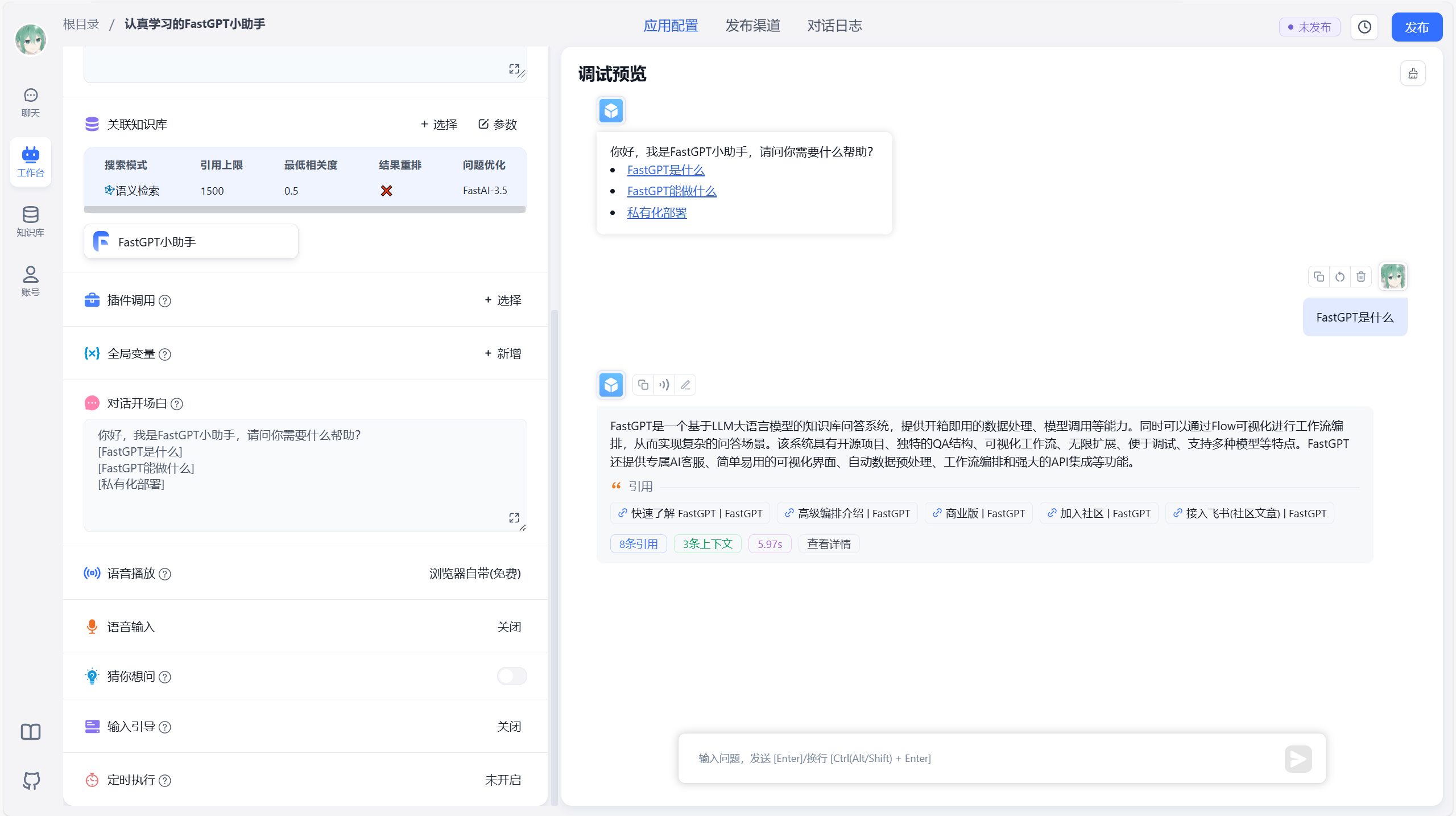
What is fastgpt?
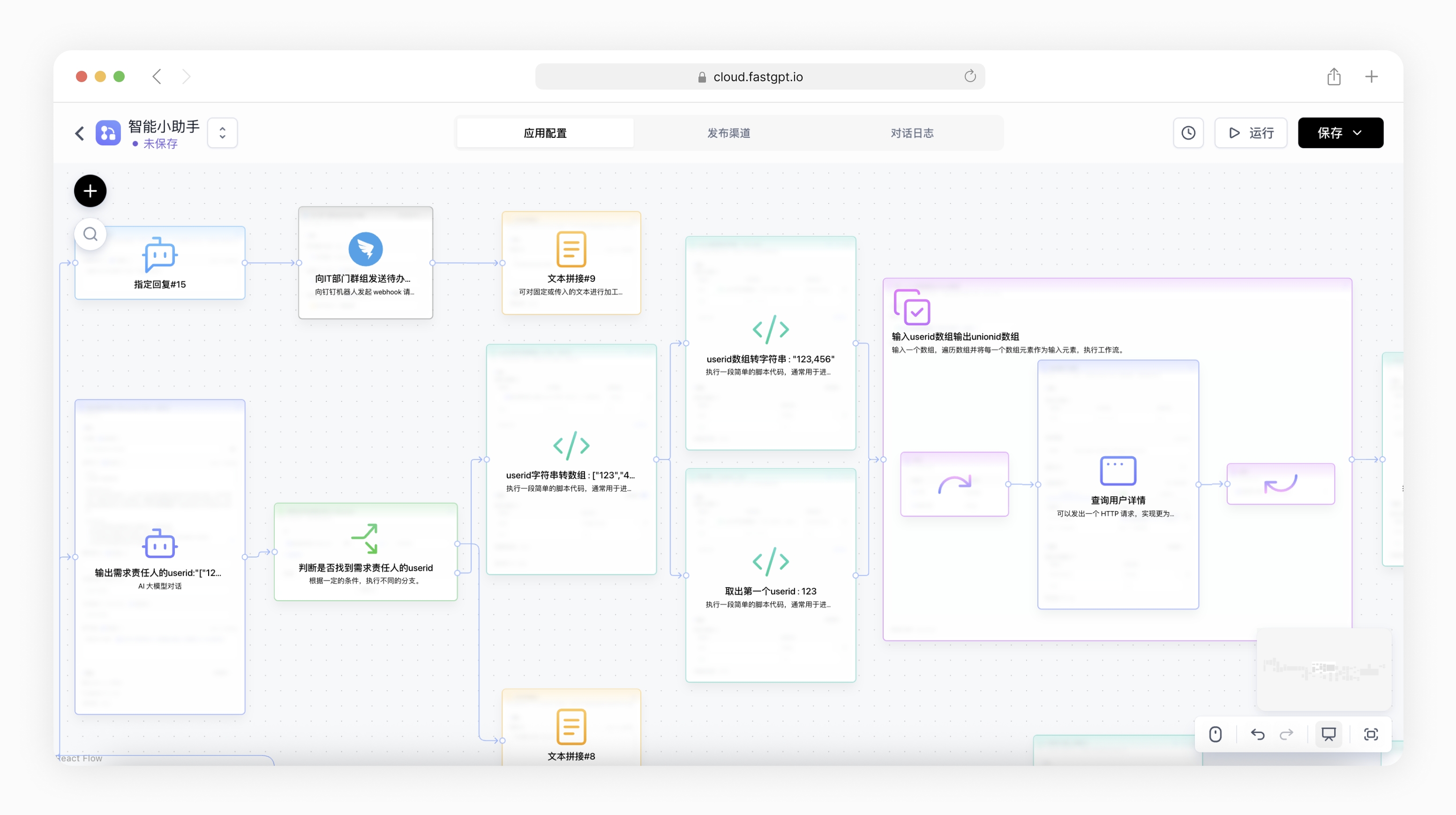
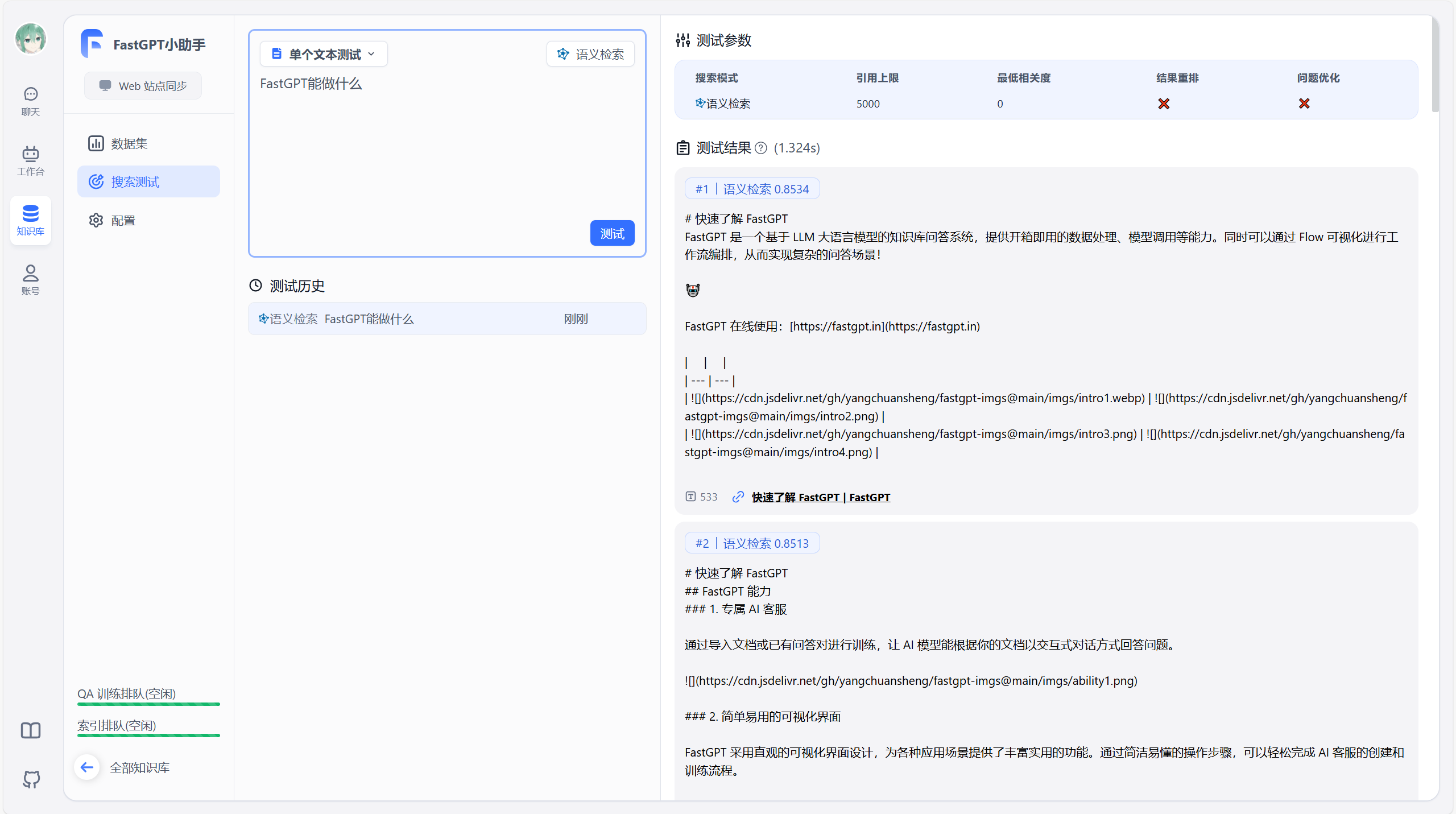
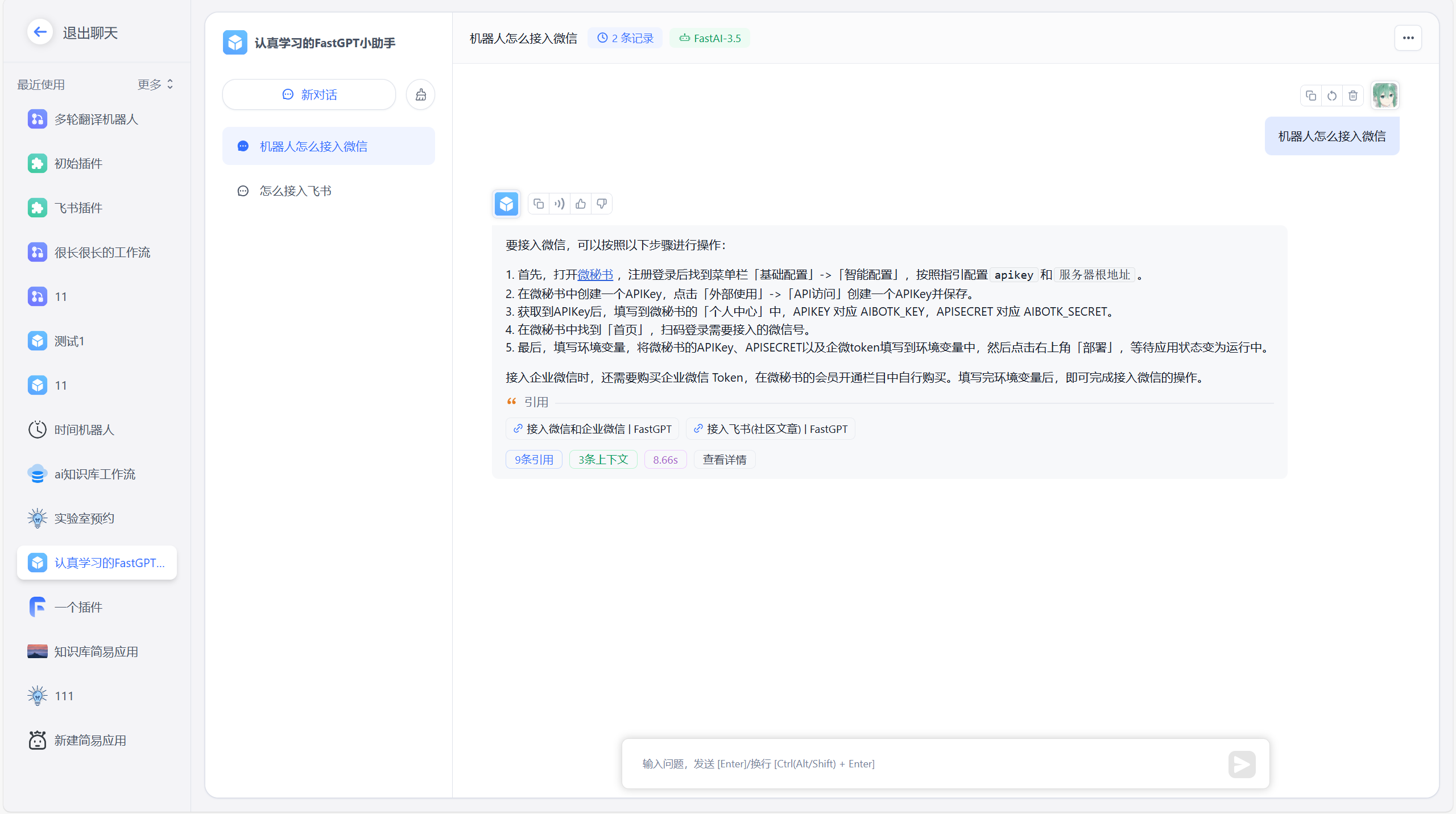
FastGPT is an AI agent and knowledge-base Q&A platform for teams that want assistants answering from their own documents. Apps are assembled in a visual Flow editor with dialogue and plugin workflows, agent skills, bidirectional MCP and sandboxed code execution, while the knowledge base indexes common document formats (Markdown, HTML, PDF, Word, PowerPoint, CSV, Excel) or pages read from a URL. Retrieval uses hybrid search with reranking, can be probed with single-point search tests, and citations are returned in chat, where chunks can also be corrected. Models are managed through the AI Proxy service, which aggregates OpenAI-style, Anthropic and other channels with load balancing and model usage dashboards, and the vector layer can run on pgvector, Milvus, OceanBase, SeekDB or Zilliz Cloud next to MongoDB, Redis and S3-compatible storage. Self-hosting is a Docker Compose stack: an interactive script downloads the compose file, generates root passwords and service tokens, and the app then listens on port 3000; Sealos one-click templates are also offered. The community edition is Apache-2.0 based but forbids operating a competing multi-tenant SaaS and removing the logo or copyright; app publishing to Feishu or WeChat, application evaluation, SSO login, RBAC and multi-tenant billing belong to the paid commercial edition, which is also available as a managed cloud service.
Should you self-host fastgpt?
fastgpt scores 77/100 on selfhost.directory (how scoring works) and ranks #16 of 209 in AI Agents. It has 29 999 GitHub stars, +222 in the last 30 days.
It shipped 31 stable releases in the past year. The latest, v4.17.4, came out on 5 November 2026. New versions land roughly every 5 days.
Setup is advanced: plan for several services and some ongoing maintenance. An official Docker image is available. It is Apache-2.0-licensed and written mostly in Typescript.
Its closest alternative on selfhost.directory is Orca (91/100, 118 573 stars). It scores higher overall, so compare the two before you pick. See fastgpt vs Orca side by side.
Features
- Agent skill orchestration
- Bidirectional MCP
- Chat log review and annotation
- Chunk editing
- Citation feedback in chat
- Document import
- External API knowledge base
- iFrame Embedding
- Knowledge base with hybrid retrieval
- Login-free sharing
- Multiple vector database backends
- Plugin toolsRAG-module and agent-loop hot updates are listed as not done.
- Retrieval testing
- SSO login and RBACCommercial edition only; also app publishing to Feishu and WeChat, application evaluation and multi-tenant billing.
- Visual workflow orchestration
fastgpt README

English | 简体中文 | Bahasa Indonesia | ไทย | Tiếng Việt | 日本語
FastGPT 是一个 AI Agent 构建平台,提供开箱即用的数据处理、模型调用等能力,同时可以通过 Flow 可视化进行工作流编排,从而实现复杂的应用场景。
fastgpt.mp4
可以通过 Docker 快速启动 FastGPT,在终端输入以下命令,根据引导完成输入即可拉取配置。
# 输入命令拉取配置文件
bash <(curl -fsSL https://doc.fastgpt.io/deploy/install.sh)
# 启动
docker compose up -d
完全启动后,可通过 http://localhost:3000 访问 FastGPT,默认账号为 root,密码为 1234。
如果你遇到问题,可以查看完整 Docker 部署教程
-
云服务版本
如果你不需要私有化部署,可以直接使用我们提供的云服务版本,地址为:fastgpt.io -
社区自托管版本
可以使用Docker快速部署,也可以使用Sealos Cloud 来一键部署FastGPT。 -
商业版
如果你需要更完整的功能,或深度的服务支持,可以选择我们的商业版。我们除了提供完整的软件外,还提供相应的场景落地辅导,具体可提交商业咨询
 |
 |
 |
 |
1 应用编排能力
- Agent Skill 编排
- 对话工作流、插件工作流,包含基础的 RPA 节点
- 用户交互
- 双向 MCP
- 辅助生成工作流
2 应用调试能力
- 知识库单点搜索测试
- 对话时反馈引用并可修改与删除
- 完整调用链路日志
- 应用评测
- 高级编排 DeBug 调试模式
- 应用节点日志
3 知识库能力
- 多库复用,混用
- chunk 记录修改和删除
- 支持手动输入,直接分段,QA 拆分导入
- 支持 TXT,MD,HTML,PDF,Docx,PPTX,CSV,XLSX (有需要更多 File Loader 可 PR ),支持 URL 读取、CSV 批量导入
- 混合检索 & 重排
- API 知识库
4 插件能力
- 系统工具热更新
- RAG 模块热更新
- Agent-loop 热更新
- AI 实时生成插件
5 运营能力
- 免登录分享窗口
- iframe 一键嵌入
- 统一查阅对话记录,并对数据进行标注
- 应用运营日志
扫码加入飞书话题群:
我们非常欢迎各种形式的贡献。如果你对贡献代码感兴趣,可以查看我们的 GitHub Issues,大展身手,向我们展示你的奇思妙想。
|
|
|
|---|---|
|
|
|
|
|
How to install fastgpt
Install fastgpt with Docker Compose
FE_DOMAIN, DEFAULT_ROOT_PSW, AIPROXY_API_ENDPOINT, AIPROXY_API_TOKEN, MONGODB_URI, REDIS_URL, PG_URL# Run the command to pull the configuration file
bash <(curl -fsSL https://doc.fastgpt.io/deploy/install.sh)
# Start the service
docker compose up -d
Access at http://localhost:3000 after start; root is the initial account and DEFAULT_ROOT_PSW sets its password. Compose variants exist for pgvector, Milvus, OceanBase, SeekDB and Zilliz, with CN or global registries.
How to configure fastgpt
DEFAULT_ROOT_PSW=123456初始化 root 用户默认密码。ROOT_KEY=fastgpt_root_key当前系统管理员 API 密钥,可用于调用 /api/admin/ 接口,长度至少 6 位。MONGODB_URI=本地 MongoDB 示例地址主业务 MongoDB 连接地址。PG_URL=空PostgreSQL/pgvector 向量库连接地址。REDIS_URL=redis://default:mypassword@localhost:6379Redis 连接地址。
fastgpt releases & version history
升级指南
镜像更新
- 更新 fastgpt-app(FastGPT 主服务)镜像 tag: v4.17.4
- 更新 fastgpt-pro(FastGPT 商业版)镜像 tag: v4.17.4
⚡ 优化
- [列表体验] 优化列表滚动分页监听,减少滚动过程中的组件重渲染,提升滚动流畅度。
🐛 修复
- [对话体验] 修复免登录分享对话中的全局变量、交互表单使用模型选择器时,未携带分享鉴权信息,导致模型列表或已选模型名称加载失败的问题。
- [对话体验] 修复免登录分享对话顶部变量面板按普通对话规则展示变量的问题,外部变量不再向分享用户显示。
- [对话体验] 修复免登录分享对话中删除消息、重试及编辑后发送失败的问题。
- [列表体验] 修复部分列表在内容缩短后无法继续滚动加载、分页失败后仍自动重复请求的问题。
- [账号与团队] 修复联系方式弹窗关闭按钮因正文滚动而偏移或被裁剪的问题。
- [账号与团队] 修复登录和修改成员名时,使用中文输入法按回车确认候选词会误提交表单的问题;确认候选词后再次按回车可正常提交。
- [Agent] 修复部分工作流工具在编辑器中配置正常,但运行时被错误过滤、无法调用的问题。
- [工具调用] 修复工具参数 JSON Schema 格式不规范导致模型请求失败的问题。
Full Changelog: v4.17.3...v4.17.4
升级指南
配置变更
- 源码部署的 Node.js 版本须满足
^22.23.4 || ^24.22.1 || ^26.12.1,升级前请先确认运行环境符合该范围。 DEFAULT_TEAM_BASIC_PERMISSIONS_ENABLED仍默认false;启用时,新团队默认全员组除应用、技能和知识库创建权限外,还会获得 API Key 创建权限,已有团队不自动补授。- Agent 沙盒活跃实例总上限改为通过
AGENT_SANDBOX_MAX配置,默认 100,应用会话与技能编辑共用额度;原AGENT_SANDBOX_MAX_EDIT_DEBUG不再使用。新增AGENT_SANDBOX_MAX_PER_TEAM设置单团队上限,默认不限制。商业版管理台中的配额配置优先于环境变量。 - OpenSandbox 新增
AGENT_SANDBOX_CPU_OVERCOMMIT_FACTOR与AGENT_SANDBOX_MEMORY_OVERCOMMIT_FACTOR,默认均为 1,取值须不小于 1。仅在 Kubernetes 运行态且 OpenSandbox Server 不低于 v0.2.1 时生效,降低资源预留但保持资源上限不变,仅影响新建或重建的沙盒。 - 商业版管理台新增「向量检索最大并发数」(
systemEnv.vectorRecallConcurrency),允许配置 0–1000,默认 0 表示不限制。正数限制所有服务实例、所有向量库的共享召回并发;开源版不启用此限制,无对应环境变量。 - 新增
AUXILIARY_GENERATION_SHOW_RUN_DETAIL,默认false,控制技能、Agent 和工作流辅助生成的运行详情入口是否展示。 - 应用市场默认地址(
MARKETPLACE_URL)更新为https://v3.marketplace.fastgpt.cn,显式配置的自定义地址继续使用原值。
镜像更新
- 更新 fastgpt-app(FastGPT 主服务)镜像 tag: v4.17.3
- 更新 fastgpt-pro(FastGPT 商业版)镜像 tag: v4.17.3
- 更新 fastgpt-plugin 镜像 tag: v1.2.0
- 更新 fastgpt-code-sandbox 镜像 tag(后续都独立发布,按需更新): v5.0.0
- 更新 AI Proxy 镜像 tag: v0.7.7
升级脚本
系统先完成启动必需任务及其前置依赖链,各 App 实例重载模型后启动业务。以下 3 个新增任务随后在后台自动执行,共享集群最多 3 个并发名额,失败不会阻断无依赖任务;可在管理页查看结果,修复失败数据后重试。
- 回填沙盒实例团队归属(
20261009_backfill_agent_sandbox_team_id):根据来源应用或技能补齐历史实例的团队归属,用于团队配额统计;来源已删除的孤儿记录跳过并计数。 - 回填目录祖先路径(
20261022_backfill_folder_ancestor_ids):重建应用、工具及知识库目录路径,清理非文件夹资源的残留字段。直接挂在其他类型目录树下的文件夹移到本团队根目录,并清理旧父级继承权限;更高层的跨树祖先路径在边界处截断。缺失父级、跨团队或成环等异常记录保留为失败项,修复后重试。 - 迁移系统模型价格至百万单位(
20261025_token_prices_per_million):将历史系统模型价格换算并写入pricing,保留旧字段原值,跳过已有合法pricing的模型;团队模型不参与迁移。
兼容说明
- root 激活与密码:移除
DEFAULT_ROOT_PSW,启动不再覆盖已有 root 密码。新建 root 初始密码为123456,首次登录需设置新密码;历史 root 未保存status时需使用原密码登录并完成激活。日常改密在账号信息页操作,忘记密码时使用 root 密码重置脚本,并显式提供新密码。 - 模型计价单位:LLM 使用
pricing.tiers,其他模型使用pricing.unitPrice。Token 单价与阶梯maxInputTokens上限改为百万 Tokens,TTS 改为每百万字符,STT 仍按每 60 秒,单价最多保留两位小数。升级后确认后台迁移成功并核对系统模型价格;未迁入pricing的系统模型暂按免费处理,团队模型免费。 - 工作流编排校验:画布、调试与辅助生成统一遵循编排规则,禁止纯串行回环、跨工具流程连线及多个调用节点共用同一工具入口,允许由有效条件出口控制的回流。工具子流程可读取调用者上游,但不可引用调用者自身尚未产生的输出。旧工作流保留已有连线并可保存草稿,调试和发布前需修正不符合规则的连线。
- 知识库管理权限:修改知识库基本信息、模型配置,以及文件名称、标签、禁用状态等自身属性需要可管理(
manage)权限;内容操作继续使用原有编辑权限。移动文件时同时修改属性,也需要该文件的管理权限。 - 知识库导出:
/api/core/dataset/exportAll仅支持单个知识库,目录导出需逐库请求;开启文件级权限时,仅导出当前成员可读文件。 - 对话文件类型:附件分类新增
document与unknown;旧file入参和历史记录继续兼容,并按文件名、链接及响应信息归类。自定义客户端应兼容新分类,不再仅用file判断文档。 - 分页与错误响应:通用分页将超过 500 的
pageSize按 500 处理,部分接口仍有更小限制;同时传入offset和pageNum时优先使用offset,包括offset=0,非法偏移量不回退为页码。被识别为用户配置错误的 API 请求返回 HTTP 400,接入方需按失败响应处理。
🚀 新增内容
- [工作流与 Agent] 商业版新增工作流辅助生成,通过自然语言确认方案后,由同一 Agent 连续搭建、校验和修复并交付候选版本,中断后可根据已保存的对话、计划和任务状态继续。候选版本卡片支持赞踩反馈,需手动应用并检查、调试后再保存发布;使用时需有应用编辑权限,并启用辅助生成与沙盒能力。
- [工作流与 Agent] 用户选择节点及表单的单选、多选字段支持变量引用动态选项,动态选项为空时返回明确错误。
- [工作流与 Agent] 密码输入、工具密钥与 HTTP/MCP 鉴权请求头支持变量引用,可在运行时使用上游节点或应用变量提供凭据。
- [模型与计费] 支持团队成员配置专属 AI 模型与渠道,完善资源隔离、鉴权及 AI Proxy 集成;团队所有者可批量替换失效的语言、语音播放和重排模型引用,覆盖知识库、应用及历史版本,并展示处理统计。空值、动态引用与索引模型不参与替换。
- [团队与权限] 新增账号待激活与首次设置密码流程,root 可在账号信息页改密;激活或改密后保留当前登录会话并清理其他会话。商业版管理台可按全部、活跃、待激活、禁用和注销状态筛选用户。
- [团队与权限] 创建应用、工具与知识库文件夹时可选择是否继承权限;资源目录导航支持沿父级路径访问被授权的子资源,父目录仅作为导航入口,不额外授予管理权限。
- [团队与权限] 团队审计补充知识库训练任务重试、删除、切换索引模型,以及资源恢复权限继承等操作记录,保留资源路径和模型标识,支持按事件类型筛选。
- [对话体验] 支持恢复输入草稿与已成功上传的附件引用,按成员、应用、会话隔离;当前浏览器标签页最多保留 10 份草稿,自最后编辑起保留 1 小时,发送被正式受理后清除。
- [对话体验] Markdown 支持有限 HTML 渲染,完善富文本组件交互。
- [工具与渠道] 系统插件的名称、简介、子工具、参数、密钥 Schema 与 README 支持多语言展示,已有工作流节点与 Agent 固定工具保留添加时的语言快照。
- [工具与渠道] MCP 与外部渠道统一接入团队对话 QPM 限制,超限返回额度和等待时间,外部渠道去重后计数。依赖服务异常时记录日志并跳过检查,避免故障阻断对话。
- [系统与运维] Agent 沙盒支持系统总配额与团队配额,OpenSandbox Kubernetes 运行态可独立配置 CPU、内存超卖倍率,控制活跃实例数量与资源预留。
- [系统与运维] 新增按请求头
x-fastgpt-profile: 1启用的性能采集,汇总阶段耗时、Mongo 操作及进程指标并支持 OTel 上报。 - [知识库与文件] 新增 OXR 自部署接入指南,补充自定义 PDF 解析配置与源文件名追踪,便于部署和定位解析问题。
⚙️ 优化
- [工作流与 Agent] 工作流与 Agent 辅助生成在本地无会话缓存时恢复服务端最近记录,恢复失败可重试;新建会话仅切换当前会话,保留历史及工作流版本归档。
- [工作流与 Agent] 辅助生成按需准备沙盒,方案或画布基线实质变化时重新确认;沙盒丢失时根据已保存上下文重建。应用候选版本时优先关联可用系统密钥,无可用密钥的工具保持待激活。
- [工作流与 Agent] 工作流候选版本的已应用状态在卡片和顶部提示间同步,未过期版本可再次应用;Agent 配置在实际应用完成后提示成功。
- [工作流与 Agent] 改善模型原生工具调用流兼容性,处理并行参数混淆、名称重复或迟到、
functions.前缀及空参数;以工具调用状态结束但没有有效工具时明确返回错误。 - [工作流与 Agent] 统一节点尺寸与画布布局,问题分类的默认文案随界面语言展示;提示词编辑器补充输入指引及系统、自定义变量选择器。
- [知识库与文件] API 文件库同步先完成目录拉取与差量校验,再批量更新层级、名称和权限继承;远端请求失败时中止本轮同步,避免误删。服务地址兼容历史裸域名并默认补全
https://。 - [知识库与文件] 启用同义词能力时,检索结果与引用可携带命中的标准词映射,重排兼顾原文与同义词标准化文本,保留较高分且不改写原文;未启用时保持原有行为。
- [知识库与文件] 统一 AI 对话、Agent、工具与外部渠道的附件分类,区分文档、未知文件和图片、音视频,兼容旧文件类型;明确文档进入解析链路,未知文件仍可由文档读取工具尝试读取。无后缀链接支持从响应头及有限内容探测,复用文件名与请求内缓存。
- [知识库与文件] 统一简易应用、Agent 与工作流的标签过滤交互,优化变量选择、启用状态和弹窗滚动;切换知识库清除无效自定义标签条件,手动输入关闭时保留已配置条件;工作流标签过滤补充结构示例与悬停说明。
- [知识库与文件]
listV2可通过withFileCount按需获取全部层级的非目录文件数量;应用、技能与知识库支持按 ID 局部刷新,权限调整后保留分页及滚动位置。通用分页收到非数组列表时保留原有效数据并结束加载。 - [知识库与文件] Agent 检索日志补充重排前候选快照,与知识库搜索节点统一使用
retrievalResults;仅在实际重排且RETRIEVAL_RESULTS_LIMIT > 0时记录,默认不记录。 - [对话体验] 重试和编辑在删除成功后优先裁剪本地历史,减少额外历史请求;缺页时保留刷新,并丢弃裁剪前的过期分页响应。
- [对话体验] 统一对话历史、资源选择器、发布历史及训练错误列表的初次加载与滚动追加状态,加载更多时保留已有内容,减少遮罩与嵌套滚动;切换查询或刷新后丢弃旧分页响应,避免旧数据混入当前列表。
- [对话体验] 优化 Mermaid 的流式渲染、换行标签、缩放、拖拽与触控预览。
- [对话体验] 简化加载动画与沙盒状态文案,改善思考过程、工具和技能详情的折叠、滚动与标题吸顶;错误标题、运行中节点与模型名称过长时省略显示,悬停可查看完整内容。
- [对话体验] 支持通过
/chat?pane=aa&tab=ta定位团队应用页签,刷新后保留选择。 - [对话体验] 统一资源卡片间距,简介截断时可悬停查看完整内容。
- [工具与渠道] MCP 工具失败及 HTTP 非 2xx 响应保留明确错误详情,便于排查限流与服务错误;MCP 收到 HTTP 429 时不再自动回退 SSE,避免重复连接。
- [团队与权限] 初始化接口按登录状态返回公开配置,模型渠道和沙盒连接信息按需获取,账号切换后刷新缓存;成员名与登录用户名明确区分,强制填写时清除默认占位值,技能控制台补齐关联应用标签。
- [系统与运维] 优化商业版应用与知识库管理列表查询,按 ID 倒序分页;知识库分块数统计仅查询当前页,并按团队与知识库配对匹配,减少全量扫描。
- [系统与运维] 系统升级任务提示具体前置任务及对应语言文案,便于按依赖顺序执行或重试。
- [系统与运维] 模型请求、请求记录与文件加载日志清理 base64 和不必要的调用栈,取消、探活中断及预期网络或用户配置错误按较低级别记录,减少无效告警。
🐛 修复
- [系统与运维] 修复 SeekDB 容器重启或重建后数据丢失的问题。
- [系统与运维] 修复 Pro API 流式或无 Content-Type 响应被 NextAPI 默认 JSON 包裹破坏的问题,等待流结束并保留微信回调等原始响应。
- [系统与运维] 修复
InvokeProcessorsession getter 自递归导致调用栈溢出的问题。 - [系统与运维] 修复沙盒通过命令编辑文件时将特殊字符当作正则、无法替换多行文本的问题,按原文匹配替换并保留符号链接及文件权限;文件缺失、无读取权限或未完整读取时明确报错,写入中断时保留原文件。
- [团队与权限] 应用测试对话和工作流调试执行传入节点前必须校验编辑权限;Agent 调用系统工具使用实际运行成员身份,重新签发登录会话保留 root 身份。
- [团队与权限] 修复重复启用文件级权限清空独立授权、父目录所有者权限错误继承及目录权限未同步到内部文件的问题,保留独立权限分支并按各知识库开关同步后代授权。
- [团队与权限] 修复历史成员名为
null或缺失时,登录、团队列表、成员列表及搜索响应校验失败的问题,统一回落为Member,已有空字符串及名称保持原值。 - [团队与权限] 修复复制或转换新建 Agent 绕过创建上限的问题,统一 License、创建额度与账号资源用量统计。
- [团队与权限] 修复批量创建成员及多团队登录补建个人团队时的事务与并发异常,避免重复创建和权限读取失败。
- [团队与权限] 修复资源移动到根目录时空父级 ID 导致 BSON 转换或权限更新异常的问题,并修复技能卡片无法拖入文件夹的问题;批量选择时关闭拖拽以避免操作冲突。
- [团队与权限] 修复邀请链接进入团队时,已加入成员无法自动切换到目标团队、成功提示在刷新后丢失的问题;切换失败时保留已接受的邀请结果并提示。
- [团队与权限] 修复商业版成员部门路径顺序或重复拼接异常,仅对同步模式下已禁用成员显示恢复操作。
- [知识库与文件] 修复 PG 与 OpenGauss 向量检索的团队隔离问题,以及商业版图片解析和索引加载可引用其他知识库内部图片路径的问题。
- [知识库与文件] 修复网站同步异常或提前截断时误删历史页面的问题;爬取因积分不足、模型配置错误、达到页数上限或页面失败而未完整结束时,跳过过期页面清理并记录结果。
- [知识库与文件] 修复 CSV 导入后重解析丢失逐行问答、自定义索引和元数据的问题,导出不再将系统索引当作自定义索引,文件级权限开启时仅导出可读内容。
- [知识库与文件] 修复多库检索因某个知识库缺少指定标签而整体排除该库的问题,否定和空值条件按缺少标签的语义匹配。
- [知识库与文件] 修复 PPTX 备注与幻灯片顺序错乱、XLSX 系统日期格式丢失世纪信息的问题;Doc2x 表格正确转义单元格竖线并保留 LaTeX 语义。
- [知识库与文件] 修复大体量 CSV、OFD 与 PDF 处理因展开参数过多而失败,以及 Markdown 超长表头中断整份文档导入的问题。
- [知识库与文件] 修复带查询参数的文件链接、SVG XML 声明与 UTF-16 文本的类型和编码识别异常,统一上传大小及数量限制的前后端口径;取消 S3 分片上传时及时中止请求,避免无效异常。
- [知识库与文件] 外部 PDF 解析服务返回加密或损坏错误时,提示解密或重新上传。
- [知识库与文件] 文件下载和日志导出失败时提取明确错误消息,避免展示整段 JSON 或重复弹错。
- [知识库与文件] 修复解析任务积分耗尽后反复报错的问题,等待后续团队余额检查暂停处理。
- [工作流与 Agent] 修复子工作流或工作流工具未捕获错误无法传到父节点,以及直接执行 MCP、HTTP、系统工具失败后不显示聊天错误卡片的问题;已捕获错误不向外提升,模型工具错误继续交给模型处理。
- [工作流与 Agent] 修复商业版工作流辅助生成无法读取上传附件的问题,恢复文档解析及沙盒文件访问;私有附件按当前应用、成员和会话校验归属。沙盒文本读取工具明确仅支持 UTF-8 纯文本,二进制文档需先解析或转换。
- [工作流与 Agent] 修复空说明表单提交时误报 dataId 重复的问题,兼容历史
null及字段不完整的交互记录,保留有效交互的续跑信息。 - [工作流与 Agent] 修复节点再次执行时保留旧输出的问题,本次未返回的输出清空,避免循环或交互恢复读到旧值;成功后才补齐必填输出默认值。
- [工作流与 Agent] 修复判断器对数组及数字、布尔引用的包含判断,并保留正则中成对斜杠和转义语义,非法正则按错误处理。
- [工作流与 Agent] 修复模型引用提取与替换不一致的问题,兼容旧名称、模型 ID、重复输入和自定义选择器,避免误识别工具的同名业务参数。
- [工作流与 Agent] 修复代码助手生成的输入输出名称与实际参数 key 不一致、单步调试上传文件无法被解析节点识别的问题,保留已有输出标识及引用关系。
- [工作流与 Agent] 修复多变量引用删除按钮、拖拽时下拉弹层与侧边面板首次引导的交互问题,打开面板时结束引导,避免旧弹层遮挡画布。
- [工作流与 Agent] 修复工具选择器进入 MCP、HTTP 工具集时目录路径报错的问题,按读取权限返回所在目录及工具集路径;合并系统工具列表加载入口,避免切换目录、标签或搜索时重复请求。
- [工具与渠道] 修复 MCP 循环引用 Schema 导致响应序列化失败的问题;不规范的外部 JSON-RPC 响应展示明确的格式错误提示。
- [工具与渠道] 修复未知 MCP SSE 会话一直等待的问题,未知会话返回 HTTP 404;无效应用访问 Key 返回携带请求 ID 的协议错误。
- [工具与渠道] 修复模型工具参数被额外过滤或校验阻断、工具结果被历史与 SSE 再次截断的问题,保留原始参数和模型实际消费的完整结果,已配置固定参数优先。
- [工具与渠道] 修复飞书未提供话题 ID 时会话标识异常的问题,无话题消息按群聊标识归入会话。
- [工具与渠道] 工具版本选择器展示实际版本号,长 MCP 名称不再撑宽选择器。
- [工具与渠道] 修正 OpenAPI 必填 ObjectId 标记与最小请求示例,避免调用方误判必填参数。
- [对话体验] 修复流结束、取消及异常退出时续传状态清理不完整、跨会话控制器相互影响和跨标签页反复写入本地存储的问题。
- [对话体验] 修复赞踩反馈保存失败后界面状态与服务端不一致的问题,保存成功后再更新并提示结果;防止重复提交及切换会话后的迟到响应串写。
- [对话体验] 修复并发生成会话标题时重复请求或旧结果覆盖的问题,保留手动标题,并保持未设置的
customTitle为未设置状态。 - [对话体验] 修复表格复制携带 CSV 转义引号,以及不同换行符导致复制或导出后错行的问题。
- [对话体验] 修复文本预览截断 emoji 等字符的代理对导致乱码的问题。
- [对话体验] 修复时间越界导致日期进位的问题,失焦时限制时分秒范围,切换日期保留时间编辑。
- [对话体验] 修复文件大小进位展示异常的问题,避免显示
1024 KB等结果。 - [模型与计费] 修复 Agent 请求失败时遗漏已产生的 Token 与积分、历史思考 Token 预估缺失,以及
maxInputTokens=0误判为无上限的问题。 - [模型与计费] 修复思考模型在工具续轮、长度续写和 Agent 多轮调用中丢失
reasoning_content的问题,保留已有思考文本,无思考文本时也按模型能力回传空字段。 - [模型与计费] 修复开票列表刷新后选中记录丢失或错位的问题;商业版开票支持银行订单,并校验全部订单归属、金额与开票状态,防止重复申请。
- [模型与计费] 修复套餐编辑将未填写配额转成 0 的问题,留空沿用标准值,显式 0 保留。
- [模型与计费] 修复定价页面月付、年付计费切换的选中背景。
🛠️ 代码优化
- [工作流与 Agent] 抽取共享
workflow-core与workflow-cli,统一节点、引用、条件分支和校验诊断;拆分资源授权、快照加载与运行时执行职责,减少重复校验。 - [工作流与 Agent] 统一 Agent Ask 与辅助生成预览的结构化回复及持久化,拆分技能调试业务与 HTTP 适配,缓存辅助生成节点模板,减少重复写入。
- [对话体验] 抽取统一聊天反馈上下文,集中管理赞踩、标注、自定义反馈及已读操作;按页面显式启用反馈类型,减少消息、控制器和弹窗间的逐层传参。
- [工具与渠道] 补充企业微信 WebSocket 发布渠道的数据模型、凭据配置与连接状态管理。
- [系统与运维] 区分错误分支数据、原始异常和展示详情,统一循环、并行与子工作流错误统计;用户配置错误保留本地诊断,跳过 OTel 日志导出,避免与系统故障混淆。修复不同 Next.js 模块实例间链路追踪状态不共享的问题。
- [系统与运维] 运行镜像升级 Node.js 至 24.22.1,并更新 Hono、Vite、Multer、Nodemailer、Undici、Zod、MCP SDK、KaTeX 等依赖;升级 OpenSandbox SDK 与部署组件,清理未使用的 Deep RAG 路径及管理台依赖。
What's Changed
- chore(deploy): bump images to v4.17.2 and sync deployment docs by @c121914yu in #7934
- chore(deps): bump katex from 0.16.22 to 0.18.2 in /projects/app by @c121914yu in #7935
- chore(deps): bump next from 15.5.24 to 15.5.27 in /document by @c121914yu in #7936
- docs: supplement manual migration script details and index optimization for 4.17.2 by @c121914yu in #7937
- chore(deps): bump @modelcontextprotocol/sdk from 1.26.0 to 1.32.1 by @c121914yu in #7939
- feat(markdown): support controlled HTML rendering and rich components by @c121914yu in #7940
- fix: update billing mode switch background by @changan-77 in #7943
- docs: add v4.17.3 upgrade changelog and make echarts 100% full width by @c121914yu in #7944
- fix(skill): align dashboard permission metadata by @FinleyGe in #7941
- fix: persist SeekDB data across container recreation by @wangyunlai-seekdb in #7942
- feat(dataset): restrict inheritPermission to folder creation by @SteelHe in #7881
- feat: support agent user initialization and app ACL by @sxf-xiongtao in #7927
- docs: supplement v4.17.3 release notes and bump pro submodule by @c121914yu in #7945
- docs: 补充 4.17.1 AIProxy 模型测试环境变量说明 by @c121914yu in #7947
- feat(model): support member-level model & channel isolation and AI Proxy integration by @DigHuang in #7895
- fix: correct InvokeProcessor session getter self-recursion by @xqvvu in #7949
- fix: prevent circular MCP tool schema from breaking response serialization by @xqvvu in #7950
- fix(user): add ordered option to agent team member batch create by @sxf-xiongtao in #7953
- fix(workflow): unify asynchronous file URL classification by @c121914yu in #7946
- docs: supplement v4.17.3 release notes by @c121914yu in #7955
- fix: classify aborted LLM requests as warn instead of error by @xqvvu in #7951
- fix(migration): prompt exact prerequisite task name and align v4.17.2 upgrading docs by @c121914yu in #7960
- fix(i18n): clarify team member name labels by @shortlight5980 in #7961
- fix(model): hide account model tabs when team model is disabled by @DigHuang in #7957
- fix(member-name): clear default name from force-fill modal by @shortlight5980 in #7963
- feat(permission): add API key creation to default team permissions by @SuXiangcheng in #7965
- feat(service): add configurable sandbox capacity limits by @ctlaltlaltc in #7917
- feat(app-folder): add configurable permission inheritance by @shortlight5980 in #7966
- fix: preserve streamed Pro API responses through NextAPI by @c121914yu in #7971
- docs: update v4.17.3 notes, upgrade Next.js and standardize pagination by @c121914yu in #7964
- fix: 修复复制 Agent 绕过创建上限和资源用量统计不准确 by @c121914yu in #7974
- fix(inform): limit popup alerts to active notifications by @shortlight5980 in #7978
- fix(agent): sign system tool invoke token as runtime caller by @FinleyGe in #7982
- refactor(dataset): preserve API hierarchy and plan batch synchronization by @c121914yu in #7959
- fix(mcp): treat an invalid app key as an expected client error by @xqvvu in #7987
- fix: 收敛初始化配置返回值 by @c121914yu in #7980
- fix(resource): unify node model extraction and decouple catalog lookup from snapshot resolution by @DigHuang in #7984
- fix(dataset): 重解析保留 template 集合的 CSV 结构化数据 by @SteelHe in #7998
- [AI-COMMIT][FIX] fix(dataset): stop counting system indexes in export… by @SteelHe in #7994
- fix(workflow): 判断器数组值与非字符串引用比较时「包含/不包含」结果错误 by @Tong-bit-art in #7986
- feat(chat): 客户端按会话缓存输入草稿 by @c121914yu in #7983
- fix(admin): 套餐编辑可选配额未填时保留套餐默认值而非置为 0 by @c121914yu in #8002
- fix(ai): 修复 toolChoice 流兼容和无效工具调用结束状态 by @c121914yu in #7999
- fix(workflow): 保留判断器正则语义并修正斜杠解析 by @Tong-bit-art in #8001
- feat(mcp): 接入团队对话 QPM 频次限制与流式错误内容增强 by @c121914yu in #8003
- fix(auth): 强制会话签发显式传入管理员身份 by @DigHuang in #8007
- fix(global): formatFileSize 进位到下一单位时显示成 1024 KB / 1024 MB by @kevin9327 in #8021
- fix(global): replaceSensitiveText 只替换独立的 ns- 片段,不再改写 tokens-per-minute 等单词 by @kevin9327 in #8018
- fix(auth): use App team mode for login fallback by @shortlight5980 in #8005
- fix(workflow): 统一 valueTypeFormat 布尔转换为 JS 原生 Boolean 语义 by @Tong-bit-art in #8008
- fix(global): parseFileExtensionFromUrl 在文件名含 % 时返回空扩展名 by @kevin9327 in #8015
- fix(worker): write the default spreadsheet dates as ISO dates by @L4XB in #8013
- fix(worker): place PowerPoint speaker notes after the slide they belong to by @L4XB in #8014
- docs: complete and validate the English documentation edition by @yangchuansheng in #7967
- fix(splitter): degrade table chunking when the markdown header exceeds chunk size by @xqvvu in #7981
- fix(workflow): downgrade dataset resource missing errors to warn in search dispatch by @xqvvu in #7975
- docs: add FAQ entry for switching the vector database from Milvus to pgvector by @mafirs in #8023
- fix(openapi): 修正 ObjectId 请求参数的必填标记 by @c121914yu in #8024
- refactor(skill): 分离调试对话业务与 HTTP 适配 by @c121914yu in #8027
- fix(chat): 避免跨标签页同步重复回写 localStorage by @c121914yu in #8026
- fix(deploy): use available code-sandbox image tag by @FinleyGe in #8034
- fix(tracing): share langfuse state across module instances by @leilei3167 in #7991
- Fix/s3 upload text type detection by @lavine77 in #8006
- fix(workflow): 修复代码助手输出名称与实际 key 不一致 by @c121914yu in #8028
- fix(chat): finalize stream resume cleanup on every exit by @c121914yu in #8029
- feat(sandbox): derive kubernetes resource requests from overcommit factor by @ctlaltlaltc in #7973
- feat(plugin): localize plugin metadata and tool schemas by @FinleyGe in #7997
- [AI-COMMIT][FIX] fix(dataset): 移动到根目录时 parentId 空串导致 BSONError by @SteelHe in #8009
- fix(chat): isolate stream resume controllers by conversation by @c121914yu in #8036
- fix(marketplace): exclude Vitest configs from app type checking by @FinleyGe in #8037
- feat(workflow): support dynamic interactive options by @lavine77 in #7788
- fix(plugin): show version numbers in tool version selectors by @c121914yu in #8038
- fix: Doc2x 表格管道符转义并保留 LaTeX 语义 by @RaphaelFakhri in #8033
- fix(markdown): 修复 Mermaid 换行图表显示破图 by @c121914yu in #8043
- fix(workflow): restore delete icon hover and click in multiple reference selector by @DigHuang in #8042
- fix: restrict team member restore action by @shortlight5980 in #8041
- feat(dataset): listV2 返回知识库文件数(不含文件夹) by @SteelHe in #8045
- feat(outlink): add wecom websocket model support by @SuXiangcheng in #8022
- feat(chat): support URL deep link to team apps tab by @xqvvu in #8040
- style(workflow): unify node dimensions and support i18n for question classification by @DigHuang in #8047
- fix(admin): restore configuration images and sync client cleanup by @c121914yu in #8051
- fix: scope pg vector recall to team by @c121914yu in #8052
- feat(workflow-builder): 接入共享 CLI、候选版本和画布交互 by @YYH211 in #7901
- fix: 修复文件解析、模型选择器、分页与 preview 兼容,清理 admin 依赖并更新 V4.17.3 文档 by @c121914yu in #7993
- fix(agent): 补充 Agent V2 提示词占位提示与变量选择 by @c121914yu in #8063
- fix: 兼容开始节点历史输入并优化日志筛选对齐 by @c121914yu in #8065
- chore(deps): 更新 Hono 与 Vite 依赖 by @c121914yu in #8067
- feat(audit): support system-scoped team audit events by @shortlight5980 in #8064
- fix(dataset): lock task and notify team on aiPointsNotEnough in parse queue by @xqvvu in #7976
- fix(markdown): keep CSV quoting out of the copied Markdown table by @simpleqt in #8056
- fix(dataset): normalize missing protocol in api dataset base url by @xqvvu in #7985
- fix(dataset): exportAll 按文件级权限过滤导出内容 and 导出仅支持知识库,拒绝目录导出 by @SteelHe in #8068
- fix(workflow): 修正引用和标签过滤校验并统一诊断码枚举 by @c121914yu in #8071
- fix(vector): scope opengauss recall to team by @Tong-bit-art in #8053
- fix(chat): simplify loading animation and status text by @c121914yu in #8075
- fix(chat): 优化 Agent Ask 展示与工作流应用提示 by @c121914yu in #8077
- fix(markdown): 表格复制与导出把裸 CR 当作换行处理 by @simpleqt in #8078
- feat(dataset): move tag filter into params modal and polish filter UI by @DigHuang in #8069
- chore(docker): upgrade Node.js images to 24.22.1 by @xqvvu in #8085
- feat(audit): add dataset training audit events by @shortlight5980 in #8082
- fix(workflow-builder): 统一交互回复并完善工具配置与聊天 UI by @c121914yu in #8079
- fix(skill): allow dragging skill cards into folders by @FinleyGe in #8088
- fix(dataset): 知识库/文件自身更新权限由 write 收紧为 manage by @SteelHe in #8080
- feat: group hidden referenced apps by creator by @FinleyGe in #8090
- fix(ui): show full truncated resource introductions on hover by @FinleyGe in #8091
- fix(tool): pass model-generated tool params through by @FinleyGe in #8089
- fix(mcp): keep long app names from widening the picker by @FinleyGe in #8092
- Audit dataset by @shortlight5980 in #8087
- fix(agent): preserve helper streams and restore generated configurations by @YYH211 in #8094
- docs: 补齐 V4.17.3 更新说明并同步英文翻译 by @c121914yu in #8093
- docs(dataset): rewrite collection tags guide and update openapi spec by @DigHuang in #8095
- fix(i18n): capitalize English UI labels by @FinleyGe in #8096
- fix(worker): downgrade external DNS and network failures to warn by @xqvvu in #7969
- fix(dataset): disable collection switch for read-only users by @FinleyGe in #8098
- feat(user): user list supports status filtering by @sxf-xiongtao in #8081
- fix(workflow): include HTTP error response body in node error text by @Li-john1021 in #8049
- fix(mcp): 未知 SSE 会话返回 404 并收敛消息处理异常 by @Tong-bit-art in #8050
- feat(audit): add audit logging for restored inheritance by @shortlight5980 in #8031
- fix: 虚拟机按需准备与状态同步,更新 V4.17.3 文档 by @c121914yu in #8099
- feat: add folder ancestor paths and navigation by @FinleyGe in #8030
- feat: add synonym-aware retrieval and index compatibility by @hellostronger in #8011
- feat(api): support targeted resource refresh and explicit request modes by @c121914yu in #8046
- fix(tool): include HTTP response body in tool error text by @Tong-bit-art in #8104
- fix(sangfor): add stable statusText codes for encrypted and corrupted pdfs by @sunjiaqi52777 in #8102
- fix(worker): avoid argument overflow when filtering large CSVs by @Ekko82 in #8101
- fix(workflow): preserve edges and unify connection validation by @Nixieboluo in #8107
- fix(worker): avoid argument overflow when detecting OFD base font size by @Tong-bit-art in #8108
- chore(skills): merge PR change analysis into PR review by @c121914yu in #8111
- fix(workflow-cli): honor global --version with other arguments by @Tong-bit-art in #8112
- docs: require strict equality in coding standards by @c121914yu in #8117
- fix(pricing): stop treating a zero maxInputTokens tier as open-ended by @lisry-1 in #8115
- fix(dataset): keep negative tag filters when a dataset lacks the tag by @Tong-bit-art in #8114
- fix(chat): preserve complete tool responses in history and SSE by @c121914yu in #8125
- feat: add shared vector recall concurrency limit by @c121914yu in #8054
- fix(permission): 修复重复启用清空独立节点子树 ACL 与父目录 owner 提权 by @SteelHe in #8066
- chore(deps): bump nodemailer from 10.0.12 to 10.1.4 by @dependabot[bot] in #8129
- docs: add FAQ entry for collecting loop results into an array by @mafirs in #8135
- test: 修复 Agent Loop 公共模块边界检查误报 by @c121914yu in #8137
- chore(deps): bump multer from 2.4.0 to 2.5.0 by @dependabot[bot] in #8127
- fix(s3): treat multipart upload cancellation as expected by @xqvvu in #8136
- chore(deps): bump undici from 7.30.0 to 7.30.1 by @dependabot[bot] in #8128
- fix: 修复 Agent 历史思考 Token 统计及工作流工具面板入口 by @YYH211 in #8139
- chore(deps): bump zod from 4.1.12 to 4.6.6 by @dependabot[bot] in #8138
- test(workflow): cover uncovered If/Else operators and branch aggregation by @lemonzoey in #8140
- feat: 升级任务优先执行启动依赖链并支持集群限流独立模式 by @c121914yu in #8145
- feat: replace invalid team model references by @Nixieboluo in #8143
- fix(ofd): replace page-level spreads with reduce to avoid stack overflow by @lemonzoey in #8146
- feat(pricing): use M Tokens and million-character TTS prices by @c121914yu in #8133
- fix(dataset): support portal in tag filter dropdowns and optimize modal scrolling by @DigHuang in #8149
- docs: 更新 V4.17.3 升级说明并修正版本号 by @c121914yu in #8144
- test(ofd): cover baseX fallback branch overflow in buildPageMarkdown by @lemonzoey in #8151
- fix(pdf): replace spread with reduce to avoid stack overflow by @lemonzoey in #8152
- fix(marketplace): update default marketplace base url to v3 by @FinleyGe in #8157
- fix(workflow): replace custom LLM model refs by @Nixieboluo in #8156
- fix(mcp): convert protocol errors to UserError for better UX by @FinleyGe in #8158
- fix(docs): isolate standalone installs from workspace patches by @c121914yu in #8159
- fix(dataset): 修复 folder 权限下发 by @SteelHe in #8059
- perf(system-tool): add stage duration logs for tool list endpoints by @FinleyGe in #8160
- feat(agent): 透出知识库检索的重排前候选快照 by @hellostronger in #8161
- perf(system-tool): trace merge permission and filter durations by @c121914yu in #8162
- fix(app): recover cross-tree folder references instead of failing migration by @FinleyGe in #8155
- chore: remove system tool timing probes and update V4.17.3 notes by @c121914yu in #8163
- ci: skip Docker Hub publishing without an account by @cuisongliu in #8166
- feat(workflow-builder): 完善埋点链路与客户端上报校验 by @YYH211 in #8154
- fix(string): 截断预览不再切开 emoji 代理对 by @simpleqt in #8165
- refactor: remove unused Deep RAG search paths by @c121914yu in #8168
- feat(user): require root password change on first login and in-app ch… by @FinleyGe in #8105
- chore(deps): bump qs from 6.16.0 to 6.16.1 by @dependabot[bot] in #8169
- fix(workflow): require write permission for workflow debug API by @FinleyGe in #8170
- feat(profiling): 按请求头启用接口分段性能采集 by @xqvvu in #8086
- fix(chat): require write permission for chat test API by @Tong-bit-art in #8172
- feat(workflow): allow using references for secret fields by @Nixieboluo in #7995
- feat(workflow-builder): 支持任务恢复、连续搭建和候选交付 by @YYH211 in #8164
- fix(skill): 复审发布后清理旧 Codex 评论 by @c121914yu in #8180
- fix(chat): tolerate incompatible interactive history payloads by @c121914yu in #8181
- fix: 修复导出错误提示和日志导出重复 toast by @c121914yu in #8182
- fix: reduce user config error telemetry noise by @xqvvu in #8126
- fix(ai): improve multimodal URL extraction and short link classification by @DigHuang in #8176
- fix: close workflow dropdowns and clamp time inputs by @Nixieboluo in #8177
- feat(auxiliary): add run detail display switch and dismiss builder guide on panel open by @YYH211 in #8183
- fix(chat): lease title generation per conversation by @c121914yu in #8187
- [codex] feat(pdf): 新增 OXR 私有化部署指南与文件名追踪 by @YYH211 in #8185
- fix(workflow): handle toolset in folder path and deduplicate system tool requests by @FinleyGe in #8190
- fix(sandbox): update OpenSandbox suite to release-1.2.0 and update code-sandbox dependencies by @DigHuang in #8186
- chore(deps): bump @hono/node-server from 2.0.12 to 2.1.3 by @dependabot[bot] in #8191
- fix: 修复工作流错误展示与交互续跑并更新 V4.17.3 文档 by @c121914yu in #8178
- fix(workflow): exclude tool caller outputs from child references by @c121914yu in #8192
- docs: 分类整理 V4.17.3 更新说明并新增版本文档 Skill by @c121914yu in #8193
- fix(sandbox-adapter): replace edit content literally instead of via sed by @RaphaelFakhri in #8120
- [codex] feat(chat): 统一反馈上下文并完善辅助生成会话 by @YYH211 in #8189
- docs: explain authenticated Streamable HTTP MCP toolkits by @ctcbyzx in #8198
- feat(workflow): add valueDesc and tooltip for dataset tag filter by @DigHuang in #8200
- fix: switch to invited team and preserve invitation toast by @shortlight5980 in #8201
- fix(deps): constrain Node.js engines for CVE-2026-111497 by @FinleyGe in #8202
- [codex] fix(workflow-builder): 修复附件读取和思考字段回传 by @YYH211 in #8203
- fix: 统一文件分类和滚动加载,并更新 V4.17.3 文档 by @c121914yu in #8196
- fix(user): 兼容空成员名,避免 OAuth 登录失败 by @c121914yu in #8209
- chore(deploy): align root activation setup and password modal copy before release by @FinleyGe in #8106
- docs: 更新 V4.17.3 中英文发布说明并同步 Pro by @c121914yu in #8210
New Contributors
- @wangyunlai-seekdb made their first contribution in #7942
- @Tong-bit-art made their first contribution in #7986
- @RaphaelFakhri made their first contribution in #8033
- @Li-john1021 made their first contribution in #8049
- @hellostronger made their first contribution in #8011
- @Ekko82 made their first contribution in #8101
- @lisry-1 made their first contribution in #8115
- @lemonzoey made their first contribution in #8140
- @ctcbyzx made their first contribution in #8198
Full Changelog: v4.17.2...v4.17.3
📦 升级指南
镜像更新
- 更新 fastgpt-app(FastGPT 主服务)镜像 tag: v4.17.2
- 更新 fastgpt-pro(FastGPT 商业版)镜像 tag: v4.17.2
升级脚本
本次升级包含以下手动触发升级脚本(可在「管理员 > 版本升级」中查看与执行):
- 历史分块训练任务迁移(
20261008_migrate_chunk_training):将存量旧版 chunk 训练任务平滑转换为关联正式数据行的新模式。属于手动触发任务(不阻塞服务启动),请在确认集群中所有旧版本 FastGPT App 与 Pro 实例已完全停止、旧任务租约过期后再点击执行。 - 知识库重建状态迁移(
20261009_migrate_dataset_rebuild_status):依赖上述训练任务迁移完成,属于手动触发任务(不阻塞服务启动),将历史知识库数据行中的旧版rebuilding标记和过渡状态统一迁移至全新的indexStatus重建状态体系。
🚀 新增内容
- 知识库数据提前落库与训练链路重构:
- 解析分块、图片导入及备份/模板导入在内容解析完成后立即落库为可见数据行,全流程绑定唯一
dataId;训练完成后直接把向量与索引写回同一条数据,彻底避免长训练周期中无数据、训练中断残留孤儿数据的问题。 - 新增数据索引三态流转(
parsed->indexing->indexed):待索引数据在检索层天然隔离不被召回,前端提供只读查看,后端对编辑、删除数据及修改索引提供安全拦截;训练失败数据支持直接编辑或删除。 - QA 拆分一对多优化:源数据直接复用为首条拆分项,其余叶子节点新建预落库数据,入队、数据写入与源任务清理收敛在单数据库事务中。
- 知识库模型切换与同义词重建优化:仅对已完成索引(
indexed)的数据触发重建,待索引数据不参与重建链;同义词重建时自动复用未变更的向量数据,大幅降低重算开销。 - 训练进度精细化看板:训练弹窗支持按处理模式(Vector、QA 等)分类展示当前阶段的训练进度,优化训练错误查看与重试体验。
- 解析分块、图片导入及备份/模板导入在内容解析完成后立即落库为可见数据行,全流程绑定唯一
- 知识库与文件列表搜索支持限定在当前目录及子树:在知识库列表或文件集合列表指定目录下搜索时,范围自动限制为当前路径自身及其全部子文件夹下的内容,命中结果平铺展示;在根目录下搜索则保持检索全量内容。底层采用高效内存分桶与层序遍历,并包含成环与最大深度/节点数截断保护。
⚙️ 优化
- 核心控制台与管理页面迁移至客户端渲染(CSR)并启用浅路由(shallow routing):将智能体、技能、MCP、系统工具、模板市场、评测等工作台页面,账号中心各模块,管理员后台以及定价页全面迁移为客户端渲染,避免页面切换时的完整 SSR 往返请求与白屏重渲染,显著提升交互响应速度。
- 国际化(i18n)资源加载性能优化:将客户端语言包打包为单一 chunk 预加载,统一采用安全翻译 hook(
useSafeTranslation),移除冗余的 namespace 异步网络请求,减少初始化开销并消除水合闪烁。 - 异步任务队列(BullMQ)失败保留策略优化:提取共享的 BullMQ 队列与 Worker 默认配置,将所有后台任务(应用删除、知识库删除、知识库同步、评测、S3 文件清理、技能创建/删除、团队删除及商业版账号注销)的失败任务保留策略统一由按时间过期改为按数量保留最新 10,000 条(
removeOnFail: { count: 10000 }),并统一采用 5000ms 指数退避重试,防止突发异常时历史失败记录过早丢失,便于任务排查与重放恢复。 - 系统模型状态探测告警优化:当模型健康状态探测达到最大重试次数全部失败时,错误信息开头自动附带模型名称,便于在告警通知与监控平台中直观识别故障模型。
- 数字本土化单位格式化进位优化:修复
formatNumberWithUnit在四舍五入到两位小数后正好达到下一单位时(如 99,999,999 进位到 10000 万、999,999 进位到 1000K),正确使用更高一级的单位(如 1 亿、1M)。 - 知识库多路召回检索去重时误删不同图片的问题:在融合去重时结合归一化文本与原始图片
imageId,确保描述相同或为空的不同图片均被完整保留。 - 文件下载 Header 解析(
parseContentDispositionFilename)在filename*包含损坏编码时解析失败的问题,安全回退到常规filename参数,避免下载文件名丢失。
🐛 修复
- 修复工作流条件判断器(
If/Else)「包含/不包含」条件对非字符串值判断异常的问题:针对 any 类型变量在运行时输入数字、布尔等非字符串值的情况,先转为字符串再进行匹配,避免非字符串值直接返回 false 导致「不包含」条件恒为真、流程分支误走向。 - 修复工作流条件判断器(
If/Else)「正则」条件对非字符串值报错的问题:输入非字符串值时自动转换为文本后再匹配;修复引用变量作为正则模式时非字符串值导致TypeError的问题,对空模式严格判定为不匹配;并修复条件输入框中示例手机号正则丢失反斜杠导致非法正则报错的问题。 - 修复开源版与未激活 License 状态下管理员菜单展示问题(#7929):使用路由白名单严格过滤管理员导航菜单项,防止非白名单子项(如未授权的应用模板)在无 License 时暴露在侧边栏中。
- 修复系统工具点击「从插件市场安装」跳转路径错误的问题:恢复正确的管理员插件市场路由
/config/tool/marketplace,并完善对应页面布局。 - 修复知识库列表滚动翻页时触发初始加载骨架屏导致重复加载的问题;并在成员信息同步函数(
addSourceMember)中,当关联成员不存在或已离职时回填离职兜底信息,保证列表长度与分页逻辑一致,避免跳页或遗漏数据。 - 修复聊天输入引导词计数接口权限校验缺失的问题:为
countTotal接口补全应用读权限校验,未授权成员禁止探测或读取引导词。 - 修复隐藏应用(Hidden App)同团队成员权限划分不严格的问题:同团队普通成员仅具备应用只读与对话权限,不再默认附带应用聊天日志权限,日志仅对团队管理员开放。
- 修复 Markdown 图片语法解析时目的地址与可选标题混淆的问题:严格遵循 CommonMark 规范分离图片 destination 与 title,支持尖括号包裹的 URL 与多行标题;知识库图片转存与 alt 描述回填时保留原有的目的地址格式与标题,避免图片链接损坏或解析截断。
- 修复通用分页参数解析器(
parsePaginationRequest)在请求省略pageSize时丢失offset或pageNum的问题,并支持正确识别offset=0。
🛠️ 代码优化
- 新增
ClientRouteReadyGate路由守卫组件与useRequiredQueryParamhook,集中处理客户端渲染页面路由参数未就绪时的状态拦截与弹窗初始化时序,消除竞态问题。 - 团队成员管理逻辑重构:在打开编辑成员弹窗前先拉取完整成员信息,避免部分信息未加载时保存导致数据覆盖。
What's Changed
- chore(deploy): bump images to v4.17.1 and sync deployment docs by @c121914yu in #7900
- fix(dataset): prevent duplicate loading on dataset list scroll by @DigHuang in #7899
- fix: include model name in model probe errors by @c121914yu in #7915
- fix(global): formatNumberWithUnit 进位到下一单位时显示成 10000万 / 1000K by @kevin9327 in #7911
- fix(file): fall back to filename when filename* is invalid by @Guo-Yixin in #7909
- fix(api): honor offset and pageNum when pageSize is omitted by @Guo-Yixin in #7906
- fix(mq): retain failed jobs by count and extract shared bullmq options by @c121914yu in #7907
- fix(workflow): 判断器「正则」条件对非字符串值报错,编辑器里的示例正则本身无效 by @huiq777 in #7903
- fix(markdown): separate image destinations from optional titles by @Guo-Yixin in #7910
- fix(deploy): define vector network in v4.14 compose template by @576657922 in #7914
- docs: add FAQ entries for multimodal download timeout, legacy template import, and reasoning_content by @mafirs in #7922
- fix: migrate default STT model to gpt-transcribe by @wamg7193-wq in #7920
- perf(dashboard): migrate pages to client-only & enable shallow routing by @DigHuang in #7829
- fix(chat): enforce input guide and hidden app permissions by @c121914yu in #7926
- fix(workflow): 判断器「包含/不包含」对非字符串值恒返回 false by @D41910 in #7924
- fix(dataset): preserve distinct images during search deduplication by @Guo-Yixin in #7921
- fix(admin): restore plugin marketplace route by @FinleyGe in #7928
- feat(dataset): 知识库数据训练链路优化与提前落库索引重构 by @c121914yu in #7861
- fix(admin): hide non-whitelisted menu items without license by @FinleyGe in #7929
- feat(dataset): 搜索范围限定在当前路径及其子树 by @SteelHe in #7893
- docs: add FastGPT v4.17.2 upgrading release notes by @c121914yu in #7930
New Contributors
- @Guo-Yixin made their first contribution in #7909
- @huiq777 made their first contribution in #7903
- @576657922 made their first contribution in #7914
- @wamg7193-wq made their first contribution in #7920
- @D41910 made their first contribution in #7924
Full Changelog: v4.17.1...v4.17.2
📦 升级指南
镜像更新
- 更新 fastgpt-app(FastGPT 主服务)镜像 tag: v4.17.1
- 更新 fastgpt-pro(FastGPT 商业版)镜像 tag: v4.17.1
- 更新 fastgpt-plugin 镜像 tag: v1.1.4
- 更新 AI Proxy 镜像 tag: v0.7.3
升级脚本
本次升级包含以下自动化脚本
- 回填应用资源权限快照,清理遗留 V1 应用及版本数据,并校验应用正式版本;迁移任务不阻塞服务启动,可在系统升级任务中查看进度和失败记录。
- 为兼容渠道启用 reasoning 映射:为现有 AIProxy OpenAI 协议渠道开启
map_reasoning_to_reasoning_content: true的响应字段转换,解决深度思考模型(如 DeepSeek-R1)的思考内容字段兼容问题,并保留渠道的原有配置;已配置该项的渠道不会重复更新,迁移任务不阻塞服务启动。 - 升级知识库标签数据:将存量 Collection 标签迁移为类型化标签,并清理重复标签定义;迁移任务不阻塞服务启动。
- 回填团队成员名设置标记:为历史团队成员回填
isSetMemberName标记;owner 始终标记为已设置,非 owner 中与登录用户名相同的成员名标记为需要补充;迁移任务不阻塞服务启动。
管理员入口调整
商业版管理界面已并入 FastGPT 主应用,root 用户登录后可从「管理员」入口访问系统配置、运营管理和 License 激活、续期页面。系统配置位于 /admin/settings/*,系统工具和系统模型分别位于 /admin/resources/tool 和 /admin/resources/model。旧路径不再保留。
FastGPT Pro 服务仍需保留;若为 Pro 配置了自定义健康检查,请将探测路径调整为 /api/health。
🚀 新增内容
- 应用发布版本新增资源权限快照和运行时授权,静态资源按发布时快照校验,动态资源按实际运行用户校验。解决协作开发的应用,运行时权限分散导致无法正确计算问题。
- 新增知识库标签管理与筛选,支持类型化标签值、集合标签维护,以及在工作流和 Agent V2 知识库搜索中使用标签条件。
- 修改密码支持第三方认证,并统一改密授权、验证和密码更新流程。
- Agent V2 的知识库搜索支持知识库引用,聊天中可展示本次检索实际返回的引用内容。
- 应用增加 Token 统计看板,用量记录同步展示 Token 消耗。
- App、Agent、Skill、工具和 Dataset 列表支持批量选择、移动和删除,并根据管理权限限制可操作资源。
- 管理员功能统一集成到主应用,支持按 License 授权展示管理菜单和功能状态。
- 文件读取节点调试支持本地上传文件和添加文件链接,并在上传未完成或文件异常时阻止运行。
- 新增知识库文件级权限(集合级权限):可按文件/文件夹单独配置协作者,并支持继承与独立态、恢复继承、所有权转移。开关默认关闭,存量知识库行为不变;开启后列表、详情与检索召回均按文件权限逐条鉴权,关闭则清空全部文件权限配置。详见 知识库文件级权限。
- 系统模型健康状态探测与监控:管理员支持开启系统模型健康状态定时探测,提供 48 小时状态图可视化监控,并支持配置告警 Webhook 和 Token,在模型状态发生变动时触发 Webhook 通知。详见 系统模型配置与监控。
- 首次登录待办与引导流程:首次登录支持强制要求补齐团队成员显示姓名,自动提示并处理待确认的团队邀请,并统一编排系统公告与企业认证提示等后续弹窗。
- 系统模型标识符修改:管理员支持通过稳定的
modelId直接修改系统模型的模型标识符(model),并自动同步更新关联渠道的模型映射与列表。 - 支持 OFD 文件解析。
- 新增词元跳动 (TokenDance) 统一 AI API 网关接入文档与示例。
- 新增 SSO 密码策略:管理员可禁止 SSO 命名空间账号使用平台密码登录和修改密码,登录页会按可用的身份验证方式展示入口。
- 个人工作流工具支持配置跟随最新发布版本,应用更新后无需重新手动调整工具版本。
- 工作流新增
off节点输入类型:专门面向第三方接口传参,界面不渲染该输入,但完整保留参数定义、默认值与校验,且禁止作为 Agent 自动生成参数。 - 工作流知识库搜索支持字符串(
string)类型标签筛选:支持结构化文本和引用变量过滤,并在检索层执行对应匹配逻辑。 - OpenAPI 开放文档新增「基础功能 - 模型管理」分类与接口,开放公开模型列表、成员可用模型清单和批量模型详情接口,支持通过 API Key 查询当前可用模型。
- 新增环境变量
DISABLE_MARKETPLACE(默认为false):支持隐藏系统工具中的插件市场安装入口,仅保留本地文件导入。 - 管理员创建用户接口支持显式传入并保存成员显示名称(
memberName)。 - 知识库、技能、应用都增加被使用引用,便于看到该资源被哪些应用引用。
⚙️ 优化
- 调整知识库集合批量操作栏、标签间距和标签管理空状态。
- App 日志使用者筛选改为打开筛选框后再加载,支持服务端搜索和分页,移除固定的 100 个使用者限制。
- 知识库搜索节点支持记录重排前的召回候选集,便于对比检索与重排结果;通过
RETRIEVAL_RESULTS_LIMIT配置记录上限,默认不记录。 - 模型选择器将 Beta 模型排在列表末尾。
- 知识库默认图片模型清空后被自动回填的问题,允许不配置图片模型。
- 重构管理员系统配置表单交互与布局设计,提供更清晰的分类导航与配置保存体验。
- 商业版 License 激活支持永久/无到期时间(unlimited expired time),完善无到期时间许可证的显示与校验。
- 优化中文语言环境下的大数字格式化,正确展示万、亿等本土化单位。
- 表格默认开启横向滚动并移除多余左右内边距,长表格在窄屏下更易浏览。
- 工作流数组类型变量收到单个对象的 JSON 字符串时被解析为普通对象、导致循环与并行节点报错「不是数组」的问题,自动将其包装为单元素数组。
- 从模板添加模型列表支持按模型提供商(Provider)预设顺序排序返回,保持界面模型分组展示整齐一致。
- 优化会话标题生成规则:首轮仅上传文件或触发自动执行时支持生成本地化固定标题(如「上传文件」/「自动执行」),后续轮次输入提问文本后自动以新问题标题覆盖;用户自定义标题(
customTitle)拥有最高优先级且不会被自动覆盖;统一会话历史、日志与导出等处的标题展示与兜底逻辑,并禁止将空值或占位符持久化为标题。 - 优化多模态消息 Token 估算:多模态内容(图片、音频、视频、文件)在进入 Token 计算 Worker 前使用固定占位符替代 base64、媒体 URL 或二进制数据,避免长 URL 或大二进制数据导致 Token 计算超时或估算严重偏离。
- 优化找回密码验证流程:在发送验证码前校验输入的账号是否符合邮箱或手机号格式,避免非法账号在打开图形验证码或请求接口时提示参数校验错误。
🐛 修复
- 工具调用隔离工作流工具运行时状态,并恢复交互节点记忆,避免并发调用相互污染或丢失交互结果。
- 修复发票抬头表单回填时覆盖现有输入、必填字段校验不完整的问题。
- 临时对话尚未保存到历史记录时不再显示自定义标题操作,避免修改结果无法保存。
- 修复 FastGPT Pro 登录后的许可证校验流程,并补充账单相关接口的鉴权校验。
- 修复同一聊天轮次内并发写入人类消息和 AI 消息导致 MongoDB 事务报错的问题。
- 修复解析文档中的 HTML 图片无法预览的问题,支持将 HTML 标签内的 S3 对象键转换为预览地址。
- 修复文本清理误删正文中的
]],并修复中文字符之间连续空白未全部清理的问题。 - 修复提示词编辑器中的变量和 Skill 标签选择、复制及粘贴异常。
- 修复模型生成 JSON 后追加包含括号的说明文字时,JSON 提取范围错误的问题。
- 修复 PowerPoint 段落中的软换行被丢弃、导致相邻文本粘连的问题。
- 修复表格单元格中的反斜杠和 HTML 无表头表格转换为 Markdown 时破坏表格结构的问题。
- 工具执行失败不再被当作普通聊天错误展示在底部错误卡片中,也不再计入节点响应摘要的错误数。
- 修复应用聊天测试未提前校验模型可用性的问题,在发送请求前提示具体的模型配置错误。
- 修复 FastGPT Pro 飞书发布渠道配置 Encrypt Key 时,事件订阅 URL 校验无法正确返回 challenge 的问题。
- 修复工具切回手动输入时错误显示 JSON 编辑器的问题,沿用节点声明的输入控件。
- 修复 MongoDB 变更监听终止后无法恢复的问题,增加自动重连及配置重新加载。
- 修复系统配置并发更新引发的 MongoDB 事务错误。
- 修复工作流中未激活或未开启思考的模型节点错误展示空白思考输出卡片的问题。
- 修复 HTML 表格转换为 Markdown 时未识别
<th>单元格,导致标准 HTML 表格丢掉列名的问题。 - 修复子工作流未发布节点调试详情时,父工作流流式响应可能异常中断的问题。
- 修复 iOS Safari 浏览器在异步请求后打开知识库集合源文件链接被弹窗拦截的问题。
- 修复为成员分配协作者角色时未严格遵循群组与组织管理员权限的问题。
- 修复工作流单节点调试时连线状态被错误重置为 waiting,导致接口立即返回且前端一直处于运行中状态的问题。
- 修复知识库切块处理带括号的 Markdown 图片 URL 时截断地址,导致图片向量化或描述关联错误的问题。
- 修复空文件和 Office 临时锁定文件上传校验异常的问题,并统一知识库图片上传的内容校验。
- 修复 MCP DNS rebinding 导致的 SSRF 风险,并收紧解析地址族校验。
- 移除远程图片的 HEAD 预校验,避免恶意地址造成请求阻塞或拒绝服务。
- 修复聊天记录详情中错误显示「内容由 AI 生成」提示的问题。
- 修复 JSON Schema 属性使用布尔值
required时无法正确识别必填项的问题。 - 修复 OpenAPI Scalar 同源测试请求未正确识别为 Web 请求,导致 CSRF 校验失败的问题。
- 修复外链删除权限判断和前端操作反馈,并在删除应用后立即清理外链与快捷引用。
- 修复表格读取长整数时被转换为科学计数法或丢失精度的问题。
- 修复严格枚举参数忽略 JSON Schema
default值、始终选择第一个枚举项的问题。 - 修复工作流与 Agent 运行中丢弃中间工具调用(ToolCall)Assistant 消息与响应顺序错乱的问题,确保流式输出与持久化时完整保留工具调用转录与节点响应。
- 修复子工作流和交互式工具暂停恢复时的状态丢失问题,恢复执行时正确传递当前提问与用户输入上下文。
- 修复 Markdown 渲染未过滤危险链接协议(如
javascript:、vbscript:等)导致的存储型点击 XSS 安全风险。 - 修复知识库检索结果重排融合(RRF)时直接修改输入列表 score 对象的问题,确保重排前记录的召回候选集分数保持真实原始值。
- 修复通用并发任务调度器
batchRun中任一任务失败后其他并发槽继续领取新任务的问题,报错后立即终止新任务分配。 - 修复启用
CHECK_INTERNAL_IP=true内网防御时,聊天日志推送、钉钉 Token 获取、第三方 API 知识库同步与自定义 PDF 解析等系统配置的内网服务被误拦截的问题。 - 修复应用资源回填迁移中遗留 V1 应用及包含非 ObjectId 等非法资源引用导致报错的问题,并在迁移时级联清理遗留 V1 应用及其关联版本、对话和外链。
- 修复搜索词高亮组件(
HighlightText)直接使用未转义的搜索词构造正则表达式,导致输入括号(、[、c++等特殊字符时页面崩溃的问题。 - 修复网页链接导入知识库时未补全相对路径的图片与链接(如
./、../等),导致导入后图片无法显示、链接失效的问题。 - 修复 OpenAI 兼容接口合并历史消息时多条 system 消息顺序被颠倒的问题,确保按原始相对顺序传递给模型。
- 修复 Markdown 链接安全校验时,包含非 UTF-8 百分号编码(如 GBK 编码查询参数)的合法链接被误判为不安全链接导致无法点击、图片无法显示的问题。
- 修复文档解析(如 Docx、XLSX 保留的 HTML 表格)中内嵌的 HTML
<img>base64 图片未被自动上传存储、残留巨大 base64 字符串至分块中的问题。 - 修复工作流条件判断器(
If/Else)对非字符串值使用「开始为」或「结束为」条件时报trim is not a function导致节点运行报错的问题。 - 修复部分知识库文件导入入口未将 S3 对象 key 绑定到已鉴权资源的问题。
- 修复配置外部文档解析服务且开启 xlsx 解析时,知识库模板和备份导入因路由到外部解析(仅返回 Markdown)导致结构化表头与表格校验失败报「文件格式错误」的问题;模板与备份导入强制使用系统内置解析。
🛠️ 代码优化
- 模型测试接口支持不配置 channel 即可请求。
- 应用和文件夹新增置顶接口,列表接口可按需启用置顶排序。
- 知识库接口支持外部文档解析配置,可控制页眉页脚、附录、图片识别和图表解析结果的保留;仅在启用外部解析服务时生效。
- 重构定时任务与分布式锁架构(
checkTimerLock),模型状态探测核心逻辑内聚于 service 层,避免多节点并发探测。 - 优化系统敏感数据加解密性能,缓存 scrypt 派生密钥并移除阻塞式的 CPU 信息查询;主应用 Dockerfile 基础镜像切换至 debian-slim。
- 升级 hono、multer、nodemailer 等核心依赖版本。
What's Changed
- ci: allow manual release tags by @c121914yu in #7729
- fix(admin): require license verification after login by @c121914yu in #7728
- feat: support workflow entry points by @lavine77 in #7724
- feat(app): Implement intelligent text chunking via external service by @sunjiaqi52777 in #7706
- chore: update deployment files for v4.17.0 by @c121914yu in #7723
- fix(workflow): isolate tool runtime state and restore interactive memory by @c121914yu in #7727
- docs: add FastGPT 4.17.1 release notes by @c121914yu in #7732
- fix: validate invoice header form by @c121914yu in #7734
- feat(dataset/tag): upgrade knowledge base tag management by @DigHuang in #7660
- feat(agent): add dataset citations for Agent V2 by @YYH211 in #7737
- Change password by @shortlight5980 in #7368
- fix(chat): hide custom title action for temporary conversations by @gallonyin in #7736
- feat(dataset): 知识库级 pdfParseConfig 文档解析开关(#68624) by @ohowandanliao in #7721
- fix: validate configured models and selector details by @c121914yu in #7741
- fix(dataset): optimize collection batch action bar and tag creation empty state by @DigHuang in #7743
- fix(chat): serialize transaction updates by @xqvvu in #7738
- fix: Fixed HTML
<img>preview forerrImgand added support for converting S3 keys within HTML tags into preview URLs by @sunjiaqi52777 in #7739 - feat(app): support opt-in app and folder pinning by @lavine77 in #7746
- fix: simpleText 的空白正则会删掉正文里的 ]] by @kevin9327 in #7712
- fix: 移除使用详情表格左右留白 by @c121914yu in #7748
- fix: place beta models at end of selector by @c121914yu in #7749
- fix: var tag select/copy/paste by @Nixieboluo in #7755
- fix(global): close every blank between Chinese characters, not every second one by @L4XB in #7754
- fix(worker): keep the soft line breaks inside a PowerPoint paragraph by @L4XB in #7751
- fix: correct the 'unknow' fallback member name to 'unknown' by @simpleqt in #7764
- fix(service): fix the collection update job JSDoc by @simpleqt in #7765
- fix(i18n): use the traditional character in the zh-Hant registration error by @simpleqt in #7763
- docs: fix the dead frontend-security link in the pr-review skill by @simpleqt in #7762
- fix(admin): serialize system config transaction updates by @xqvvu in #7759
- feat(dataset): record pre-rerank candidates on dataset search node by @SteelHe in #7752
- fix(worker): keep a cell's own backslash from breaking the markdown table by @L4XB in #7760
- fix(global): end the sliced JSON where the JSON ends by @L4XB in #7757
- test(service): align app list query assertions with implementation by @FinleyGe in #7767
- chore(typescript): scope tsconfig file inclusion by @FinleyGe in #7766
- feat: add Langfuse workflow tracing by @lean-zone in #7742
- feat(dashboard): support batch management for agents, skills, tools and datasets by @DigHuang in #7758
- refactor(app): reuse move services in update APIs and eliminate refetches by @DigHuang in #7771
- fix(worker): read the first row of a header-less table as its header by @L4XB in #7761
- fix(chat): exclude tool execution errors from chat bubble error message by @DigHuang in #7770
- feat(app): support app resource permission snapshots and runtime authorization by @DigHuang in #7559
- fix(app): validate models before chat test by @c121914yu in #7776
- fix(outlink): bump pro submodule for the Feishu challenge fix by @FinleyGe in #7773
- fix(migration): expose raw schema errors in app-backfill by @DigHuang in #7778
- feat(logs): add token consumption to app dashboard and usage records … by @c121914yu in #7775
- feat(app): paginate app log users and optimize log indexes by @c121914yu in #7780
- fix(chat): refine tool execution error handling and unify failed node resolution by @DigHuang in #7782
- fix(workflow): use textarea over JSONEditor if desired by @Nixieboluo in #7779
- docs: remove two duplicated words in comments by @simpleqt in #7785
- docs: fix a dead anchor in the agent debug guide and drop a dead skill checklist link by @simpleqt in #7784
- docs: fix two JSDoc @PARAM tags that do not match the signatures by @simpleqt in #7783
- fix(dataset): allow clearing default image model by @lavine77 in #7774
- fix(workflow): hide inactive reasoning output by @Nixieboluo in #7789
- Admin migrate by @xqvvu in #7777
- feat(workflow): support file upload in read files debug by @SuXiangcheng in #7772
- style(dataset): revert collection batch action bar UI and refine tag gap by @DigHuang in #7791
- Admin migrate follow-up by @xqvvu in #7792
- test(web): stabilize virtual list pagination assertion by @FinleyGe in #7795
- perf(mongo): deduplicate common middleware hooks by @c121914yu in #7794
- refactor: redesign admin configuration forms by @c121914yu in #7797
- feat: collection permission by @FinleyGe in #7750
- feat: first login flow by @shortlight5980 in #7553
- fix(permission): honor group and organization admin rights when assigning collaborator roles by @FinleyGe in #7800
- refactor(admin): reorganize admin routes and openapi tag groups by @c121914yu in #7805
- feat(admin): support updating system model identifier by modelId by @c121914yu in #7808
- fix(dataset): sangfor 四开关默认口径对齐 keep_appendix 默认保留(#68624) by @ohowandanliao in #7803
- style(web): constrain filter menu max width and unify item flex gap by @DigHuang in #7799
- ci: stop persisting checkout tokens, scope the release checks and verify rustup-init by @Totara-thib in #7802
- fix(openapi): generate complete client schemas by @ctlaltlaltc in #7787
- fix(workflow): stream node response when child details were not published by @YYH211 in #7810
- fix(common): improve number formatting for Chinese locales and billion units by @imanecdoche in #7817
- fix: htmlTable2Md 未识别 th 单元格,标准 HTML 表格会丢掉列名 by @kevin9327 in #7818
- fix(license): support unlimited expired time by @sxf-xiongtao in #7813
- Login 2fa by @shortlight5980 in #7756
- fix(dataset): open collection source on iOS Safari after async fetch by @leilei3167 in #7824
- docs: supplement collection permission OpenAPI and guide by @FinleyGe in #7820
- refactor(chat): 调整合规提示组件位置 by @shortlight5980 in #7811
- feat(admin): support system model status probe and restructure core/ai/model by @c121914yu in #7822
- feat(dataset): 原生支持 OFD 文档解析与解析失败诊断错误码 by @sunjiaqi52777 in #7806
- feat(outlink): add login protection for share links by @sxf-xiongtao in #7793
- perf(service): eliminate blocking os.cpus calls, cache scrypt key and switch Dockerfile to debian-slim by @DigHuang in #7825
- fix(service): 修复 CHECK_INTERNAL_IP=true 时拦截部署方配置的内网服务 by @FinleyGe in #7828
- feat(admin): optimize model status timeline UI and probe concurrency handling by @c121914yu in #7826
- fix(migration): make dataset tags v2 migration non-blocking for 4.17.1 by @c121914yu in #7830
- fix(service): remove remote image HEAD pre-validation by @c121914yu in #7838
- fix(mcp): prevent DNS rebinding SSRF by @c121914yu in #7839
- feat(web): default table horizontal scroll and remove head px by @c121914yu in #7841
- fix(chat): 日志详情不再展示 AI 生成合规提示 by @shortlight5980 in #7843
- fix(global): support boolean required in json schema properties by @c121914yu in #7845
- fix(openapi): add web request header to Scalar test requests by @helloxjade in #7844
- fix: reject empty files and Office lock files in upload MIME checks by @kevin9327 in #7834
- Sso password availability by @shortlight5980 in #7389
- fix: keep parenthetical markdown image URLs in dataset chunks by @kevin9327 in #7831
- fix(app): immediately remove outlinks and quick refs on app deletion by @c121914yu in #7847
- fix(outlink): adjust delete permission to manage and handle frontend toasts by @DigHuang in #7846
- fix(global): 严格枚举参数的初始值忽略了 JSON Schema 的 default by @kevin9327 in #7851
- fix(worker): write a long whole number from a spreadsheet in full by @L4XB in #7849
- perf(migration): app resource snapshots migration performance by @DigHuang in #7836
- fix(markdown): sanitize link href to prevent stored click-xss by @c121914yu in #7856
- fix(wallet): normalize empty team invoice header contact phone by @c121914yu in #7857
- fix(workflow): preserve ToolCall assistant messages by @c121914yu in #7854
- fix(workflow): deduplicate nested node responses by parent by @c121914yu in #7859
- docs(openapi): clarify password login hashing by @helloxjade in #7860
- fix(global): 数组类型收到单个对象的 JSON 字符串时包成单元素数组 by @kevin9327 in #7862
- fix(global): 知识库检索结果融合不再改写传入列表的 score by @kevin9327 in #7863
- fix(global): batchRun 任一任务失败后不再领取新任务 by @kevin9327 in #7864
- fix(dataset): force system parse for template/backup imports by @sunjiaqi52777 in #7865
- docs: update 4.17.1 release notes by @c121914yu in #7867
- fix(migration): clean legacy v1 apps and handle invalid resource refs in app resource backfill by @c121914yu in #7874
- chore:Feat/off input and tag filter string by @SteelHe in #7812
- fix(web): 高亮搜索词时输入括号等正则字符会导致页面崩溃 by @kevin9327 in #7868
- fix(dataset): 网页链接导入时路径相对的图片和链接没有补全成绝对地址 by @kevin9327 in #7872
- fix(global): concatHistories 合并历史时多条 system 消息被倒序 by @kevin9327 in #7869
- fix(global): 含非 UTF-8 百分号编码的链接被 isSafeHref 当成不安全链接 by @kevin9327 in #7871
- fix(global): parse base64 images inside HTML
tags by @sunjiaqi52777 in #7866
- fix(workflow): 判断器对非字符串值使用「开始为/结束为」时报 trim is not a function by @kevin9327 in #7870
- feat: title gen rule change by @shortlight5980 in #7842
- fix(service): stop duplicating workflowDuration in skill debug chat by @ctlaltlaltc in #7877
- feat(login): 添加找回密码验证码发送前的账号格式验证 by @shortlight5980 in #7883
- chore(dataset): 模板/备份导入接口未返回集合 ID 与插入结果 by @SteelHe in #7885
- feat(ai): 从模板添加模型时列表按 provider 顺序返回 by @c121914yu in #7876
- docs: clarify MinIO access for public assets by @helloxjade in #7886
- docs: clarify security vulnerability scope to code level only by @c121914yu in #7889
- fix(dataset): bind client-supplied S3 keys to authorized resources by @xqvvu in #7878
- fix(share): 关闭免登录后按登录用户身份做知识库权限过滤 by @SteelHe in #7890
- fix(app): disable marketplace installation entry by @FinleyGe in #7891
- chore(deps): upgrade hono, multer and nodemailer by @c121914yu in #7892
- fix(dataset): keep own inherit state when moving by @SteelHe in #7882
- refactor(team): 重构团队成员名管理逻辑 by @shortlight5980 in #7875
- feat(dataset): add batch download archive by @SuXiangcheng in #7809
- docs: add FAQ entries for common self-host and chat issues by @mafirs in #7898
- feat(app): list apps referencing a dataset, tool or skill by @lavine77 in #7702
- refactor: 规范化系统迁移任务目录结构与 UI 交互修复 by @c121914yu in #7897
New Contributors
- @sunjiaqi52777 made their first contribution in #7706
- @ohowandanliao made their first contribution in #7721
- @L4XB made their first contribution in #7754
- @Totara-thib made their first contribution in #7802
- @imanecdoche made their first contribution in #7817
- @helloxjade made their first contribution in #7844
- @mafirs made their first contribution in #7898
Full Changelog: v4.17.0...v4.17.1
AI summary Automated upgrades with lease-based concurrency control
升级说明
升级到 V4.17.0 前,请先升级到 V4.16.2,并执行完成 V4.16.x 版本要求的所有旧升级脚本。 V4.17.0 的自动升级机制只管理从本版本开始登记的新任务,不会补执行此前版本的历史脚本。
从 4.17.0 版本开始,登记到系统升级机制的任务会自动执行,并通过 lease 抢占避免多节点并发问题,同时支持心跳检测,检查脚本是否活跃。可在 管理员 > 版本升级 中查看升级脚本状态。
分批迁移任务默认每批处理 100 条记录。数据量较大时,可通过 SYSTEM_MIGRATION_BATCH_SIZE 调整为 50~1000。
AI Proxy(必需)
从 V4.17.0 起,必须部署或接入 AI Proxy,并在 FastGPT App 及复用 App/Service 配置的商业版 Admin 服务中设置:
AIPROXY_API_ENDPOINT:可访问的 AI Proxy 服务根地址,例如http://aiproxy:3000,不要附加/v1。AIPROXY_API_TOKEN:与 AI Proxy 服务端配置一致的非空管理员 Token。
从 V4.17.0 起,OPENAI_BASE_URL 和 CHAT_API_KEY 已弃用并移除,配置后不再生效。 请从部署环境中删除这两个变量,改用上述 AI Proxy 配置,并在管理员的模型渠道中维护模型服务商地址和密钥。旧的 systemEnv.oneapiUrl/chatApiKey 覆盖配置也不再生效。
缺少任一 AI Proxy 配置会导致启动校验失败,单模型的 requestUrl/requestAuth 不能替代这两个必填项。升级前请确认 AI Proxy 可访问,且管理员 Token 可以访问渠道管理接口;不要把模型服务商的 API Key 当作 AI Proxy 管理员 Token。
CSRF 防御
本版本新增了环境变量用于防御 HTML 标签的 CSRF 工具。
CSRF_ENABLED=true
Code Sandbox seccomp 兼容配置(可选)
Code Sandbox 默认继续启用 seccomp。若宿主机内核不支持应用内 seccomp,进程池初始化会失败;确认可以接受系统调用隔离能力降低后,可为 Code Sandbox 显式设置:
SANDBOX_DISABLE_SECCOMP=true
该配置只关闭 seccomp,chroot、no_new_privs 和 UID/GID 降权仍保持启用。关闭后不再从内核层阻断网络、创建进程、线程和执行二进制等系统调用,不建议在支持 seccomp 的环境中使用。
新建团队默认创建权限(可选)
设置 DEFAULT_TEAM_BASIC_PERMISSIONS_ENABLED=true 后,新建团队时会为默认全员组授予应用、Skill 和知识库创建权限。默认值为 false,仅影响新建团队,不会修改已有团队权限。FastGPT Pro 请在 FastGPT 和 Admin 服务中保持该配置一致,以覆盖各自的团队创建入口,包括企业微信授权建队。
镜像更新
- 更新 fastgpt-app(FastGPT 主服务)镜像 tag: v4.17.0
- 更新 fastgpt-pro(FastGPT 商业版)镜像 tag: v4.17.0
- 更新 fastgpt-plugin 镜像 tag: v1.1.3
- 更新 fastgpt-code-sandbox 镜像 tag: v4.17.0
弃用说明
模型自定义请求地址
模型自定义请求地址将于未来版本弃用,当前版本仍兼容,请都改成渠道进行模型管理。
🚀 新增内容
- FastGPT SSO Service 新增 LDAP 成员与组织架构同步,并补充不同 SSO Provider 的独立环境变量模板和配置文档。
- FastGPT SSO Service 新增钉钉用户与部门同步。
- Workflow Tool 的文件上传字段支持设置为由 Agent 生成;历史文件字段仍默认保持手动上传,避免升级后行为变化。
- 新增自动系统升级任务管理,可查看升级状态、阶段进度、失败数据和执行结果,并重试失败的非阻塞任务。
- Agent V2 新增语音播报(TTS)配置,支持关闭播报、浏览器播报或模型播报,并可选择音色、调整语速和试听;配置样式与 Chat Agent 保持一致。
- AI 对话节点的响应详情新增首 Token 响应时间,统计从发起模型请求到收到首个正文或思考内容的耗时。
- 团队所有者转让扩展到多团队模式,支持选择团队成员作为新所有者,并通过输入确认降低误操作风险。
- CSRF 防御,避免外部系统(尤其是 HTML 标签)携带 Cookie 直接请求接口。
⚙️ 优化
- 优化对话暂停体验:暂停请求写入工作流停止标记后立即返回;客户端收到确认后主动中断当前流式请求,不再等待最多 5 秒。
- 优化暂停后的内容保留:模型仅输出思考内容、尚未生成正文时暂停,也会持久化已有思考内容,刷新后仍可查看。
- 优化图片引用展示:图片后仅包含引用标记时,引用标记在图片下方居中显示;正文中的行内引用保持原有布局。
- 优化生成冲突恢复:当前对话仍在服务端生成时,客户端会识别冲突并恢复原有生成流,避免新增空白消息或错误状态。
- 优化处理中内容的交互:思考或工具调用的折叠预览支持点击展开,并直接定位到对应详情。
- 统一工作台 App、Skill、Dataset、模板市场、工具、账号用量、模型看板、API Key、审计日志和 App 日志等列表的筛选交互;按页面提供类型、来源、创建者、成员、分类、时间和排序等筛选,并支持在长选项列表中搜索。
- App、Skill 和 Dataset 列表新增按创建者与创建时间排序等筛选能力;历史 App 和 Dataset 创建时间由系统升级任务自动补齐。
- 统一表格多选、日期范围、数字输入、长列表滚动和弹窗等基础交互,改善批量操作和长内容展示体验。
- App、Dataset 和 Skill 列表及相关资源选择器改为分页加载,并优化虚拟滚动、加载骨架屏和文件夹导航,改善大量资源时的加载与浏览体验。
- 模型摘要、详情和候选列表按使用场景加载,选择器展开时再加载候选模型,并区分加载中、加载失败和模型不可用状态。
- 统一工具描述逻辑:工具节点和工具集子工具使用节点简介作为工具调用描述;工具集子工具支持直接编辑描述,并保留历史自定义或主动清空的内容,避免同步工具定义时被覆盖。
- 表格组件,支持表头和内容分离滚动,同时支持虚拟滚动。
🐛 修复
- 修复账号注销确认弹窗底部间距、长文本无法正确换行的问题,并优化账号注销邮件模板。
- 将
DB_MAX_LINK限制在10~1000,避免连接数过低影响并发或配置过大造成资源压力;官方部署模板默认使用20。 - 修复关闭团队插件安装后,部分上传、URL 安装和安装确认接口仍可绕过功能开关的问题。
- 修复禁用 XLSX XML 扫描后仍可能继续扫描文件的问题。
- 修复 HTTP/OpenAPI Tool 输入项的「手动输入 / Agent 生成」模式保存后丢失,以及作为 Agent Tool 或子工作流运行时被错误重置的问题。
- 修复模型选择未严格区分模型类型、模型最高温度留空时校验失败,以及管理员模型目录与成员可用模型列表排序不一致的问题;同时避免服务启动阶段误清理仍然有效的成员模型缓存。
- FastGPT Pro 将飞书、企业微信、钉钉和微信公众号等发布渠道收到的非法消息调整为返回明确的客户端错误,避免将请求格式问题误报为服务端故障。
- FastGPT Pro 修复历史团队成员
role字段可能覆盖当前权限计算的问题:除团队所有者外,废弃的角色值不再参与权限判断。 - 修复简易应用和对话 Agent 的隐藏多模态配置导致图片、音频或视频未进入模型请求的问题;工作流中有显式多模态开关的模型切换入口统一清除新模型不支持的选项,切回后不会自动恢复。
- 修复模型请求字段映射在同名、交换或链式映射时覆盖错误的问题;映射使用已归一化并按模型能力过滤的请求数据,重复目标字段会明确报错。
- 修复 MCP / HTTP Tool 定义随工作流快照过期或存储不兼容的问题,运行时读取工具定义,并兼容历史工具配置和鉴权信息。
- 修复 OpenAPI 导入工具未按接口定义发送参数的问题:根据原文将参数分配到 Path、Query、Header 和 JSON Body,支持路径级共享参数,并按
style/explode序列化数组和浅对象,保留重复 Query 参数名及 JSON Body 中的原始数据类型。 - 修复 OpenAPI 定义中未传入的可选 Cookie 参数阻断请求的问题;必填参数缺失、实际传入但不支持的 Cookie 或不支持的参数编码仍会明确报错。
- 修复 ToolCall 统一关闭子工作流流式输出、导致子节点配置不生效的问题;子工作流继承父流程流式能力,并遵循自身禁流配置,简易应用生成的子应用和工作流工具节点仍强制禁流。
- 修复模型异步加载可能覆盖用户选择、将尚未加载的模型误判为不可用,以及编辑器恢复配置时意外补入默认模型的问题。
- 修复工作流发布时对已关闭的重排、问题优化、猜你想问和模型播报功能仍校验模型的问题;已开启的可选功能仅在模型为空时补入默认值,失效的非空模型引用仍会明确报错。
- 兼容历史团队成员缺失名称、应用
questionGuide为null以及知识库模型引用为空的情况,避免读取旧数据时校验失败。 - 修复工作流连线在节点间距较小时的圆角与路径展示异常,以及站点图标配置为
/时未使用默认图标的问题。 - 插件工作流模板头像保留插件返回的原始 URL,避免地址被重写后无法正确展示。
- 修复 HTML 表格转 Markdown 时,表头列数少于数据行导致部分列无法显示的问题;转换时自动补齐表头,保留完整表格内容。
🛠️ 代码优化
- 系统模型、模型权限及业务配置统一使用稳定的
modelId引用,并通过自动升级任务兼容旧版模型名称引用。 - 自动升级任务通过 MongoDB lease、运行 ID 隔离和心跳实现多节点互斥与失效接管;大数据任务支持分批断点续跑。
- 协作者查询接口可按需返回团队成员登录用户名,并通过批量查询避免逐成员请求。
- FastGPT Pro 优化集群镜像构建缓存,使用代理缓存和带缓存的 Runner 降低重复拉取与构建开销。
- 修复部署脚本的访问地址与宿主机端口配置混淆问题,支持独立配置 FastGPT 和 Sandbox Proxy 的宿主机端口,避免误用反向代理的公网端口。
- Code Sandbox 在 JS 或 Python 代码执行失败时返回异常堆栈、异常链和已捕获的 console/print 输出,并记录到 warn 级别的响应日志。错误详情和输出各限制为 16K 字符,超限明确标记截断;Worker 响应解析失败时补充 worker ID、响应长度和已捕获的 stderr。进程被强制终止时,尚未发送的输出仍可能丢失。
What's Changed
- fix: restore template marketplace avatars by @xqvvu in #7571
- Ko translation by @c121914yu in #7573
- feat: redesign account pages by @c121914yu in #7574
- docs(upgrade): complete 4.16.1 upgrade guide by @c121914yu in #7575
- docs: fix misspelled upgrade-instruction path by @simpleqt in #7576
- fix(app): i18n rendering, tool description and refactor virtual list by @DigHuang in #7570
- feat(skill): support version publisher details and confirmation on switch by @DigHuang in #7572
- fix: preserve chat input height with file preview by @xqvvu in #7580
- fix: unify file upload limit warnings by @xqvvu in #7579
- fix: preserve apostrophes in content-disposition filenames by @primorLee in #7552
- refactor(workflow): centralized workflow legacy data migrator by @Nixieboluo in #7544
- feat: add admin model and tool navigation by @c121914yu in #7578
- chore(outlink): ui and docs cleanup by @Nixieboluo in #7583
- fix: avoid plugin requests for system tool reinstall by @FinleyGe in #7584
- fix(s3): recover multipart uploads after request timeout by @xqvvu in #7581
- refactor(api): expand Pro OpenAPI contracts by @c121914yu in #7548
- fix(api): normalize admin plan ObjectIds by @c121914yu in #7586
- perf: per clean api by @c121914yu in #7585
- fix: improve payment, agent loop, and admin list handling by @c121914yu in #7587
- perf(admin): optimize username-based list searches by @c121914yu in #7588
- fix(login): usrSchema contact nullish by @shortlight5980 in #7592
- fix: team contact nullish by @shortlight5980 in #7593
- Unsubscribe by @shortlight5980 in #7358
- docs(dataset): fix zh-CN typography in RAG intro (#7531) by @skyzhao1223 in #7591
- fix(dataset): accept empty/single-row backup CSV import (#7491) by @skyzhao1223 in #7590
- fix: handle missing chat settings and member names by @c121914yu in #7597
- fix(file): bound XLSX parsing resources by @c121914yu in #7596
- docs(upgrade): update 4.16.2 release notes by @c121914yu in #7595
- fix(unsubscribe): add notificationStatus and modify corn; fix ui by @shortlight5980 in #7600
- fix(workflow): normalize legacy app templates by @c121914yu in #7604
- fix(wallet): preserve invoice bill IDs and normalize months by @c121914yu in #7606
- Update reference from 'sandbox' to 'agent sandbox' by @Deepturn in #7607
- refactor(permission): materialize resource permissions by @FinleyGe in #7560
- fix(dataset): require session for data creation by @c121914yu in #7610
- fix: resolve app tools, permissions, and routing regressions by @FinleyGe in #7611
- fix: harden dataset and invoice zod compatibility by @c121914yu in #7613
- feat(fulltext): add Milvus BM25 full-text search engine and mongo->millvus migration by @SteelHe in #7594
- feat: support additional document formats with anydoc by @c121914yu in #7612
- fix(app): allow nullish avatar and intro in storage by @c121914yu in #7614
- perf: stabilize client i18n and price purchase flow by @c121914yu in #7615
- fix(sandbox): allow absolute paths for builtin skill files by @DigHuang in #7617
- docs: sync V4.16.2 release notes by @c121914yu in #7620
- feat(workflow): allow more nodes in tool call by @Nixieboluo in #7496
- fix(skill): open created skill in current tab by @DigHuang in #7625
- fix(sandbox): add one-shot native isolation for JavaScript by @c121914yu in #7624
- refactor(ai): migrate model references to modelId by @c121914yu in #7599
- docs: finalize V4.16 deployment and release notes by @c121914yu in #7627
- feat: permission interface supports returning the username field by @sxf-xiongtao in #7616
- fix: update startup cache and deployment defaults by @c121914yu in #7630
- fix(unsubscribe): fix ui & chang email template by @shortlight5980 in #7632
- fix: clamp database connection pool size by @c121914yu in #7633
- feat: sso ldap by @shortlight5980 in #7589
- fix(chat): improve pause handling and image citations by @c121914yu in #7635
- fix(unsubscribe): css break-all by @shortlight5980 in #7636
- feat(workflow): make file uploading field agent generatable by @Nixieboluo in #7618
- fix(plugin): enforce team plugin installation feature gate by @FinleyGe in #7637
- fix: Python 沙箱 seccomp 加载失败时降级 by @lorenzozanee in #7631
- fix: complete V4.16.3 follow-up fixes by @c121914yu in #7640
- fix(ai): require model type in selectors by @c121914yu in #7648
- feat: add automatic system migration manager by @c121914yu in #7651
- fix: update dependencies and complete V4.17 release prep by @c121914yu in #7654
- fix: model schema by @c121914yu in #7656
- feat(app): add shared list filters for dashboard, account, and logs by @DigHuang in #7643
- fix(http): persist OpenAPI tool input mode by @FinleyGe in #7650
- fix(wallet): backfill missing historical bill metadata by @c121914yu in #7666
- feat(migration): backfill resource owner ACLs by @c121914yu in #7669
- refactor(ui): consolidate shared interaction improvements by @c121914yu in #7670
- fix(ai): harden model field mapping and empty migrations by @c121914yu in #7674
- fix: use dynamic port from FE_DOMAIN_INPUT instead of hardcoded 3000 by @notzhan in #7657
- fix(migration): clean legacy team roles before startup by @c121914yu in #7675
- feat(dataset): add synonym management and search enhancement by @lean-zone in #7558
- fix(unsubscribe): not check password expired when cancelling by @shortlight5980 in #7667
- fix(app): resolve MCP and HTTP schemas at runtime by @c121914yu in #7661
- fix: preserve literal backslashes during markdown cleanup by @gallonyin in #7678
- fix(sandbox): avoid reconnecting on toast changes by @DigHuang in #7682
- chore: update pro submodule for WeCom sync by @shortlight5980 in #7645
- fix(workflow): always specify tool param node as agent generated by @Nixieboluo in #7680
- fix(app): align form and workflow multimodal settings by @c121914yu in #7677
- feat(workflow): show first-token response time in AI chat node by @SteelHe in #7685
- feat: team onwer give by @shortlight5980 in #7605
- fix: stabilize model selection and legacy migrations by @c121914yu in #7686
- fix(sandbox): log worker response handling errors by @c121914yu in #7689
- fix(typo): upgrade-instruction.mdx by @i-square in #7690
- fix: various visual gliches by @Nixieboluo in #7696
- fix: default missing team member names by @c121914yu in #7693
- docs: align team mode default by @FinleyGe in #7694
- feat(resource-list): paginate app, dataset, and skill lists by @FinleyGe in #7622
- feat(app): keep plugin template avatar URL unmodified by @FinleyGe in #7697
- feat: add default team basic permissions by @SuXiangcheng in #7668
- fix(layout): keep single children tree across isPc breakpoint by @leilei3167 in #7695
- feat:member resource save by @shortlight5980 in #7683
- fix: 完善移动端适配、资源兼容、Admin 统计与沙箱诊断 by @c121914yu in #7699
- chore(deps): bump next from 15.5.21 to 15.5.24 by @dependabot[bot] in #7703
- fix(onwer-give): add audit & no change team by @shortlight5980 in #7701
- fix: 兼容旧工作流渲染类型和聊天配置 null 值 by @c121914yu in #7707
- feat(ai): redesign administrator model management by @c121914yu in #7663
- refactor: unified tool desc in the app by @Nixieboluo in #7649
- fix: correct pagination empty state and scroll behavior by @FinleyGe in #7708
- fix(web): folder picker empty state and clear selection when switching folders by @FinleyGe in #7710
- feat(web): reset multi-select filter to all when empty and align dropdown search by @DigHuang in #7711
- feat: CSRF Prevention by @shortlight5980 in #7687
- fix: HTML 表格转 Markdown 时表头列数没有补齐,导致表格缺列 by @kevin9327 in #7713
- feat: add third-party sangfor parsing by @sxf-xiongtao in #7715
- refactor: move tool desc editing to a modal by @Nixieboluo in #7716
- perf: The table component locks the table header by @c121914yu in #7717
- feat(s3): 文件访问短链有效期支持环境变量控制(FILE_URL_EXPIRED_HOURS) by @xqvvu in #7709
- fix: prompt editor not clearing internal selection/focus state by @Nixieboluo in #7719
- fix(sandbox): sanitize jwt validation errors and converge proxy error responses by @DigHuang in #7720
- fix: fill linked channels table width by @c121914yu in #7718
New Contributors
- @simpleqt made their first contribution in #7576
- @primorLee made their first contribution in #7552
- @skyzhao1223 made their first contribution in #7591
- @sxf-xiongtao made their first contribution in #7616
- @lorenzozanee made their first contribution in #7631
- @notzhan made their first contribution in #7657
- @lean-zone made their first contribution in #7558
- @SuXiangcheng made their first contribution in #7668
- @leilei3167 made their first contribution in #7695
- @kevin9327 made their first contribution in #7713
Full Changelog: v4.16.1...v4.17.0
@ Every self-hosted release, weekly
One Monday email with the week's stable releases across the directory.
FAQ
How do I resolve a port conflict?
Container-side ports never collide, but host mapping does; change the left-hand (mapped) side of the host:container pair to a free port.
Why can't FastGPT reach my local model container?
The compose file bridges a fastgpt network, so a local model container must be attached to that same network to be reachable by container name or 0.0.0.0.
How can I check that environment variables were loaded?
Run docker exec -it fastgpt sh to enter the container and print the environment with the env command.
How do I add custom environment variables?
Edit the environment section of fastgpt-app inside docker-compose.yml and restart the container with docker compose up -d, following the environment variable reference.
How do I update the version?
Check the upgrade notes to pick a target version, change the image tags in docker-compose.yml, then rerun the containers so the new images are pulled, plus any init script for that version.
How do I change the API address and keys?
From V4.17.0 onward you must run or connect an AI Proxy and set AIPROXY_API_ENDPOINT plus a non-empty AIPROXY_API_TOKEN in the FastGPT container; old OpenAI variables cannot replace them, and provider addresses/keys are maintained in the admin channel settings.
More in AI Agents
 FeynmanSelf-hosted, open-source AI research agent for the terminal: literature reviews, deep-research briefs with citations, and paper audits, on any model provider.
 FlockSelf-hosted AI dev-team bot for Telegram, VK, LO. Uses your Claude Pro/Max or Anthropic API key. Five-agent pipeline plans, codes, tests, reviews, opens PRs.
 flow-likeFlow-Like is a self-hosted, source-available workflow automation platform with visual workflows, frontend builder, AI agents, and data studio.
 fonosterOpen-source, self-hosted voice-agent platform for real phone calls: Autopilot agents defined in YAML, SIP trunks and numbers, transfer, recording, webhooks.
 ForgeA self-hosted, open-source tool for visually creating AI agents and workflows on your own hardware using a canvas interface with retrieval and MCP capabilities.
 FridayPrivate control plane for AI agents
 Friday StudioFriday Studio is a self-hosted AI workflow platform turning natural language into repeatable YAML automations with MCP tools, skills, and cron/webhook triggers.
 GaiaNet NodeOpen-source, self-hosted GaiaNet node: pick any Hugging Face LLM, add a RAG knowledge base, serve an OpenAI-compatible API and web chat UI.
 gawkbotSelf-hosted desktop app that unifies terminal AI agents into a coordinated team with an AI lead, delivering questions to your Mac notch or iPhone.
 GetMCPGetMCP is a self-hosted Zero Trust proxy for AI agents that generates MCP servers from OpenAPI specs and enforces per-agent policies with tamper-evident audit logs.
 giselleGiselle is a self-hosted, open-source AI agent studio for building visual workflows with drag-and-drop, supporting multiple LLM providers and GitHub integration.
 GoClawSelf-hosted multi-tenant AI agent platform with 20+ LLM providers, 7 messaging channels, PostgreSQL with row-level security, and a native desktop edition.
0 comments