
Self-host ERPNext
v16.54.0Open-source ERP for complete business management
- Stars
- 41 158
- Ports
- 8000 (HTTP development server), 8080 (HTTP Docker demo)
frappe/erpnext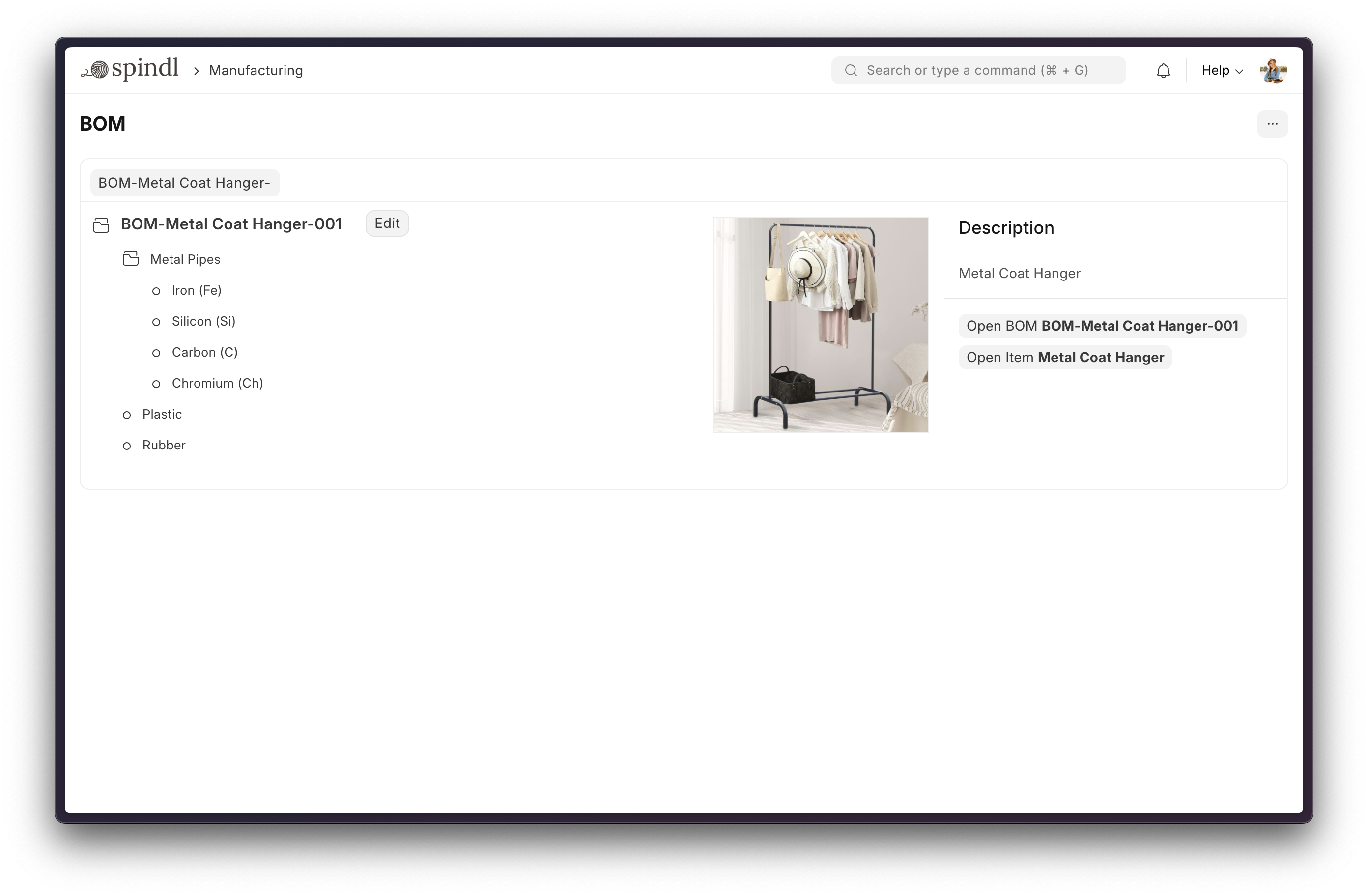

What is ERPNext?
ERPNext is a comprehensive open-source Enterprise Resource Planning (ERP) system built on the Frappe Framework. It provides modules for accounting, procurement, sales, CRM, stock/inventory, manufacturing, projects, asset management, point of sale, quality management, support/helpdesk, and HR/payroll. The software is 100% open-source under GPL-3.0 with no features locked behind paywalls. It can be self-hosted via Docker (using the frappe_docker repository) or installed manually via the bench CLI on Linux. ERPNext offers a REST API for integrations, supports multi-company and multi-currency setups, and includes a no-code/low-code builder for customization. Frappe Technologies maintains the project and offers managed hosting (Frappe Cloud) and enterprise support as paid services, while the software itself remains free to self-host.
ERPNext alternatives
 DolibarrSelf-hosted open-source ERP and CRM for SMEs, large companies, freelancers managing customers, invoices, orders, stocks, HR, accountingCompareDolibarr with ERPNext
 FacturaScriptsSelf-hosted open-source ERP and accounting software for SMBs with invoicing, inventory, CRM, and a plugin system for extensibility.CompareFacturaScripts with ERPNext
 AureusSelf-hosted, open-source ERP for SMEs built on Laravel and FilamentPHP, covering accounting, inventory, manufacturing, HR, CRM and sales as installable plugins.CompareAureus with ERPNext
 CarbonOpen-source manufacturing suite spanning ERP, MRP, MES and QMS on one Postgres schema: self-hosted quoting, planning, shop-floor tracking, quality and costing.CompareCarbon with ERPNext
 EspoCRMA self-hosted, open-source CRM to manage contacts, sales, support, and marketing with a clean UI and REST API.CompareEspoCRM with ERPNext
 craftplanSelf-hosted open-source ERP for artisanal manufacturers combining catalog, inventory, orders, production, purchasing, and CRM in one platform.Comparecraftplan with ERPNext
 OFBizSelf-hosted open-source ERP suite with accounting, CRM, e-commerce, warehousing, and manufacturing. Runs on Java 17 with embedded H2 or external PostgreSQL/MySQL.CompareOFBiz with ERPNext
 Snipe-ITSelf-hosted, open-source ITAM system to track hardware, software licenses, accessories and consumables, with barcode checkout, LDAP/SAML SSO and a REST API.CompareSnipe-IT with ERPNext
All self-hosted alternatives to Quickbooks → All self-hosted alternatives to Salesforce → All self-hosted alternatives to SAP Business One →
Should you self-host ERPNext?
ERPNext scores 84/100 on selfhost.directory (how scoring works) and ranks #1 of 2 in Enterprise Resource Planning (ERP). It has 41 158 GitHub stars, +1 302 in the last 30 days.
It shipped 77 stable releases in the past year. The latest, v16.54.0, came out on 6 November 2026. New versions land roughly every 1 days.
Setup is advanced: plan for several services and some ongoing maintenance. An official Docker image is available. It is GPL-3.0-licensed and written mostly in Python.
Its closest alternative on selfhost.directory is Twenty (83/100, 60 734 stars). ERPNext scores higher overall. See ERPNext vs Twenty side by side.
Features
- Accounting
- Asset Management
- CRM
- Helpdesk/Support
- HR & Payroll
- Inventory Management
- Manufacturing
- Multi-company
- Multi-currency
- No-code/Low-code Builder
- Point of Sale
- Procurement
- Project Management
- Quality Management
- REST API
ERPNext README


100% Open-Source ERP System to help you run your business.
Running a business is a complex task - handling invoices, tracking stock, managing personnel, and other daily operations. In a market where software is sold separately to manage each of these tasks, ERPNext does all of the above and more, for free.
- Accounting: All the tools you need to manage cash flow in one place, right from recording transactions to summarizing and analyzing financial reports.
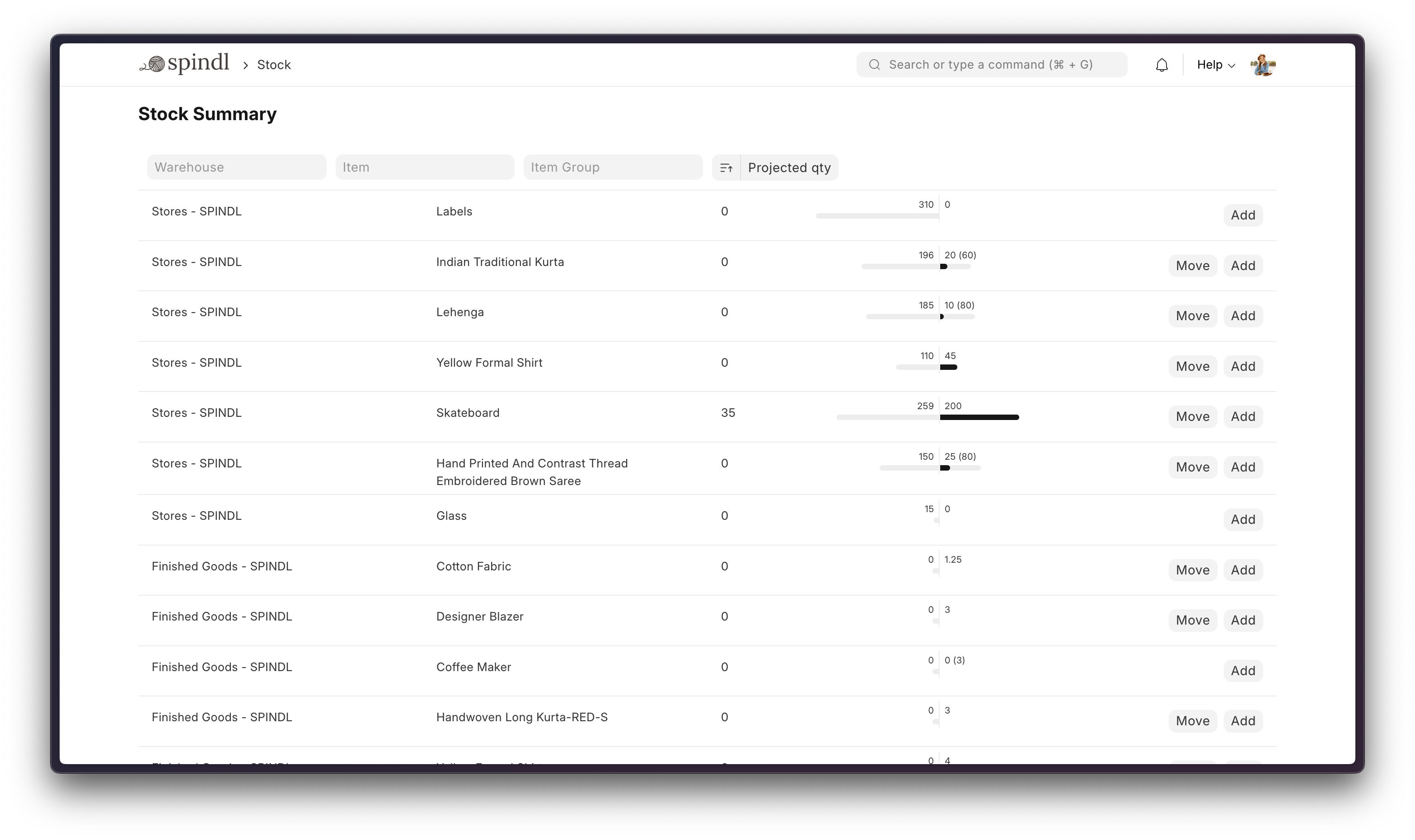
- Order Management: Track inventory levels, replenish stock, and manage sales orders, customers, suppliers, shipments, deliverables, and order fulfillment.
- Manufacturing: Simplifies the production cycle, helps track material consumption, exhibits capacity planning, handles subcontracting, and more!
- Asset Management: From purchase to disposal, IT infrastructure to equipment. Covers every branch of your organization, all in one centralized system.
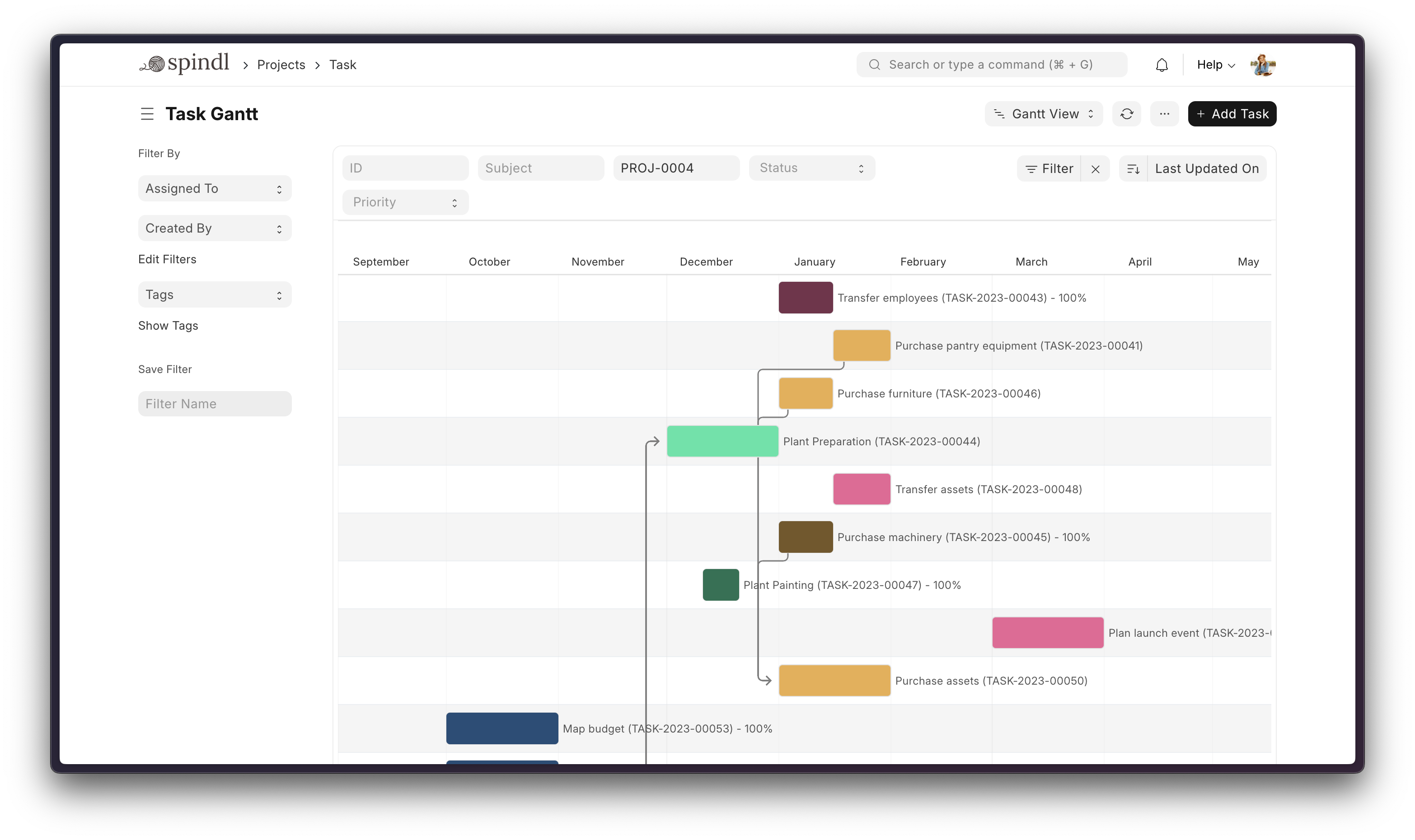
- Projects: Deliver both internal and external projects on time, budget and profitability. Track tasks, timesheets, and issues by project.
More
-
Frappe Framework: A full-stack web application framework written in Python and JavaScript. The framework provides a robust foundation for building web applications, including a database abstraction layer, user authentication, and a REST API.
-
Frappe UI: A Vue-based UI library, to provide a modern user interface. The Frappe UI library provides a variety of components that can be used to build single-page applications on top of the Frappe Framework.
You can try Frappe Cloud, a simple, user-friendly, and sophisticated open-source platform to host Frappe applications reliably and securely.
It handles installation, setup, upgrades, monitoring, maintenance, and support of your Frappe deployments. It is a fully featured developer platform with an ability to manage and control multiple Frappe deployments.
See Frappe Docker Documentation for full documentation & FAQ on Docker setup
For Docker basics and best practices refer to Docker's documentation
⚠️ Disposable demo only
This setup is intended for quick evaluation. Expect to throw the environment away. You will not be able to install custom apps to this setup. For production deployments, custom configurations, and detailed explanations, see the full documentation.
First clone the repo:
git clone https://github.com/frappe/frappe_docker
cd frappe_docker
Then run:
docker compose -f pwd.yml up -d
Wait for a couple of minutes for ERPNext site to be created or check the create-site container logs before opening browser on port 8080. (username: Administrator, password: admin)
See Frappe Docker for ARM based docker setup
The Easy Way: our install script for bench will install all dependencies (e.g. MariaDB). See https://github.com/frappe/bench for more details.
New passwords will be created for the ERPNext "Administrator" user, the MariaDB root user, and the Frappe user (the script displays the passwords and saves them to ~/frappe_passwords.txt).
To setup the repository locally follow the steps mentioned below:
-
Setup bench by following the Installation Steps and start the server
bench start -
In a separate terminal window, run the following commands:
# Create a new site bench new-site erpnext.localhost -
Get the ERPNext app and install it
# Get the ERPNext app bench get-app https://github.com/frappe/erpnext # Install the app bench --site erpnext.localhost install-app erpnext -
Open the URL
http://erpnext.localhost:8000/appin your browser, you should see the app running
- Frappe School - Learn Frappe Framework and ERPNext from the various courses by the maintainers or from the community.
- Official documentation - Extensive documentation for ERPNext.
- Discussion Forum - Engage with the community of ERPNext users and service providers.
- Telegram Group - Get instant help from huge community of users.
Please read our Logo and Trademark Policy.
How to install ERPNext
Install ERPNext with Docker
git clone https://github.com/frappe/frappe_docker cd frappe_docker docker compose -f pwd.yml up -d
Disposable demo only; for production see full Frappe Docker documentation
ERPNext releases & version history
AI summary Added proforma invoices, purchase order grouping, customer blocking, and order-specific r…
General
Features (2)
- Allows stock to be reserved for individual components in a Product Bundle, including through a Pick List, and carries reserved serial and batch numbers into the Delivery Note or Sales Invoice. (#63048)
- Adds Restrict to Companies and Allowed Companies settings to Item, Customer, and Supplier, so each record can be limited to selected companies. Users with access to specific companies only see records allowed for those companies; transactions cannot use restricted records in other companies, and records linked to hidden masters are also hidden. (#63045)
Bug Fixes (26)
- Separates profit or loss from unclosed earlier financial years from the current period’s provisional profit or loss in the "Balance Sheet" report when accumulated values are enabled, and displays a notice when the previous financial year is still open. (#61981)
- Checks Pricing Rule conditions before choosing which rule takes priority, so a rule that does not match no longer blocks another eligible rule from applying. (#62806)
- Adds fixes for cases involving stock quantities and batches, manufacturing material transfers, invoice allocations, and links between purchase and sales orders. Also corrects item weights and Timesheet titles, displays linked-record counts in Supplier Scorecard, removes related records when old logs are deleted, and handles user-entered text safely in announcements and project searches. (#60722)
- Applies Asset access restrictions to Asset Activity lists and reports, limiting visible activity to assets each user can access. (#60054)
- Fixes Appointment slot capacity, time-zone and holiday handling, agent assignment, and calendar events; updates Email Campaign unsubscribe and send timing behavior, and corrects Contract expiry, status, linked-document checks, post-submission signing and checklist updates, and Contract Template text display. Updates sales reports to apply permissions and filters, use opportunity conversion rates and company-based amounts, and include qualifying leads, child territories, lost reasons, partly ordered quotations, and post-conversion activity without duplicate lead rows; grants sales users read access to Market Segment and Sales Stage. (#62163)
- Fixes an error when editing a draft POS Invoice that prevented its payment methods from being restored. (#59036)
- Restricts data-changing actions to POST requests; scripts that call them with GET must switch to POST. The "Pay" button on the Sales Order portal page continues to work with the updated request method. (#62519)
- Fixes a migration error that stopped older sites from creating Asset Depreciation Schedule entries; migrated schedules now use the Value After Depreciation recorded in the asset’s finance book. (#60089)
- Updates three older upgrade steps to read the saved account freeze date even when it no longer appears in Accounts Settings, preventing those steps from failing during upgrades. (#60087)
- Skips reporting-currency conversion for GL Entry and Account Closing Balance records when a Company has no reporting currency, allowing entries and closing balances to be processed without a conversion rate. (#60088)
- Updates the "Asset Activity", "Fixed Asset Register", and "Asset Maintenance" reports to follow users’ access to assets; the Fixed Asset Register also shows zero for disposed assets and ignores reversed depreciation. Adds checks for Asset Category accounts and depreciation settings, and corrects maintenance task and log handling, team membership rules, asset location and custodian updates, shift cancellation and default factors, and Location area totals and coordinate checks. (#62166)
- Updates "Update Items" to account for unit conversions when checking edited quantities against quantities already delivered, received, ordered, or purchased in Quotation, Sales Order, and Purchase Order, so valid changes are not blocked just because the units differ. (#63071)
- Excludes components of supplier-delivered bundles from Pick List entries created from a Sales Order, so warehouse staff aren’t asked to pick items shipped directly by the supplier. (#63092)
- When items are changed or removed using "Update Items" on a Sales Order, the linked Quotation reflects the updated ordered quantities and status. (#63170)
- Blocks closing a Sales Order while stock is reserved, requiring the stock to be unreserved first. Rate-only changes through "Update Items" leave existing stock reservations intact instead of rebuilding them. (#63158)
- Updates "Update Items" to retain the Price List Rate and record the difference from the entered Rate as a discount or margin on new rows in Sales Order, Purchase Order, Quotation, and Supplier Quotation; changing a new row’s UOM also refreshes its price list rate. (#63181)
- Updates Sales Order handling to apply over-delivery limits to product bundle items, use order details when building delivery schedules, and show returned quantities immediately after a return Delivery Note is submitted without reloading. It also checks that a Sales Order is in a valid state before changing its status. (#63302)
- Batch prefixes in Stock Settings Naming Series Prefix and serial-number series in Item Serial No Series now replace
{fieldname}placeholders with document values, including for automatically created and work-order serial numbers. Only the text portions of batch prefixes are uppercased, leaving placeholder values unchanged. (#63630) - Requires at least one lost reason before a Quotation can be marked Lost, and lets Sales Users and Sales Managers create Quotation Lost Reason records without granting them permission to edit or delete them. (#62744)
- Updates the State label in the print address dialog to State/Province to distinguish it from workflow states. (#63680)
- Allows pre-upgrade Asset Shift Allocation records to be cancelled without changing the asset’s current schedule, restores assigned employees’ access to Appointment records, and lets existing Asset Maintenance Team records be saved when their manager is not listed as a member, provided the manager is unchanged. The default "Fixed Asset Register" now lists depreciating assets that use named finance books when no finance book is selected and the company has no default. (#63607)
- When a transaction created from another document changes currency, it fetches the corresponding exchange rate; loading the transaction or changing its date keeps the source rate. (#63852)
- Updates Customer credit-limit handling to retain customer and customer-group limits when Sales Order checks are bypassed, reject duplicate company limits, and correct credit-limit alert recipients and amounts. Adds checks for customer names, group-name conflicts, contact and address links, and loyalty-program access; excludes disabled customers from internal-customer checks, uses primary contact and address details when mapping customers, and includes nested territories and customer groups in automatic loyalty enrollment. (#63891)
- Cancelling either a submitted Asset Capitalization or its linked Asset now cancels the other and restores consumed assets; assets in maintenance can still receive due depreciation while keeping their maintenance status. When no number on a Contact is marked primary, its first listed number now fills the linked Lead’s Phone and Mobile No fields. (#63885)
- Prevents saving an Asset Maintenance Team when its manager is removed from the member list. Updates Appointment sharing to include assigned users whose tasks are closed, while excluding cancelled tasks. (#63926)
- Requires Frappe
16.55.0or later because company-based access restrictions for Item, Customer, and Supplier records rely on features added in that version. (#63977)
Accounts
Bug Fixes (61)
- Calculates stock adjustment amounts for Purchase Invoice using the full valuation rate instead of a rounded rate, reducing differences between invoice and stock values. (#62936)
- Updates "Trial Balance" and "Account Balance" to apply user permissions and start income and expense balances at each company’s fiscal year; "Cash Flow" excludes opening entries, handles totals across fiscal years, and adds a row for other balance-sheet movements. Corrects the margin basis in "Profit and Loss Statement" and account grouping in "Financial Ratios"; financial statements use closing rates for presentation currency, consolidated statements translate income, expenses, and equity at transaction rates and show currency translation differences, and reports display an error when an exchange rate is missing. (#62209)
- Rejects Share Transfer issues when their share-number ranges overlap shares already issued for the same company and share type, including when a new range contains an existing range. (#62999)
- Splits transaction-currency amounts among the cost centers in a Cost Center Allocation, so the "General Ledger" shows each cost center’s share instead of repeating the full amount. Amounts follow the currency’s decimal precision, with rounding differences carried forward across the split. (#62953)
- Updates coupon handling in sales documents so changing a coupon recalculates discounts and free items, and each coupon applies its linked Pricing Rule. Gift Card use is restricted to its assigned customer, Quotation checks coupon dates, usage limits, and customer ownership, and generated Coupon Code values omit spaces and avoid existing codes. (#63022)
- Preserves fixed-amount and percentage discounts, along with their discount dates, when payment schedules are fetched from orders or quotations. (#63011)
- Updates Payment Reconciliation to list Employee journal entries as invoices or payments based on the selected account type, and remove fully settled entries from outstanding items. Employee reconciliations now allow both Receivable and Payable accounts, with exchange adjustments posted in the appropriate direction. (#63013)
- Checks combined allocations in Payment Entry against the amount still due on an invoice or payment term, rejecting allocations that exceed the balance. Dunning accounts for earlier payments not assigned to payment terms when calculating the amount still due. (#62951)
- Updates automatic email scheduling in Process Statement Of Accounts so emails start on the configured date, resume after missed runs, and keep their next send date when unrelated fields are edited. Bases the ageing summary on the statement period end date. (#62957)
- Fixed-amount taxes are now divided only among items they apply to; if those items have a zero combined net total, the full amount goes to the last applicable item. Taxes calculated from an earlier tax row now use this corrected split. (#63024)
- Prevents the "Create Print Format" action in Cheque Print Template from overwriting an unrelated Print Format with the same name; it updates only formats previously generated for that cheque template. (#62955)
- Requires a submitted Period Closing Voucher and blocks duplicate or repeated processing in Process Period Closing Voucher to prevent duplicate closing entries. Processing remains in progress until the closing entries are posted. (#63058)
- Updates Dunning payments to use the receivable account’s currency and account for earlier payments across overdue installments, so generated payments reflect the remaining amount due when invoice and bank currencies differ. (#62997)
- Assigns a no-expiry date to loyalty points earned from a Sales Invoice when Expiry Duration (in days) is zero or blank, so they do not expire the next day. (#63288)
- Payment Order keeps its own numbering series when created from a Payment Entry and accepts only submitted Payment Requests and Payment Entries that are not already included in another submitted Payment Order; paid requests are not accepted. Cancelling an order restores each Payment Request status based on its unpaid amount, and submitting or cancelling a related Journal Entry updates the request to reflect the amount paid. (#63289)
- Updates Payment Request to include existing requests and credit notes when checking amounts due, and to record payments confirmed by a payment gateway. It also respects user permissions when replacing open requests, restricts loyalty-point use, and takes party details from the linked document. (#63290)
- Adds account-currency amount checks to the daily ledger health check and two corresponding columns to the "General and Payment Ledger Comparison" report; "Voucher-wise Balance" checks vouchers separately by type and number. The daily check keeps one Ledger Health record per voucher and check, updates Checked On when a mismatch remains, and removes the record when a later check finds no mismatch. (#63408)
- Updates Period Closing Voucher checks to block a new closing when an earlier period remains open or incomplete, reject unusable closing accounts, and display posting failures. It also handles periods with no net profit or loss and foreign-currency balances, uses the period end date for immutable-ledger reversals, and limits access to period dates to users who can view the voucher. (#63409)
- Updates Cost Center Allocation so split amounts add up to the original amount, and rejects zero or negative percentages and cost centers that are disabled, groups, or belong to another company. It also prevents duplicate allocations with the same Main Cost Center and Valid From; when duplicates already exist, it uses the most recently created allocation. (#63410)
- Adds checks in Account and Ledger Merge to prevent merging ledger accounts with different Account Type values or balances that violate the target’s Balance Must Be, and to prevent merging a group into one of its descendants. It also restricts account moves to parents with the same report type when ledger entries exist, prevents changes to Company, checks account names and numbers, limits child-company account renames to the parent company, and applies the same frozen-entry permission rule when saving and syncing accounts. (#63411)
- Updates Item Tax Template tax-row selection to use the latest applicable Valid From date and retain undated rows when needed, including on backdated transactions. It also rejects group Account records and prevents transactions from using disabled templates or templates from another company. (#63412)
- Prevents adding new purchase tax rows with Add/Deduct Tax set to Deduct and Category set to Valuation in Purchase Taxes and Charges Template and purchase transactions, while allowing the same tax on the same account when it carries over from a linked document. (#63413)
- Corrects Pricing Rule behavior when transactions are saved, free items and discounts are applied, and cumulative or mixed-condition rules are calculated. Transaction rules also follow the For Price List setting, and removing rules from transaction items checks user permissions. (#63416)
- When a slab is removed from a Promotional Scheme, its Pricing Rule is deleted or disabled if a document links to it. The scheme now rejects enabled slabs that overlap on quantity and amount at the same Priority, unless both have Apply Multiple Pricing Rules enabled. (#63415)
- Limits who can open a POS Opening Entry to users in the POS Profile’s Applicable for Users list when it contains users and has no blank entries. Rejects negative Opening Amount values and duplicate Mode of Payment entries, and shows each payment mode only once when entering opening balances. (#63287)
- Restricts changes to POS Settings to System Managers and Accounts Managers, and blocks switching Invoice Type Created via POS to Sales Invoice while submitted POS Invoices remain unconsolidated. Checks required POS Additional Fields when submitting POS Invoice and POS-created Sales Invoice records. (#63291)
- Updates POS Invoice stock checks to count the same item across separate rows and exclude stock reserved for Sales Orders. Recalculates Paid Amount, Change Amount, and Loyalty Amount, counts write-offs toward payment totals, updates the original invoice status after returns, and checks that collected balances are positive and use a payment method from the POS Profile. (#63407)
- Updates Sales Invoice consolidation in POS Invoice Merge Log to include redeemed loyalty amounts, change, and write-offs from the original POS Invoice records. Cancelling a POS Closing Entry cancels all its consolidated credit notes, and merges by Customer Group reject invoices from customers outside the selected group and its child groups. (#63406)
- Updates POS Closing Entry to check that all invoices from a POS session are included before submission or retry, and allows cancellation of entries with 10 or more invoices. Limits "Retry" to failed entries and preserves the appropriate status when submission or cancellation fails. (#63418)
- Excludes item templates from both the Item filter and results in the "Inactive Sales Items" report. (#63485)
- “Balance Sheet” and “Profit and Loss” snapshots now follow the selected accumulated-values setting and report view, and use report templates when available. “Trial Balance” snapshots now apply the same company access check as the live report. (#63501)
- The Bank Reconciliation Tool now loads its summary cards before displaying the reconciliation table, so the cards appear when an account is selected while the tool is still loading. (#63500)
- Expands the Invoices and Payments tables in Payment Reconciliation to use the full form width and gives document references and amounts more room to display. (#63423)
- Updates Payment Entry to record payment-term discounts only when they are deducted, so later payments include only the remaining invoice balance. (#63326)
- Updates amount matching and formatting in Bank Reconciliation to use the configured currency precision, so rounding differences don’t mark equal amounts as mismatches and distinct amounts remain distinguishable. (#63324)
- Limits the portal "Pay" button to submitted Sales Order and Sales Invoice documents with an amount due that the linked customer is authorized to pay; purchase documents and users without the required access no longer see it. Checkout now uses a protected form. (#63232)
- Makes Company Logo and Website optional in the print company details dialog, allowing users to save other company information without providing them. (#63227)
- When a Payment Entry references a Journal Entry, it uses the exchange rate recorded in that entry to calculate currency differences instead of looking up a rate for the posting date. (#63216)
- Corrects a misspelled setting in the "General Ledger" report that caused an error when expanding filters. (#63578)
- Allows loyalty points earned on one invoice type to be redeemed on another, including between POS Invoice and Sales Invoice, and deducts the redeemed points from the customer’s balance. (#62451)
- Validates that parties in Payment Entry and Journal Entry use a registered Party Type with a matching Account Type, and displays custom parties using their configured title. Accounts Managers and System Managers can create and edit Party Type records, but cannot change Account Type after ledger entries exist. (#62742)
- Allows older Cheque Print Template records to update their generated Print Format after layout changes, while protecting customized or unrelated formats. The form refreshes after an update so further edits can be saved without manually reloading. (#63625)
- Caps payment-term allocations in Payment Entry at the invoice’s remaining balance when currency rounding would otherwise make them exceed it, allowing affected foreign-currency payments to be saved. (#63629)
- When you amend or duplicate a Bank Transaction, its draft Status now resets to Pending instead of carrying over Cancelled or Reconciled from the original. (#63234)
- Updates over-billing checks for returns: returns that do not increase an order’s billed amount no longer trigger the limit check, while returns that increase it remain subject to the limit. (#63557)
- Keeps the unpaid Payment Amount in Outstanding for payment schedule rows with a zero Invoice Portion in Sales Invoice and Purchase Invoice, so those amounts can be allocated in Payment Entry. (#62991)
- Adds Journal Entry to the connections shown on Payment Entry, making it easier to find linked exchange gain or loss entries. (#62974)
- Moves Cheque/Reference No, Cheque/Reference Date, and Clearance Date beside the payment accounts in Payment Entry, replacing the separate Transaction ID section with Accounts and Transaction Details. (#63647)
- Limits editing POS Settings to Accounts Managers and System Managers; Sales Users and Accounts Users retain read access. Requires fields marked mandatory in POS Settings to contain a value before a POS Invoice can be submitted. (#63622)
- Distributes rounding differences across item amounts when tax is included in prices, reducing discrepancies between the tax breakdown and document total, including when a grand-total discount is applied. (#63223)
- Allows a Payment Request for the last payment term when rounded schedule amounts slightly exceed the document total by limiting the request to the remaining balance. (#63830)
- Records cash change in the company currency when users collect an outstanding amount on a POS Invoice, so it carries over to the consolidated Sales Invoice; an upgrade update also fills in this amount on affected existing invoices. (#63831)
- Recalculates grand-total discounts after a shipping rule changes the shipping charge, so totals reflect the updated charge, including on documents without taxes. (#63851)
- Allows Sales Orders to remove a rate Pricing Rule that no longer applies when an item has no saved price; if no replacement price is available, the current rate is kept. (#63840)
- Keeps the required rounding adjustment when a rounded-up foreign-currency advance is fully allocated through Payment Reconciliation or the Advances section of Sales Invoice, preventing reconciliation from failing because the payment is unbalanced. (#63837)
- Rounds Unallocated Amount in Payment Entry after converting it to the party account’s currency, using that currency’s decimal precision. It also includes transaction-currency values when updating an existing deduction to the Round Off account, preventing mismatches between company- and transaction-currency balances. (#63205)
- Marks earlier Dunning notices as resolved when a later payment covers their charges, preventing those fees or interest from being collected again. Cancelling the payment reopens notices that were resolved automatically. (#63627)
- Clears outdated cached fiscal year information when a Fiscal Year is added, changed, or deleted, so the Accounting dashboard picks up the current fiscal year after reload. (#62542)
- Batches Account Closing Balance records during period closing, reducing database writes when many account and dimension combinations are involved and helping avoid transaction write limits. (#63969)
- Shows Company Bank Account below Mode of Payment in Payment Entry for Pay and Receive entries, even when no party is selected. (#64024)
- Updates Paid From and Paid To in Payment Entry when you change Company Bank Account, even if the selected Mode of Payment has a different default account. (#63642)
Selling
Features (2)
- Adds Proforma Invoice creation from Sales Order, with quantity- or amount-based options, editable line descriptions, and email templates. The PDF reflects the proforma’s amounts and its share of order discounts and charges. (#62152)
- Adds Block Customer and Release Date settings to Customer, allowing users to block Sales Order, Delivery Note, Sales Invoice, and POS Invoice transactions while a hold is active; Quotation transactions remain allowed, and held customers are marked “On Hold” in the customer list. (#63041)
Bug Fixes (9)
- When a batch-tracked item is added again in Point of Sale, batch selection opens so it can be added from a different batch instead of increasing the first batch’s quantity. POS Invoice returns release batch reservations for returned stock. (#62949)
- When creating a Sales Invoice from a Sales Order, each line now carries the item's Enable Deferred Revenue setting. (#63149)
- Excludes components of supplier-delivered bundles from Pick List entries created from a Sales Order, so warehouse staff aren’t asked to pick items shipped directly by the supplier. (#63159)
- Allows POS Closing Entry to create consolidated sales invoices and lets users process returns for customers on hold. Customer holds now end on their release date. (#63243)
- Updates the party label and search on Quotation when Quotation To is set to a type other than Customer or Lead, so those parties can be found in search. (#63392)
- Loads pro forma invoice settings with submitted Sales Order forms, so Sales Users no longer need permission to access Selling Settings just to open an order. (#63391)
- Checks an item's maximum discount for discounts entered as a fixed amount or through a reduced price, as well as a percentage, and rejects sales documents that exceed the limit. (#63211)
- Clears Incoterm and Named Place when creating a supplier Purchase Order from a Sales Order, so customer delivery terms are not copied to the supplier order. (#62739)
- Updates Point of Sale so repeated clicks on a batch-tracked item increase the existing cart line, and adds an "Add Another Batch" option for selecting another batch. Keeps items with selected serial numbers separate from items awaiting serial selection, so serial scans update the appropriate cart line. (#63644)
Point of Sale
Bug Fixes
- In Point of Sale, hides the invoice discount control and prevents users from opening its editor when Allow User to Edit Discount is disabled in POS Profile. (#63218)
Buying
Features (3)
- Adds a Group By Item option to "Purchase Order Analysis" that combines quantities and amounts for the same item across purchase orders, while keeping different units and companies separate. When no company is selected, the report uses the default company instead of including orders from every company. (#63042)
- Adds a non-printing Remarks field to Purchase Order for recording order-specific notes; the notes are not copied when an order is duplicated. (#63040)
- Supplier Quotation now shows whether items are partially or fully ordered, and the "Supplier Quotation Comparison" report can be filtered by Order Status. Expired quotations remain marked expired during status updates and cannot be used to create Purchase Orders. (#63046)
Bug Fixes (9)
- The expiry process now marks only submitted Supplier Quotation records as expired, leaving draft quotations unchanged. (#63167)
- Allows users to create a Purchase Invoice from a Purchase Order line when its quantity is fully billed but part of its amount remains, supporting progressive billing for lump-sum services. (#63348)
- Blocks "Update Items" on Supplier Quotation when its status is Ordered, Stopped, or Expired, including requests made through the API. (#63349)
- When suppliers create a Purchase Invoice from the portal, rows with a quantity of zero are omitted so the invoice can be saved with the remaining items. (#63390)
- When a Purchase Order uses an item’s Last Purchase Rate because no submitted purchase is available, it now converts the rate to the item’s selected unit and the order’s currency, including when using "Update Rate as per Last Purchase". (#63265)
- Calculates rejected-item values on Purchase Receipts in the company’s currency, so foreign-currency receipts use the converted amount when valuing rejected stock. (#63238)
- Corrects how valuation deductions are applied to items in Purchase Receipt and stock-updating Purchase Invoice, so item costs and stock values reflect the deductions. (#63212)
- Updates Last Purchase Rate in Purchase Order rows to reflect the current unit of measure and conversion factor when the order is saved or its items are updated. (#63555)
- When creating a Purchase Order from a Material Request using supplier selection, fetches the selected supplier’s price for unpriced rows instead of leaving them at zero. (#63989)
Stock
Features (1)
- Adds an optional snapshot mode for the "Stock Balance" report, using the latest completed stock-ledger sync to calculate balances faster. Ageing columns aren’t available in this mode, and the last displayed digits may differ slightly from the live report. (#63073)
Bug Fixes (33)
- Updates the price list test data to include the item's UOM and Conversion Factor. (#62875)
- Updates Stock Reconciliation to exclude serial numbers with no remaining stock when fetching historical availability, so delivered serials don’t inflate the quantity. (#62565)
- Applies the Price Not UOM Dependent setting in Price List to item rates in sales and purchase transactions and BOM costing: rates stay the same across units when enabled and scale by the unit conversion when disabled. (#60095)
- Applies company restrictions in the "Items To Be Requested" report and excludes serial numbers and batches linked to restricted items from "Serial No and Batch Traceability." (#63093)
- When creating a Delivery Note or Sales Invoice from a Sales Order, packed bundle components use the warehouse reserved for them on the order. Return documents keep the warehouse selected for the returned items. (#63064)
- Fixes Stock Reservation Entry validation so a fractional Reserved Qty for a unit that requires whole numbers displays the intended message instead of an error. (#63169)
- Corrects Item and BOM searches so users can find permitted records when a company or item group name contains
%. (#63161) - Removes the unavailable Item Standard Cost link from the Item dashboard and its related stock-value calculation in Bin, avoiding item connection-count errors caused by the missing record type in version 16. (#63171)
- Updates the "Stock Balance" snapshot report to treat dimensions added after the last sync as blank, rather than failing to load. (#63252)
- Updates item checks in Purchase Material Requests so items copied from different customers’ Sales Orders aren’t all checked against the same customer’s restrictions. (#63254)
- Exempts Communication records from company restriction checks, allowing emails and call logs linked to records restricted to another company to be saved. (#63260)
- Allows a Pick List created from a Work Order to use serial numbers reserved for that work order, and carries the selected serial and batch details into a Stock Entry created from the Pick List. (#63268)
- Allows a returned serial number to be reserved again when it was delivered from a partially fulfilled stock reservation. (#63259)
- Keeps warehouse assignments for Product Bundle components when transactions are returned or amended, so returned stock goes to the original warehouses and amended documents retain those assignments. (#63323)
- A Pick List now skips serial numbers reserved for other orders when selecting stock, reducing submission failures caused by picking those reserved serials. (#63335)
- Fixes an error when adding Additional Costs to Stock Entry, Subcontracting Order, or Subcontracting Receipt by handling the exchange rate in the correct table. (#63394)
- Updates Asset accounting so depreciation is not posted twice, split or revalued assets retain the correct values, and invalid sales, value adjustments, and capitalizations are rejected. Updates Asset Repair and Asset Maintenance so repair stock is recorded on the completion date, asset statuses reflect open work, maintenance due dates respect their end dates, and completed logs remain available. (#62216)
- Updates delivered quantities in Stock Reservation Entry using serial and batch details from either a Serial and Batch Bundle or the item row, preventing an error when no bundle is attached. (#63363)
- Requires the Increment in numeric Item Attribute settings to be greater than zero; positive fractional increments remain allowed. (#63214)
- A Sales Invoice with Update Stock now uses serial numbers reserved for its Sales Order, instead of choosing a different serial and leaving the reservation open. (#63352)
- Skips stock valuation reposting when cancelling a Purchase Receipt that did not affect inventory, so receipts containing only non-stock items can be cancelled even when their posting date falls in a closed period. (#62981)
- A Delivery Note created from a Pick List now includes only the undelivered quantities of product bundles, rather than repeating quantities from earlier deliveries. The Pick List asks whether to continue if draft Delivery Notes already exist, before creating another one. (#62979)
- Posts accounting entries when a zero-priced item changes stock value in a Purchase Receipt or a Purchase Invoice with Update Stock enabled, recording the change in the accounts. (#63805)
- When creating a Delivery Note or Sales Invoice from a Sales Order, packed items now use the warehouse specified on the order, even when stock is not reserved. (#63795)
- Updates the source document’s Reserved Qty and reservation status when reserved stock is handed off to another document. (#63828)
- When a Work Order is disassembled more than once, earlier returns are deducted from available batch quantities so the same material isn’t returned twice. Batch quantities are rounded to the allowed precision, and batches with no usable quantity are skipped. (#63039)
- Uses configured item-specific inventory accounts for Consumed Stock Items in Asset Capitalization when Enable Item-wise Inventory Account is enabled. (#63838)
- Sales returns for product bundles now use serial and batch numbers from Delivery Note records without a Serial and Batch Bundle and value returned stock using the original delivery rate. When a new document is created from an existing one, packed components keep their serial and batch details with the correct bundle item. (#62883)
- Prevents negative Re-order Level and Re-order Qty values from being saved in Item reorder settings. (#63942)
- Updates Manufacturer and Manufacturer Part No in Material Request rows when the selected item changes, replacing details from the previous item. (#63932)
- Limits stock reservations from Purchase Receipt entries linked to a Production Plan to the plan’s remaining material needs. Serial and batch items are limited to the quantity being reserved. (#63504)
- Item records without their own tax rows no longer automatically copy tax rows from their Item Group, so transactions can use the group’s current tax settings. (#63988)
- Allows Item search indexing on SQLite 3.34–3.44 and finds accented item names even when searches omit accents. Global Defaults blocks Enable Item Search Index on older SQLite versions that lack the required search support. (#63939)
Performance Improvements (4)
- When saving Serial and Batch Bundle, Total Qty is calculated without a separate database update, and available quantities are read from bundle entries without an additional stock ledger lookup. (#62971)
- The "Warehouse Wise Stock Balance" report calculates warehouse levels and parent balances in fewer passes, reducing processing time for large warehouse lists. (#63220)
- Speeds up Repost Item Valuation by reusing already loaded stock entries and avoiding repeated reordering as related items are added, while keeping the same processing order. (#63668)
- When stock entries are reposted, Stock Reconciliation refreshes only the affected row instead of every row, reducing processing for reconciliations with many items. (#63671)
Manufacturing
Features (3)
- When creating a Material Request or Pick List from a Work Order, users enter the finished-goods quantity, and the required materials are limited to the matching amount still pending. Work Order items track Requested Qty and Picked Qty, and submission is blocked when a request or pick exceeds the remaining quantity. (#63043)
- Adds a Consider Process Loss option to Production Plan. When enabled, it increases Work Order and Subcontracting Order quantities to account for each BOM’s planned process loss while keeping the displayed quantity at the usable output needed. (#63753)
- When Consider Process Loss is enabled, Production Plan requests the extra raw materials needed to cover production loss for finished goods and exploded sub-assemblies. (#63759)
Bug Fixes (17)
- Displays the Finished Goods Based Operating Cost option on a BOM when With Operations and Is Phantom BOM are off, allowing users to enable the setting and enter an Operating Cost Per BOM Quantity. (#63028)
- Refreshes ordered quantities on Blanket Orders when their rows are removed using "Update Items". (#63267)
- Allows Material Requests, Pick Lists, and related Stock Entries from a Work Order to include the allowance set in Transfer Extra Materials Percentage, instead of limiting quantities to the required amount. (#63256)
- Excludes material requests created from a Job Card from the linked Work Order’s pending-quantity check, so one job card’s request does not block requests from other job cards. (#63257)
- Corrects quantities when creating a Material Request or Pick List from a Work Order by totaling transferred materials across all rows and rounding partial amounts up to a whole unit, without exceeding the amount still pending. (#63314)
- Limits submitted Material Request quantities to what the linked Job Card requires and keeps the item link on duplicated requests so the same limit applies to copies. (#63321)
- Updates Material Request forms created from a Job Card to include only the quantity still pending, leaving fully requested items out. When Allow Excess Material Transfer is enabled in Manufacturing Settings, the request limit is skipped and the full required quantity is prefilled. (#63395)
- Manufacturing now uses company-currency amounts for non-stock item and operating costs in foreign-currency BOMs, so converted costs are reflected in finished-goods valuation and additional-cost entries. (#63236)
- Updates BOM material breakdowns to account for process loss in sub-assemblies, so multi-level Work Order and Material Request records include the raw materials needed for the required good quantity. Existing submitted BOMs keep their current breakdown until a child BOM is replaced or a new BOM is created. (#63764)
- Updates Sales Order checks and Work Order Qty to count linked Work Orders by their output after planned or recorded process loss, and adjusts the quantity offered when creating a Work Order. (#63755)
- Updates Work Order Qty on a Sales Order when a linked Work Order’s produced quantity or process loss changes. (#63761)
- Rounds up sub-assembly quantities in Production Plan and Work Order records to whole units when their unit of measure does not allow fractions. (#63757)
- Counts transferred materials on Job Card in stock units, so transfers entered in another unit are compared with the required quantity on the same basis. (#63230)
- Updates BOM cost allocation calculations to round the finished-good share and amount to their field precision, and checks allocation totals at that precision so valid fractional percentages are not rejected because of tiny rounding differences. (#63228)
- Creating a Master Production Schedule from a Sales Forecast now pre-fills Select Items and loads matching demand from existing Sales Order and Material Request records. If no actual demand is available yet, a message directs users to "View MRP" to review forecast demand. (#63564)
- Work Order records created from a BOM now receive the company’s default Work-in-Progress Warehouse and Scrap Warehouse even when Target Warehouse is already filled, so they can be saved. (#64002)
- Disassembly from a Work Order now returns raw materials in the batches used during manufacture, even when they go to a different warehouse, and selects finished goods and serial numbers from the warehouse being disassembled. (#63986)
Subcontracting
Features
- Adds the "Subcontracting Inward Order Summary," "Subcontracted Raw Materials To Be Received," and "Subcontracted Items To Be Delivered" reports to track inward orders and quantities awaiting receipt or delivery. (#63037)
- Allows variant finished goods to use their template item’s default BOM in Subcontracting BOM, Purchase Order, and Subcontracting Order, without requiring a separate BOM for each variant. (#63049)
Bug Fixes
- Allows variant finished goods without their own bill of materials to use the template’s default in subcontracted Sales Orders and when adding items to Purchase Orders with "Update Items". (#63269)
Assets
Bug Fixes
- Uses accounting dimension defaults and required settings only from the company on the Asset or Asset Value Adjustment, while retaining dimension values explicitly set on the document. (#60086)
- Blocks saving an Asset Repair for an Asset with Status set to Capitalized, preventing the repair from changing the asset’s status. (#63088)
- Blocks users from opening an Asset Activity record when they lack permission to view its linked Asset. (#62959)
Projects
Bug Fixes
- Uses the system time zone for Timesheet timer start and end times, so differences between browser and system time zones do not distort recorded durations. (#63487)
CRM
Bug Fixes
- Corrects status and conversion handling for Lead, Prospect, and Opportunity records, updates campaign pricing and submitted-activity counts in the "Campaign Efficiency" report, and makes the "Lost Opportunity" report use the date the opportunity was lost. Adds party-based access rules to Contract records and updates appointment booking to allow slots without assigned agents while rejecting durations of zero or less and overlapping availability. (#62213)
Setup
Bug Fixes
- Allows separate Authorization Rule entries to share an approver when their company, customer or item, or approval limit differs, while still blocking exact duplicates. Limits discount rules to 0–100% and checks that the selected customer, item, or item group matches the rule. (#62614)
- Saving Global Defaults no longer overwrites the rounding setting in POS Profile records when Disable Rounded Total has not changed. The Disable In Words setting now also hides In Words fields in Payment Entry and Subcontracting Receipt. (#62737)
Full Changelog: v16.53.0...v16.54.0
Authors: @ervishnucs, @khushi8112, @kwyj1bo, @diptanilsaha, @krishna-254, @nishkagosalia, @rohitwaghchaure, @Shllokkk, @nabinhait, @Afsalsyed, @harisansari008, @barredterra, @Pandiyan5273, @Sudharsanan11, @mihir-kandoi
Reviewers: @diptanilsaha, @khushi8112, @rohitwaghchaure, @nabinhait, @nareshkannasln, @Pandiyan5273, @mihir-kandoi
AI content
For these release notes, we used an LLM (OpenAI gpt-6-luna) to review and summarise the code changes, along with the associated issue and PR descriptions. It may contain typical errors and inaccuracies. You can read the prompt here.
Changes with the following labels were excluded:
- skip-release-notes
Changes with the following types were excluded:
- test
- ci
- build
- style
- refactor
- chore
- docs
Bug Fixes
- Saves Account Closing Balance records in batches during period closing, reducing failures when a large number of balances must be created. (#63974)
Authors: @diptanilsaha
AI content
For these release notes, we used an LLM (OpenAI gpt-6-luna) to review and summarise the code changes, along with the associated issue and PR descriptions. It may contain typical errors and inaccuracies. You can read the prompt here.
Changes with the following labels were excluded:
- skip-release-notes
Changes with the following types were excluded:
- ci
- docs
- refactor
- style
- build
- chore
- test
General
Bug Fixes (12)
- Applies Asset access restrictions to Asset Activity lists and reports, limiting visible activity to assets each user can access. (#60053)
- Updates the "Inactive Sales Items" report to include items and sales in child item groups and territories, and to ignore credit notes when finding an item's last sale. Users with the Auditor role can run the report for group territories without Territory access. (#60083)
- Restores the "Split" action on Issue timelines, allowing users to create a new Issue from a selected communication. (#62529)
- Allows users without the System Manager role to run affected reports, including "General Ledger", by removing the extra access requirement from columns that display document types. (#63059)
- Website users and web-form submitters cannot set an Issue’s Customer or Status through submitted values; new issues start as Open, and web-form issues use the signed-in user as Raised By. (#62666)
- Prevents closing a Sales Order while stock is reserved and keeps reservations when "Update Items" changes only item rates. Updates Returned Qty when a return Delivery Note is submitted without reloading, and checks the order’s status before applying status changes. (#63308)
- Checks Pricing Rule conditions before choosing which rule takes priority, so a rule that does not match no longer blocks another eligible rule from applying. (#62805)
- Updates "Update Items" to retain the Price List Rate and record the difference from the entered Rate as a discount or margin on new rows in Sales Order, Purchase Order, Quotation, and Supplier Quotation; changing a new row’s UOM also refreshes its price list rate. (#63350)
- Updates Call Log handling so agents can save their own call summaries, transferred calls are assigned to the new agent, timeline entries respect access permissions, and calls match contacts and leads by phone-number digits. Corrects Warranty Claim handling so Resolved By records the service person’s user, warns when a serial number was not delivered to the claim customer, and keeps completed claims closed after partial visit changes; updates Issue and Service Level Agreement tracking to select the most specific agreement active on the current date, count pauses using working time, and record response, resolution, and overdue statuses based on deadlines. (#63475)
- Keeps the accounting entries for asset sales and returns unchanged when they are reposted with the "Repost Accounting Ledger" report. For purchase debit notes, reverses tax withheld at the original invoice’s Lower Deduction Certificate rate for the amount previously deducted at that rate, even if the certificate has expired or reached its limit; any remaining amount uses the tax category rate. (#63519)
- The "Gross Profit" report now uses each undelivered invoice’s posting date and time, stock batch details, and quantity to calculate its buying amount. (#62811)
- Requires at least one lost reason before a Quotation can be marked Lost, and lets Sales Users and Sales Managers create Quotation Lost Reason records without granting them permission to edit or delete them. (#62743)
Accounts
Bug Fixes (29)
- Calculates stock adjustment amounts for Purchase Invoice using the full valuation rate instead of a rounded rate, reducing differences between invoice and stock values. (#62937)
- Rejects Share Transfer issues when their share-number ranges overlap shares already issued for the same company and share type, including when a new range contains an existing range. (#62998)
- Checks combined allocations in Payment Entry against the amount still due on an invoice or payment term, rejecting allocations that exceed the balance. Dunning accounts for earlier payments not assigned to payment terms when calculating the amount still due. (#62950)
- Splits transaction-currency amounts among the cost centers in a Cost Center Allocation, so the "General Ledger" shows each cost center’s share instead of repeating the full amount. Amounts follow the currency’s decimal precision, with rounding differences carried forward across the split. (#62952)
- Prevents the "Create Print Format" action in Cheque Print Template from overwriting an unrelated Print Format with the same name; it updates only formats previously generated for that cheque template. (#62954)
- Updates automatic email scheduling in Process Statement Of Accounts so emails start on the configured date, resume after missed runs, and keep their next send date when unrelated fields are edited. Bases the ageing summary on the statement period end date. (#62956)
- Preserves fixed-amount and percentage discounts, along with their discount dates, when payment schedules are fetched from orders or quotations. (#63010)
- Updates Payment Reconciliation to list Employee journal entries as invoices or payments based on the selected account type, and remove fully settled entries from outstanding items. Employee reconciliations now allow both Receivable and Payable accounts, with exchange adjustments posted in the appropriate direction. (#63012)
- Updates coupon handling in sales documents so changing a coupon recalculates discounts and free items, and each coupon applies its linked Pricing Rule. Gift Card use is restricted to its assigned customer, Quotation checks coupon dates, usage limits, and customer ownership, and generated Coupon Code values omit spaces and avoid existing codes. (#63021)
- Updates Dunning payments to use the receivable account’s currency and account for earlier payments across overdue installments, so generated payments reflect the remaining amount due when invoice and bank currencies differ. (#62996)
- Excludes item templates from both the Item filter and results in the "Inactive Sales Items" report. (#63484)
- The Bank Reconciliation Tool now loads its summary cards before displaying the reconciliation table, so the cards appear when an account is selected while the tool is still loading. (#63499)
- Updates Payment Entry to record payment-term discounts only when they are deducted, so later payments include only the remaining invoice balance. (#63325)
- Rounds Unallocated Amount in Payment Entry after converting it to the party account’s currency, using that currency’s decimal precision. It also includes transaction-currency values when updating an existing deduction to the Round Off account, preventing mismatches between company- and transaction-currency balances. (#63204)
- Limits the portal "Pay" button to submitted Sales Order and Sales Invoice documents with an amount due that the linked customer is authorized to pay; purchase documents and users without the required access no longer see it. Checkout now uses a protected form. (#63231)
- Requires a submitted Period Closing Voucher and blocks duplicate or repeated processing in Process Period Closing Voucher to prevent duplicate closing entries. Processing remains in progress until the closing entries are posted. (#63057)
- Allows loyalty points earned on one invoice type to be redeemed on another, including between POS Invoice and Sales Invoice, and deducts the redeemed points from the customer’s balance. (#62450)
- Validates that parties in Payment Entry and Journal Entry use a registered Party Type with a matching Account Type, and displays custom parties using their configured title. Accounts Managers and System Managers can create and edit Party Type records, but cannot change Account Type after ledger entries exist. (#62741)
- Allows older Cheque Print Template records to update their generated Print Format after layout changes, while protecting customized or unrelated formats. The form refreshes after an update so further edits can be saved without manually reloading. (#63624)
- When you amend or duplicate a Bank Transaction, its draft Status now resets to Pending instead of carrying over Cancelled or Reconciled from the original. (#63233)
- Updates over-billing checks for returns: returns that do not increase an order’s billed amount no longer trigger the limit check, while returns that increase it remain subject to the limit. (#63556)
- Fixed-amount taxes are now divided only among items they apply to; if those items have a zero combined net total, the full amount goes to the last applicable item. Taxes calculated from an earlier tax row now use this corrected split. (#63023)
- Adds Journal Entry to the connections shown on Payment Entry, making it easier to find linked exchange gain or loss entries. (#62973)
- Caps payment-term allocations in Payment Entry at the invoice’s remaining balance when currency rounding would otherwise make them exceed it, allowing affected foreign-currency payments to be saved. (#63628)
- Marks earlier Dunning notices as resolved when a later payment covers their charges, preventing those fees or interest from being collected again. Cancelling the payment reopens notices that were resolved automatically. (#63626)
- When a Payment Entry references a Journal Entry, it uses the exchange rate recorded in that entry to calculate currency differences instead of looking up a rate for the posting date. (#63215)
- Limits editing POS Settings to Accounts Managers and System Managers; Sales Users and Accounts Users retain read access. Requires fields marked mandatory in POS Settings to contain a value before a POS Invoice can be submitted. (#63620)
- Recalculates grand-total discounts after a shipping rule changes the shipping charge, so totals reflect the updated charge, including on documents without taxes. (#63850)
- Allows Sales Orders to remove a rate Pricing Rule that no longer applies when an item has no saved price; if no replacement price is available, the current rate is kept. (#63839)
Selling
Bug Fixes (7)
- When a batch-tracked item is added again in Point of Sale, batch selection opens so it can be added from a different batch instead of increasing the first batch’s quantity. POS Invoice returns release batch reservations for returned stock. (#62948)
- When creating a Sales Invoice from a Sales Order, each line now carries the item's Enable Deferred Revenue setting. (#63164)
- Clears Incoterm and Named Place when creating a supplier Purchase Order from a Sales Order, so customer delivery terms are not copied to the supplier order. (#62738)
- Updates Point of Sale so repeated clicks on a batch-tracked item increase the existing cart line, and adds an "Add Another Batch" option for selecting another batch. Keeps items with selected serial numbers separate from items awaiting serial selection, so serial scans update the appropriate cart line. (#63643)
- Checks an item's maximum discount for discounts entered as a fixed amount or through a reduced price, as well as a percentage, and rejects sales documents that exceed the limit. (#63210)
- Fixes an error that prevented cashiers from using "Add Another Batch" in Point of Sale to add a second batch of an item to the cart. (#63823)
- Changing the date or exchange rate on a multicurrency Sales Invoice or Quotation keeps the item rates and tax amounts you entered. The amounts shown in your company currency still update with the new rate. (#63770)
Point of Sale
Bug Fixes
- In Point of Sale, hides the invoice discount control and prevents users from opening its editor when Allow User to Edit Discount is disabled in POS Profile. (#63217)
Buying
Bug Fixes (5)
- When a Purchase Order uses an item’s Last Purchase Rate because no submitted purchase is available, it now converts the rate to the item’s selected unit and the order’s currency, including when using "Update Rate as per Last Purchase". (#63264)
- Allows users to create a Purchase Invoice from a Purchase Order line when its quantity is fully billed but part of its amount remains, supporting progressive billing for lump-sum services. (#63347)
- When suppliers create a Purchase Invoice from the portal, rows with a quantity of zero are omitted so the invoice can be saved with the remaining items. (#63389)
- Calculates rejected-item values on Purchase Receipts in the company’s currency, so foreign-currency receipts use the converted amount when valuing rejected stock. (#63237)
- Updates Last Purchase Rate in Purchase Order rows to reflect the current unit of measure and conversion factor when the order is saved or its items are updated. (#63554)
Stock
Bug Fixes (17)
- Updates Stock Reconciliation to exclude serial numbers with no remaining stock when fetching historical availability, so delivered serials don’t inflate the quantity. (#62564)
- Updates inventory handling for batch- and serial-tracked items, transfers, returns, and stock adjustments so quantities and values are recorded against the relevant batch and warehouse. Updates "Stock Ageing" and "Batch-Wise Balance History" to reflect warehouse-specific stock details. (#60743)
- Applies the Price Not UOM Dependent setting in Price List to item rates in sales and purchase transactions and BOM costing: rates stay the same across units when enabled and scale by the unit conversion when disabled. (#60094)
- Restricts data-changing actions to POST requests; scripts that call them with GET must switch to POST. The "Pay" button on the Sales Order portal page continues to work with the updated request method. (#62520)
- Updates item checks in Purchase Material Requests so items copied from different customers’ Sales Orders aren’t all checked against the same customer’s restrictions. (#63253)
- Excludes delivered serial numbers from reserved stock counts, allowing returned items to be reserved or picked again. (#63272)
- Corrects Item and BOM searches so users can find permitted records when a company or item group name contains
%. (#63255) - A Pick List now skips serial numbers reserved for other orders when selecting stock, reducing submission failures caused by picking those reserved serials. (#63336)
- Fixes an error when adding Additional Costs to Stock Entry, Subcontracting Order, or Subcontracting Receipt by handling the exchange rate in the correct table. (#63393)
- Requires the Increment in numeric Item Attribute settings to be greater than zero; positive fractional increments remain allowed. (#63213)
- Allows a returned serial number to be reserved again when it was delivered from a partially fulfilled stock reservation. (#63258)
- When creating a Delivery Note or stock-updating Sales Invoice from a Sales Order, reserved serial numbers are used first for the matching order row, and any remaining quantity comes from unreserved stock. (#63368)
- A Delivery Note created from a Pick List now includes only the undelivered quantities of product bundles, rather than repeating quantities from earlier deliveries. The Pick List asks whether to continue if draft Delivery Notes already exist, before creating another one. (#62978)
- Posts accounting entries when a zero-priced item changes stock value in a Purchase Receipt or a Purchase Invoice with Update Stock enabled, recording the change in the accounts. (#63806)
- Updates stock valuation and accounting for returned Purchase Receipts, including when Set Valuation Rate for Rejected Materials is disabled. (#63534)
- Skips stock valuation reposting when cancelling a Purchase Receipt that did not affect inventory, so receipts containing only non-stock items can be cancelled even when their posting date falls in a closed period. (#62980)
- When a Work Order is disassembled more than once, earlier returns are deducted from available batch quantities so the same material isn’t returned twice. Batch quantities are rounded to the allowed precision, and batches with no usable quantity are skipped. (#63038)
Performance Improvements (3)
- The "Warehouse Wise Stock Balance" report calculates warehouse levels and parent balances in fewer passes, reducing processing time for large warehouse lists. (#63219)
- Speeds up Repost Item Valuation by reusing already loaded stock entries and avoiding repeated reordering as related items are added, while keeping the same processing order. (#63667)
- When stock entries are reposted, Stock Reconciliation refreshes only the affected row instead of every row, reducing processing for reconciliations with many items. (#63669)
Manufacturing
Bug Fixes
- Refreshes ordered quantities on Blanket Orders when their rows are removed using "Update Items". (#63266)
- Manufacturing now uses company-currency amounts for non-stock item and operating costs in foreign-currency BOMs, so converted costs are reflected in finished-goods valuation and additional-cost entries. (#63235)
- Counts transferred materials on Job Card in stock units, so transfers entered in another unit are compared with the required quantity on the same basis. (#63229)
Assets
Bug Fixes (4)
- Uses accounting dimension defaults and required settings only from the company on the Asset or Asset Value Adjustment, while retaining dimension values explicitly set on the document. (#60085)
- Blocks saving an Asset Repair for an Asset with Status set to Capitalized, preventing the repair from changing the asset’s status. (#63087)
- Fixes cancellation of Asset Value Adjustment so the asset’s salvage value is restored and its depreciation schedule is rebuilt using the restored value. (#63076)
- Blocks users from opening an Asset Activity record when they lack permission to view its linked Asset. (#62958)
Projects
Bug Fixes
- Uses the system time zone for Timesheet timer start and end times, so differences between browser and system time zones do not distort recorded durations. (#63486)
Setup
Bug Fixes
- Allows separate Authorization Rule entries to share an approver when their company, customer or item, or approval limit differs, while still blocking exact duplicates. Limits discount rules to 0–100% and checks that the selected customer, item, or item group matches the rule. (#62613)
- Saving Global Defaults no longer overwrites the rounding setting in POS Profile records when Disable Rounded Total has not changed. The Disable In Words setting now also hides In Words fields in Payment Entry and Subcontracting Receipt. (#62736)
Full Changelog: v15.124.3...v15.124.4
Authors: @Pandiyan5273, @nishkagosalia, @khushi8112, @Shllokkk, @mihir-kandoi, @ervishnucs, @Sudharsanan11, @nabinhait, @Afsalsyed, @krishna-254, @rohitwaghchaure
Reviewers: @Pandiyan5273, @diptanilsaha, @khushi8112, @mihir-kandoi, @nabinhait, @rohitwaghchaure, @nareshkannasln
AI content
For these release notes, we used an LLM (OpenAI gpt-6-luna) to review and summarise the code changes, along with the associated issue and PR descriptions. It may contain typical errors and inaccuracies. You can read the prompt here.
Changes with the following labels were excluded:
- skip-release-notes
Changes with the following types were excluded:
- ci
- docs
- build
- test
- chore
- refactor
- style
Bug Fixes
- Allows users without the System Manager role to run affected reports, including "General Ledger", by removing the extra access requirement from columns that display document types. (#63085)
Authors: @mihir-kandoi
AI content
For these release notes, we used an LLM (OpenAI gpt-6-luna) to review and summarise the code changes, along with the associated issue and PR descriptions. It may contain typical errors and inaccuracies. You can read the prompt here.
Changes with the following labels were excluded:
- skip-release-notes
Changes with the following types were excluded:
- chore
- style
- refactor
- build
- ci
- docs
- test
AI summary BOM Creator now supports STEP and CSV imports with 3D viewing
Features
- Rebuilds BOM Creator as a design workspace for importing STEP or CSV files, organizing parts and quantities, and creating bills of materials with optional production operations; STEP designs can also be viewed in 3D. Adds tools to create and compare design revisions. (#62170)
Bug Fixes
- Restores the v15 behavior of party-specific item rules: parties with rules can select and save only matching Item records, while parties without rules are unaffected; Customer Group and Supplier Group rules also apply to their members. (#61764)
- Updates SMS Center recipient lists to use mobile numbers from Lead records, include Contact records that aren’t linked to other records, and avoid listing the same contact more than once; disabled Sales Person records and inactive Employee records are excluded. It also correctly reads phone numbers from the recipient list. (#61682)
- The item barcode scanning dialog now shows an error and plays the configured failure sound when a scanned barcode, batch, or serial number does not match the selected item. (#61805)
- When you disassemble a manufactured Stock Entry in multiple partial entries, each later entry skips serial numbers used by earlier disassemblies of the same source. (#61822)
- The sales commission setting in Selling Settings now shows or hides the Commission and Sales Team sections in Sales Invoice, Sales Order, Delivery Note, and POS Invoice. (#61803)
- Partial disassembly now allocates whole quantities for components with whole-number units, accounting for earlier entries and assigning the remainder to the entry that completes the source; batch quantities are also taken from what remains. (#61852)
- Updates the BOM warning for steps without raw materials to include the Output Item name and point users to "Add Raw Materials" in the Steps section; steps without an Output Item no longer show this warning. (#61831)
- Checks Installation Note quantities against the related Delivery Note, excluding returned and non-stock quantities from the installation limit. (#61823)
- Applies Party Specific Item rules set for an item template to its variants, so customer-specific restrictions also affect which variants customers can find and use in sales transactions. (#61880)
- Updates Item Price to use the selected Customer for Reference when a price list is enabled for both buying and selling; when no customer is selected, it uses the Supplier. (#61850)
- When all payments are cancelled, a foreign-currency Payment Request returns to Initiated for outgoing requests or Requested for incoming requests instead of showing Partially Paid. (#61845)
- Corrects the Delivery Note credit-limit check so it counts uninvoiced amounts once, after discounts and conversion to company currency. (#61843)
- Lets customer portal users view issues for their customer but change only the Issue records they raised. (#61750)
- When snapshot mode is enabled, runs the "General Ledger", "Balance Sheet", "Profit and Loss", and "Trial Balance" reports on live data for users with permissions on GL Entry, applying those restrictions to opening and closing balances. (#61752)
- When the Contact Us form is disabled, submissions no longer create a Lead or Opportunity; messages match a Customer only when the sender address matches the signed-in user’s email. (#61751)
- Checks customer-specific item rules when users change items on submitted Sales Order records or add them to Opportunity records, and applies rules set for a customer group to its subgroups. (#61920)
- Rounds remaining amounts to the Repair Cost precision in Asset Repair, allowing a repair to use the full amount left on a Purchase Invoice without rejection due to tiny rounding differences. (#61877)
- Updates release settings so breaking changes on the stable branch do not trigger a major version bump. (#61979)
- Allows Payment Terms Template calculations to accept date values for Posting Date and Bill Date, avoiding errors when documents pass dates directly. (#61989)
- Displays task, project, and assignee names as plain text in the Task Gantt popup and uses the correct links to open Task and Project records. (#61992)
- Corrects how special characters appear in Task details and commenter email addresses on the task information page. (#62002)
- Users can view stock-item valuation rates only for warehouses they’re permitted to access, including when the warehouse comes from the item’s defaults. (#62027)
- Updates Selling Settings so the Maintain Same Rate option is applied as configured, company monthly sales refresh daily or monthly, section toggles take effect on new and existing sites, and POS invoices hide the tax ID when enabled. (#61975)
- Fixes internal transfer validation so it uses the rate rules and override permissions configured in Accounts Settings. (#62054)
- Checks that users have permission to view a POS Profile or Item, and to update delivered quantities on a Purchase Order; Workstation job-card lists show only records users can access. The BOM Configurator safely displays values in its component tree. (#62095)
- The activity heatmap on Item excludes cancelled stock movements, so they no longer inflate the displayed count. (#62018)
- Converts the default fee in a Dunning Type to the invoice currency and generates Dunning letters after calculating totals and interest. Rejects overdue payment entries that reference the wrong Sales Invoice or payment schedule, exceed the outstanding balance, or are not yet due. (#62090)
- Matches selected Sales Order rows individually when creating Purchase Orders, so repeated items go to their assigned suppliers and unselected rows are excluded. (#62088)
- Treats billing percentages at the completion threshold as 100% when updating statuses, so a nearly fully billed Sales Order can progress to the correct delivery status. (#62078)
- Updates the advance payment status in Sales Order and Purchase Order to include payments recorded through Payment Entry, including payments in a different currency. (#61946)
- Allows automatically calculated component quantities in disassembly Stock Entry records to pass validation when unit conversion rounding causes a small difference, while still rejecting quantities that exceed the expected amount. (#62080)
- Adds a finished-good row to Stock Entry records made from a Work Order even when no serial numbers are available, so the entry can report a missing Serial Number Series instead of failing because the row is absent. Shows the serial/batch reset message only when a serial number or batch was selected. (#62076)
- Journal Entry records created from a Payment Order now use the order’s company, and Payment Order references use the request’s outstanding amount in the supplier’s account currency. Payment Orders accept only enabled bank accounts belonging to their company, while Payment Requests accept enabled accounts belonging to their company or the specified party. (#61958)
- Allows changing the Default Valuation Method in Stock Settings when only cancelled Stock Ledger Entry records remain; active entries still block the change. (#62114)
- Updates Delivery Schedule Item quantities, units, and warehouse details when a Sales Order item’s quantity or unit changes, and removes schedules when items or orders are deleted. (#62120)
- Makes Delivery Schedule Item records read-only for Sales and System Manager roles while allowing Sales Order to create schedule entries. (#62141)
- The Sales Person activity heatmap counts only submitted Sales Orders, Delivery Notes, and Sales Invoices, excluding drafts and cancelled documents. (#62056)
- The Dunning dialog now fetches overdue payments from selected Sales Invoice records and includes only selected installments, while keeping create and read permission checks in place. (#61915)
- Allows users to change an Item’s Default Unit of Measure when only cancelled stock ledger entries remain and no outstanding quantities prevent the change. (#62181)
- The upgrade now skips non-applicable tax rates when converting item-wise tax details, so they no longer cause the migration to fail. (#62190)
- Releases a paused Job Card from On Hold when its required quantity is accounted for, allowing it to be submitted. (#62200)
- Company default buying and selling terms are now applied only to draft transactions, so opening a submitted transaction no longer adds terms that can block permitted updates. (#62204)
- Corrects totals and filters across financial statement, trial balance, ledger, profit, budget, and asset reports, including currency conversions, fiscal-year balances, and finance book entries. Reports also apply company and user access restrictions, and invalid ledger entries linked to canceled invoices or deleted vouchers are flagged. (#62174)
- When naming an Account or Cost Center, displays a clear error identifying a company that is missing or has no abbreviation instead of a type error. (#62188)
- Preserves Profit and Loss Summary and Balance Sheet Summary under their correct headings when users revisit a calculated node in Bisect Accounting Statements. (#62177)
- Makes browser tax calculations follow the Round Tax Amount Row-wise setting, so recalculated taxes match server totals when updating submitted documents. (#62224)
- Updates the "Stock Balance" report to show dimension-wise balances and balances set by adjustment entries in Stock Reconciliation, including when stock closing entries exist. The "Stock Ledger" report now respects the Batch No filter and shows batch values for older entries without a serial and batch bundle. (#62146)
- Allows users with the required role access to select a party in Payment Entry when Ignore User Permissions is enabled for the party field, even if individual user permissions would otherwise block it. (#62239)
- Shows the account-payee message and its border lines in Cheque Print Template previews and print formats only when Is Account Payable is enabled. (#62232)
- Changing Qty in Stock Entry updates the transferred quantity and row amount immediately; rows drawing stock from a warehouse recalculate their rate unless it is manually set, while receipt rows keep their entered rate. (#62247)
- Removes an unused Stock Entry component that could prevent ERPNext from installing or updating because it referenced unavailable parts. (#62255)
- Clears Source Warehouse from Material Request rows when the purpose is not Material Transfer, so a hidden warehouse value that matches Target Warehouse does not block saving. (#62268)
- When updating an item's Last Purchase Rate, the lookup skips return Purchase Receipt and Purchase Invoice records, including when buyers use "Get Last Purchase Rate" on a Purchase Order. (#62246)
- Restricts Recalculate Valuation Rate in Repost Item Valuation to transaction-based reposts for Purchase Receipt, Purchase Invoice records with Update Stock, and non-transfer Stock Entry records; the option is rejected for stock transfers and other repost types. (#62290)
- Updates "Electronic Invoice Register", "UAE VAT 201", "VAT Audit Report", and "IRS 1099" to check company access and show corrected VAT and payment amounts, including reverse-charge VAT. Also updates South Africa VAT Settings, UAE VAT Settings, Lower Deduction Certificate, Import Supplier Invoice, Plaid Settings, Bulk Transaction Log, Code List, and Common Code to validate records, preserve supplier invoice details, and skip failed or ineligible transactions; bulk transaction logs also show counts and job results. (#62162)
- Limits HR Users and HR Managers to linking, unlinking, or updating non-administrator User accounts through an Employee record; only System Managers can manage links to administrator accounts. (#61749)
- Updates Call Log so summaries and transferred calls go to the right agent, calls match phone numbers despite formatting differences, and employees see only calls they’re permitted to access. Warranty Claim warns when a serial number was delivered to another customer or is still in stock, Issue tracks response and resolution times without a service agreement, and Service Level Agreement deadlines account for working hours; YouTube statistics refresh according to the chosen interval in Video Settings. (#62208)
- Fixes sales, purchase, banking, tax, and ledger reports so they account for returns and related transactions, show currency and payment totals correctly, and apply relevant date and user-permission filters. (#62173)
- Updates Product Bundle packing to use each component’s unit of measure, keeps packed items in sync when a component appears more than once, and rejects bundles that include themselves or other bundles. (#62165)
- Makes 20 previously untranslated labels, dialog descriptions, and tour titles available for translation in ERPNext. (#62330)
- Cheque print formats generated from Cheque Print Template now spell payment amounts using the company currency and its fractional unit. (#62341)
- When stock transfers are reposted, the receiving side now uses the value recorded for stock leaving the source warehouse, preventing rounding differences from being posted as stock adjustments. (#62343)
- Removes an account type unavailable in versions 15 and 16 from four Belgian chart of accounts, so Company setup can complete with those templates. (#62351)
- Uses each operation’s Output Qty to calculate Job Card quantities, materials, time, and progress when a BOM produces items at intermediate steps. Books the Work Order’s additional operating cost only on the final item and preserves operation times when creating a BOM from a Work Order. (#62230)
- Prevents direct edits to share balances in Shareholder records; balances can only be changed through Share Transfer. It also blocks changing a shareholder’s company assignment or company-shareholder status, or deleting the record, when shares or submitted transfers are linked. (#62387)
- Chart of Accounts Importer now checks for incomplete rows, circular or missing parent accounts, and missing required account types before replacing existing accounts. (#62389)
- Checks the target Asset before loading its tagged items from Purchase Receipt records for work-in-progress composite asset capitalization. (#62403)
- The Chart of Accounts Importer now respects links when replacing a chart, so accounts still used by other records block the replacement. It also deletes tax templates with their tax rows and lets Accounts Managers replace charts without Purchase Master Manager permissions. (#62385)
- Restricts Process Payment Reconciliation Log records so Accounts Users and Accounts Managers can view or delete them, but cannot create, edit, or share them. Before processing, payment reconciliation checks saved allocations against current invoice balances and rejects amounts that exceed the balance owed. (#62367)
- Changes Subscription timing so an unpaid invoice becomes overdue the day after its due date, and the subscription gets the full configured grace period before it is marked unpaid or cancelled. Clarifies in Subscription Settings that Grace Period is counted from the invoice due date. (#62259)
- In Bank Clearance, updates are limited to submitted vouchers users can view and edit, clearance dates cannot precede posting or cheque dates, and dates cannot be changed while vouchers are allocated to submitted bank transactions. Invoice amounts are displayed in the bank account’s currency. (#62264)
- Budget checks for Purchase Orders and purchase-type Material Requests now count outstanding commitments across all items using the same budget account and dimension, so submissions that exceed the budget are rejected. (#62378)
- Preserves valid purchase-row links for Asset records when they are saved or split, preventing them from being replaced by another matching row. When no valid link exists, Asset creation uses a row for the same item with enough unassigned quantity, and canceled Assets release that quantity. (#62376)
- Keeps manually entered item Rate values when a Pricing Rule is considered but not applied, instead of replacing them with the price list rate. (#62443)
- Desk users see and manage only their own Voice Call Settings. (#61927)
- Updates Call Log to send missed and ended call updates to agents assigned to the called number, so an open call popup closes even if the agent’s scheduled availability ends during the call. (#61929)
- Limits appointment availability checks on the booking page to 60 requests per minute. (#61931)
- Requires users to have permission to edit a document before resetting its service-level agreement, and permission to view a payment document before checking its references. (#61933)
- Removes HTML tags from the Contact Us form’s Subject before saving it as an Opportunity title or Communication subject, so these fields contain plain text. (#61935)
- Cleans file names for files attached during Code List imports and uses
genericode.xmlwhen no usable name remains. (#61937) - The Request for Quotation portal now embeds only the details needed to submit a Supplier Quotation, rather than the full request record. (#61939)
- Links in Appointment verification emails now use the site's configured address, and verifying a booking no longer changes the visitor's login session. (#61941)
- The "Item-wise Sales History" report uses the default company when no company is selected and returns no results if none is set, so the Selling dashboard chart displays an empty state instead of an error. (#62467)
- Checks users’ permissions before loading details for selected target and consumed assets in Asset Capitalization. (#62446)
- Fixes an error that prevents the BOM tree view from loading the full assembly structure during search. (#62449)
- Landed Cost Voucher records can now be linked only to Manufacture or Repack Stock Entry records; other stock entry purposes are rejected. (#62447)
- The duplicate-entry check for Stock Entry includes a Work Order’s configured overproduction allowance, allowing additional manufacturing entries while the total remains within that limit. (#62505)
- When Make Serial No / Batch from Work Order is enabled, submitting a Work Order now reports when a serialized item lacks Serial Number Series or a batch item lacks Automatically Create New Batch, so users can correct the item setup or disable the setting before manufacturing. For overproduction, a Stock Entry can add a finished-good row and create a new batch after the Work Order’s existing batches are used. (#62461)
- Accounting dimension validation messages now show translated labels for mandatory and invalid values, with a readable fallback name when a dimension field is missing. (#62488)
- Keeps rates entered on the supplier portal, including zero, in the resulting Supplier Quotation instead of replacing them with price list or pricing rule rates. (#62301)
- Corrects support report counts, averages, SLA totals, time periods, filters, and permission handling, and updates Issue workflows for splitting, assignments, status changes, and issues created from sent email; Support Settings also supports the default help page and requires SLA tracking for each record type that uses an SLA. Updates communication settings to skip disabled methods, use fallback groups, and handle overnight schedules, while allowing users to create their own Voice Call Settings; YouTube tracking requires an API key and update frequency, video links in more formats are recognized, cleared date filters remain open-ended, and the Rename Tool uses uploaded files and reports failed rows. (#62164)
- In Subscription, invoices issued before a period starts are recognized by the period they cover, preventing duplicate invoices; billing periods no longer extend beyond End Date. (#62512)
- Uses the posting date to age supplier invoices without a bill date and updates payment-term allocations, future-payment handling, ageing totals, and credit-note placement in the "Accounts Receivable" and "Accounts Payable" reports. Corrects ledger amounts and balances in the "Purchase Register" and "Sales Register", adds child groups to register filters, and updates the "Sales Payment Summary" to include payments from all sources, use company-currency amounts, and show only invoices users can access; the "Item-wise Sales Register" displays the related Delivery Note, and asset sale and return entries remain unchanged when records are reposted. (#62211)
- Requires users to have read access to the outgoing Stock Entry before its items are added to a material-transfer stock-in entry. (#62502)
- Allows HR users to upload an image on an Employee record linked to a User without write access to User; the image also updates the linked user’s profile image. (#62594)
- A migration patch fills in Finished Good Qty on existing Stock Entry records for material transfers created from a Job Card’s Material Request, then updates the Job Card’s Transferred Qty and status. (#62595)
- Cancels the linked exchange gain or loss Journal Entry when a return is fully unreconciled, preventing the same exchange difference from being booked again when the return is reconciled. (#62434)
- Checks the decimal total of allocation percentages in Cost Center Allocation, avoiding false rejections when the percentages add up to 100% while still rejecting totals that differ. (#62592)
- Refreshes Status on the original Sales Invoice or Purchase Invoice when a linked return is submitted or cancelled, so a paid invoice shows “Credit Note Issued” or “Debit Note Issued” as applicable. (#62532)
- Limits external currency-rate lookups to users with system access, checks currency names and dates, and stops provider requests that exceed a time limit. Changing Currency Exchange Settings clears cached rates, and invalid provider responses are reported instead of being saved as zero. (#62485)
- Updates customer credit-limit calculations to deduct returned goods from outstanding standalone Delivery Note amounts, including when the return is credited through a Sales Invoice. (#62439)
- Limits Bank Account Balance records to company bank accounts and one closing balance per account and date. When duplicates already exist, the update keeps the most recently changed balance. (#62437)
- Displays the Message to Show from Cheque Print Template as literal text in previews and generated cheque print formats, so HTML and template-like text are not rendered or evaluated. Updates existing formats when their message matches the saved template and leaves unmatched custom content unchanged. (#62453)
- Prevents Sales Invoice and consolidated POS Invoice documents from counting a coupon again when it was already used on a linked order or invoice. Returns preserve the coupon’s existing usage count, and linked invoices retain the discount. (#62609)
- Updates Stock Reconciliation to check only non-cancelled stock entries for the selected company when validating Difference Account, so entries in other companies or cancelled entries do not allow a Profit and Loss account for opening stock. (#62604)
- Validates that payments applied to a Dunning match its customer, company, income account, and charge amount, and requires a valid exchange rate and income account when charges apply. A Dunning cannot be cancelled while linked payments remain active, and draft or cancelled records display the matching status. (#62436)
- Updates Issue web forms to ignore submitted Customer and Status values and set Raised By to the submitting user for new issues. (#62674)
- The "Profitability Analysis" report now shows only Cost Center, Project, and Accounting Dimension values users can view; cost centers appear at the top level when their parent is not accessible. Reports by accounting dimension also require permission to view the selected Company. (#62550)
- Validates that each child Cost Center in a Cost Center Allocation belongs to the selected Company and identifies the offending row when it does not. (#62688)
- The Chart of Accounts Importer selects default receivable and payable accounts in the company’s currency, leaving the default unset if no matching account exists. (#62690)
- Updates cheque print templates to display the Bank Account No from Payment Entry, including leading zeros. (#62692)
- Updates Cheque Print Template to show Payment Entry amounts in the bank account’s currency in figures and words, using the selected print language. (#62702)
- Blocks saving a Stock Reconciliation when users manually set Purpose to “Adjustment Entry,” and explains that this purpose is reserved for entries created through the "Stock Valuation Comparison" report. It also checks report-created adjustment entries against the posting date applied during saving. (#62676)
- Rejects duplicate dates in Holiday List entries when a newly added date is entered as text but matches an existing holiday. (#62618)
- Call popups now use the current user account for active employees in Employee Group records, rather than outdated saved details. Employee Group lists show full employee names and prevent adding the same employee more than once. (#62620)
- Lets users save a Vehicle with only one insurance date entered, while still rejecting dates where the start is later than the end. The Vehicle dashboard shows Vehicle Log only when it is available and continues to show Delivery Trip. (#62622)
- Checks that a Driver is active and has a valid licence on the departure date before a Delivery Trip can be submitted, and rejects licence expiry dates earlier than issue dates. Updates Driver records to clear the linked user when an Employee is removed, preserve a manually selected user when the Employee has no user, and limit employee email access to users who can view that Employee; Fleet Managers can also create, edit, and delete Driver records. (#62699)
- Sales target variance reports now limit actual sales to the selected company, include sales from descendants in group targets, and count matching sales only once when target entries overlap. Negative target amounts and quantities are rejected when saving Territory, Sales Person, and Sales Partner. (#62697)
- When a site is updated, the system copies Posting Datetime from Stock Ledger Entry to Serial and Batch Bundle records in batches. This limits the amount processed at once on sites with large stock histories. (#62662)
- Checks Share Transfer amounts at the configured currency precision, allowing valid totals from fractional rates to pass validation after a draft is reloaded. (#62777)
- Warehouse-specific stock details and quantity lookups now respect users’ Warehouse permissions: inaccessible default warehouses stay blank, and requests for restricted warehouses are rejected. (#62025)
- Fixes Asset splitting so the remaining asset’s Purchase Amount matches its scaled Net Purchase Amount instead of being reduced twice. (#62657)
- Preserves manually entered discounts and their discount basis when no coupon is selected, instead of clearing them because a coupon-based Pricing Rule matches the invoice. When a coupon is removed, clears its previously applied discount while retaining manual discount changes, including on older invoices. (#62773)
- Fixes an issue that prevented users from opening the Company Address list on Dunning records without items. (#62803)
- Applies data masking in Stock Ledger Entry and GL Entry previews, so users without permission see masked values instead of actual ledger details. (#62813)
- Limits ledger previews on draft stock transactions to users who can view the corresponding GL Entry or Stock Ledger Entry records; users without access no longer see the preview buttons or ledger details. (#62810)
- Updates Production Plan calculations to use shared subassembly stock left after earlier rows, so later rows account for the remaining quantity. (#62804)
- Uses the document’s buying or selling transaction type when applying price lists to item rows, so a row-level value does not change which pricing rules apply. (#62790)
- Setting an Employee’s Status back to Active re-enables the linked User only if you can edit user accounts or the Employee status change disabled that user; otherwise, the User stays disabled and a message explains why. (#62828)
- Adds an Incoming Rate (Costing) field to standalone returns in POS Invoice and asks for a rate when the return is saved; POS Closing Entry carries that rate into the consolidated return. The missing-rate message now points users to this field instead of the Item master. (#62820)
- Updates batch filtering in the Serial and Batch selector for Stock Entry to follow whether an item row is incoming or outgoing, making empty batches available for incoming items even before a purpose is selected. (#62867)
- Updating items in a Quotation now refreshes its status and bundled products, and status calculations account for alternative items that have not been ordered. Only submitted Quotation records can be marked Lost, and Lost or expired quotations cannot be invoiced. (#62863)
- Uses the first scheduled time slot to set an operation’s Planned Start Time in a Work Order. Clears a Job Card’s Actual Start Date and Actual End Date when all time logs are removed. (#62882)
Performance Improvements
- Groups repeated account, cost center, warehouse, stock, bin, and batch lookups across BOM, Work Order, and Sales Invoice processing, and recalculates transfers with additional costs once per repost instead of once per row. Adds an index for serial numbers in Serial and Batch Entry to speed up serial valuation searches. (#60762)
Reverts
- When stock transactions are recalculated, purchase returns for Moving Average items use the current average cost rather than the original purchase rate, with any difference recorded as an expense. (#61962)
Authors: @Afsalsyed, @krishna-254, @nishkagosalia, @Sudharsanan11, @AdleenaLobo, @Shllokkk, @khushi8112, @rohitwaghchaure, @Pandiyan5273, @sokumon, @mihir-kandoi, @nabinhait, @diptanilsaha
Reviewers: @nareshkannasln, @frappe-guard[bot], @khushi8112, @mihir-kandoi, @diptanilsaha
AI content
For these release notes, we used an LLM (OpenAI gpt-6-luna) to review and summarise the code changes, along with the associated issue and PR descriptions. It may contain typical errors and inaccuracies. You can read the prompt here.
Changes with the following labels were excluded:
- skip-release-notes
Changes with the following types were excluded:
- ci
- refactor
- build
- style
- docs
- chore
- test
@ Every self-hosted release, weekly
One Monday email with the week's stable releases across the directory.
FAQ
Is ERPNext a good fit for service-based businesses or only for manufacturing and distribution?
ERPNext works well for service-based businesses with modules for project management, timesheets, invoicing, CRM, help desk, and HR.
Can ERPNext integrate with other software I'm already using?
Yes, via RESTful API and Marketplace apps including LDAP, fairlogin, Dropbox, Google Drive, Amazon S3, Plaid, Stripe, PayPal, RazorPay, GoCardless, Braintree, M-pesa, Paytm, Shopify, WooCommerce, Amazon, Unicommerce, Zenoti, Twilio, and Exotel.
What kind of support and training does Frappe provide after deployment?
Free online documentation, community forums, video tutorials, technical support via HelpDesk, and partner escalation for advanced cases.
How long does it take to fully implement ERPNext?
Typically 2-8 weeks for small businesses depending on modules used; standard modules like Accounting, CRM, and Inventory are faster to deploy.
Do I need to hire an IT team to implement ERPNext?
Not necessarily; many small businesses self-implement using online documentation, though certified partners are available for complex setups.
Can ERPNext scale as my business grows?
Yes, ERPNext supports multi-company setups, advanced user permissions, high transaction volumes, and can be extended with additional modules and custom workflows.
How is ERPNext different from other ERP systems for small businesses?
ERPNext is fully open-source, cost-effective with no per-user fees, and designed with an intuitive UI for small and medium businesses, avoiding vendor lock-in.

0 comments