
Self-host drawdb
v1.9.0Visual database schema editor with SQL generators
docker run -p 3000:80 drawdb- Stars
- 40 291
- Port
- 80 (Nginx serving the built static app inside the container; run as -p 3000:80.)
ghcr.io/drawdb-io/drawdb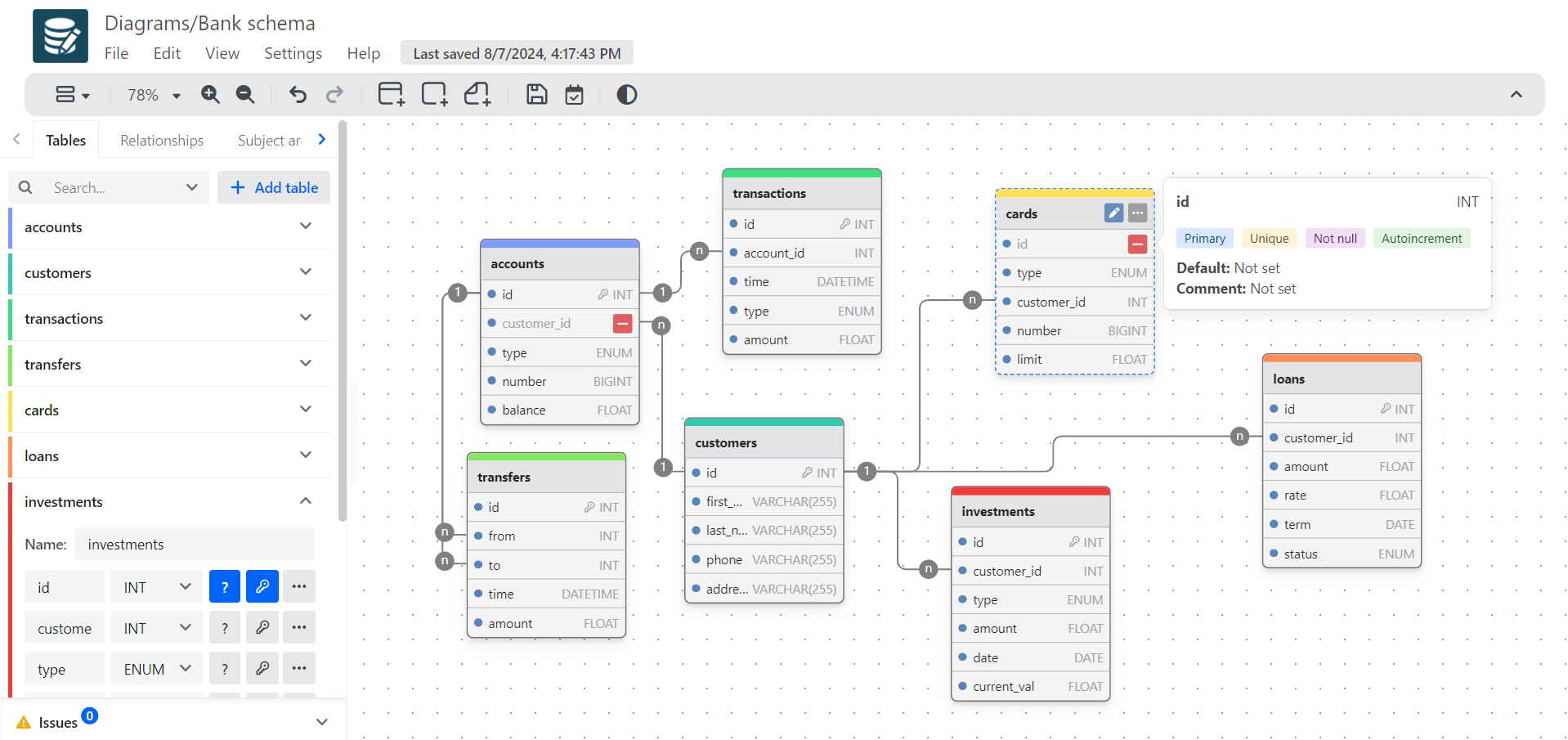
What is drawdb?
drawDB puts a database schema designer in the browser: you model tables, fields, indexes and foreign-key relationships on an infinite canvas and get dialect-specific DDL out of it. Supported flavours are MySQL and PostgreSQL, plus MariaDB, SQLite, Microsoft SQL Server, Oracle (still beta) and a portable Generic option. Feeding it an existing DDL script reverse-engineers the diagram, and work can leave the app as SQL, DBML, JSON, Markdown, Mermaid, or an image (PNG, JPEG, SVG, PDF). The open-source edition keeps diagrams and custom templates in browser storage, so nothing is uploaded; sharing snapshots uses GitHub Gist instead of a live sync, and connecting your own drawdb-server backend enables richer sharing. Running it yourself means cloning the repo for an npm dev or production build, or launching the published container image on port 80 (mapped to 3000) and passing VITE_BACKEND_URL at start — no rebuild required. Undo/redo history, templates, keyboard shortcuts, a presentation view and a configurable workspace round out the editor. Cloud sync, teams and permissions, live collaboration, version history with migrations, the AI schema assistant, API keys and an MCP server belong to the paid drawDB Pro service rather than this self-hosted app.
drawdb alternatives
 draw.iodraw.io is a JavaScript, client-side editor for general diagramming.Comparedraw.io with drawdb
 LibreDB StudioSelf-hosted, open-source SQL IDE covering 41 database engines in one browser tab, with OIDC SSO, RBAC, query auditing and an AI query agent — MIT licensed.CompareLibreDB Studio with drawdb
 OrcaQOrcaQ is a self-hosted, open-source database editor for PostgreSQL, MySQL, MariaDB, Oracle, SQLite, and Redis with AI-assisted querying and a dark native workspace.CompareOrcaQ with drawdb
 next-ai-draw-ioOpen-source, self-hosted draw.io canvas where an AI turns chat prompts into diagrams you can edit, version and export, across 25 model providers.Comparenext-ai-draw-io with drawdb
 DbGateSelf-hosted, open-source (GPL-3.0) database client for engines like MySQL, Postgres, SQL Server, Mongo and Redis, shipped as desktop apps or a Docker/NPM web UI.CompareDbGate with drawdb
 excalidrawExcalidraw is a self-hosted, open-source virtual whiteboard for hand-drawn diagrams with infinite canvas, dark mode, and PWA support.Compareexcalidraw with drawdb
- WebDBOpen-source self-hosted database IDE with a Monaco query editor, ERD, 200-step version rollback and data generation for PostgreSQL, MySQL, MariaDB and MongoDB.CompareWebDB with drawdb
 AzimuttOpen-source, self-hosted database explorer and Next-Gen ERD: design schemas with AML, document tables and columns, browse data and lint large, messy databases.CompareAzimutt with drawdb
Should you self-host drawdb?
drawdb scores 80/100 on selfhost.directory (how scoring works) and ranks #1 of 12 in Diagramming. It has 40 291 GitHub stars, +450 in the last 30 days.
It shipped 1 stable release in the past year. The latest, v1.9.0, came out on 1 November 2026.
Setup is easy: most people get it running in one sitting. An official Docker image is available. It is AGPL-3.0-licensed and written mostly in JavaScript.
Its closest alternative on selfhost.directory is next-ai-draw-io (80/100, 36 840 stars). drawdb scores higher overall. See drawdb vs next-ai-draw-io side by side.
Features
- AI schema assistantPro feature; docs list AI, API keys and MCP under drawDB Pro.
- Custom data types
- DBML import and export
- ER Diagram Editor
- Image and document export
- Keyboard Shortcuts
- Local browser storage
- Multiple SQL dialectsOracle SQL is marked Beta in the docs.
- Presentation Mode
- Real-Time CollaborationdrawDB Pro (hosted) feature, not part of the self-hosted open-source editor.
- Reverse engineer schema from DDL
- Sharing via Gist snapshot
- SQL DDL generation
- Templates
- Version history and migrationsDocumented under drawDB Pro, not the browser-local OSS editor.
drawdb README


DrawDB is a robust and user-friendly database entity relationship diagram (ERD) editor right in your browser. Build diagrams with a few clicks, export and import SQL scripts, generate migrations, customize your editor, and more without creating an account. See the full set of features on here.
FAQ
Do I need an account to try it?
No — you can open the editor and start drawing immediately; sign-in is only needed for Pro features like cloud sync, sharing and team collaboration.
Can I import an existing schema?
Yes — paste or upload a DDL script and drawDB rebuilds the diagram for you. Output can go to SQL, DBML, JSON or an image.
Which databases does it support?
MySQL, PostgreSQL, SQLite, MariaDB, SQL Server, Oracle and a generic dialect, each with DDL import (script to diagram) and export (diagram to DDL).
Where are my diagrams saved?
The free editor keeps diagrams in your browser's IndexedDB, so back them up before clearing browser data. With Pro they sync to the cloud and across your team.
Is drawDB free?
Yes — it is free and open source, and the full editor runs in the browser with no account. Pro adds cloud storage, teams and real-time collaboration.
More in Diagramming
- draw.iodraw.io is a JavaScript, client-side editor for general diagramming.
 DrawnixSelf-hosted, open-source all-in-one whiteboard with mind maps, flowcharts and freehand drawing, built on the Plait framework.
 ExcaliDashExcaliDash is a self-hosted, open-source Excalidraw workspace adding collections, real-time collaboration, version history, and backups with local or OIDC auth.
- excalidrawExcalidraw is a self-hosted, open-source virtual whiteboard for hand-drawn diagrams with infinite canvas, dark mode, and PWA support.
 excalidraw-collaborationSelf-hosted Excalidraw stack for live collaborative drawing: an open-source Docker Compose setup with frontend, scene storage and a Go room server.
 flowchart.funEasily generate flowcharts and diagrams from text ⿻
 FossFLOWFossFLOW is a self-hosted, open-source PWA for creating isometric infrastructure diagrams with drag-and-drop editing, connector routing, and JSON import/export.
 krokiOpen-source, self-hosted diagram API that turns text into images using 30+ engines such as PlantUML, Mermaid, GraphViz and D2, deployed with Docker or Kubernetes.
 mermaid-live-editorSelf-hosted, open-source web editor for Mermaid diagrams with live preview, SVG and PNG export, and shareable view or edit links.
- next-ai-draw-ioOpen-source, self-hosted draw.io canvas where an AI turns chat prompts into diagrams you can edit, version and export, across 25 model providers.
 The-One-FileSelf-hosted offline-first network topology editor in a single HTML file with optional Docker collaboration.
 astradrawAstraDraw is a self-hosted, open-source whiteboard forked from Excalidraw with workspaces, role-based access, real-time collaboration, and video walkthroughs.
0 comments