
Self-host Dozzle
v11.4.3Real-time container logs in your browser
- Stars
- 14 926
- Ports
- 8080 (Dozzle web UI and API (server mode)), 7007 (Agent mode listener that a main Dozzle instance connects to)
amir20/dozzle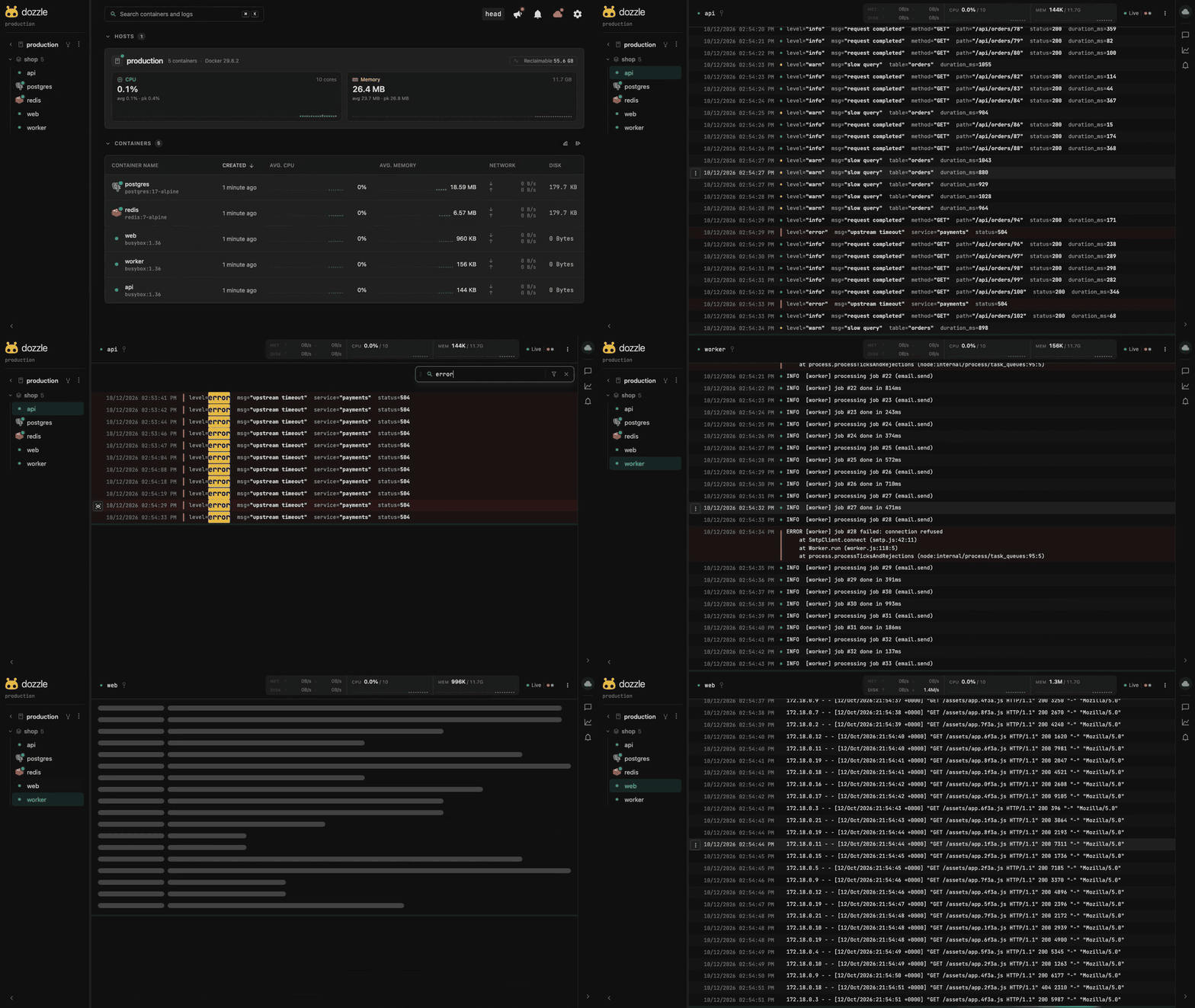
What is Dozzle?
Dozzle is a lightweight web app for watching container logs as they happen. It streams logs over SSE/WebSocket instead of storing them, so it stays a single binary with no database. Alongside live log tailing it shows CPU, memory, network and disk stats per container and host, supports fuzzy name search, regex searching and an embedded SQL query engine, and can open several containers side by side. It runs against a local Docker socket, Docker Swarm, Kubernetes, or Podman, and agent mode or TCP remote hosts let one UI cover many machines. Newer versions add container actions (start, stop, restart), safe image updates on a schedule, browser shell access, log/metric/event alert rules with webhook, Slack, Discord and ntfy delivery, and an MCP endpoint for AI coding assistants. Authentication is optional: file-based users.yml, GitHub/OIDC sign-in, or a forward-proxy such as Authelia. Deploy it with a single docker run or compose service mounting /var/run/docker.sock and a /data volume; Docker Engine 19.03+ is required, offline log search is not supported, and Dozzle Cloud is an optional paid managed layer.
Dozzle alternatives
 DockTailOpen-source, self-hosted Go agent that watches Docker labels and publishes containers as native Tailscale Services, with HTTPS, TCP, PROXY protocol and Funnel support.CompareDockTail with Dozzle
 Traefik Log DashboardSelf-hosted, open-source dashboard for analyzing Traefik logs with IP geolocation, status codes, service metrics, and 3D globe visualization. Runs via Docker Compose.CompareTraefik Log Dashboard with Dozzle
 maintenantSelf-hosted monitoring auto-discovering Docker, Swarm, and Kubernetes containers, endpoints, TLS certs, cron jobs, and host resources from one Go binary (~100MB).Comparemaintenant with Dozzle
 Dock-DploySelf-hosted web app for visually building Docker Compose files, generating Homepage configs, and creating schedulers in cron, GitHub Actions, and systemd formats.CompareDock-Dploy with Dozzle
 statainerSelf-hosted open-source web UI for Docker monitoring with live metrics, Compose grouping, updates, and multi-provider notifications.Comparestatainer with Dozzle
 tugtainerTugtainer is a self-hosted, open-source tool that automates Docker container updates across multiple hosts with a web UI, scheduled checks, and notifications.Comparetugtainer with Dozzle
 usulnetSelf-hosted Docker management platform with built-in OSINT recon, metadata hygiene, and infrastructure tooling — all in a single AGPL-3.0 binary.Compareusulnet with Dozzle
 drydockSelf-hosted open-source container update monitor watching 23 registries with 21 notification and action integrations.Comparedrydock with Dozzle
Should you self-host Dozzle?
Dozzle scores 78/100 on selfhost.directory (how scoring works) and ranks #1 of 13 in Log Management. It has 14 926 GitHub stars, +335 in the last 30 days.
It shipped 47 stable releases in the past year. The latest, v11.4.3, came out on 13 November 2026. New versions land roughly every 4 days.
Setup is easy: most people get it running in one sitting. An official Docker image is available. It is MIT-licensed and written mostly in Go.
Its closest alternative on selfhost.directory is fluentd (73/100, 13 614 stars). Dozzle scores higher overall. See Dozzle vs fluentd side by side.
Features
- Alerts & webhooks
- Container ActionsDisabled by default; enable with DOZZLE_ENABLE_ACTIONS.
- Fuzzy container search
- Live container & host metrics
- MCP endpoint for AI assistantsDisabled by default; enable with DOZZLE_ENABLE_MCP.
- Multi-Host Monitoring
- Multi-user access control
- Offline log searchUse a log aggregation product for full search.
- Real-time log streaming
- Regex log search
- Split-screen log views
- SQL log queries
- Swarm and Kubernetes support
- Web terminal (shell access)Disabled by default; enable with DOZZLE_ENABLE_SHELL.
Dozzle README

Dozzle - dozzle.dev
Dozzle is a lightweight, web-based application for monitoring Docker logs in real time. It doesn't store any log files—it's designed purely for live log viewing.

FAQ
Why doesn't Dozzle support notifications for Slack, Discord, Telegram, email, etc. directly?
By design Dozzle ships generic webhooks with payload templates instead of per-provider integrations, so any HTTP endpoint works. Richer provider channels are offered through Dozzle Cloud.
Is there a way to sync my settings across multiple instances of Dozzle?
Single-user settings live in browser localStorage. Enable multi-user authentication so settings are stored per username under /data and sync across instances.
Why am I only seeing running containers? How do I see stopped containers?
Running-only is the default to keep the list short. Turn on the Show Stopped Containers option in settings.
I am seeing host not found error in the logs. How do I fix it?
Mainly a Podman issue, since Podman's /info returns a random UUID each call. Dozzle now derives a stable ID; if two Podman hosts collide, set DOZZLE_HOST_ID on one of them and restart the server.
I am seeing duplicate hosts error in the logs. How do I fix it?
Hosts restored from VM backups can share a Docker engine ID. Remove /var/lib/docker/engine-id, which is created when the daemon starts, so a unique ID is generated.
I installed Dozzle but memory consumption doesn't show up!
This is usually an ARM-device issue where the Docker API returns no memory usage. Enable cgroups by adding cgroup_enable=cpuset cgroup_enable=memory cgroup_memory=1 to /boot/cmdline.txt and reboot.
How can I get a direct link to a container by name?
Use the /show?name=... route, which resolves the name and forwards to the container page; several comma-separated names open a merged view, and host=<host id> limits matching to one host.
I installed Dozzle, but logs are slow or they never load. What do I do?
Dozzle streams over SSE, so a buffering or compressing reverse proxy can hang it. Disable buffering (nginx) or exclude text/event-stream from compression (Traefik).
What is stored in /data and how do I back it up?
The users.yml auth file, notification rules and delivery state, per-user settings in multi-user mode and a few internal files. The directory is usually well under 10 MB and can be backed up with tar or rsync.
My platform wraps the container entrypoint and Dozzle fails with "no such file or directory"
The default image is FROM scratch with no shell, so entrypoint wrappers (e.g. Unraid's Tailscale toggle) fail. Use the alpine variant, which is the same binary on an Alpine base.
How do I upgrade Dozzle?
Pull the new image and recreate the container, keeping the /data volume mounted so settings survive. Pin a specific tag instead of latest in production.
Dozzle fails to start with "client version 1.x is too new" — what does this mean?
Dozzle needs Docker Engine 19.03+ (API 1.40+); older daemons are unsupported by the Docker SDK. Upgrade Docker, or temporarily pin Dozzle to v10.5.2 or earlier.
More in Log Management
 Fail2Ban-ReportSelf-hosted web dashboard aggregating Fail2Ban logs from multiple servers into searchable JSON reports with UFW blocklist sync and role-based auth.
 fluentdFluentd is a self-hosted, open-source data collector that unifies logging infrastructure with 500+ plugins for sources and destinations.
 GeoMetrikksGeoMetrikks is a self-hosted, open-source service that tails reverse proxy logs, performs GeoLite2 lookups, and displays requests on a live MapLibre map with analytics.
 gigapipeSelf-hosted open-source observability backend merging four telemetry types into ClickHouse with Loki, Prometheus, Tempo and Pyroscope protocol support.
 grafanaGrafana is a self-hosted, open-source observability platform for querying, visualizing, and alerting on telemetry data from many sources.
 graylogSelf-hosted open-source log management and SIEM server: aggregate and search logs, transform them in pipelines, alert and build dashboards.
 hertzbeatApache HertzBeat is a self-hosted, open-source observability system unifying agentless metrics and logs collection, alerting, and notification dispatch.
 highlightSelf-hosted open-source monitoring platform combining session replay, error monitoring, logging and distributed tracing, with Docker deployment and dozens of client SDKs.
 howlerHowler is a self-hosted log monitor that watches files and sends alerts to Discord, Gotify, or Slack. Runs via Docker or Java JAR with a web UI.
 hyperdxSelf-hosted, open-source observability platform unifying logs, metrics, traces and session replays on any ClickHouse cluster, with ingestion through OpenTelemetry.
 logarrLogarr is a self-hosted, open-source PHP web app that consolidates and displays log files in a single-page interface for easy monitoring.
 LogchefLightweight, single-binary log analytics interface for ClickHouse, focused on high-performance querying and visualization
0 comments