
Self-host ddns-go
v6.17.8Lightweight dynamic DNS updater with web UI and webhooks
docker run -d --name ddns-go --restart=always --net=host -v /opt/ddns-go:/root jeessy/ddns-go- Stars
- 17 548
- Port
- 9876 (Web configuration UI)
jeessy/ddns-go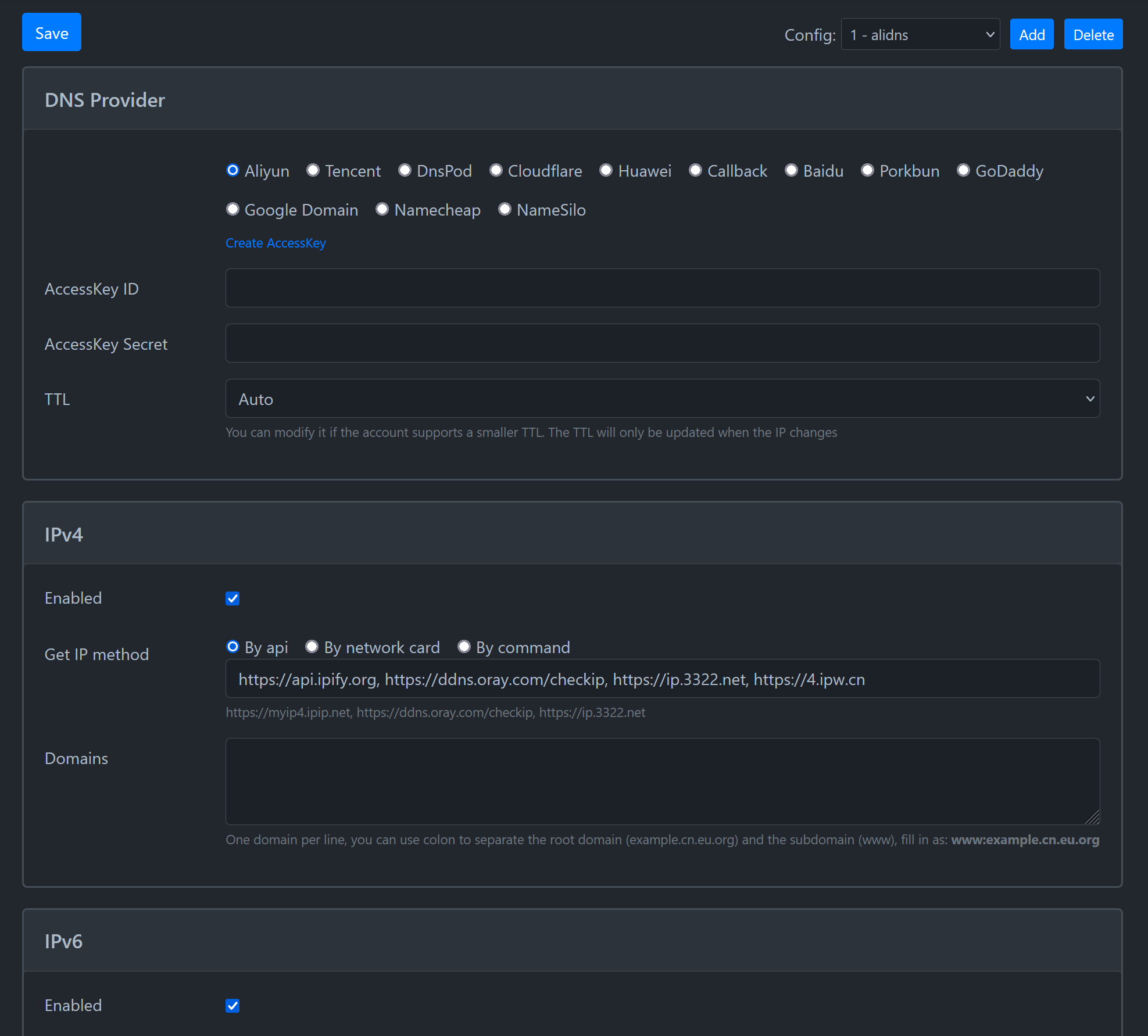
What is ddns-go?
ddns-go is an open-source dynamic DNS client written in Go that figures out your host's external IPv4/IPv6 address and keeps your domain records in sync at the DNS provider. It covers more than twenty providers out of the box (Cloudflare, Dnspod, Aliyun, Porkbun, GoDaddy, Namecheap, deSEC and others), lets you configure several providers and multiple domains — including multi-level subdomains — at once, gets the current IP from an API, a network interface or a shell command, and honors TTL settings. All setup happens in a built-in web admin interface that listens on port 9876 by default and also shows the last 50 log lines; exposure to the public internet is switched off by default, and the project recommends fronting it with a reverse proxy like Nginx over HTTPS if you do enable access. Whenever a domain update succeeds or fails, configured webhooks are called (GET if the request body is empty, otherwise POST) with template variables such as the new address, the update result and the domain list; a generic callback mechanism (with #{ip}, #{domain}, #{recordType}, #{ttl}) lets you drive DNS services that have no built-in adapter. Self-hosting is a single docker run line with host networking — images live on Docker Hub and ghcr.io — or a binary from GitHub Releases registered as a system service via ddns-go -s install on Linux, macOS or Windows (ARM, x86 and RISC-V builds exist). Sync runs every five minutes unless you change it with CLI flags, and a -resetPassword flag recovers a lost admin password.
ddns-go alternatives
 mikrotik-dnsSelf-hosted DNS analytics dashboard collecting MikroTik logs via UDP with real-time React UI, domain/client analysis, and live DNS search.Comparemikrotik-dns with ddns-go
 Technitium DNS ServerSelf-hosted, open-source authoritative and recursive DNS server with a web console, DNS sinkhole ad blocking, DoH/DoT/DoQ, and a built-in DHCP server.CompareTechnitium DNS Server with ddns-go
 corednsSelf-hosted, open-source DNS server and forwarder built from chained plugins: DoT/DoH/DoQ, DNSSEC, caching, and Kubernetes or etcd service discovery.Comparecoredns with ddns-go
 autoxposeSelf-hosted open-source tool that auto-creates DNS records and configures reverse proxies with SSL for Docker containers using labels.Compareautoxpose with ddns-go
 domain-watchdogSelf-hosted open-source domain monitor using RDAP to track history, alert on changes, and auto-backorder expiring domains via registrar APIs.Comparedomain-watchdog with ddns-go
 pdnsPowerDNS is an open-source DNS suite with an authoritative server, a recursive resolver and dnsdist loadbalancer, self-hosted via packages, Docker images or source.Comparepdns with ddns-go
 PowerDNS-AdminOpen-source, self-hosted web interface for administering PowerDNS forward and reverse zones, with role-based access, SAML/LDAP/OAuth sign-in, TOTP 2FA and DynDNS support.ComparePowerDNS-Admin with ddns-go
 ddns-route53Dynamic DNS for Amazon Route 53 on a time-based scheduleCompareddns-route53 with ddns-go
Should you self-host ddns-go?
ddns-go scores 74/100 on selfhost.directory (how scoring works) and ranks #7 of 41 in DNS. It has 17 548 GitHub stars, +138 in the last 30 days.
It shipped 16 stable releases in the past year. The latest, v6.17.8, came out on 9 November 2026. New versions land roughly every 3 days.
Setup is easy: most people get it running in one sitting. An official Docker image is available. It is MIT-licensed and written mostly in Go.
Its closest alternative on selfhost.directory is Pi-hole (87/100, 61 908 stars). It scores higher overall, so compare the two before you pick. See ddns-go vs Pi-hole side by side.
Features
- CLI password reset
- Configurable sync interval
- Custom callback for extra DNS providers
- Custom provider parameters (geo/multi-IP)
- Dynamic DNS updates (IPv4/IPv6)
- In-app log viewer
- IP detection via API, interface or command
- Multi-level domain support
- Multiple DNS providers
- Multiple domains
- Restrict web UI from public network
- Runs as a system service
- TTL control
- Web-based configuration UI
- Webhook Notifications
ddns-go README
FAQ
On Android it fails with [::1]:53: read: connection refused?
Pass a DNS server explicitly at install, e.g. ./ddns-go -s install -dns 114.114.114.114.
"For security, when accessed via the public network the first configuration is only allowed within 5 minutes of service start" when saving?
Restart ddns-go, keep the page open and save again, or save while accessing it through the LAN IP.
Is DynV6 supported?
Yes, indirectly: choose Callback as the DNS provider, point the callback URL at DynV6's update API with your token, and list your domains.
Cloudflare API error code 1038?
Cloudflare does not allow updating DNS via API for Freenom free TLDs (.cf, .ga, .gq, .ml, .tk); switch to another TLD or move the nameservers to a provider that supports it.
CPU is ARMv7 Processor rev 0 (v7l) and the armv7 build does not run?
Download the armv5 architecture build of ddns-go instead.
Error x509: certificate signed by unknown authority?
Install a trusted certificate, or add the -skipVerify option at startup to skip certificate verification.
After enabling "deny public access" the web UI is unreachable via the domain?
Only networks following RFC 1918 private ranges are allowed: 10.0.0.0-10.255.255.255, 172.16.0.0-172.31.255.255 and 192.168.0.0-192.168.255.255.
Forgot the username or password?
The username and password are stored in the configuration file, by default .ddns_go_config.yaml in the current user's directory.
Aliyun error code InvalidTimeStamp.Expired?
Your machine's clock differs from Aliyun's servers by more than 15 minutes; correct your system time.
More in DNS
 ddns-updaterOpen-source self-hosted DDNS client that keeps A and AAAA records current for many DNS providers, with a web UI, Shoutrrr notifications and a 12MB Docker image.
 DesignateDesignate is a self-hosted, open-source DNSaaS for OpenStack with REST API, CLI, and Horizon dashboard for DNS zone management.
 dnsboxDNSBox is a self-hosted DNS server that issues Let's Encrypt SSL certs for any public IP without a domain, enabling instant HTTPS for servers and IoT devices.
 dnscrypt-proxySelf-hosted, open-source DNS proxy for your machine or router: encrypts queries with DNSCrypt, DoH and ODoH, filters ads/malware, caches and balances resolvers.
 dnsweaverSelf-hosted DNS automation for homelabs: reads from 7 sources, writes to 12 providers with split-horizon DNS.
 docker-adguardMinimal, security-hardened Docker image for self-hosted AdGuard Home ad blocking. Runs rootless, distroless from scratch, with health checks and CVE scanning.
 docker-duckdnsA self-hosted Docker container that automatically updates DuckDNS subdomains with your current public IP address every 5 minutes, supporting both IPv4 and IPv6.
 docker-dyndnsSelf-hosted dynamic DNS server using BIND9 and Go API in Docker. Manage custom subdomains with basic auth via browser, curl, or router.
 docker-pi-holeSelf-hosted, open-source Docker image of Pi-hole: network-wide DNS ad blocking with a web dashboard, query log, blocklists, built-in DHCP server and a REST API.
 docker-traefik-cloudflare-companionSelf-hosted Docker companion that automatically creates and updates Cloudflare CNAME records for containers managed by Traefik reverse proxy.
 DockFlareOpen-source, self-hosted control plane turning Docker labels into Cloudflare Tunnel routes, DNS entries and Zero Trust policies, with an optional sovereign email suite.
 DomainMODDomainMOD is an open source application written in PHP & MySQL used to manage your domains and other internet assets in a central location. DomainMOD also includes a Data Warehouse framework that allows you to import your web server data so that you can view, export, and report on your live data.
0 comments