
Self-host ConvertX
v0.20.0Self-hosted online file converter supporting 1000+ formats
docker run -p 3000:3000 -e PUID=1000 -e PGID=1000 -v ./data:/app/data ghcr.io/c4illin/convertx- Stars
- 19 710
- Port
- 3000 (Application HTTP port)
ghcr.io/c4illin/convertx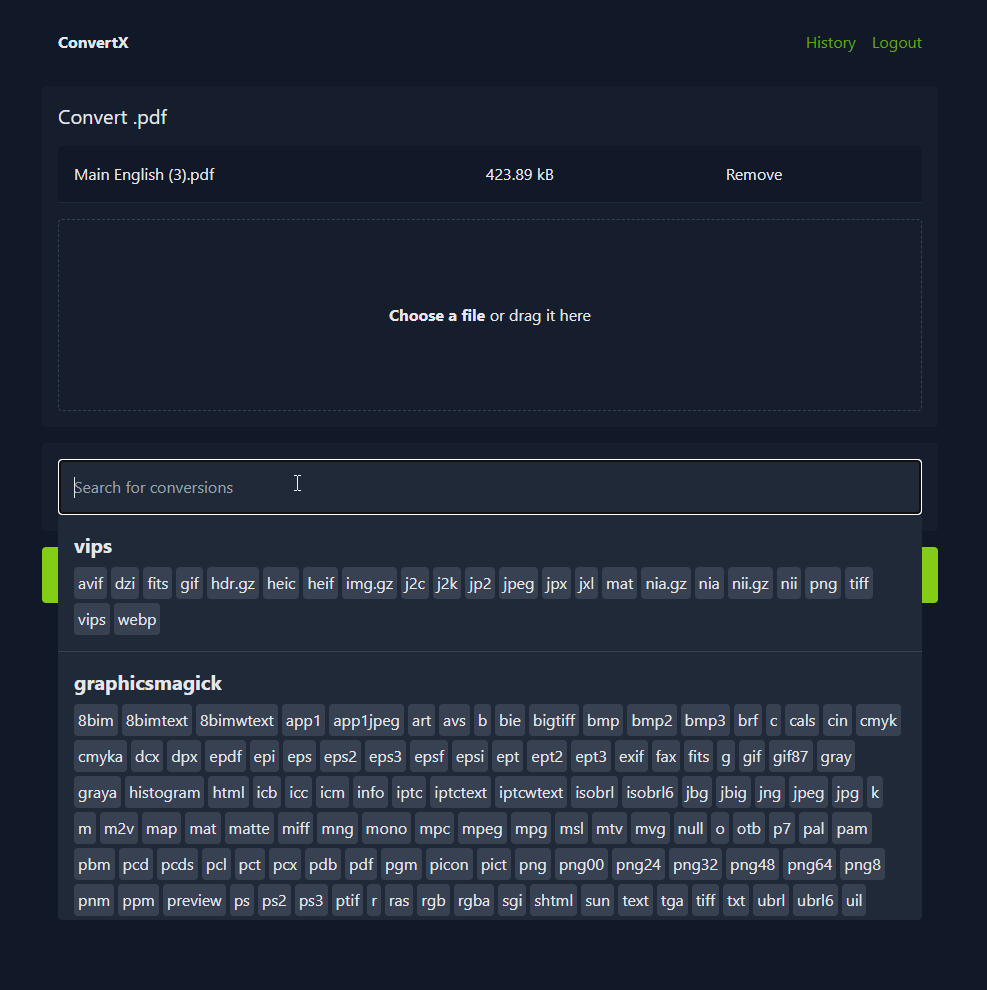
What is ConvertX?
ConvertX is a self-hosted online file converter application that handles more than 1000 different file formats. You can use it to convert files between various formats including documents, images, videos, e-books, and 3D assets. The software uses established open-source tools like FFmpeg, Calibre, LibreOffice, Pandoc, and ImageMagick behind a web interface. User accounts support password protection, batch processing, and configurable cleanup policies for temporary files.
ConvertX alternatives
 OmniToolsA self-hosted, open-source browser toolbox of image, PDF, video, audio, text, list and data tools where every file is processed on your own device.CompareOmniTools with ConvertX
 FileWizardSelf-hosted web app for file conversion (180+ formats), OCR, and audio transcription with local Whisper. Runs via Docker or Python 3.12.CompareFileWizard with ConvertX
 transmuteFree open-source self-hosted file converter and compressor for images, video, audio, data, documents, and 3D models with no file size limits or watermarks.Comparetransmute with ConvertX
 SnapOtterOpen-source, self-hosted file-processing suite with 200+ image, video, audio, PDF and document tools, local AI, a REST API and pipelines.CompareSnapOtter with ConvertX
 pingvin-share-xOpen-source self-hosted file sharing platform and WeTransfer alternative with link sharing, expiration, passwords, ClamAV scanning, S3 support, and OIDC/LDAP auth.Comparepingvin-share-x with ConvertX
 folderhostA self-hosted, open-source cloud platform offering file sharing, real-time collaboration, and user management in a ~19MB binary as a lightweight Nextcloud alternativeComparefolderhost with ConvertX
 ReubahSelf-hosted web tool for converting documents and processing images with support for multiple formats including JPG, PNG, WebP, PDF, DOCX, and more.CompareReubah with ConvertX
 drivebaseDrivebase is a self-hosted, open-source file manager unifying Google Drive, S3, Dropbox, and local files into a desktop-like web UI with real-time transfers.Comparedrivebase with ConvertX
Should you self-host ConvertX?
ConvertX scores 77/100 on selfhost.directory (how scoring works) and ranks #1 of 10 in File Conversion. It has 19 710 GitHub stars, +584 in the last 30 days.
It shipped 6 stable releases in the past year. The latest, v0.20.0, came out on 28 October 2026. New versions land roughly every 5 weeks.
Setup is moderate: expect some configuration beyond a single command. An official Docker image is available. It is AGPL-3.0-licensed and written mostly in Typescript.
Its closest alternative on selfhost.directory is Vert (69/100, 16 253 stars). ConvertX scores higher overall. See ConvertX vs Vert side by side.
Features
- 3D asset conversion
- Batch file processing
- Data file conversion
- Document Conversion
- E-book Conversion
- HEIF support
- Image Conversion
- JPEG XL support
- LaTeX conversion
- Multi-Account Support
- Multi-format file conversion
- Password Protection
- PDF conversion
- Vector image conversion
- Video Transcoding
ConvertX README


A self-hosted online file converter. Supports over a thousand different formats. Written with TypeScript, Bun and Elysia.
- Convert files to different formats
- Process multiple files at once
- Password protection
- Multiple accounts
| Converter | Use case | Converts from | Converts to |
|---|---|---|---|
| Inkscape | Vector images | 7 | 17 |
| libjxl | JPEG XL | 11 | 11 |
| resvg | SVG | 1 | 1 |
| Vips | Images | 45 | 23 |
| libheif | HEIF | 2 | 4 |
| XeLaTeX | LaTeX | 1 | 1 |
| Calibre | E-books | 26 | 19 |
| LibreOffice | Documents | 41 | 22 |
| Dasel | Data Files | 5 | 4 |
| DjVuLibre | Documents | 2 | 2 |
| Pandoc | Documents | 43 | 65 |
| msgconvert | Outlook | 1 | 1 |
| VCF to CSV | Contacts | 1 | 1 |
| dvisvgm | Vector images | 4 | 2 |
| ImageMagick | Images | 245 | 183 |
| GraphicsMagick | Images | 167 | 130 |
| Assimp | 3D Assets | 77 | 23 |
| FFmpeg | Video | ~472 | ~199 |
| Potrace | Raster to vector | 4 | 11 |
| VTracer | Raster to vector | 8 | 1 |
| Markitdown | Documents | 6 | 1 |
| pdftops | Documents | 1 | 2 |
Any missing converter? Open an issue or pull request!
Warning
If you can't login, make sure you are accessing the service over localhost or https otherwise set HTTP_ALLOWED=true
# docker-compose.yml
services:
  convertx:
    image: ghcr.io/c4illin/convertx
    container_name: convertx
    restart: unless-stopped
    ports:
      - "3000:3000"
    environment:
      - PUID=1000 # user id for file permissions (should match your host user id)
      - JWT_SECRET=aLongAndSecretStringUsedToSignTheJSONWebToken1234 # will use randomUUID() if unset
      # - HTTP_ALLOWED=true # uncomment this if accessing it over a non-https connection
    volumes:
      - ./data:/app/data
or
docker run -p 3000:3000 -e PUID=1000 -e PGID=1000 -v ./data:/app/data ghcr.io/c4illin/convertx
Ensure PUID and PGID match your host user (id -u and id -g) to avoid permission issues on the mapped ./data volume. If you get unable to open database file, verify the directory permissions or run chown -R $USER:$USER path on the path you choose.
Then visit http://localhost:3000 in your browser and create your account. Don't leave it unconfigured and open, as anyone can register the first account.
All are optional, JWT_SECRET is recommended to be set.
Warning
Never expose the service to the internet with ALLOW_UNAUTHENTICATED or ACCOUNT_REGISTRATION true. Only allow users you trust to access the service.
| Name | Default | Description |
|---|---|---|
| JWT_SECRET | when unset it will use the value from randomUUID() | A long and secret string used to sign the JSON Web Token |
| PUID | 0 (root) | User ID to run the application process as (it first uses root to chown the files) |
| PGID | PUID if unset, root if both unset | Group ID to run the application process as |
| UMASK | 002 (when PUID is set) | File creation mask for processes and created files |
| ACCOUNT_REGISTRATION | false | Allow users to register accounts |
| HTTP_ALLOWED | false | Allow HTTP connections, only set this to true locally |
| ALLOW_UNAUTHENTICATED | false | Allow unauthenticated users to use the service, only set this to true locally |
| AUTO_DELETE_EVERY_N_HOURS | 24 | Checks every n hours for files older then n hours and deletes them, set to 0 to disable |
| WEBROOT | The address to the root path setting this to "/convert" will serve the website on "example.com/convert/" | |
| BRANDING | ConvertX | Custom string that allows you to change the display name of the website in the header (max 26 characters) |
| FFMPEG_ARGS | Arguments to pass to the input file of ffmpeg, e.g. -hwaccel vaapi. See #190 for more info about hw-acceleration. |
|
| FFMPEG_OUTPUT_ARGS | Arguments to pass to the output of ffmpeg, e.g. -preset veryfast |
|
| HIDE_HISTORY | false | Hide the history page |
| LANGUAGE | en | Language to format date strings in, specified as a BCP 47 language tag |
| UNAUTHENTICATED_USER_SHARING | false | Shares conversion history between all unauthenticated users |
| MAX_CONVERT_PROCESS | 0 | Maximum number of concurrent conversion processes allowed. Set to 0 for unlimited. |
| PORT | 3000 | Application listen port |
There is a :latest tag that is updated with every release and a :main tag that is updated with every push to the main branch. :latest is recommended for normal use.
The image is available on GitHub Container Registry and Docker Hub.
| Image | What it is |
|---|---|
image: ghcr.io/c4illin/convertx |
The latest release on ghcr |
image: ghcr.io/c4illin/convertx:main |
The latest commit on ghcr |
image: c4illin/convertx |
The latest release on docker hub |
image: c4illin/convertx:main |
The latest commit on docker hub |
Note
These are written by other people, and may be outdated, incorrect or wrong.
Tutorial in french: https://belginux.com/installer-convertx-avec-docker/
Tutorial in chinese: https://xzllll.com/24092901/
Tutorial in polish: https://www.kreatywnyprogramista.pl/convertx-lokalny-konwerter-plikow

- Install Bun and Git
- Clone the repository
bun installbun run dev
Pull requests are welcome! See open issues for the list of todos. The ones tagged with "converter request" are quite easy. Help with docs and cleaning up in issues are also very welcome!
Use conventional commits for commit messages.
More in File Conversion
 DigitranscodeSelf-hosted audio and video converter that transcodes in the browser with FFmpeg.wasm — nothing is uploaded. Offers bitrate, sample-rate and resolution options.
- FileWizardSelf-hosted web app for file conversion (180+ formats), OCR, and audio transcription with local Whisper. Runs via Docker or Python 3.12.
 GotenbergSelf-hosted open-source Docker API that converts URLs, HTML, Markdown, and 100+ office formats into PDFs, and merges, splits, encrypts or watermarks them.
 HRCloud2HRCloud2 is an open-source, self-hosted cloud storage platform with file conversion, OCR, media streaming, virus scanning, and a voice-enabled personal assistant.
 HRConvert2Open-source, self-hosted file conversion web app: 488 formats, 26 languages, bubblewrap-sandboxed tools, no sign-up, no tracking, no database.
 Kindle Comic ConverterOpen-source, self-hosted comic and manga converter turning CBZ, PDF or image folders into margin-free MOBI, EPUB, KEPUB or PDF for Kindle, Kobo and reMarkable readers.
 MazanokeSelf-hosted, open-source image optimizer that compresses, resizes and converts JPG, PNG, WebP, HEIC and more entirely on-device, with offline PWA use and EXIF stripping.
 music-geshizhuanhuanSelf-hosted tool decrypting NCM, QMC, KGM, KWM files from major Chinese music platforms into standard audio formats via local web UI and CLI.
- OmniToolsA self-hosted, open-source browser toolbox of image, PDF, video, audio, text, list and data tools where every file is processed on your own device.
- ReubahSelf-hosted web tool for converting documents and processing images with support for multiple formats including JPG, PNG, WebP, PDF, DOCX, and more.
- SnapOtterOpen-source, self-hosted file-processing suite with 200+ image, video, audio, PDF and document tools, local AI, a REST API and pipelines.
 StemDeckOpen-source stem separator and practice studio for musicians: split a song into six parts locally with Demucs, then mute, slow, loop and transpose it.
0 comments