
Self-host CodiMD
2.6.1Realtime collaborative markdown notes editor
docker-compose up -d- Stars
- 10 164
- Port
- 3000 (CodiMD web editor and API)
nabo.codimd.dev/hackmdio/hackmd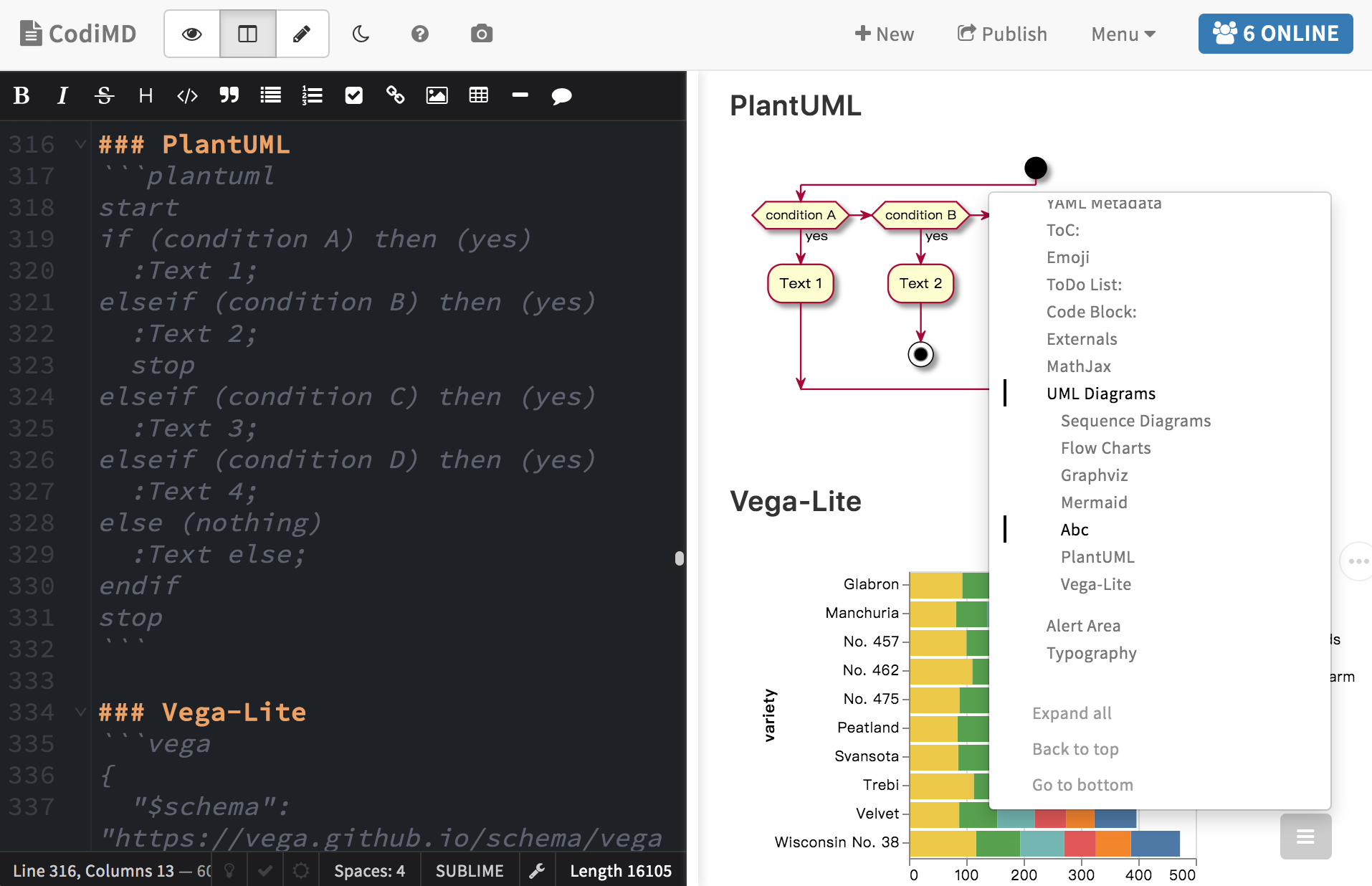
What is CodiMD?
CodiMD is the community edition of HackMD: the HackMD team publishes it under AGPL so anyone can run the collaborative markdown editor on their own hardware. Several people edit the same note live in the browser, and notes carry permission presets (freely, editable, locked, private and others) with a configurable default. Administrators can open the instance to anonymous readers or writers, allow new notes to appear simply by visiting an unused URL, and switch PDF export on or off. Picture uploads stay on the local disk or move to Imgur, Amazon S3, MinIO, or Azure Blob Storage, PlantUML graphics can be rendered by a server you choose, and profile pictures can come from Gravatar. Users log in with local email accounts, SAML, LDAP/Active Directory, generic OAuth2, or provider-specific OAuth for GitHub, GitLab, Google, Mattermost, Dropbox and friends. Deploy it with docker-compose next to PostgreSQL or MySQL (the container listens on 3000), or install from source with Node.js and npm; Kubernetes, Heroku and Scalingo recipes are also written up, while TLS is normally left to nginx, Apache or HAProxy. Nearly every knob is a CMD_* environment variable, with config.json kept for development. CodiMD is the reduced-feature sibling of commercial HackMD — book mode is not included — and building the web bundle wants about 2GB of RAM.
CodiMD alternatives
 kodboxkodbox is a self-hosted, open-source PHP file manager and private cloud drive: multi-storage mounting, fine-grained permissions, sharing, and online preview/edit.Comparekodbox with CodiMD
 salt.mdSelf-hosted open-source workspace with docs, databases, realtime collaboration, and built-in MCP server for AI agents — one Go binary with embedded SQLite.Comparesalt.md with CodiMD
 docmostSelf-hosted, open-source collaborative wiki with real-time editing, diagrams, AI features, and enterprise SSO as a Confluence/Notion alternative.Comparedocmost with CodiMD
 ColanodeOpen-source, local-first chat-and-docs workspace that stands in for Slack and Notion; self-hosted via Docker Compose or Helm with Postgres, Redis and object storage.CompareColanode with CodiMD
 DiaryMDSelf-hosted Markdown editor in Go and SolidJS with tabs, workspaces, blog, and themes — no database needed.CompareDiaryMD with CodiMD
 refmdSelf-hosted, open-source real-time collaborative Markdown workspace with Git sync, anonymous sharing, and Extism-powered plugin platform.Comparerefmd with CodiMD
 folderhostA self-hosted, open-source cloud platform offering file sharing, real-time collaboration, and user management in a ~19MB binary as a lightweight Nextcloud alternativeComparefolderhost with CodiMD
 DocsOpen-source collaborative text editor with live cursors, comments and version history — a self-hosted alternative to Notion or Google Docs, built on Django and React.CompareDocs with CodiMD
Should you self-host CodiMD?
CodiMD scores 68/100 on selfhost.directory (how scoring works) and ranks #12 of 83 in Notes & Editors. It has 10 164 GitHub stars, +9 in the last 30 days.
There was no stable release in the past 12 months, so check the repository's recent activity before you rely on it.
Setup is moderate: expect some configuration beyond a single command. An official Docker image is available. It is AGPL-3.0-licensed and written mostly in JavaScript.
Its closest alternative on selfhost.directory is Memos (85/100, 64 518 stars). It scores higher overall, so compare the two before you pick. See CodiMD vs Memos side by side.
Features
- Anonymous access control
- Book mode presentationCodiMD ships fewer features than HackMD; book mode is absent.
- Custom note URLs
- Markdown Notes
- PDF Export
- Per-note permission levels
- PlantUML diagrams
- Pluggable image storage
- Real-time collaborative editing
CodiMD README

CodiMD lets you collaborate in real-time with markdown. Built on HackMD source code, CodiMD lets you host and control your team's content with speed and ease.
More in Notes & Editors
 collabmdSelf-hosted realtime collaborative Markdown editor turning folders into shared workspaces with diagrams, git sync, comments, and MCP AI agent access.
 cowyoSelf-hosted pastebin with real-time collaborative editing, E2E encrypted private pages, password-encrypted blocks, page locking, publishing, and self-destructing notes.
 CrossnoteCrossnote is a self-hosted, open-source markdown note app in your browser. Notes are plain markdown files synced with any Git repo — no server, no account, offline.
 CrumbsCrumbs is a self-hosted, privacy-first note-taking app with rich Markdown, checklists, image attachments, full-text search, version history, and offline-first PWA.
 cryptgeonSelf-hosted open-source service for encrypted notes and files that self-destruct after viewing, with client-side encryption so the server cannot read contents.
 DailyTxTSelf-hosted encrypted diary web app with markdown, file uploads, map/GPX, templates, multi-user, and PWA — runs in Docker with no database.
 Deta SurfSelf-hosted, open-source AI notebook that organizes files, webpages, and generates notes from them with local-first data storage and support for local LLMs.
 DiarumDiarum is a self-hosted, open-source diary with one entry per day, Markdown, media uploads, AI reflections via RAG, and an MCP server — all in a single binary.
- DiaryMDSelf-hosted Markdown editor in Go and SolidJS with tabs, workspaces, blog, and themes — no database needed.
 DigiflashcardsSelf-hosted open-source flashcard app for making multimedia card sets with auto-generated quiz, writing and matching exercises, exportable as a standalone HTML page.
 DigimindmapOpen-source, self-hosted mind-mapping web app by La Digitale: shared maps guarded by a secret question, item notes, PNG and .dgm export, QR and embed sharing.
 DillingerOpen-source, self-hosted markdown editor built on Next.js with Monaco, live preview, cloud sync to GitHub and Dropbox, PDF export, and no account required.
0 comments