
Self-host chatwoot
v4.19.1Omnichannel customer support desk with a shared inbox
- Stars
- 39 060
- CPU
- 2 cores
- RAM
- 4GB
- Storage
- 20GB SSD
- Port
- 3000 (Rails web app server (dashboard, widget and API); the compose file binds it to 127.0.0.1 behind a proxy)
- Requires
- PostgreSQL, Redis
chatwoot/chatwoot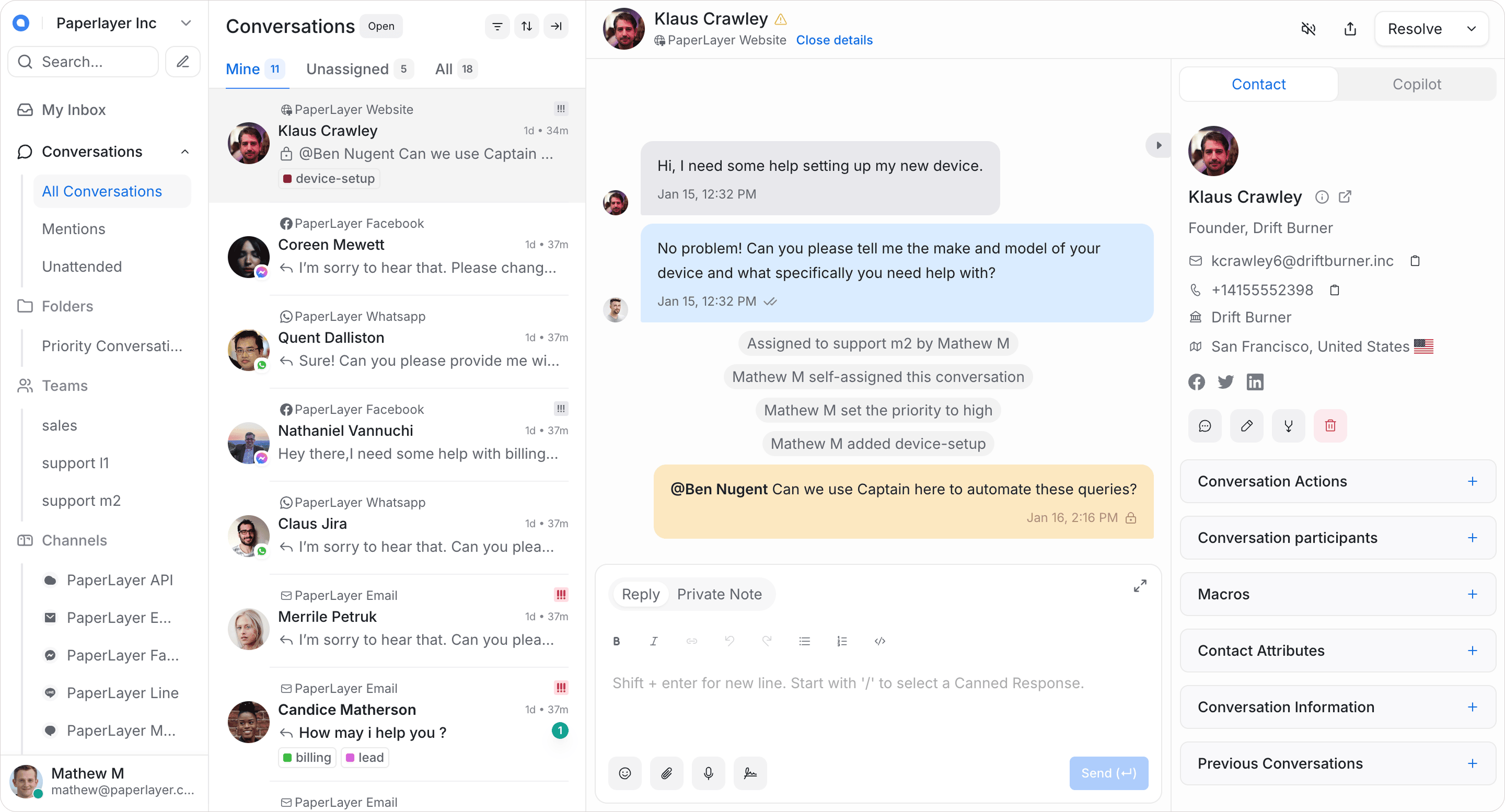
What is chatwoot?
Chatwoot is an open-source customer support platform that gathers conversations from a website live-chat widget, email, messaging and social networks into one shared inbox, so support teams can keep their customer data on their own servers instead of paying per seat for a hosted desk. Agents get private notes with @mentions, labels, canned replies, auto-assignment, business hours and auto-responders, custom views, and proactive campaigns; contacts carry profiles, segments, notes and custom attributes, and pre-chat forms collect details before a conversation opens. A Help Center portal for self-serve articles is built in, reports cover agents, inboxes, labels, teams, live activity and CSAT scores, and Slack, Dialogflow, Shopify, Linear plus real-time Google Translate tie into the workflow. Captain, the AI agent that drafts and automates replies, is reserved for paid self-hosted editions, along with voice calls, roles and permissions, agent capacity, SSO/SAML, SLA policies, audit logs and custom branding; the free Community Edition omits them. Deployment paths include a docker-compose stack of Rails web and Sidekiq worker containers over PostgreSQL and Redis, an install script for Ubuntu, a Helm chart, and one-click Heroku or DigitalOcean setups, typically fronted by Nginx with Let's Encrypt. The code is a Ruby on Rails and Vue application from Chatwoot Inc, MIT-licensed, with a new version landing around the first Monday of each month and the v4.x line current.
chatwoot alternatives
 WhatomateSelf-hosted WhatsApp Business Platform with calling, visual IVR, S3 recordings, chatbot, campaigns, and team inbox — all on your infrastructure.CompareWhatomate with chatwoot
 GOFLY LIVE CHATSelf-hosted, open-source live chat support system in Go and Vue with agent routing, a website widget, WebRTC, and WeChat/ChatGPT channels; needs only MySQL.CompareGOFLY LIVE CHAT with chatwoot
 NextChat✨ Zero-config AI chat assistant. No API key needed — sign up and instantly chat with GPT-5, Claude 4, Gemini 2.5, DeepSeek & 100+ top models. Pay-as-you-go saves you more. Available on Web, iOS, macOS, Android, Linux, Windows.CompareNextChat with chatwoot
 AgentaOpen-source, self-hosted workspace where teams build AI agents by chatting, run them in Slack, Telegram or WhatsApp, and schedule automations on any LLM.CompareAgenta with chatwoot
 DeskcommCRMSelf-hosted MIT CRM where AI agents answer and qualify leads on WhatsApp, with kanban funnels, per-tenant RAG, automations and LGPD tooling. No paid tier.CompareDeskcommCRM with chatwoot
 MindRoomSelf-hosted AI agent platform with persistent memory, 100+ tool integrations, and Matrix-based chat. Run locally or on your servers with local or cloud models per agent.CompareMindRoom with chatwoot
 cossistantSelf-hosted AI customer support platform with customizable agents that learn from your team, built for React and Next.js.Comparecossistant with chatwoot
 Frappe HelpdeskSelf-hosted open-source helpdesk with tickets, SLAs, knowledge base, and email integration. Unlimited agents, AGPL-3.0.CompareFrappe Helpdesk with chatwoot
All self-hosted alternatives to Intercom → All self-hosted alternatives to Salesforce Service Cloud → All self-hosted alternatives to Zendesk →
Should you self-host chatwoot?
chatwoot scores 85/100 on selfhost.directory (how scoring works) and ranks #1 of 14 in Customer Support. It has 39 060 GitHub stars, +1 561 in the last 30 days.
It shipped 18 stable releases in the past year. The latest, v4.19.1, came out on 24 October 2026. New versions land roughly every 2 weeks.
Setup is advanced: plan for several services and some ongoing maintenance. An official Docker image is available. It is MIT-licensed and written mostly in Ruby.
Its closest alternative on selfhost.directory is DeskcommCRM (70/100, 5 260 stars). chatwoot scores higher overall. See chatwoot vs DeskcommCRM side by side.
Features
- AI support agentNot included in the free self-hosted Community Edition; bundled with paid self-hosted plans.
- Automation RulesAutomation rules are listed as not included in the Community Edition self-hosted plan.
- Built-in help center
- Business hours and auto-responders
- Canned Responses
- Contact management and segmentation
- Internal notes and mentions
- Labels and custom views
- Omnichannel shared inbox
- Outreach campaigns
- Pre-chat forms
- Reports and CSAT
- REST API
- Two-factor authenticationNeeds Chatwoot 4.6 or higher plus Active Record encryption keys in the environment.
- Webhooks
chatwoot README


FAQ
How to use webhooks?
Webhooks push real-time event notifications to your own applications when conversations or contacts change. They are used to sync data and trigger custom workflows.
How to set up a Help Center?
A self-serve knowledge base is built from articles, categories and collections so customers find answers themselves. A well-organized help center deflects common tickets from the team.
How to use Campaigns?
Campaigns send targeted proactive messages to website visitors based on behaviour or the page they are viewing. They are used to drive conversions or offer help at the right moment.
How to answer conversations from Slack?
Connecting Slack notifies you about new conversations and lets agents reply to customers without leaving the workspace. It suits teams that already work in Slack.
How to use Automation?
Automations are if-this-then-that rules that assign, label or reply to conversations on their own. They route incoming messages to the right team and cut repetitive manual work.
How do I configure the website live chat settings?
The widget's colors, position, greeting and pre-chat forms are customizable, along with availability and business hours. You also choose which visitor details are collected before a chat starts.
How to set up a WhatsApp channel?
Link your WhatsApp Business account so messages can be sent and received inside the shared inbox. The whole team then handles WhatsApp conversations alongside the other channels from one place.
What is Captain AI and how do I use it?
Captain is Chatwoot's built-in AI assistant that drafts replies, suggests responses and resolves routine questions automatically. It learns from your help center content and past conversations.
More in Customer Support
- cossistantSelf-hosted AI customer support platform with customizable agents that learn from your team, built for React and Next.js.
 customermatesSelf-hosted open-core CRM with AI agents, MCP, webhooks, and n8n automation. Community Edition is AGPL-3.0; Enterprise features need commercial agreement.
- DeskcommCRMSelf-hosted MIT CRM where AI agents answer and qualify leads on WhatsApp, with kanban funnels, per-tenant RAG, automations and LGPD tooling. No paid tier.
 Discord TicketsDiscord Tickets is a self-hosted, open-source Discord ticket bot with web dashboard, slash commands, message archiving, and multi-language support.
 EspoCRMA self-hosted, open-source CRM to manage contacts, sales, support, and marketing with a clean UI and REST API.
- Frappe HelpdeskSelf-hosted open-source helpdesk with tickets, SLAs, knowledge base, and email integration. Unlimited agents, AGPL-3.0.
 FreeScoutA self-hosted, open-source help desk & shared mailbox — Zendesk / Help Scout alternative on PHP & MySQL, with unlimited agents and tickets.
- GOFLY LIVE CHATSelf-hosted, open-source live chat support system in Go and Vue with agent routing, a website widget, WebRTC, and WeChat/ChatGPT channels; needs only MySQL.
 gowaOpen-source, self-hosted WhatsApp gateway in Go: a REST API plus web dashboard, multi-account support, signed webhooks, scheduled sends, and an MCP endpoint.
 HiveMtkSelf-hosted AI marketing SCRM unifying 10+ channels with ReAct agents (45 tools) and local LLM inference. Zero data egress, AGPL-3.0 licensed.
 LibredeskFree, open-source omnichannel support desk you self-host as one binary: shared inbox for live chat, email and WhatsApp, plus help center, AI assistant and automations.
 Live Helper ChatLive Helper Chat - live support for your website. Featuring web and mobile apps, Voice & Video & ScreenShare. Supports Telegram, Twilio (whatsapp), Facebook messenger including building a bot.
0 comments