Release Notes: v4.0.7
Changelog
🔒 Security
Please update. This release fixes several access-control problems:
- Kobo Auth Tokens: Any logged-in user could create, view or delete another user's Kobo sync token, and use it to sign a device in as that user. Tokens can now only be managed by their owner or an admin. (Fixes #1303)
- CWA Service Pages: The Convert Library and EPUB Fixer start/cancel/status pages, and the CWA log viewer/downloads, were reachable without logging in. They now require an admin account. (Fixes #1304)
- Internal Endpoints: The endpoints CWA's own background services use to talk to the web app (
/cwa-internal/*) could be reached from outside by spoofing a request header. They now require a shared secret that only CWA's own processes can read.
- Single-Book EPUB Fixer: Now requires edit rights. With anonymous browsing enabled it was reachable by guests.
✨ New Features
- KOReader Sync:
- Hardcover Progress: Reading progress pushed from KOReader is now also sent to Hardcover. (PR #1324)
- Shared Progress Across Copies: Progress is now stored against the Calibre book rather than the file checksum, so different copies/formats of the same book on different devices stay in sync. (PR #1225)
- Plugin Menu: The CWASync menu now lives under "Tools" in KOReader, and its sync actions are disabled (with a reason shown) when no book is open. (PR #1371, #1074)
- OPDS:
- Custom Columns: Custom columns are now exposed as category elements in the OPDS feed. (PR #1129)
- Magic Shelves: Added a "Currently Reading" template, and the read-status filter now supports "In Progress". (PR #1201)
- Web Reader: KEPUB files can now be opened in the web reader. (PR #1318)
- Kobo Annotations: Annotations synced to Hardcover now carry a tag matching their highlight colour. (PR #1166)
- Auto-Send Subfolders: Books dropped into an ingest subfolder named after a user are auto-sent only to that user (if they have auto-send enabled), instead of to everyone. (PR #1221)
- Page Jump: The pagination ellipsis is now a dropdown you can use to jump straight to a page. (PR #1387)
🎨 Interface
- Login Page: Redesigned as a single centred card with the CWA logo, clearer fields, a show-password toggle, and matching buttons for SSO, GitHub, Google and Magic Link logins.
- Book Covers:
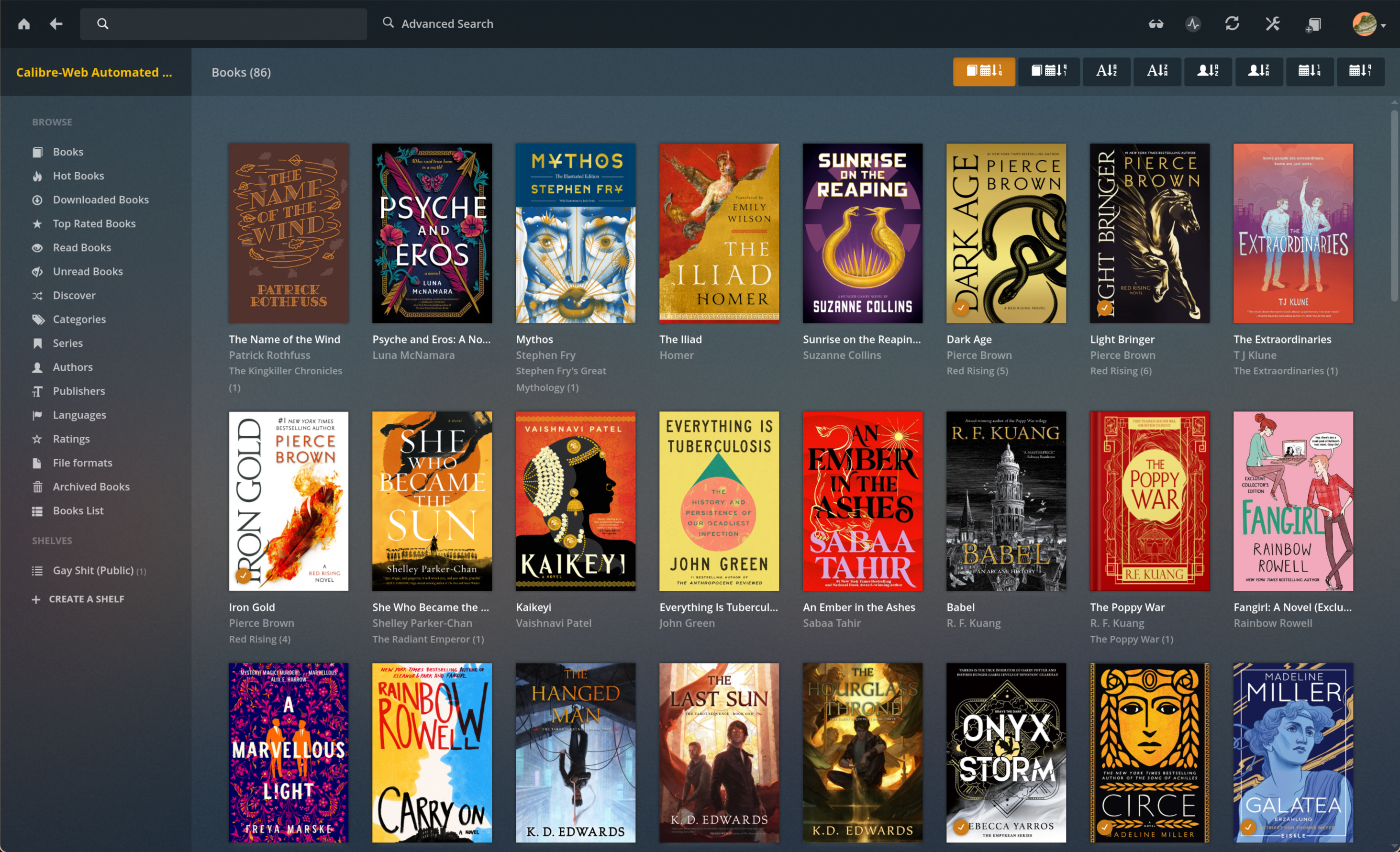
- Even Shadows: Covers now have a soft shadow all the way round, replacing the grey glow along the bottom edge.
- No More Stretching: Every cover sits in the same 2:3 frame and is cropped to fit instead of stretched, so square and wide covers are no longer distorted. The placeholder cover now matches that shape.
- First Cover Size: The first book in the grid no longer renders smaller than the others.
- Phone Layout:
- Book Grid: 3 columns instead of 2, so you can see far more of your library at once.
- Sort Buttons: One row you can swipe sideways, instead of a two-row block.
- Menu: The menu button is now a ☰ on the left, the side the menu opens from, instead of your avatar on the right. The menu itself is a dark panel with a compact profile row, evenly spaced items and a highlight on the current page.
- Tablet Layout: 3 columns beside the sidebar instead of 2.
- Sort Toolbar: Tidier rounded toolbar with consistent buttons on every screen size.
🚀 Improvements
- Kobo Sync Performance:
- Much Faster Syncs: Reading-state handling and metadata loading were rewritten to avoid per-book queries, saving up to ~15 seconds per sync request on large libraries. (PR #1344)
- On-Demand KEPUBs: KEPUB conversion now happens when a book is downloaded instead of up front. Opening your Kobo token page no longer converts every EPUB in the library. (PR #1344, Fixes #817)
- Ingest & Duplicates:
- Smarter Ingest: Stale and repeated watcher events are ignored, missing files exit early, and database reconnects/duplicate refreshes are batched until an import run goes quiet. This stops the ingest service reprocessing the same files on polling/NFS setups. (PR #1349)
- Incremental Duplicate Scanning: Duplicates are now tracked in an index that updates incrementally after imports and edits, instead of rescanning the whole library. (PR #1353)
- Ingest Runs as
abc: The ingest service now drops root privileges, so imported books are owned by the same user as the web app. The ingest status files are handed to abc at startup too, so status tracking works on fresh installs and with NETWORK_SHARE_MODE. (PR #1145)
- Stability:
- Thumbnail Deadlock: Fixed a database deadlock between cover thumbnail generation and metadata saves that could freeze the web UI. (PR #1346)
- Detached Sessions: Book relationships now load eagerly, fixing intermittent 500 errors when pages rendered after the database session closed. (PR #1279, Fixes #1067)
- Healthcheck: The Docker healthcheck now follows the redirect to
/login, so healthy containers are no longer marked unhealthy. (PR #1298)
- OPDS Covers: OPDS feeds now request cached medium-resolution covers instead of reading full-size originals from disk for every book. (PR #1447)
🐛 Bug Fixes
Scheduling
- Scheduled Convert Library / EPUB Fixer: Scheduled runs crashed before starting, so they never ran. They now run as expected. (Fixes #1481)
- Schedule Buttons: The "Schedule 5m / 15m" buttons only worked when browsing from the server itself, and could otherwise hang the web UI for 10 seconds. Both are fixed.
- Status Page on Fresh Installs: The Convert Library and EPUB Fixer status checks no longer error before their first run.
Kobo & Readers
- Modern Kobo Firmware: Serve an OIDC discovery document and local reading-services stubs so fully-local sync works on firmware 4.45+. (PR #1367)
- Bookmarks: Fixed a crash when a Kobo bookmark has no location, and 0% progress is no longer dropped from bookmark responses. (PR #1213, #1362)
- Shelf-Only Sync: Fixed a stale collection filter when syncing only selected shelves. (PR #1443)
- Reverse Proxies: Kobo download and cover URLs no longer include the internal port behind Cloudflare Tunnel and similar proxies, and the external port setting is now optional. (PR #1143)
- KOReader Plugin: Fixed progress sync errors on some older KOReader versions. (PR #1131)
- Web Reader: Restored the missing back button. (PR #1231, Fixes #1203)
Safari & Browser
- Safari Forms: Fixed save buttons on the user edit/create pages and other forms that did nothing in Safari. (PR #1104, Fixes #1078)
- Safari Metadata Search: Fixed metadata search failing immediately in Safari. (PR #1096)
- Quick Send: The caliBlur quick "Send to eReader" button now works for users without upload permission. (PR #1164)
Metadata & Editing
- Save Loss: Fixed edits sometimes being lost when a save also renamed the book's folder. (PR #1331)
- Fetched Descriptions: Fetched descriptions are now saved on the first click. The result button is renamed "Apply". (PR #1336)
- Metadata Modal: No longer crashes when a provider returns results without authors, tags or identifiers. (PR #1330)
Library & Misc
- Recently Added: Newly imported books now get the current time as their "date added" rather than their publication date. (PR #1280)
- Magic Shelves: Sorting by author no longer returns an empty shelf. (PR #1233, Fixes #1232)
- Email: Sending falls back to the original file if the metadata export fails. (PR #1236, Fixes #1235). Fixed a TypeError when running eReader send tasks. (PR #1406)
- Restore Database: The "Restore Calibre Database" button now works. It was nested inside another form and silently submitted that instead. (PR #1444)
- Duplicates: The resolution log now uses local time, and the cooldown setting is saved correctly. (PR #1435)
- User Profiles: Profile pictures now load behind a reverse proxy with a path prefix. (PR #1283, Fixes #1188)
- Comics: CBR/CBZ files now use their registered MIME types. (PR #1322)
- Ingest Folder: CWA no longer changes the ingest folder's ownership before checking network share mode. (PR #1226)
- Docker Compose: Fixed the invalid timezone example. (PR #1229, Fixes #1197)
🌍 Translations
- Merged 40 community translation PRs across 12 languages. German, French, Korean and Simplified Chinese were fully translated when merged; a handful of strings added later in this release still need translating. Thank you to everyone who contributed!
- Slovak: Fixed a missing placeholder that broke compilation.
| Language |
Coverage |
Language |
Coverage |
| German (de) |
99% |
French (fr) |
99% |
| Korean (ko) |
99% |
Chinese Simplified (zh_Hans_CN) |
99% |
| Chinese Traditional (zh_Hant_TW) |
98% |
Czech (cs) |
98% |
| Turkish (tr) |
96% |
Spanish (es) |
93% |
| Hungarian (hu) |
90% |
Russian (ru) |
73% |
| Dutch (nl) |
66% |
Ukrainian (uk) |
35% |
🔧 Technical & CI
- Test Suite: Unit tests no longer share the real
/config/cwa.db, which was making CI fail at random. New tests cover route authentication.
- CI: Fixed Docker SDK shadowing in integration tests and translation-update push races, and bumped codecov-action to v5.
- Development: Templates and Python code auto-reload in development mode. (PR #1378)
⚠️ Upgrade Notes
- Duplicates: After upgrading, run one full scan from the Duplicates page to build the new duplicate index.
- File Ownership: The ingest service now runs as the
abc user (your PUID/PGID). If earlier versions left root-owned books in your library, fix their ownership once if you see "Permission denied" errors when editing or deleting them.
Thanks to our Contributors! 🙏
This release is built on a huge amount of community work. Thank you to everyone who sent a fix or a feature:
- @SethMilliken — KOReader progress shared across copies (#1225), plugin menu under Tools and no-book guards (#1371, #1074), older KOReader sync fix (#1131), Safari form and metadata search fixes (#1104, #1096)
- @navels — Incremental duplicate scanning (#1353), smarter ingest (#1349), thumbnail deadlock fix (#1346)
- @shavitmichael — Much faster Kobo sync and on-demand KEPUBs (#1344), KEPUB support in the web reader (#1318)
- @I-Would-Like-To-Report-A-Bug-Please — Metadata save loss (#1331), fetched descriptions (#1336), metadata modal crash (#1330)
- @burakemirsezen — Kobo shelf-only sync (#1443), web reader back button (#1231), timezone example (#1229)
- @scottjamesrogers — Email metadata fallback (#1236), magic shelf author sort (#1233)
- @dbraendle — Recently Added timestamps (#1280), intermittent 500 errors (#1279)
- @AsherMaximum — Page jump (#1387), dev mode auto-reload (#1378)
- @frbncis — KOReader progress to Hardcover (#1324)
- @thijsdezoete — Kobo fully-local sync on modern firmware (#1367)
- @ajn142 — Ingest service runs as
abc (#1145)
- @antifuchs — Ingest folder ownership fix (#1226)
- @EuanKerr — Auto-send subfolder routing (#1221)
- @vijaykalam — Custom columns in OPDS (#1129)
- @Sheol27 — Currently Reading magic shelf (#1201)
- @austin-rt — Kobo URLs behind reverse proxies (#1143)
- @rjmcnamara — Cached OPDS covers (#1447)
- @luisalduucin — Restore Database button (#1444)
- @jdbway — Duplicate cooldown and local timestamps (#1435)
- @hsttlrjeff — Kobo bookmark crash (#1213)
- @raphi011 — Kobo 0% progress (#1362)
- @black-dragon74 — Kobo highlight colours (#1166)
- @kurtlieber — eReader send TypeError (#1406)
- @Sycha — Comic MIME types (#1322)
- @rancur — Healthcheck redirect (#1298)
- @mihneabulu — Quick send for users without upload permission (#1164)
- @chloeroform — Profile pictures behind a path prefix (#1283)
- @jgoguen — Groundwork for per-user OPDS shelves (#1258)
A special welcome to our first-time contributors: @antifuchs, @ajn142, @shavitmichael, @Sycha, @EuanKerr, @vijaykalam, @rancur, @hsttlrjeff, @raphi011, @black-dragon74, @kurtlieber and @AsherMaximum! 🎉
Translators 🌍
@6112562a, @Blistex77, @Demelja, @GSAlex, @HaruIjima-kun, @Krux86, @Marodeur80, @RFrens, @SkyLull, @Yeerayy, @adocampo, @amatorkoleksiyoner, @antocpu, @area57, @arths31, @baptistesavinve, @brushax, @cebo29, @coutadeurf, @djalexz85, @euneuneu, @finevine, @fucx, @futurelook, @julien-noblet, @koma52, @krylus, @leolivier, @lexis11mob, @martinlehanneur, @michaelkastner, @moduvoice, @pablo-alcaniz, @petriiczech, @pfederi, @slauns, @tJ-ek0, @ynaciri and @zdeubeu. Your work brings CWA to readers around the world!
Supporting the Project ❤️
CWA is and always will be free and open source. If it makes your library life easier and you're able to support development, contributions go directly to:
- Testing hardware (ereader devices & tablets etc.)
- Development tools and infrastructure
- Coffee ☕ (lots of coffee)
 ied" errors when editing or deleting them.

 KindleEarSelf-hosted, open-source app that turns RSS feeds and Calibre recipes into ebooks or mp3 pushed to Kindle devices, with an e-ink reader, AI summaries and translation.CompareKindleEar with Calibre Web Automated
 AnthoLumeSelf-hosted, open-source PWA for managing and reading EPUBs with offline support, KOReader KOSync and OPDS APIs, metadata scraping, and reading progress tracking.CompareAnthoLume with Calibre Web Automated
 librarrLibrarr is a self-hosted, open-source search and download manager for books, audiobooks, and manga. It searches multiple indexers and auto-imports into Calibre.Comparelibrarr with Calibre Web Automated
 KavitaSelf-hosted, open-source reading server that organizes and serves your comics, manga, ebook and PDF collection with built-in readers, OPDS and OIDC multi-user logins.CompareKavita with Calibre Web Automated
 IssuedIssued is a self-hosted, open-source comic library server for CBZ, CBR, CB7, and PDF files with OPDS catalog, web reader, dark mode, and automatic library updates.CompareIssued with Calibre Web Automated

 ComiGoSelf-hosted, open-source comic/manga reader supporting CBZ, CBR, EPUB, PDF with web UI, PWA offline reading, progress sync, and Docker deployment.
 dir2opdsA lightweight OPDS 1.2 ebook server you host yourself that turns a folder into a digital library. Serves EPUB, PDF, MOBI, AZW3, and FB2 to OPDS readers or a web browser.
 eloranEloran is a self-hosted, open-source comics and ebook web library in Rust with folder-based library view, reading progress tracking, bookmarks, and multi-user support.
 GrimoireA self-hosted web app for organizing and reading your tabletop RPG PDF collection with full-text search, maps, tokens, audio, and campaign management.
 InkWeaverInkWeaver is a self-hosted manga download manager with desktop GUI and CLI. Organizes downloads with metadata, cover art, and export formats (CBZ, PDF).
 KOllectorSelf-hosted Flask app that aggregates KOReader highlights from multiple devices via Syncthing, enriches metadata via Open Library, and exports to blog posts.
 KomgaKomga is a self-hosted, open-source media server for comics, manga, and eBooks with responsive web UI, REST API, OPDS, Kobo/KOReader sync, and multi-user management.
 kompanionKOmpanion is a self-hosted, open-source backend for KOReader e-readers providing OPDS catalog, reading progress sync, and book statistics without a web reading interface.
 KoShelfSelf-hosted web dashboard combining KOReader notes, highlights, and reading statistics with library browsing, in-app reader, calendar, and optional auth.
 news2readerSelf-hosted OPDS catalog that fetches articles from Hacker News, Tildes, and Karakeep, converts them to EPUB, and serves them to e-reader software like KOReader.
 Nowen ReaderNowenReader 是一款轻量开源、本地化优先的漫画 / 同人志管理与阅读一体化工具,对标 LANraragi 核心体验,聚焦本地漫画资源的归档整理、元数据智能管理与沉浸式阅读,为漫画爱好者打造私域、可控、高效的个人漫画图书馆。
0 comments