
Self-host Bytebase
3.24.1Database governance for schema change, access and audit
docker run --rm --init --name bytebase --publish 8080:8080 --pull always --volume ~/.bytebase/data:/var/opt/bytebase bytebase/bytebase:latest- Stars
- 14 691
- Port
- 8080 (HTTP web console and API of the Bytebase server)
bytebase/bytebase
What is Bytebase?
Bytebase is an open-source platform for database governance, positioned as the control plane between a team's people — engineers and AI agents alike — and their production databases. Schema migrations and data fixes flow through apply, review, deploy and rollback steps in a web console, SQL conventions are enforced by more than 200 lint rules, and database-as-code pipelines hook into GitHub or GitLab. It manages engines across the OLTP and OLAP spectrum: Postgres, MySQL, MariaDB, MongoDB, Redis plus SQL Server, Oracle, OceanBase, Snowflake, ClickHouse, Spanner and TiDB. Built-in IAM gives fine-grained roles at workspace and project level, while just-in-time access grants, role-based column masking, data classification and long-term audit retention are paid capabilities. On the AI side it exposes an MCP server so agents operate under the same review, masking and audit rules as humans, plus text-to-SQL in the editor and an assistant that runs workflows from natural language. Policies can be codified through its Terraform provider and REST/gRPC APIs, and events stream to Slack, Teams, Discord, Jira, ServiceNow, Datadog and Splunk. You run it as a single Docker container on port 8080 or with a Helm chart; its metadata store is embedded by default, with an external Postgres 14+ required only for high availability. Licensing is open-core: code outside enterprise-marked directories is MIT, and self-hosted OIDC/LDAP SSO, 2FA, masking and JIT need an Enterprise license; the free Community tier caps at 20 users and 10 database instances, while Pro is cloud-only.
Bytebase alternatives
 nocodbSelf-hosted open-source Airtable alternative that turns any database into a no-code platform with spreadsheet-like interface, supporting PostgreSQL, MySQL, and SQLite.Comparenocodb with Bytebase
 BaserowA self-hosted, open-source Airtable alternative: no-code databases with forms, automations and an app builder, MIT-licensed core with paid Premium tiers.CompareBaserow with Bytebase
 dbhubDBHub is a minimal, token-efficient MCP server connecting AI assistants to PostgreSQL, MySQL, SQL Server, Oracle, MariaDB, and SQLite with built-in guardrails.Comparedbhub with Bytebase
 LibreDB StudioSelf-hosted, open-source SQL IDE covering 41 database engines in one browser tab, with OIDC SSO, RBAC, query auditing and an AI query agent — MIT licensed.CompareLibreDB Studio with Bytebase
 databasementDatabasement is a self-hosted, open-source database backup manager: register MySQL, PostgreSQL, MongoDB, Redis and more, schedule backups, and restore.Comparedatabasement with Bytebase
 ToolJetSelf-hosted, open-source low-code platform for internal tools and dashboards: visual builder, 90+ data sources, built-in database, AI app generation and MCP agent access.CompareToolJet with Bytebase
 budibaseOpen-source low-code platform for building AI agents, internal apps and automations; self-hosted via Docker, Compose, Kubernetes or Digital Ocean.Comparebudibase with Bytebase
 kiteSelf-hosted, open-source Kubernetes workspace for multi-cluster management: RBAC, LDAP/OAuth login, Prometheus monitoring, Helm, audit logs, and an AI assistant.Comparekite with Bytebase
All self-hosted alternatives to DataGrip → All self-hosted alternatives to Flyway → All self-hosted alternatives to Jira →
Should you self-host Bytebase?
Bytebase scores 70/100 on selfhost.directory (how scoring works) and ranks #11 of 41 in Database Management. It has 14 691 GitHub stars, +153 in the last 30 days.
It shipped 21 stable releases in the past year. The latest, 3.24.1, came out on 30 October 2026. New versions land roughly every 2 weeks.
Setup is moderate: expect some configuration beyond a single command. An official Docker image is available. It is MIT-licensed and written mostly in Go.
Its closest alternative on selfhost.directory is Plane (86/100, 62 221 stars). It scores higher overall, so compare the two before you pick. See Bytebase vs Plane side by side.
Features
- Audit LoggingEnterprise plan gives unlimited retention; Community plan shows none per pricing table
- Broad database engine support
- Built-in AI assistant
- Database change management
- Data classificationPaid plans (Pro/Enterprise)
- Dynamic data maskingPaid plans (Pro/Enterprise)
- GitOps / database-as-code
- Just-in-time accessPaid plans (Pro/Enterprise); not in the Community plan
- MCP Server
- Policy as Code
- REST and gRPC API
- Role-based Access Control
- SQL review and linting
- Text-to-SQL
Bytebase README
⚙️ Install • 📚 Docs • 🙋♀️ Book Demo
Bytebase is the open-source database governance platform. It acts as a single control plane between your users — humans and AI agents — and your databases, governing change management, access control, and compliance so every change and query is reviewed, controlled, and recorded.
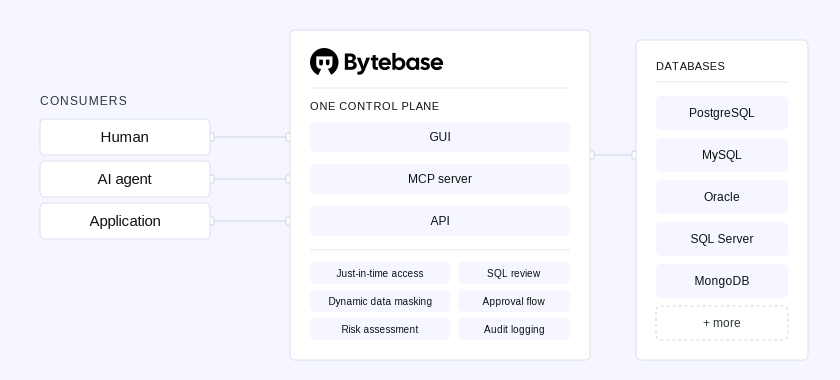
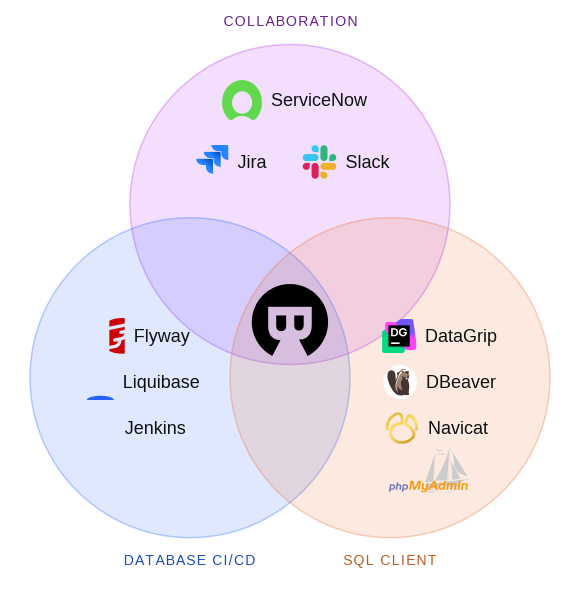
It replaces the disparate tools stitched across migration scripts, SQL clients, and ticketing systems, unifying database operations in a single platform.
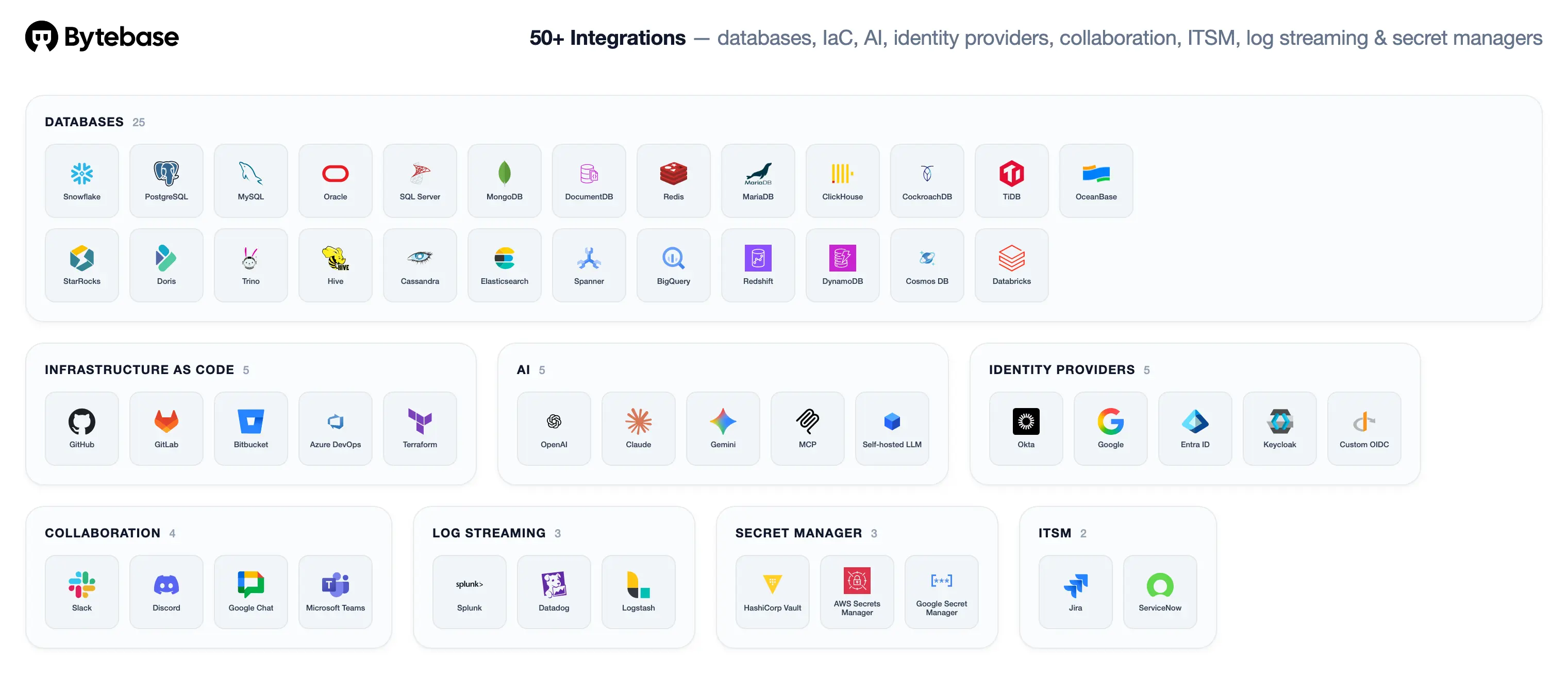
Bytebase supports PostgreSQL, MySQL, SQL Server, Oracle, MongoDB, Redis, MariaDB, TiDB, Snowflake, ClickHouse, Spanner, OceanBase, and more — plus integrations spanning IaC, AI, identity providers, collaboration, ITSM, log streaming, and secret managers.
- GUI-Based Workflow: Request, review, deploy, and rollback changes through a web console
- GitOps Integration: Native GitHub/GitLab integration for database-as-code workflows
- SQL Review: 200+ lint rules to enforce SQL standards and best practices
- Fine-Grained RBAC: Project and workspace-level roles and permissions
- Just-in-Time Access: Time-boxed database access grants with automatic revocation
- Dynamic Data Masking: Column-level masking applied based on user role at query time
- Audit Logging: Complete audit trail of all database activities
- Codified Policy: Manage policies as code via Terraform Provider and API
- Data Classification: Identify and tag sensitive data across your databases
- MCP Server: Connect AI agents and IDEs to Bytebase through the Model Context Protocol
- Text-to-SQL: Generate and refine queries in the SQL Editor with AI assistance
- Page Agent: Built-in AI assistant that guides or executes workflows from plain language requests
docker run --init \
  --name bytebase \
  --publish 8080:8080 \
  --volume ~/.bytebase/data:/var/opt/bytebase \
bytebase/bytebase:latesthelm install bytebase bytebase/bytebase
Visit http://localhost:8080 and follow the setup wizard.
- Implement database schema version control
- Automate database deployments through CI/CD pipelines
- Collaborate on database changes with review workflows
- Centralize database management across all environments
- Enforce organization-wide SQL standards and policies
- Monitor and audit all database activities
- Control data access with column-level permissions
- Implement data masking for sensitive information
- Maintain compliance with audit trails
We welcome contributions!
# Setup a postgres database with user bbdev and database bbdev
export PG_URL=postgresql://bbdev@localhost/bbdev

# Start backend
alias r='go build -ldflags "-w -s" -p=16 -o ./bytebase-build/bytebase ./backend/bin/server/main.go && ./bytebase-build/bytebase --port 8080 --data . --debug'

# Start frontend
alias y="pnpm --dir frontend i && pnpm --dir frontend dev"
- Bytebase vs Liquibase
- Bytebase vs Flyway
- Bytebase vs Jira
- Bytebase vs DBeaver
- Bytebase vs DataGrip
- Bytebase vs Navicat
- Bytebase vs CloudBeaver
FAQ
How to reach us?
Sales questions go through the contact page; enterprise support needs an active contract; community technical support is via GitHub issues.
What is your cancellation policy?
Pro subscriptions can be cancelled any time; the Enterprise plan is a yearly subscription that cannot be cancelled mid-year.
Which payment methods do you accept?
Credit card for the Pro plan; credit card, wire transfers, AWS Marketplace and GCP Marketplace for Enterprise.
Is there a free trial?
Yes, the Enterprise plan can be tried for free for 14 days.
Which certifications do you have?
Bytebase states compliance with SOC 2 Type II and HIPAA.
Can the self-host version operate in an air-gapped environment?
Yes — you can deploy it in your own data center or private cloud without any external connectivity.
More in Database Management
 ChartDBOpen-source database diagram editor that visualizes schemas with a single query, supports major databases, exports SQL, and self-hosts via Docker.
 chmonitorchmonitor is a self-hosted, open-source operational advisor for ClickHouse that reads system tables for real-time monitoring and AI-driven schema recommendations.
 clinSelf CLI provisions a production-ready backend — PostgreSQL, Hasura GraphQL, Auth, Nginx — on your own server in minutes via Docker. MIT licensed with 171 plugins.
 clickhouseClickHouse is an open-source, self-hosted column-oriented DBMS for real-time OLAP analytics using SQL.
 CloudBeaverOpen-source, self-hosted web front end for your databases: SQL and data editors, multi-user administration, LDAP and proxy login, shipped as a Docker image.
 cloudberryOne advanced and mature open-source MPP (Massively Parallel Processing) database. Open source alternative to Greenplum Database.
 cogneeCognee is the open-source AI memory platform for agents. Give your AI agents persistent long-term memory with small models for free
 CouchDBSeamless multi-primary syncing database with an intuitive HTTP/JSON API, designed for reliability
 d9d9 is a self-hosted, open-source headless CMS forked from Directus 9 with GPLv3 licensing, REST/GraphQL APIs, a no-code Data Studio, and multi-database support.
 DatabasusSelf-hosted open-source backup tool for PostgreSQL (also MySQL, MariaDB and MongoDB) with point-in-time recovery, restore verification, encrypted archives and S3 storage.
 DBackupSelf-hosted open-source backup for 10 databases and files. Supports S3, Google Drive, SFTP with AES-256-GCM encryption, incremental backups, GFS retention, OIDC SSO, 2FA.
 DbGateSelf-hosted, open-source (GPL-3.0) database client for engines like MySQL, Postgres, SQL Server, Mongo and Redis, shipped as desktop apps or a Docker/NPM web UI.
0 comments