
Self-host airbyte
v2.0.0Open-source data movement for ELT and AI agents
- Stars
- 22 390
- CPU
- 2 CPUs (low-resource mode) / 4+ CPUs (recommended)
- RAM
- 8 GB
- Ports
- 8000 (Web UI (local Docker deployment)), 8001 (Web UI (Kubernetes internal port))
What is airbyte?
Airbyte is an open-source data integration platform that moves data from APIs, databases, and files to warehouses, lakes, and AI applications. It provides hundreds of pre-built connectors and a no-code Connector Builder for custom sources. The platform can be self-hosted via Docker using the abctl CLI, Kubernetes with Helm charts, or on cloud VMs. It includes a web UI for managing connections, orchestration integrations with Airflow, Dagster, and Kestra, and a REST API. The core is licensed under ELv2 (Elastic License 2.0) with some components under MIT. Airbyte Enterprise adds SSO, RBAC, and other enterprise features on top of the open-source edition.
Should you self-host airbyte?
airbyte scores 76/100 on selfhost.directory (how scoring works) and ranks #1 of 3 in Data Engineering. It has 22 390 GitHub stars, +175 in the last 30 days.
There was no stable release in the past 12 months, so check the repository's recent activity before you rely on it.
Setup is advanced: plan for several services and some ongoing maintenance. It is Elastic-2.0-licensed and written mostly in Python.
Its closest alternative on selfhost.directory is data-observability-installer (43/100, 144 stars). airbyte scores higher overall. See airbyte vs data-observability-installer side by side.
Features
- 700+ pre-built connectors
- AI agent data access
- Connector registry
- ELT/ETL pipelines
- Low-code CDK
- No-code Connector Builder
- Orchestration integrations
- Python library (PyAirbyte)
- REST API
- Web UI
airbyte README
Open-source data movement for ELT pipelines and AI agents — from APIs, databases & files to warehouses, lakes, and AI applications
How to install airbyte
Install airbyte with Docker
curl -LsfS https://get.airbyte.com | bash - abctl local install
Requires Docker Desktop running locally. Uses abctl CLI to create a Kubernetes cluster in Docker.
Install airbyte with Kubernetes
helm repo add airbyte https://airbytehq.github.io/charts helm repo update kubectl create namespace airbyte helm install airbyte airbyte/airbyte --namespace airbyte --values ./values.yaml --version 2.0.18
Recommended for production deployments. Supports external databases, object storage, and secrets managers.
Install airbyte with Linux
brew tap airbytehq/tap brew install abctl
or download from https://github.com/airbytehq/abctl/releases/latest
Standalone CLI for managing Airbyte deployments locally or on remote VMs.
airbyte releases & version history
We're back, fast, and furious. 🏎️ 🏁 Airbyte version 2.0 was released on October 14, 2025. This version marks a major achievement in Airbyte's platform architecture. We're excited to share new improvements and changes to the Airbyte platform.
Faster sync speed
Faster sync speed is now generally available. When using faster sync speed, Airbyte syncs data 4-6 times faster, on average, while consuming resources more economically. Learn more about faster sync speed >
Data activation
Data activation is now generally available. It enables you to move data out of your data warehouse and into the operational tools where work happens, like CRMs, marketing platforms, and support systems. With this capability, you can deliver modeled data directly to points of action and systems people already use, helping your organization respond faster and more effectively.
Instead of limiting insights to dashboards and reports, data activation powers workflows and decisions in real time and in the places people need data. Learn more about data activation >
Airbyte Enterprise Flex
Airbyte Enterprise Flex is a hybrid solution that consists of a fully managed Cloud control plane that supports separate data planes that run in your own infrastructure. It's ideal for organizations with data sovereignty and compliance requirements who need to carefully manage data movement while also minimizing the time and effort needed to self-manage Airbyte.
Managing operational and compliance requirements with more infrastructure often means increased maintenance commitments, higher spend, and greater complexity. Airbyte built Enterprise Flex to ensure you don't have to choose between data sovereignty and ease of deployment.
If you're an Airbyte Cloud customer, any Cloud organization can upgrade to an Enterprise Flex organization. Talk to Sales to get started. Learn more about Enterprise Flex >
Better Connector Builder interface
Airbyte has aligned the Connector Builder's user interface with the YAML specification it represents. You should find it more intuitive to switch between UI and YAML modes. These changes also ensure that virtually all the capabilities of YAML mode are available in the UI. Future new features can be available in the UI at release time, and you no longer need to write YAML to handle most complex APIs.
Your custom connectors still work normally and migrate seamlessly to the new user interface. You don't need to take any action. If you need help with any of the fields, see the documentation.
Here's what's changed.
Global configuration
-
The API base URL and Authentication method fields have been removed from this form. You now define URLs and authentication on each stream.
-
Use the Global Configuration page to control which streams are included in check operations, set concurrency, and adjust request frequency with HTTP budgets.
Streams
-
URL path is removed. The new API Endpoint URL field replaces both the URL path and the API base URL from the Global Configuration. Each stream can now use a different base URL if needed.
-
The Authenticator panel handles authentication for each stream. Each stream can use a different authentication method if needed. OAuth 2.0 flows are now fully supported in the Connector Builder, including in asynchronous streams.
-
The Parent Streams and Parameterized Requests panels are now merged into the Partition Router panel.
-
Added a new Advanced panel at the bottom of the page, introducing new capabilities, like file transfers, that were previously only available in YAML mode.
-
Renamed or combined some fields to make their purpose more obvious.
Better organizations and workspaces interface
Airbyte's UI for viewing and managing organizations and workspaces is reorganized.
-
The navigation bar is now split into "Organization" and "Workspace" sections.
-
The general settings page is now split into Organization settings and Workspace settings.
-
Your user settings and applications/tokens are now under your name > User settings.
-
Organizations now have a meaningful home page that shows all workspaces in that organization, plus any in-progress, successful, and failed syncs. This gives you a birds-eye view of all the activity across all workspaces you have access to.
Learn more about organizatons and workspaces >
abctl 0.30.2 required
If you deploy Airbyte with abctl, upgrade to abctl version 0.30.2 before upgrading to Airbyte version 2.0.
Final version with Helm chart V1 support
Version 2.0 is the final version of Airbyte that supports Helm chart V1. In versions 2.1 and later, Airbyte will only support Helm Chart V2.
-
New deployments should use Helm chart V2 from the start to avoid a future upgrade. The Deployment documentation includes examples for this Helm chart.
-
Existing deployments can migrate at the time of your choosing. Airbyte strongly encourages you to migrate as soon as practical to avoid blocking future upgrades. For help and to learn more, see the migration guides for Core or Self-Managed Enterprise.
Other improvements
Version 2.0 also contains these improvements.
-
Ingress: Airbyte now ships ingress with the Helm chart. If you've already set up ingress, you can continue using your existing configuration. For new deployments, you might find it easier to enable ingress through values.yaml. Learn more >
-
Data activation: validation improvements to help prevent failed syncs due to improperly configuring connectors through the API.
-
Data activation: the Mappings page now warns you if you attempt to navigate away with unsaved changes.
-
Data activation: The Mappings page renders more swiftly when dealing with large-scale data sets with dozens and hundreds of mapped fields.
-
Workspaces members: this version turns off email validation when adding new users to a workspace. If you're a Self-Managed Enterprise customer using SSO, you can now add users who have user IDs that aren't email addresses.
Fixes
This version fixes the following issues that you reported, or which might have affected you.
-
Fixed an issue in which Airbyte didn't show your client IDs and client secrets. This issue was first reported with version 1.8.2. Airbyte fixed it for 1.8.3, but the issue recurred in version 1.8.5.
-
Fixed an issue that could make data activation connections fail to display rejected records.
-
Fixed alignment issues for timestamps in the Connection Timeline.
-
Fixed an issue where the on/off toggles didn't work on the Connections home page.
-
Fixed a rare issue where turning a connection off and then on again could cause a reset.
-
Fixed an issue where opening a drop down menu on the source and destination configuration page caused the form to shift to the left.
-
Fixed an issue where an empty table flashed on the screen if you didn't have any Connections yet.
-
Fixed an issue where workspace admins could see 403 errors if they only had access to some workspaces in the organization.
-
Updated base images to address security vulnerabilities.
A look back at version 1
Airbyte is an open source product. We win together. Here are some of the main enhancements that landed in 2025. Thank you for being on this journey with us. We're just getting started, and the best is yet to come.
Sovereignty, privacy, and security:
Better connector and connection management:
-
Schema configuration updates show in the connection timeline
-
Pagination for better UI performance
More support for AI use cases:
Connector Builder improvements:
-
Configuration normalization rules, including transformations and validations
Why don't Docker containers get lost in Kubernetes? Because Helm charts the right course! Airbyte 1.8 was released on August 11, 2025. We're excited to share new improvements and changes to the Airbyte platform.
Platform changes
These changes improve Airbyte for everyone.
Pagination for better UI performance
Airbyte has added pagination to many pages in the user interface. This provides a critical performance boost for workspaces with hundreds or thousands of connections. As you scroll, pages automatically add new data until you reach the end of the list.
You can find pagination in the following places:
-
The Sources, Destinations, and Connections pages.
-
The source and destination details pages
-
The Define Source and Define Destination pages when setting up a new connection: we've added manual pagination and search bars to make it easier to find existing sources and destinations.
You might notice slight visual and content differences on some pages as a result of this change. For example, when upgrading a connector version, Airbyte no longer lists all the connections affected by the upgrade. These messages were too long for workspaces with many connections.
File streams indicated in the UI
If a connection contains a stream that moves files, Airbyte's UI now indicates this on the connection's schema tab. Learn more >
Helm chart V2 is available
A new Helm chart is available for you to use in your deployments. Migrating to this new chart is currently optional. In a future version of Airbyte, Helm chart V2 will be mandatory.
-
New deployments should use Helm chart V2 from the start to avoid a future upgrade. The Deployment documentation includes examples for this Helm chart.
-
Existing deployments can migrate at the time of your choosing. Schedule a convenient time to migrate so you aren't blocked from upgrading to a future version. For help and to learn more, see the migration guides for Self-Managed Community or Self-Managed Enterprise.
-
Version 0.30 of abctl uses Helm chart V2 by default when installing new versions of Airbyte.
Early access
Airbyte's working toward some big product milestones. Some of these improvements are available for you to use today.
Data activation and reverse ETL
Airbyte now supports data activation and reverse ETL use cases. Data activation enables you to move data out of your data warehouse and into the operational tools where work happens, like CRMs, marketing platforms, and support systems. With this capability, you can deliver modeled data directly to points of action and systems people already use, helping your organization respond faster and more effectively. Customer IO and HubSpot destinations are already available. Learn more >
Self-Managed Enterprise changes
These changes bring new capabilities to Airbyte's Self-Managed Enterprise customers.
Enterprise Salesforce destination
To support Airbyte's data activation capabilities, a new Salesforce destination is available exclusively to enterprise customers for an additional charge.
Fixes
This version fixes the following issues that our users reported.
-
Fixed an issue that caused the authentication button to not work when you set up connectors.
-
Fixed an issue that caused database migrations to fail when there was a single data plane group named "AUTO".
-
Fixed an issue that failed to remove the stream state for disabled streams on connections with global states. This could cause CDC-based connections to fail on refreshes.
-
Fixed an issue that didn't clear the connection state when switching a connection from Incremental to Full Refresh. This could cause Airbyte to fail to populate all records in the destination during a full refresh.
-
Fixed a rare typing and deduping issue where Airbyte could exit a job prematurely, incorrectly believing there had been a heartbeat failure. This could cause final tables to be missing data after a full refresh, even though the raw table populated correctly.
-
Removed a duplicate
AB_JWT_SIGNATURE_SECRETkey that prevented upgrades with Helm. -
Fixed an issue that could cause the Airbyte UI to show that it was refreshing more streams than it actually was.
How to upgrade
For help, see Upgrading Airbyte.
Breaking changes
This version includes the following breaking change. For a list of all breaking changes from recent versions, see Breaking change list.
airbyte-webapp is removed
Airbyte has removed airbyte-webapp and merged its functions into airbyte-server. We'll no longer publish a webapp image and webapp is no longer independently deployable. It's likely you need to take one of the following actions when you upgrade.
- If you deploy Airbyte with abctl, ensure your version of abctl is compatible with this version of Airbyte.
- If you deploy Airbyte with Helm, update any rules in your ingress controller that direct to
airbyte-webapp.
If you used version 1.7, you probably already completed these tasks. If not, make these necessary changes before upgrading to version 1.8. Learn more >
People liked the last version of Airbyte so much that we decided to ship another one 🚢. Airbyte 1.7 was released on June 16, 2025. We're excited to share new improvements and changes to the Airbyte platform.
Platform changes
These changes improve Airbyte for everyone.
Move files and records together
Airbyte now supports moving files and records in the same connection. The combination of structured and unstructured data drives more robust knowledge systems that have more context, which is critical to successful AI systems.
-
In connectors that move structured data but also contain attachments, like ZenDesk Support, when you set up your connection, you can choose to move attachments as a separate stream in the same connection. Airbyte also generates metadata describing those files.
-
In file-based connectors, like S3 or Google Drive, when you choose Copy raw files as your delivery method, Airbyte generates metadata describing those files.
-
You choose the format and content of the metadata the same way you already manage your streams.
Connector Builder and low-code improvements
Airbyte's Connector Builder and low-code CDK have new features to interact with a wider range of more complex APIs. These changes allow Airbyte to migrate more connectors to the low-code format. Low-code connectors are forkable, faster, and easier for everyone to contribute to.
Stream templates
Use stream templates to generate multiple similar streams from a single template configuration. Stream templates are ideal for APIs that have multiple regions or a large number of resources that have predictable endpoint structures. Learn more >
File syncing
The low-code CDK now supports syncing files up to 1.5-GB. You can implement this feature with manifest.yaml files in a manifest-only or hybrid connector when making requests from endpoints that return files. Learn more >
Property chunking
Some APIs don't send a complete set of properties for a record in a single API request, so connectors have to make a series of requests, then merge those responses into a single record. Connector developers working with the low-code CDK can now chunk properties, specify the chunk size, and statically or dynamically define the list of properties to fetch. Learn more >
Config normalization rules
The Spec component in the low-code CDK now supports config_normalizaton_rules. Use this to automatically modify, migrate, and validate user configurations before your connector uses them and without needing to write custom Python code. It consists of three arrays.
-
config_migrations: Apply discrete, one-time transformations to migrate user configurations from old formats to new ones. -
transformations: Apply configuration modifications at the start of each sync, dynamically modifying configurations based on current values. -
validations: Apply validation checks after the connector completes transformations to ensure data integrity and proper formatting.
Self-Managed Enterprise changes
These changes bring new capabilities to Airbyte's Self-Managed Enterprise customers.
:::danger Breaking Change
Before upgrading from version 1.5.1 or earlier, you must upgrade your service account permissions. If you don't, Airbyte doesn't permit you to begin the upgrade. Learn more >
:::
Audit logs
Self-Managed Enterprise now supports audit logging. Audit logging gives you visibility into data, environment, user, and permission changes. This data ensures you have records of any unauthorized changes and insider threats, making it easy to continue meeting your compliance obligations while using Airbyte.
Audit logging requires you to configure a blob storage solution (S3, GCS, Azure Blob Storage). This bucket must be accessible by Airbyte's pods using the same credentials it uses to access your log and state storage. Then, you configure Airbyte to read from and write to your bucket with Airbyte’s values.yaml file:
Once enabled, Airbyte writes audit logs to the /audit-logging/ directory as JSON files named in this format: <yyyyMMddHHmmss>_<hostname>_<random UUID>.
{
  "id": "8478fcbd-d369-4bda-8d9b-b782cea5ad40",
  "timestamp": 1746724563299,
  "actor": {
    "actorId": "1c26c465-58h8-43e6-8jko-2252b7g8a9e2",
    "email": "user@airbyte.io",
    "ipAddress": "192.000.000.0",
    "userAgent": "Mozilla/5.0 (Macintosh; Intel Mac OS X 10_15_7) AppleWebKit/537.36 (KHTML, like Gecko) Chrome/136.0.0.0 Safari/537.36"
  },
  "operation": "deleteWorkspace",
  "request": "<request object>",
  "response": "<response object>",
  "success": true,
  "errorMessage": null
}Assign data planes from Airbyte's UI
If you're using multiple data planes, you can now assign a workspace to a region from Airbyte's workspace settings. Previously, you could only do this with the API. Learn more >
Known issues
- Customers using generic OIDC for single sign on (rare) can't use the Connector Builder due to an authentication issue. If you use generic OIDC, Airbyte recommends that you don't upgrade to 1.7 until a patch is available for this issue.
Contributors: airbyte-ci is deprecated
Everyone is welcome to contribute to Airbyte. In most cases, the best way to contribute to Marketplace connectors is with Airbyte's Connector Builder. Some connectors still require using one of Airbyte's connector development kits (CDKs), though.
To simplify and speed up connector development, Airbyte has deprecated the airbyte-ci tool.
-
Most
airbyte-cicommands have simpler equivalents in Poe the Poet. -
Airbyte's GitHub repository provides new, more helpful messages in your pull requests.
-
Airbyte has removed 8 legacy GitHub workflows that were no longer necessary.
-
The new Connector CI suite of checks is between 2 and 10 times faster for rapid iteration with less waiting.
-
Maintainers can still manually run connector acceptance tests (CATs 🐈) if needed.
For help developing your own connectors, see Developing connectors locally.
Connector Builder off in low resource mode
In abctl version 0.26.0, if you deploy Airbyte in low resource mode, the Connector Builder is now turned off. To access the Connector Builder, allocate Airbyte's suggested resources and re-deploy Airbyte without setting the --low-resource-mode flag.
Valentine's Day let you down? That's OK. You'll love this. Airbyte 1.5.0 was released on February 20, 2025. We’re excited to share new improvements and changes to the Airbyte platform.
🚀 Platform Changes
These changes improve Airbyte for all Self-Managed users.
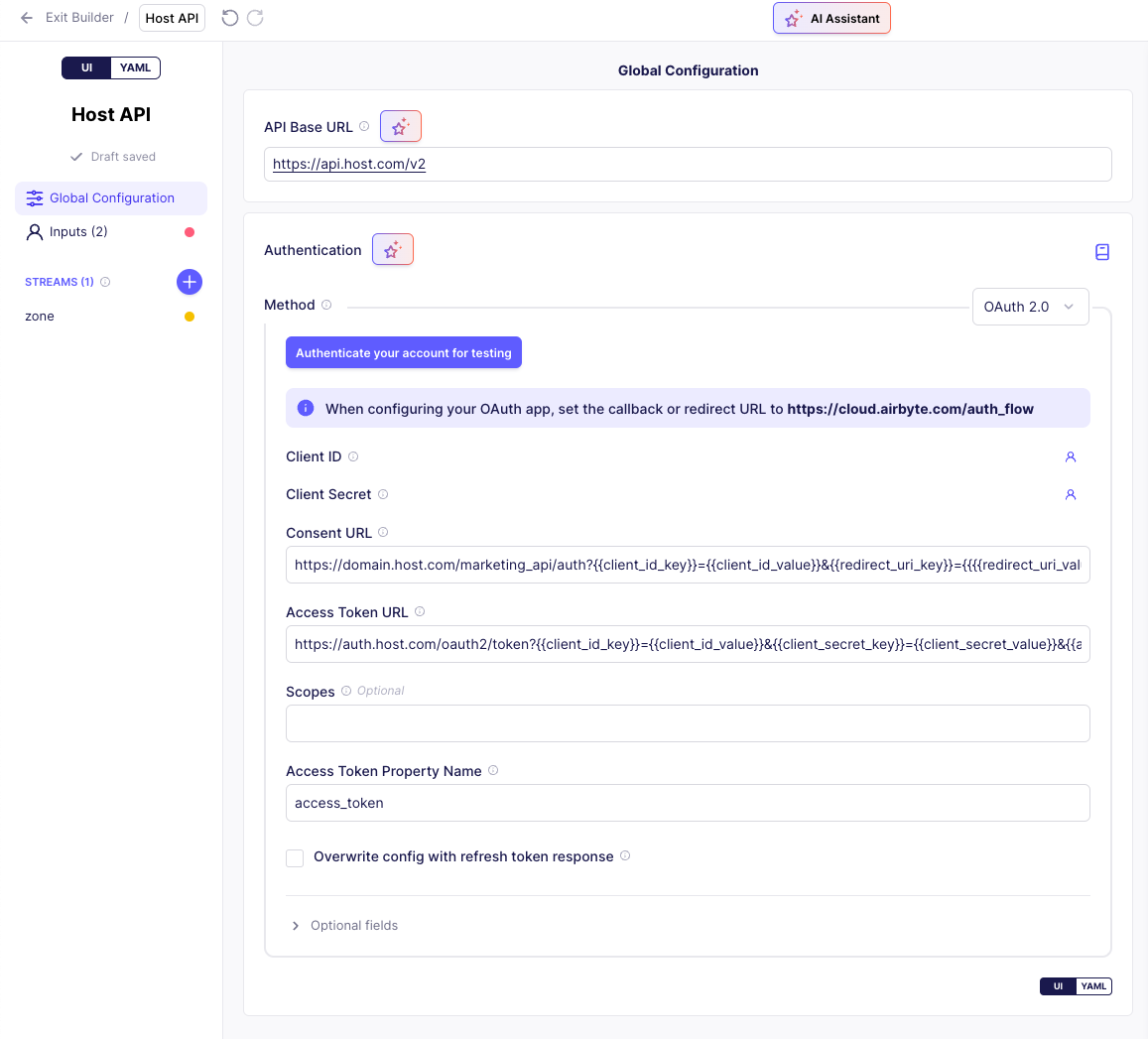
Declarative OAuth 2.0 in the connector builder
If you're building a connector to an API and want to authenticate with OAuth, you can now authenticate directly in the Connector Builder. This simplified flow ensures you can start building connectors to APIs that support OAuth without writing code to authenticate yourself and provide Airbyte with tokens. OAuth 2.0 is also supported in the low-code connector development kit (CDK), where you can define your authentication using YAML.
To learn more, see the authentication documentation: No-code Connector Builder | Low-code CDK.
Connection tags
You can now classify your connections with tags. As time goes on, your number of connections tends to increase. This popular classification tool gives you the power to organize connections based on any set of criteria you like, then filter for the ones you want to see. Learn more >

Configure workspace notifications in the API
Use the Airbyte API to view and change email and webhook notification settings in your workspace. Previously, this was only available in Airbyte's user interface.
- List workspaces returns a notifications object with details about each workspace's notification settings.
- Get workspace details returns a notifications object with details about that workspace's notification settings.
- Create a workspace has a notifications object parameter so you can configure notifications when you create the workspace.
- Update a workspace has a notifications object parameter so you can configure notifications later.
Use notifications if you want to be alerted to important events in Airbyte, like failed syncs, schema changes, and mandatory connector upgrades. Learn more about notifications >
Full Refresh - Overwrite + Deduped in the API
Use the API to set "Full Refresh - Overwrite + Deduped" as your sync mode when creating and updating a connection. Previously, this sync mode was only available in Airbyte's user interface.
🚀 Self-Managed Enterprise Changes
These changes bring new capabilities to Airbyte's Self-Managed Enterprise customers.
Mappings in the UI
We introduced mappings in the API in version 1.3, and it's now available in Airbyte's user interface, too. Use mappings to hash, encrypt, and rename fields, and filter rows. You set up mappings on each stream, ensuring your source data arrives in your destination in a more meaningful way. Learn more >

OpenTelemetry (OTel) metrics monitoring
Self-Managed Enterprise now generates a number of crucial metrics about syncs and volumes of data moved. You can configure Airbyte to send telemetry data to an OTel collector endpoint so you can consume these metrics in your downstream monitoring tool of choice. The following metrics are available:
- Sync details
- Sync duration
- Volume of data moved
- API requests
To start sending metrics, update your values.yaml file with the following configurations. Learn more >
global:
    edition: enterprise # This is an enterprise-only feature
    metrics:
        enabled: true
        otlp:
            enabled: true
            collectorEndpoint: "YOUR_ENDPOINT" # The OTel collector endpoint Airbyte sends metrics to. You configure this endpoint outside of Airbyte as part of your OTel deployment.
Resource allocation on connectors
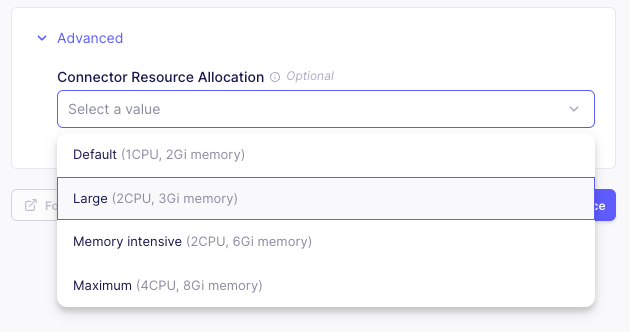
In Self-Managed Enterprise, you can now define resource allocations for individual connectors as part of that connector's configuration, both in the user interface and the API.
Airbyte's default CPU and memory allocations aren't always appropriate for every situation, and different connectors have different resource requirements. This can make it challenging to run a large number of concurrent syncs. Historically, you had to tweak a number of variables to configure this. Now, you can set CPU and memory allocation when you set up a source or destination, and it applies to all connections using that connector. Learn more >
:::note
Resource allocation can still be set on specific connections, on all connectors of a type using resourceRequirements, and using environment variables. In cases where resource allocation is defined multiple times, there is an order of precedence. Narrower definitions have higher precedence. From highest to lowest: Connection > Connector > Connector yaml definition > environment variables. See the documentation to learn more about precedence.
:::
🐛 Bug fixes
-
Fixed issue #46097. When using AWS Secrets Manager, updating a connector that used secrets caused its secrets to be deleted. For connectors with secrets that were deleted because of the bug, upgrade to 1.5 and then update your connector's secrets. They will persist correctly. For sources/destinations that were not affected, upgrading to 1.5 prevents the issue.
-
1.5.2 is a security patch release. The base images have been updated to address security vulnerabilities.
Other Changes
Docusaurus is upgraded to version 3.7. Local docs site builds are a bit faster.
The Easter Bunny reports a shortage of eggs this year. Airbyte has plenty of new features, though, so we're cracking 🐣 open a new version just for you. Airbyte 1.6 was released on April 11, 2025. We're excited to share new improvements and changes to the Airbyte platform.
🚀 Platform changes
These changes improve Airbyte for everyone.
Connection page dashboard
Connection pages now include a dashboard that visualizes sync successes and failures. This high-level view gives you quick insight into the health of your syncs over hours, days, and weeks. Track down intermittent failures, even after a connection becomes healthy again. With one click, you can get more information about a point in time, and fast access to any problematic sync in your workspace. Learn more >
Schema configuration updates in the connection Timeline
When someone makes a change to a connection's schema, Airbyte now logs an event in the connection's Timeline page. This data can help you understand why sync behaviors or record volumes suddenly changed. Learn more >

Copy JSON from connectors
All connectors now have a Copy JSON button in the Airbyte UI. This button generates a JSON object matching the configuration of that connector. It's ready for use in Airbyte's API and Terraform provider. Learn more >
{
  "name": "Airbyte",
  "workspaceId": "c0e5b294-2c71-475b-ae9c-6d70b36ff4f4",
  "definitionId": "284f6466-3004-4d83-a9b2-e4b36cbbbd41",
  "configuration": {
    "client_id": "******", // Replace this with your real client ID.
    "start_date": "2024-01-01T00:00:00Z",
    "client_secret": "******" // Replace this with your real client secret.
  }
}
Connector Builder improvements
Airbyte's Connector Builder has new features to target more advanced and complex API sources: asynchronous endpoints, non-REST APIs, new response formats, and more.
Asynchronous streams
The Connector Builder UI now supports asynchronous streams, allowing you to handle scenarios where data extraction happens over multiple steps. Some APIs that handle large datasets or perform resource-intensive operations do not support synchronous requests. By setting up a stream as asynchronous, you can separate creating a request, polling for a response, and downloading the response into distinct steps. Learn more >

GraphQL request body
You can write request bodies as free form GraphQL queries with built-in syntax validation.

Handle CSV, gzip, and ZIP response formats
Airbyte has two new ways to handle API responses in the Connector Builder.
-
CSV decoding: Make requests to sources that respond in CSV format and set expected delimiter and encoding options.
-
Nested decoding. Make requests to sources that respond with compressed
gziporzipfiles, then set a nested decoding option to handle the unzipped contents within.

Create custom connectors from YAML or Docker images using the API and Terraform
Airbyte's public APIs and Terraform provider have new endpoints and resources you can use to create and update custom connectors using a Connector Builder YAML manifest or Docker image. The following new endpoints are available.
For YAML source definitions:
GET- /workspaces/{workspaceId}/definitions/declarative_sources/ - List YAML source definitionsPOST- /workspaces/{workspaceId}/definitions/declarative_sources/ - Create YAML source definitionsGET/- /workspaces/{workspaceId}/definitions/declarative_sources/{definitionId}- Get a specific YAML source definitionPUT- /workspaces/{workspaceId}/definitions/declarative_sources/{definitionId}- Update a specific YAML source definitionDELETE- /workspaces/{workspaceId}/definitions/declarative_sources/{definitionId}- Delete a specific YAML source definition
For Docker source definitions:
GET- /workspaces/{workspaceId}/definitions/sources/ - List source definitionsPOST- /workspaces/{workspaceId}/definitions/sources/ - Create source definitionsGET- /workspaces/{workspaceId}/definitions/sources/{definitionId}- Get a specific source definitionPUT- /workspaces/{workspaceId}/definitions/sources/{definitionId}- Update a specific source definitionDELETE- /workspaces/{workspaceId}/definitions/sources/{definitionId}- Delete a specific source definition
For destination definitions:
GET/workspaces/{workspaceId}/definitions/destinations - List destination definitionsPOST/workspaces/{workspaceId}/definitions/destinations - Create destination definitionsGET/workspaces/{workspaceId}/definitions/destinations/{definitionId}- Get a specific destination definitionPUT/workspaces/{workspaceId}/definitions/destinations/{definitionId}- Update a specific destination definitionDELETE/workspaces/{workspaceId}/definitions/destinations/{definitionId}- Delete a specific destination definition
You can't use these endpoints to modify Airbyte's public connector definitions. If you're using the Cloud version of Airbyte, you can only create or modify custom connectors using a YAML manifest.
🚀 Self-Managed Enterprise changes
These changes bring new capabilities to Airbyte's Self-Managed Enterprise customers.
⚠️ Breaking Change
Before upgrading from version 1.5.1 or earlier, you must upgrade your service account permissions. If you don't, Airbyte doesn't permit you to begin the upgrade. Learn more.
Deploy Airbyte across multiple regions
Self-Managed Enterprise customers can now build data pipelines across multiple isolated regions (data planes), all governed from a single Airbyte deployment. For each Airbyte workspace, you can select the region where syncs run, ensuring pipelines spin up in specific physical locations. This enables you to meet compliance needs, run across different cloud vendors, and reduce cross-region egress fees. Region and data plane configuration is available via Airbyte's public API, and the Organization Settings page in the UI helps you easily identify the region associated with each workspace. Learn more >

Unique stream prefixes or namespaces are now mandatory
Airbyte now requires that stream identifiers be unique across Airbyte connections that share a destination. You can no longer set multiple connections to sync to the same destination stream.
A common scenario looks like this: you have multiple accounts for the same source API and want to sync all this data to a single table in your destination. Although convenient, doing this carried a risk of data loss as multiple connections clashed with each other while writing to the same table.
After careful consideration, Airbyte has stopped supporting this. You must use a unique prefix for each stream or a unique namespace in each connection. Then, you can combine your tables downstream of Airbyte. Learn more >
@ Every self-hosted release, weekly
One Monday email with the week's stable releases across the directory.
FAQ
When did ELv2 become effective?
ELv2 applies as of September 27, 2021 and version 0.30.0.
Can I customize ELv2 software?
Yes, you can modify ELv2-licensed software, integrate it into your app, and operate the modified version, as long as you don't violate the license limitations.
Will Airbyte connectors continue to be open source?
Yes, Airbyte's own connectors remain open-source, and community contributors can choose their own license for connectors they develop.
Why did Airbyte adopt ELv2?
Airbyte adopted ELv2 to balance open-source access with building a sustainable business around Airbyte Cloud, preventing large companies from monetizing the project without contributing back.
What limitations does ELv2 impose on the use of Airbyte?
ELv2 allows free use at any scale but prohibits offering Airbyte as a managed service, circumventing license key functionality, or removing licensing notices.
More in Data Engineering
 Apache AirflowApache Airflow - A platform to programmatically author, schedule, and monitor workflows
 data-observability-installerSelf-hosted installer for DataKitchen's open-source Data Observability suite — TestGen for data quality tests and Observability for pipeline monitoring.
 lakehouse-at-homeSelf-hosted lakehouse for local data engineering with Spark, Iceberg, and Kafka via Docker Compose, plus optional Airflow and test data tools.
 MyDuck ServerMyDuck Server is a self-hosted, open-source analytics server with MySQL/PostgreSQL wire protocols and DuckDB's OLAP engine for 1000x faster queries.
 PontoonPontoon is a self-hosted, open-source data export platform for vendors to send data directly to customer warehouses like Snowflake, BigQuery, Redshift, and Postgres.
 prefectPrefect is a self-hosted, open-source workflow orchestration framework turning Python functions into production data pipelines with scheduling, retries, and caching.
 sparklabxSelf-hosted Apache Spark notebook platform with per-user PySpark/Scala kernels, MinIO IAM storage isolation, OAuth, and Helm deployment. Open-source core, Apache-2.0.
0 comments