
Self-host acme-companion
v2.8.2Automated SSL certificate management for nginx-proxy
- Stars
- 7 730
- Requires
- Nginx-proxy
nginxproxy/acme-companion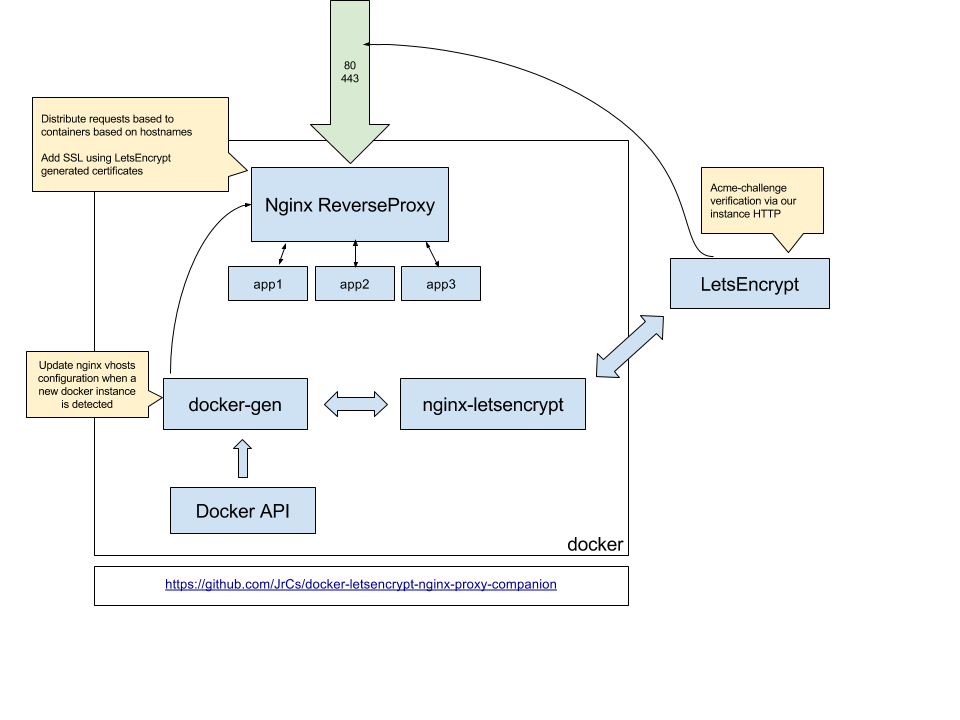
What is acme-companion?
A lightweight Docker container that works alongside nginx-proxy to automatically obtain and renew SSL certificates using ACME protocol. Powered by acme.sh, it supports Let's Encrypt and other ACME providers including ZeroSSL. The companion handles certificate validation through HTTP-01 or DNS-01 challenges, updates nginx configuration when certificates change, and can generate multi-domain and wildcard certificates.
acme-companion alternatives
 SWAG (Secure Web Application Gateway)Self-hosted Nginx reverse proxy with automatic SSL certificates from Let's Encrypt or ZeroSSL. Includes Fail2ban intrusion prevention and reverse proxy configurations.CompareSWAG (Secure Web Application Gateway) with acme-companion
 docker-traefik-cloudflare-companionSelf-hosted Docker companion that automatically creates and updates Cloudflare CNAME records for containers managed by Traefik reverse proxy.Comparedocker-traefik-cloudflare-companion with acme-companion
 Self-Hosted GatewayOpen-source alternative to Cloudflare Tunnels using WireGuard, NGINX, and Caddy to expose local Docker containers without port forwarding.CompareSelf-Hosted Gateway with acme-companion
 nginx-loveSelf-hosted open-source platform for managing Nginx reverse proxies with ModSecurity WAF, Let's Encrypt SSL, load balancing, JA4 bot detection, and multi-user RBAC.Comparenginx-love with acme-companion
 CertMateCertMate is a self-hosted, open-source TLS certificate manager that issues, renews, discovers, and deploys certs across 29 DNS providers with audit trail, OIDC/SSO.CompareCertMate with acme-companion
 Nginx-Reverse-EmbySelf-hosted Go reverse proxy with HTTP/HTTPS and TCP/UDP forwarding, auto ACME certs, multi-node agents, Relay tunnels, and traffic quotas — managed via web UI.CompareNginx-Reverse-Emby with acme-companion
 caddy-docker-proxySelf-hosted Caddy plugin, shipped as ready-to-run Docker images, that reads container labels to build its proxy config with zero-downtime reloads and automatic HTTPS.Comparecaddy-docker-proxy with acme-companion
 NPMplusNPMplus is an open-source fork of nginx-proxy-manager offering hardened TLS, HTTP/3 (QUIC), crowdsec integration, and external authentication provider support.CompareNPMplus with acme-companion
Should you self-host acme-companion?
acme-companion scores 66/100 on selfhost.directory (how scoring works) and ranks #20 of 78 in Security. It has 7 730 GitHub stars, +6 in the last 30 days.
It shipped 7 stable releases in the past year. The latest, v2.8.2, came out on 17 July 2026. New versions land roughly every 2 weeks.
Setup is easy: most people get it running in one sitting. An official Docker image is available. It is MIT-licensed and written mostly in Shell.
Its closest alternative on selfhost.directory is CyberChef (83/100, 36 398 stars). It scores higher overall, so compare the two before you pick. See acme-companion vs CyberChef side by side.
Features
- Automated SSL certificate creation
- Automatic Certificate Renewal
- Automatic nginx config reload
- DNS-01 challenge validation
- HTTP-01 challenge validation
- Multi-domain SAN certificate support
- Wildcard certificate supportDNS-01 required
acme-companion README


acme-companion is a lightweight companion container for nginx-proxy.
It handles the automated creation, renewal and use of SSL certificates for proxied Docker containers through the ACME protocol.
More in Security
 AdGuard HomeSelf-hosted open-source DNS server blocking ads/trackers network-wide. Supports encrypted DNS, parental controls, safe search, per-client config, DHCP.
 AdrianAdrian is an open-source runtime security tool that monitors AI agent reasoning and actions, spotting injected prompts and unsafe tool calls before they execute.
 Advanced Camera CardA comprehensive camera card for Home Assistant
 AgentSafeSelf-hosted gateway intercepting AI agent HTTP actions, asking Decionis for authorization, forwarding only approved requests with signed evidence.
 aisecuritygatewaySelf-hosted AI gateway that redacts PII, blocks prompt injection, and routes to 8 LLM providers via OpenAI-compatible API.
 AiSOCSelf-hosted, open-source AI SOC with 2,535 detection rules and agents that record every step in an auditable ledger. MIT licensed, no API keys needed.
 AlarmoEasy to use alarm system integration for Home Assistant
 altchaSelf-hosted, open-source CAPTCHA alternative that swaps image puzzles for a silent proof-of-work widget plus MIT-licensed server libraries for 10+ languages.
 am-i-exposedam-i-exposed is a self-hosted, open-source Bitcoin privacy scanner running 34 client-side heuristics with Boltzmann entropy via WebAssembly.
 amiuniqueSelf-hosted browser fingerprinting research platform collecting device fingerprints to study web tracking. Built with Play Framework and MySQL.
 anondeAnonde is an open-source, self-hosted PII anonymization engine that tokenizes data before LLMs see it, restoring originals only in your environment.
 AnubisWeighs the soul of incoming HTTP requests to stop AI crawlers
0 comments